My Haas Welcome,
!
Haas Tooling MyHaas/HaasConnect Sign In Register Haas Tooling MyHaas/HaasConnect Sign Out Welcome, My Machines Latest Activity My Quotes My Account My Users Sign Out
Find Your Distributor
  1. Select Language
    1. English
    2. Deutsch
    3. Español - España
    4. Español - México
    5. Français
    6. Italiano
    7. Português
    8. Český
    9. Dansk
    10. Nederlands
    11. Magyar
    12. Polski
    13. Svenska
    14. Türkçe
    15. 中文
    16. Suomi
    17. Norsk
    18. الإنجليزية
    19. български
    20. Hrvatski
    21. Ελληνικά
    22. Română
    23. Slovenský
    24. Slovenščina
    25. 한국어
    26. 日本語
    27. Українська
  • machines Main Menu
    • Vertical Mills
      Vertical Mills
      Vertical Mills View All
      • Vertical Mills
      • VF Series
      • Universal Machines
      • VR Series
      • VP-5 Prismatic
      • Pallet-Changing VMCs
      • Mini Mills
      • Mold Machines
      • High-Speed Drill Centers
      • Drill/Tap/ Mill Series
      • Toolroom Mills
      • Pocket Mill
      • Compact Mills
      • Gantry Series
      • SR Sheet Routers
      • Extra-Large VMC
      • Double-Column Mills
      • 3+2 Positioning Machines
    • Multi-Axis Solutions
      Multi-Axis Solutions
      Multi-Axis Solutions View All
      • Multi-Axis Solutions
      • Y-Axis Lathes
      • 5-Axis Mills
    • Lathes
      Lathes
      Lathes View All
      • Lathes
      • ST Series
      • Dual-Spindle
      • Box Way Series
      • Toolroom Lathes
      • Chucker Lathe
      • Haas Bar Feeders
    • Horizontal Mills
      Horizontal Mills
      Horizontal Mills View All
      • Horizontal Mills
      • 50-Taper
      • 40-Taper
    • Rotaries & Indexers
      Rotaries & Indexers
      Rotaries & Indexers View All
      • Rotaries & Indexers
      • Rotary Tables
      • Indexers
      • 5-Axis Rotaries
      • Extra-Large Rotaries
    • Special Series
      Special Series
      Special Series View All
      • Special Series
      • EU_Series_Redirect
    • Automation Systems
      Automation Systems
      Automation Systems View All
      • Automation Systems
      • Mill Automation
      • Lathe Automation
      • Automatic Parts Loaders
      • Automation Models
    • Desktop Machines
      Desktop Machines
      Desktop Machines View All
      • Desktop Machines
      • Desktop Mill
      • Desktop Lathe
      • Control Simulator, Standard
      • Control Simulator, Premium
    • Shop Equipment
      Shop Equipment
      Shop Equipment View All
      • Shop Equipment
      • Knee Mill
      • Haas Manual Lathes
      • Haas Saws
    • Fabrication Machines
      Fabrication Machines
      Fabrication Machines View All
      • Fabrication Machines
      • Laser Cutting Machines
      • CNC Press Brakes
    • QUICK LINKS Special Series  Special Series 
      EU SERIES EU SERIES BUILD & PRICE | PRICE LIST BUILD & PRICE | PRICE LIST In-Stock Machines In-Stock Machines WHAT’S NEW WHAT’S NEW YOUR FIRST CNC YOUR FIRST CNC
      SHOPPING TOOLS
      • Build & Price a Haas
      • Price List
      • Available Inventory
      • CNCA Financing
      WANT TO TALK TO SOMEONE?

      A Haas Factory Outlet (HFO) can answer your questions, and walk you through your best options.

      CONTACT YOUR DISTRIBUTOR >
  • Options Main Menu
    • The Haas Control Value Option Packages
      Value Option Packages
      Value Option Packages View All
      • Value Option Packages
    • Product Image Spindles
      Spindles
      Spindles View All
      • Spindles
    • Product Image Tool Changers
      Tool Changers
      Tool Changers View All
      • Tool Changers
    • Product Image 4th- | 5th-Axis
      4th- | 5th-Axis
      4th- | 5th-Axis View All
      • 4th- | 5th-Axis
    • Product Image Turrets & Live Tooling
      Turrets & Live Tooling
      Turrets & Live Tooling View All
      • Turrets & Live Tooling
    • Product Image Probing
      Probing
      Probing View All
      • Probing
    • Haas Chip & Coolant Management Chip & Coolant Management
      Chip & Coolant Management
      Chip & Coolant Management View All
      • Chip & Coolant Management
    • The Haas Control The Haas Control
      The Haas Control
      The Haas Control View All
      • The Haas Control
    • Product Image Product Options
      Product Options
      Product Options View All
      • Product Options
    • Product Image Tooling & Fixturing
      Tooling & Fixturing
      Tooling & Fixturing View All
      • Tooling & Fixturing
    • Product Image Workholding
      Workholding
      Workholding View All
      • Workholding
    • Product Image 5-Axis Solutions
      5-Axis Solutions
      5-Axis Solutions View All
      • 5-Axis Solutions
      • 5 Easy Steps to 5-Axis
    • QUICK LINKS Special Series  Special Series 
      EU SERIES EU SERIES BUILD & PRICE | PRICE LIST BUILD & PRICE | PRICE LIST In-Stock Machines In-Stock Machines WHAT’S NEW WHAT’S NEW YOUR FIRST CNC YOUR FIRST CNC
      SHOPPING TOOLS
      • Build & Price a Haas
      • Price List
      • Available Inventory
      • CNCA Financing
      WANT TO TALK TO SOMEONE?

      A Haas Factory Outlet (HFO) can answer your questions, and walk you through your best options.

      CONTACT YOUR DISTRIBUTOR >
  • Why Haas Main Menu
      Discover the Haas Difference
    • Why Haas
    • MyHaas
    • Education Community
    • Industry 4.0
    • Haas Certification
    • Customer Testimonials
  • Service Main Menu
      Welcome to Haas Service
      SERVICE HOME Operator’s Manuals How-To Procedures Troubleshooting Guides Preventive Maintenance Haas Parts Haas Tooling Videos
  • Videos Main Menu
  • Main Menu
    • View All
    • View All
    • View All
    • View All
      • HTEC Curriculum Support
      • Haas Value Option Packages (VOP) Journey
    • View All
      • Haas 10 kg Cobot Package
      • Cobot Kits
      • DC-1 Drill Center
      • CNC Sales News
      • Do More With Your Haas
    • View All
    • View All
      • contact-us-test
      • 4 - AUTOMATION SYSTEMS
      • Carousel-V2
      • expert test
      • Demo_Day_Trident-test
      • Link Test
      • image-sale-tag-test
      • article-list-test
      • Haas 25 kg Robot Package
      • test-algolia-page
    • View All
    • View All
    • View All
    • View All
      • calc-test
    • View All
    • QUICK LINKS Special Series  Special Series 
      EU SERIES EU SERIES BUILD & PRICE | PRICE LIST BUILD & PRICE | PRICE LIST In-Stock Machines In-Stock Machines WHAT’S NEW WHAT’S NEW YOUR FIRST CNC YOUR FIRST CNC
      SHOPPING TOOLS
      • Build & Price a Haas
      • Price List
      • Available Inventory
      • CNCA Financing
      WANT TO TALK TO SOMEONE?

      A Haas Factory Outlet (HFO) can answer your questions, and walk you through your best options.

      CONTACT YOUR DISTRIBUTOR >
  • Haas Tooling Main Menu
  • Haas Service Parts Main Menu

My Haas Welcome,
!
Haas Tooling MyHaas/HaasConnect Sign In Register Haas Tooling MyHaas/HaasConnect Sign Out Welcome, My Machines Latest Activity My Quotes My Account My Users Sign Out
Find Your Distributor
  1. Select Language
    1. English
    2. Deutsch
    3. Español - España
    4. Español - México
    5. Français
    6. Italiano
    7. Português
    8. Český
    9. Dansk
    10. Nederlands
    11. Magyar
    12. Polski
    13. Svenska
    14. Türkçe
    15. 中文
    16. Suomi
    17. Norsk
    18. الإنجليزية
    19. български
    20. Hrvatski
    21. Ελληνικά
    22. Română
    23. Slovenský
    24. Slovenščina
    25. 한국어
    26. 日本語
    27. Українська
×

Search Results

Web Pages

Images

    • <
    • 1
    • >

Rotary - Troubleshooting Guide - CHC - TG0120

Service Home Rotary - Troubleshooting Guide - CHC - TG0120

Rotary - Troubleshooting Guide - CHC - TG0120

Jump to Section Back to Top

8.2 Rotary - Troubleshooting - CHC

Recently Updated Last updated: 05/13/2026

Rotary - Troubleshooting Guide - CHC


TG0120

Revision B - 05/2026

Symptom Table

Do not perform any type of maintenance on the rotarty if it is under warranty, contact your Haas Factory Outlet for further assistance.

Download and fill out the Rotary Inspection Report Checklist below before replacing any parts.

Rotary Inspection Report Checklist
Symptom Possible Cause Corrective Action

Alarm 106 A SERVO ERROR TOO LARGE

Alarm 111 A SERVO OVERLOAD

Alarm 164 A AXIS DRIVE FAULT

Alarm 187 B SERVO ERROR TOO LARGE

Alarm 188 B SERVO OVERLOAD

Alarm 193 B AXIS DRIVE FAULT


The feeds and speeds are too high for the work. Decrease the feeds and speeds.
The cutting tool is not sharp or is damaged. Install a new tool or a new tool insert.
There is a mechanical blockage in the axis of travel. Make sure the axis has a clear path of travel.
There is an internal mechanical obstruction in the rotary unit. Test the rotary unit.
The brake solenoid for the rotary unit has an electrical fault. Troubleshoot the brake solenoid.
The air exhaust is clogged. Remove the exhaust and inspect it.
The servo amplifier has a problem Troubleshoot the servo amplifier.
The machined part has inaccurate features There is lost motion or backlash in the rotary. Do the rotary backlash test.
The feeds and speeds are too high for the work. Decrease the feeds and speeds.
The tilt (A) axis of the trunnion does not find home.
The home sensor or cable is faulty.

Jog the tilt axis from the positive travel limit to the negative travel limit. Make sure the A HOME SWITCH bit changes (on the Diagnostics INPUT 2 screen). If the bit does not change, replace the home switch.

This can be done in the field This cannot be done on TR110 units.

Note: The A HOME SWITCH change cannot be seen on machines with software version 18.16A or higher.

Caution: If the A axis (tilt) moves more than 20 degrees past the home position,

Push [EMERGENCY STOP]

The tilt (A) axis does not home to a horizontal position.
The tool change offset parameter has not been set. Set the rotary platter flatness: Refer to the Rotary - TR/TRT/T5C - Platter Flatness - Adjustment procedure.
The tilt (A) axis does not home to a horizontal position consistently. The parameters 1115, 1116, and 1122 are not set correctly.

On a machine with a rotary scale, when you install version M18.18A or higher to improve zero-return consistency: Be sure to set parameters 1115, 1116, and 1122 correctly, as follows:

UMC-750:
Parameter 1116 (B Axis) = 5
Parameter 1122 (C Axis) = 5

TR-Series Rotaries with Scales:
Parameter 1115 (A Axis) =  4

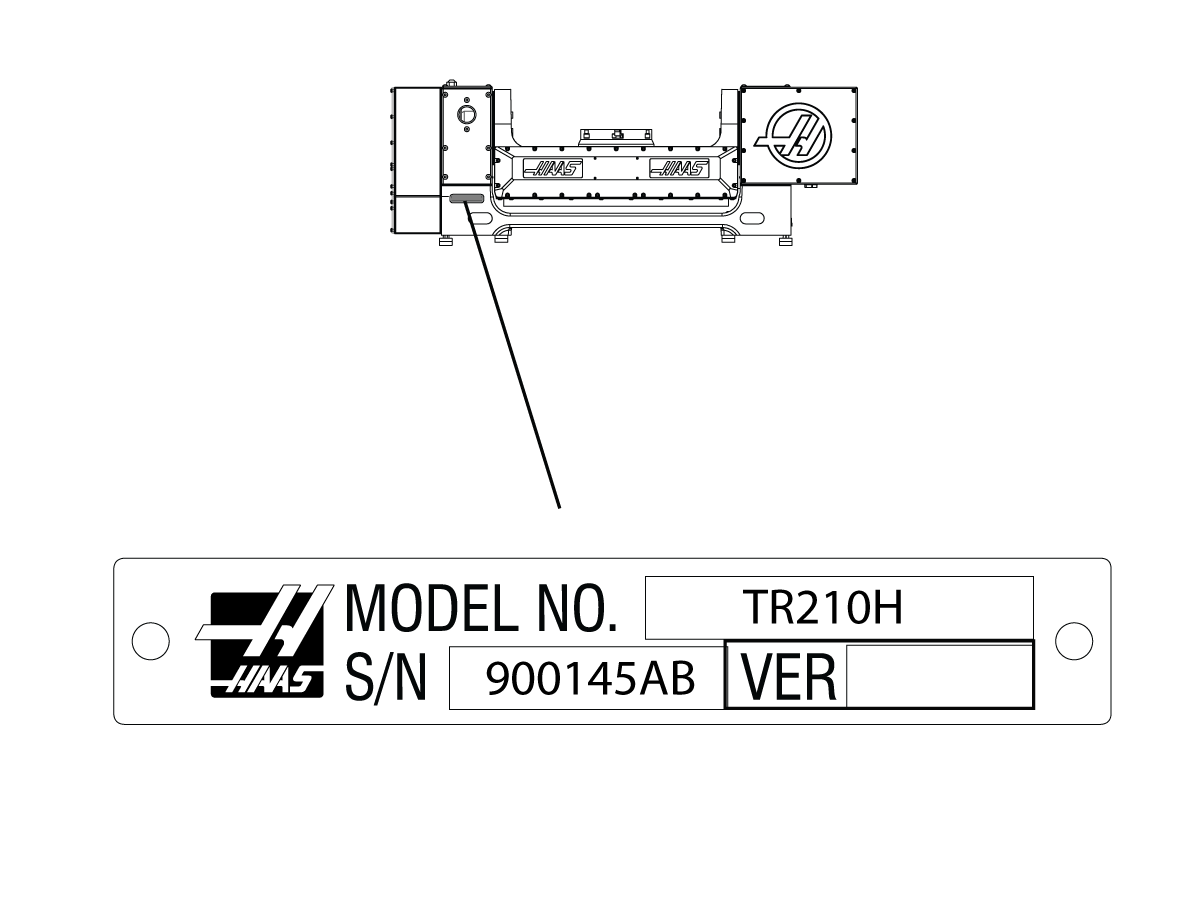
Note: On machines that do not have rotary scales, set parameter 1115 to 0. TR-series rotary products that do not have a P2 or P4 on the name tag do not have rotary scales.

After you change parameters 1116, 1122, 1115:

  • When the rotary searches for zero, it may travel farther than it did before. This is normal.
  •  You must adjust the tool-change offset parameters (Parameter 212 for A Axis, Parameter 213 for B Axis, Parameter 523 for C Axis). Reference: Rotary - TR/TRT/T5C - Installation procedure

Alarm 426 A AXIS SECONDARY ENCODER POSITION MISMATCH

Alarm 558 B AXIS SECONDARY ENCODER POSITION MISMATCH

Alarm 559 C AXIS SECONDARY ENCODER POSITION MISMATCH


The rotary scale or scale cable is faulty.

Check the rotary scale cable.


  • For ES-5 models - Rotary Scale service parts are no longer available. Refer to the following corrective action: 
  1. Turn off the scale feature
  2. Use without scales.  Verify worm backlash is set to factory specifications for best accuracies. 
  3. If worm backlash is worn out beyond adjustment, a table rebuild would be recommended.
  4. Laser comp the 4th axis                                                                         


Alarm 175 GROUND FAULT DETECTED


Alarm 185 A CABLE FAULT

Alarm 195 B CABLE FAULT

Alarm 552 TRIPPED CIRCUIT BREAKER


There is a short to ground in the axis motor cable. Test the axis motor cable for short.
There is a short to ground in the axis motor. Test the axis motor for short.
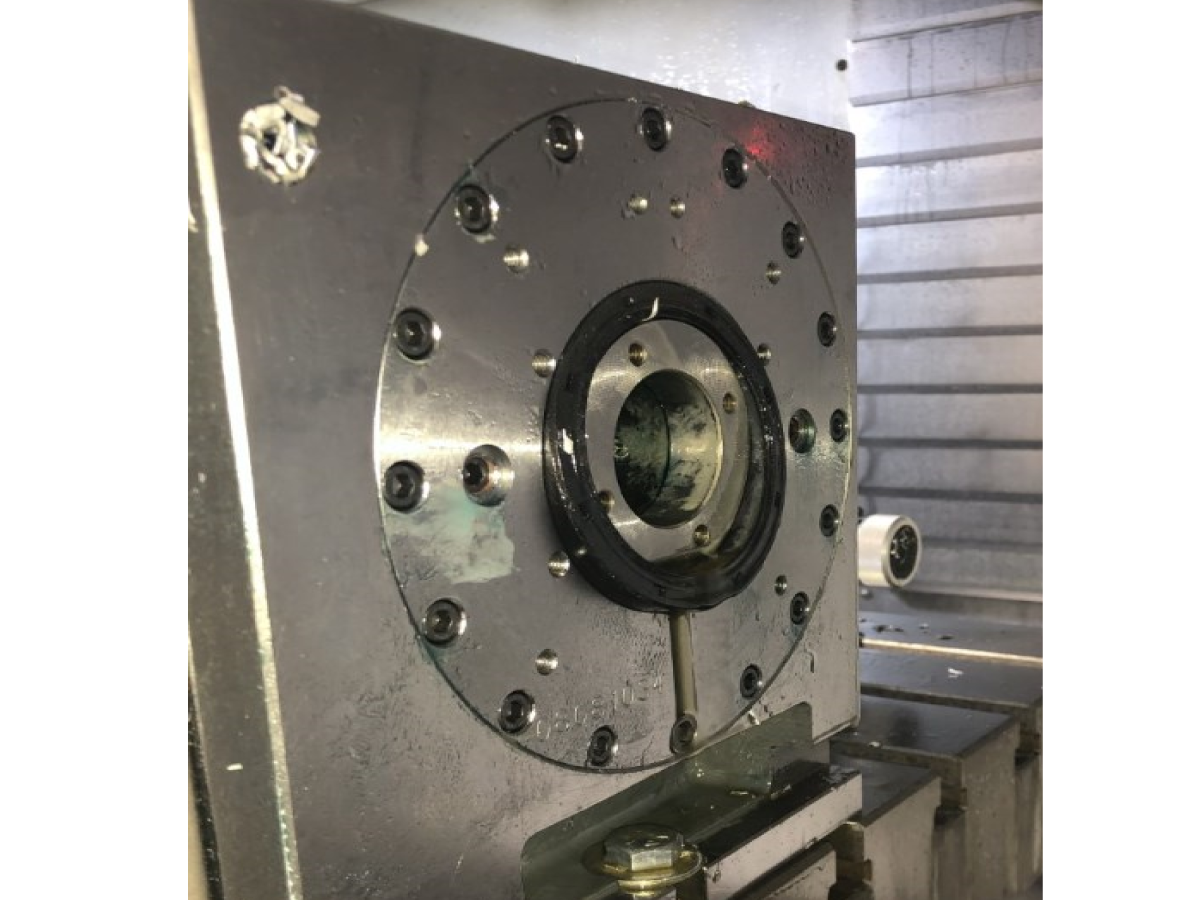
HRC rear seal is popping out  Oil level is too high. Drain oil until the correct level is reached, use sight glas to identify if oil is filled to the top of the glass.
Internal pressure is unable to escape 

 NOTE: ONLY DO THIS ONCE THE OIL LEVEL HAS BEEN VERIFIED AND THE SEAL CONTINUES TO POP OUT.

Replace two of the break fasteners with modified fasteners see "Rear seal popping out" section below for further instructions.

Alarm 138 A-axis Overheat  The rotary product has an air pressure sensor.  The updated P12 and P15 rotary products were intended to run on NGC machines.   Note:  There were some P3 rotary products that were built with the air pressure sensor.

To run these units on a Classic Haas Control see Air Pressure Sensor section.
Oil leaks under the platter, rotary, or trunnion.  The shop’s air compressor is turned off at night, and air pressure builds up slowly after being turned on in the morning. This could cause O-rings not to sit correctly.  Add a ball valve and gauge to the airline going to the rotary. Close the valve before the compressor gets turned off, and open the ball valve after the compressor has been turned ON and the air pressure is higher than 85 psi. 
Positive pressure builds up inside the enclosure.  Follow this page's instructions in the "Leaking Pressure Switch" section below. 
Bad brake O-ring or bad platter O-ring. 
Replace bad O-rings. Contact your local HFO for repair options. 
Metal chips can damage the platter and brake O-rings if they get under the platter or break. Compressed air can push chips under the brake plate and the platter.  Do not use an air hose to clean rotaries around the platter. Instead, use a brush to remove chips around the platter before using coolant or air to clean up the rest of the chips. 
Air pressure inside the enclosures for tilt or rotary.  Open enclosure/enclosures and activate and release the brake multiple times while inspecting fittings, air lines, pressure switches, etc., for air leaks. Fix the air leaks if any are found. 
Positive air pressure in the enclosure.  Refer to the TRT 160 and TRT 210 Breather Hole Identification section below. 
Positioning or accuracy errors Machine level and geometry out of tolerance.   Have an HFO inspect the machine level and geometry and fill out a machine inspection report. Then, contact your HFO for repair options. 
Loose or worn belt 
Check the condition and tension of the drive belt on HRT, TR, and TRT units. 
Loose or worn pulleys Check the condition of the pulleys. Check that the pulleys are not slipping. 
The brake solenoid is not working correctly.  Check that the brake solenoid for HRT, TR, and TRT units is working correctly. 
Mechanical backlash is too high. 

Measure the mechanical Backlash or have an HFO inspect the rotary.

Measure mechanical backlash at least every 90 degrees for HA5C and HRT at 0 deg, +- 90 deg for the tilt axis of TR and TRT units. If the unit is out of tolerance, contact your HFO for repair options. 

Incorrect parameters enabled.  Make sure the correct set of parameters is in the machine. Then, make an error report and send it to Haas service. 
The rotary has crashed.  Contact your HFO for repair options. 

Axis Obstruction

Possible Cause: There is a mechanical blockage in the axis of travel.

Corrective Action:

Make sure the axis has a clear path of travel. Tools, part fixtures, or work pieces that are too large can crash into the machine enclosure.

Air Pressure Sensor

The P12 and P15 rotary units were intended to run on NGC machines, if  the unit is connected to a Classic Haas Control the control will generate overheat alarms.

Note:  There was some P3 rotary products that were built with the air pressure sensor.


If you want to run the unit it on a Classic Haas Control machine the following needs to be done:

Get the correct CHC parameters, contact your local (Haas Factory Outlet).

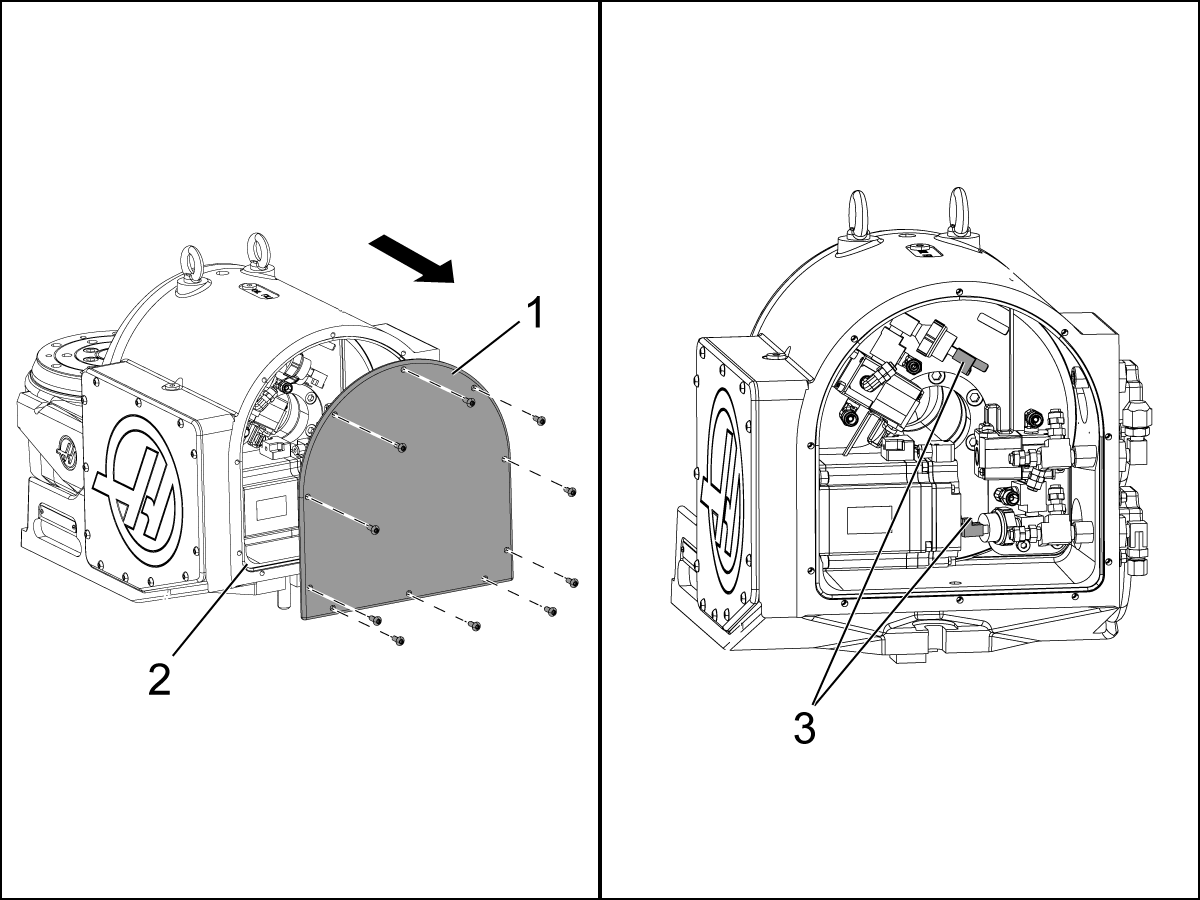
  • Disconnect the air pressure sensors.  This will prevent the overheat alarms to be generated.
  • Power off the machine.
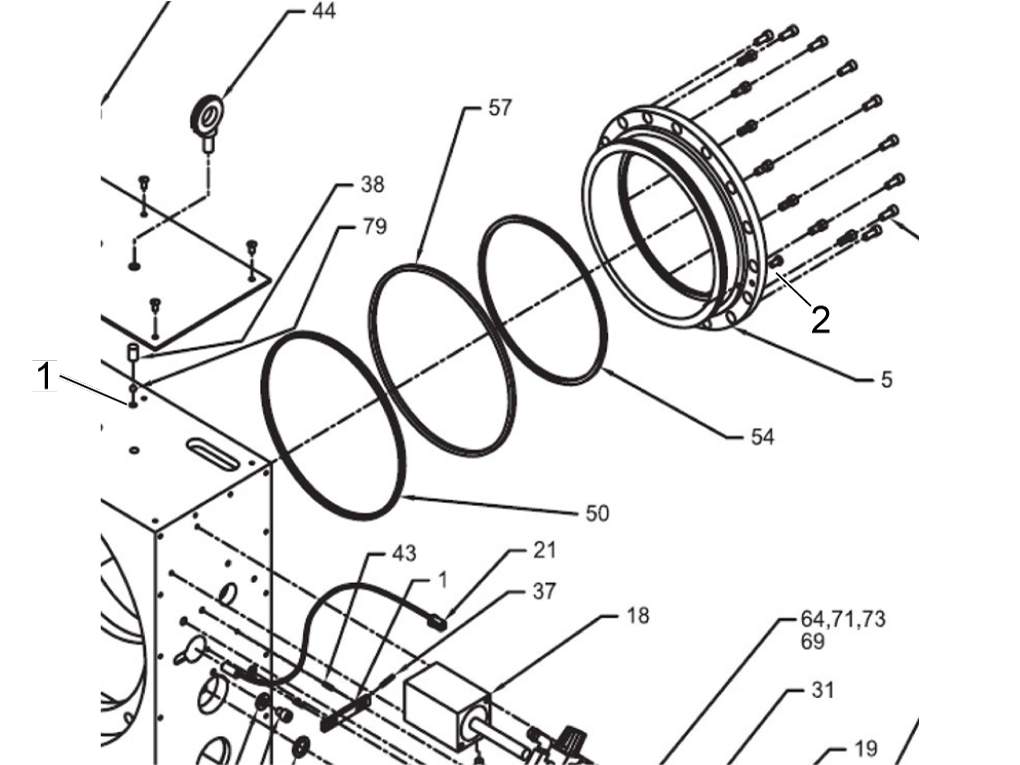
  • Remove the motor enclosure cover [1].
  • Disconnect the air pressure sensors [3] shown in the illustration.
  • Test the operation.
  • Install the enclosure cover. Make sure the o-ring [2] is not pinched
  •  IMPORTANT:  The sensors will need to be connected when the rotary is used on a NGC machine.
  • TR160-P15 The rotary axis zero return position needs to be checked at power on. 
  • Due to the ratio of this unit the rotary axis will find the zero position in two positions.
  • The work around is to zero return the rotary axis and permanently identify the zero position with engraved arrows or two lines. 
    If the marks do not line up during the zero return process (usually off by 3.8 degrees) jog the platter at least 45 degrees in the same direction the unit homed in and then perform another zero return.  The platter will now be in the proper zero position.

Program

Possible Cause: The feeds and speeds are too high for the work.

Corrective Action:

Decrease the feeds and speeds of the active program to decrease the machine load.

Tooling

Possible Cause: The cutting tool is not sharp or is damaged.

Corrective Action:

Examine the cutting tool for damage. Install a new tool or a new tool insert if the cutting tool is damaged or is not sharp.

Mechanical Obstruction

Possible Cause: There is an internal mechanical obstruction in the rotary unit.

Corrective Action:

Disconnect the air supply to rotary unit. Press [ZERO RETURN], press the rotary axis letter, Press [SINGL], and jog the axis. If an alarm is generated, remove the necessary enclosure covers to get access to the faulty axis. Rotate the axis motor drive pulley by hand. If the axis cannot be rotated by hand, there is internal mechanical bind. The rotary unit needs to be serviced. For instructions on where to find a rotary repair facility and how to send your rotary unit, go to Rotary Repair on our website.

Brake Solenoid

Possible Cause: The brake solenoid for the rotary unit has an electrical fault.

Corrective Action:

Make sure the air supply is connected to the rotary unit. In MDI mode, push the rotary axis letter. Push [HAND JOG], you should hear air go out from the rotary unit. For solenoid test instructions, refer to Solenoid - Troubleshooting Guide.

Servo Amplifier

Possible Cause: The servo amplifier has a problem.

Corrective Action:

For servo amplifier troubleshooting instructions, refer to Servo Amplifier - Troubleshooting Guide.

Backlash

Possible Cause: There is lost motion or backlash in the rotary.

Corrective Action:

Test for backlash. For backlash test instructions, refer to HA5C Indexer - Backlash Test or Rotary Tables - Backlash Test.

Proximity Sensor

Possible Cause: The home proximity sensor is faulty.

Corrective Action:

For proximity sensor troubleshooting instructions, refer to Proximity Sensor - Troubleshooting Guide.

Rotary Scale

Possible Cause: The rotary scale or rotary scale cable is faulty.

Corrective Action:

Make sure the cables are connected correctly.

Inspect the rotary scale cables for wear or damage. 

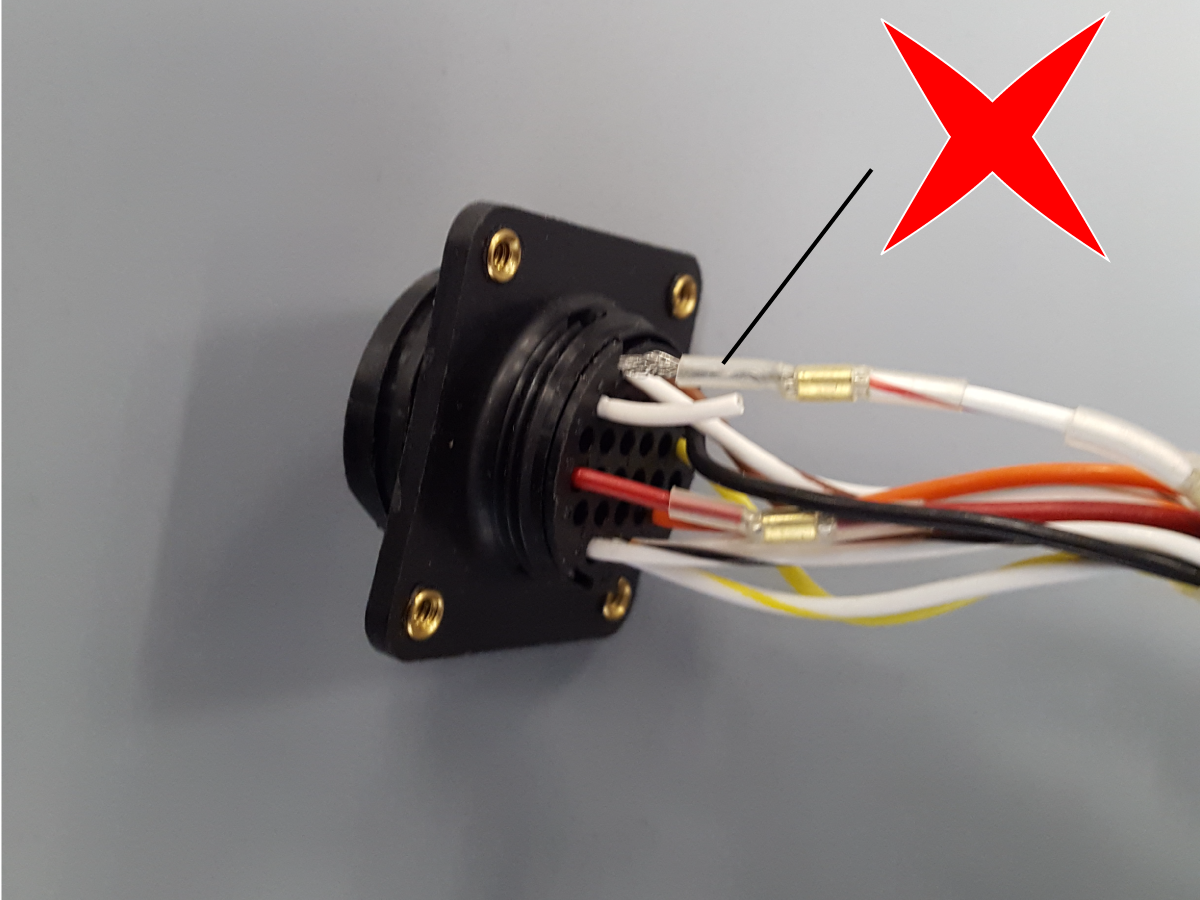
Inspect the internal rotary scale cable interface cable, slightly pull on the wires to make sure they have a good crimp.  If the cables are connected correctly and not damaged, and the alarm persists, the rotary unit needs to be serviced.

For instructions on where to find a rotary repair facility and how to send your rotary unit, go to Haas Rotary Repair Center page.

Electrical Short

Possible Cause: There is a short to ground in the axis motor cable.

Corrective Action:

Inspect the rotary cables for wear or damage, refer to electrical diagram below.

HRC Units - Rear Seal Popping Out

Do not perform any type of maintenance on the rotarty if it is under warranty, contact your Haas Factory Outlet for further assistance.

This section will explain what to do if the rear seal keeps popping out. 

NOTE:  This should only be done if the oil level has been verified and the seal is still popping out. 

1

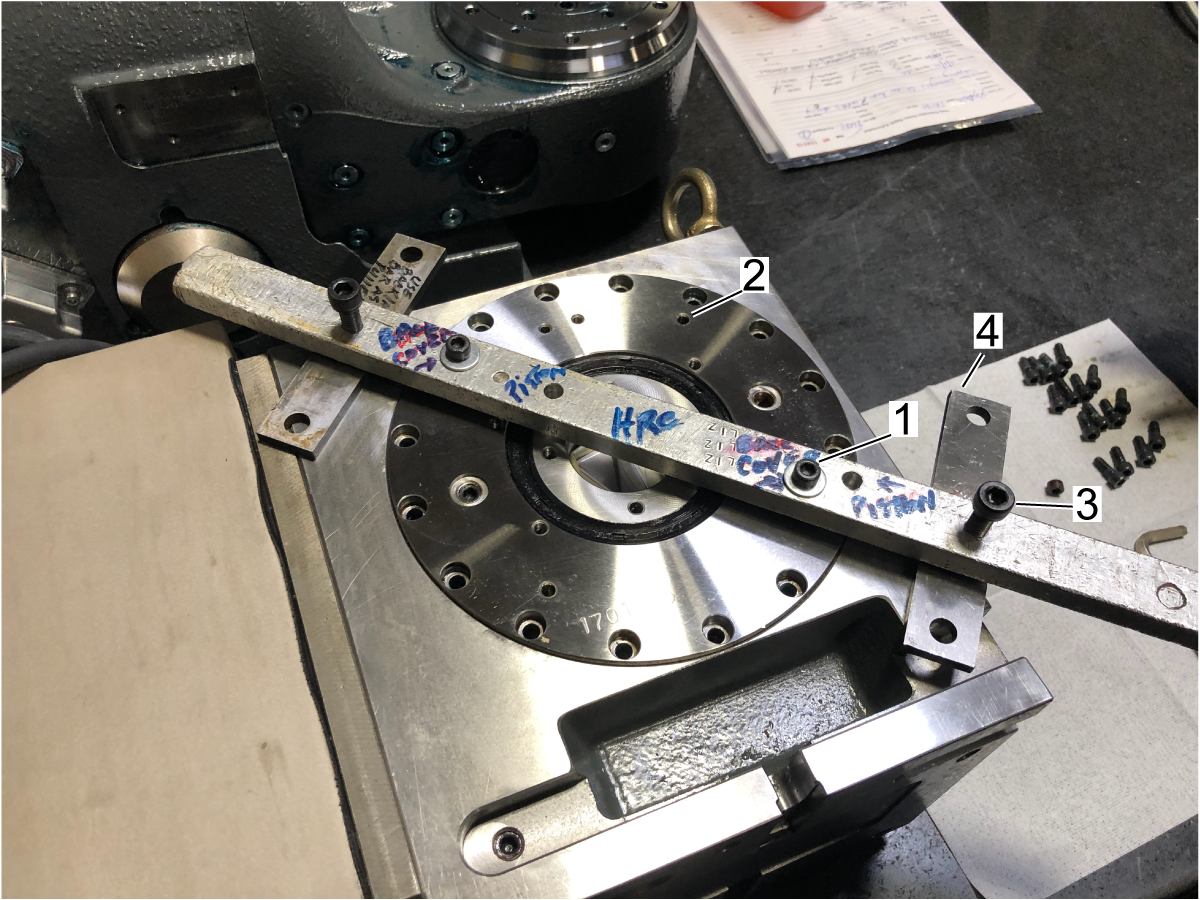
Before starting, a fixture needs to be fabricated, the fixture will have two through holes [1] to be threaded to the back of the brake cap and two threaded holes [2] on the outer section that will act like a jack and be placed on a plate [3], so it will not damage the rotary casting


An example of this is shown.

2

Remove the air supply to the table.

Place the rotary on its platter face and remove the rear M5 brake bolts.

Use the fixture made to thread to the back of the brake cap and remove it [1].

The threaded holes should be the ones denoted [2] and should be across from each other.

Using the other bolts on the threaded holes [3] as jacks, turn the bolts on each side evenly, so the plate comes off.

Make sure to use place plates of some sort [4] to prevent damage to the rotary.

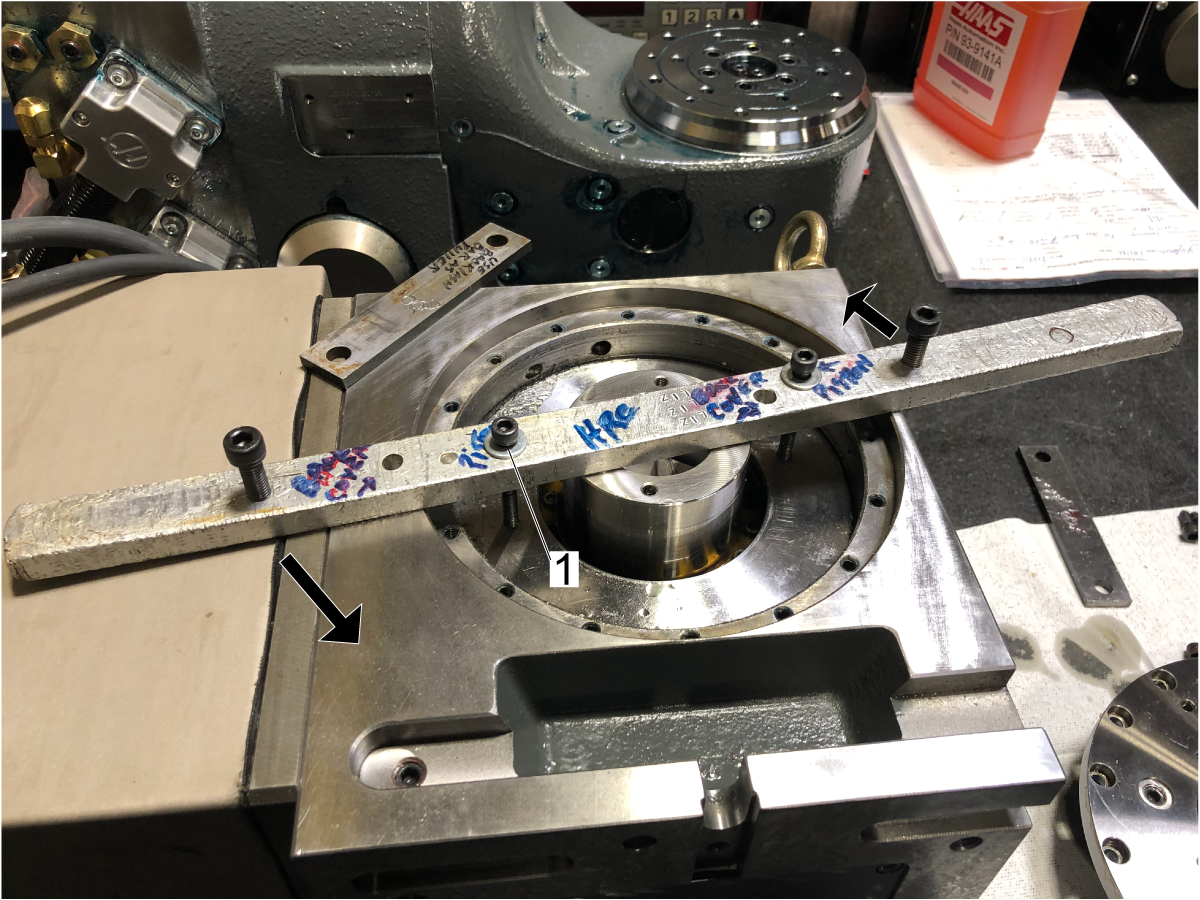
3

Using the same fixture, pull out the brake piston.

NOTE: Longer bolts will be needed to reach the brake piston [1]. Ensure the jack bolts are in the position indicated by the arrows to have leverage. Make sure plates are under the bolts to avoid damage to the rotary.

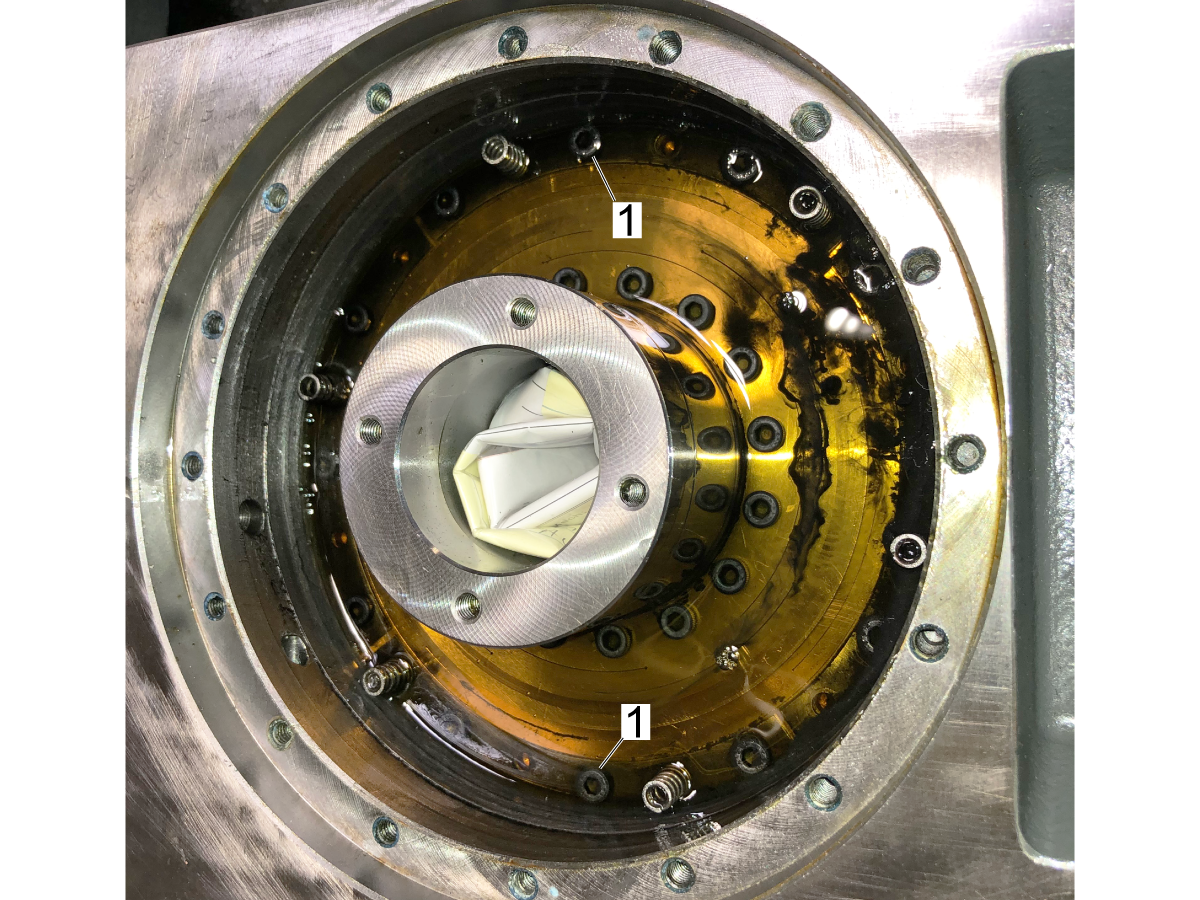
4

Remove the two M5 brake fasteners 180 degrees apart [1] and replace them with the modified fasteners. 

The modified fasteners have a through hole to relieve pressure under the rear brake seal. These have no part number and will need to be made.

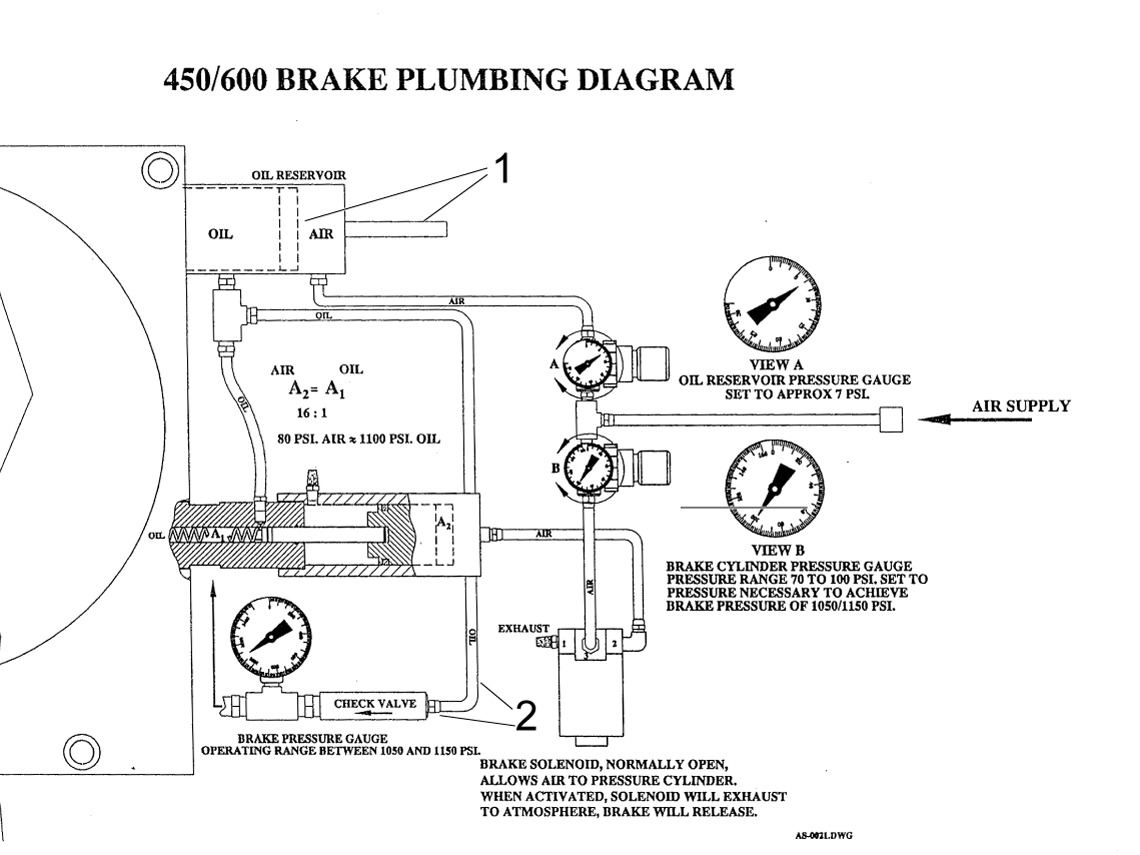
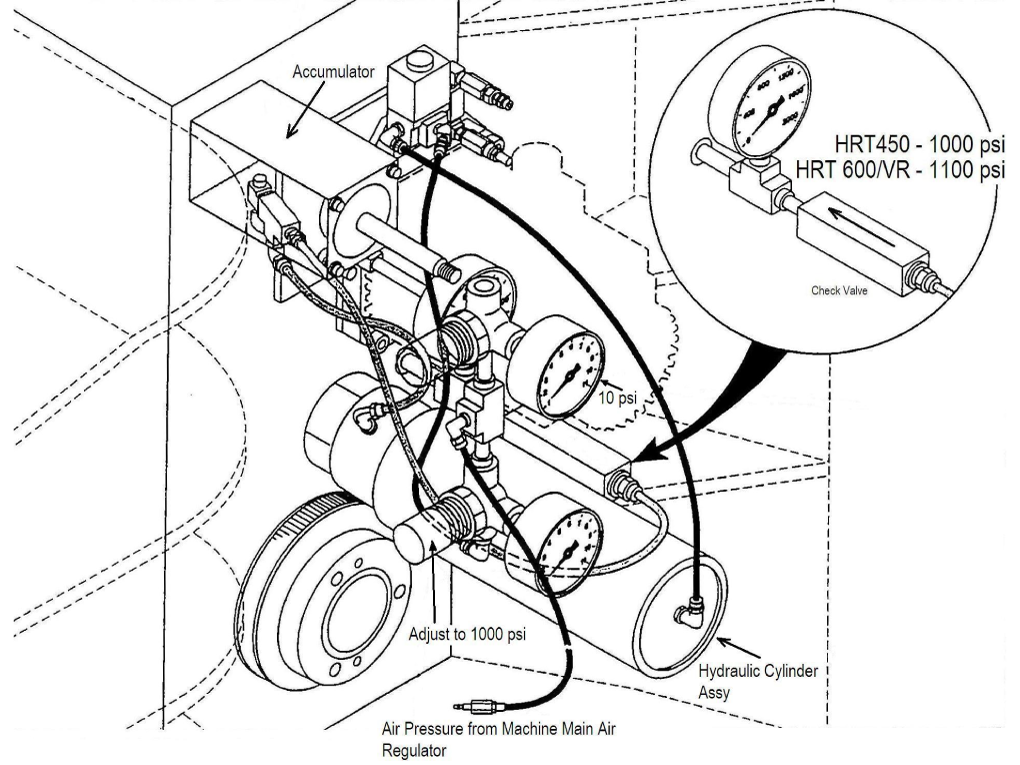
HRT450 Brake Bleeding

A fully extended rod indicates a full reservoir [1]

After bleeding, the rod will stick out slightly less. 

Disconnect one of the oil lines and dip the tube in oil. Push and pull the rod to fill the reservoir. Reconnect the line and perform the bleeding procedure.

Disconnect the oil line [2] and insert a tube into a hydraulic fluid container when filling the reservoir.

1

Bleeding Procedure

  1. Set regulator A to the max
  2. Set regulator B to zero 
  3. Loosen the top air bleed plug [1] until the air is out. 
    NOTE: Use bleed plug [2] if the top plug is not accessible.
  4. Set regulator B to 80 PSI 
  5. Set regulator A to 7 PSI

Check the main gauge. It should be 0 PSI when unclamped and 1000 PSI when clamped.

2

Use the image on the left for additional reference.

Electrical Diagrams

Sigma 1 - Service Replacement Motor Instructions

Updated

This following reference document addresses the end‑of‑life status of Yaskawa Sigma 1 motors (‑02, ‑04, and ‑08) used on legacy machines and rotary tables from the mid‑1990s to mid‑2000s. Since these motors are no longer in production, continued service support depends on refurbishment and repair. The Sigma 1 - Service Replacement Motor Instructions document identifies the appropriate contacts and resources for supporting refurbishment and repair of these motors to meet ongoing service needs.

Recently Viewed Items

You Have No Recently Viewed Items Yet

Feedback
Haas Logo

Haas Delivered Price

This price includes shipping cost, export and import duties, insurance, and any other expenses incurred during shipping to a location in France agreed with you as a buyer. No other mandatory costs can be added to the delivery of a Haas CNC Product.

KEEP UP WITH THE LATEST HAAS TIPS AND TECHNOLOGY...

Sign up now!   

HAAS TOOLING ACCEPTS THE FOLLOWING:

  • Service & Support
  • Owners
  • Request Service
  • Operator Manuals
  • Haas Parts
  • Rotary Repair Request
  • Pre-Install Guides
  • Shopping Tools
  • Build & Price a New Haas
  • Available Inventory
  • The Haas Price List
  • CNCA Financing
  • About Haas
  • Accessibility Statement
  • DNSH Statement
  • Export Compliance
  • Careers
  • Certifications & Safety
  • Contact Us
  • History
  • Terms & Conditions
  • Haas Tooling Terms & Conditions
  • Privacy
  • Warranty
  • Haas Community
  • Haas Certification Program
  • Haas Motorsports

  • Gene Haas Foundation
  • Haas Technical Education Community
  • Events

  • Join the Conversation
  • Facebook
  • X
  • Flickr
  • YouTube
  • LinkedIn
  • Instagram
  • TikTok
© 2026 Haas Automation, Inc – CNC Machine Tools

This site is protected by reCAPTCHA and the Google Privacy Policy and Terms of Service apply.

2800 Sturgis Rd., Oxnard, CA 93030
Toll Free: (888) 817-4446 / Fax: 805-278-8554