My Haas Welcome,
!
Haas Tooling MyHaas/HaasConnect Sign In Register Haas Tooling MyHaas/HaasConnect Sign Out Welcome, My Machines Latest Activity My Quotes My Account My Users Sign Out
Find Your Distributor
  1. Select Language
    1. English
    2. Deutsch
    3. Español - España
    4. Español - México
    5. Français
    6. Italiano
    7. Português
    8. Český
    9. Dansk
    10. Nederlands
    11. Magyar
    12. Polski
    13. Svenska
    14. Türkçe
    15. 中文
    16. Suomi
    17. Norsk
    18. الإنجليزية
    19. български
    20. Hrvatski
    21. Ελληνικά
    22. Română
    23. Slovenský
    24. Slovenščina
    25. 한국어
    26. 日本語
    27. Українська
  • machines Main Menu
    • Vertical Mills
      Vertical Mills
      Vertical Mills View All
      • Vertical Mills
      • VF Series
      • Universal Machines
      • VR Series
      • VP-5 Prismatic
      • Pallet-Changing VMCs
      • Mini Mills
      • Mold Machines
      • High-Speed Drill Centers
      • Drill/Tap/ Mill Series
      • Toolroom Mills
      • Pocket Mill
      • Compact Mills
      • Gantry Series
      • SR Sheet Routers
      • Extra-Large VMC
      • Double-Column Mills
      • 3+2 Positioning Machines
    • Multi-Axis Solutions
      Multi-Axis Solutions
      Multi-Axis Solutions View All
      • Multi-Axis Solutions
      • Y-Axis Lathes
      • 5-Axis Mills
    • Lathes
      Lathes
      Lathes View All
      • Lathes
      • ST Series
      • Dual-Spindle
      • Box Way Series
      • Toolroom Lathes
      • Chucker Lathe
      • Pocket Lathe
      • Haas Bar Feeders
    • Horizontal Mills
      Horizontal Mills
      Horizontal Mills View All
      • Horizontal Mills
      • 50-Taper
      • 40-Taper
    • Rotaries & Indexers
      Rotaries & Indexers
      Rotaries & Indexers View All
      • Rotaries & Indexers
      • Rotary Tables
      • Indexers
      • 5-Axis Rotaries
      • Extra-Large Rotaries
    • Special Series
      Special Series
      Special Series View All
      • Special Series
      • EU_Series_Redirect
    • Automation Systems
      Automation Systems
      Automation Systems View All
      • Automation Systems
      • Mill Automation
      • Lathe Automation
      • Automatic Parts Loaders
      • Automation Models
    • Desktop Machines
      Desktop Machines
      Desktop Machines View All
      • Desktop Machines
      • Desktop Mill
      • Desktop Lathe
      • Control Simulator, Standard
      • Control Simulator, Premium
    • Shop Equipment
      Shop Equipment
      Shop Equipment View All
      • Shop Equipment
      • Knee Mill
      • Haas Manual Lathes
      • Haas Saws
    • Fabrication Machines
      Fabrication Machines
      Fabrication Machines View All
      • Fabrication Machines
      • Laser Cutting Machines
      • CNC Press Brakes
    • QUICK LINKS Special Series  Special Series 
      EU SERIES EU SERIES BUILD & PRICE | PRICE LIST BUILD & PRICE | PRICE LIST In-Stock Machines In-Stock Machines WHAT’S NEW WHAT’S NEW YOUR FIRST CNC YOUR FIRST CNC
      SHOPPING TOOLS
      • Build & Price a Haas
      • Price List
      • Available Inventory
      • CNCA Financing
      WANT TO TALK TO SOMEONE?

      A Haas Factory Outlet (HFO) can answer your questions, and walk you through your best options.

      CONTACT YOUR DISTRIBUTOR >
  • Options Main Menu
    • The Haas Control Value Option Packages
      Value Option Packages
      Value Option Packages View All
      • Value Option Packages
    • Product Image Spindles
      Spindles
      Spindles View All
      • Spindles
    • Product Image Tool Changers
      Tool Changers
      Tool Changers View All
      • Tool Changers
    • Product Image 4th- | 5th-Axis
      4th- | 5th-Axis
      4th- | 5th-Axis View All
      • 4th- | 5th-Axis
    • Product Image Turrets & Live Tooling
      Turrets & Live Tooling
      Turrets & Live Tooling View All
      • Turrets & Live Tooling
    • Product Image Probing
      Probing
      Probing View All
      • Probing
    • Haas Chip & Coolant Management Chip & Coolant Management
      Chip & Coolant Management
      Chip & Coolant Management View All
      • Chip & Coolant Management
    • The Haas Control The Haas Control
      The Haas Control
      The Haas Control View All
      • The Haas Control
    • Product Image Product Options
      Product Options
      Product Options View All
      • Product Options
    • Product Image Tooling & Fixturing
      Tooling & Fixturing
      Tooling & Fixturing View All
      • Tooling & Fixturing
    • Product Image Workholding
      Workholding
      Workholding View All
      • Workholding
    • Product Image 5-Axis Solutions
      5-Axis Solutions
      5-Axis Solutions View All
      • 5-Axis Solutions
      • 5 Easy Steps to 5-Axis
    • QUICK LINKS Special Series  Special Series 
      EU SERIES EU SERIES BUILD & PRICE | PRICE LIST BUILD & PRICE | PRICE LIST In-Stock Machines In-Stock Machines WHAT’S NEW WHAT’S NEW YOUR FIRST CNC YOUR FIRST CNC
      SHOPPING TOOLS
      • Build & Price a Haas
      • Price List
      • Available Inventory
      • CNCA Financing
      WANT TO TALK TO SOMEONE?

      A Haas Factory Outlet (HFO) can answer your questions, and walk you through your best options.

      CONTACT YOUR DISTRIBUTOR >
  • Why Haas Main Menu
      Discover the Haas Difference
    • Why Haas
    • MyHaas
    • Education Community
    • Industry 4.0
    • Haas Certification
    • Customer Testimonials
  • Service Main Menu
      Welcome to Haas Service
      SERVICE HOME Operator’s Manuals How-To Procedures Troubleshooting Guides Preventive Maintenance Haas Parts Haas Tooling Videos
  • Videos Main Menu
  • Main Menu
    • View All
    • View All
    • View All
    • View All
      • HTEC Curriculum Support
      • Haas Value Option Packages (VOP) Journey
    • View All
      • Haas 10 kg Cobot Package
      • Cobot Kits
      • DC-1 Drill Center
      • CNC Sales News
      • Do More With Your Haas
    • View All
    • View All
      • contact-us-test
      • 4 - AUTOMATION SYSTEMS
      • Carousel-V2
      • expert test
      • Demo_Day_Trident-test
      • Link Test
      • image-sale-tag-test
      • article-list-test
      • Haas 25 kg Robot Package
      • test-algolia-page
    • View All
    • View All
    • View All
    • View All
      • calc-test
    • View All
    • QUICK LINKS Special Series  Special Series 
      EU SERIES EU SERIES BUILD & PRICE | PRICE LIST BUILD & PRICE | PRICE LIST In-Stock Machines In-Stock Machines WHAT’S NEW WHAT’S NEW YOUR FIRST CNC YOUR FIRST CNC
      SHOPPING TOOLS
      • Build & Price a Haas
      • Price List
      • Available Inventory
      • CNCA Financing
      WANT TO TALK TO SOMEONE?

      A Haas Factory Outlet (HFO) can answer your questions, and walk you through your best options.

      CONTACT YOUR DISTRIBUTOR >
  • Haas Tooling Main Menu
  • Haas Service Parts Main Menu
My Haas Welcome,
!
Haas Tooling MyHaas/HaasConnect Sign In Register Haas Tooling MyHaas/HaasConnect Sign Out Welcome, My Machines Latest Activity My Quotes My Account My Users Sign Out
Find Your Distributor
  1. Select Language
    1. English
    2. Deutsch
    3. Español - España
    4. Español - México
    5. Français
    6. Italiano
    7. Português
    8. Český
    9. Dansk
    10. Nederlands
    11. Magyar
    12. Polski
    13. Svenska
    14. Türkçe
    15. 中文
    16. Suomi
    17. Norsk
    18. الإنجليزية
    19. български
    20. Hrvatski
    21. Ελληνικά
    22. Română
    23. Slovenský
    24. Slovenščina
    25. 한국어
    26. 日本語
    27. Українська
×

Search Results

Web Pages

Images

    • <
    • 1
    • >

12 - RPL - Troubleshooting

Haas Robot Pallet Loader - Operators / Service Manual


  • 0 - RPL - Table of Contents
  • 1 - RPL - Introduction
  • 2 - RPL - Legal Information
  • 3 - RPL - Safety
  • 4 - RPL - Zero Point Ready - Installation
  • 5 - RPL - Installation
  • 6 - RPL - Fence/Interlock Installation
  • 7 - RPL - Light Curtain Installation
  • 8 - RPL - DCS Setup
  • 9- RPL - Pallet Loader Setup
  • 10 - RPL - Operation
  • 11 - RPL - Maintenance
  • 12 - RPL - Troubleshooting

Go To :

  • 12.1 RPL Troubleshooting

12.1 RPL Troubleshooting

Recently Updated

Robot Pallet Loader - Troubleshooting Guide


Revision A - 8/2025

Troubleshooting

This chapter provides troubleshooting information for both the Robot and the Pallet Loader System. It includes a symptom table listing known alarms along with recommended corrective actions.

Symptom Table

Symptom Cause Corrective Action
The default motions are blank on the Robot Motions Setup page on the control The defaults included in the configuration did not load properly See the section Manually Load Motion Files below for how to manually load the information in the configuration to the Haas control.
 The robot frames are empty and not loaded in the control. The frames did not load properly from the configuration rpp.zip file. Load the Robot Frames directly from the USB. Follow the instructions in the Load Robot Frames section below.
When going to other stations than A1, the robot goes to a position that doesn't match the position of the pallet holder. The robot frame may need to be adjusted. See the Adjust Robot Frames page below for how to adjust the frames values to compensate for the issue.
Parts machined on the zero-point clamp are out of tolerance.  Zero-point clamp surface is not flat.  See Service News: RPL Troubleshooting - Check Zero Point Vise Flatness

Manually Load Motion Files

1

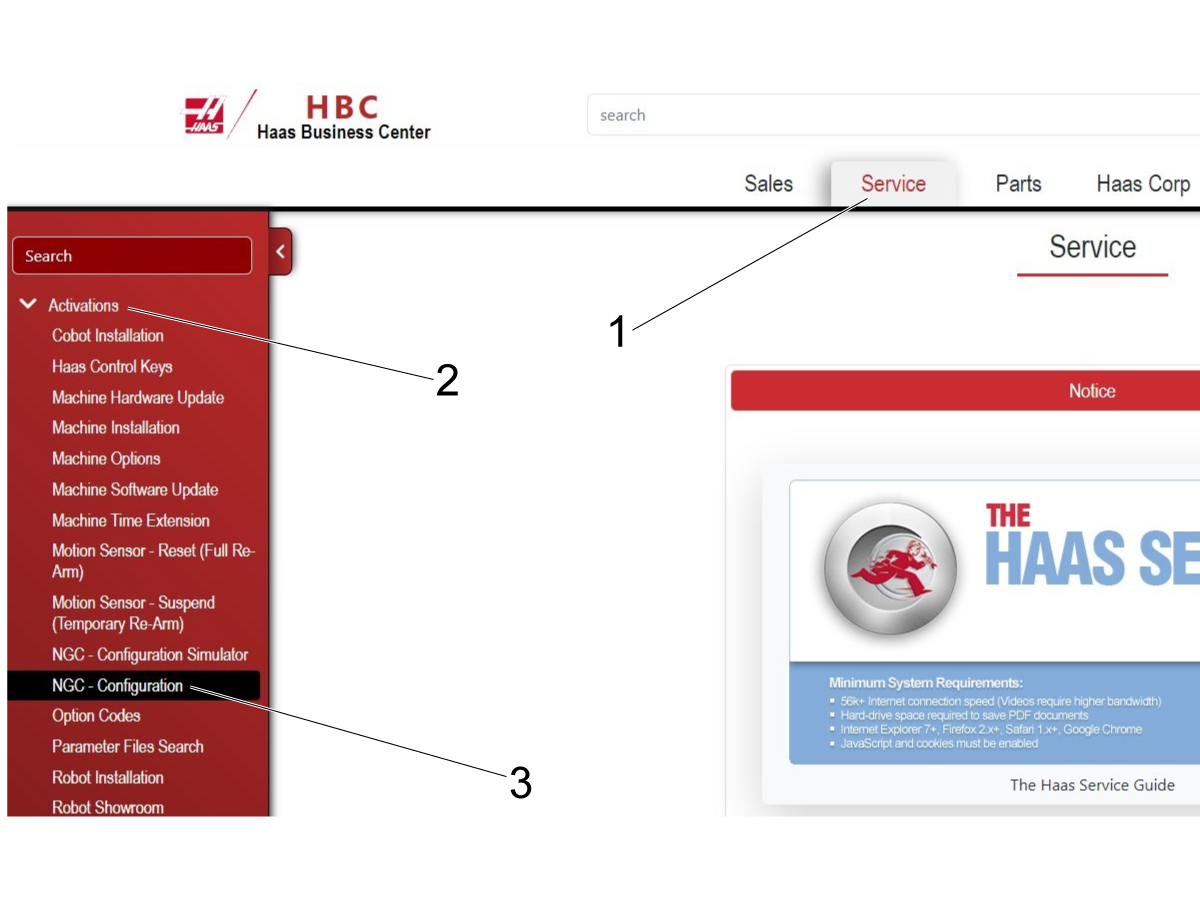
Go to the HBC site to download the configuration for the machine. 

Press the Service [1] button.

Press the Activation [2] button.

Press the NGC - Configuration option [3].

2

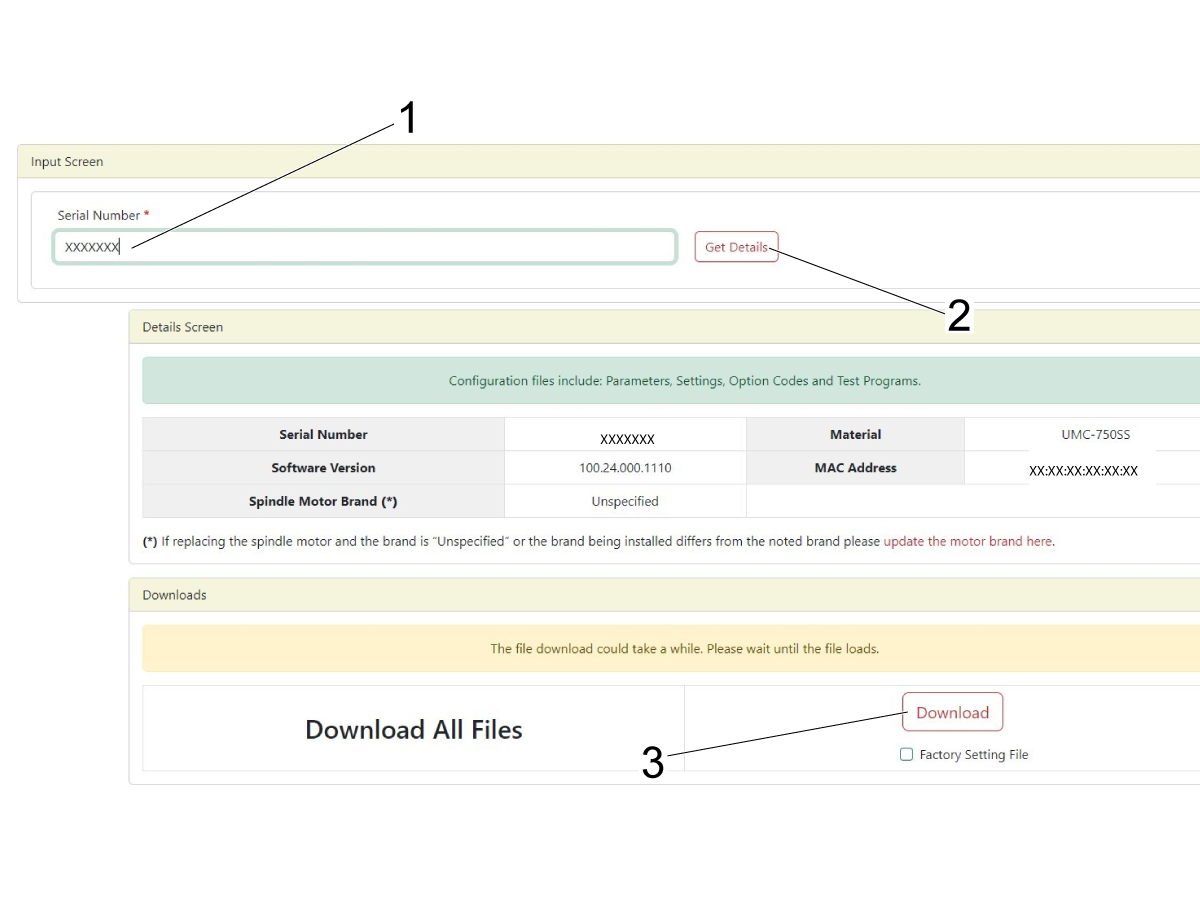
Enter the serial number for the machine [1].

Note: Do Not use the serial number for the RPL.

Press Get Details [2].

Make sure the information entered is correct and then press Download [3].

3

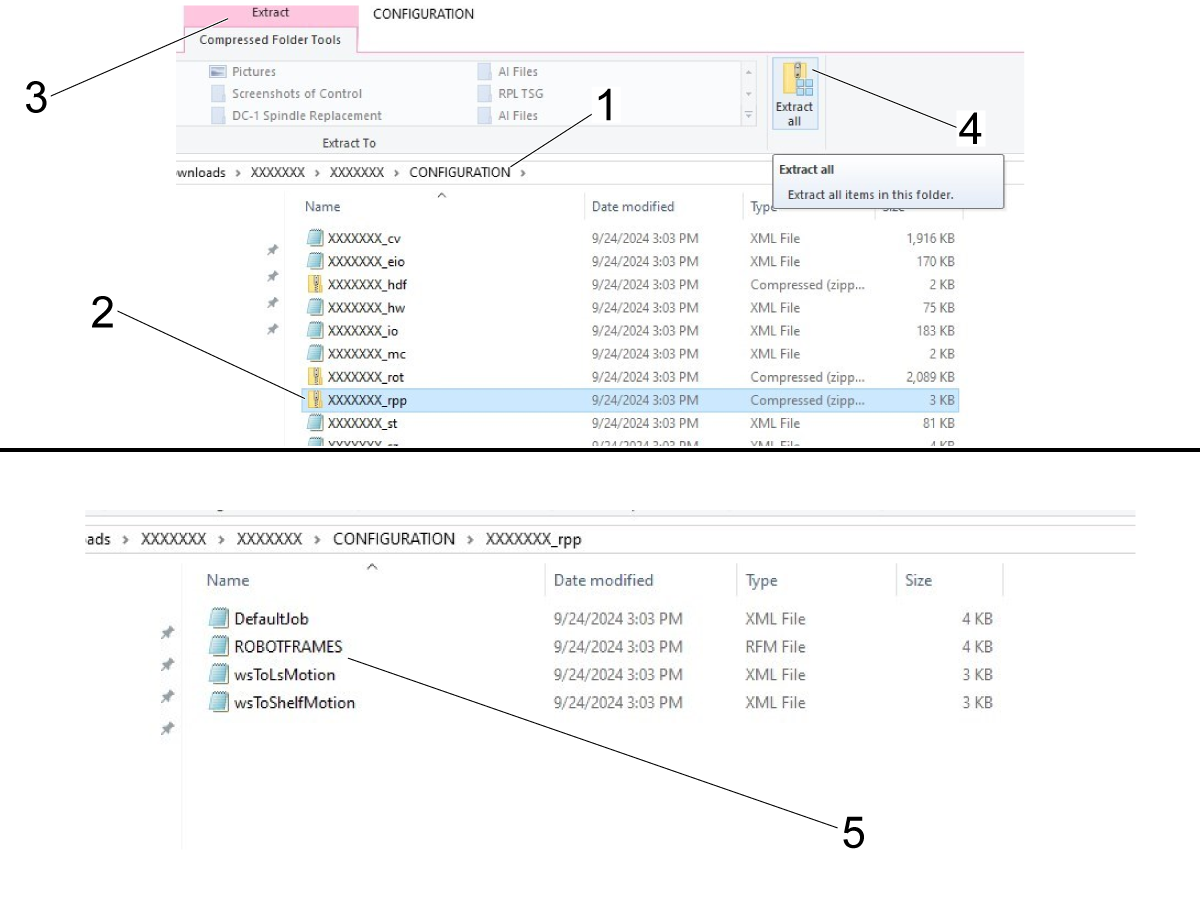
Navigate into the configuration folder [1].

Select the Serial number_rpp.zip file [2].

Press Extract [3] at the top and then press Extract All [4].

Then navigate into the rpp.zip file and confirm that it has the same files as shown in the image [5].

If this is an initial RPL setup then confirm that the following files are in the folder:

  • ROBOTFRAMES.rfm
  • wsToLsMotion.xml
  • wsToShelfMotion.xml

Put the zipped SN_rpp.zip on a USB drive.

4

Put the USB drive with the zipped SN_rpp.zip file into the Haas control.

Press [List Program] on the Haas control and then go to the USB tab [1].

Scroll down until you find the SN_rpp.zip file and highlight it [2].

Press [F2] [3] to copy the SN_rpp.zip file into the User Data/My Robot/ directory.

5

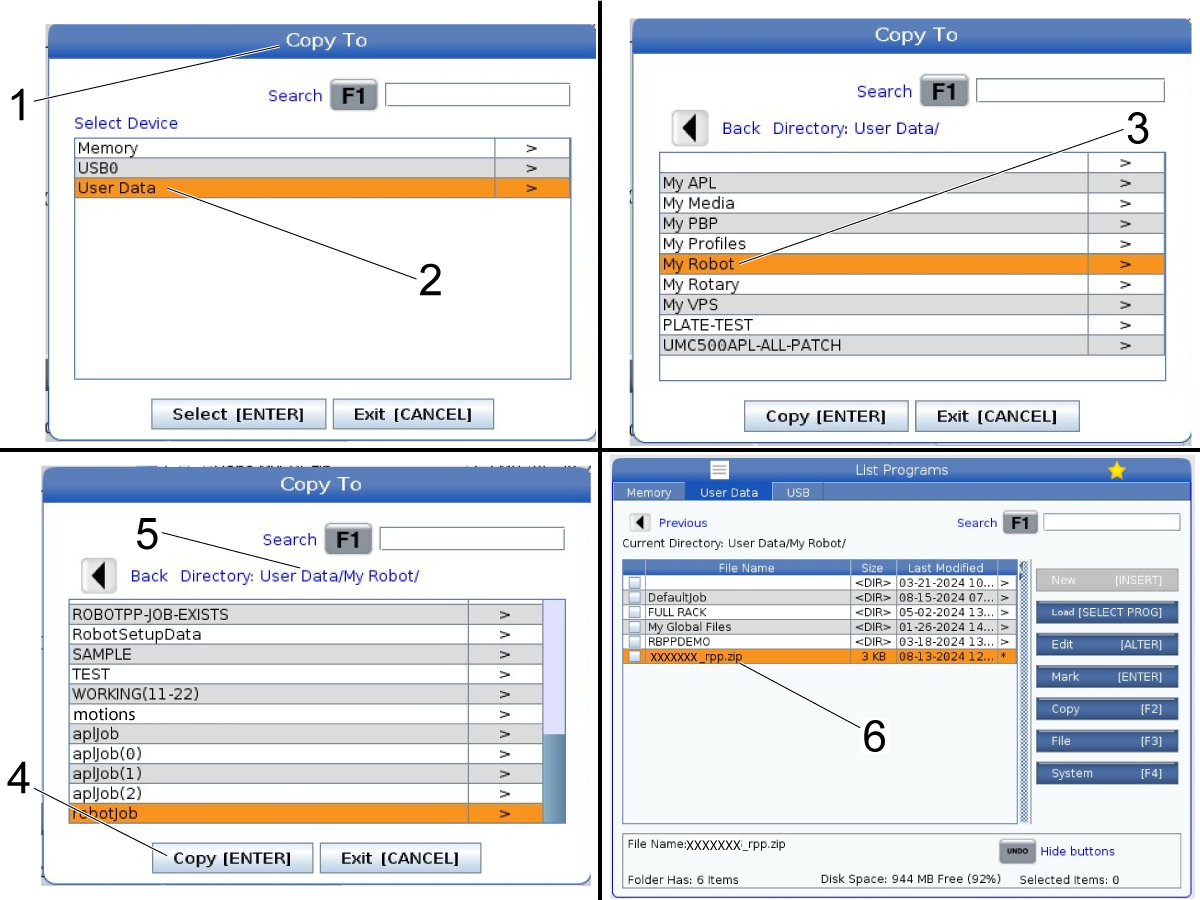
After pressing [F2] the "Copy To" window [1] will appear on the center of the control.

Highlight the User Data/ directory [2] and press the right arrow to enter the folder.

Then highlight the My Robot/ directory [3] and press the right arrow to enter that folder.

Inside the User Data/My Robot/ directory press [Enter] [4] to copy the SN_rpp.zip file into the directory.

Note: It doesn't matter what is highlighted when you press [Enter]. Just verify that the current directory at the top [5] shows User Data/My Robot/

To confirm that the file zip file was copied, go to the User Data window and then navigate to the My Robot/ folder and confirm that the SN_rpp.zip file [6] is now in showing.

6

Important: After confirming that the file was copied to the correct location, cycle power on the machine. 

The machine needs to power cycled in order for the files in the SN_rpp.zip file to be loaded to the control.

Load Robot Frames File

1

In the configuration in the SN_rpp.zip file there is a file named ROBOTFRAMES.RFM.

Extract this file and put it on a USB.

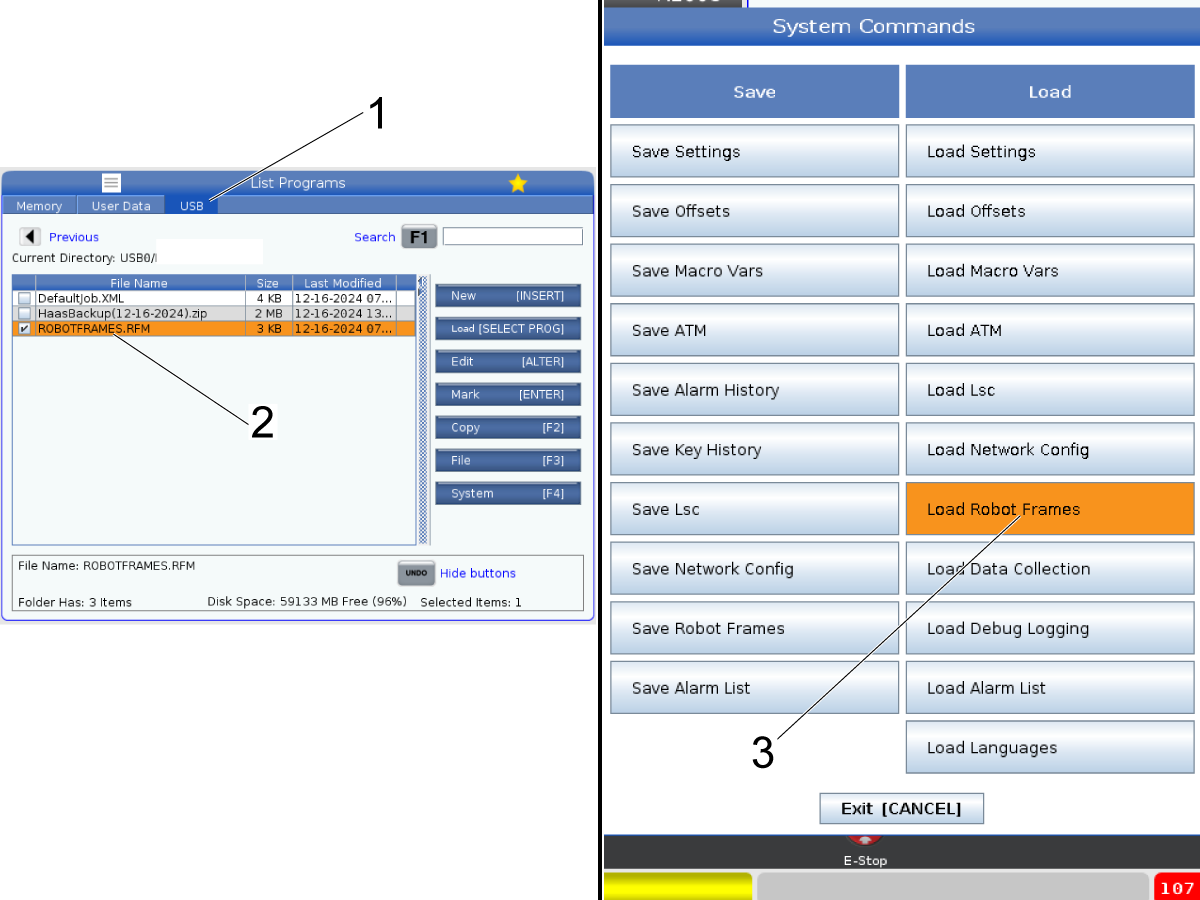
Press [List Program] and then go to the USB tab [1].

Highlight the ROBOTFRAMES.RFM file [2] and press [Enter] to checkmark it.

Press [F4] and then select Load Robot Frames [3].

2

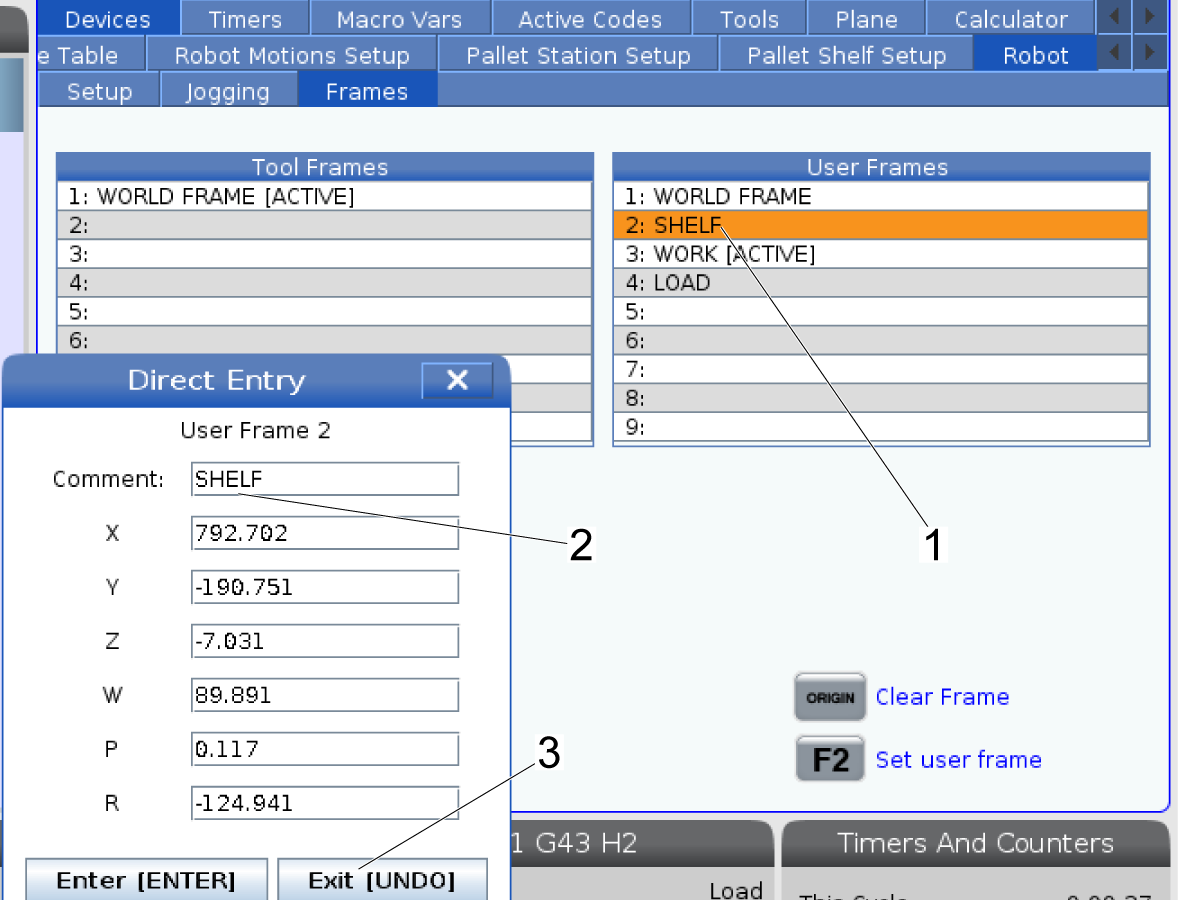
Press the [Current Commands] button and navigate to the Robot tab. Go into frames and highlight the Shelf frame [1].

Press [ENTER] and make sure that the values shown in the frame match what were on the ROBOTFRAMES.RFM file.

After you confirm that the frame values were loaded, press [UNDO] [3] to exit back to the Frames page.

Adjust Robot Frames

1

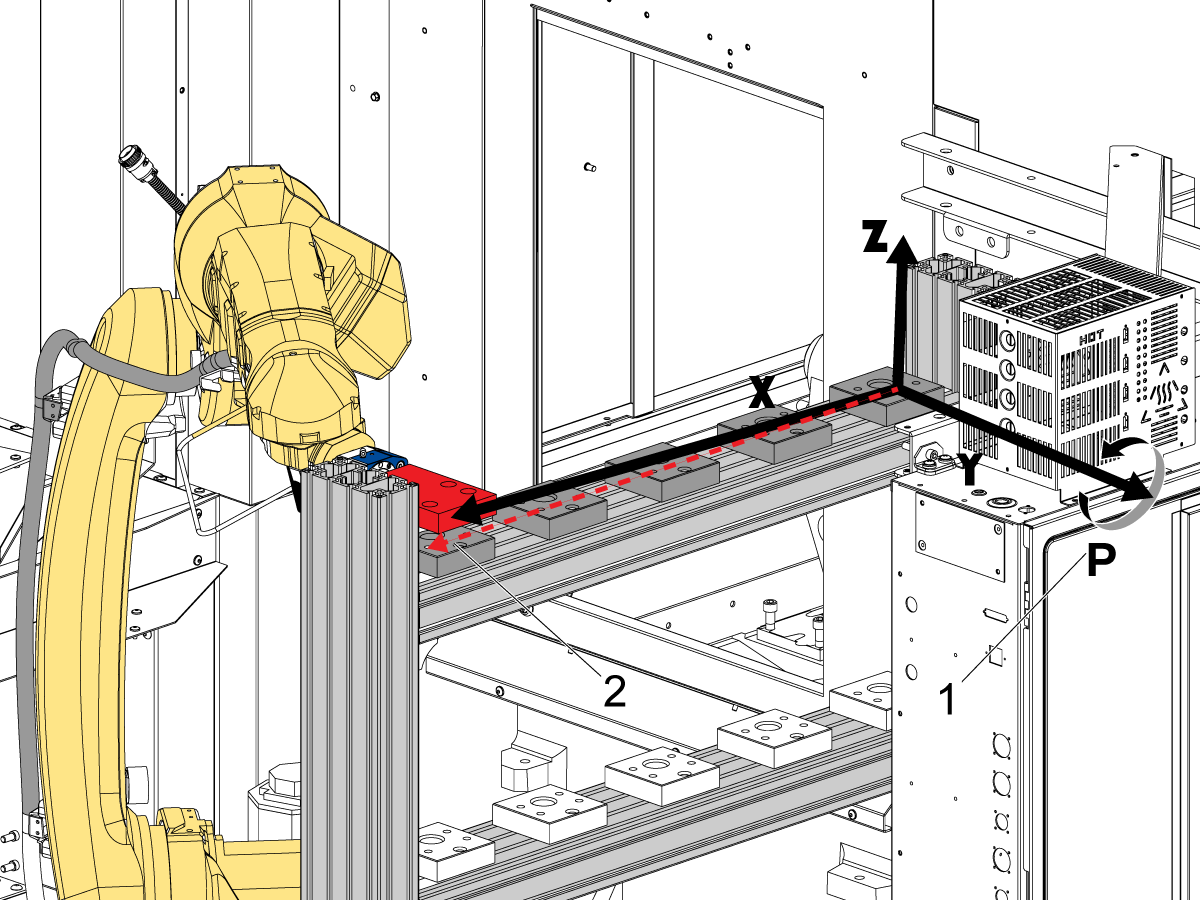
Adjust the robot frames needs to be done when the robot doesn't move to the correct position on locations towards the right side of the shelf (Stations A3, A4, or A5).

For example the setup pallet may be in the correct spot at station A1, but then at station A5 the setup pallet is higher than the pallet holder creating a gap between the pallet holder.

This would be an indicator that the frame needs to be adjusted.

You can adjust this by changing the value for P in the Shelf frame. Rotating around P [1] would change the frame so that the setup pallet moves across the shelf at a consistent height.

The image shows how the frame adjusts the robot motion moving across the shelf [2].

Recently Viewed Items

You Have No Recently Viewed Items Yet

Feedback
Haas Logo

Haas Delivered Price

This price includes shipping cost, export and import duties, insurance, and any other expenses incurred during shipping to a location in France agreed with you as a buyer. No other mandatory costs can be added to the delivery of a Haas CNC Product.

KEEP UP WITH THE LATEST HAAS TIPS AND TECHNOLOGY...

Sign up now!   

HAAS TOOLING ACCEPTS THE FOLLOWING:

  • Service & Support
  • Owners
  • Request Service
  • Operator Manuals
  • Haas Parts
  • Rotary Repair Request
  • Pre-Install Guides
  • Shopping Tools
  • Build & Price a New Haas
  • Available Inventory
  • The Haas Price List
  • CNCA Financing
  • About Haas
  • Accessibility Statement
  • DNSH Statement
  • Export Compliance
  • Careers
  • Certifications & Safety
  • Contact Us
  • History
  • Terms & Conditions
  • Haas Tooling Terms & Conditions
  • Privacy
  • Warranty
  • Haas Community
  • Haas Certification Program
  • Haas Motorsports
  • Gene Haas Foundation
  • Haas Technical Education Community
  • Events
  • Join the Conversation
  • Facebook
  • X
  • Flickr
  • YouTube
  • LinkedIn
  • Instagram
  • TikTok
© 2026 Haas Automation, Inc – CNC Machine Tools

This site is protected by reCAPTCHA and the Google Privacy Policy and Terms of Service apply.

2800 Sturgis Rd., Oxnard, CA 93030
Toll Free: (888) 817-4446 / Fax: 805-278-8554