My Haas Welcome,
!
Haas Tooling MyHaas/HaasConnect Sign In Register Haas Tooling MyHaas/HaasConnect Sign Out Welcome, My Machines Latest Activity My Quotes My Account My Users Sign Out
Find Your Distributor
  1. Select Language
    1. English
    2. Deutsch
    3. Español - España
    4. Español - México
    5. Français
    6. Italiano
    7. Português
    8. Český
    9. Dansk
    10. Nederlands
    11. Magyar
    12. Polski
    13. Svenska
    14. Türkçe
    15. 中文
    16. Suomi
    17. Norsk
    18. الإنجليزية
    19. български
    20. Hrvatski
    21. Ελληνικά
    22. Română
    23. Slovenský
    24. Slovenščina
    25. 한국어
    26. 日本語
    27. Українська
  • machines Main Menu
    • Vertical Mills
      Vertical Mills
      Vertical Mills View All
      • Vertical Mills
      • VF Series
      • Universal Machines
      • VR Series
      • VP-5 Prismatic
      • Pallet-Changing VMCs
      • Mini Mills
      • Mold Machines
      • High-Speed Drill Centers
      • Drill/Tap/ Mill Series
      • Toolroom Mills
      • Pocket Mill
      • Compact Mills
      • Gantry Series
      • SR Sheet Routers
      • Extra-Large VMC
      • Double-Column Mills
      • 3+2 Positioning Machines
    • Multi-Axis Solutions
      Multi-Axis Solutions
      Multi-Axis Solutions View All
      • Multi-Axis Solutions
      • Y-Axis Lathes
      • 5-Axis Mills
    • Lathes
      Lathes
      Lathes View All
      • Lathes
      • ST Series
      • Dual-Spindle
      • Box Way Series
      • Toolroom Lathes
      • Chucker Lathe
      • Haas Bar Feeders
    • Horizontal Mills
      Horizontal Mills
      Horizontal Mills View All
      • Horizontal Mills
      • 50-Taper
      • 40-Taper
    • Rotaries & Indexers
      Rotaries & Indexers
      Rotaries & Indexers View All
      • Rotaries & Indexers
      • Rotary Tables
      • Indexers
      • 5-Axis Rotaries
      • Extra-Large Rotaries
    • Special Series
      Special Series
      Special Series View All
      • Special Series
      • EU_Series_Redirect
    • Automation Systems
      Automation Systems
      Automation Systems View All
      • Automation Systems
      • Mill Automation
      • Lathe Automation
      • Automatic Parts Loaders
      • Automation Models
    • Desktop Machines
      Desktop Machines
      Desktop Machines View All
      • Desktop Machines
      • Desktop Mill
      • Desktop Lathe
      • Control Simulator, Standard
      • Control Simulator, Premium
    • Shop Equipment
      Shop Equipment
      Shop Equipment View All
      • Shop Equipment
      • Knee Mill
      • Haas Manual Lathes
      • Haas Saws
    • Fabrication Machines
      Fabrication Machines
      Fabrication Machines View All
      • Fabrication Machines
      • Laser Cutting Machines
      • CNC Press Brakes
    • QUICK LINKS Special Series  Special Series 
      EU SERIES EU SERIES BUILD & PRICE | PRICE LIST BUILD & PRICE | PRICE LIST In-Stock Machines In-Stock Machines WHAT’S NEW WHAT’S NEW YOUR FIRST CNC YOUR FIRST CNC
      SHOPPING TOOLS
      • Build & Price a Haas
      • Price List
      • Available Inventory
      • CNCA Financing
      WANT TO TALK TO SOMEONE?

      A Haas Factory Outlet (HFO) can answer your questions, and walk you through your best options.

      CONTACT YOUR DISTRIBUTOR >
  • Options Main Menu
    • The Haas Control Value Option Packages
      Value Option Packages
      Value Option Packages View All
      • Value Option Packages
    • Product Image Spindles
      Spindles
      Spindles View All
      • Spindles
    • Product Image Tool Changers
      Tool Changers
      Tool Changers View All
      • Tool Changers
    • Product Image 4th- | 5th-Axis
      4th- | 5th-Axis
      4th- | 5th-Axis View All
      • 4th- | 5th-Axis
    • Product Image Turrets & Live Tooling
      Turrets & Live Tooling
      Turrets & Live Tooling View All
      • Turrets & Live Tooling
    • Product Image Probing
      Probing
      Probing View All
      • Probing
    • Haas Chip & Coolant Management Chip & Coolant Management
      Chip & Coolant Management
      Chip & Coolant Management View All
      • Chip & Coolant Management
    • The Haas Control The Haas Control
      The Haas Control
      The Haas Control View All
      • The Haas Control
    • Product Image Product Options
      Product Options
      Product Options View All
      • Product Options
    • Product Image Tooling & Fixturing
      Tooling & Fixturing
      Tooling & Fixturing View All
      • Tooling & Fixturing
    • Product Image Workholding
      Workholding
      Workholding View All
      • Workholding
    • Product Image 5-Axis Solutions
      5-Axis Solutions
      5-Axis Solutions View All
      • 5-Axis Solutions
      • 5 Easy Steps to 5-Axis
    • QUICK LINKS Special Series  Special Series 
      EU SERIES EU SERIES BUILD & PRICE | PRICE LIST BUILD & PRICE | PRICE LIST In-Stock Machines In-Stock Machines WHAT’S NEW WHAT’S NEW YOUR FIRST CNC YOUR FIRST CNC
      SHOPPING TOOLS
      • Build & Price a Haas
      • Price List
      • Available Inventory
      • CNCA Financing
      WANT TO TALK TO SOMEONE?

      A Haas Factory Outlet (HFO) can answer your questions, and walk you through your best options.

      CONTACT YOUR DISTRIBUTOR >
  • Why Haas Main Menu
      Discover the Haas Difference
    • Why Haas
    • MyHaas
    • Education Community
    • Industry 4.0
    • Haas Certification
    • Customer Testimonials
  • Service Main Menu
      Welcome to Haas Service
      SERVICE HOME Operator’s Manuals How-To Procedures Troubleshooting Guides Preventive Maintenance Haas Parts Haas Tooling Videos
  • Videos Main Menu
  • Main Menu
    • View All
    • View All
    • View All
    • View All
      • HTEC Curriculum Support
      • Haas Value Option Packages (VOP) Journey
    • View All
      • Haas 10 kg Cobot Package
      • Cobot Kits
      • DC-1 Drill Center
      • CNC Sales News
      • Do More With Your Haas
    • View All
    • View All
      • contact-us-test
      • 4 - AUTOMATION SYSTEMS
      • Carousel-V2
      • expert test
      • Demo_Day_Trident-test
      • Link Test
      • image-sale-tag-test
      • article-list-test
      • Haas 25 kg Robot Package
      • test-algolia-page
    • View All
    • View All
    • View All
    • View All
      • calc-test
    • View All
    • QUICK LINKS Special Series  Special Series 
      EU SERIES EU SERIES BUILD & PRICE | PRICE LIST BUILD & PRICE | PRICE LIST In-Stock Machines In-Stock Machines WHAT’S NEW WHAT’S NEW YOUR FIRST CNC YOUR FIRST CNC
      SHOPPING TOOLS
      • Build & Price a Haas
      • Price List
      • Available Inventory
      • CNCA Financing
      WANT TO TALK TO SOMEONE?

      A Haas Factory Outlet (HFO) can answer your questions, and walk you through your best options.

      CONTACT YOUR DISTRIBUTOR >
  • Haas Tooling Main Menu
  • Haas Service Parts Main Menu

My Haas Welcome,
!
Haas Tooling MyHaas/HaasConnect Sign In Register Haas Tooling MyHaas/HaasConnect Sign Out Welcome, My Machines Latest Activity My Quotes My Account My Users Sign Out
Find Your Distributor
  1. Select Language
    1. English
    2. Deutsch
    3. Español - España
    4. Español - México
    5. Français
    6. Italiano
    7. Português
    8. Český
    9. Dansk
    10. Nederlands
    11. Magyar
    12. Polski
    13. Svenska
    14. Türkçe
    15. 中文
    16. Suomi
    17. Norsk
    18. الإنجليزية
    19. български
    20. Hrvatski
    21. Ελληνικά
    22. Română
    23. Slovenský
    24. Slovenščina
    25. 한국어
    26. 日本語
    27. Українська
×

Search Results

Web Pages

Images

    • <
    • 1
    • >

6 - TL - Operation

Toolroom Lathe - Operator's Manual Supplement


  • 1 - TL - Introduction
  • 2 - TL - Legal Information
  • 3 - TL - Safety
  • 4 - TL - Installation
  • 5 - TL - Control Icons
  • 6 - TL - Operation
  • 7 - TL - G-Codes
  • 8 - TL - M-Codes
  • 9 - TL - Settings
  • 10 - TL - Maintenance

Go To :

  • 6.1 TL - Machine Power-On
  • 6.2 TL - Manual Mode
  • 6.3 TL- eHandwheel
  • 6.4 Position TL-1/2 Tailstock
  • 6.5 TT-4 - Turret Operation
  • 6.6 TT-4 - Tool Change Recovery
  • 6.7 ATT8 - Turret Operation
  • 6.8 ATT8 - Tool Change Recovery
  • 6.9 TL - Steady Rest Operation

6.1 TL - Machine Power-On

TL - Machine Power-On

Follow this procedure to turn on a Toolroom Lathe for the first time.

Note: Before you do this procedure, remove all shipping brackets and steady rest if equipped from the machine. Make sure that possible crash areas, such as the spindle, cross-slide, and tailstock, are clear.

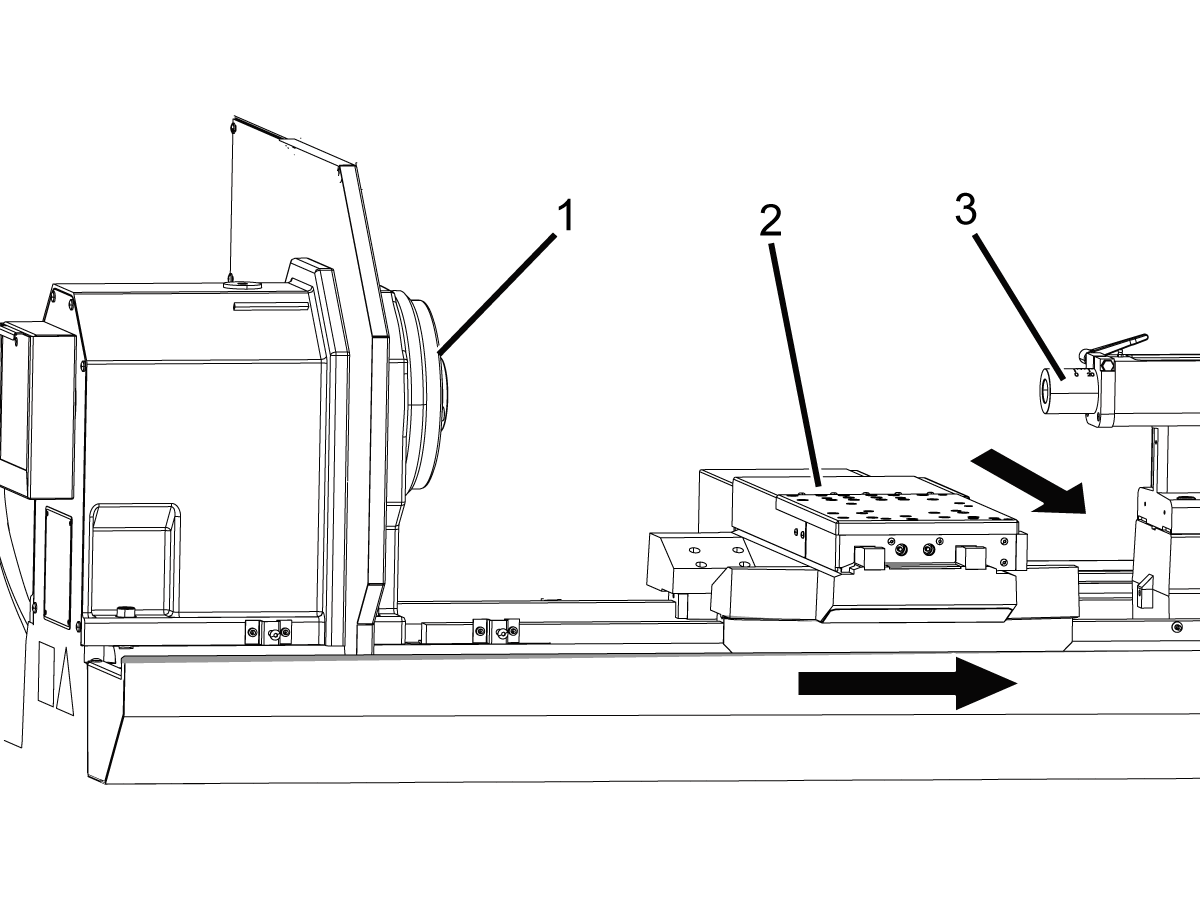
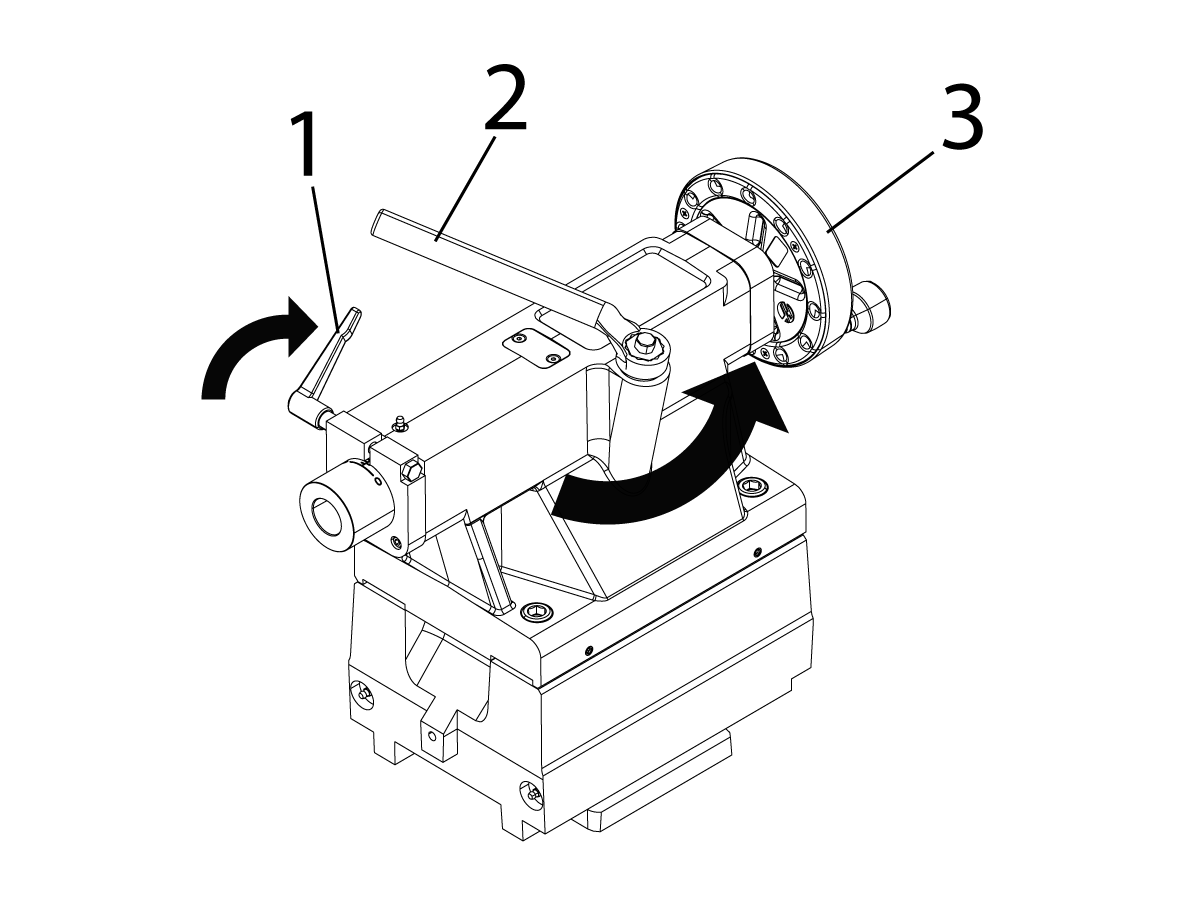
Power-Up Cross-Slide Home Movement and Possible Crash Areas:

  • Spindle[1]
  • Cross-slide with tool post, riser block, or tool changer[2] 
  • Tailstock[3]

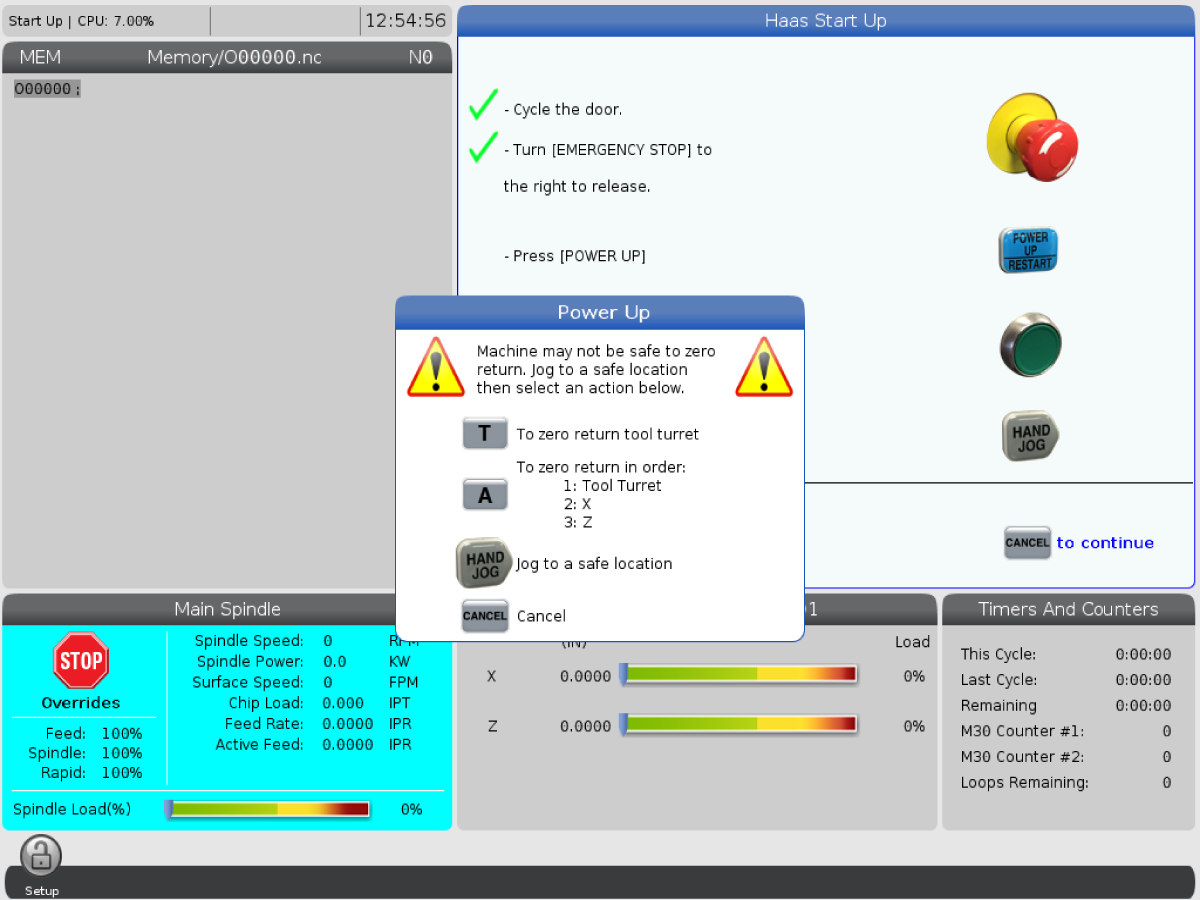
1. Press and hold [POWER ON] until you see the Haas logo on the screen. After a self-test and boot sequence, the display shows the startup screen. The startup screen gives basic instructions to start the machine. Press [CANCEL] to dismiss the screen. You can also press [F1] to disable it.

2. Turn [EMERGENCY STOP] clockwise to reset it.

3. Press [RESET] to clear the startup alarms. If you cannot clear an alarm, the machine may need service. Contact your Haas Factory Outlet (HFO) for assistance.

4. Close the doors.

Warning: Before you do the next step, remember that automatic motion begins immediately when you press [POWER UP]. Make sure the motion path is clear. If equipped, the steady rest cannot be installed between the cross slide and tailstock during the zero return procedure. Stay away from the spindle, cross-slide, and tailstock.

5. Press [POWER UP]. The axes move slowly until the machine finds the home switch for each axis. This establishes the machine home position. A flashing message, INSTALL TOOL 1 PRESS CYCLE START, prompts you to install tool 1 and press [CYCLE START].

 Note: Some options, such as TT-4 or ATT8, disable the Power Up function. In this case, the zero return menu will be used to home the machine.

6. Check clearance before moving each axis. If needed, push [HANDLE JOG] and move axes to a safe position. Remove tools if necessary. If the eHandwheel is installed the pendant jog wheel is only used to scroll through the control. You must use the eHandwheel to jog the axes if installed. Zero return each axis separately. Press [T], and only the tool changer will find home. c) Press [A], and the Tool Turret will find home first then X and last the Z-axis. The control is now in OPERATION:MEM mode. 

6.2 TL - Manual Mode

TL - Manual Mode

The Toolroom Lathe can run in manual mode without being homed. When in manual mode the machine will not read offsets, programs, or any G & M-codes. Travel limits are not active so use caution when moving the axis. 

Power-Up Menu:

1. Setting 325 Enable Manual Mode must be set to ON.

2. Press [HAND JOG] to enter the handle jog mode.

3. Use the eHandwheel to jog the axis.

4. To turn on the spindle, use the numeric keypad to enter an RPM value and press [FWD] or [REV].

5. With the spindle running the Power Feed rocker switches will be active.

6. If the optional TT-4 or ATT-8 tool changer is installed, In MDI mode, press [TURRET FWD] or [TURRET REV] to change tools. Make sure there is enough clearance around the tool changer before changing tools.

6.3 TL - E-Handwheel

TL - eHandwheel

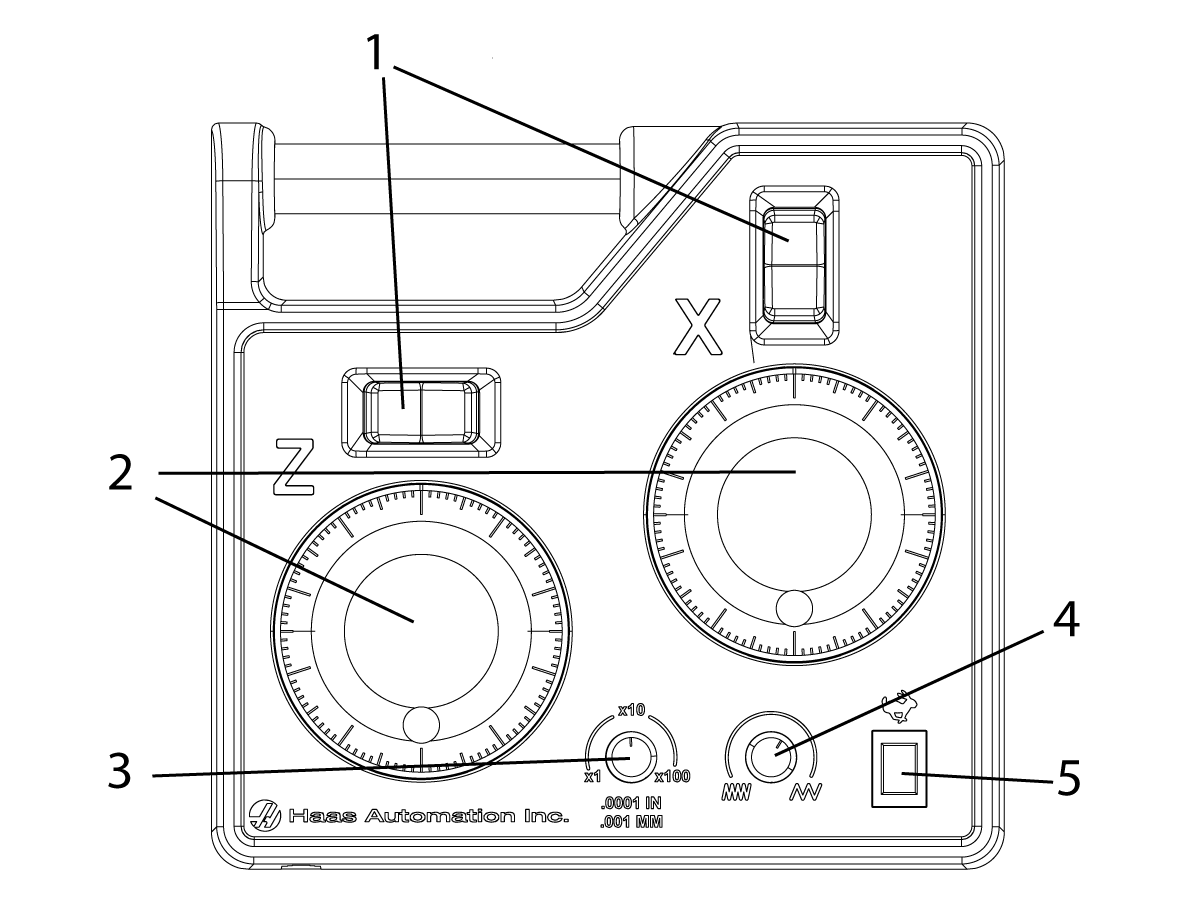
eHandwheel Overview:

1. Power Feed
2. Handle Jog
3. Jog Increment
4. Power Feed Rate
5. Rapid Feed

Note: When the eHandweel is installed the pendent jog wheel will only scroll through the control page. It cannot be used to jog the machine.

Note: Feed Rocker switches only work when the spindle is turning or while Rapid Feed is pressed. 

Jog Behavior:

The eHandwheel on the new TL's with the Next Generation Control is setup to jog similarly to a manual lathe. This is different than how the older TL's with the Classic Haas Control are set up. The table below shows the differences. If you want your TL with the Next Generation Control to function the same as your older TL with the Classic Haas Control, you can have your local Haas Factory Outlet invert the direction under the Factory Settings tab, invert Parameter 1.177 AXIS JOG DIRECTION INVERTED. Some machines might need to download the most recent configuration files from HBC before changing the parameter.

Axis Jog:

Select the Jog Increment then use the X or Z axis jog wheels to position the axes.

Rapid Feed:

Hold the Rapid Feed button and press the desired Power Feed rocker switch.

  Standard Manual Lathe CHC TL NGC TL
Turn the X-Axis jog handle CW CW CW
The numbers on the handle Increase Increase Increase
The movement relative to the operator Moves Away Moves Towards Moves Away
The movement in terms of positive display N/A Numbers Increase Numbers Decrease
The movement in terms of part size Part gets smaller Part get bigger Part gets smaller
Turret location Close side of part Close side of part Close side of part

Jog Chamfer:

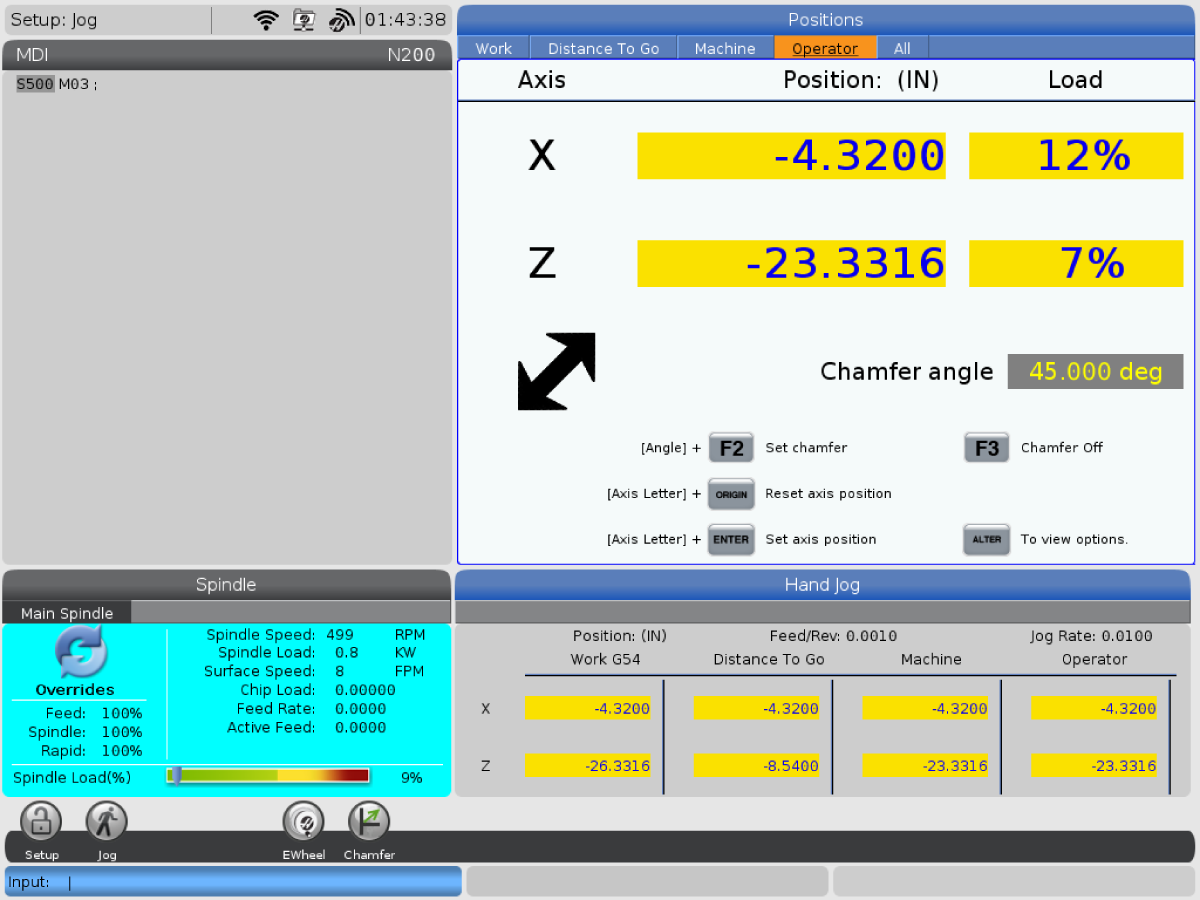
Use the Jog Wheels to jog the tool to the starting point. While in the operator tab in handle jog mode, press [F3] to enable the chamfer option. The chamfer icon will appear on the screen. Enter a number value and press [F2] to set the chamfer angle. Use the Power Feed rocker switches to jog in or out of a chamfer. Press [F3] to exit chamfer mode.

6.4 Position TL-1/2 Tailstock

TL - Position TL-1/2 Tailstock

TL-1/2 Tailstock:

  • Quill Clamp Lock[1]
  • Base Lock Wrench[2]
  • Quill Adjustment Wheel[3]

To operate the tailstock:

1. Loosen the clamp bolt at the base of the tailstock casting with the Base Lock Wrench[2]. Move the wrench counterclockwise to loosen.

2. Position the tailstock base manually, then tighten the clamp bolt at the base of the tailstock casting with the Base Lock Wrench[2]. Move the wrench clockwise to lock.

3. To drive the quill in and out, rotate the quill clamp lock[1] away from the spindle and rotate the hand wheel on the rear of the casting[3] counterclockwise and clockwise.

Note: The TL-1/2 tailstock has a #4 Morse taper (MT4).

6.5 TT-4 - Turret Operation

TL - TT-4 Turret Operation

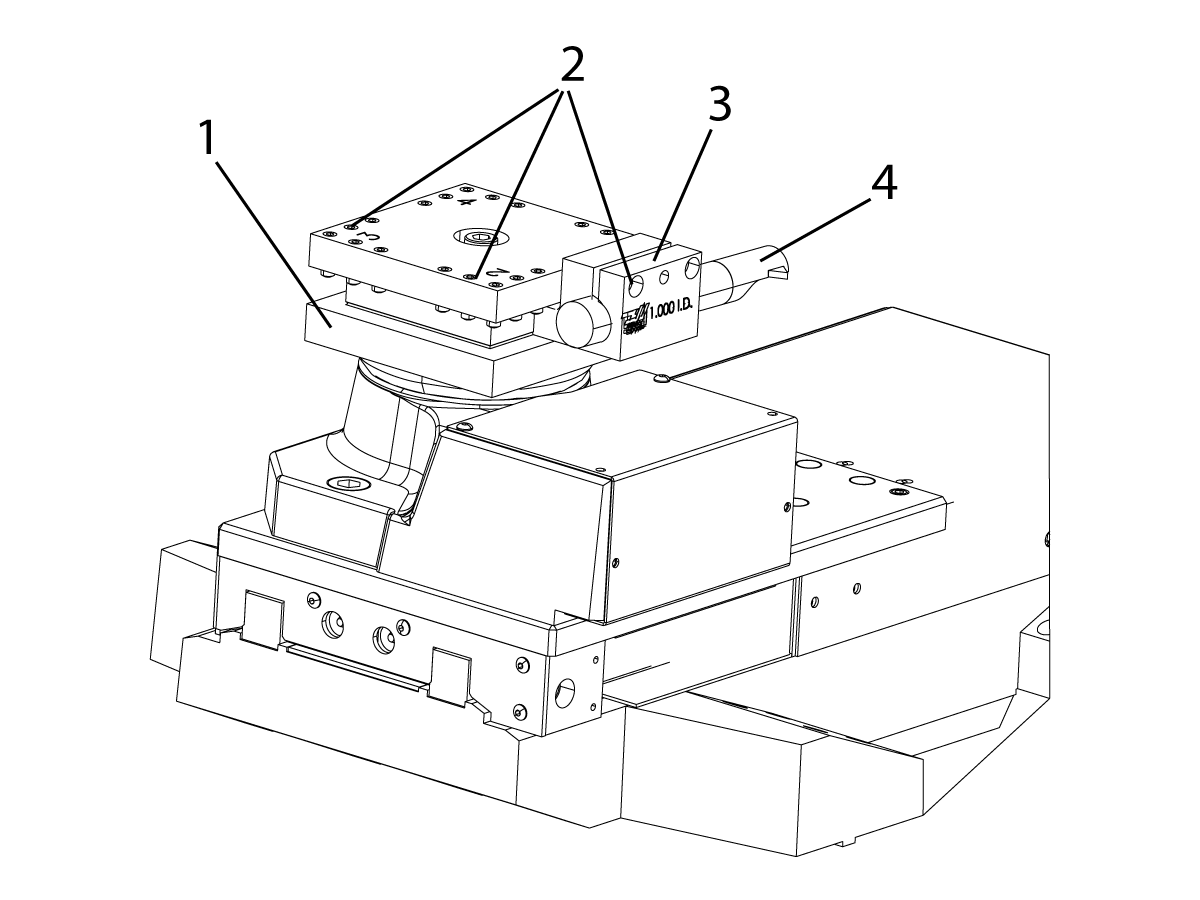
TT-4 Turret Detail:

1. Turret
2. Tool-Retention Screws
3. Tool Holder
4. Tool.

To set up the TT-4 turret:

Loosen the tool-retention screws[2]. Put the tool[4] into the tool holder[3] and tighten the tool-retention screws[2].

Caution: There is a clearance of 0.25" (6 mm) between the bottom of the lower TT-4 plate[1] and the top of the servo-motor cover. Do not use a tool that extends below the top of the servo-motor cover. Use a boring-bar holder[3] of the type shown.

Caution: If you use the air gun to remove chips and coolant from the turret, do not blow air into the ring cover at the base of the turret. Compressed air can force chips and coolant into the mechanism. This damages the unit.

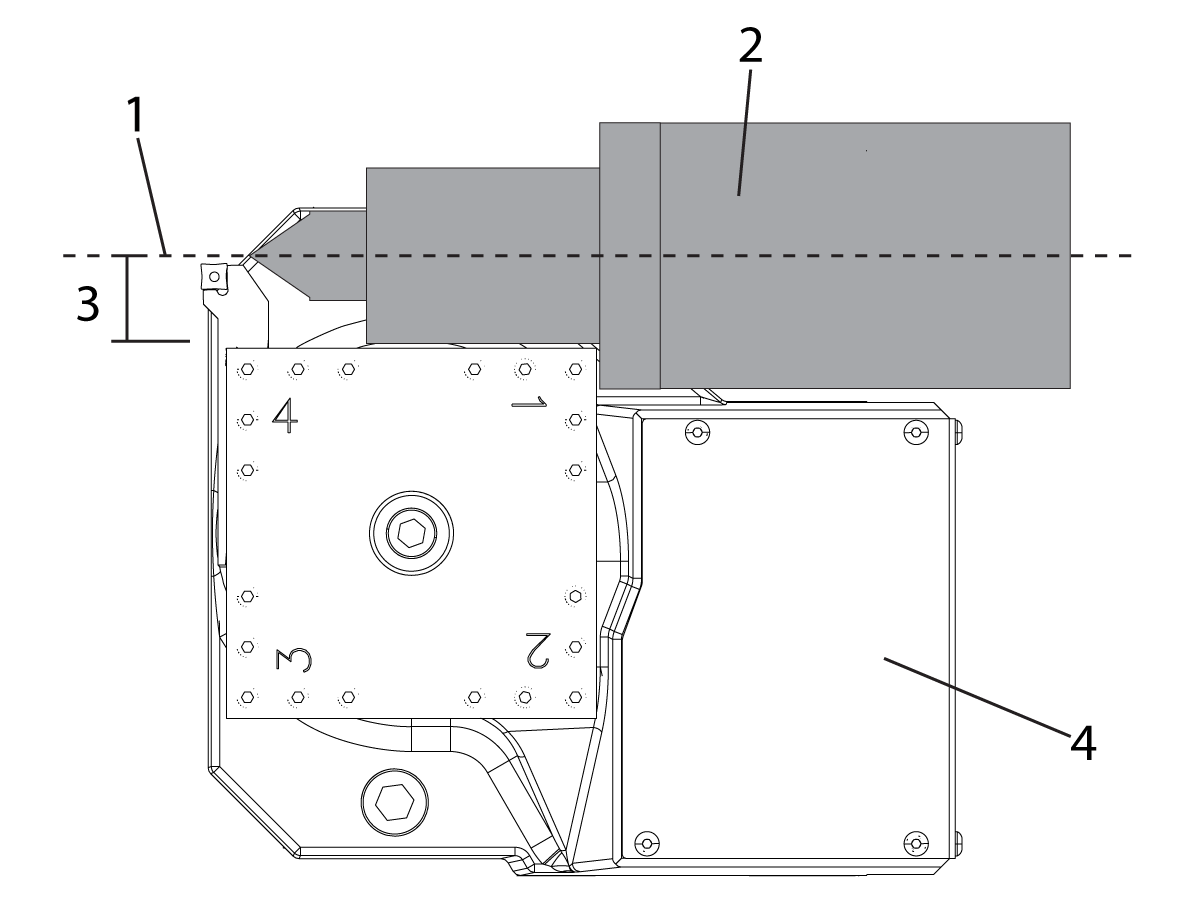
Make sure the tailstock[2] has sufficient clearance around the servo motor cover. To prevent interference between the tailstock and the servo-motor cover, extend the tool holder farther out of the turret.

TT-4 Turret and Servo-motor Cover Clearance:

1. Tailstock centerline
2. Tailstock
3. Clearance
4. Servo-motor Cover

Make sure the clearance[3] between the tailstock centerline[1] and the edge of the servo-motor cover[4] and the turret is more than 1.78" (45 mm).

TL - TT-4 Turret Operation Test

%
T1;
T2;
T3;
T4;
T3;
T2;
M99;
;
;
;
%

Use this program to test the tool changer:

Note: Use T-address codes to operate the tool changer. For example, T303 rotates the tool changer to the number 3 tool position, and uses offset 3. Add the T-address code to the program like the other lines of code. Refer to the Lathe Operator’s manual for more information on the T-codes and tool offsets.

6.6 TT-4 - Tool Change Recovery

TL - TT-4 Turret Tool Change Recovery

To recover the tool changer from an incomplete tool change:

1. Press [MDI].
2. Press [TURRET FWD] or [TURRET REV].

Caution: The tool changer moves rapidly when you push [TURRET FWD] or [TURRET REV]. To prevent injury, give the turret sufficient clearance.

6.7 ATT8 - Turret Operation

TL - ATT8 Turret Operation

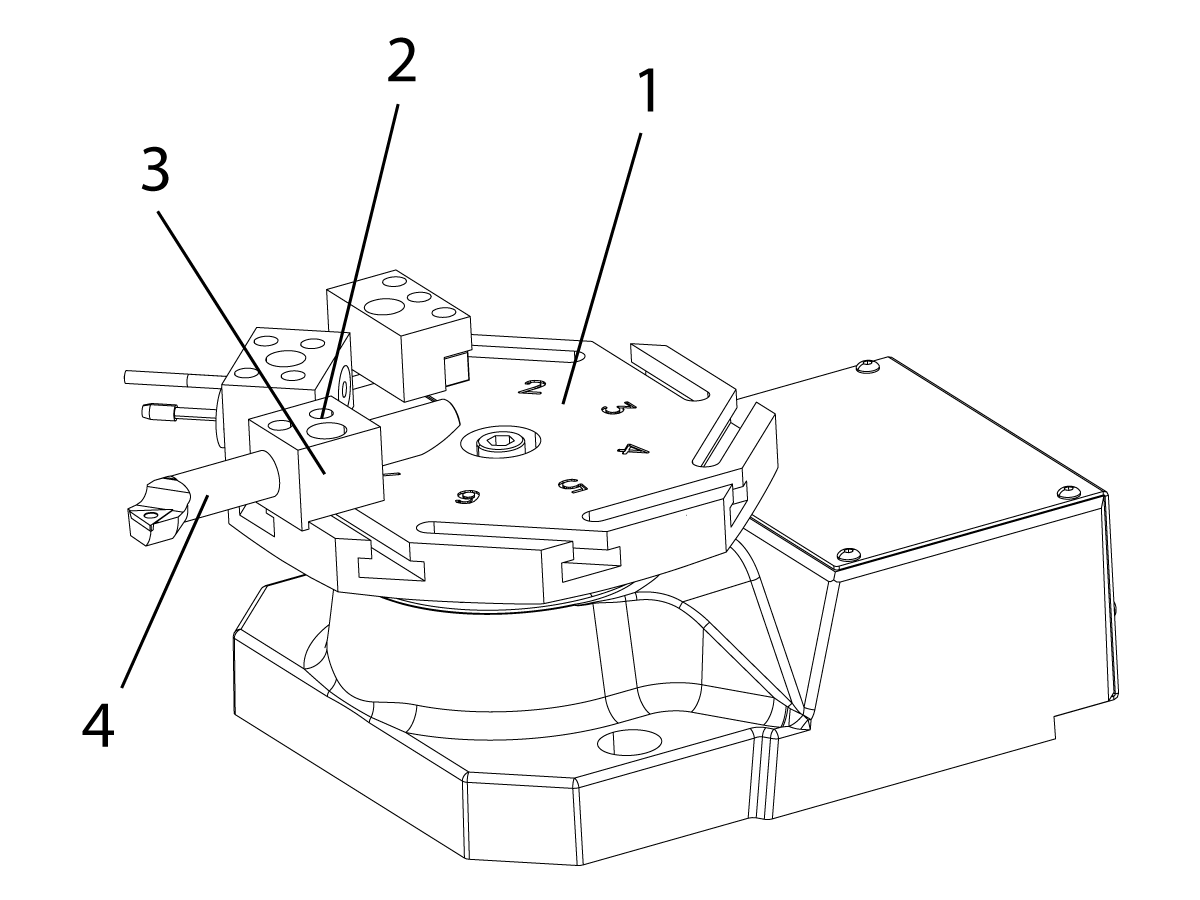
ATT8 Turret Detail:

1. Turret
2. Tool-Retention Screws
3. Tool Holder
4. Tool

Note: The ATT8 has a 1/2 inch turning tool height from the top of the turret.

To set up the ATT8 turret:

  1. Loosen the tool-retention screws[2].
  2. Put the tool[4] into the tool holder[3] and tighten the tool-retention screws[2].


Caution: It is not recommended to use the ATT8 tool changer on a machine with the tailstock option.


Caution: If you use the air gun to remove chips and coolant from the turret, do not blow air into the ring cover at the base of the turret. Compressed air can force chips and coolant into the mechanism. This damages the unit.

TL - ATT8 Turret Operation Test

%
T1;
T2;
T3;
T4;
T5;
T6;
T7;
T8;
T7;
T6;
T5;
T4;
T3;
T2;
M99;
;
;
;
%

Use this program to test the tool changer:

Note: Use T-address codes to operate the tool changer. For example, T303 rotates the tool changer to the number 3 tool position, and uses offset 3. Add the T-address code to the program like the other lines of code. Refer to the Lathe Operator’s manual for more information on the T-codes and tool offsets.

6.8 ATT8 - Tool Change Recovery

TL - ATT8 Turret Tool Change Recovery

To recover the tool changer from an incomplete tool change:

1. Press [MDI].
2. Press [TURRET FWD] or [TURRET REV].

Caution: The tool changer moves rapidly when you push [TURRET FWD] or [TURRET REV]. To prevent injury, give the turret sufficient clearance.

6.9 TL - Steady Rest Operation

TL - Stead Rest Operation

The steady rest provides increased support for long- or narrow-shaft operations. Manually position the steady rest along the Z-Axis travel and lock it in place with the clamp bolts. It can be used with the tailstock option.

Caution: Do not home the Z Axis until you have removed the steady rest out of its shipping position. The Z-Axis cannot be homed if the steady rest is between the cross slide and the tailstock. The carriage can collide with the steady rest and damage both components.

1. If you have not moved the steady rest out of its shipping position, use a lift to move the steady rest from its shipping position between the cross-slide and the tailstock to its operational position between the chuck and the cross-slide.

2. Tighten the clamps at the base of the steady rest.

Caution: Make sure to use a lift that is rated for the weight of the steady rest.

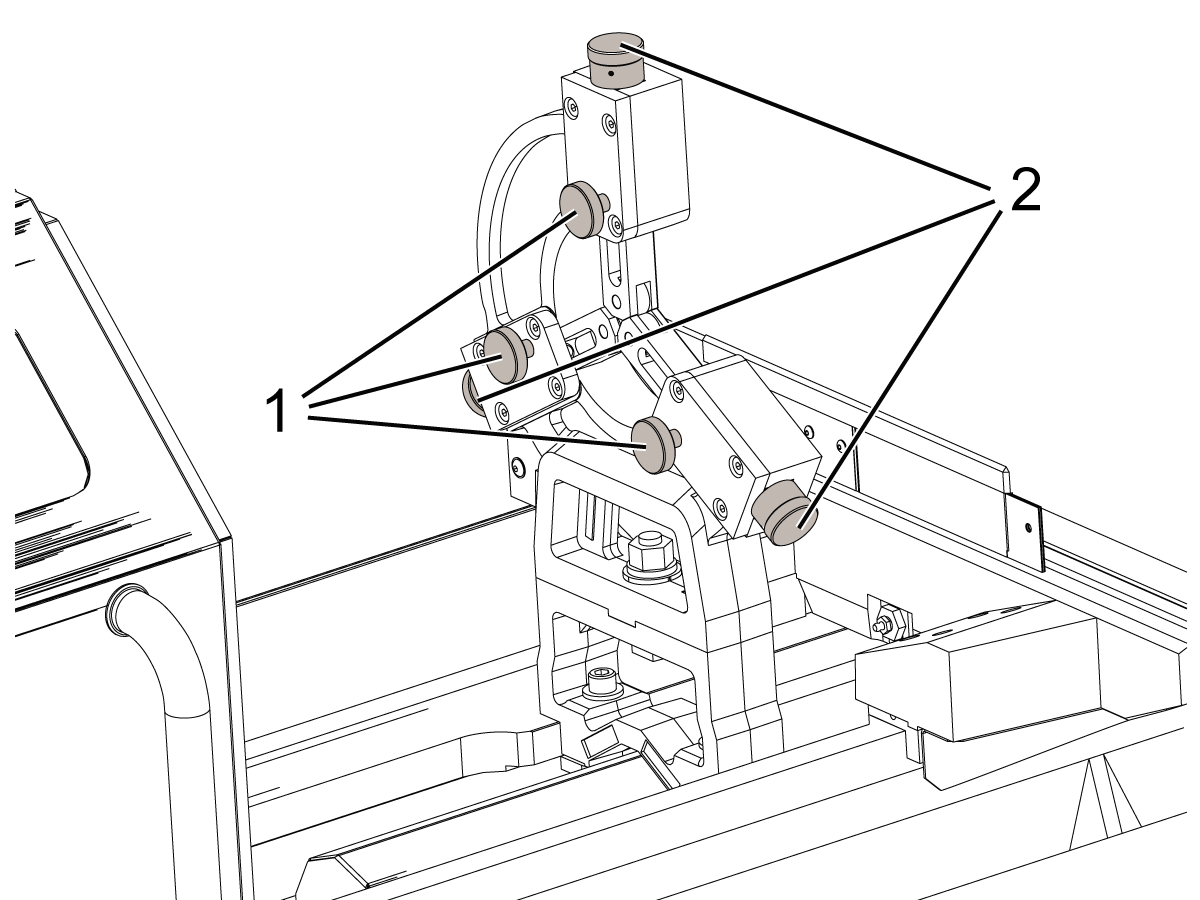
TL - C-Type Steady Rest Operation

To operate the C-type steady rest:

1. Turn the roller lock screws[1] to loosen the rollers.

2. Retract the rollers by turning the adjustment screws[2].

3. Clamp the workpiece into the chuck.

4. If a tailstock is to be used, engage the tailstock live center and engage the tailstock brake.

5. Turn the steady rest roller adjustment screws[2] to move the rollers against the workpiece.

6. Tighten the roller lock screws[1] to secure the rollers in place.

Note: Haas recommends that you do not place material with a rough finish in the steady rest. The steady rest holds more securely on a workpiece with a smooth surface.

7. Place a dial indicator on a Z-Axis linear guide and position the indicator tip near the outside edge of the workpiece.

8. Turn the workpiece by hand and check for deflection in the part.

9. Adjust and tighten the steady rest rollers as necessary.

Feedback

Recently Viewed Items

You Have No Recently Viewed Items Yet

Feedback
Haas Logo

Haas Delivered Price

This price includes shipping cost, export and import duties, insurance, and any other expenses incurred during shipping to a location in France agreed with you as a buyer. No other mandatory costs can be added to the delivery of a Haas CNC Product.

KEEP UP WITH THE LATEST HAAS TIPS AND TECHNOLOGY...

Sign up now!   

HAAS TOOLING ACCEPTS THE FOLLOWING:

  • Service & Support
  • Owners
  • Request Service
  • Operator Manuals
  • Haas Parts

  • Rotary Repair Request
  • Pre-Install Guides
  • Shopping Tools
  • Build & Price a New Haas
  • Available Inventory
  • The Haas Price List
  • CNCA Financing
  • About Haas
  • Accessibility Statement
  • DNSH Statement
  • Export Compliance
  • Careers
  • Certifications & Safety
  • Contact Us
  • History
  • Terms & Conditions
  • Haas Tooling Terms & Conditions
  • Privacy
  • Warranty
  • Haas Community
  • Haas Certification Program
  • Haas Motorsports
  • Gene Haas Foundation
  • Haas Technical Education Community
  • Events
  • Join the Conversation
  • Facebook
  • X
  • Flickr
  • YouTube
  • LinkedIn
  • Instagram
  • TikTok
© 2026 Haas Automation, Inc – CNC Machine Tools

This site is protected by reCAPTCHA and the Google Privacy Policy and Terms of Service apply.

2800 Sturgis Rd., Oxnard, CA 93030
Toll Free: (888) 817-4446 / Fax: 805-278-8554