My Haas Welcome,
!
Haas Tooling MyHaas/HaasConnect Sign In Register Haas Tooling MyHaas/HaasConnect Sign Out Welcome, My Machines Latest Activity My Quotes My Account My Users Sign Out
Find Your Distributor
  1. Select Language
    1. English
    2. Deutsch
    3. Español - España
    4. Español - México
    5. Français
    6. Italiano
    7. Português
    8. Český
    9. Dansk
    10. Nederlands
    11. Magyar
    12. Polski
    13. Svenska
    14. Türkçe
    15. 中文
    16. Suomi
    17. Norsk
    18. الإنجليزية
    19. български
    20. Hrvatski
    21. Ελληνικά
    22. Română
    23. Slovenský
    24. Slovenščina
    25. 한국어
    26. 日本語
    27. Українська
  • machines Main Menu
    • Vertical Mills
      Vertical Mills
      Vertical Mills View All
      • Vertical Mills
      • VF Series
      • Universal Machines
      • VR Series
      • VP-5 Prismatic
      • Pallet-Changing VMCs
      • Mini Mills
      • Mold Machines
      • High-Speed Drill Centers
      • Drill/Tap/ Mill Series
      • Toolroom Mills
      • Pocket Mill
      • Compact Mills
      • Gantry Series
      • SR Sheet Routers
      • Extra-Large VMC
      • Double-Column Mills
      • 3+2 Positioning Machines
    • Multi-Axis Solutions
      Multi-Axis Solutions
      Multi-Axis Solutions View All
      • Multi-Axis Solutions
      • Y-Axis Lathes
      • 5-Axis Mills
    • Lathes
      Lathes
      Lathes View All
      • Lathes
      • ST Series
      • Dual-Spindle
      • Box Way Series
      • Toolroom Lathes
      • Chucker Lathe
      • Haas Bar Feeders
    • Horizontal Mills
      Horizontal Mills
      Horizontal Mills View All
      • Horizontal Mills
      • 50-Taper
      • 40-Taper
    • Rotaries & Indexers
      Rotaries & Indexers
      Rotaries & Indexers View All
      • Rotaries & Indexers
      • Rotary Tables
      • Indexers
      • 5-Axis Rotaries
      • Extra-Large Rotaries
    • Special Series
      Special Series
      Special Series View All
      • Special Series
      • EU_Series_Redirect
    • Automation Systems
      Automation Systems
      Automation Systems View All
      • Automation Systems
      • Mill Automation
      • Lathe Automation
      • Automatic Parts Loaders
      • Automation Models
    • Desktop Machines
      Desktop Machines
      Desktop Machines View All
      • Desktop Machines
      • Desktop Mill
      • Desktop Lathe
      • Control Simulator, Standard
      • Control Simulator, Premium
    • Shop Equipment
      Shop Equipment
      Shop Equipment View All
      • Shop Equipment
      • Knee Mill
      • Haas Manual Lathes
      • Haas Saws
    • Fabrication Machines
      Fabrication Machines
      Fabrication Machines View All
      • Fabrication Machines
      • Laser Cutting Machines
      • CNC Press Brakes
    • QUICK LINKS Special Series  Special Series 
      EU SERIES EU SERIES BUILD & PRICE | PRICE LIST BUILD & PRICE | PRICE LIST In-Stock Machines In-Stock Machines WHAT’S NEW WHAT’S NEW YOUR FIRST CNC YOUR FIRST CNC
      SHOPPING TOOLS
      • Build & Price a Haas
      • Price List
      • Available Inventory
      • CNCA Financing
      WANT TO TALK TO SOMEONE?

      A Haas Factory Outlet (HFO) can answer your questions, and walk you through your best options.

      CONTACT YOUR DISTRIBUTOR >
  • Options Main Menu
    • The Haas Control Value Option Packages
      Value Option Packages
      Value Option Packages View All
      • Value Option Packages
    • Product Image Spindles
      Spindles
      Spindles View All
      • Spindles
    • Product Image Tool Changers
      Tool Changers
      Tool Changers View All
      • Tool Changers
    • Product Image 4th- | 5th-Axis
      4th- | 5th-Axis
      4th- | 5th-Axis View All
      • 4th- | 5th-Axis
    • Product Image Turrets & Live Tooling
      Turrets & Live Tooling
      Turrets & Live Tooling View All
      • Turrets & Live Tooling
    • Product Image Probing
      Probing
      Probing View All
      • Probing
    • Haas Chip & Coolant Management Chip & Coolant Management
      Chip & Coolant Management
      Chip & Coolant Management View All
      • Chip & Coolant Management
    • The Haas Control The Haas Control
      The Haas Control
      The Haas Control View All
      • The Haas Control
    • Product Image Product Options
      Product Options
      Product Options View All
      • Product Options
    • Product Image Tooling & Fixturing
      Tooling & Fixturing
      Tooling & Fixturing View All
      • Tooling & Fixturing
    • Product Image Workholding
      Workholding
      Workholding View All
      • Workholding
    • Product Image 5-Axis Solutions
      5-Axis Solutions
      5-Axis Solutions View All
      • 5-Axis Solutions
      • 5 Easy Steps to 5-Axis
    • QUICK LINKS Special Series  Special Series 
      EU SERIES EU SERIES BUILD & PRICE | PRICE LIST BUILD & PRICE | PRICE LIST In-Stock Machines In-Stock Machines WHAT’S NEW WHAT’S NEW YOUR FIRST CNC YOUR FIRST CNC
      SHOPPING TOOLS
      • Build & Price a Haas
      • Price List
      • Available Inventory
      • CNCA Financing
      WANT TO TALK TO SOMEONE?

      A Haas Factory Outlet (HFO) can answer your questions, and walk you through your best options.

      CONTACT YOUR DISTRIBUTOR >
  • Why Haas Main Menu
      Discover the Haas Difference
    • Why Haas
    • MyHaas
    • Education Community
    • Industry 4.0
    • Haas Certification
    • Customer Testimonials
  • Service Main Menu
      Welcome to Haas Service
      SERVICE HOME Operator’s Manuals How-To Procedures Troubleshooting Guides Preventive Maintenance Haas Parts Haas Tooling Videos
  • Videos Main Menu
  • Main Menu
    • View All
    • View All
    • View All
    • View All
      • HTEC Curriculum Support
      • Haas Value Option Packages (VOP) Journey
    • View All
      • Haas 10 kg Cobot Package
      • Cobot Kits
      • DC-1 Drill Center
      • CNC Sales News
      • Do More With Your Haas
    • View All
    • View All
      • contact-us-test
      • 4 - AUTOMATION SYSTEMS
      • Carousel-V2
      • expert test
      • Demo_Day_Trident-test
      • Link Test
      • image-sale-tag-test
      • article-list-test
      • Haas 25 kg Robot Package
      • test-algolia-page
    • View All
    • View All
    • View All
    • View All
      • calc-test
    • View All
    • QUICK LINKS Special Series  Special Series 
      EU SERIES EU SERIES BUILD & PRICE | PRICE LIST BUILD & PRICE | PRICE LIST In-Stock Machines In-Stock Machines WHAT’S NEW WHAT’S NEW YOUR FIRST CNC YOUR FIRST CNC
      SHOPPING TOOLS
      • Build & Price a Haas
      • Price List
      • Available Inventory
      • CNCA Financing
      WANT TO TALK TO SOMEONE?

      A Haas Factory Outlet (HFO) can answer your questions, and walk you through your best options.

      CONTACT YOUR DISTRIBUTOR >
  • Haas Tooling Main Menu
  • Haas Service Parts Main Menu

My Haas Welcome,
!
Haas Tooling MyHaas/HaasConnect Sign In Register Haas Tooling MyHaas/HaasConnect Sign Out Welcome, My Machines Latest Activity My Quotes My Account My Users Sign Out
Find Your Distributor
  1. Select Language
    1. English
    2. Deutsch
    3. Español - España
    4. Español - México
    5. Français
    6. Italiano
    7. Português
    8. Český
    9. Dansk
    10. Nederlands
    11. Magyar
    12. Polski
    13. Svenska
    14. Türkçe
    15. 中文
    16. Suomi
    17. Norsk
    18. الإنجليزية
    19. български
    20. Hrvatski
    21. Ελληνικά
    22. Română
    23. Slovenský
    24. Slovenščina
    25. 한국어
    26. 日本語
    27. Українська
×

Search Results

Web Pages

Images

    • <
    • 1
    • >

11 - Lathe - Programming

Lathe Operator's Manual


  • 0 - Lathe - Table of Contents
  • 1 - Lathe - Introduction
  • 2 - Lathe - Legal Information
  • 3 - Lathe - Safety
  • 4 - Lathe - Control Pendant
  • 5 - Lathe - Control Display
  • 6 - Lathe - Device Manager
  • 7 - Lathe - TouchScreen Feature
  • 8 - Lathe - Part Setup
  • 9 - Lathe - Control Icons
  • 10 - Lathe - Operation
  • 11 - Lathe - Programming
  • 12 - Lathe - Macros
  • 13 - Lathe - Options Programming
  • 14 - Lathe - Probing
  • 15 - Lathe - Remote Jog Handle
  • 16 - Lathe - G-Codes
  • 17 - Lathe - M-Codes
  • 18 - Lathe - Settings
  • 19 - Lathe - Other Equipment

Go To :

  • 11.1 Basic Programming
  • 11.2 Absolute / Incremental Positioning
  • 11.3 Tool Offsets Calls
  • 11.4 Tool Nose Compensation
  • 11.5 Subprograms

11.1 Basic Programming

Basic Programming

A typical CNC program has (3) parts:

1) Preparation: This portion of the program selects the work and tool offsets, selects the cutting tool, turns on the coolant, sets spindle speed, and selects absolute or incremental positioning for axis motion.

2) Cutting: This portion of the program defines the tool path and feed rate for the cutting operation.

3) Completion: This portion of the program moves the spindle out of the way, turns off the spindle, turns off the coolant, and moves the table to a position from where the part can be unloaded and inspected.

This is a basic program that makes a 0.100" (2.54 mm) deep cut with Tool 1 in a piece of material along a straight line path from X = 0.0, Y = 0.0 to X = - 4.0, Y = - 4.0.

NOTE: A program block can contain more than one G-code, as long as those G-codes are from different groups. You cannot place two G-codes from the same group in a program block. Also note that only one M-code per block is allowed.

%
O40001 (Basic program) ;
(G54 X0 Y0 is top right corner of part) ;
(Z0 is on top of the part) ;
(T1 is a 1/2" end mill) ;
(BEGIN PREPARATION BLOCKS) ;
T1 M06 (Select tool 1) ;
G00 G90 G17 G40 G49 G54 (Safe startup) ;
X0 Y0 (Rapid to 1st position) ;
S1000 M03 (Spindle on CW) ;
G43 H01 Z0.1 (Tool offset 1 on) ;
M08 (Coolant on) ;
(BEGIN CUTTING BLOCKS) ;
G01 F20. Z-0.1 (Feed to cutting depth) ;
X-4. Y-4. (linear motion) ;
(BEGIN COMPLETION BLOCKS) ;
G00 Z0.1 M09 (Rapid retract, Coolant off) ;
G53 G49 Z0 M05 (Z home, Spindle off) ;
G53 Y0 (Y home) ;
M30 (End program) ;
%

Preparation

These are the preparation code blocks in the sample program O40001:

Preparation Code Block Description
% Denotes the beginning of a program written in a text editor.
O40001 (Basic program) ; O40001 is the name of the program. Program naming convention follows the Onnnnn format: The letter “O”, or “o” is followed by a 5-digit number.
(G54 X0 is at the center of rotation) ; Comment
(Z0 is on face of the part) ; Comment
(T1 is an end face cutting tool) ; Comment
T101 (Select tool and offset 1) ; T101 selects the tool, the offset 1, and commands the tool change to Tool 1.
G00 G18 G20 G40 G80 G99 (Safe startup) ;

This is referred to as a safe startup line. It is good machining practice to place this block of code after every tool change. G00 defines axis movement following it to be in Rapid Motion mode. G18 defines the cutting plane as the XZ plane. G20 defines the coordinate positioning to be in Inches. G40 cancels Cutter Compensation. G80 cancels any canned cycles. G99 puts the machine in Feed per Rev mode.

G50 S1000 (Limit spindle to 1000 RPM) ; G50 limits the spindle to a max of 1000 RPM. S1000 is the spindle speed address. Using Snnnn address code, where nnnn is the desired spindle RPM value.
G97 S500 M03 (CSS off, Spindle on CW) ;

G97 cancels constant surface speed (CSS) making the S value a direct RPM of 500. S500 is the spindle speed address. Using Snnnn address code, where nnnn is the desired spindle RPM value. M03 turns on the spindle.

Note: Lathes equipped with a gearbox, the control will not select high gear or low gear for you. You must use a M41 Low Gear or M42 High Gear on the line before the Snnnn code. Refer to M41 / M42 Low / High Gear Override for more information on these M-codes.

G00 G54 X2.1 Z0.1 (Rapid to 1st position) ; G00 defines axis movement following it to be in Rapid Motion mode. G54 defines the coordinate system to be centered on the Work Offset stored in G54 on the Offset display. X2.0 commands the X Axis to X = 2.0. Z0.1 commands the Z Axis to Z = 0.1. 
M08 (Coolant on) ; M08 turns on the coolant. 
G96 S200 (CSS on) ; G96 turns on CSS. S200 specifies a cutting speed of 200 ipm to be used along with the current diameter to calculate the correct RPM.

Cutting

These are the cutting code blocks in the sample program O40001:

Cutting Code Block Description
G01 Z-0.1 F.01 (Linear feed) ; G01 defines axis movements after it to be in a straight line. Z-0.1 commands the Z Axis to Z = -0.1. G01 requires address code Fnnn.nnnn. F.01 specifies the feedrate for the motion is .0100" (.254 mm)/Rev.
X-0.02 (Linear feed) ; X-0.02 commands the X Axis to X = -0.02.

Completion

Completion Code Block Description
G00 Z0.1 M09 (Rapid retract, Coolant off) ; G00 commands the axis motion to be completed in rapid motion mode. Z0.1 Commands the Z Axis to Z = 0.1. M09 commands the coolant to turn off.
G97 S500 (CSS off) ; G97 cancels constant surface speed (CSS) making the S value a direct RPM of 500. On machines with a gearbox, the control automatically selects high gear or low gear, based on the commanded spindle speed. S500 is the spindle speed address. Using Snnnn address code, where nnnn is the desired spindle RPM value.
G53 X0 (X home) ; G53 defines axis movements after it to be with respect to the machine coordinate system. X0 commands the X Axis to move to X = 0.0 (X home).
G53 Z0 M05 (Z home, spindle off) ; G53 defines axis movements after it to be with respect to the machine coordinate system. Z0 commands the Z Axis to move to Z = 0.0 (Z home). M05 turns off the spindle.
M30 (End program) ; M30 ends the program and moves the cursor on the control to the top of the program.
% Denotes the end of a program written in a text editor.

11.2 Absolute / Incremental Positioning

Absolute vs. Incremental Positioning (XYZ vs. UVW)

Absolute (XYZ) and incremental positioning (UVW) define how the control interprets axis motion commands. When you command axis motion using X, Y, or Z, the axes move to that position relative to the origin of the coordinate system currently in use. When you command axis motion using U(X), V(Y), or W(Z), the axes move to that position relative to the current position. Absolute programming is useful in most situations. Incremental programming is more efficient for repetitive, equally spaced cuts.

11.3 Tool Offsets Calls

Tool Offsets

Tool Functions:

The Tnnoo code selects the next tool (nn) and offset (oo).

FANUC Coordinate System:

T-codes have the format Txxyy where xx specifies the tool number from 1 to the maximum number of stations on the turret; and yy specifies the tool geometry and tool wear indices from 1 to 50. The tool geometry X and Z values are added to the work offsets. If tool nose compensation is used, yy specifies the tool geometry index for radius, taper, and tip. If yy = 00 no tool geometry or wear is applied.

Tool Offsets Applied by FANUC:

Setting a negative tool wear in the tool wear offsets moves the tool further in the negative direction of the axis. Thus, for O.D. turning and facing, setting a negative offset in the X-axis results in a smaller diameter part and setting a negative value in the Z-axis results in more material being taken off the face.

Note: There is no X or Z motion required prior to performing a tool change and it wastes time in most cases to return X or Z to the home position. However, you must position X or Z to a safe location prior to a tool change in order to prevent a crash between the tools and the fixture or part.

Low air pressure or insufficient volume reduces the pressure applied to the turret clamp/unclamp piston and slows down the turret index time or does not unclamp the turret.

To load or change tools:

1. Press [POWER UP/RESTART] or [ZERO RETURN] and then [ALL]. The control moves the tool turret to a normal position.

2. Press [MDI/DNC] to toggle to MDI mode.

3. Press [TURRET FWD] or [TURRET REV]. The machine indexes the turret to the next tool position. Shows the current tool in the Active Tool window in the lower right of the display.

4. Press [CURRENT COMMANDS]. Shows the current tool in the Active Tool display in the upper right of the screen.

11.4 Tool Nose Compensation

Tool Nose Compensation - Programming

Tool Nose Compensation (TNC) is a feature that lets you adjust a programmed tool path in for different cutter sizes, or for normal cutter wear. With TNC. you only need to enter minimal offset data when you run a program. You do not need to do additional programming.

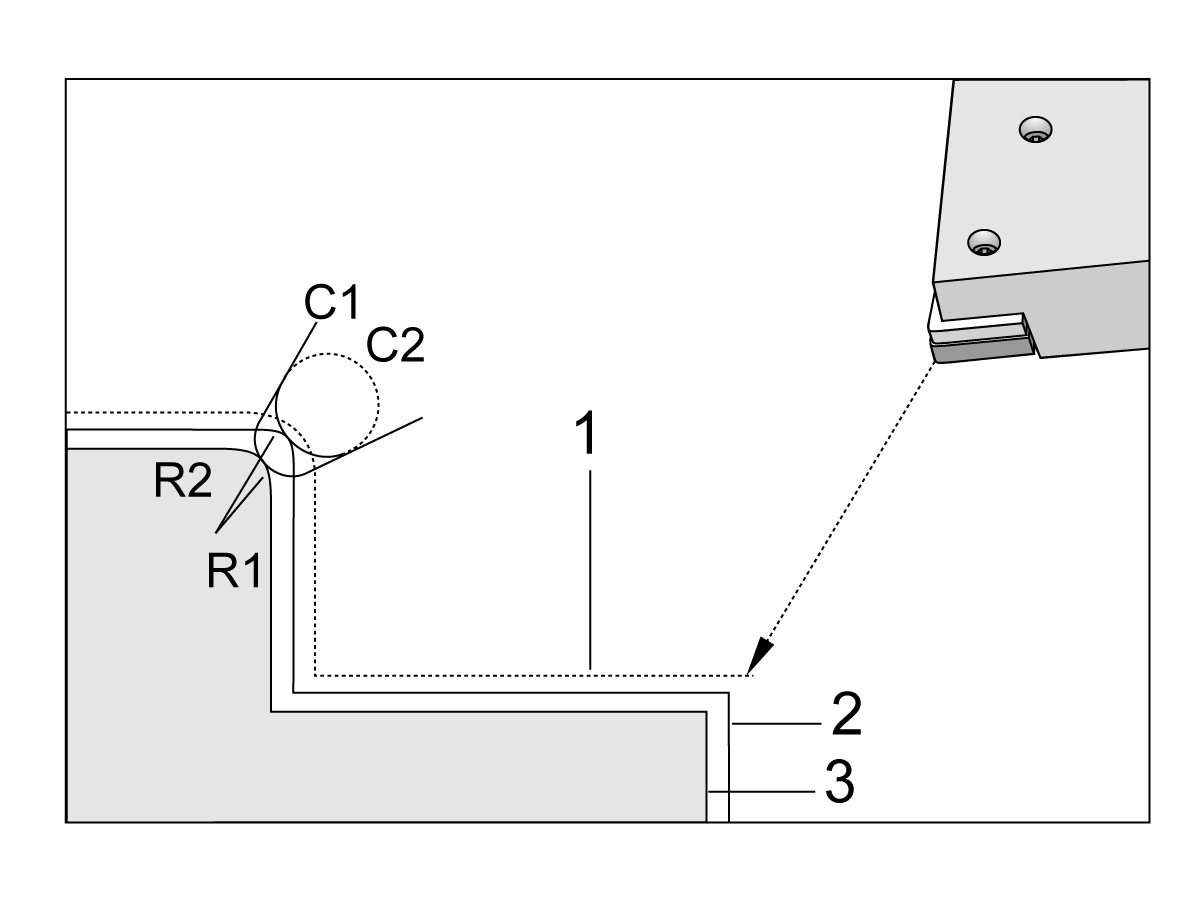
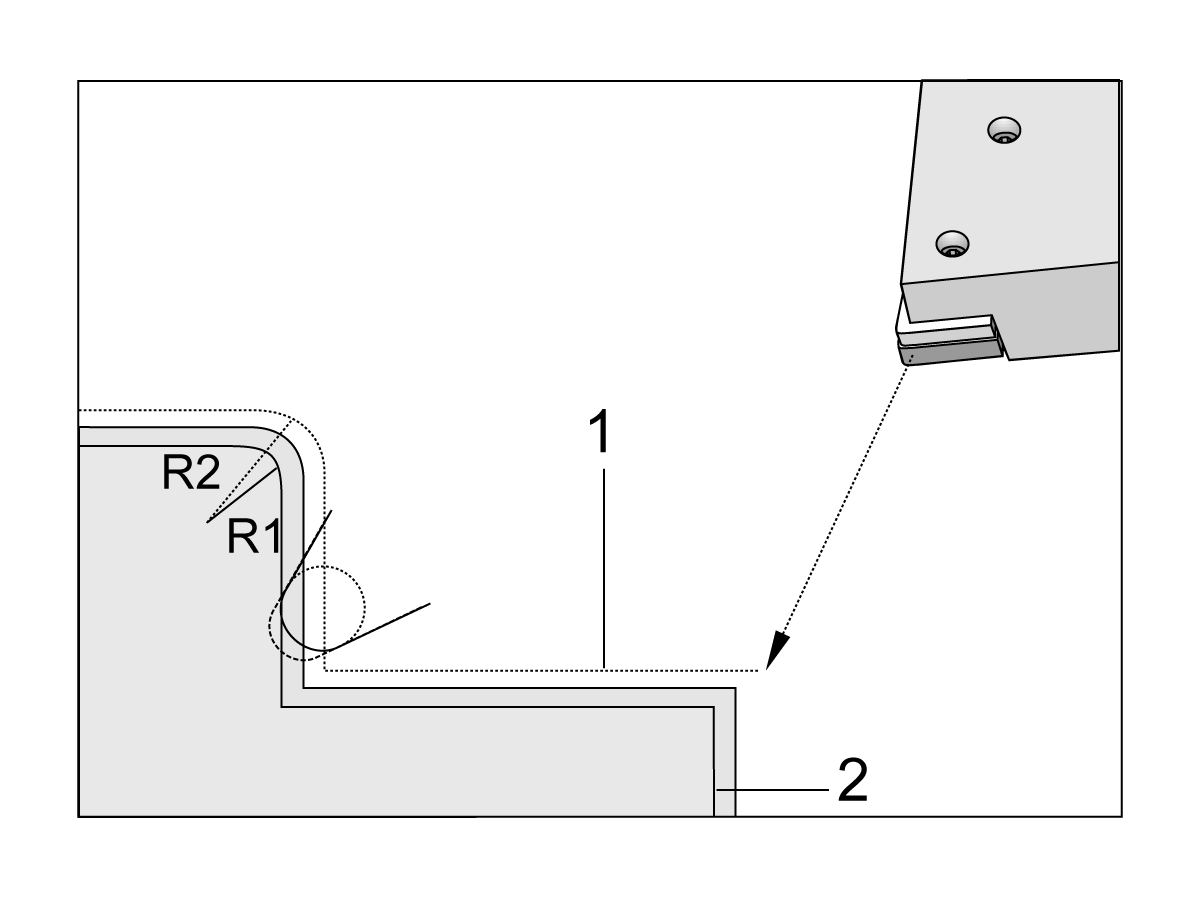
Tool Nose Compensation is used when the tool nose radius changes, and cutter wear is to be accounted for with curved surfaces or tapered cuts. Tool Nose Compensation generally does not need to be used when programmed cuts are solely along the X- or Z-axis. For taper and circular cuts, as the tool nose radius changes, under or overcutting can occur. In the figure, suppose that immediately after setup, C1 is the radius of the cutter that cuts the programmed tool path. As the cutter wears to C2, the operator might adjust the tool geometry offset to bring the part length and diameter to dimension. If this were done, a smaller radius would occur. If tool nose compensation is used, a correct cut is achieved. The control automatically adjusts the programmed path based on the offset for tool nose radius as set up in the control. The control alters or generates code to cut the proper part geometry.

Cutting path without tool nose compensation:

[1] Tool Path

[2] Cut after wear

[3] Desired cut.

Cutting path with tool nose compensation:

[1] Compensated tool path

[2] Desired cut and programmed tool path.

Note: The second programmed path coincides with the final part dimension. Although parts do not have to be programmed using tool nose compensation, it is the preferred method because it makes program problems easier to detect and resolve.

11.5 Subprograms

Subprograms

Subprograms:

  • Are usually a series of commands that are repeated several times in a program.
  • Are written in a separate program, instead of repeating the commands many times in the main program.
  • Are called in the main program with an M97 or M98 and a P code.
  • Can include an L for repeat count. The subprogram call repeats L times before the main program continues with the next block.

When you use M97:

  • The P code (nnnnn) is the same as the block number (Nnnnnn) of the local subprogram.
  • The subprogram must be within the main program

When you use M98:

  • The P code (nnnnn) is the same as the program number (Onnnnn) of the subprogram.
  • If the subprogram is not in memory, the file name must be Onnnnn.nc. The file name must contain the O, leading zeros and .nc for the machine to find the subprogram.
  • The subprogram must reside in the active directory, or in a location specified in Settings 251/252. Refer to page 5 for more information on subprogram search locations.

Canned Cycles are the most common use of subprograms. For example, you might put the X and Y locations of a series of holes in a separate program. Then you can call that program as a subprogram with a canned cycle. Instead of writing the locations once for each tool, you write the locations only once for any number of tools.

Setting Up Search Locations

When program calls a subprogram, the control first looks for the subprogram in the active directory. If the control cannot find the subprogram, the control uses Settings 251 and 252 to determine where to look next. Refer to those settings for more information.

To build a list of search locations in Setting 252:

  1. In the Device Manager (LIST PROGRAM), select the directory that you want to add to the list.
  2. Press F3.
  3. Highlight the SETTING 252 option in the menu, and then press ENTER.

    The control adds the current directory to the list of search locations in Setting 252.

Result: 

To see the list of search locations, look at the values of Setting 252 on the Settings page.

Local Subprogram (M97)

This code calls a subprogram (subprogram) referenced by a line number (N) within the same program. A Pnn code is required and must match a line number within the same program. This is useful for subprograms within a program as it does not require a separate program. The subprogram must end with an M99. An Lnn code in the M97 block will repeat the subprogram call nn times.

%
O69701 (M97 LOCAL SUBPROGRAM CALL) ;
M97 P1000 L2 (L2 will run the N1000 line twice) ;
M30 ;
N1000 G00 G55 X0 Z0 (N line that will run after M97 P1000 is run) ;
S500 M03 ;
G00 Z-.5 ;
G01 X.5 F100. ;
G03 ZI-.5 ;
G01 X0 ;
Z1. F50. ;
G28 U0 ;
G28 W0 ;
M99 ;
%

External Subprogram (M98)

P - The subprogram number to run
L - Repeats the subprogram call (1-99) times.
(<PATH>) - The Subprogram’s directory path

M98 calls a subprogram in the format M98 Pnnnn, where Pnnnn is the number of the program to call, or M98 (/Onnnnn), where is the device path that leads to the subprogram.

The subprogram must contain an M99 to return to the main program. You can add an Lnn count to the M98 block M98 to call the subprogram nn times before continuing to the next block.

When your program calls an M98 subprogram, the control looks for the subprogram in the main program’s directory. If the control cannot find the subprogram, it then looks in the location specified in Setting 251. An alarm occurs if the control cannot find the subprogram.

M98 Example:
The subprogram is a separate program (O00100) from the main program (O00002).

%
O00002 (PROGRAM NUMBER CALL);
M98 P100 L4 (CALLS O00100 SUB 4 TIMES) ;
M30 ;
%
%
O00100 (SUBPROGRAM);
M00 ;
M99 (RETURN TO MAIN PROGRAM) ;
%

%
O00002 (PATH CALL);
M98 (USB0/O00001.nc) L4 (CALLS O00100 SUB 4 TIMES) ;
M30 ;
%
%
O00100 (SUBPROGRAM);
M00 ;
M99 (RETURN TO MAIN PROGRAM) ;
%

Feedback

Recently Viewed Items

You Have No Recently Viewed Items Yet

Feedback
Haas Logo

Haas Delivered Price

This price includes shipping cost, export and import duties, insurance, and any other expenses incurred during shipping to a location in France agreed with you as a buyer. No other mandatory costs can be added to the delivery of a Haas CNC Product.

KEEP UP WITH THE LATEST HAAS TIPS AND TECHNOLOGY...

Sign up now!   

HAAS TOOLING ACCEPTS THE FOLLOWING:

  • Service & Support
  • Owners
  • Request Service
  • Operator Manuals
  • Haas Parts
  • Rotary Repair Request
  • Pre-Install Guides
  • Shopping Tools
  • Build & Price a New Haas
  • Available Inventory
  • The Haas Price List
  • CNCA Financing
  • About Haas
  • Accessibility Statement
  • DNSH Statement
  • Export Compliance
  • Careers
  • Certifications & Safety
  • Contact Us
  • History
  • Terms & Conditions
  • Haas Tooling Terms & Conditions
  • Privacy
  • Warranty
  • Haas Community
  • Haas Certification Program
  • Haas Motorsports
  • Gene Haas Foundation
  • Haas Technical Education Community
  • Events
  • Join the Conversation
  • Facebook
  • X
  • Flickr
  • YouTube
  • LinkedIn
  • Instagram
  • TikTok
© 2026 Haas Automation, Inc – CNC Machine Tools

This site is protected by reCAPTCHA and the Google Privacy Policy and Terms of Service apply.

2800 Sturgis Rd., Oxnard, CA 93030
Toll Free: (888) 817-4446 / Fax: 805-278-8554