My Haas Welcome,
!
Haas Tooling MyHaas/HaasConnect Sign In Register Haas Tooling MyHaas/HaasConnect Sign Out Welcome, My Machines Latest Activity My Quotes My Account My Users Sign Out
Find Your Distributor
  1. Select Language
    1. English
    2. Deutsch
    3. Español - España
    4. Español - México
    5. Français
    6. Italiano
    7. Português
    8. Český
    9. Dansk
    10. Nederlands
    11. Magyar
    12. Polski
    13. Svenska
    14. Türkçe
    15. 中文
    16. Suomi
    17. Norsk
    18. الإنجليزية
    19. български
    20. Hrvatski
    21. Ελληνικά
    22. Română
    23. Slovenský
    24. Slovenščina
    25. 한국어
    26. 日本語
    27. Українська
  • machines Main Menu
    • Vertical Mills
      Vertical Mills
      Vertical Mills View All
      • Vertical Mills
      • VF Series
      • Universal Machines
      • VR Series
      • VP-5 Prismatic
      • Pallet-Changing VMCs
      • Mini Mills
      • Mold Machines
      • High-Speed Drill Centers
      • Drill/Tap/ Mill Series
      • Toolroom Mills
      • Pocket Mill
      • Compact Mills
      • Gantry Series
      • SR Sheet Routers
      • Extra-Large VMC
      • Double-Column Mills
      • 3+2 Positioning Machines
    • Multi-Axis Solutions
      Multi-Axis Solutions
      Multi-Axis Solutions View All
      • Multi-Axis Solutions
      • Y-Axis Lathes
      • 5-Axis Mills
    • Lathes
      Lathes
      Lathes View All
      • Lathes
      • ST Series
      • Dual-Spindle
      • Box Way Series
      • Toolroom Lathes
      • Chucker Lathe
      • Haas Bar Feeders
    • Horizontal Mills
      Horizontal Mills
      Horizontal Mills View All
      • Horizontal Mills
      • 50-Taper
      • 40-Taper
    • Rotaries & Indexers
      Rotaries & Indexers
      Rotaries & Indexers View All
      • Rotaries & Indexers
      • Rotary Tables
      • Indexers
      • 5-Axis Rotaries
      • Extra-Large Rotaries
    • Special Series
      Special Series
      Special Series View All
      • Special Series
      • EU_Series_Redirect
    • Automation Systems
      Automation Systems
      Automation Systems View All
      • Automation Systems
      • Mill Automation
      • Lathe Automation
      • Automatic Parts Loaders
      • Automation Models
    • Desktop Machines
      Desktop Machines
      Desktop Machines View All
      • Desktop Machines
      • Desktop Mill
      • Desktop Lathe
      • Control Simulator, Standard
      • Control Simulator, Premium
    • Shop Equipment
      Shop Equipment
      Shop Equipment View All
      • Shop Equipment
      • Knee Mill
      • Haas Manual Lathes
      • Haas Saws
    • Fabrication Machines
      Fabrication Machines
      Fabrication Machines View All
      • Fabrication Machines
      • Laser Cutting Machines
      • CNC Press Brakes
    • QUICK LINKS Special Series  Special Series 
      EU SERIES EU SERIES BUILD & PRICE | PRICE LIST BUILD & PRICE | PRICE LIST In-Stock Machines In-Stock Machines WHAT’S NEW WHAT’S NEW YOUR FIRST CNC YOUR FIRST CNC
      SHOPPING TOOLS
      • Build & Price a Haas
      • Price List
      • Available Inventory
      • CNCA Financing
      WANT TO TALK TO SOMEONE?

      A Haas Factory Outlet (HFO) can answer your questions, and walk you through your best options.

      CONTACT YOUR DISTRIBUTOR >
  • Options Main Menu
    • The Haas Control Value Option Packages
      Value Option Packages
      Value Option Packages View All
      • Value Option Packages
    • Product Image Spindles
      Spindles
      Spindles View All
      • Spindles
    • Product Image Tool Changers
      Tool Changers
      Tool Changers View All
      • Tool Changers
    • Product Image 4th- | 5th-Axis
      4th- | 5th-Axis
      4th- | 5th-Axis View All
      • 4th- | 5th-Axis
    • Product Image Turrets & Live Tooling
      Turrets & Live Tooling
      Turrets & Live Tooling View All
      • Turrets & Live Tooling
    • Product Image Probing
      Probing
      Probing View All
      • Probing
    • Haas Chip & Coolant Management Chip & Coolant Management
      Chip & Coolant Management
      Chip & Coolant Management View All
      • Chip & Coolant Management
    • The Haas Control The Haas Control
      The Haas Control
      The Haas Control View All
      • The Haas Control
    • Product Image Product Options
      Product Options
      Product Options View All
      • Product Options
    • Product Image Tooling & Fixturing
      Tooling & Fixturing
      Tooling & Fixturing View All
      • Tooling & Fixturing
    • Product Image Workholding
      Workholding
      Workholding View All
      • Workholding
    • Product Image 5-Axis Solutions
      5-Axis Solutions
      5-Axis Solutions View All
      • 5-Axis Solutions
      • 5 Easy Steps to 5-Axis
    • QUICK LINKS Special Series  Special Series 
      EU SERIES EU SERIES BUILD & PRICE | PRICE LIST BUILD & PRICE | PRICE LIST In-Stock Machines In-Stock Machines WHAT’S NEW WHAT’S NEW YOUR FIRST CNC YOUR FIRST CNC
      SHOPPING TOOLS
      • Build & Price a Haas
      • Price List
      • Available Inventory
      • CNCA Financing
      WANT TO TALK TO SOMEONE?

      A Haas Factory Outlet (HFO) can answer your questions, and walk you through your best options.

      CONTACT YOUR DISTRIBUTOR >
  • Why Haas Main Menu
      Discover the Haas Difference
    • Why Haas
    • MyHaas
    • Education Community
    • Industry 4.0
    • Haas Certification
    • Customer Testimonials
  • Service Main Menu
      Welcome to Haas Service
      SERVICE HOME Operator’s Manuals How-To Procedures Troubleshooting Guides Preventive Maintenance Haas Parts Haas Tooling Videos
  • Videos Main Menu
  • Main Menu
    • View All
    • View All
    • View All
    • View All
      • HTEC Curriculum Support
      • Haas Value Option Packages (VOP) Journey
    • View All
      • Haas 10 kg Cobot Package
      • Cobot Kits
      • DC-1 Drill Center
      • CNC Sales News
      • Do More With Your Haas
    • View All
    • View All
      • contact-us-test
      • 4 - AUTOMATION SYSTEMS
      • Carousel-V2
      • expert test
      • Demo_Day_Trident-test
      • Link Test
      • image-sale-tag-test
      • article-list-test
      • Haas 25 kg Robot Package
      • test-algolia-page
    • View All
    • View All
    • View All
    • View All
      • calc-test
    • View All
    • QUICK LINKS Special Series  Special Series 
      EU SERIES EU SERIES BUILD & PRICE | PRICE LIST BUILD & PRICE | PRICE LIST In-Stock Machines In-Stock Machines WHAT’S NEW WHAT’S NEW YOUR FIRST CNC YOUR FIRST CNC
      SHOPPING TOOLS
      • Build & Price a Haas
      • Price List
      • Available Inventory
      • CNCA Financing
      WANT TO TALK TO SOMEONE?

      A Haas Factory Outlet (HFO) can answer your questions, and walk you through your best options.

      CONTACT YOUR DISTRIBUTOR >
  • Haas Tooling Main Menu
  • Haas Service Parts Main Menu

My Haas Welcome,
!
Haas Tooling MyHaas/HaasConnect Sign In Register Haas Tooling MyHaas/HaasConnect Sign Out Welcome, My Machines Latest Activity My Quotes My Account My Users Sign Out
Find Your Distributor
  1. Select Language
    1. English
    2. Deutsch
    3. Español - España
    4. Español - México
    5. Français
    6. Italiano
    7. Português
    8. Český
    9. Dansk
    10. Nederlands
    11. Magyar
    12. Polski
    13. Svenska
    14. Türkçe
    15. 中文
    16. Suomi
    17. Norsk
    18. الإنجليزية
    19. български
    20. Hrvatski
    21. Ελληνικά
    22. Română
    23. Slovenský
    24. Slovenščina
    25. 한국어
    26. 日本語
    27. Українська
×

Search Results

Web Pages

Images

    • <
    • 1
    • >

3 - Lathe - Installation

Lathe - Interactive Service Manual


  • 1 - Lathe - Introduction
  • 2 - Lathe - Specifications
  • 3 - Lathe - Installation
  • 4 - Lathe - Spindle
  • 5 - Lathe - C-Axis
  • 6 - Lathe - Turret Indexer Assembly
  • 7 - Lathe - Live Tooling
  • 8 - Lathe - Hydraulic Power Unit (HPU)
  • 9 - Lathe - Tailstock
  • 10 - Lathe - Sub-Spindle
  • 11 - Lathe - Probing
  • 12 - Lathe - Parts Catcher
  • 13 - Lathe - Axis Motion
  • 14 - Lathe - Lubrication Systems
  • 15 - Lathe - Electrical Control
  • 16 - Lathe - Chip Removal and Coolant
  • 17 - Lathe - Workholding
  • 18 - Lathe - Auto Door
  • 19 - Lathe - Enclosure
  • 20 - Lathe - Maintenance
  • 21 - Lathe - Applications
  • 22 - Lathe - Automatic Parts Loader (APL)
  • 23 - Lathe - Haas Bar Feeder
  • 24 - Lathe - Haas Robot Package
  • 25 - Lathe - CAN Bus Systems

Go To :

  • 3.1 Lathe - Installation
  • 3.2 Anchoring

3.1 Lathe - Installation

Recently Updated

ST Lathe - Installation - NGC


Revision E - 06/2026

Introduction

This procedure shows you how to install an ST Lathe.

Tools required:

  • Precision Machinist Level, 0.0005" Division
  • T-2181A CNC Dual Leveling Tool 

To identify if you have a reboot machine, refer to: ST-Series Machine Version - Identification

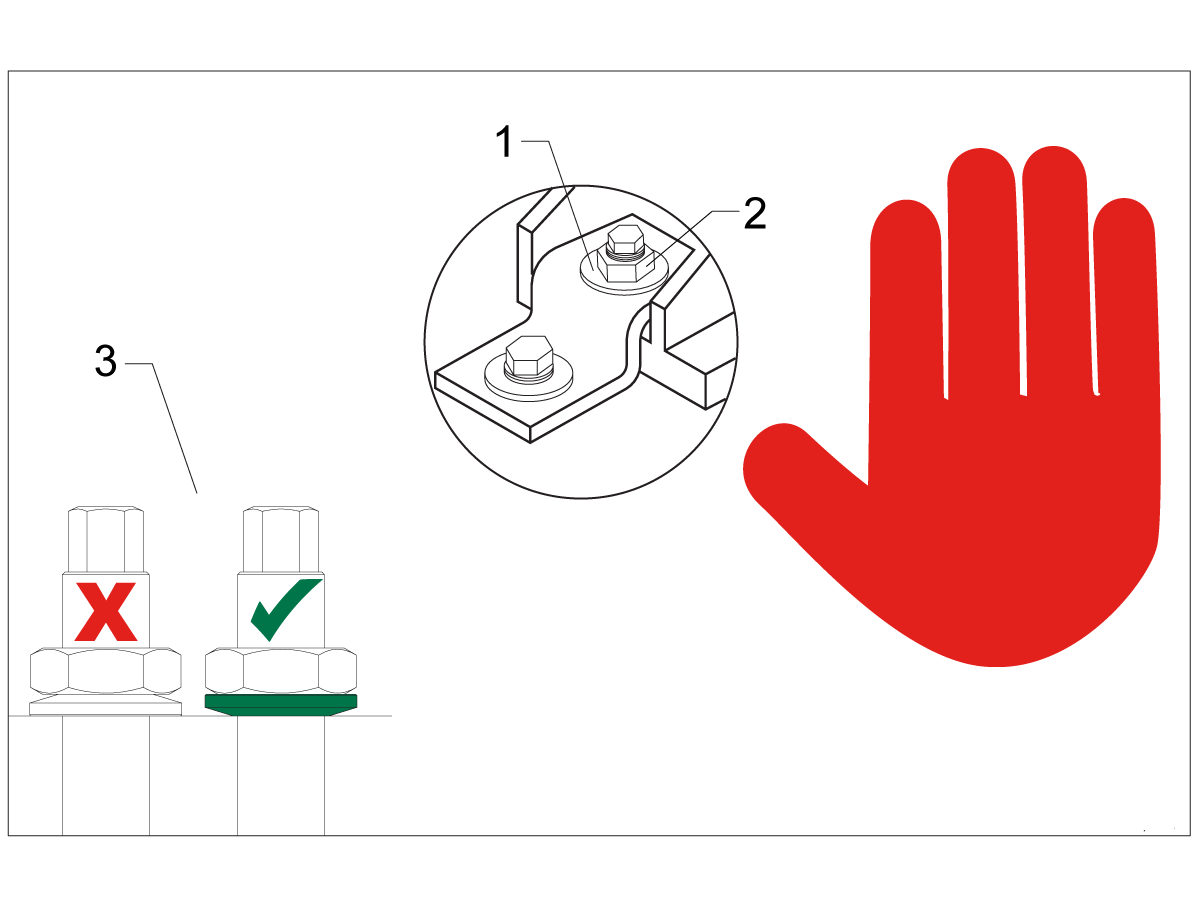
Leveling Screws Hardware

Note: The washers [1] and nuts [2] are installed during shipping and should be saved for installation and not be discarded.

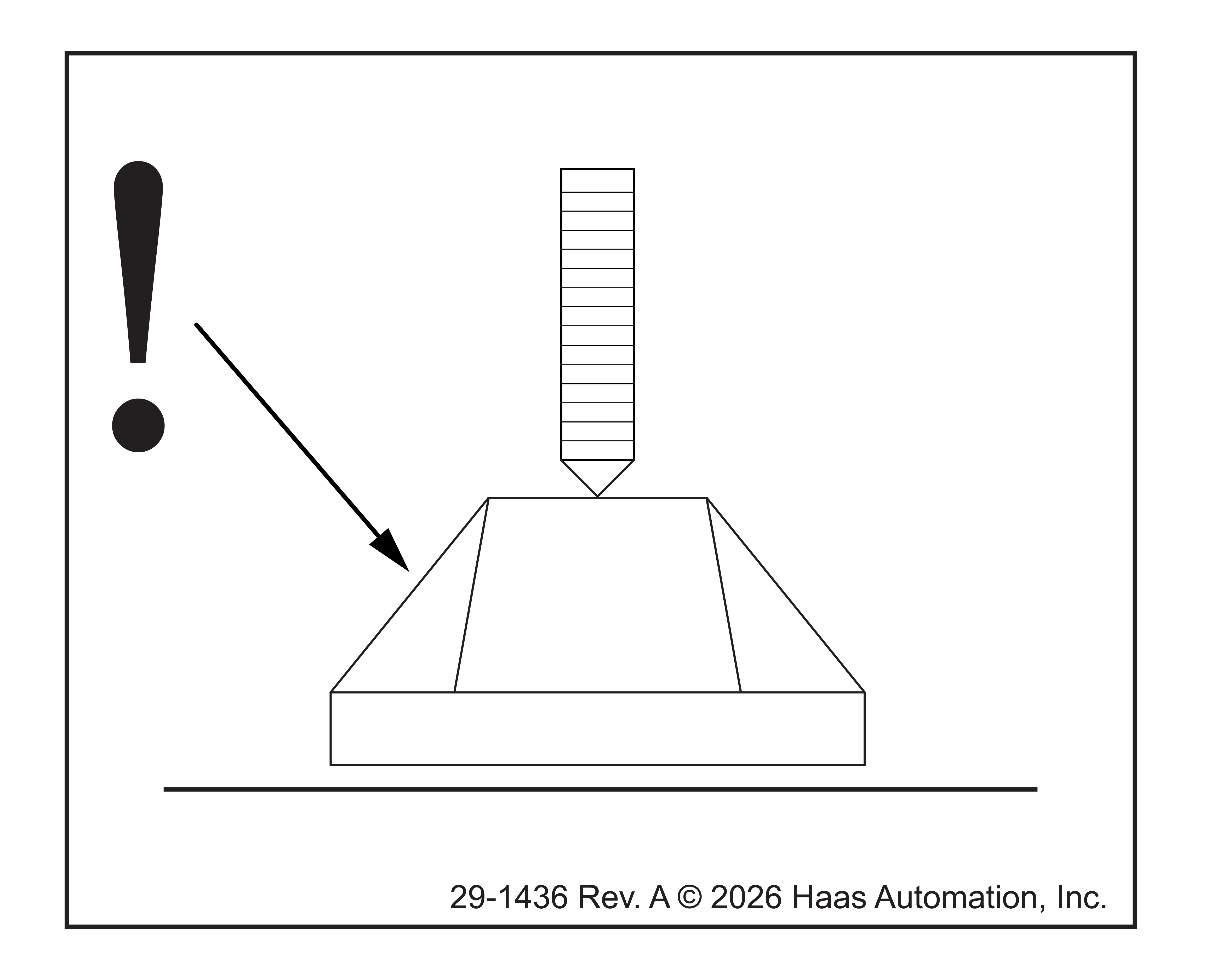
Note: The washer orientation [3] is important.  The conical part of the washer should be against the casting,  see illustration.

Remove Rust Inhibitor

To safely and effectively remove rust inhibitor from way covers and other non-painted surfaces:

Initial Scraping

  • Use a plastic scraper to remove the bulk of the rust inhibitor.
  • Avoid using metal tools to prevent scratching or damaging the surface.

 Important: Do not use scotch-brite or metal scrapers, these will scratch the way covers.

Chemical Cleaning

  • Spray the affected areas with a heavy-duty citrus cleaner or Simple Green.
  • Ensure full coverage of all non-painted surfaces coated with rust inhibitor.

Soak Time

  • Allow the cleaner to soak for several minutes to loosen remaining residue.

Wipe Down

  • Use a clean shop towel to thoroughly wipe off the softened rust inhibitor.

Rust Proofing

  • Apply mineral spirits or WD-40 to all exposed metal surfaces to prevent future rust formation.

Important: Always wear gloves and eye protection when handling chemical cleaners. Dispose of used towels and cleaning agents according to local environmental regulations.

 Important: To avoid any contamination of the way cover seals with the sticky residue. Do not move any of the axes until all the rust inhibitor has been removed.

Rust Inhibitor - Safety Data Sheet (SDS)

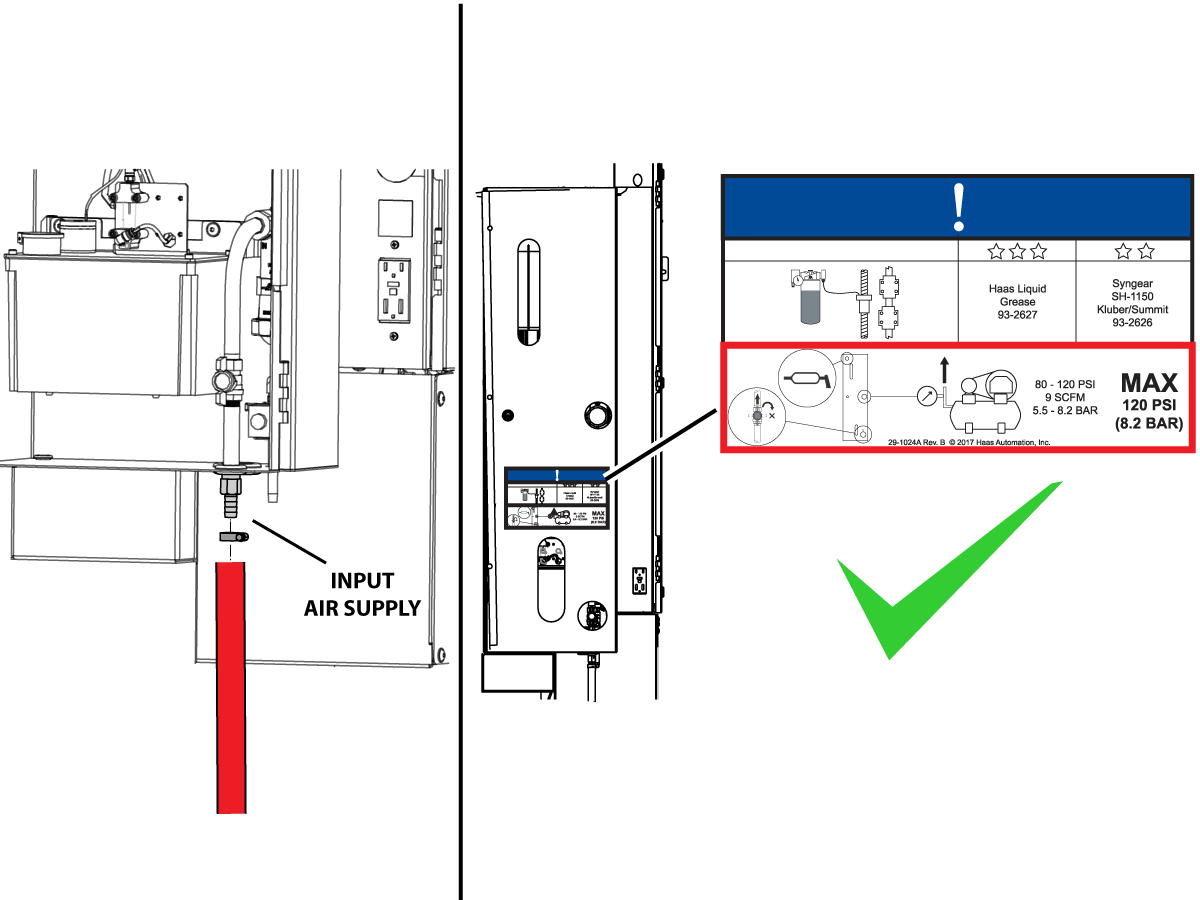
Air Connection

Connect the air supply at the lube panel.

 Note: For air requirements refer to the decal that is located on the lube cabinet door.

Follow the Air Gun and Hose Installation procedure to install or replace the Air Gun.

 Note: Some installation kits will come with a spare air gun assembly.

Electrical Installation

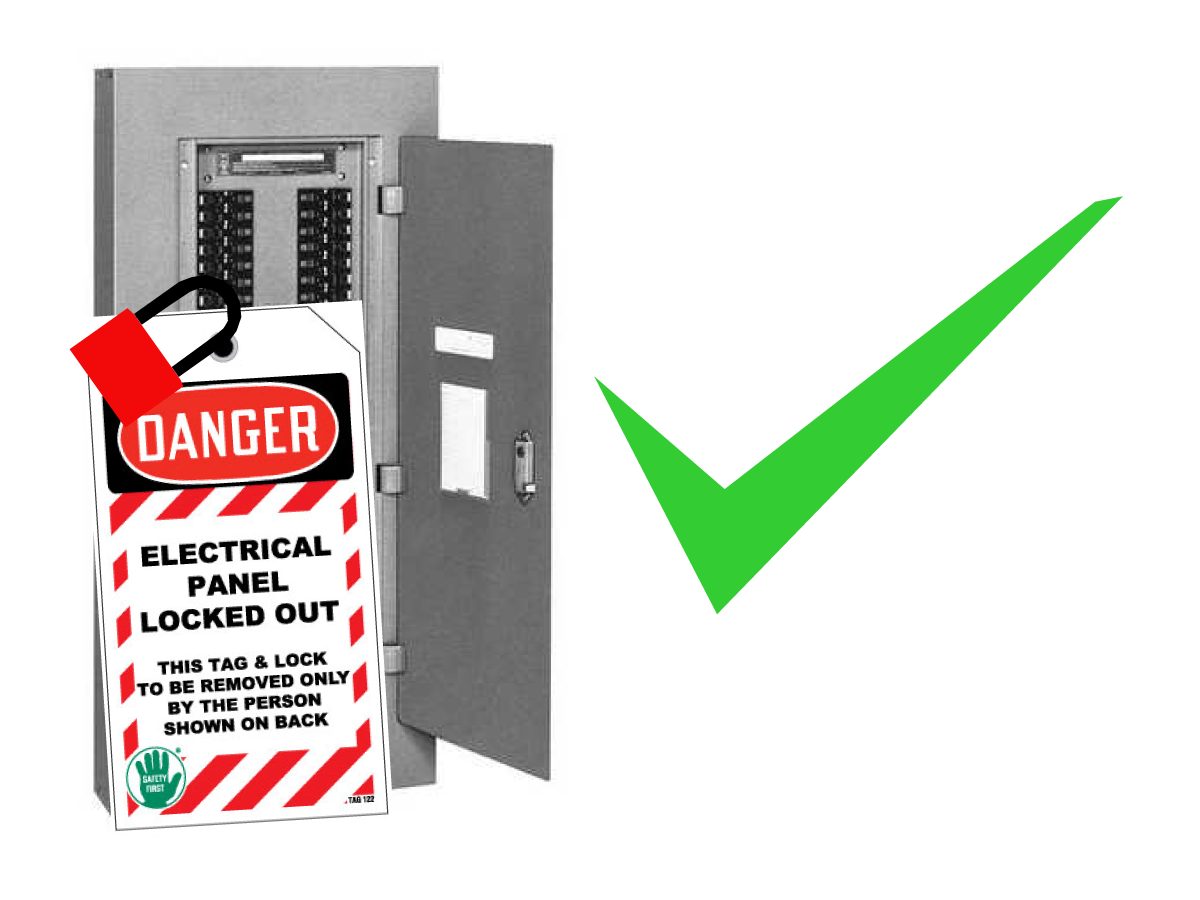
 DANGER: Working with the electrical services required for CNC machines is extremely hazardous and can result in serious injury or death.

Before connecting line wires to the CNC:

  • Turn off all power to the machine at the source.
  • Perform a Lockout-Tagout (LOTO) procedure to ensure the power remains off during service.
  • Verify that power has been disconnected by using an AC voltage detector on all incoming lines.

If you are uncertain about how to safely disconnect power or perform LOTO procedures:

  • Do not proceed.
  • Contact qualified personnel or obtain appropriate assistance before continuing.

Failure to follow these precautions may result in electrical shock, equipment damage, or fatal injury.

1

Initial Control Inspection

Danger: At this point, there should be no electrical connection to the machine. Electrical panel must be closed and secured. When main switch is on, there is HIGH VOLTAGE throughout the electrical panel (including the circuit boards and logic circuits) and some components operate at high temperatures. Therefore, exercise extreme caution when working in the panel.

  • Set the main breaker switch at the upper right of the electrical panel on the back of the machine to OFF.
  • Using a screwdriver, unlock the two latches on the panel door, unlock the cabinet with the key and open the door.
  • Take sufficient time to check all the components and connectors associated with the circuit boards. Look for any cables that have become disconnected, look for any signs damage and loose parts in the bottom of the panel box. If there are any signs that the machine was mishandled, call the factory before proceeding.

2

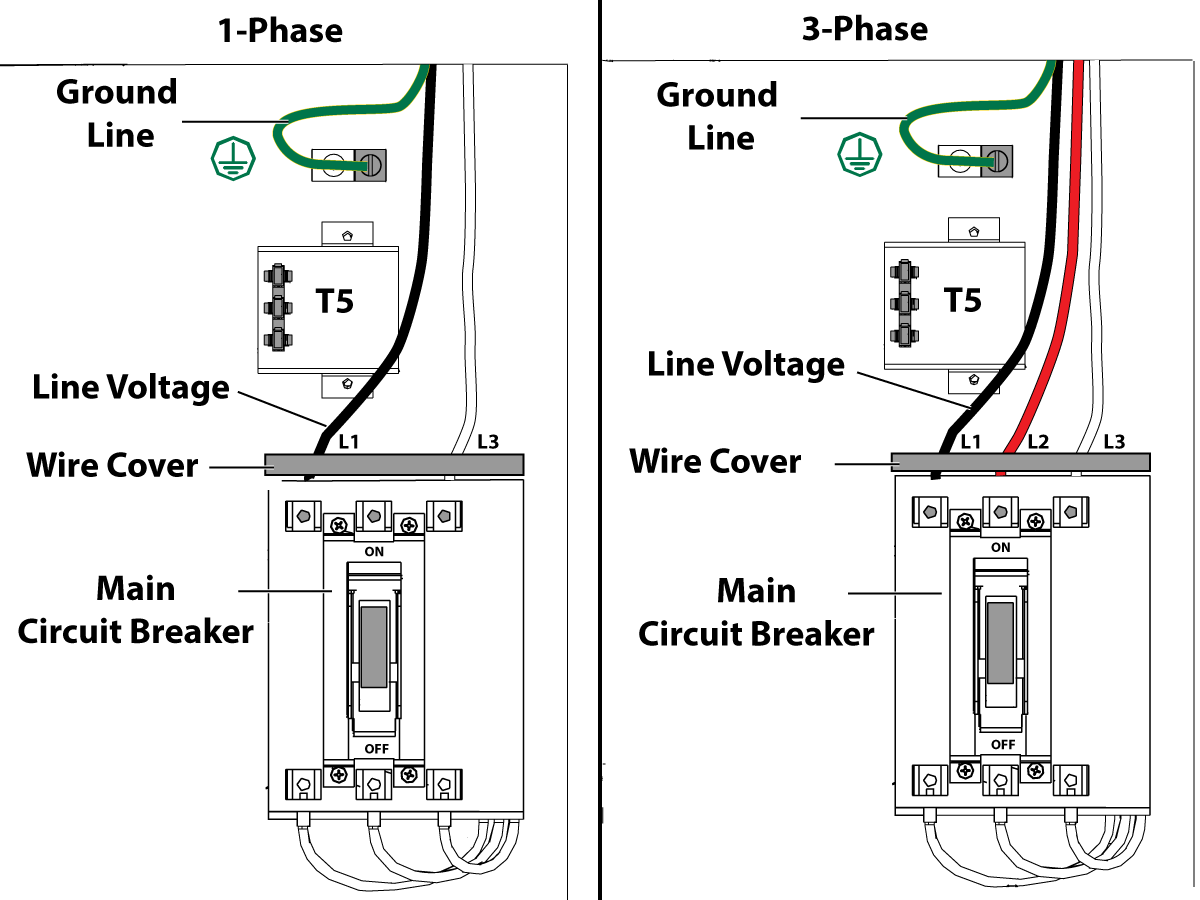
1-Phase Machines: Insert each power lead into the wire cover.  Connect the two power leads to L1 and L3 terminals on top of the main circuit breaker.

3-Phase Machines: Insert each power lead into the wire cover.  Connect the three power leads to L1, L2 and L3 terminals on top of the main circuit breaker.

Connect the separate ground line to the ground bus to the left of the terminals.

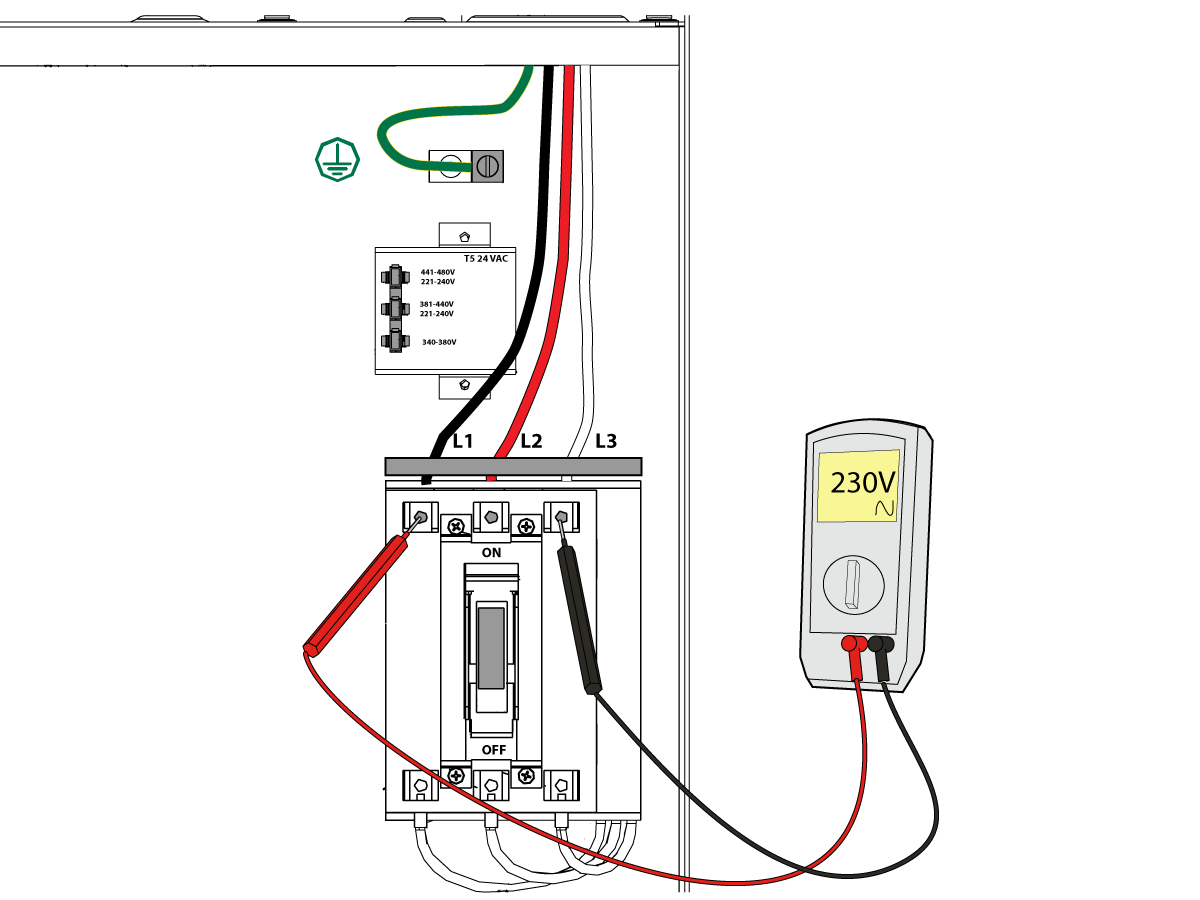
For 3-phase machines, check to see what type of power configuration is supplying the machine. Take voltage measurements of each power lead to ground line. Then refer to RD0084 - Input Power Configurations to determine which power lead should be connected to the L1 terminal based of the voltage readings and power configuration.

Refer to Haas Main Circuit Breaker - Torque Specifications for what value to torque the circuit breaker power leads.

 Note: Make sure that the leads actually go into the terminal-block clamps . (A poor connection will cause the machine to run intermittently or have other problems, such as servo overloads.) To check, simply pull on the wires after the screws are tightened.

3

After the line voltage is connected to the machine, make sure that main circuit breaker (at top-right of rear cabinet) is OFF . Remove the Lockout / Tagout and Turn ON the power at the source. Using a digital voltmeter and appropriate safety procedures: 

1-Phase Machines: Measure the AC voltage across L1 & L3 at the main circuit breaker.  The AC voltage must be between 220 - 250 volts .
Note: Lower or higher than this voltage can generate low/high voltage alarms.

3-Phase Machines : Measure the AC voltage between all three pair phases at the main circuit breaker. 

The AC voltage must be between 195 and 260 volts (360 and 480 volts for high voltage option).

SMinimill - Reboot: The AC voltage must be between 198 and 242 volts for machines without a high voltage transformer.  Refer to the Minimill/SMinimill - Identification document.

 Note: Wide voltage fluctuations are common in many industrial areas; minimum and maximum voltage supplied to a machine while it is in operation must be known. U.S. National Electrical Code specifies that machines should operate with a variation of +5% to -5% around an average supply voltage. If problems with line voltage occur, or low line voltage is suspected, an external transformer may be used. If you suspect voltage problems, voltage should be checked every hour or two during a typical day to be sure it does not fluctuate more than +5% or -5% from an average.

4

Important: With the main circuit breaker turned OFF.

Check the transformer taps at the bottom-right corner of the rear cabinet.

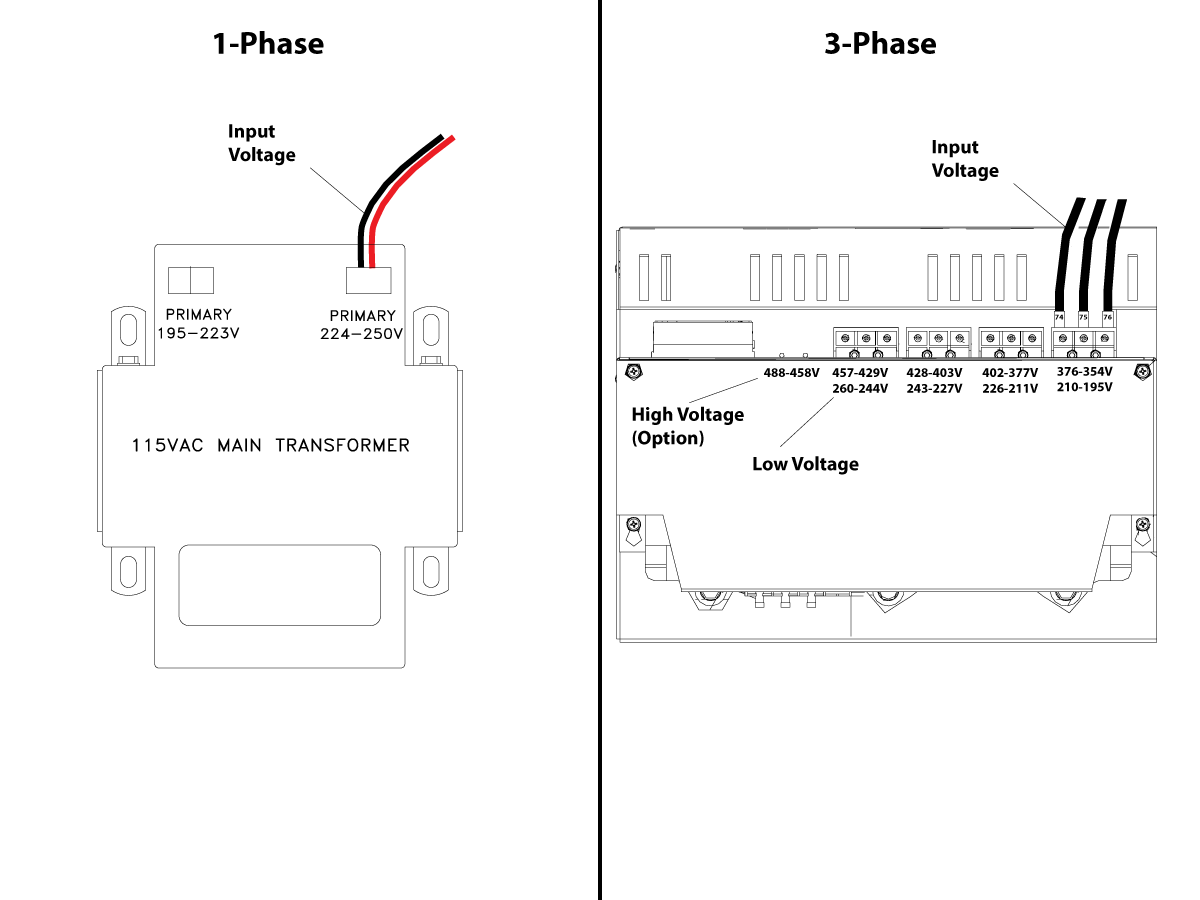
1-Phase Machines: The input voltage cable must be moved to the connector which corresponds to the average voltage measured in the above step.

3-Phase Machines:  The input voltage cables labeled 74, 75, and 76 must be moved to the terminal block triple which corresponds to the average voltage measured in the above step.

5

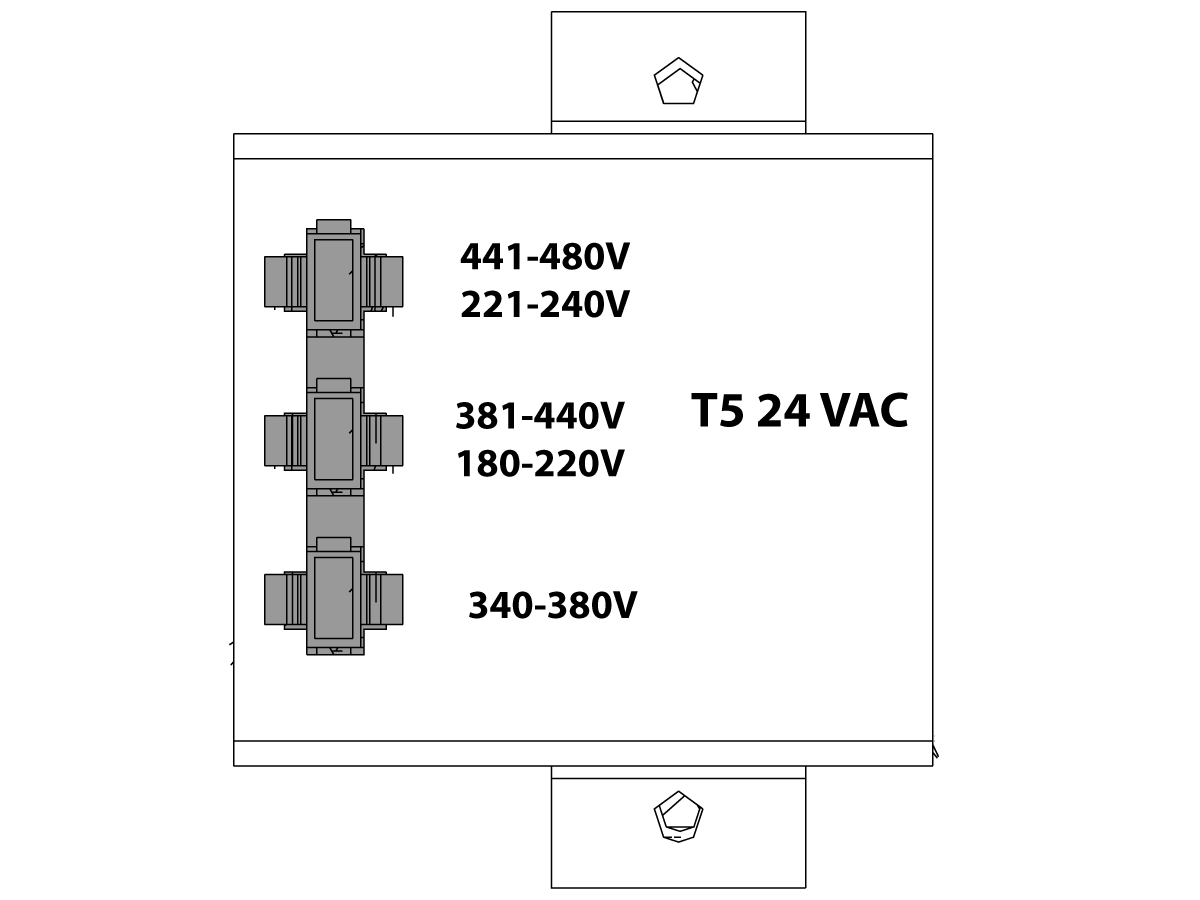
Transformer T5 supplies 24VAC used to power the main contactor. There are two versions of this transformer for use on a 240 and 400V machines. The 240V transformer has two input connectors located about two inches from the transformer, which allow it to be connected to either 180-220V or 221-240V.

Users that have 220V-240V RMS input power should use the connector labeled 221-240V, while users with 190-220V input power should use the connector labeled 180-220V. Failure to use the correct input connector will result in either overheating of the main contactor or failure to reliably engage the main contactor.

The 480V (option) T5 transformer has three input connectors, labeled 340-380V, 381-440V and 441-480V.

Users with 340-380V 50/60Hz power should use the 340-380V connector while users with 380V-440V 50/60Hz power should use the 381-440V connector.

Important: Set the main circuit breaker to ON. Check for evidence of problems, such as the smell of overheating components or smoke. If such problems are indicated, immediately set the main circuit breaker to OFF and call the factory before proceeding.

After the power is on, measure the voltage across the bottom terminals on the main circuit breaker. It should be the same as the measurements where the input power connects to the main breaker. If there are any problems, check the wiring.

6

Apply power to the control by pressing the Power-On switch on the front panel.

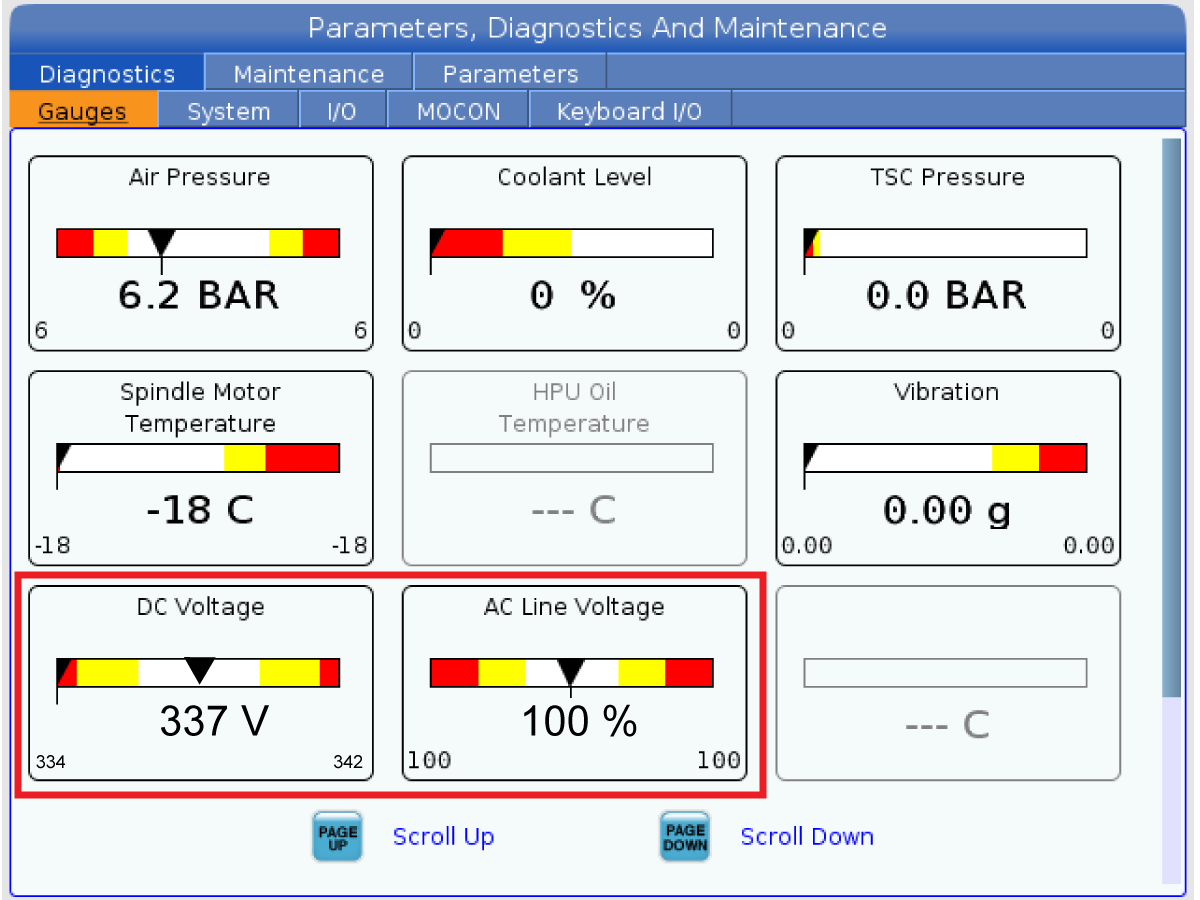
Check the DC Voltage and AC Line Voltage gauges in Diagnostics. The DC Voltage gauge must read between 310 - 360V. The AC Line Voltage must be between 90 and 105 percent. If the voltage is outside these limits, turn off the power and recheck steps 2 and 3. If the voltage is still outside these limits, call the factory.

7

Electrical power must be phased properly to avoid damage to your equipment. The Power Supply Assembly PC board incorporates a "Phase Detect" circuit with neon indicators. When the orange neon is lit (NE5), the phasing is incorrect. If the green neon is lit (NE6), the phasing is correct. If both neon indicators are lit, you have a loose wire; check the connections. Adjust phasing by setting the source power to off and then swapping L1 and L2 of the incoming power lines at the main circuit breaker.

Danger: ALL POWER TO CNC MUST BE TURNED OFF LOCKOUT-TAGOUT AT THE SOURCE PRIOR TO ADJUSTING PHASING. ALWAYS DOUBLE CHECK THE INCOMING LINES WITH AN AC VOLTAGE DETECTOR.

Turn off the power and set the main circuit breaker to OFF. Close the door, lock the latches, and turn the power back on.

Remove the key from the control cabinet and give it to the shop manager.

8

Activation

When the machine is properly placed and connected to both air and electrical power, it is ready for final installation (removing shipping blocks, leveling, spindle sweep, etc.) and software activation. The HFO service technician does this. Contact the local HFO to schedule the work.

IMPORTANT:  Machines equipped with motion sensors must be rough‑leveled before attempting to arm the motion sensor.  For detailed instructions, refer to Service Notification - SA0007.  Access to this document is restricted to Haas Factory Outlet personnel.

Shipping Brackets Removal

Updated

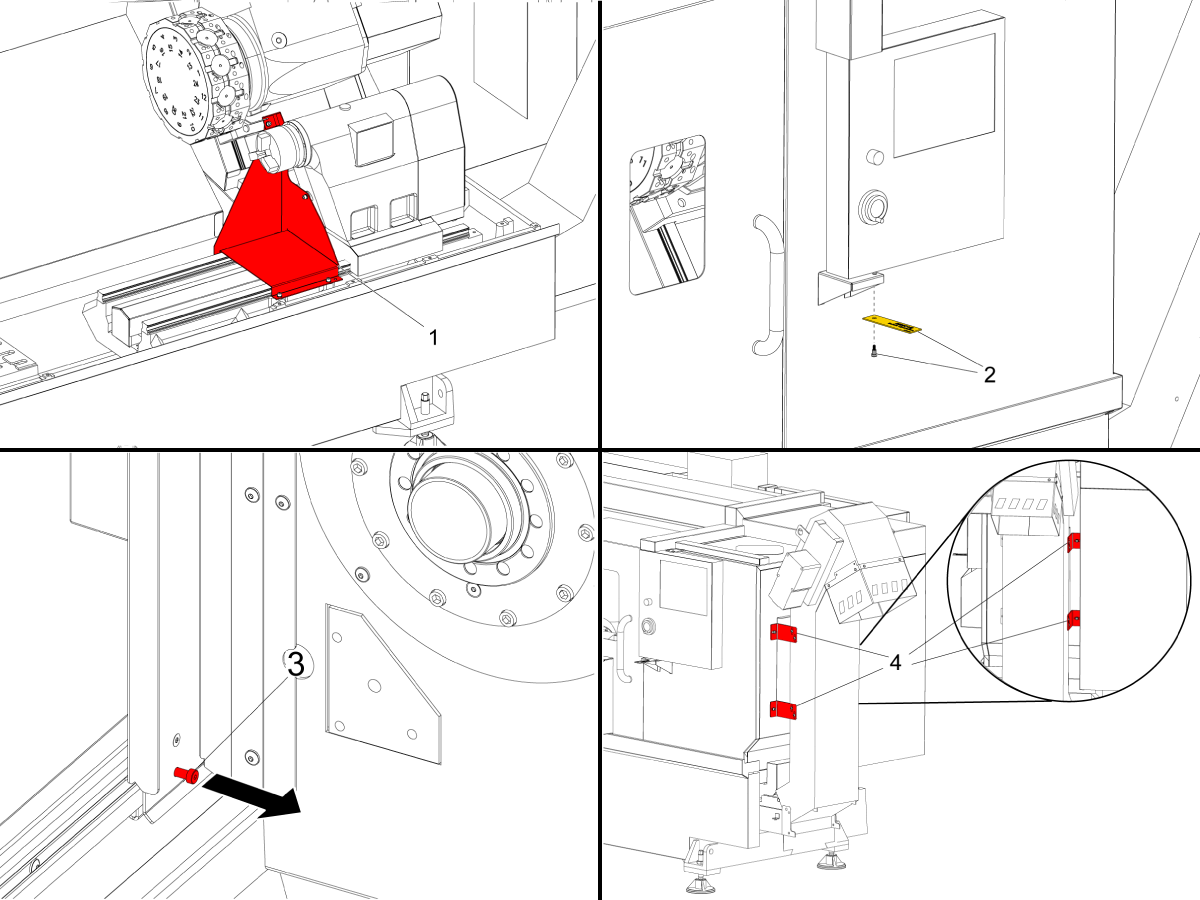
For ST-10-35 Series Machines and DS-30Y Lathes

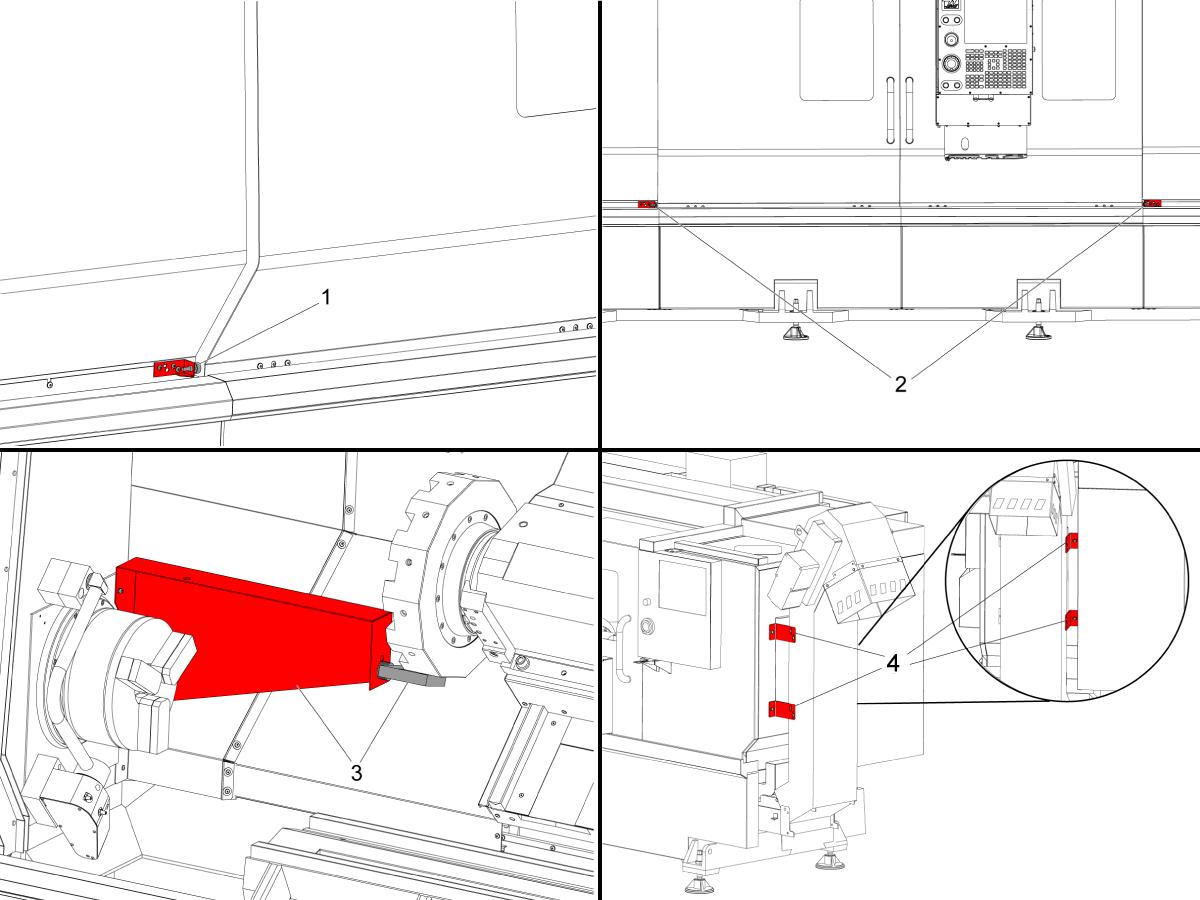
Remove the turret to casting shipping bracket [1].

Remove the control panel shipping shoulder bolt [2]. Machines with pendant cabinet will have the shipping bracket to the right side of the control. 

Remove the door shipping shoulder bolt [3].

Remove the chip conveyor shipping brackets [4]. Plug the threaded sheet metal holes with the shipping bracket screws.

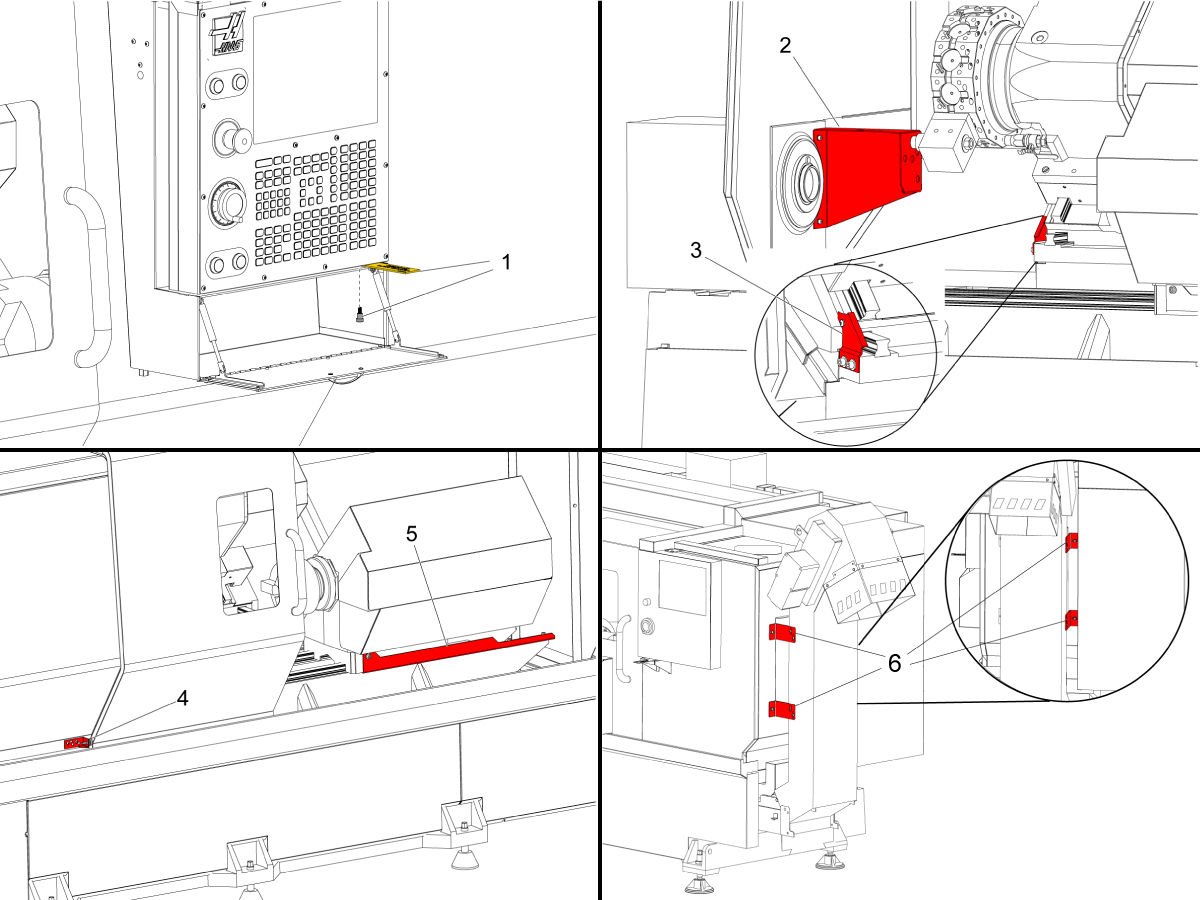
For Pre-reboot ST-30/35/DS-30Y Lathes

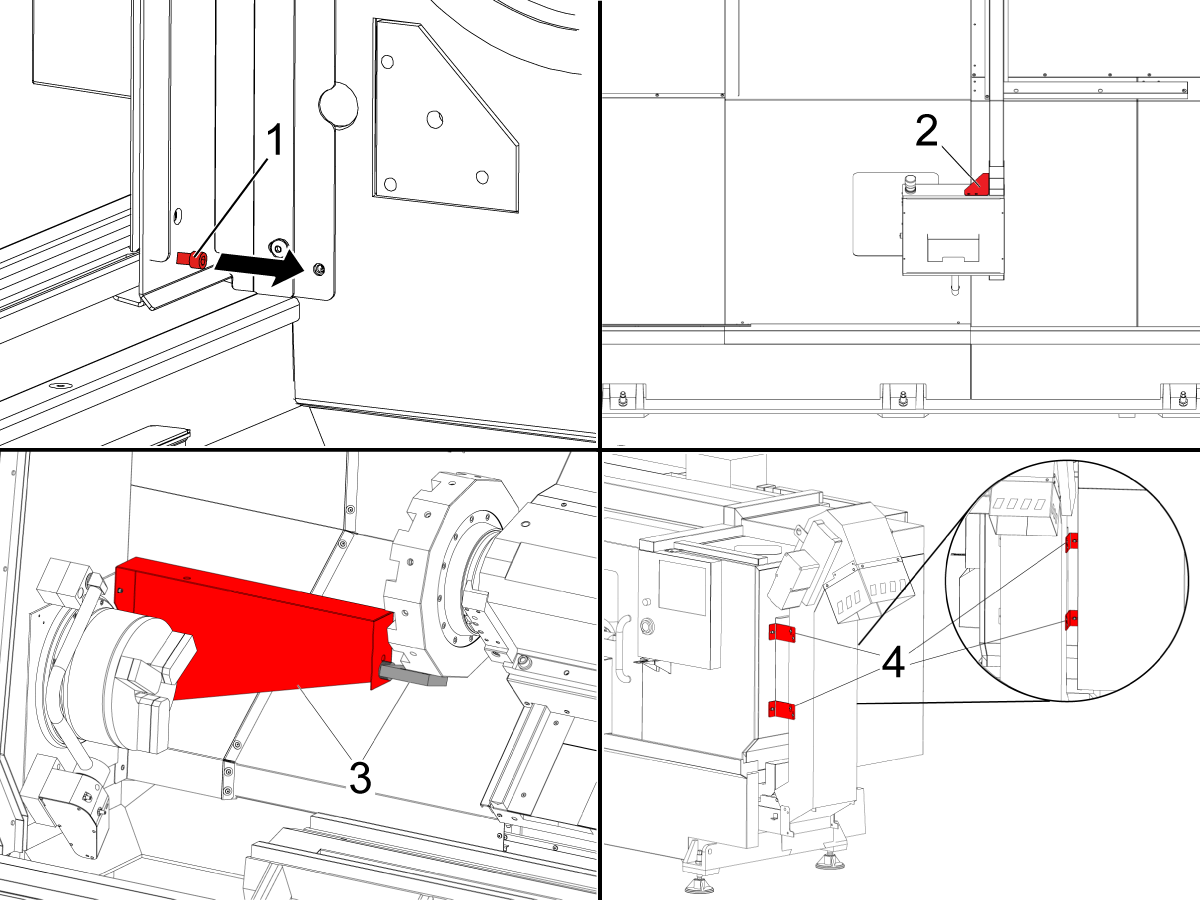
Remove the control panel shipping shoulder bolt [1]. 

Remove the turret to spindle shipping bracket [2].

Remove the Y-axis shipping bracket [3].

Remove the door shipping bracket [4].

Remove the second spindle shipping bracket [5]. See DS Shipping Bracket Removal AD0065.

Remove the chip conveyor shipping brackets [6].

For Pre-reboot ST-40/40L/45/45L/50/55 Lathes

Remove the door shipping brackets. For ST-40/45 there is one bracket. For ST-40L/45L/50/55 there are two brackets [1,2].

Remove the turret to spindle shipping bracket [3].

Remove the chip conveyor shipping brackets [4].

Install the pendant to the machine.

For a guide on how to install the pendant please see:

ST-40/45/50/55 - Pendant - Installation

For ST-40-55 Series Reboot Machines and DS-40Y Machines:

Remove the door shipping shoulder bolt [1].

Remove the control pendant shipping bracket [2].

Remove the turret to spindle shipping bracket [3].

Remove the chip conveyor shipping brackets [4].

NOTE: To identify ST- Lathes pre-reboot from reboot machines, see the ST-Series Machine Version - Identification.

Updated

For DS-40Y Machines:

Remove the Secondary Spindle shipping bracket[1].

ST-10/10Y/15/15Y Leveling

1

Zero return each axis one at a time or press [POWER UP]. Go through the leveling process.
Repeat these steps to achieve correct machine level.

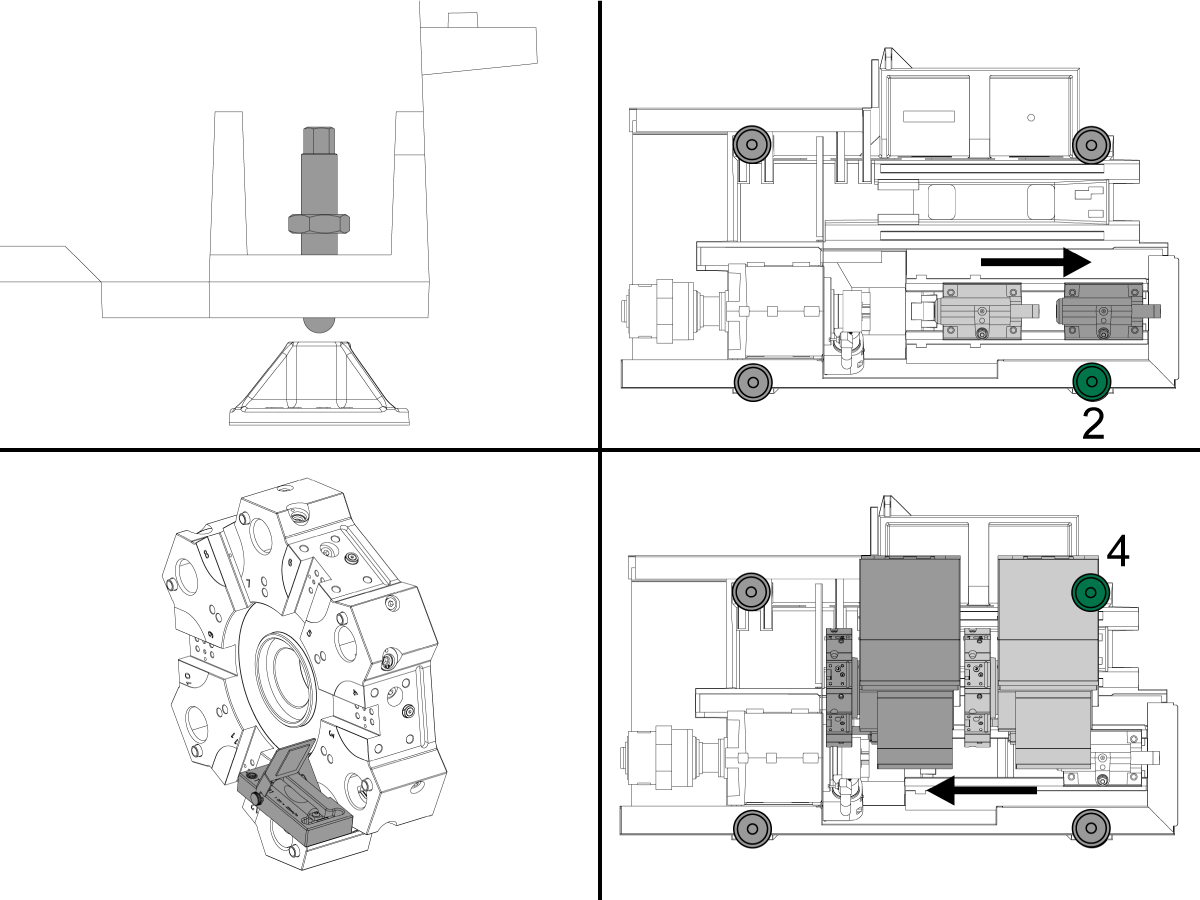
2

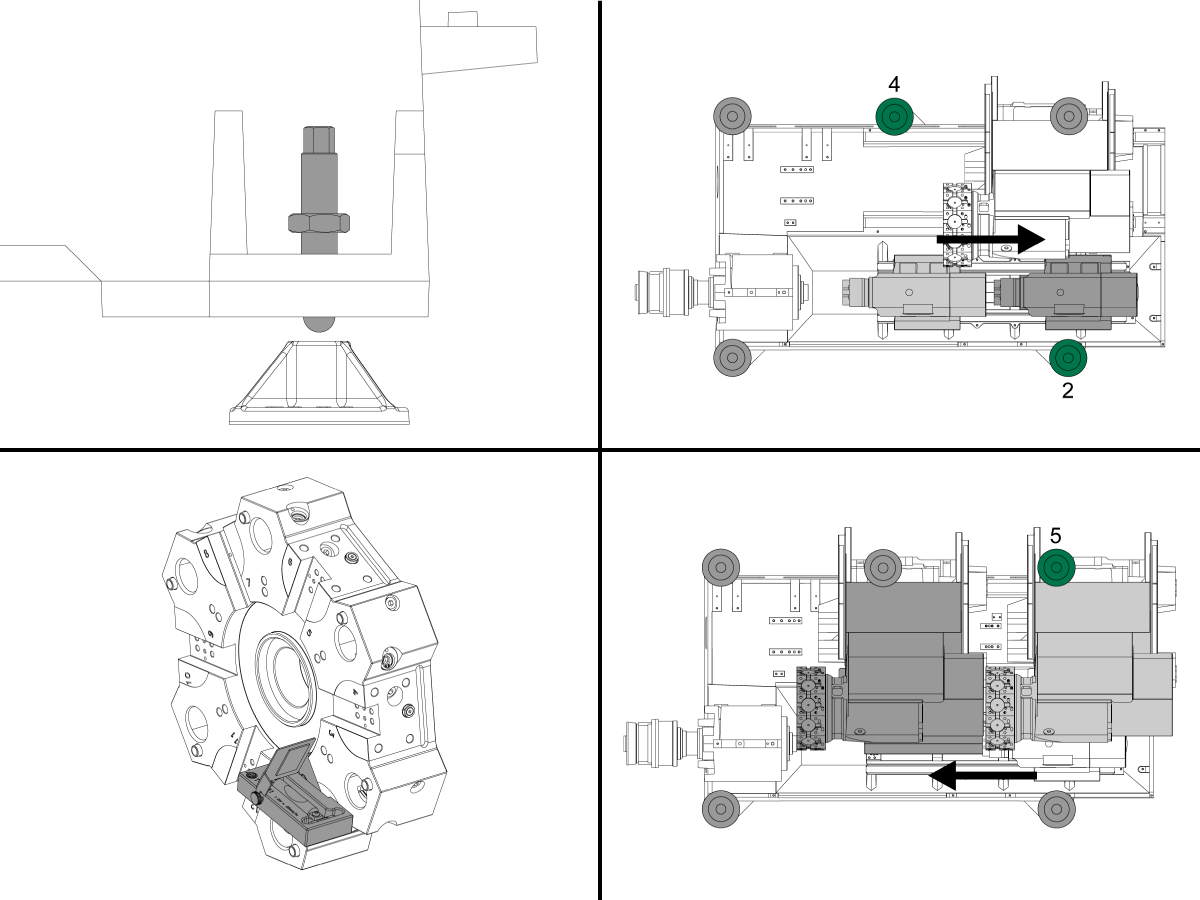
Set the machine height using the four corner leveling screws to 3.0" above the floor. Turn each screw so they have equal tension.

Raise screw 2 so it is off the pad.

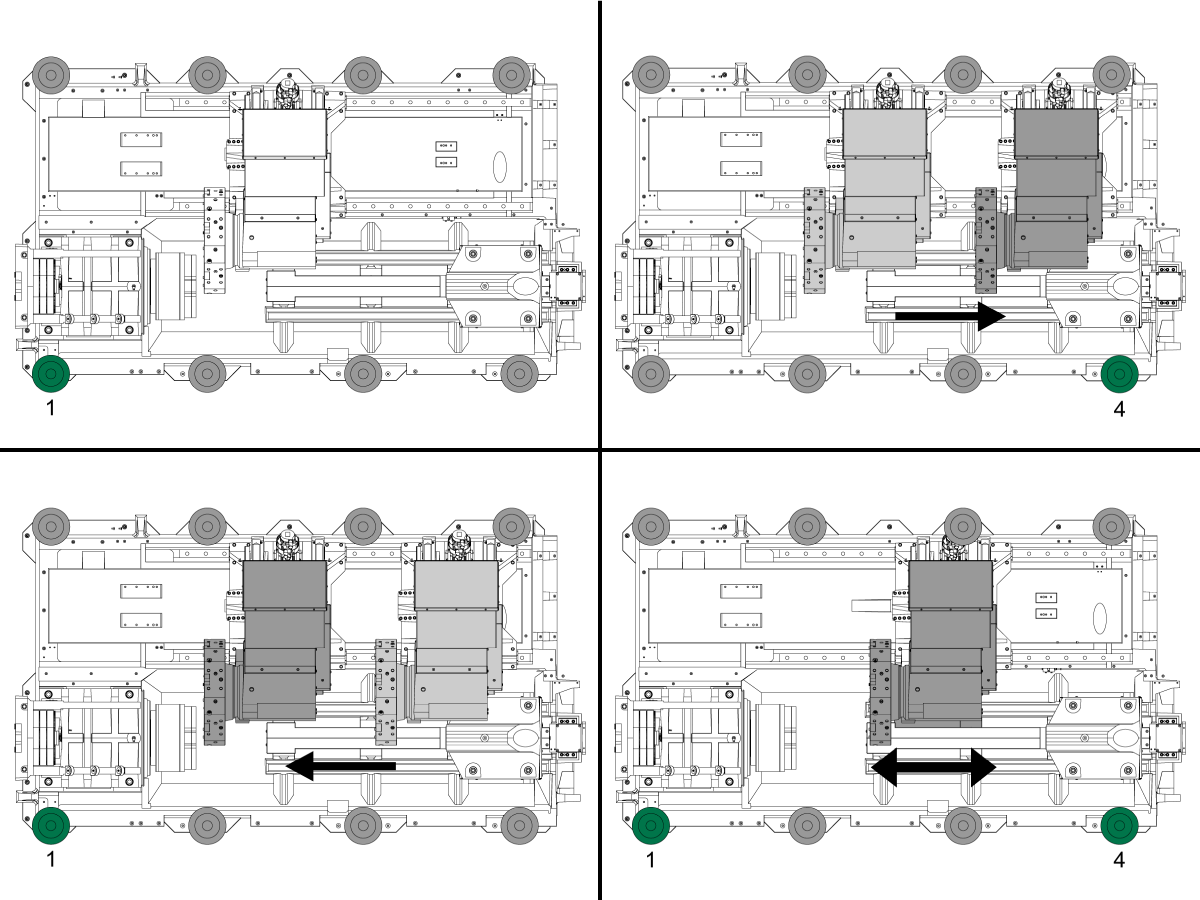
Move the tailstock or second spindle to its home position.

Mount tool T-2181A onto turret so that it is parallel to the ground.

Jog the turret to center of X-axis then jog turret towards spindle on Z-axis as far as possible.

Look at the smaller level that is parallel to the Z-axis and raise or lower screw 4 to center the bubble.

3

Now look at the larger level that is parallel to the turret face and raise or lower screw 1 to center the bubble.

To check for twist in the machine move the turret along the Z-axis back to home position.

Using the larger level raise or lower screw 2 to center the bubble and wait 10 seconds for the bubble to settle.

Move the turret back towards the spindle as far as possible and raise or lower screw 1 to center the bubble. Continue moving the turret from the home position to the spindle and adjusting screws 1 and 2 until the twist is removed. 

Tighten the locking nuts making sure that you do not raise or lower the screws.

Verify that the machine is level by moving the turret along the Z-axis and checking for twist and continue adjusting until level.

ST-20/20Y/25/25Y Leveling

1

Zero return each axis one at a time or press [POWER UP]. Go through the leveling process. Repeat these steps to achieve correct machine level.

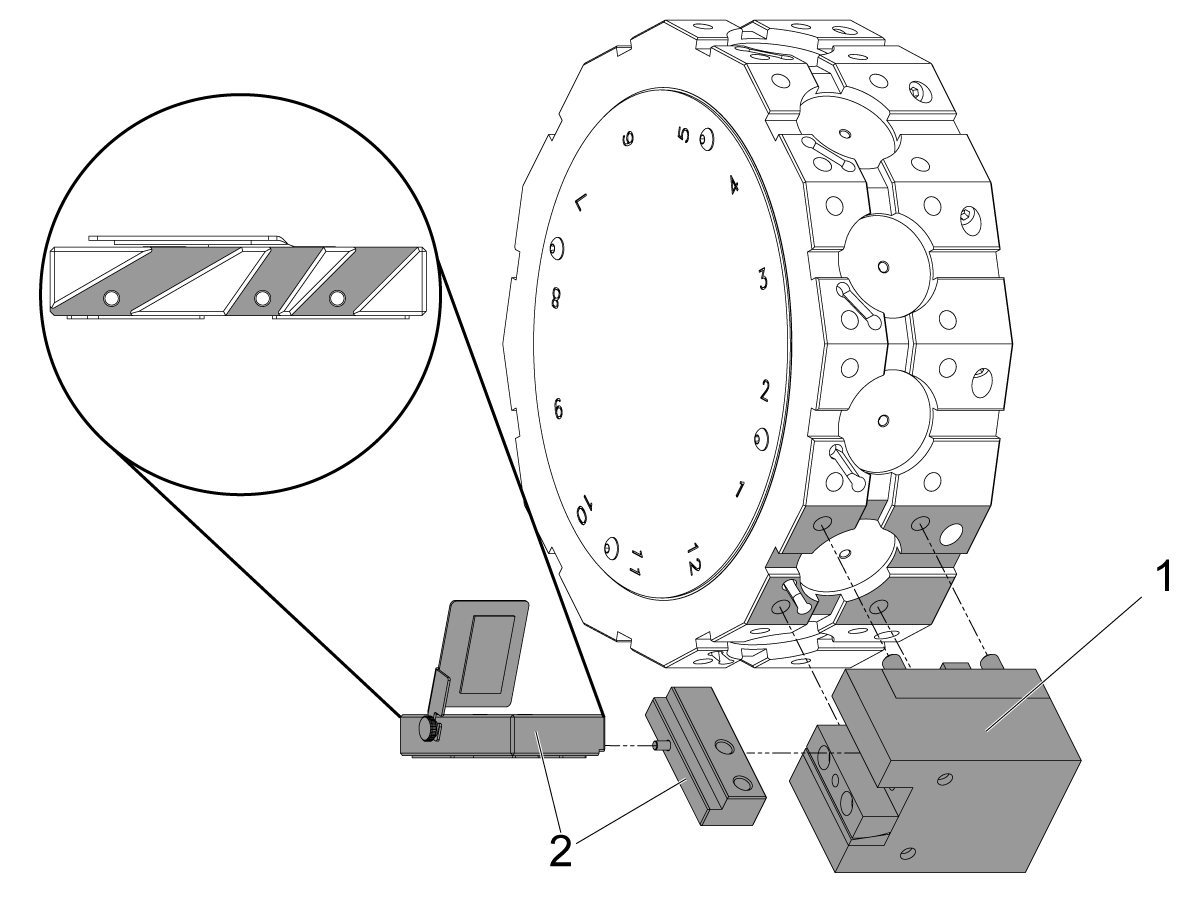
Note: If your machine has a BMT turret install a BMT65OD-1 tool holder[1] to pocket 1. Assemble T-2181A[2] so the level is parallel to the floor. There are three slots depending on the wedge angle of the machine. Use the tool holder to clamp the level or use the jack screws to fix the level in the tool holder.

2

Set the machine height using the four corner leveling screws to 3.0" above the floor. Turn each screw so they have equal tension.

Raise screws 2 and 4 so they are off the pads.

Move the tailstock or second spindle to its home position.

Mount tool T-2181A onto turret so that it is parallel to the ground.

Jog turret to center of X-axis then jog turret towards spindle on Z-axis as far as possible.

Look at the smaller level that is parallel to the Z-axis and raise or lower screw 5 to center the bubble.

3

Now look at the larger level that is parallel to the turret face and raise or lower screw 1 to center the bubble.

To check for twist in the machine move the turret along the Z-axis back to home position.

Using the larger level raise or lower screw 2 to center the bubble and wait 10 seconds for the bubble to settle. .

Move the turret back towards the spindle as far as possible and raise or lower screw 1 to center the bubble. Continue moving the turret from the home position to the spindle and adjusting screw 1 and 2 until the twist is removed.

Lower screw 4 onto the pad by hand and use a wrench and tighten only by 10°.

Do not tighten any further as you will change the level of the machine.

Tighten the locking nuts making sure that you do not raise or lower the screws.

Verify that the machine is level by moving the turret along the Z-axis and checking for twist and continue adjusting until level.

ST-30/30Y/35/35Y/40Y and DS-30Y/40Y Leveling

1

Zero return each axis one at a time or press [POWER UP]. Go through the leveling process. Repeat these steps to achieve correct machine level.

 Note: If your machine has a BMT turret install a BMT OD-1 tool holder[1] to pocket 1. Assemble T-2181A[2] so the level is parallel to the floor. There are three slots depending on the wedge angle of the machine. Use the tool holder to clamp the level or use the jack screws to fix the level in the tool holder.

2

Set the machine height using the four corner leveling screws to 3.0" above the floor. Turn each screw so they have equal tension.

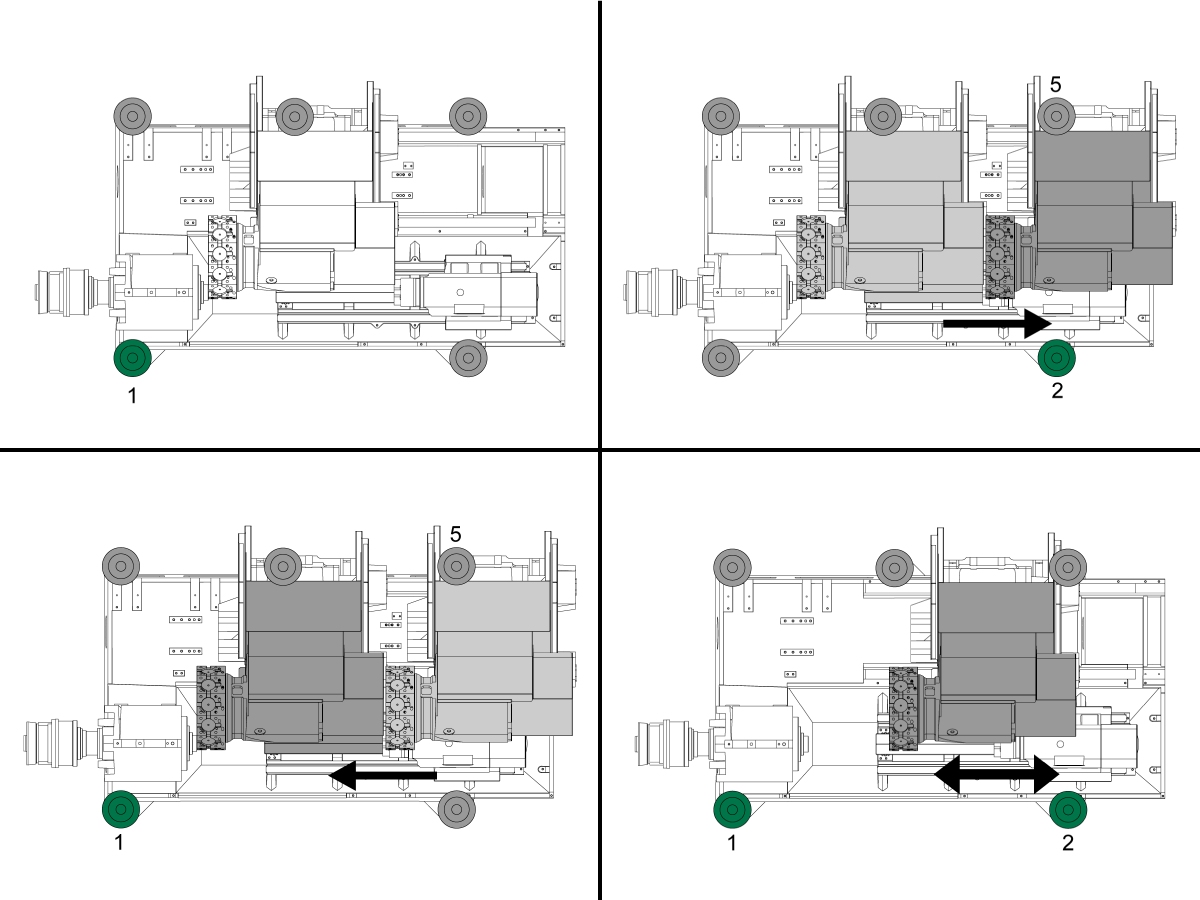
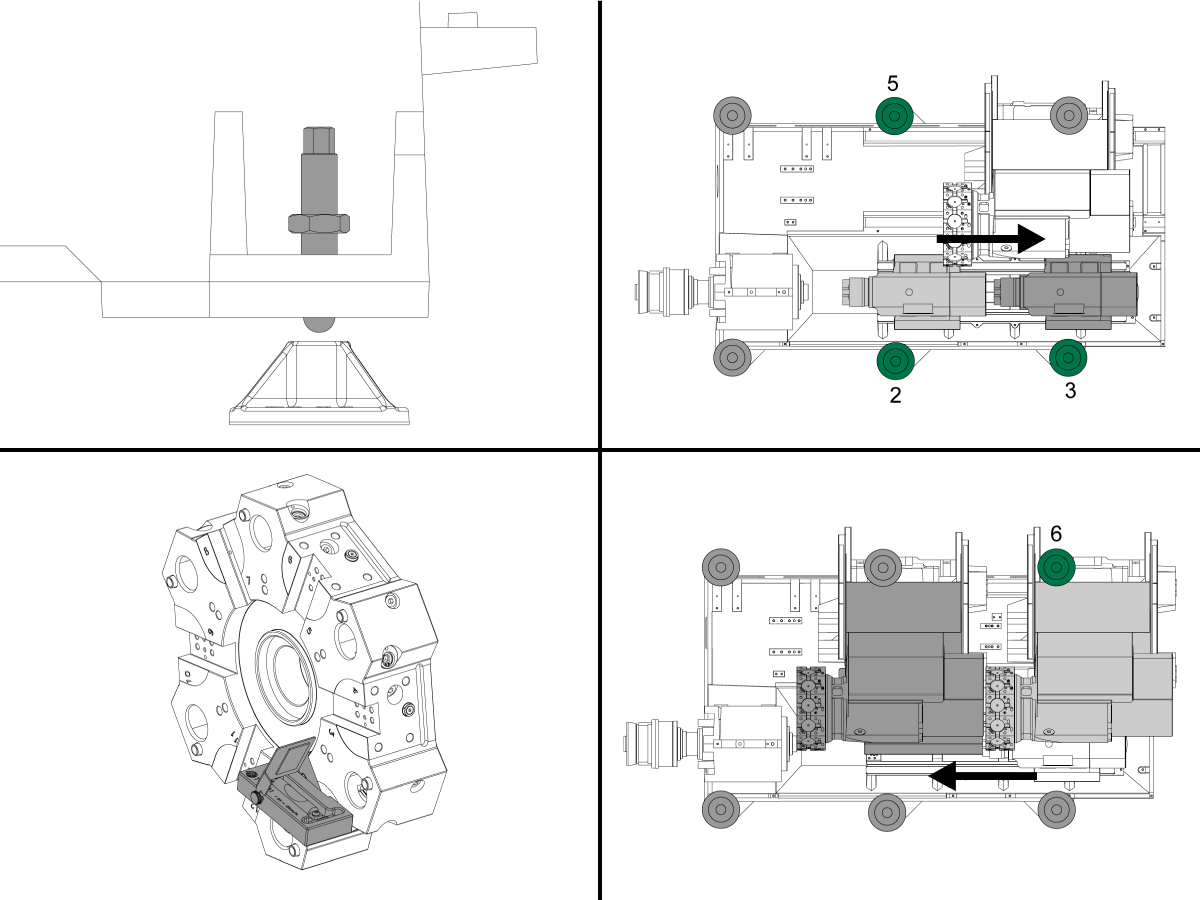
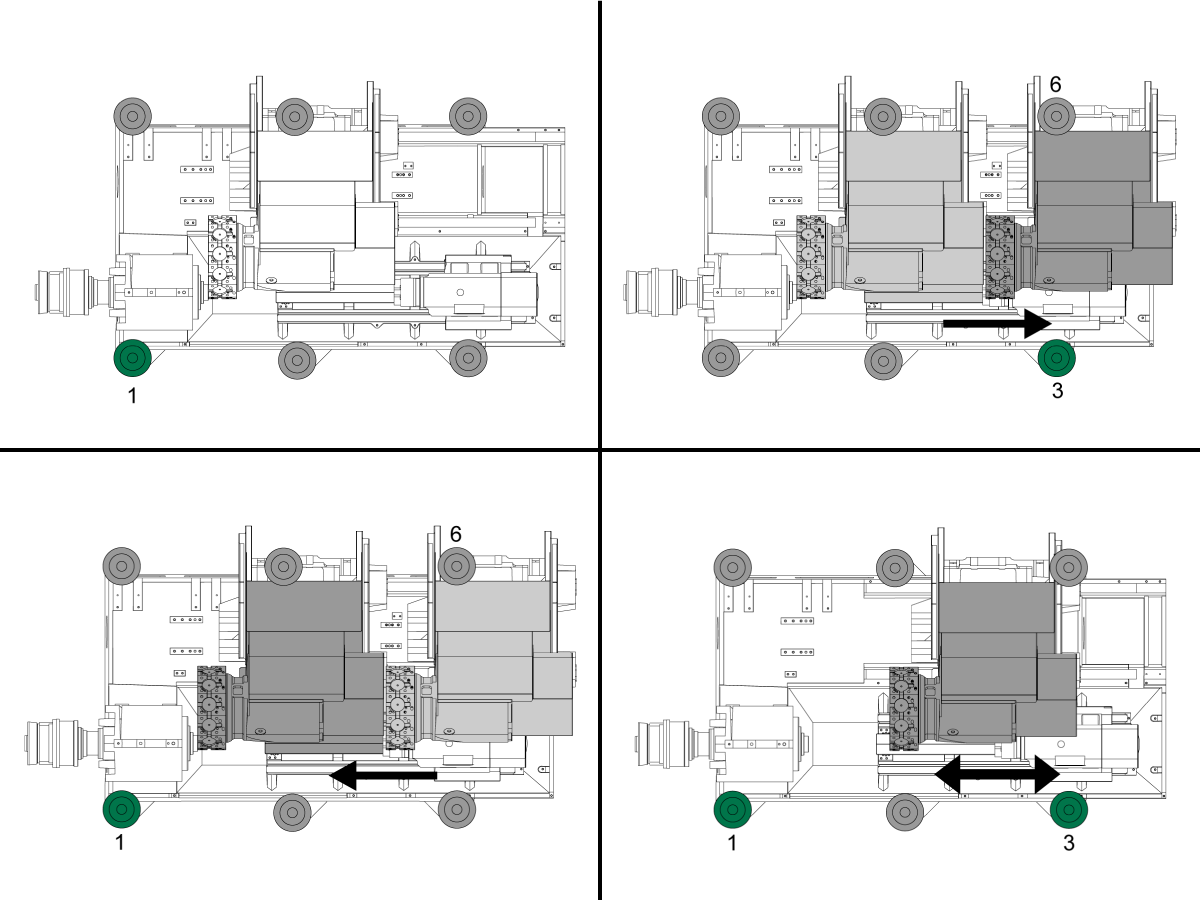
Raise screws 2, 3, and 5 so they are off the pads.

Move the tailstock or second spindle to its home position

Mount tool T-2181A onto turret so that it is parallel to the ground.

Jog turret to center of X-axis then jog turret towards spindle on Z-axis as far as possible.

Look at the smaller level that is parallel to the Z-axis and raise or lower screw 6 to center the bubble.

3

Now look at the larger level that is parallel to the turret face and raise or lower screw 1 to center the bubble.

To check for twist in the machine move the turret along the Z-axis back to home position.

Using the larger level raise or lower screw 3 to center the bubble and wait 10 seconds for the bubble to settle. .

Move the turret back towards the spindle as far as possible and raise or lower screw 1 to center the bubble. Continue moving the turret from the home position to the spindle and adjusting screw 1 and 3 until the twist is removed.

Lower screws 2 and 5 onto the pads by hand and use a wrench and tighten only by 10°.

Do not tighten any further as you will change the level of the machine.

Tighten the locking nuts making sure that you do not raise or lower the screws.

Verify that the machine is level by moving the turret along the Z-axis and checking for twist and continue adjusting until level.

ST-40/40L/45/45L/50/55 Leveling

1

Zero return each axis one at a time or press [POWER UP]. Go through the leveling process.
Repeat these steps to achieve correct machine level.

2

Set the machine height using the four corner leveling screws to 3.0" above the floor. Turn each screw so they have equal tension.

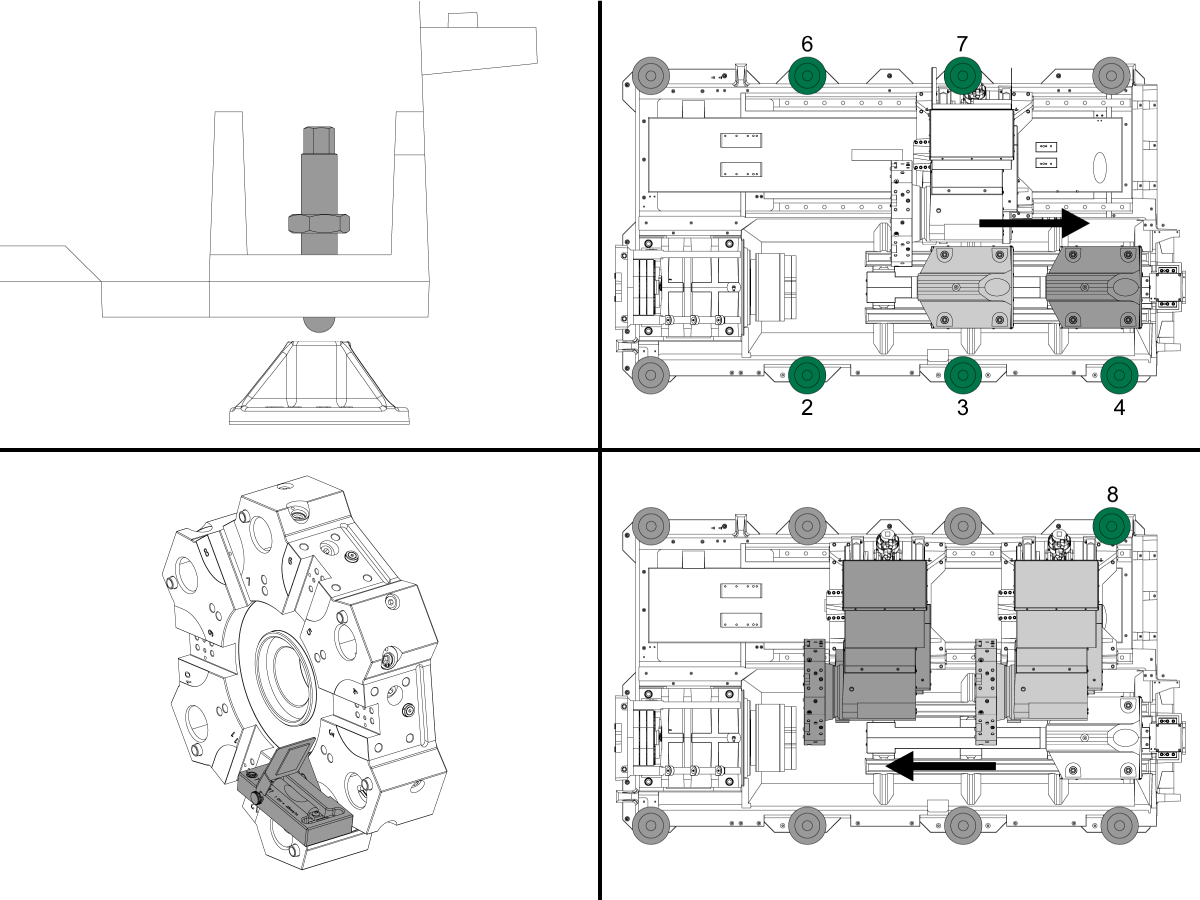
Raise screws 2, 3, 4, 6, and 7 so they are off the pads.

Move the tailstock or second spindle to its home position

Mount tool T-2181A onto turret so that it is parallel to the ground.

Jog turret to center of X-axis then jog turret towards spindle on Z-axis as far as possible.

Look at the smaller level that is parallel to the Z-axis and raise or lower screw 8 to center the bubble.

3

Now look at the larger level that is parallel to the turret face and raise or lower screw 1 to center the bubble.

To check for twist in the machine move the turret along the Z-axis back to home position.

Using the larger level raise or lower screw 4 to center the bubble and wait 10 seconds for the bubble to settle. .

Move the turret back towards the spindle as far as possible and raise or lower screw 1 to center the bubble. Continue moving the turret from the home position to the spindle and adjusting screw 1 and 4 until the twist is removed.

Lower screws 2, 3, 6, and 7 onto the pads by hand and use a wrench and tighten only by 10°.

Do not tighten any further as you will change the level of the machine.

Tighten the locking nuts making sure that you do not raise or lower the screws.

Verify that the machine is level by moving the turret along the Z-axis and checking for twist and continue adjusting until level.

Lubrication Verification

1

Run the spindle run-in program.

 Note: For 10K spindles and above use a balanced tool holder

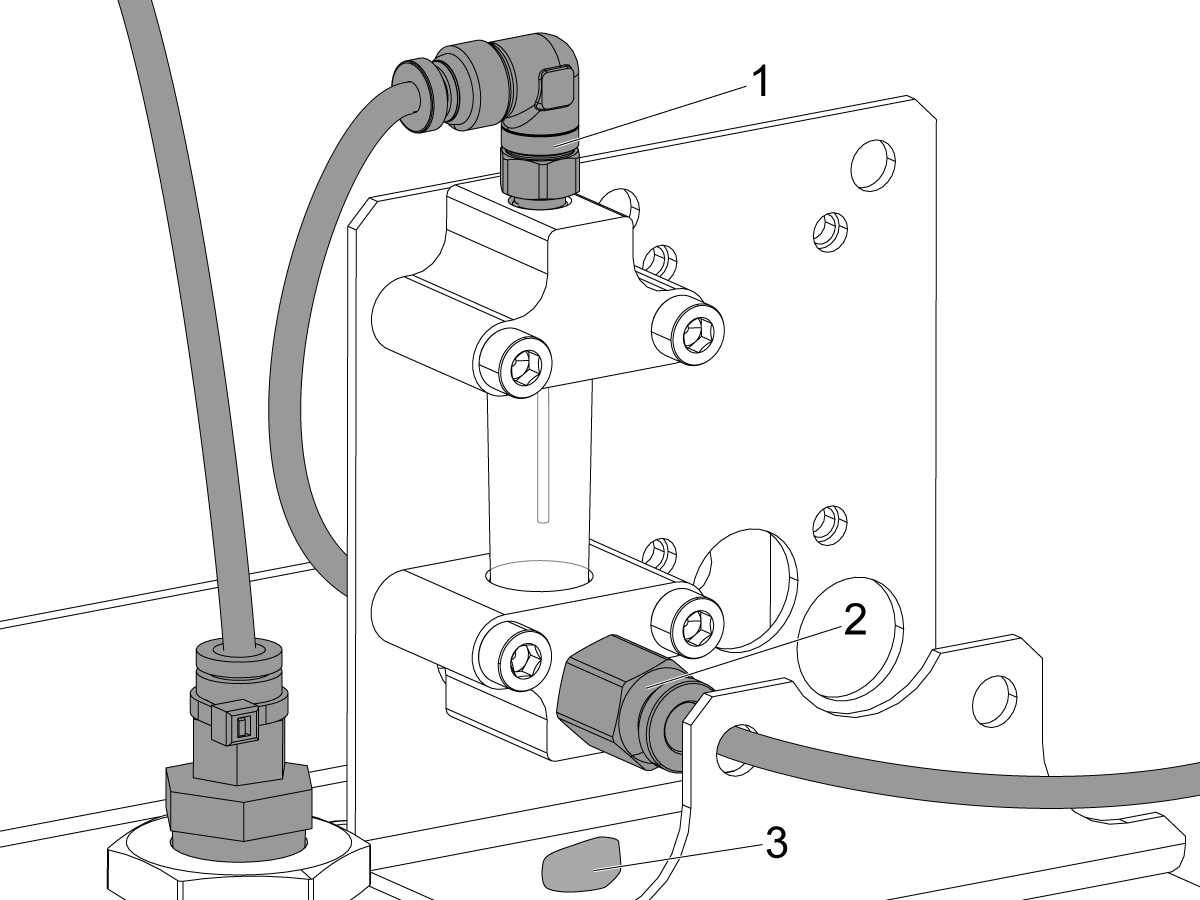
Examine the sight glass, make sure the correct number of drops are fall through the sight glass.

Examine the fittings [1,2] on top of the oil pump tank.

The oil collects on top of the oil pump tank [3] either behind or in front of the sight glass bracket, underneath the leaking fitting.

Tighten any leaking fittings.

2

Go to the Maintenance tab.

Press [F2] to cycle an axis lubrication test.

Inspect the gauge on the lubrication system.  Make sure it holds pressure.

Machine Operation

1

Updated

Test Coolant Operation - Multi-Stage Coolant Pump

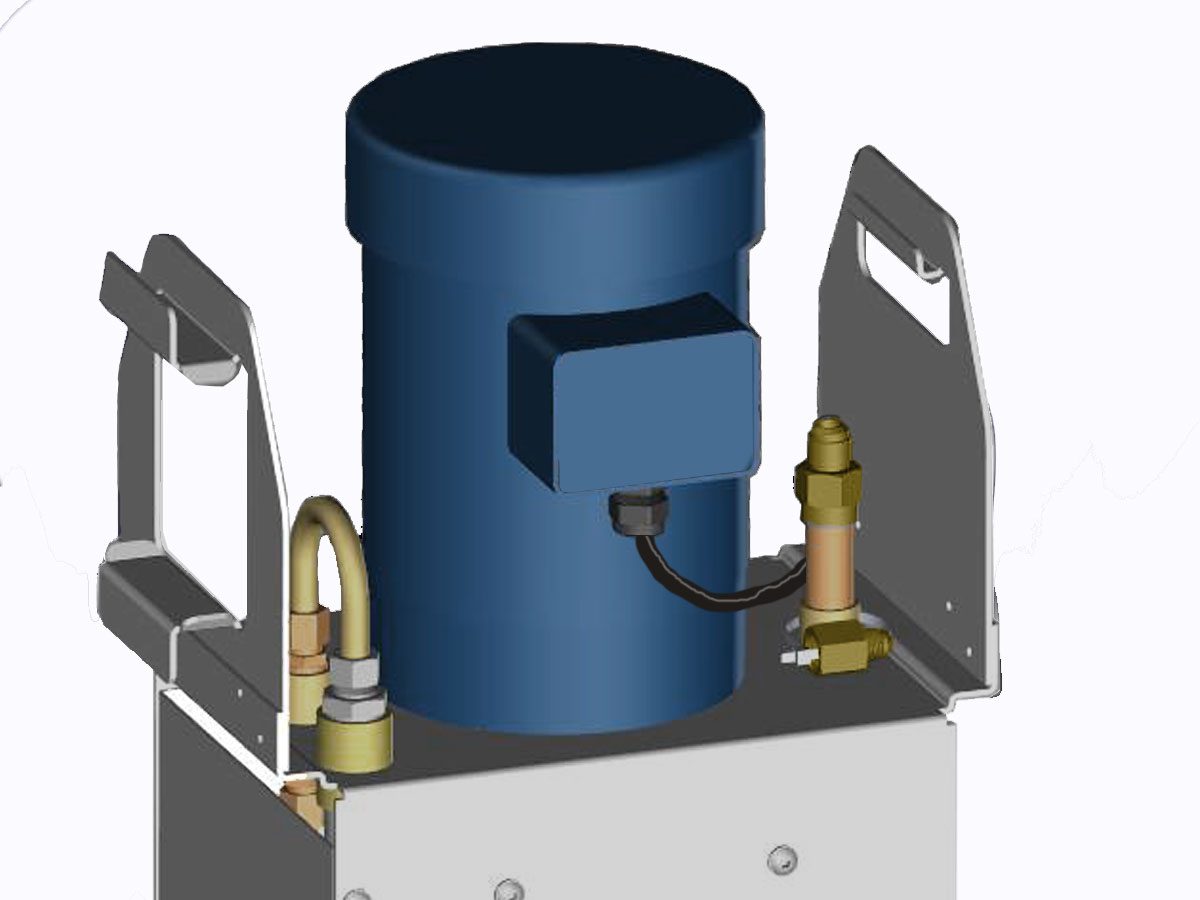
If your machine comes equiped with the Multi-Stage Coolant Pump, conduct the following operation:

  • Ensure the hose fittings to the Multi-Stage Coolant Pump are connected and secure. 
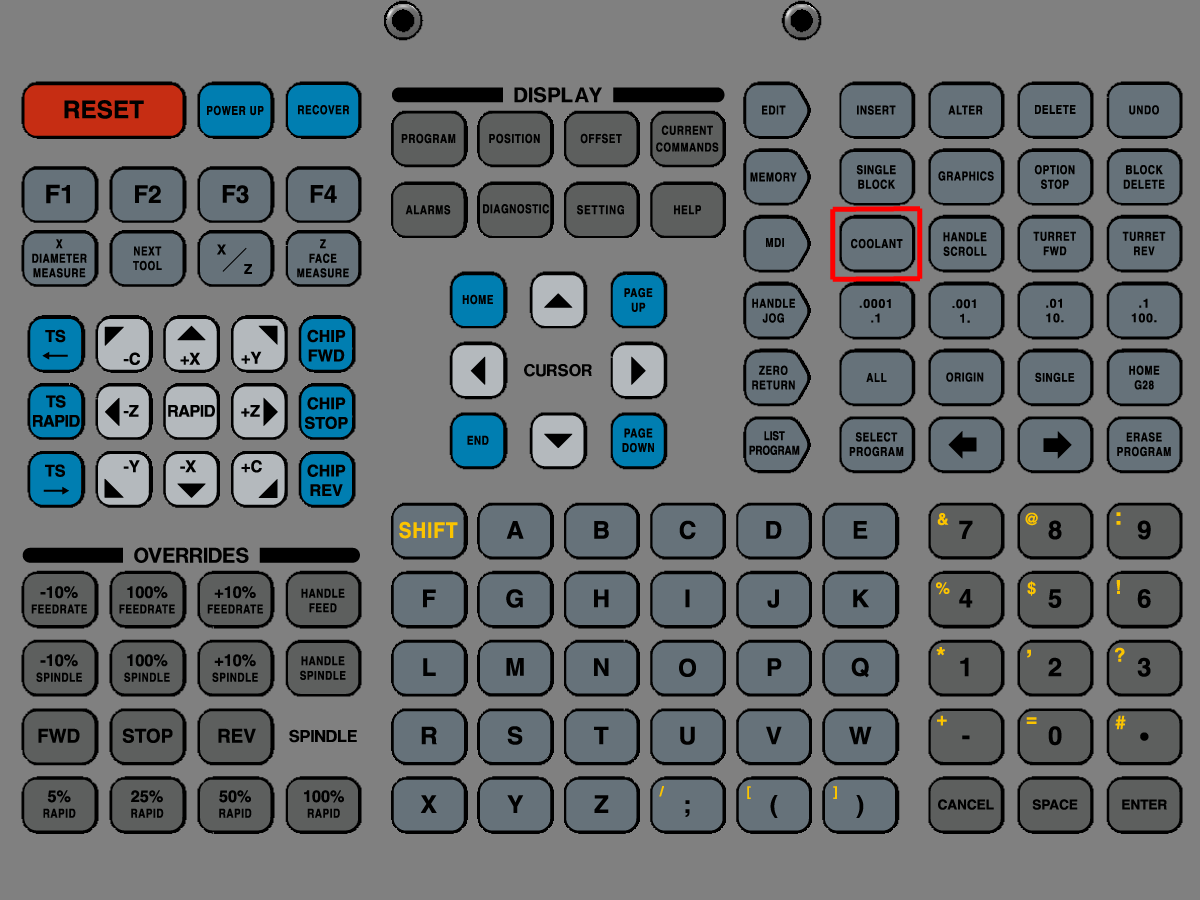
  • Run coolant by pressing  [COOLANT] on control pendant.
  • Check for leaks around the coolant pump and hose connections.

2

Updated

Test High Pressure Coolant (HPC) Operation

If your machine comes equiped with the High Pressure Coolant system, conduct the following operation:

  • In [MDI] command: M88; G04 P10.; M89;
  • Verify that the HPC pump motor turns on.
  • Check for leaks at the coolant manifold and hose fittings.

3

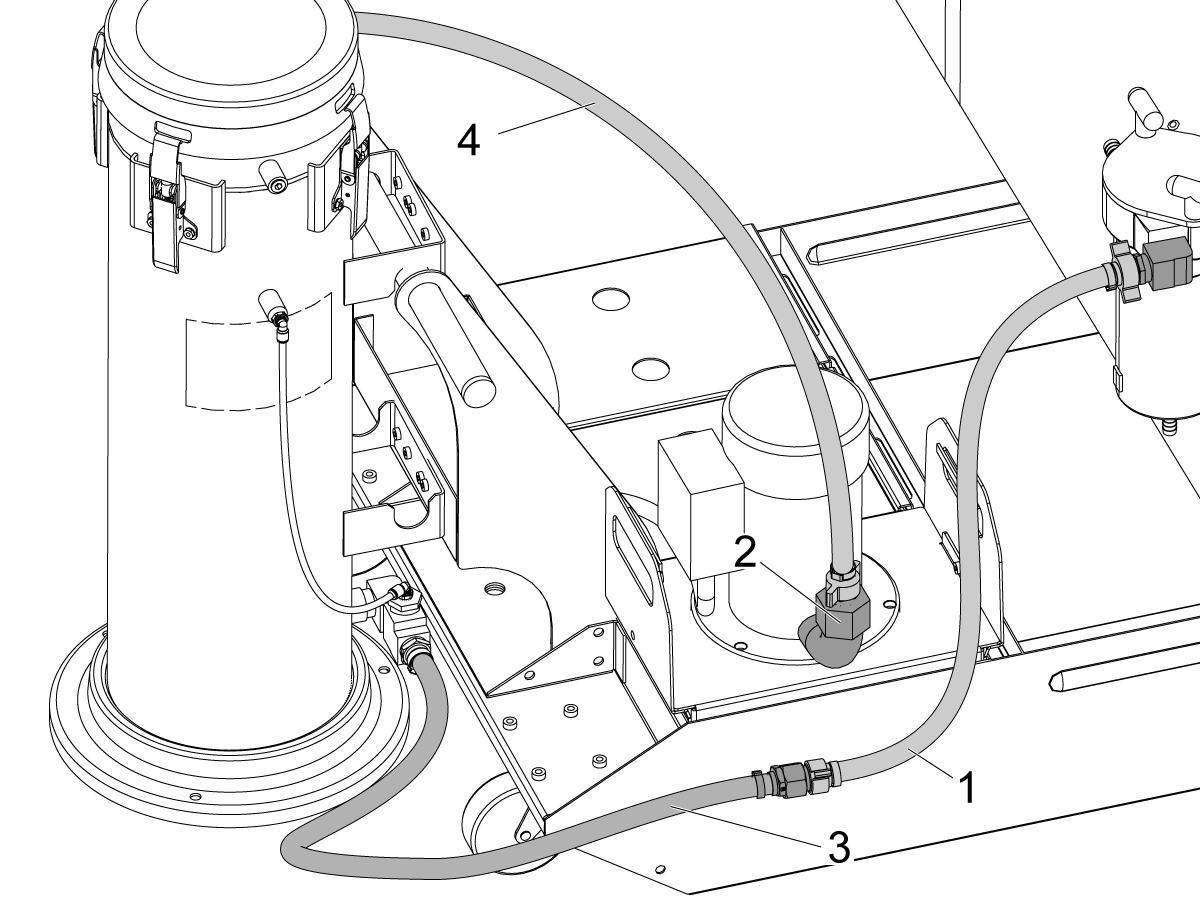
Auxiliary Coolant Filter Installation

  • If your machine includes the Auxiliary Coolant Filter option perform the installation procedure

For a guide on how to perform the Auxiliary Coolant Filter installation procedure please see:

Auxiliary Coolant Filter Installation
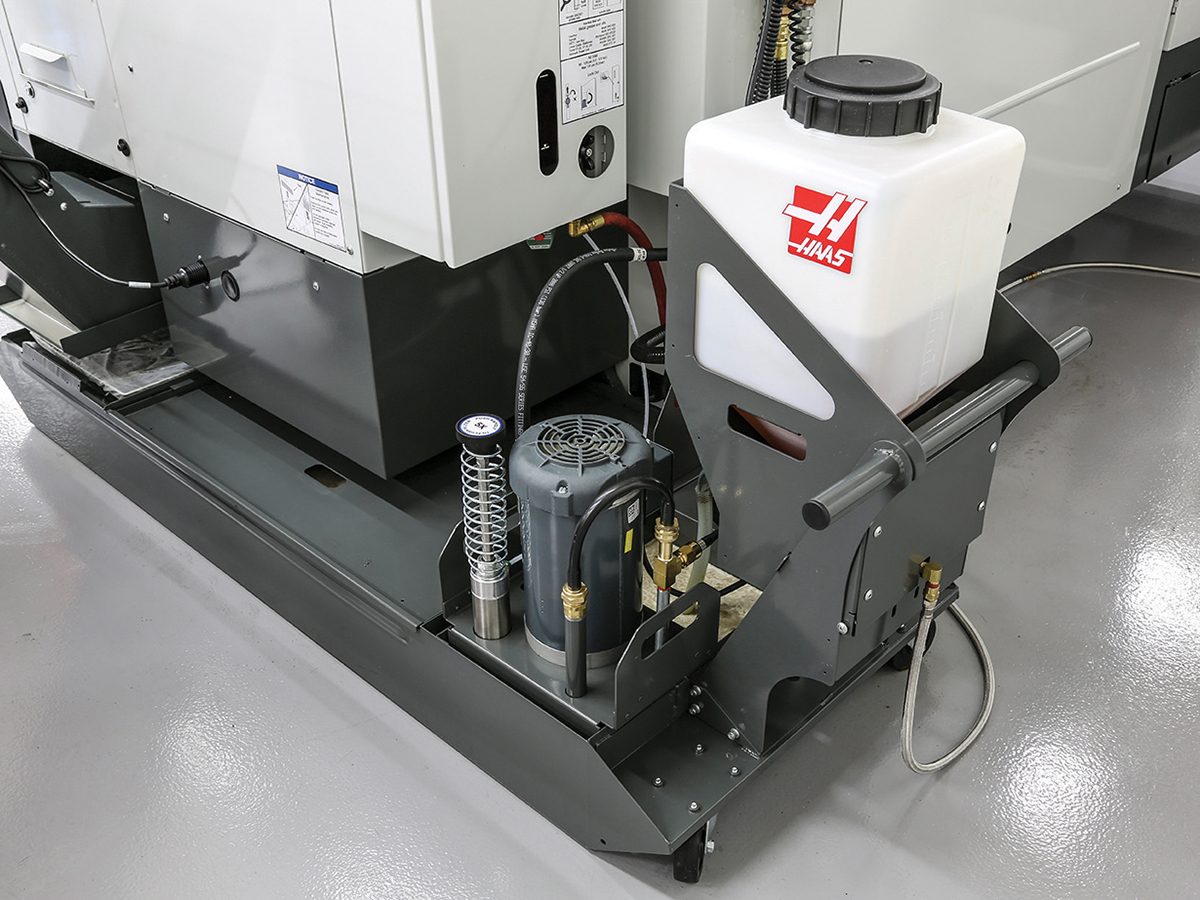
Chips and Coolant- coolant refill. Product of Haas CNC machine tools.

4

Coolant Refill Calibration 

  • If your machine includes the Coolant Refill option perform the calibration procedure.

For a guide on how to install and perform the Coolant Refill calibration procedure please see:

Coolant Refill Calibration

5

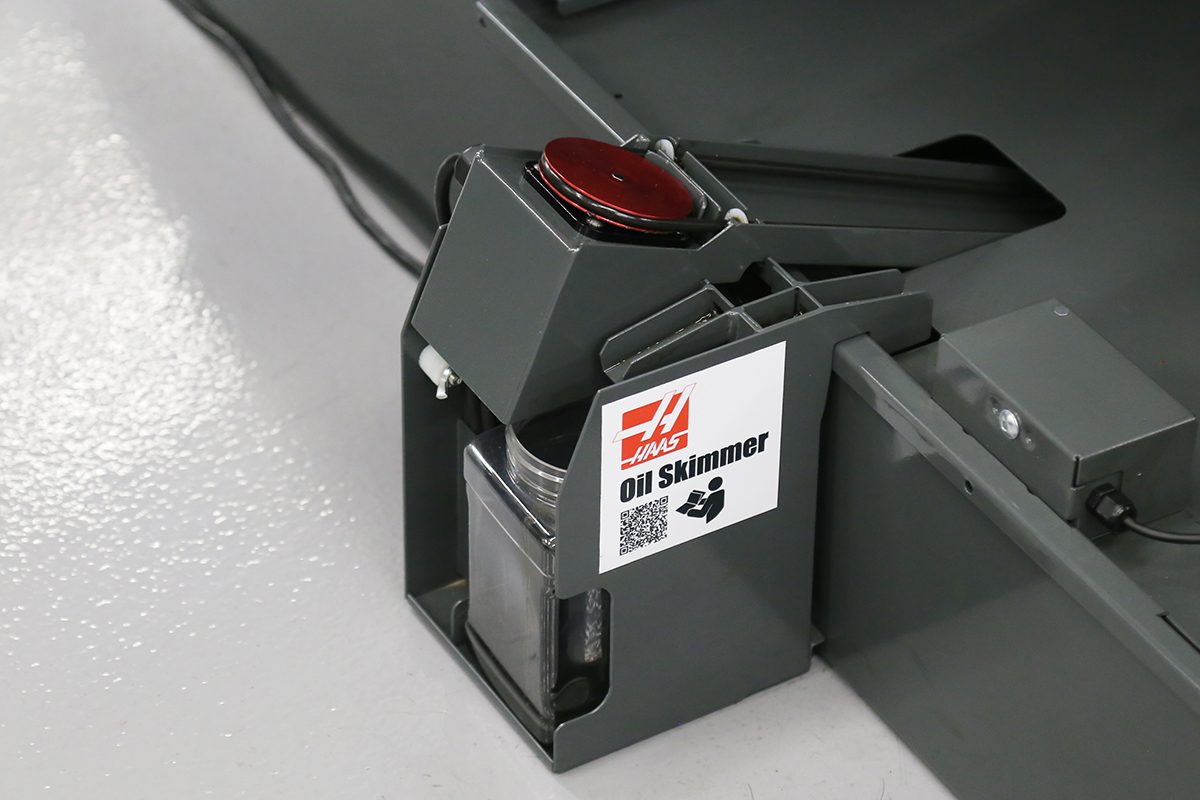
Oil Skimmer Installation

  • If your machine includes the Oil Skimmer option perform the installation procedure

For a guide on how to perform the Oil Skimmer installation procedure please see:

Oil Skimmer Installation

6

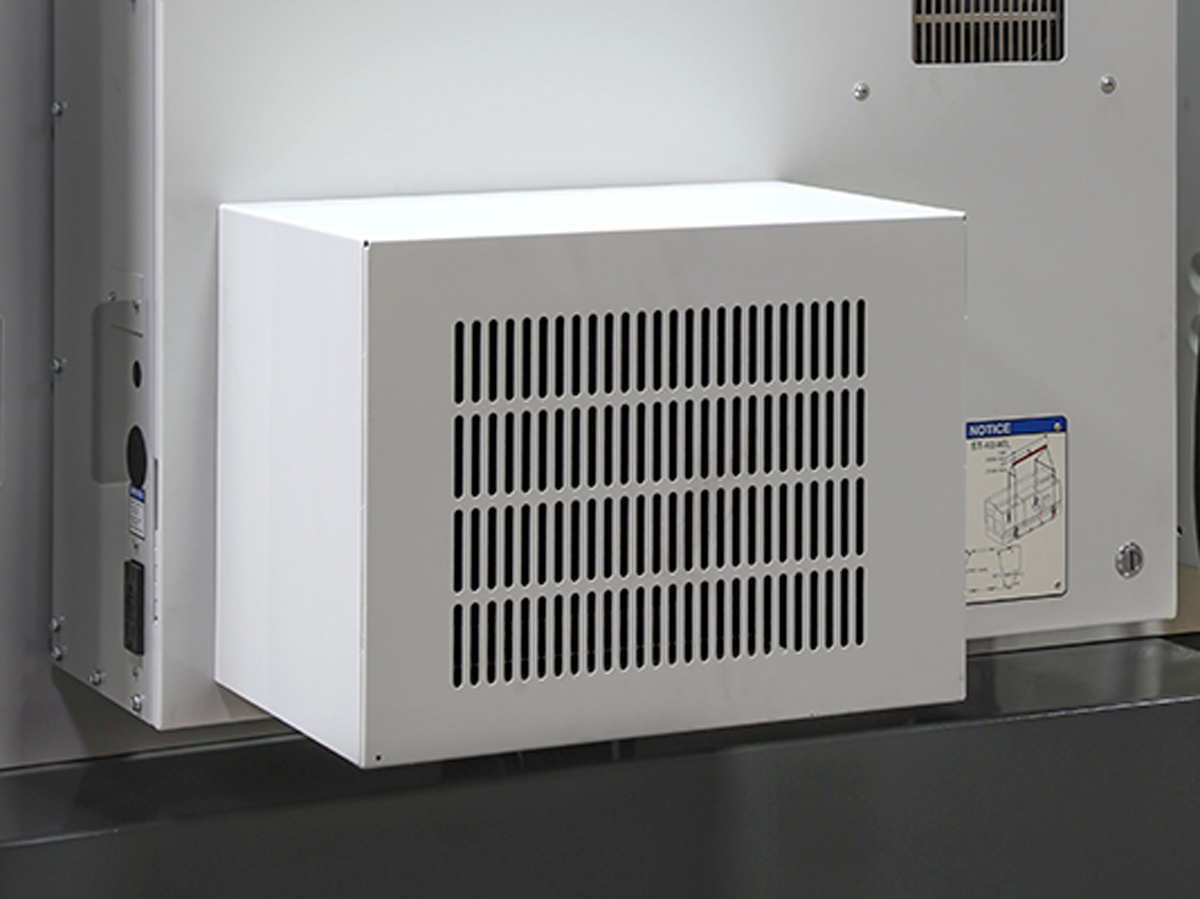
Cabinet Cooler Installation

  • If your machine includes the Cabinet Cooler option perform the installation procedure

For a guide on how to perform the Cabinet Cooler installation procedure please see:

Cabinet Cooler Installation
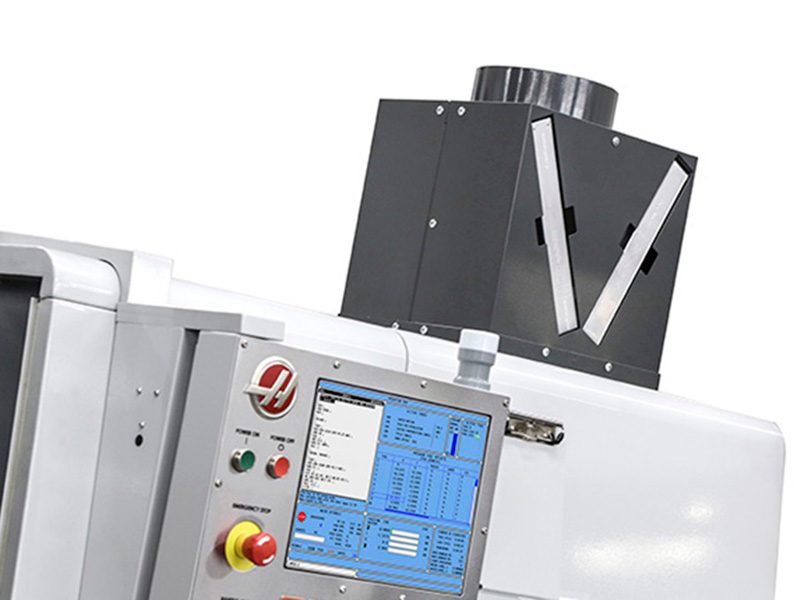
Chips and Coolant Excel Exhaust. Product of Haas CNC machine tools.

7

Enclosure Exhaust Installation

  • If your machine includes the Enclosure Exhaust option perform the installation procedure

For a guide on how to perform the Enclosure Exhaust installation procedure please see:

Enclosure Exhaust Installation

8

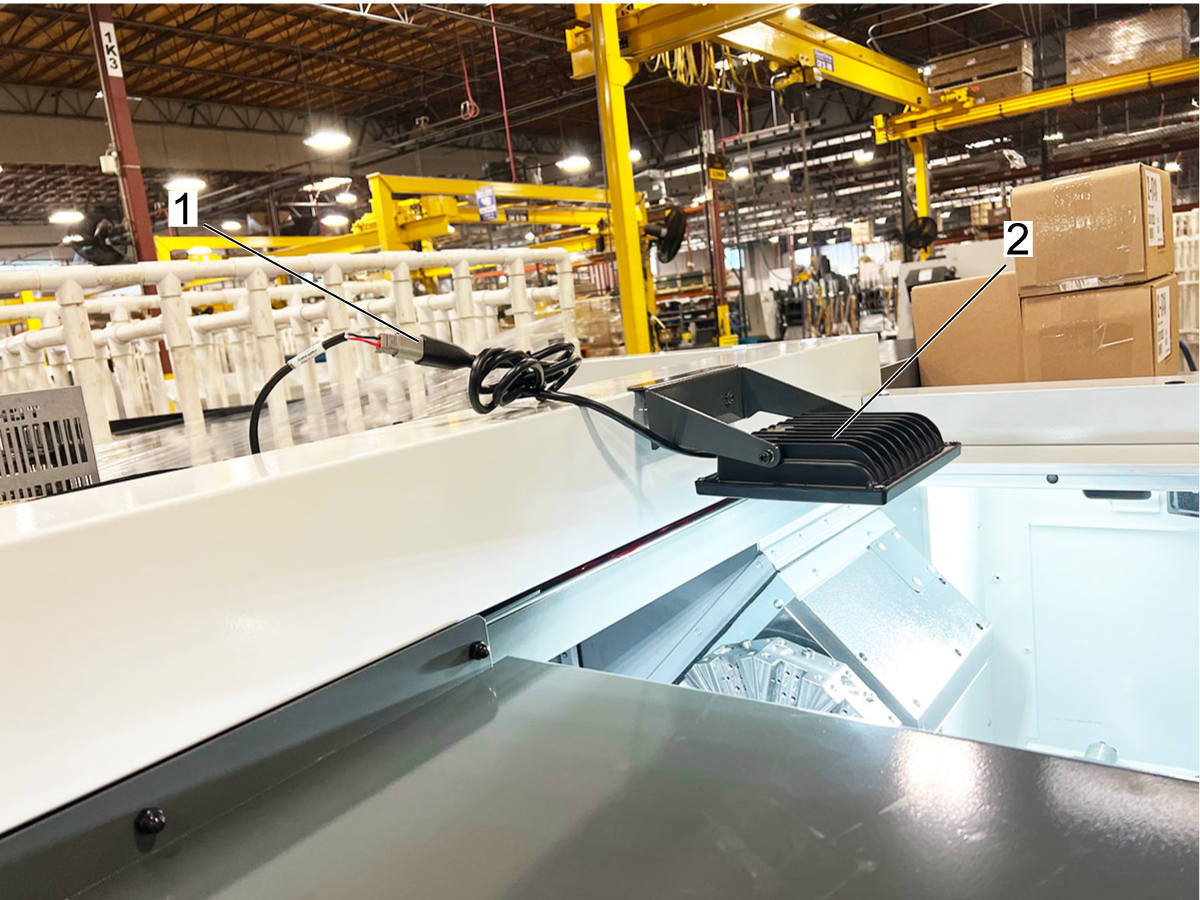
24V Magnetic Worklight Installation

For a guide on how to perform the Magnetic Worklight installation procedure please see:

Lathe 24V Magnetic Worklight Installation

9

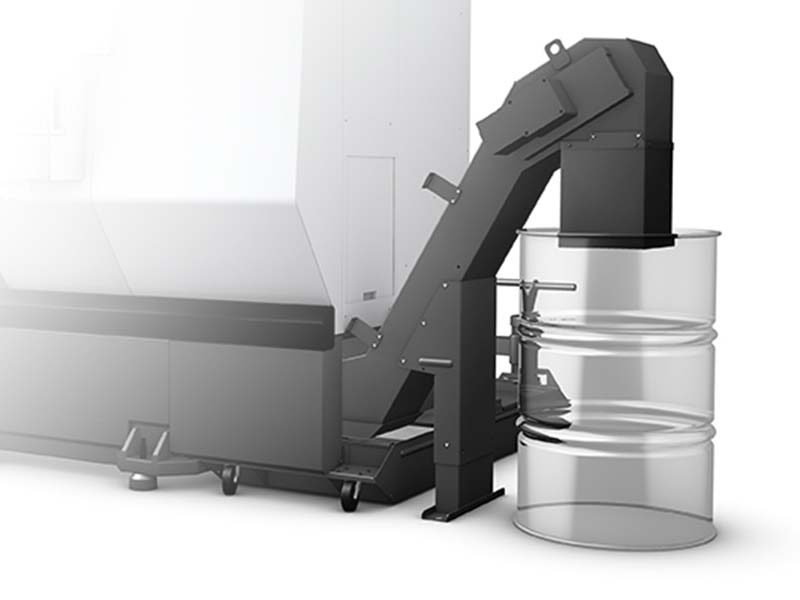
Chip Conveyor Installation

  • If your machine includes the Chip Conveyor option perform the installation procedure

For a guide on how to perform the Chip Conveyor installation procedure please see:

Chip Conveyor Installation

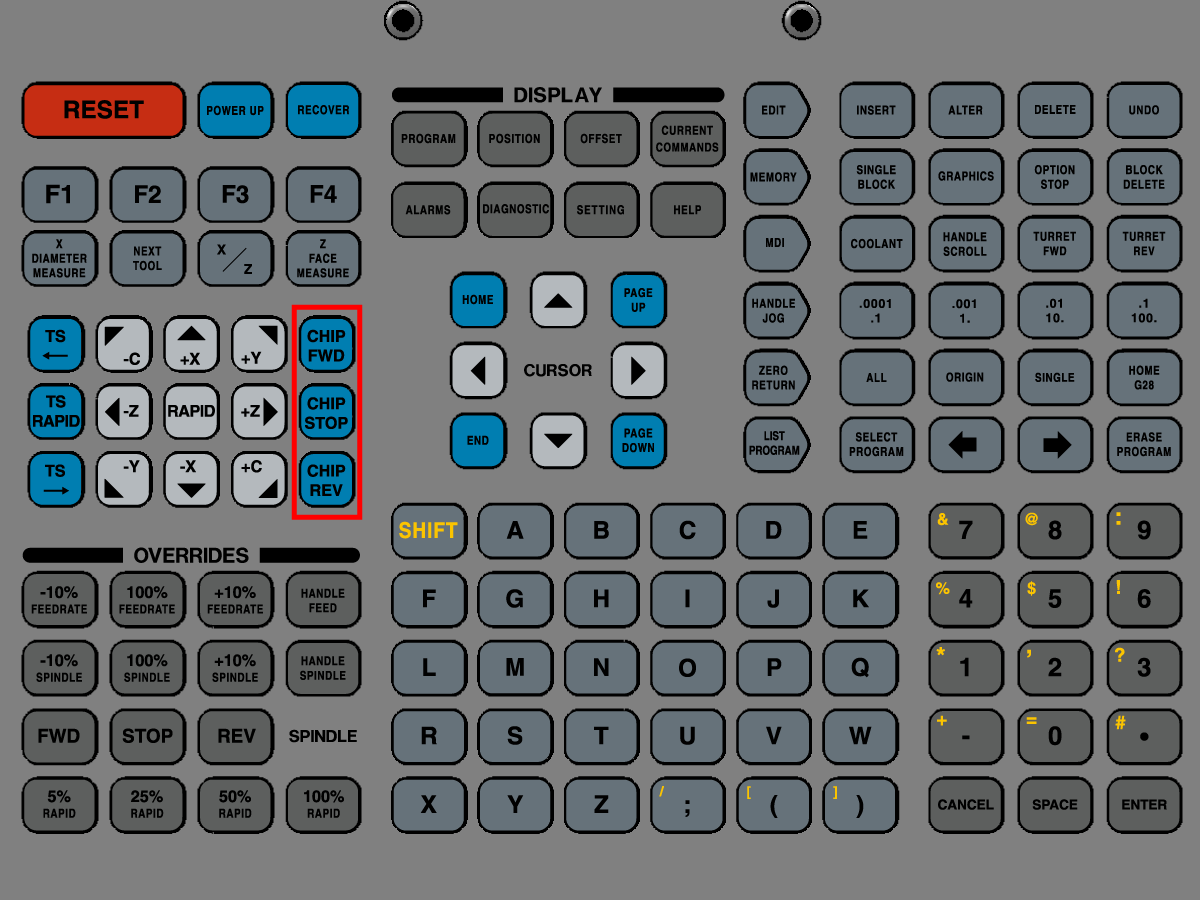
10

Test Chip Conveyor

  • Test the chip conveyor by pressing the [CHIP FWD],  [CHIP STOP], and [CHIP REV] buttons on the control pendant

11

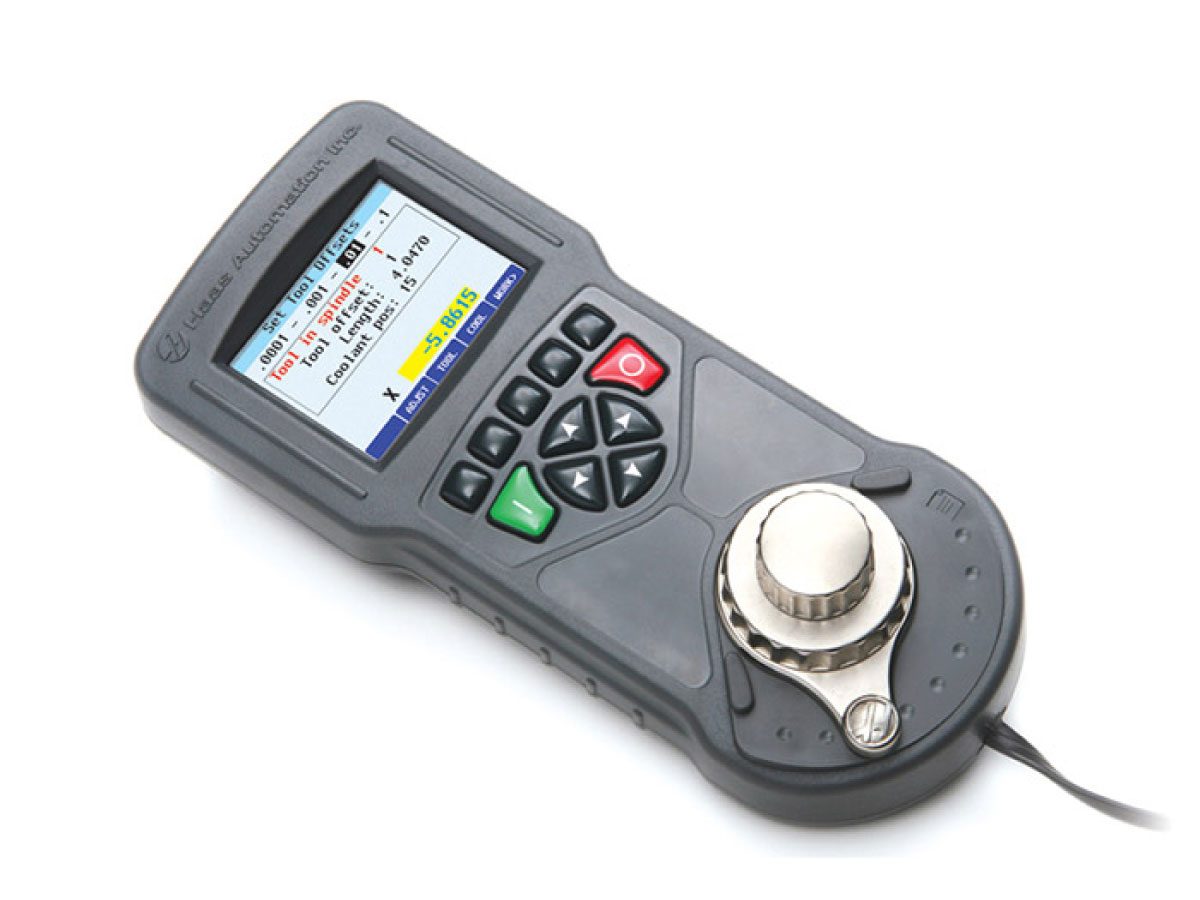
Remote Jog Handle Color Installation

  • If your machine includes the Remote Jog Handle Color option perform the installation procedure

For a guide on how to perform the Remote Jog Handle Color installation procedure please see:

RJH-C Installation

12

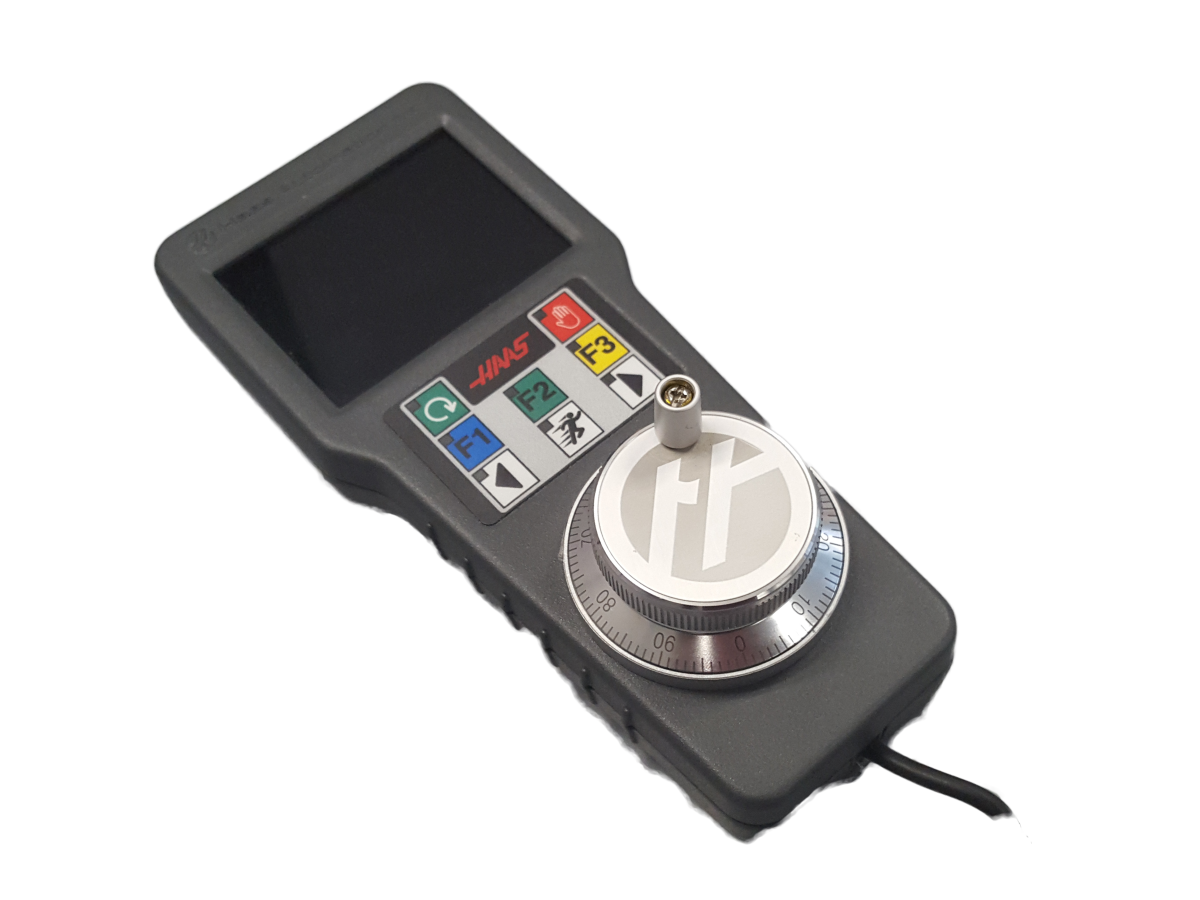
Remote Jog Handle Touch Installation

  • If your machine includes the Remote Jog Handle Touch option perform the installation procedure

For a guide on how to perform the Remote Jog Handle Touch installation procedure please see:

RJH-T Installation

13

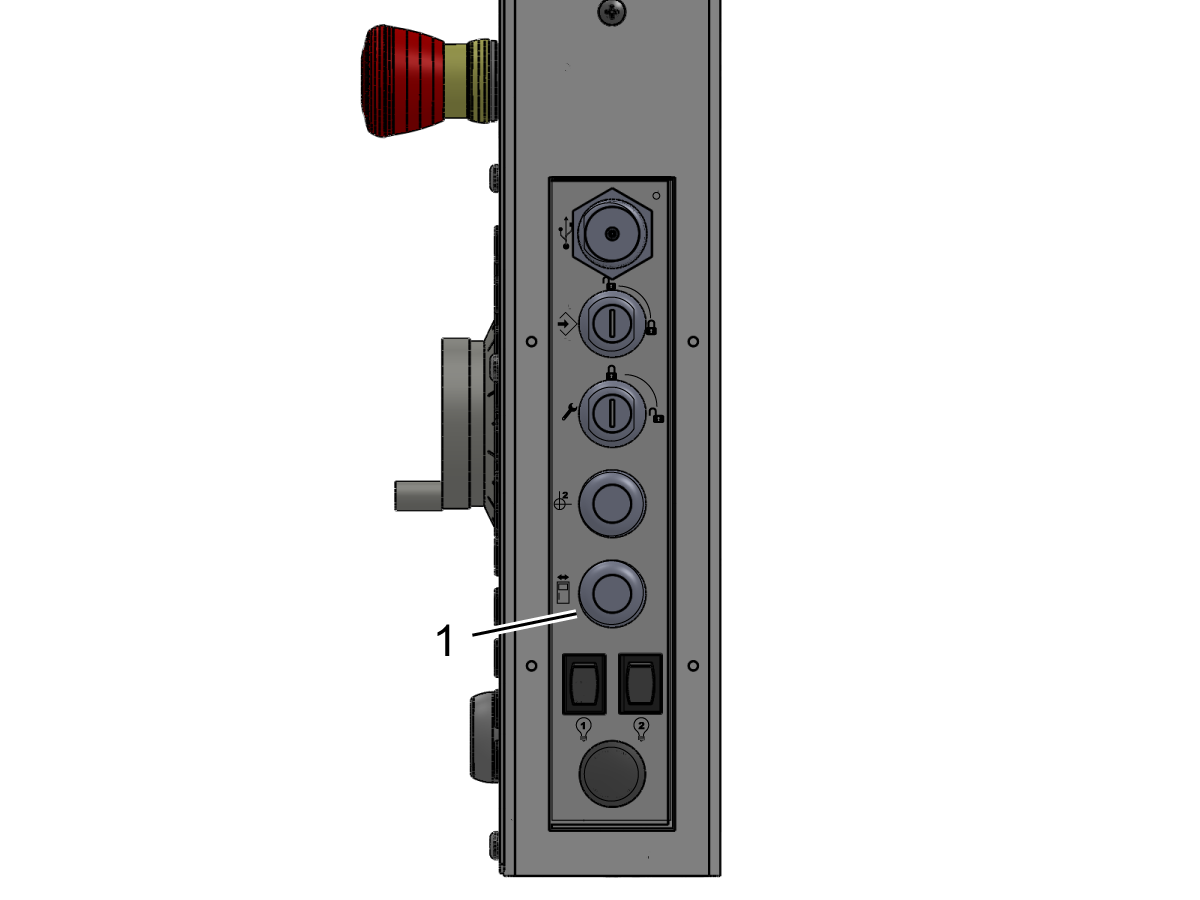
Test the Door Interlocks

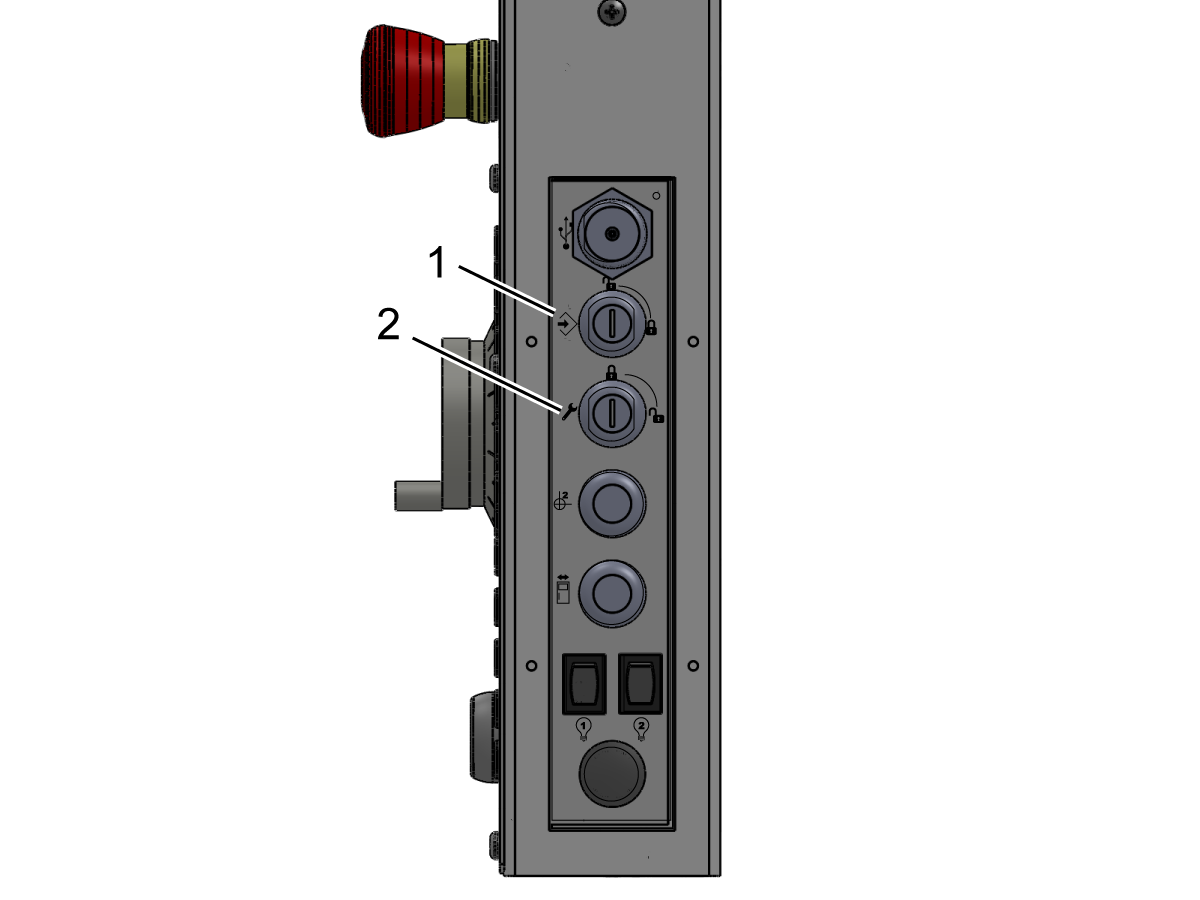
  • Go to MDI. Type in S500 M3; Press [ENTER]. Make sure the machine is not in Setup Mode. Check the Key Switch on the side of the pendant.
  • With the door open, press [CYCLE START]. The machine should say to close the door and press [CYCLE START].
  • With the door closed, press [CYCLE START]. The Interlock Pin should extend, and the spindle starts rotating.
  • While the locks are on try to open the doors. 
  • The spindle should not stop rotating but if the spindle stops, re-adjustment is required. 

14

Test Auto Air Jet Blast (AJB)

Open the primary air valve. This supplies air to the machine.

Test the AJB:

  • M12: Main Spindle Air Jet Blast ON
  • M13: Main Spindle Air Jet Blast OFF

DS Machines:

  • M112: Secondary Spindle Air Jet Blast ON
  • M113: Secondary Spindle Air Jet Blast OFF

For more information regarding these M-codes refer to the Lathe Operator Manual below.

Lathe Operator's Manual

15

Test Auto Door Option

  • Cycle the auto door using the Auto Door button on the side of the pendant.
  • If the machine alarms out, does not close properly, or closes hard, check for the proper engagement of the Door Interlock Switch both manually and on the monitor.
  • If there is a misalignment adjust the Door Interlock Switch in or out to ensure proper engagement of the switch key.

16

Test Safety Features

  • Test Memory Lock switch by verifying that in the locked position changes cannot be made to settings or programs[1].
  • Test Run/Setup Mode switch by verifying that in the unlocked position machine functions can be done in Setup Mode[2].
  • Verify that Interlock and Actuator are installed & cable is routed correctly.
  • Verify that a window (or T/S access door) latch is installed on each side window.
  • Verify that the latch engages to keep the window or door in the up position.
  • Verify that a window or door lock is installed on each side window.
  • Verify that the window or door locks closed in the down position.
  • Verify that all lathe door locks function like the windows and doors stated above.

17

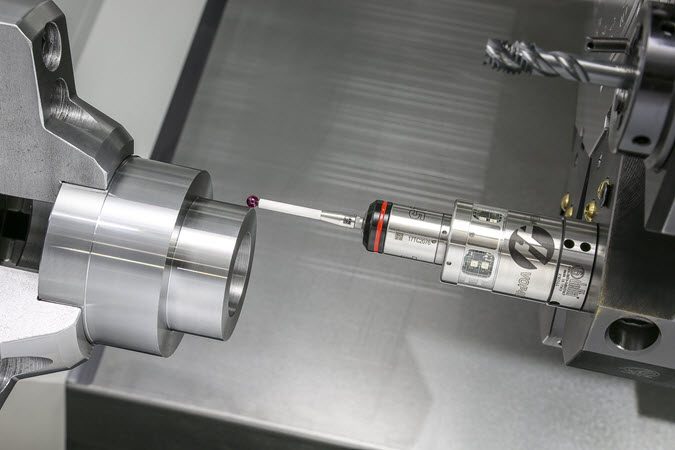
Automatic Tool Presetter (ATP) Calibration 

  • If your machine includes the ATP option perform the calibration procedure

For a guide on how to perform the ATP calibration procedure please see:

ATP Calibration

18

WIPS-L Installation and Calibration 

  • If your machine includes the WIPS-L option install and perform the calibration procedure

For a guide on how to install and perform the WIPS-L calibration procedure please see:

WIPS-L Installation
WIPS-L Calibration
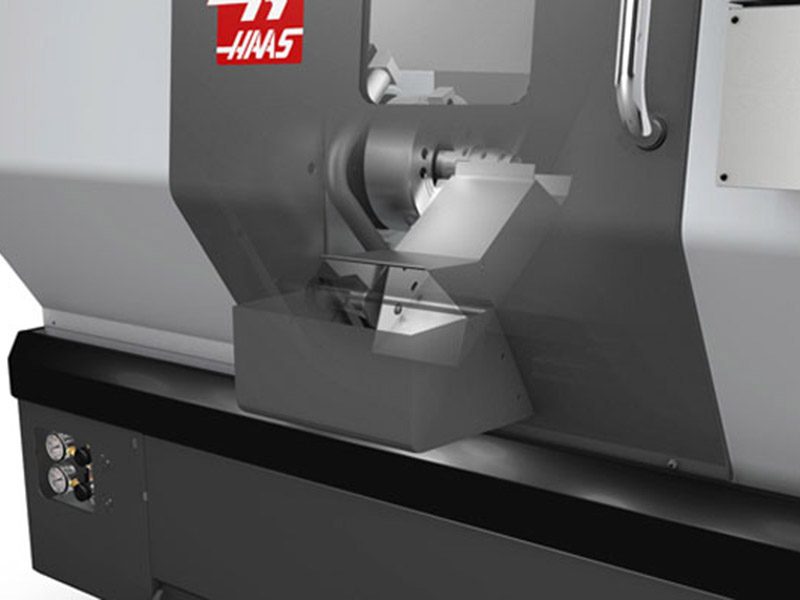
Parts Catcher. Product of Haas CNC machine tools.

19

Test Parts Catcher (PCAT)

If your machine includes the PCAT option perform the test procedure.

  • Open CURRENT COMMANDS window on control
  • Use the arrow keys to navigate to devices and to the Part Catcher
  • Open the door
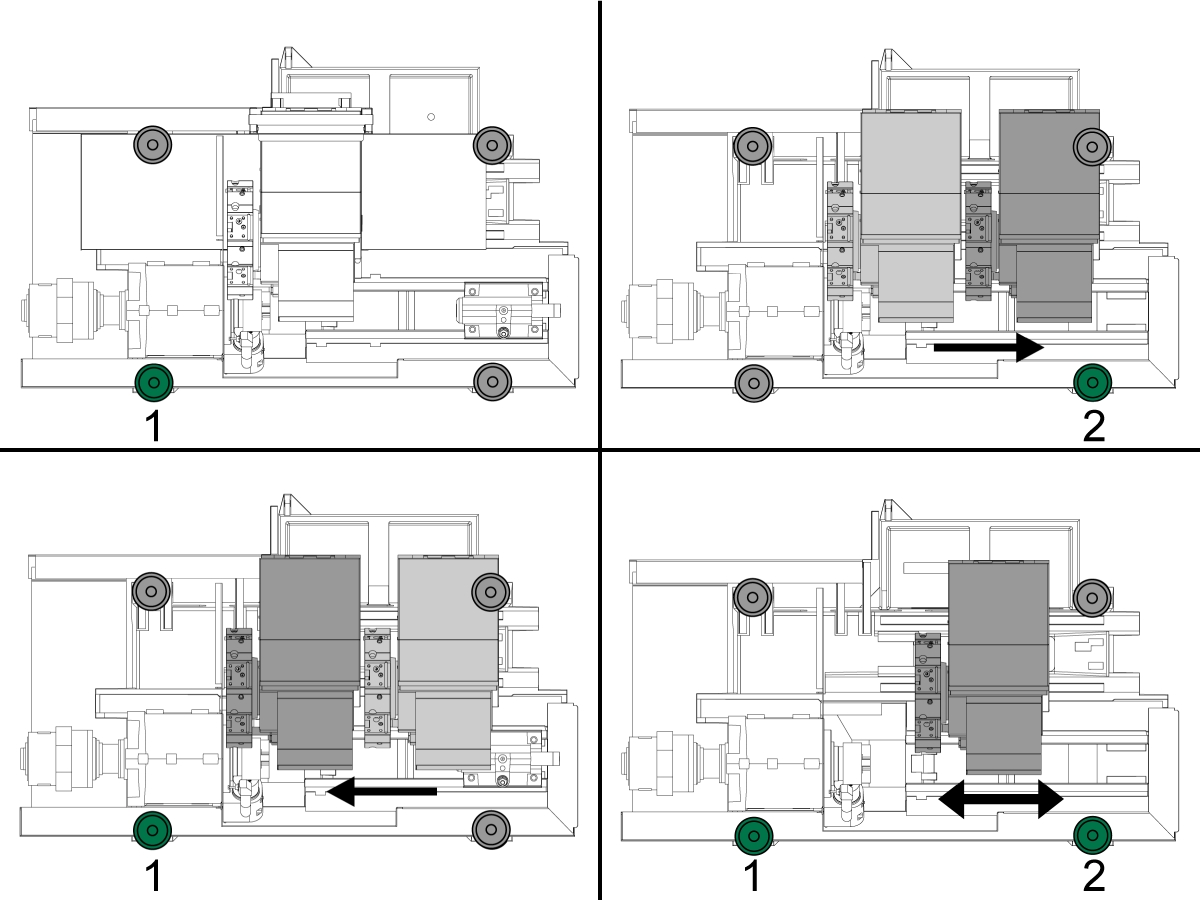
  • Use F2 to extend and retract the Parts Catcher
  • Verify PCAT extends and returns while door is open
  • Next verify PCAT extends and returns while door is closed
  • Verify enclosure PCAT door opens fully with PCAT

 NOTE: If PCAT hits the door while returning notify Haas

20

Wi-Fi Camera Installation

  • If your machine includes the Wi-Fi Camera option perform the installation procedure

For a guide on how to perform the Wi-Fi Camera installation procedure please see:

Wi-Fi Camera Installation

21

Mini Conveyor Installation

  • If your machine includes the Mini Conveyor option perform the installation procedure

For a guide on how to perform the Mini Conveyor installation procedure please see:

Mini Conveyor Installation

22

Updated

Test C-Axis

Test C-Axis Engagement:

  • Press [C] then [HANDLE JOG] to orient and engage the C Axis
  • Then turn handle jog wheel to rotate the C axis

Test C Axis Brake:

  • To engage spindle brake you enter M14 in MDI then press [CYCLE START] with the door closed. 
  • Open the door and check that the chuck is locked into position
  • To disengage the brake you enter M15 in MDI. Close the door and then press [CYCLE START]

Lathe Maintenance Schedule

Keep your Haas machines running at peak performance while avoiding unplanned downtime. A maintenance program allows you to manage your schedule rather than getting caught with untimely surprises. Please see the link below for recommended maintenance intervals.

Lathe Maintenance Schedule

3.2 Anchoring

Recently Updated

Anchoring Instructions (Drop-In Expansion)


AD0456

Introduction

This procedure will show you how to install the Drop-In expansion style anchors to a Haas CNC.

NOTE: If the machine was built before Jan 2020 or is a VS or HDC series machine, please refer to the epoxy style anchoring procedure (AD0212) click here.

For instructions on how to anchor the various components for the Haas Cobot kits refer to the Haas Cobot - Anchoring instruction page.

This procedure applies to the following Service Kits:

Mill
Model Part Number
DC-1 93-1001018
DC-2 93-1001019
DC-4 93-1001211
DT/DM 93-1000601
EC-400/VC-400 93-1000567
EC-500/50 93-1001145
EC-1600/UMC-1600H 93-1000535
EC-630 93-1000856
GM-1 93-1001115
GM-1XT 93-1001235
GM-2-3AX 93-1000574
GM-2-5AX 93-1000542
GR-510 93-1000574
GR-712 93-1000574
MM/SMM Reboot 93-1001016
UMC-350HD 93-1000780
UMC-400/SS 93-1001224
UMC-500/SS 93-1000379
UMC-750/SS (NON REBOOT) 93-1000380
UMC-750/SS (REBOOT)  93-1000381
UMC-1000/SS (REBOOT) 93-1000381
UMC-1250/SS 93-1000644
UMC-1500-DUO/SS-DUO 93-1000871
VF-1/2, VF-2TR, VF-2SS 93-1000534
VF-2YT, VF-2SSYT, VM-2 93-1000549
 VF-3/3SS, VF-4/4SS 93-1000550
VF-3YT/3YTSS, VF-3YT/50, VF-5/40, VF-5/40TR, VF-5/40XT, VF-5SS, VF-5/50, VF-5/50TR, VF-5/50XT, VM-3, VMT-750 93-1000548
VF-6/40, VF-6SS, VF-6/40TR, VF-7/40, VF-6/50, VF-6/50TR, VF-7/50, VM-6 (Base with 8 leveling feet) Built between January 2020 and September 6th 2023 93-1000547
VF-8/40, VF-9/40, VF-8/50, VF-9/50, VR-8, VR-9 (Base with 8 leveling feet) Built between January 2020 and October 6th 2023 93-1000546
VF-10/40, VF-12/40, VF-10/50, VF-12/50 (Base with 8 leveling feet) 93-1000545
VF-11/40, VF-11/50, VR-11 (Base with 8 leveling feet) 93-1000544
VF-6/6TR/6SS/7/10/12 both 40T & 50T and VM-6 (Base with 6 leveling feet) Built September 7th 2023 and later 93-1000999
VF-8/9/11/14 both 40T & 50T and VR-8/9/11/14 (Base with 6 leveling feet) Built October 7th 2023 and later 93-1001000
VS-3 93-1000870
Pallet Pool/RPL
UMC-500PP 93-3526
UMC-750PP (V1) See Note Below
UMC-750PP (V2) 93-3527
UMC-1000PP (V2) 93-3527
UMC-1250PP See Note Below
EC-400PP 93-3525
VF-2YTPP See Note Below
VF-4 PP See Note Below
Robot Pallet Loader See Note Below
Note: There is currently no 93-xxxx service kit for the following models:
  • (30-12644B + 96-0316A) UMC-750 Pallet Pool (V1)
  • (30-12644B + 96-0364) VF-2YT Pallet Pool
  • (30-12644B + 96-0383) VF-4 Pallet Pool
  • (30-12644B + 96-0388) Robot Pallet Loader

You would need to order individual parts,  please contact your Local Haas Factory Outlet for availability.

Lathe
Model Part Number
ST-10/10Y/15/15Y 93-1000378
ST-10L/10LY/15L/15LY 93-1000855
ST-20/25/20Y/25Y 93-1000552
ST-20L/20LY/25L/25LY/28L/28LY 93-1001005
ST-30/35/30Y/35Y, DS-30Y (REBOOT ONLY) 93-1000541
ST-30L/35L/LY 93-1001079
ST-40 93-1000540
ST-40/40Y (Reboot) 93-1000819
ST-40L 93-1000539
ST-40L (Reboot) 93-1000820
ST-40S/45S/SY  93-1001012
ST-50/55 93-1000538
TL-1 93-1000537
TL-2 93-1000536
Extended Liner System
ST-10/10L/10Y/10LY 93-1000844
93-1000845

Tools required:

  • Paint markers
  • Painters Tape
  • Pipe cleaner brush
  • 5 lb. Sledge Hammer
  • SDS Plus Hammer Drill
    Note:  The SDS-Plus Hammer drill should be rated for 1" bit.

Video Instructions

Anchor Template Placement

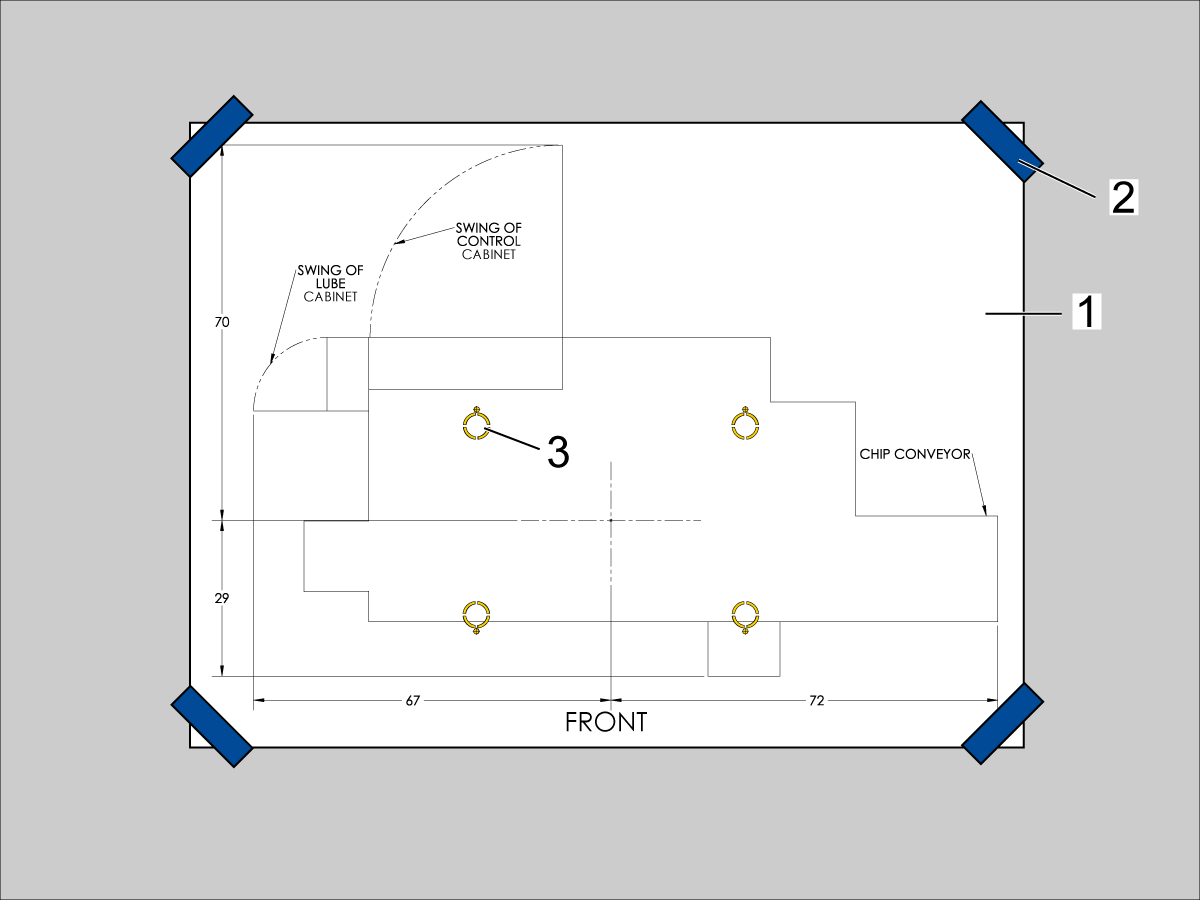
  1. Unroll machine anchoring template [1].
  2. Use centerlines and provided reference sheet dimensions, measure distances to nearest allowable obstructions.
  3. Once position is established, taped the corners [2] of the anchoring template to the foundation.  Keep the template as flat as possible.
  4. Spray paint the foundation in the cutout areas of the template [3].
  5. Let the paint dry for 5-10 minutes.
  6. Remove the anchoring template [1].

Drill Holes and Set the Anchors

Use the provided SDS-Plus Style drill for the following steps:

  • Drill specified number of 5/8" holes at depth 2.00 - 2.25" each.  
    • Drill bit should be perpendicular to foundation.
  • Clean the holes with pipe cleaner.
  • Use compressed air and a vacuum to clear holes.
  • Repeat for the number of leveling pads.
  • Cover the holes with tape to protect from unwanted debris while the other holes are drilled.
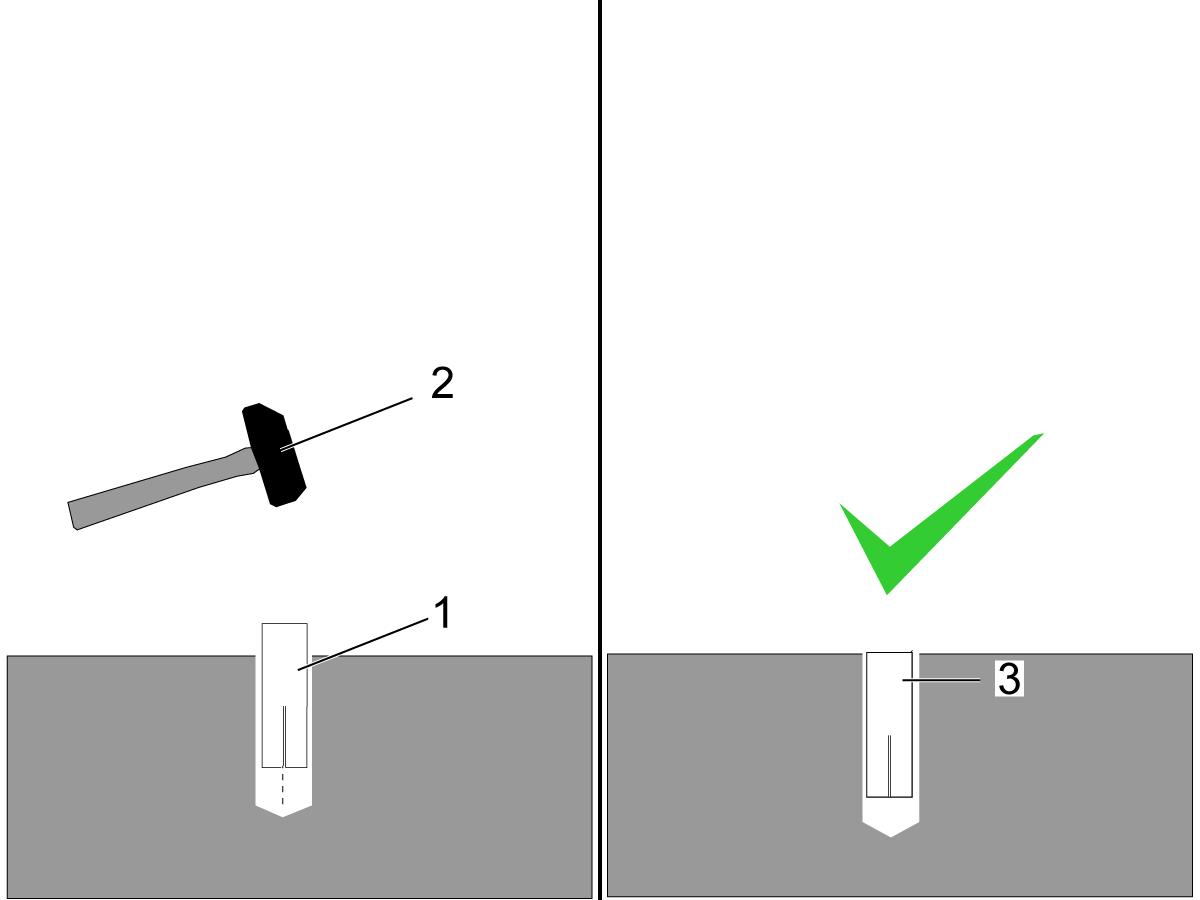
  • Using the hammer [2] set the drop-in anchor [1] flush with the concrete [3].

    Note:  Do not use the set tool to drive the anchor.  
  • Use the provided setting tool [1] and hammer [2], to seat the anchor in the concrete.
  • Make sure that the anchors are seated flush [3], use the setting tool as a gauge.
    Note:  Be careful not to overdrive the anchor [4] to far inside the hole.

Machine Placement

  1. Once the anchors are set, place the leveling pads on the spray painted cross-hairs.
  2. Place the machine on the leveling pads.
  3. Set the machine height.
  4. Level the machine
  5. Tighten down the machine locknuts.

Anchoring Strap Installation

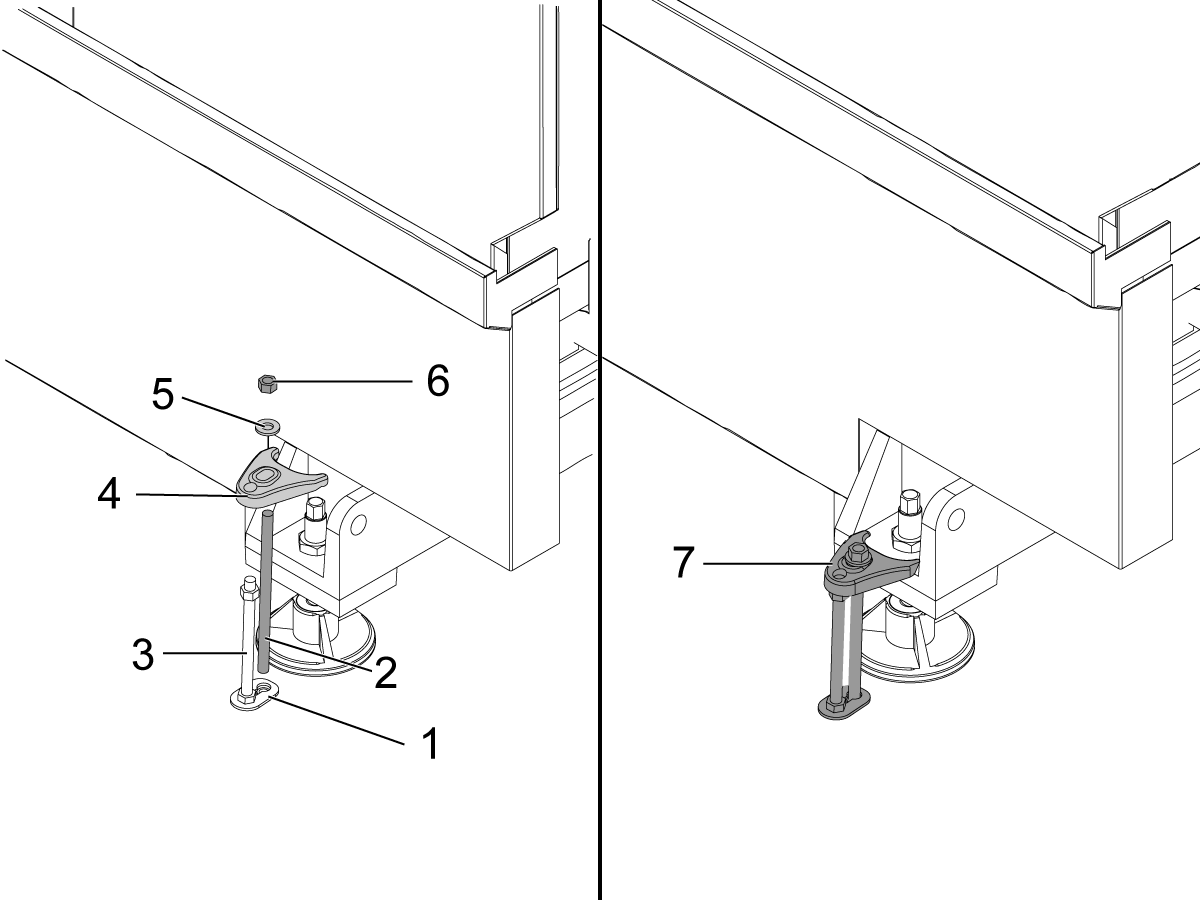
  1. Place the thrust plate flush [1] with the foundation.
  2. Thread stud [2] into the anchor location using two lock nuts.
  3. Place 1/2-13 hex nut on the 1/2-13 hex bolt [3] on top of the thrust plate.
  4. Place the anchoring strap [4].
  5. Place the washer [5] on the threaded rod.
  6. Thread the 1/2-13 hex nut [6] into the threaded rod.
  7. Be sure the anchoring strap [7] remains parallel to the clamped casting surface.
  8. Torque 1/2-13 hex nut to 25ft-lbs (34 nm).

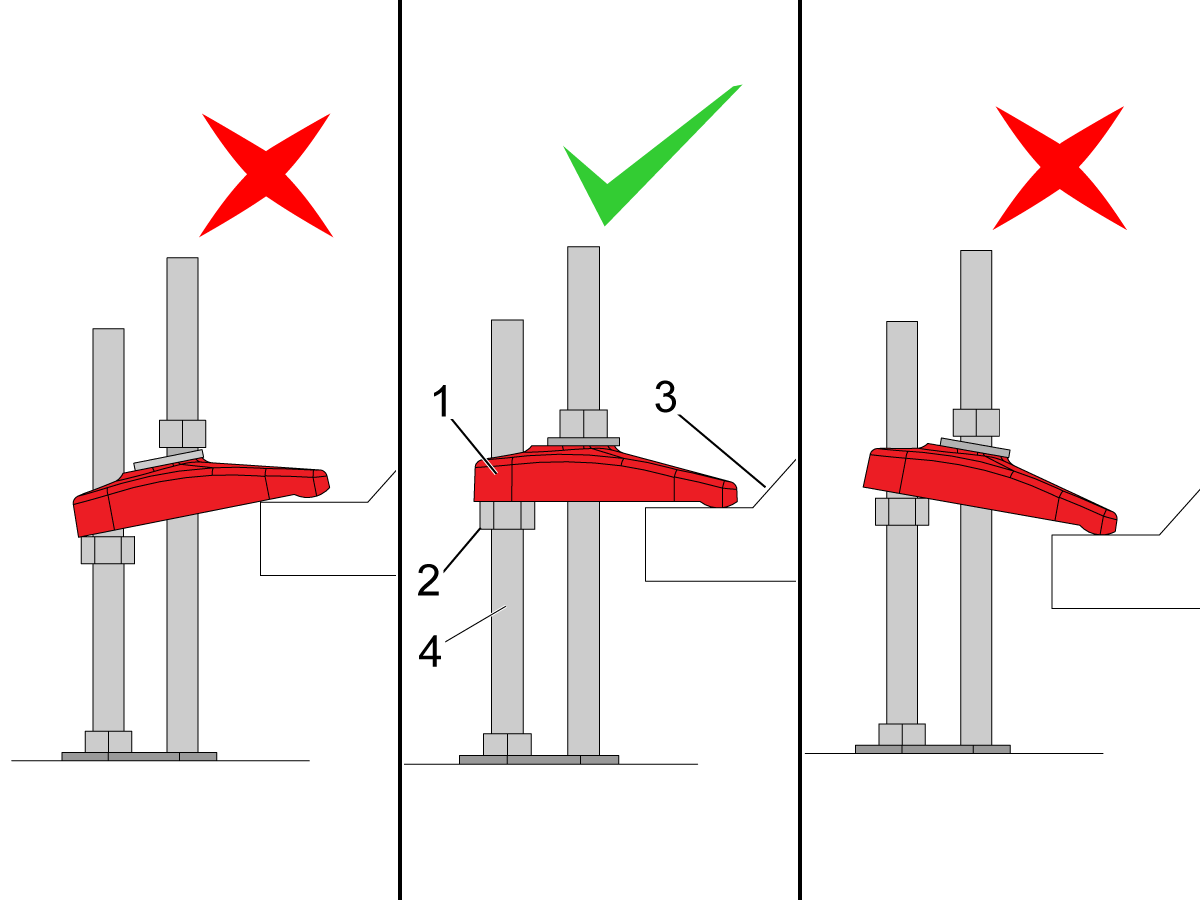
Make sure that the anchor strap [1] is level on the hex nut [2] and the machine base [3].

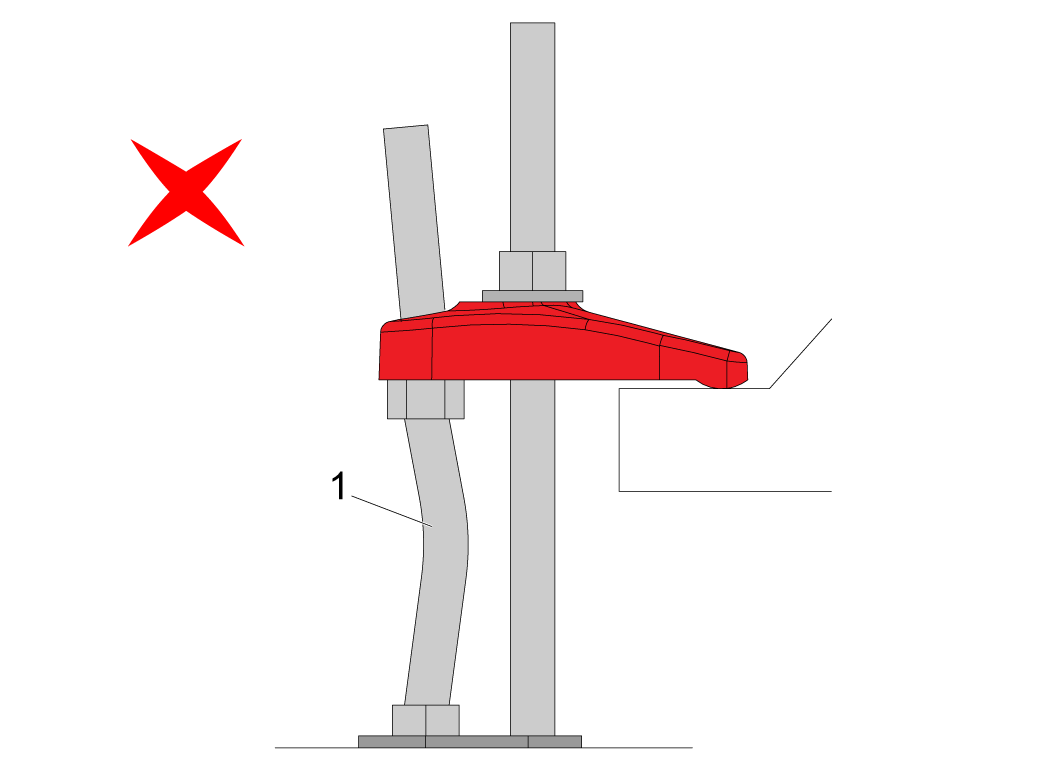
NOTE: Make sure the threaded stud [4] is perpendicular to the floor and not bent. 

Make sure the threaded stud welded to the base is not bent as shown in the image [1].

If this occurs make sure that the anchor holes are drilled straight and re-drill them if necessary. 

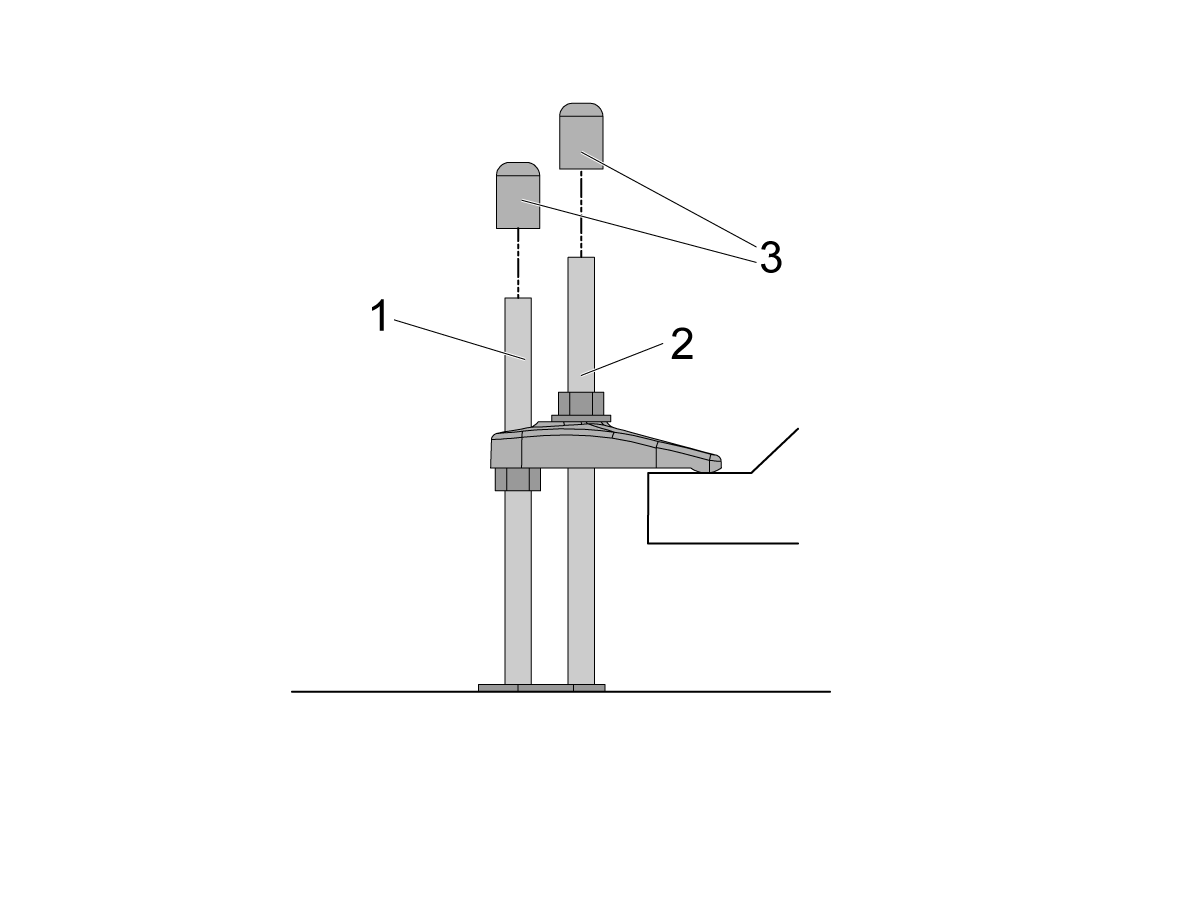
If there is clearance on the anchor [1] and stud [2] place the end caps [3] on the ends as shown in the image. Place these caps on all all anchors.

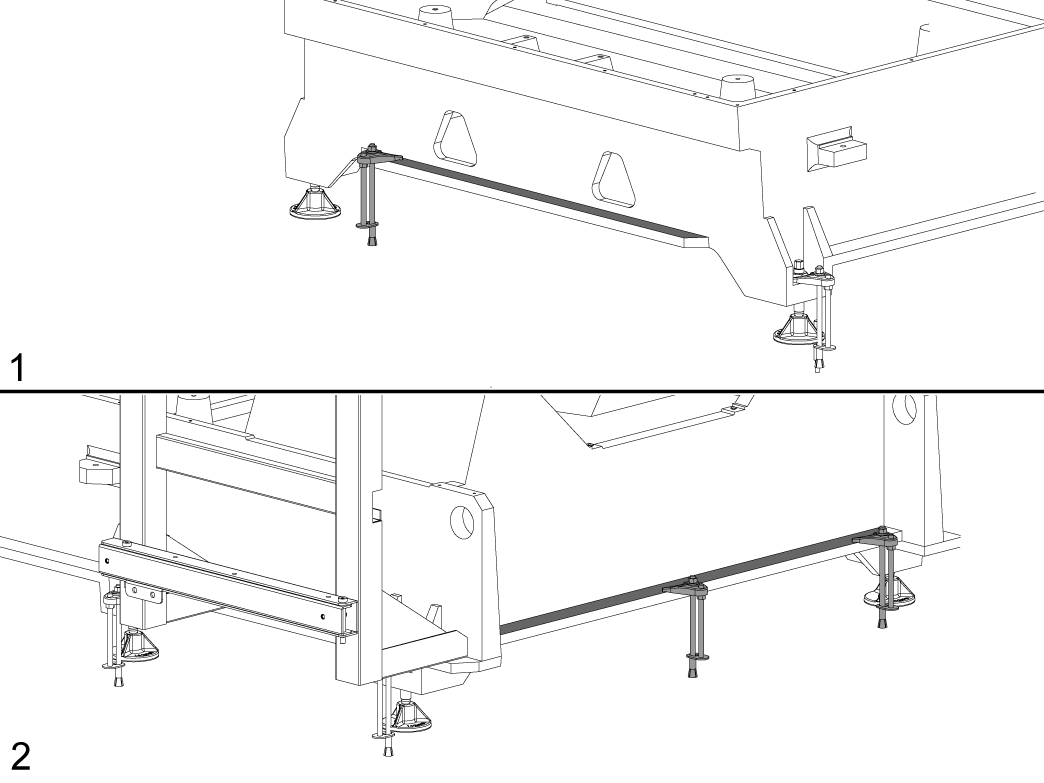
NOTE: The UMC-1250/SS does not have the anchoring fingers on the base foot. The indicated holes on the anchoring layout will have them anchoring down the base flange as shown in the image. Image [1] is the front of the machine, while image [2] is the back of the machine. 

Recently Viewed Items

You Have No Recently Viewed Items Yet

Feedback
Haas Logo

Haas Delivered Price

This price includes shipping cost, export and import duties, insurance, and any other expenses incurred during shipping to a location in France agreed with you as a buyer. No other mandatory costs can be added to the delivery of a Haas CNC Product.

KEEP UP WITH THE LATEST HAAS TIPS AND TECHNOLOGY...

Sign up now!   

HAAS TOOLING ACCEPTS THE FOLLOWING:

  • Service & Support
  • Owners
  • Request Service
  • Operator Manuals
  • Haas Parts
  • Rotary Repair Request
  • Pre-Install Guides
  • Shopping Tools
  • Build & Price a New Haas
  • Available Inventory
  • The Haas Price List
  • CNCA Financing
  • About Haas
  • Accessibility Statement
  • DNSH Statement
  • Export Compliance
  • Careers
  • Certifications & Safety
  • Contact Us
  • History
  • Terms & Conditions
  • Haas Tooling Terms & Conditions
  • Privacy
  • Warranty
  • Haas Community
  • Haas Certification Program
  • Haas Motorsports
  • Gene Haas Foundation
  • Haas Technical Education Community
  • Events
  • Join the Conversation
  • Facebook
  • X
  • Flickr
  • YouTube
  • LinkedIn
  • Instagram
  • TikTok
© 2026 Haas Automation, Inc – CNC Machine Tools
This site is protected by reCAPTCHA and the Google Privacy Policy and Terms of Service apply.

2800 Sturgis Rd., Oxnard, CA 93030
Toll Free: (888) 817-4446 / Fax: 805-278-8554