My Haas Welcome,
!
Haas Tooling MyHaas/HaasConnect Sign In Register Haas Tooling MyHaas/HaasConnect Sign Out Welcome, My Machines Latest Activity My Quotes My Account My Users Sign Out
Find Your Distributor
  1. Select Language
    1. English
    2. Deutsch
    3. Español - España
    4. Español - México
    5. Français
    6. Italiano
    7. Português
    8. Český
    9. Dansk
    10. Nederlands
    11. Magyar
    12. Polski
    13. Svenska
    14. Türkçe
    15. 中文
    16. Suomi
    17. Norsk
    18. الإنجليزية
    19. български
    20. Hrvatski
    21. Ελληνικά
    22. Română
    23. Slovenský
    24. Slovenščina
    25. 한국어
    26. 日本語
    27. Українська
  • machines Main Menu
    • Vertical Mills
      Vertical Mills
      Vertical Mills View All
      • Vertical Mills
      • VF Series
      • Universal Machines
      • VR Series
      • VP-5 Prismatic
      • Pallet-Changing VMCs
      • Mini Mills
      • Mold Machines
      • High-Speed Drill Centers
      • Drill/Tap/ Mill Series
      • Toolroom Mills
      • Pocket Mill
      • Compact Mills
      • Gantry Series
      • SR Sheet Routers
      • Extra-Large VMC
      • Double-Column Mills
      • 3+2 Positioning Machines
    • Multi-Axis Solutions
      Multi-Axis Solutions
      Multi-Axis Solutions View All
      • Multi-Axis Solutions
      • Y-Axis Lathes
      • 5-Axis Mills
    • Lathes
      Lathes
      Lathes View All
      • Lathes
      • ST Series
      • Dual-Spindle
      • Box Way Series
      • Toolroom Lathes
      • Chucker Lathe
      • Haas Bar Feeders
    • Horizontal Mills
      Horizontal Mills
      Horizontal Mills View All
      • Horizontal Mills
      • 50-Taper
      • 40-Taper
    • Rotaries & Indexers
      Rotaries & Indexers
      Rotaries & Indexers View All
      • Rotaries & Indexers
      • Rotary Tables
      • Indexers
      • 5-Axis Rotaries
      • Extra-Large Rotaries
    • Special Series
      Special Series
      Special Series View All
      • Special Series
      • EU_Series_Redirect
    • Automation Systems
      Automation Systems
      Automation Systems View All
      • Automation Systems
      • Mill Automation
      • Lathe Automation
      • Automatic Parts Loaders
      • Automation Models
    • Desktop Machines
      Desktop Machines
      Desktop Machines View All
      • Desktop Machines
      • Desktop Mill
      • Desktop Lathe
      • Control Simulator, Standard
      • Control Simulator, Premium
    • Shop Equipment
      Shop Equipment
      Shop Equipment View All
      • Shop Equipment
      • Knee Mill
      • Haas Manual Lathes
      • Haas Saws
    • Fabrication Machines
      Fabrication Machines
      Fabrication Machines View All
      • Fabrication Machines
      • Laser Cutting Machines
      • CNC Press Brakes
    • QUICK LINKS Special Series  Special Series 
      EU SERIES EU SERIES BUILD & PRICE | PRICE LIST BUILD & PRICE | PRICE LIST In-Stock Machines In-Stock Machines WHAT’S NEW WHAT’S NEW YOUR FIRST CNC YOUR FIRST CNC
      SHOPPING TOOLS
      • Build & Price a Haas
      • Price List
      • Available Inventory
      • CNCA Financing
      WANT TO TALK TO SOMEONE?

      A Haas Factory Outlet (HFO) can answer your questions, and walk you through your best options.

      CONTACT YOUR DISTRIBUTOR >
  • Options Main Menu
    • The Haas Control Value Option Packages
      Value Option Packages
      Value Option Packages View All
      • Value Option Packages
    • Product Image Spindles
      Spindles
      Spindles View All
      • Spindles
    • Product Image Tool Changers
      Tool Changers
      Tool Changers View All
      • Tool Changers
    • Product Image 4th- | 5th-Axis
      4th- | 5th-Axis
      4th- | 5th-Axis View All
      • 4th- | 5th-Axis
    • Product Image Turrets & Live Tooling
      Turrets & Live Tooling
      Turrets & Live Tooling View All
      • Turrets & Live Tooling
    • Product Image Probing
      Probing
      Probing View All
      • Probing
    • Haas Chip & Coolant Management Chip & Coolant Management
      Chip & Coolant Management
      Chip & Coolant Management View All
      • Chip & Coolant Management
    • The Haas Control The Haas Control
      The Haas Control
      The Haas Control View All
      • The Haas Control
    • Product Image Product Options
      Product Options
      Product Options View All
      • Product Options
    • Product Image Tooling & Fixturing
      Tooling & Fixturing
      Tooling & Fixturing View All
      • Tooling & Fixturing
    • Product Image Workholding
      Workholding
      Workholding View All
      • Workholding
    • Product Image 5-Axis Solutions
      5-Axis Solutions
      5-Axis Solutions View All
      • 5-Axis Solutions
      • 5 Easy Steps to 5-Axis
    • QUICK LINKS Special Series  Special Series 
      EU SERIES EU SERIES BUILD & PRICE | PRICE LIST BUILD & PRICE | PRICE LIST In-Stock Machines In-Stock Machines WHAT’S NEW WHAT’S NEW YOUR FIRST CNC YOUR FIRST CNC
      SHOPPING TOOLS
      • Build & Price a Haas
      • Price List
      • Available Inventory
      • CNCA Financing
      WANT TO TALK TO SOMEONE?

      A Haas Factory Outlet (HFO) can answer your questions, and walk you through your best options.

      CONTACT YOUR DISTRIBUTOR >
  • Why Haas Main Menu
      Discover the Haas Difference
    • Why Haas
    • MyHaas
    • Education Community
    • Industry 4.0
    • Haas Certification
    • Customer Testimonials
  • Service Main Menu
      Welcome to Haas Service
      SERVICE HOME Operator’s Manuals How-To Procedures Troubleshooting Guides Preventive Maintenance Haas Parts Haas Tooling Videos
  • Videos Main Menu
  • Main Menu
    • View All
    • View All
    • View All
    • View All
      • HTEC Curriculum Support
    • View All
      • Haas 10 kg Cobot Package
      • Cobot Kits
      • DC-1 Drill Center
      • CNC Sales News
      • Do More With Your Haas
    • View All
    • View All
      • contact-us-test
      • 4 - AUTOMATION SYSTEMS
      • Carousel-V2
      • expert test
      • Demo_Day_Trident-test
      • Link Test
      • image-sale-tag-test
      • article-list-test
      • Haas 25 kg Robot Package
    • View All
      • Choose Options
    • View All
    • View All
    • View All
    • View All
    • View All
      • calc-test
    • View All
    • QUICK LINKS Special Series  Special Series 
      EU SERIES EU SERIES BUILD & PRICE | PRICE LIST BUILD & PRICE | PRICE LIST In-Stock Machines In-Stock Machines WHAT’S NEW WHAT’S NEW YOUR FIRST CNC YOUR FIRST CNC
      SHOPPING TOOLS
      • Build & Price a Haas
      • Price List
      • Available Inventory
      • CNCA Financing
      WANT TO TALK TO SOMEONE?

      A Haas Factory Outlet (HFO) can answer your questions, and walk you through your best options.

      CONTACT YOUR DISTRIBUTOR >
  • Haas Tooling Main Menu
  • Haas Service Parts Main Menu

My Haas Welcome,
!
Haas Tooling MyHaas/HaasConnect Sign In Register Haas Tooling MyHaas/HaasConnect Sign Out Welcome, My Machines Latest Activity My Quotes My Account My Users Sign Out
Find Your Distributor
  1. Select Language
    1. English
    2. Deutsch
    3. Español - España
    4. Español - México
    5. Français
    6. Italiano
    7. Português
    8. Český
    9. Dansk
    10. Nederlands
    11. Magyar
    12. Polski
    13. Svenska
    14. Türkçe
    15. 中文
    16. Suomi
    17. Norsk
    18. الإنجليزية
    19. български
    20. Hrvatski
    21. Ελληνικά
    22. Română
    23. Slovenský
    24. Slovenščina
    25. 한국어
    26. 日本語
    27. Українська
×

Search Results

Web Pages

Images

    • <
    • 1
    • >

7 - BF - Programming

Haas Bar Feeder - Operator's Manual Supplement


  • 0 - Haas Bar Feeder - Table of Contents
  • 1 - BF - Introduction
  • 2 - BF - Legal Information
  • 3 - BF - Safety
  • 4 - BF - Installation
  • 5 - BF - Control Icons
  • 6 - BF - Operation
  • 7 - BF - Programming
  • 8 - BF - G-Codes
  • 9 - BF - Settings
  • 10 - BF - Maintenance

Go To :

  • 7.1 Program Examples
  • 7.2 Cutoff Subprogram
  • 7.3 Cutoff in Program
  • 7.4 Double Push
  • 7.5 Q13 Facing Subprogram
  • 7.6 Bar Feeder - Counter
  • 7.7 Bar Feeder - Macro Variables

7.1 Program Examples

Program Examples - Introduction

This section has four program examples.

Cutoff Subprogram: Calls a subprogram in the G105 command to cut off the part. This programming style is most appropriate for solid stock where the cutoff program must cut to the centerline.

Cutoff in Program: Includes the cutoff in the part program. This programming style is most appropriate when the finished part has a hole through the center, and the cutoff program does not have to cut to the centerline.

Double Push: Describes a double push. This programming style is most appropriate to machine a length of bar shorter than the full part length, and then push to the full part length.

Q13 Facing Subprogram: Describes the use of Q13 to specify a subprogram to run at the beginning of each new bar. This programming style is most appropriate when you need a multiple-pass facing operation to clean the bar before machining. Q13 is the only Q-Code that works with the Next Generation Control.

Caution: The sample programs in this manual have been tested for accuracy, but they are for illustrative purposes only. The programs do not define tools, offsets, or materials. They do not describe workholding or other fixturing. If you choose to run a sample program on your machine, do so in GRAPHICS mode. Always follow safe machining practices when you run an unfamiliar program.

7.2 Cutoff Subprogram

Cutoff Subprogram

 Caution: The sample programs in this manual have been tested for accuracy, but they are for illustrative purposes only. The programs do not define tools, offsets, or materials. They do not describe workholding or other fixturing. If you choose to run a sample program on your machine, do so in GRAPHICS mode. Always follow safe machining practices when you run an unfamiliar program.

This example shows the preferred programming method with solid stock material, where the cutoff operation must cut to the centerline.

The material is 2" (51mm) diameter solid stock and the finished part is 1" (25mm) long. The cutoff tool is 0.125" wide. The spindle/tool clearance is 0.875". The amount of stock to remove from the face is 0.025".

The program uses these Bar Feeder variable values:

Variable Number / NGC Letter Description Value
#3100 (D) Part Length + Cutoff Allowance + Facing Allowance 1.15
#3101 (F) Initial Push Length 2.025
#3102 (G) Minimum Clamping Length 1.0

%
O00023 (PART PROGRAM)
G105 P24 (CALL CUTOFF SUB PROGRAM THEN BAR FEED)
T303 (FACE & TURN)
G50 S1500
G96 S500 M03
G00 G54 X2.1 Z0 M08
G01 X-0.05 F0.005
G00 X1.95 Z.05
G01 Z-1.0 F0.01
X2.1
G53 G00 X0
G53 Z0
G105 P24 (CALL CUTOFF SUB PROGRAM THEN BAR FEED)
/M99
M30
%

%
O00024 (CUT-OFF SUB PROGRAM)
T404
G50 S1500
G96 S500 M03
G00 X2.1 Z0.1 M08
Z-1.125 (1" PART LENGTH PLUS THE TOOL WIDTH)
G01 X-0.05 F0.005
G00 X2.1
G53 X0
G53 Z0
M99
%

Command G105 in MDI mode to load a bar and push it to the initial push length. In this example, the initial push length includes the 0.875" spindle/tool clearance, the 0.125" width of the cutoff tool, and a 0.025" facing allowance.

This program starts with a call to the cutoff subprogram. The effect of this is different depending on whether this is a new bar or if it is the next program loop on a bar:

  • If this is a new bar, the cutoff subprogram faces and cleans the bar end at the initial push length (#3101(F)), and then the Bar Feeder pushes out the part length plus allowances (#3100(D)).
  • When the subprogram call repeats on a bar, the cutoff subprogram cuts off finished parts and leaves a clean bar end, and then the Bar Feeder pushes out the part length plus allowances (#3100(D)). 

Note: When you write a bar feed program with a cutoff routine and then a bar feed command, or with a bar feed command that includes a Pxxxxx cutoff subprogram call, it is safest and most consistent to start the program with the bar feed command. This practice makes sure that a fresh piece of material, with a faced surface, in a consistent position, is always available for the rest of the operation.

Note: The main program has a block-deleted M99 command in the second-to-last line. This lets you turn on block delete if you want the program to run only one time.

Dimensions are not to scale.

[1] Shows the Bar After the Initial Push at MDI Setup.

[2] Shows the Bar During Subsequent Feeds.

[A] Reference Point, Variables as Defined Above.

7.3 CUTOFF IN PROGRAM

Cutoff in Program

 Caution: The sample programs in this manual have been tested for accuracy, but they are for illustrative purposes only. The programs do not define tools, offsets, or materials. They do not describe workholding or other fixturing. If you choose to run a sample program on your machine, do so in GRAPHICS mode. Always follow safe machining practices when you run an unfamiliar program.

This example shows the preferred programming method when the cutoff operation does not have to cut to the centerline, as when the finished part has a hole through the center. Unlike the first program example, which uses the same subprogram to both face a new bar and cut off finished parts, this program includes a facing operation and a separate cutoff operation for finished parts. The facing operation cuts to the workpiece centerline. To save machining time, the cutoff operation cuts only as far as the finished part’s inner diameter.

The material is 2" (51 mm) diameter solid stock and the finished part is 1" (25 mm) long. The cutoff tool is 0.125" wide. The spindle/tool clearance is 0.875". The amount of stock to remove from the face is 0.025".

The program uses these Bar Feeder variable values:

Variable Number / NGC Letter Description Value
#3100 (D) Part Length + Cutoff Allowance + Facing Allowance 1.15
#3101 (F) Initial Push Length 2.025
#3102 (G) Minimum Clamping Length 1.0

%
O00020 (PART PROGRAM);
T303 (FACE & TURN);
G50 S1500;
G96 S500 M03;
G00 G54 X2.1 Z0 M08;
G01 X-0.05 F0.005;
G00 X1.95 Z.05;
G01 Z-1.0 F0.01;
X2.1;
G53 G00 X0;
G53 Z0;
T404 (CUT OFF OPERATION);
G50 S1500;
G96 S500 M03;
G00 X2.1 Z0.1 M08;
Z-1.125 (1" PART LENGTH PLUS THE TOOL WIDTH);
G01 X-0.05 F0.005;
G00 X2.1;
G53 X0;
G53 Z0;
G105 (BAR FEED);
/M99;
M30;
%

Command G105 in MDI mode to load a bar and push it to the initial push length. In this example, the initial push length includes the 1" finished part length, 0.875" spindle/tool clearance, the 0.125" width of the cutoff tool, and a 0.025" facing allowance.

This program starts with the face and turn operation, then the cutoff operation, and the bar feed command at the end.

Note: The program has a block-deleted M99 command in the second-to-last line. This lets you turn on block delete if you want the program to run only one time.

7.4 Double Push

Double Push

 Caution: The sample programs in this manual have been tested for accuracy, but they are for illustrative purposes only. The programs do not define tools, offsets, or materials. They do not describe workholding or other fixturing. If you choose to run a sample program on your machine, do so in GRAPHICS mode. Always follow safe machining practices when you run an unfamiliar program.

This example demonstrates a double push on the workpiece. The program contains G105 commands. The first G105 uses the variables values set on the Bar Feeder current commands page. The second G105 uses J and K values to override the variable values.

Note: A G105 with a J code will not increment the counter. The J code is intended for double push operation to make a long part. This is the preferred programming method when, for example, you need the rigidity of a short bar for part of your operation, and then to machine the rest of the longer finished part.

The material is 2" (51 mm) diameter solid stock and the finished part is 4" (100 mm) long. The cutoff tool is 0.125" wide. The spindle/tool clearance is 0.875". The amount of stock to remove from the face is 0.025".

The program uses these Bar Feeder variable values. These values apply to the first G105 command, given without address codes:

Variable Number / NGC Letter Description Value
#3100 (D) Part Length + Cutoff Allowance + Facing Allowance 1.15
#3101 (F) Initial Push Length 2.025
#3102 (G) Minimum Clamping Length 1.0

In the second G105 command, the program uses these address codes to override the values given in the bar feeder variables:

Address Code Description Value
J Part Length + Cutoff Allowance + Facing Allowance 3.0
K Minimum Clamping Length 1.0

%
O00021 (DOUBLE PUSH WITH Bar Feeder);
T303 (FACE & TURN);
M01;
G50 S1500;
G96 S500 M03;
G00 G54 X2.1 Z0 M08;
G01 X-0.05 F0.005;
G00 X1.95 Z.05;
G01 Z-1.0 F0.01;
X2.1;
G53 G00 X0;
G53 Z0;
G105 J3.0 K1.0 (BAR FEED WITH OPTIONAL VARIABLES);
M01;
T404 (CUT OFF TOOL);
G55 (WORK OFFSET CHANGE);
G50 S1500;
G96 S500 M03;
G00 G55 X2.1 Z0.1 M08;
Z-4.125;
G01 X-0.05 F0.005;
G00 X2.1;
G53 X0;
G53 Z0;
G105 (BAR FEED USING MACRO VARIABLES);
/M99;
M30;
%

Command G105 in MDI mode to load a bar and push it to the initial push length. In this example, the initial push length includes the 2" length to machine first and a 0.025" facing allowance.

Before you run this program for the first time after you load a bar in MDI mode, move the cursor to the block after the first G105 command in the program to bypass the first push. Remember that after the initial push, the bar is already in position to start machining.

Note: The program has a block-deleted M99 command in the second-to-last line. This lets you turn on block delete if you want the program to run only one time.

7.1 Q13 Facing Subprogram

Q13 Facing Subprogram

 Caution: The sample programs in this manual have been tested for accuracy, but they are for illustrative purposes only. The programs do not define tools, offsets, or materials. They do not describe workholding or other fixturing. If you choose to run a sample program on your machine, do so in GRAPHICS mode. Always follow safe machining practices when you run an unfamiliar program.

This example uses a two-pass facing operation that runs conditionally at the beginning of each new bar. The Q13 command in the G105 line specifies program O00025 as the new bar facing subprogram.

Variable Number / NGC Letter Description Value
#3100 (D) Part Length + Cutoff Allowance + Facing Allowance 1.15
#3101 (F) Initial Push Length 2.025
#3102 (G) Minimum Clamping Length 1.0

%
O00022;
G105;
T303 (FACE & TURN);
G50 S1500;
G96 S500 M03;
G00 G54 X2.1 Z0 M08;
G01 X-0.05 F0.005;
G00 X1.95 Z.05;
G01 Z-1.0 F0.01;
X2.1;
G53 G00 X0;
G53 Z0;
M01;
(CUT-OFF PROGRAM);
T404;
G50 S1500;
G96 S500 M03;
G00 X2.1 Z0.1 M08;
Z-1.125 (1" PART LENGTH PLUS THE TOOL WIDTH);
G01 X-0.05 F0.005;
G00 X2.1;
G53 X0;
G53 Z0;
G105 Q13 P25 (RUN FACING SUBPROGRAM AT A NEW BAR);
M99;
%

%
O00025;
T303 (FACING PROGRAM FOR BEGINNING OF NEW BAR);
G50 S1500;
G96 S500 M03;
G00 G54 X2.1 Z.1 M08;
G01 X-0.05 F0.005 (1ST FACING PASS);
G00 Z.15;
X2.1;
Z.05;
G01 X-0.05 (2ND FACING PASS);
G53 X0;
G53 Z0;
M99;
%

Each time the control loads a new bar, it gives variable #3114 a value of 1. This prompts the control to run the specified subprogram at Q13. The control then changes the value of variable #3114 to 0 until it loads another new bar. While variable #3114 has a value of 0, the control does not run the facing subprogram.

7.6 Program Examples

Bar Feeder - Counter

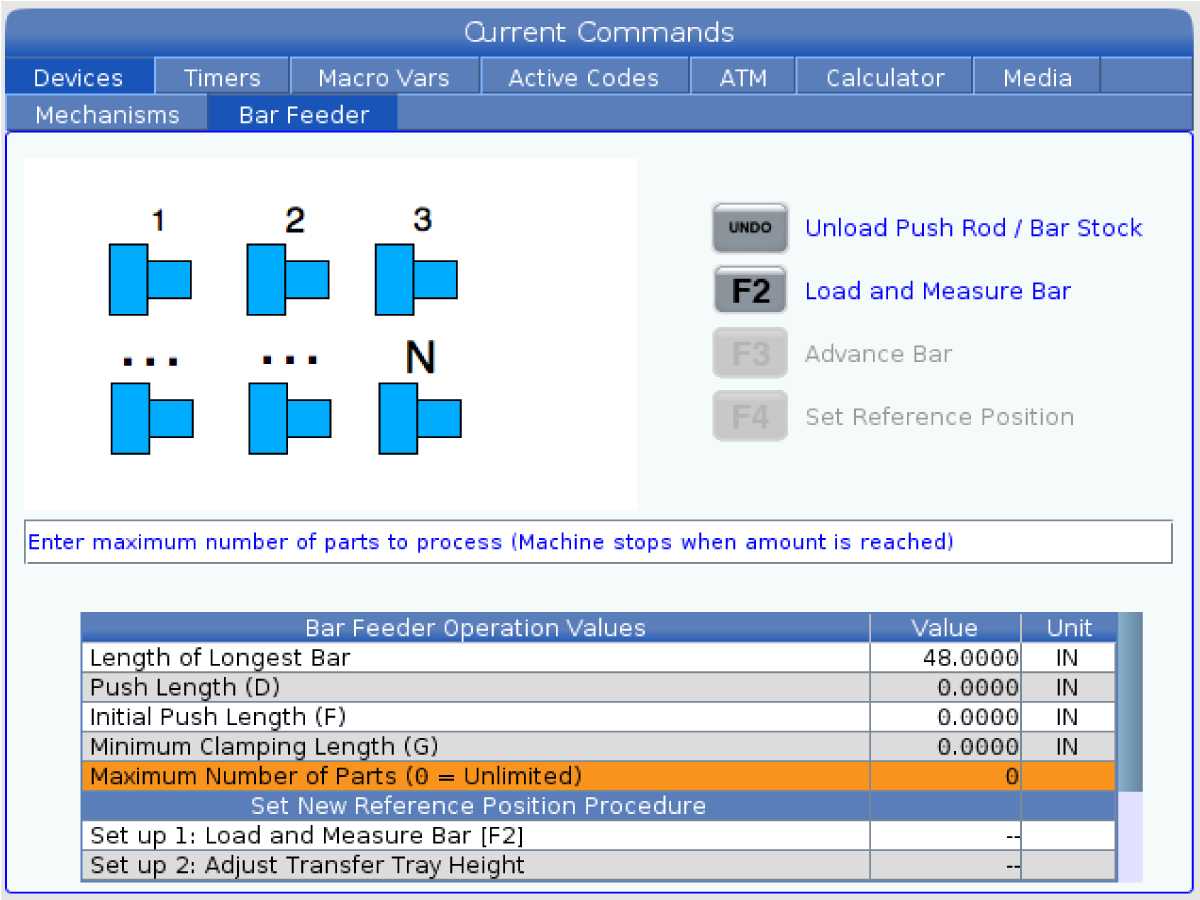
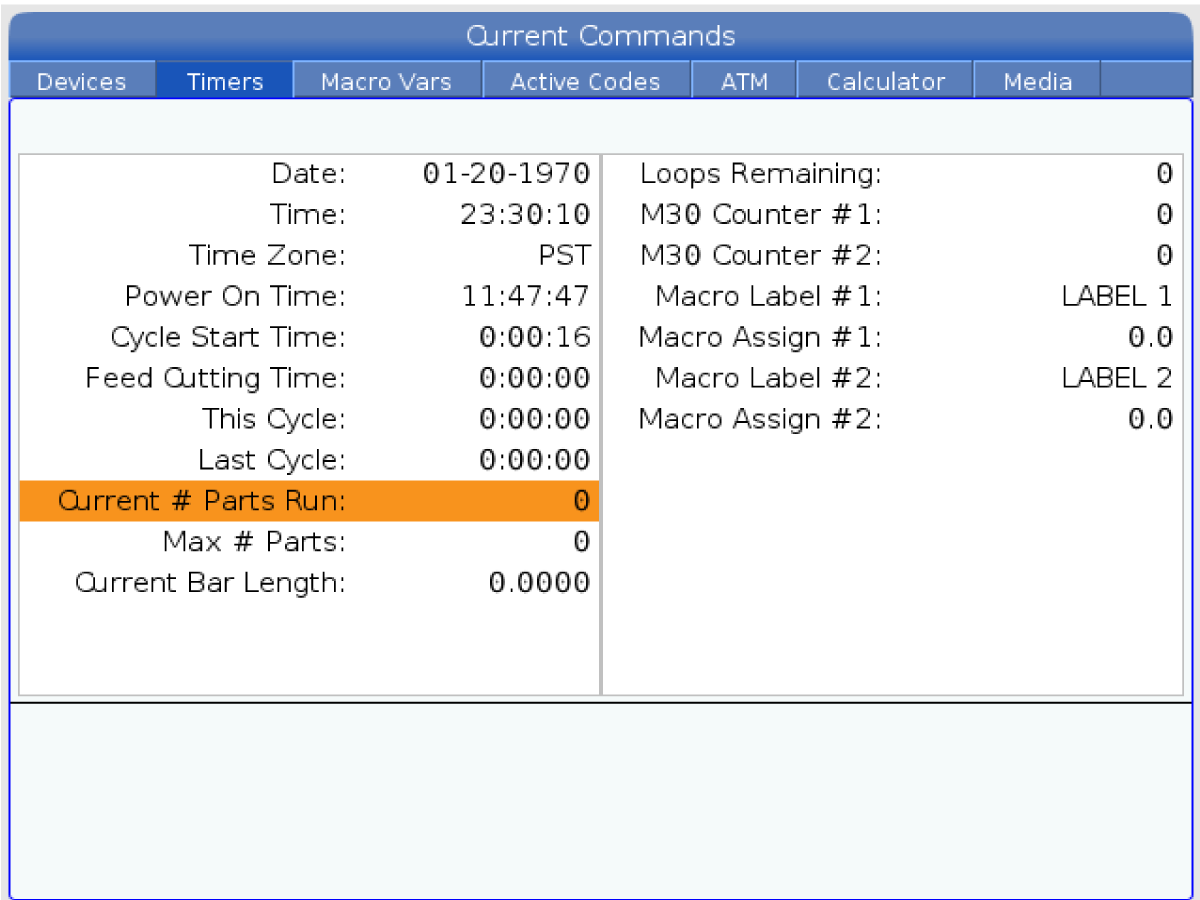
The Bar Feeder can count either the number of parts made, or the length of material run. A non-zero value set in, Maximum Number of parts determines the active counting modes. The first non-zero value stops the cycle if more than one is present.

To stop the machine after a chosen number of parts, set Maximum Number of Parts to the chosen quantity. The counter increments at each G105 command. If G105 is at the beginning of the program, the counter increments before each part starts machining. If G105 is at the end of the program, the counter increments after each part finishes machining.

Note: A G105 with a J code will not increment the counter. The J code is intended for double push operation to make a long part.

To view the counters exit the Devices tab and navigate to the Timers tab.

7.7 Bar Feeder - Macro Variables

Bar Feeder - Macro Variables

Variable Number / NGC Letter Name Description
#3100 Part Length + Cutoff Allowance + Facing Allowance Bar feed increment (Length of bar pushed out with each G105 after the bar is loaded). Finished part length + cutoff length + face cleanup allowance.
#3101 Initial Push Length Initial bar feed length (Length of bar pushed out past the reference position when loaded).
#3102 Minimum Clamping Length Minimum length for clamping (Length of bar required to support the length pushed past the collet face).
#3103 MAX # PARTS Maximum number of parts.
#3104 MAX # BARS Maximum number of bars.
#3105 MAX LENGTH TO RUN Maximum length to run.
#3106 CURRENT # PARTS RUN Part counter.
#3107 CURRENT # BARS RUN Bar counter.
#3108 CURRENT LENGTH RUN Length counter.
#3109 LENGTH OF LONGEST BAR Length of the longest bar (set to 48, if unknown). Setting the length close to the size of the bar stock allows faster measurement of shorter bars. This length must be longer than the bar stock being used.
#3110 (READ ONLY) CURRENT BAR LENGTH Current bar length measured by the machine.
#3112 (INTERNAL ONLY) REFERENCE POSITION Established using G105 Q4 Jog To Reference Position.
#3113 MIN RETRACT POSITION Adjust this to make sure the push rod retracts out of the spindle liner after each G105 push. Jog the V Axis until there is a safe gap between the end of the push rod and the spindle liner (approximately 1 inch/25 mm). Look at your V-Axis position, it will be a negative number (example: -13.0). Enter this number, as a positive value under variable #3113 (example: #3113=13.0).
#3114 NEW BAR This variable has a value of 1 if the last Bar Feeder operation loaded a new bar. It has a value of 0 if the last Bar Feeder operation did not load a new bar.
Feedback

Recently Viewed Items

You Have No Recently Viewed Items Yet

Feedback
Haas Logo

Haas Delivered Price

This price includes shipping cost, export and import duties, insurance, and any other expenses incurred during shipping to a location in France agreed with you as a buyer. No other mandatory costs can be added to the delivery of a Haas CNC Product.

KEEP UP WITH THE LATEST HAAS TIPS AND TECHNOLOGY...

Sign up now!   

HAAS TOOLING ACCEPTS THE FOLLOWING:

  • Service & Support
  • Owners
  • Request Service
  • Operator Manuals
  • Haas Parts
  • Rotary Repair Request
  • Pre-Install Guides
  • Shopping Tools
  • Build & Price a New Haas
  • Available Inventory
  • The Haas Price List
  • CNCA Financing
  • About Haas
  • Accessibility Statement
  • DNSH Statement
  • Export Compliance
  • Careers
  • Certifications & Safety
  • Contact Us
  • History
  • Terms & Conditions
  • Haas Tooling Terms & Conditions
  • Privacy
  • Warranty
  • Haas Community
  • Haas Certification Program
  • Haas Motorsports
  • Gene Haas Foundation
  • Haas Technical Education Community
  • Events
  • Join the Conversation
  • Facebook
  • X
  • Flickr
  • YouTube
  • LinkedIn
  • Instagram
  • TikTok
© 2026 Haas Automation, Inc – CNC Machine Tools

This site is protected by reCAPTCHA and the Google Privacy Policy and Terms of Service apply.

2800 Sturgis Rd., Oxnard, CA 93030
Toll Free: (888) 817-4446 / Fax: 805-278-8554