My Haas Welcome,
!
Haas Tooling MyHaas/HaasConnect Sign In Register Haas Tooling MyHaas/HaasConnect Sign Out Welcome, My Machines Latest Activity My Quotes My Account My Users Sign Out
Find Your Distributor
  1. Select Language
    1. English
    2. Deutsch
    3. Español - España
    4. Español - México
    5. Français
    6. Italiano
    7. Português
    8. Český
    9. Dansk
    10. Nederlands
    11. Magyar
    12. Polski
    13. Svenska
    14. Türkçe
    15. 中文
    16. Suomi
    17. Norsk
    18. الإنجليزية
    19. български
    20. Hrvatski
    21. Ελληνικά
    22. Română
    23. Slovenský
    24. Slovenščina
    25. 한국어
    26. 日本語
    27. Українська
  • machines Main Menu
    • Vertical Mills
      Vertical Mills
      Vertical Mills View All
      • Vertical Mills
      • VF Series
      • Universal Machines
      • VR Series
      • VP-5 Prismatic
      • Pallet-Changing VMCs
      • Mini Mills
      • Mold Machines
      • High-Speed Drill Centers
      • Drill/Tap/ Mill Series
      • Toolroom Mills
      • Pocket Mill
      • Compact Mills
      • Gantry Series
      • SR Sheet Routers
      • Extra-Large VMC
      • Double-Column Mills
      • 3+2 Positioning Machines
    • Multi-Axis Solutions
      Multi-Axis Solutions
      Multi-Axis Solutions View All
      • Multi-Axis Solutions
      • Y-Axis Lathes
      • 5-Axis Mills
    • Lathes
      Lathes
      Lathes View All
      • Lathes
      • ST Series
      • Dual-Spindle
      • Box Way Series
      • Toolroom Lathes
      • Chucker Lathe
      • Haas Bar Feeders
    • Horizontal Mills
      Horizontal Mills
      Horizontal Mills View All
      • Horizontal Mills
      • 50-Taper
      • 40-Taper
    • Rotaries & Indexers
      Rotaries & Indexers
      Rotaries & Indexers View All
      • Rotaries & Indexers
      • Rotary Tables
      • Indexers
      • 5-Axis Rotaries
      • Extra-Large Rotaries
    • Special Series
      Special Series
      Special Series View All
      • Special Series
      • EU_Series_Redirect
    • Automation Systems
      Automation Systems
      Automation Systems View All
      • Automation Systems
      • Mill Automation
      • Lathe Automation
      • Automatic Parts Loaders
      • Automation Models
    • Desktop Machines
      Desktop Machines
      Desktop Machines View All
      • Desktop Machines
      • Desktop Mill
      • Desktop Lathe
      • Control Simulator, Standard
      • Control Simulator, Premium
    • Shop Equipment
      Shop Equipment
      Shop Equipment View All
      • Shop Equipment
      • Knee Mill
      • Haas Manual Lathes
      • Haas Saws
    • Fabrication Machines
      Fabrication Machines
      Fabrication Machines View All
      • Fabrication Machines
      • Laser Cutting Machines
      • CNC Press Brakes
    • QUICK LINKS Special Series  Special Series 
      EU SERIES EU SERIES BUILD & PRICE | PRICE LIST BUILD & PRICE | PRICE LIST In-Stock Machines In-Stock Machines WHAT’S NEW WHAT’S NEW YOUR FIRST CNC YOUR FIRST CNC
      SHOPPING TOOLS
      • Build & Price a Haas
      • Price List
      • Available Inventory
      • CNCA Financing
      WANT TO TALK TO SOMEONE?

      A Haas Factory Outlet (HFO) can answer your questions, and walk you through your best options.

      CONTACT YOUR DISTRIBUTOR >
  • Options Main Menu
    • The Haas Control Value Option Packages
      Value Option Packages
      Value Option Packages View All
      • Value Option Packages
    • Product Image Spindles
      Spindles
      Spindles View All
      • Spindles
    • Product Image Tool Changers
      Tool Changers
      Tool Changers View All
      • Tool Changers
    • Product Image 4th- | 5th-Axis
      4th- | 5th-Axis
      4th- | 5th-Axis View All
      • 4th- | 5th-Axis
    • Product Image Turrets & Live Tooling
      Turrets & Live Tooling
      Turrets & Live Tooling View All
      • Turrets & Live Tooling
    • Product Image Probing
      Probing
      Probing View All
      • Probing
    • Haas Chip & Coolant Management Chip & Coolant Management
      Chip & Coolant Management
      Chip & Coolant Management View All
      • Chip & Coolant Management
    • The Haas Control The Haas Control
      The Haas Control
      The Haas Control View All
      • The Haas Control
    • Product Image Product Options
      Product Options
      Product Options View All
      • Product Options
    • Product Image Tooling & Fixturing
      Tooling & Fixturing
      Tooling & Fixturing View All
      • Tooling & Fixturing
    • Product Image Workholding
      Workholding
      Workholding View All
      • Workholding
    • Product Image 5-Axis Solutions
      5-Axis Solutions
      5-Axis Solutions View All
      • 5-Axis Solutions
      • 5 Easy Steps to 5-Axis
    • QUICK LINKS Special Series  Special Series 
      EU SERIES EU SERIES BUILD & PRICE | PRICE LIST BUILD & PRICE | PRICE LIST In-Stock Machines In-Stock Machines WHAT’S NEW WHAT’S NEW YOUR FIRST CNC YOUR FIRST CNC
      SHOPPING TOOLS
      • Build & Price a Haas
      • Price List
      • Available Inventory
      • CNCA Financing
      WANT TO TALK TO SOMEONE?

      A Haas Factory Outlet (HFO) can answer your questions, and walk you through your best options.

      CONTACT YOUR DISTRIBUTOR >
  • Why Haas Main Menu
      Discover the Haas Difference
    • Why Haas
    • MyHaas
    • Education Community
    • Industry 4.0
    • Haas Certification
    • Customer Testimonials
  • Service Main Menu
      Welcome to Haas Service
      SERVICE HOME Operator’s Manuals How-To Procedures Troubleshooting Guides Preventive Maintenance Haas Parts Haas Tooling Videos
  • Videos Main Menu
  • Main Menu
    • View All
    • View All
    • View All
    • View All
      • HTEC Curriculum Support
      • Haas Value Option Packages (VOP) Journey
    • View All
      • Haas 10 kg Cobot Package
      • Cobot Kits
      • DC-1 Drill Center
      • CNC Sales News
      • Do More With Your Haas
    • View All
    • View All
      • contact-us-test
      • 4 - AUTOMATION SYSTEMS
      • Carousel-V2
      • expert test
      • Demo_Day_Trident-test
      • Link Test
      • image-sale-tag-test
      • article-list-test
      • Haas 25 kg Robot Package
      • test-algolia-page
    • View All
    • View All
    • View All
    • View All
      • calc-test
    • View All
    • QUICK LINKS Special Series  Special Series 
      EU SERIES EU SERIES BUILD & PRICE | PRICE LIST BUILD & PRICE | PRICE LIST In-Stock Machines In-Stock Machines WHAT’S NEW WHAT’S NEW YOUR FIRST CNC YOUR FIRST CNC
      SHOPPING TOOLS
      • Build & Price a Haas
      • Price List
      • Available Inventory
      • CNCA Financing
      WANT TO TALK TO SOMEONE?

      A Haas Factory Outlet (HFO) can answer your questions, and walk you through your best options.

      CONTACT YOUR DISTRIBUTOR >
  • Haas Tooling Main Menu
  • Haas Service Parts Main Menu

My Haas Welcome,
!
Haas Tooling MyHaas/HaasConnect Sign In Register Haas Tooling MyHaas/HaasConnect Sign Out Welcome, My Machines Latest Activity My Quotes My Account My Users Sign Out
Find Your Distributor
  1. Select Language
    1. English
    2. Deutsch
    3. Español - España
    4. Español - México
    5. Français
    6. Italiano
    7. Português
    8. Český
    9. Dansk
    10. Nederlands
    11. Magyar
    12. Polski
    13. Svenska
    14. Türkçe
    15. 中文
    16. Suomi
    17. Norsk
    18. الإنجليزية
    19. български
    20. Hrvatski
    21. Ελληνικά
    22. Română
    23. Slovenský
    24. Slovenščina
    25. 한국어
    26. 日本語
    27. Українська
×

Search Results

Web Pages

Images

    • <
    • 1
    • >

18 - Coolant Level Float Sensor

Chip Removal and Coolant - Service Manual


  • 1 - Chip and Coolant - Introduction
  • 2 - Auxiliary Coolant Filter
  • 3 - Single-Stage Flood Coolant
  • 4 - Oil Skimmer
  • 5 - Programmable Coolant
  • 6 - Chip Auger
  • 7 - Coolant Chiller
  • 8 - Chip Conveyor - Overview
  • 8a - Standard Belt Chip Conveyor
  • 8c - CDF Chip Conveyor
  • 9 - Chip Conveyor - VMC
  • 10 - Chip Conveyor - UMC
  • 11 - Chip Conveyor - Lathe
  • 12 - Coolant Refill
  • 13 - High Pressure Flood Coolant
  • 14 - Through-Spindle Coolant
  • 15 - Through-Tool Air Blast
  • 15a - Through-Tool Oil Mist
  • 16 - Haas Chip Lift
  • 17 - Mist Condenser
  • 18 - Coolant Level Float Sensor
  • 19 - Mini Conveyor
  • 20 - Coolant VFD
  • 21 - Coolant Sanitizer
  • 22 - Chip Separator
  • 23 - Chip Tray Strainer
  • 24 - Multi-Stage Flood Coolant
  • 25 - Coolant Cart

Go To :

  • 18.1 Coolant Level Float Sensor - Installation
  • 18.2 Coolant Level Float Sensor - Troubleshooting Guide

18.1 Coolant Level Float Sensor - Installation

Recently Updated

Coolant Level Float Sensor - NGC - Installation


AD0661

Revision A - 3/2026

Introduction

COOLANT LEVEL FLOAT INSTALLTION

This procedure tells you how to install the Coolant Float Sensor into the coolant tank.

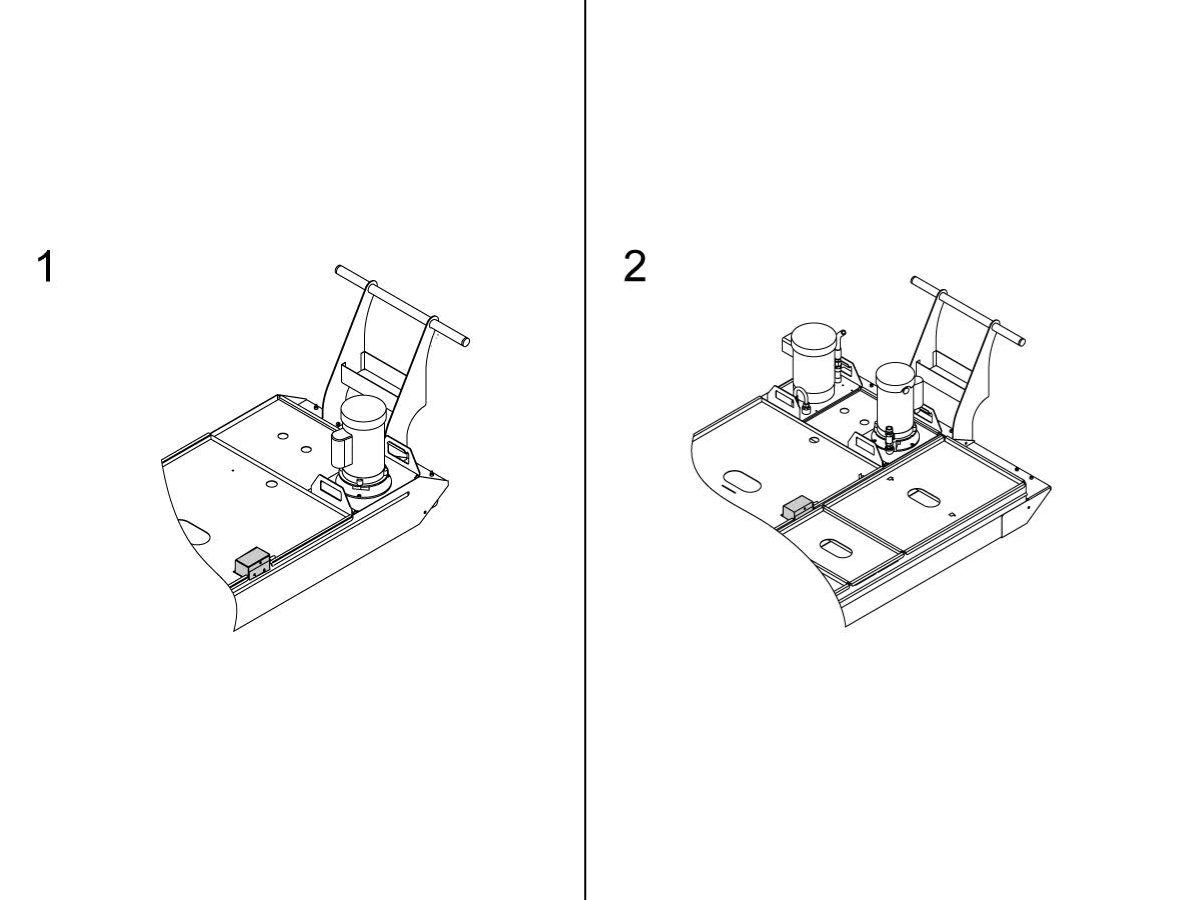
Do this procedure for these tanks:

  1. 55-gallon tank
  2. 95-gallon tank

The machine software requirements:

  • NGC Software

This procedure applies to the following P/N:

  • 93-2876        FIELD INSTALL KIT CPK-MM EDU/UK
  • 93-CS_GR     FIELD INSTALL CS-GR
  • 93-1000353  COOLANT OPTION W/AUGER GM-2
  • 93-1000354  COOLANT OPTION GR
  • 93-1000396  COOLANT OPTION KIT GM-2 3AX
  • 93-1000397  COOLANT OPTION KIT GM-2 5AX
  • 93-2257        COOLANT FLOAT SVC KIT

COOLANT LEVEL FLOAT INSTALLTION INTEGRATED BASE

This procedure tells you how to install the Coolant Float Sensor into integrated base tanks.

Do this procedure for these machines.

  • ST-10
  • ST-10Y
  • ST-15
  • ST-15Y


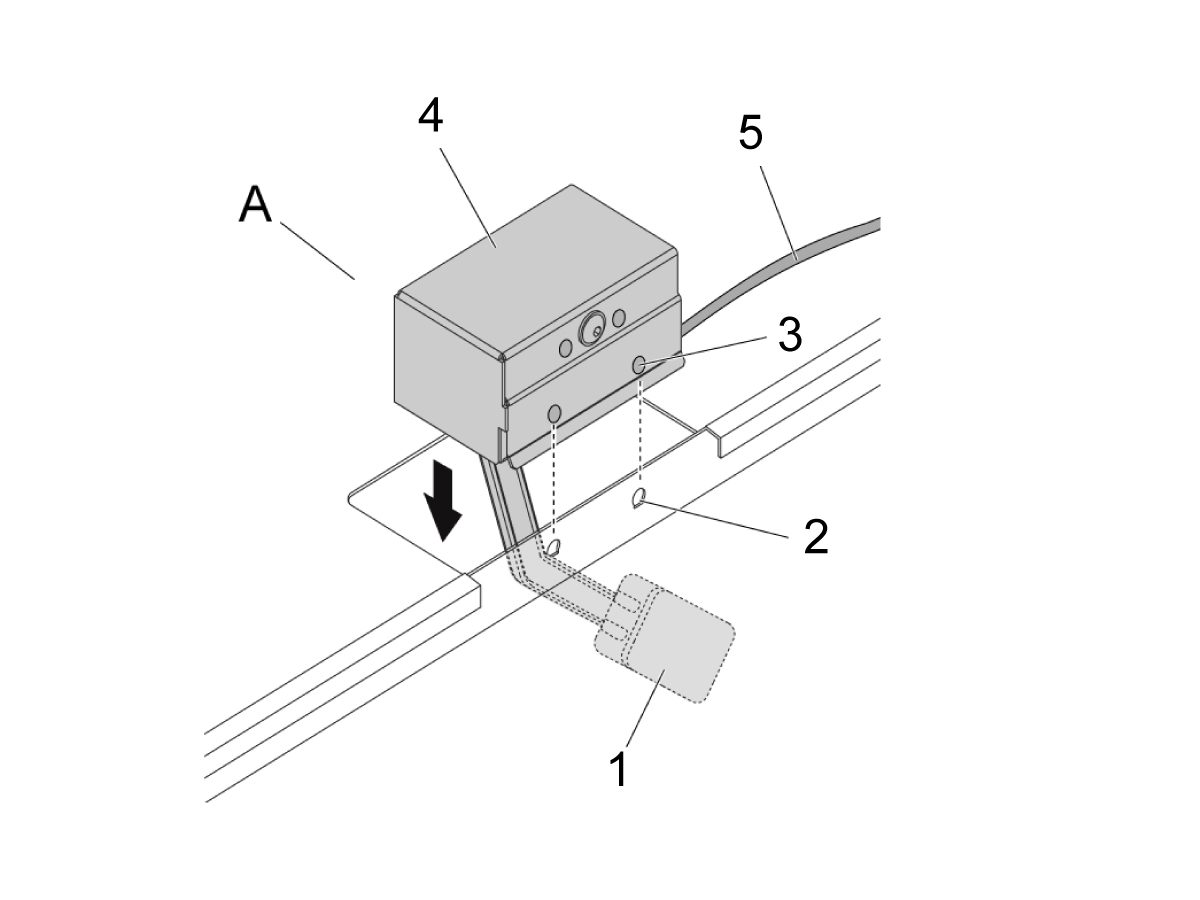
Coolant Level Float Installation

Push [POWER OFF].

Put the float [1] from the coolant float assembly [A] into the tank. 

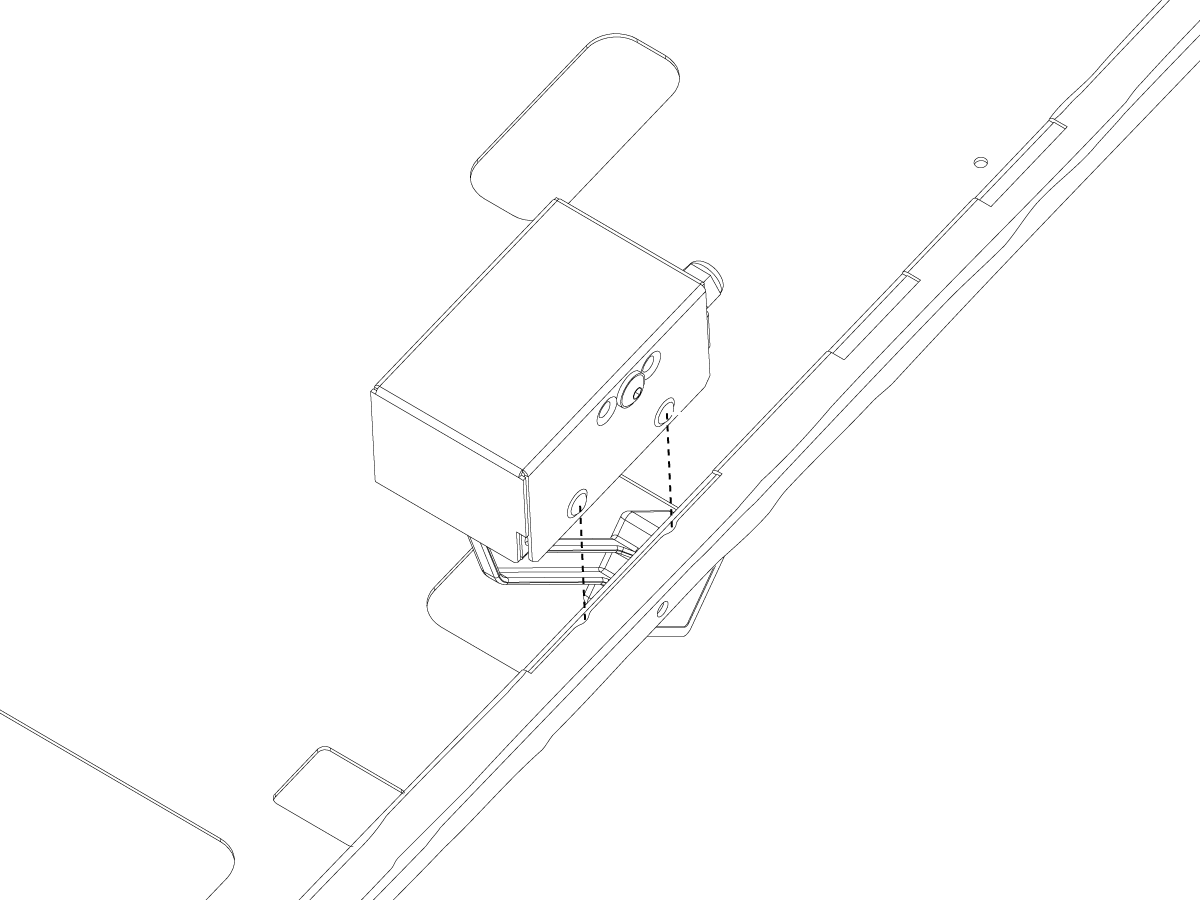
If coolant tank has dimples [2], align the housing dimples [3] with the dimples of the side of the tank lid [2].

Push the housing [4] down into the cutout of the tank lid. 

Put the cable [5] from the assembly to the coolant electrical connection panel.  


Coolant Level Float Installation Integrated Base

Push [POWER OFF].

Attach coolant float assembly [1] 30-30090E to float assembly bracket [2] 25-14916.

Align slots and dimples on each assembly.

Attach the float assembly to bracket until it snaps into place.


Place Float Sensor and bracket through casting cutout and hang on the inside edge of base casting [1].

 Note: You may need to rotate assembly in order to place in correct location.

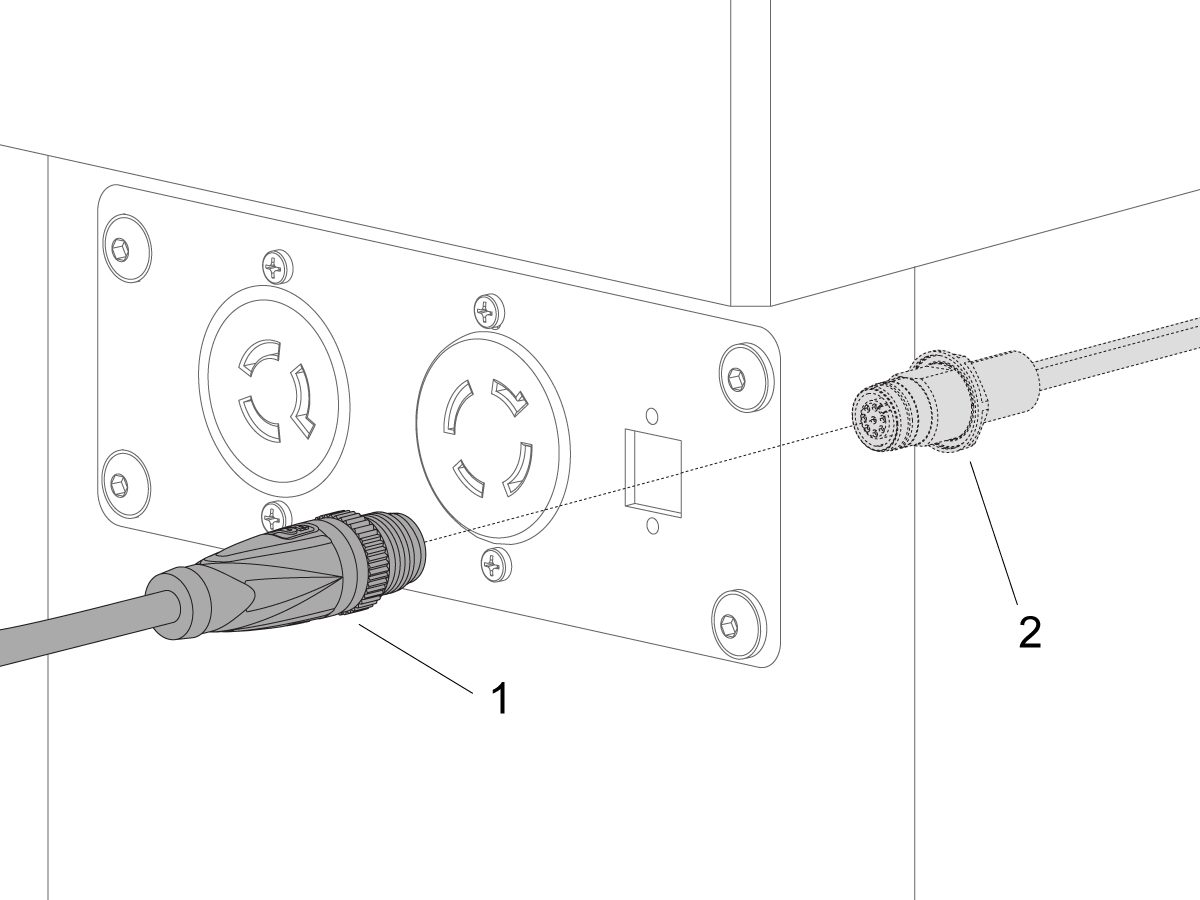
Coolant Level Float Sensor Connection

 Note: The location of the electrical connector panel changes with the machine type.

Route the cable from the assembly to the coolant electrical connection panel.  

Connect the M12 cable [1] from the coolant float assembly to the rear-panel coolant sensor [2].


Verifying Parameters

Push [POWER ON].

Insert Service USB key and go into Service Mode.

Push [DIAGNOSTIC].  Go to the Factory tab.

Push [E-STOP].

Ensure the values for Parameters 603 and 604 are correct. Refer to the tables below for the correct values of parameters.

To make sure the coolant tank float operates correctly, do these steps:

  1. Push [MEMORY] on the pendant.

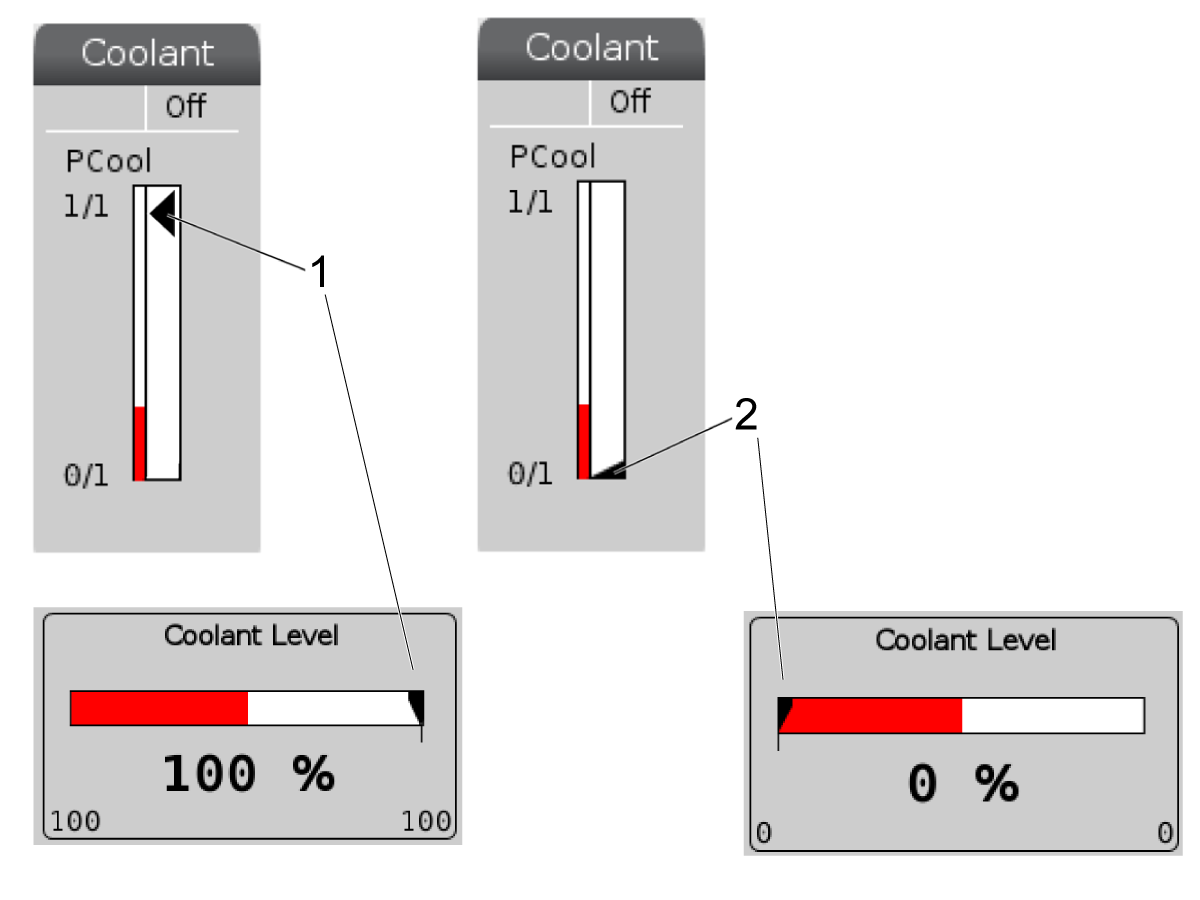
  2. The upper-right corner of the screen shows a coolant level arrow. When the float goes up, the arrow goes up [1]. When the float goes down, the arrow goes down [2].


Mill Machine Model Parameter 603 Value
(NGC)
Parameter 604 Value
(NGC)
DM, DT, EC, ES, GR, HS, UMC, VF, VR, VS 2580 3080
MM, SMM 2580 3080
Lathe Machine Model Parameter 603 Value
(NGC)
Parameter 604 Value
(NGC)
TL-1, TL-2 0 0
ST‑10 through ST-55, DS‑30 2580 3080

18.2 Coolant Level Float Sensor - Troubleshooting Guide

Recently Updated

Coolant Float Sensor - Troubleshooting Guide


TG0054

Revision A - 04/2025

Coolant Level Float Sensor Inspection Report

Download and fill out the Coolant Float Sensor Inspection Report Checklist below before replacing any parts.

Coolant Float Sensor Inspection Report

Introduction

The image shows the following components of the Coolant Float Sensor:

  1. Float [1]
  2. Potentiometer [2]
  3. Bracket [3]
  4. Power Cord [4]
  5. Potentiometer Cover (not shown for clarity)

Symptom Table

Symptom Possible Cause Corrective Action
The coolant level sensor displays an incorrect coolant level. The coolant float is installed incorrectly.  See Check Float Installation section below.
The float is blocked and cannot move.  Clear all chips from float and coolant tank. 
The factory settings 603 and 604 have the incorrect values.  Refer to Coolant Level Float Sensor - Installation for the correct parameter values.
The cable is damaged or unplugged.  Make sure that the cable is securely connected and is not damaged. 
The sensor is damaged. Check all of the wires and clear chips blocking the float. Inspect for any leaks. If issue persists, follow the Malfunctioning Sensor section below. 
Coolant level sensor displays 0% with no change when level sensor is moved up/down.  The coolant float is installed incorrectly.   See Check Float Installation section below.
The sensor is damaged or the float cannot move.  Check all of the wires and clear chips blocking the float. Inspect for any leaks. If issue persists, follow the Malfunctioning Sensor section below. 
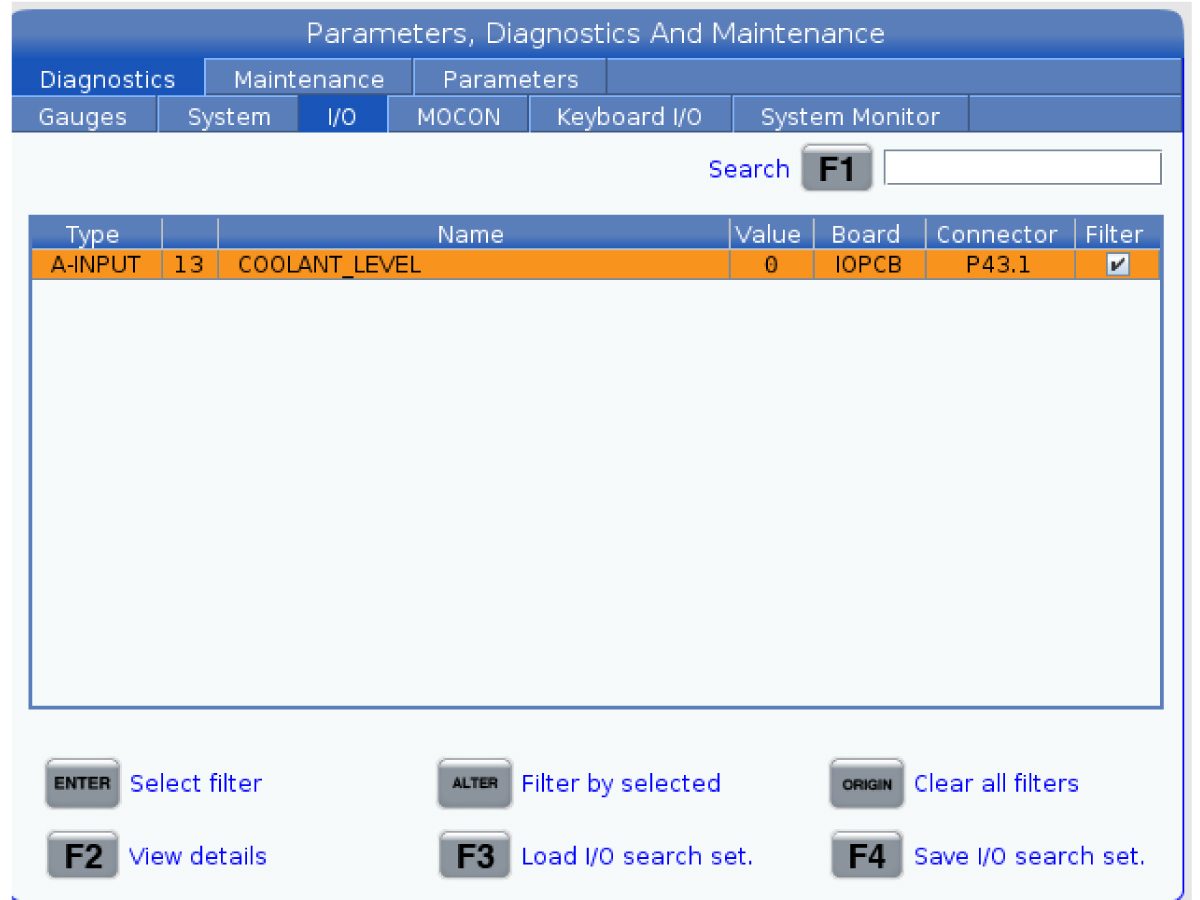
The I/O PCB isn't configured properly with the coolant level sensor.  Display analog input 13 while manually moving the coolant level float up/down. The input value should change from ~2500 to ~3150. If the input value remains the same, make sure that I/O configuration is correct. A-Input 13 should be mapped to P43.1. Refer to I/O Mapping section below. 

Low coolant alerts appearing and disappearing frequently while machine is idle.

20022 and 20023 notification occurences in Alarm History.

Coolant level is close to 50%.  Fill coolant tank until coolant touches chip filter. Ensure that coolant level is above 70% before starting any operation that requires coolant. Clear any chips and debris from coolant filter, tank and machine. If issue persists, follow the Malfunctioning Sensor section below. 

Low coolant alerts appearing and disappearing frequently while machine is cutting.

20022 and 20023 notification occurences in Alarm History.

Coolant is cycling through the machine during operations.  Fill coolant tank until coolant touches chip filter. Ensure that coolant level is above 70% before starting any operation that requires coolant. Clear any chips and debris from coolant filter, tank, and machine. If issue persists, follow the Malfunctioning Sensor section below. 

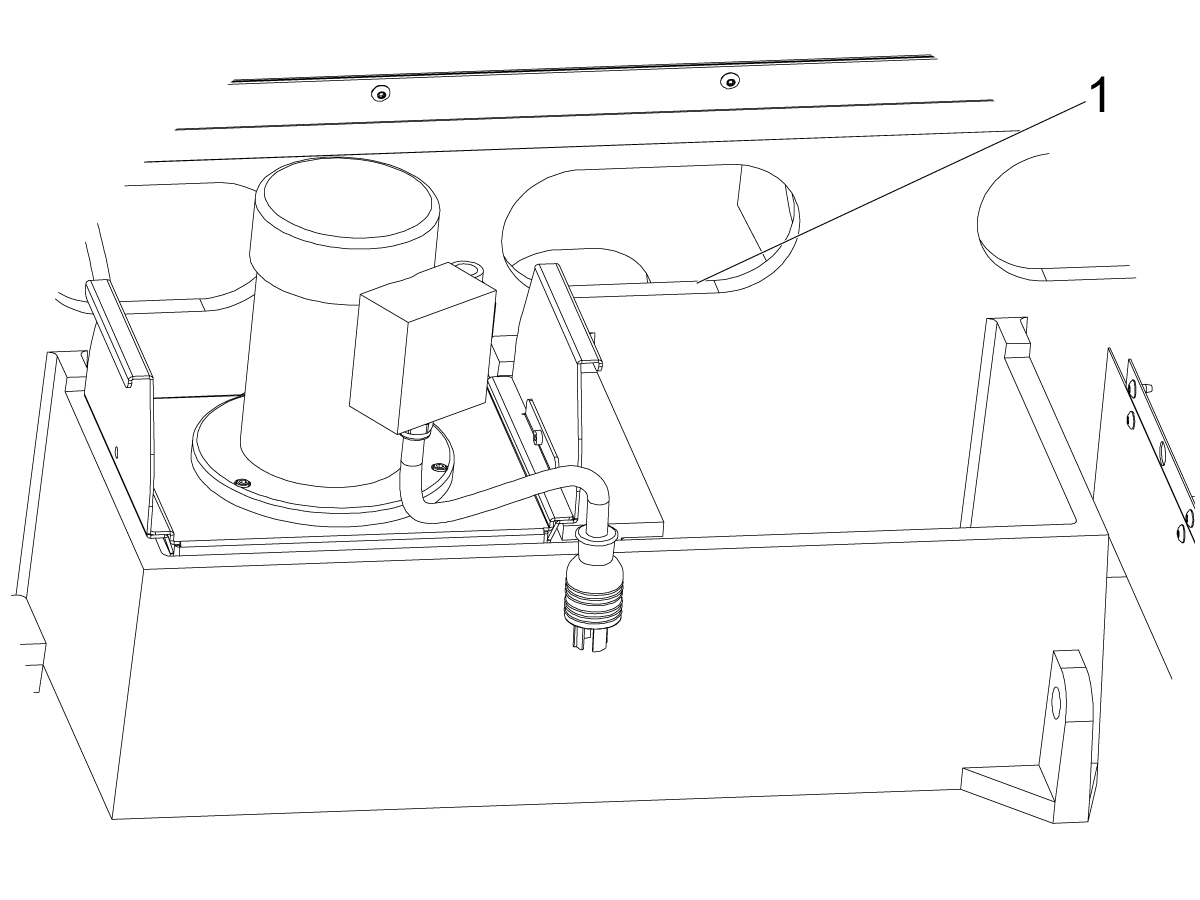
Check Float Installation

1

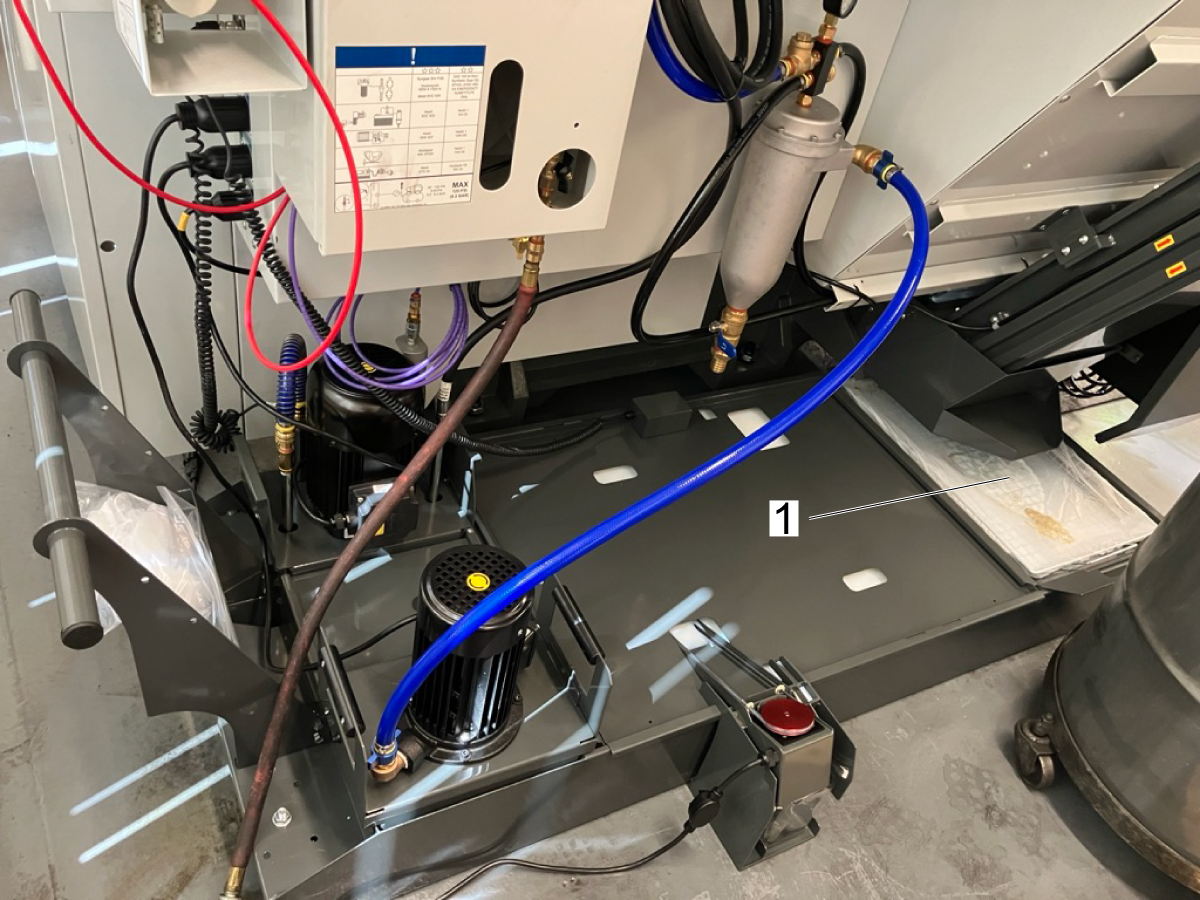
Check the orientation of the coolant tank lid. The cutout containing the coolant float [1] should be on the side of the coolant tank closest to the machine, as shown.

Ensure that the lid is sitting flat on top of the coolant tank. 

2

Check that the dimples on the coolant float are properly seated in the dimples on the coolant tank. Check that the coolant float is sitting flat on top of the lid. 

3

Re-fill coolant tank until coolant level touches the bottom of the chip filter [1]. 

Malfunctioning Sensor

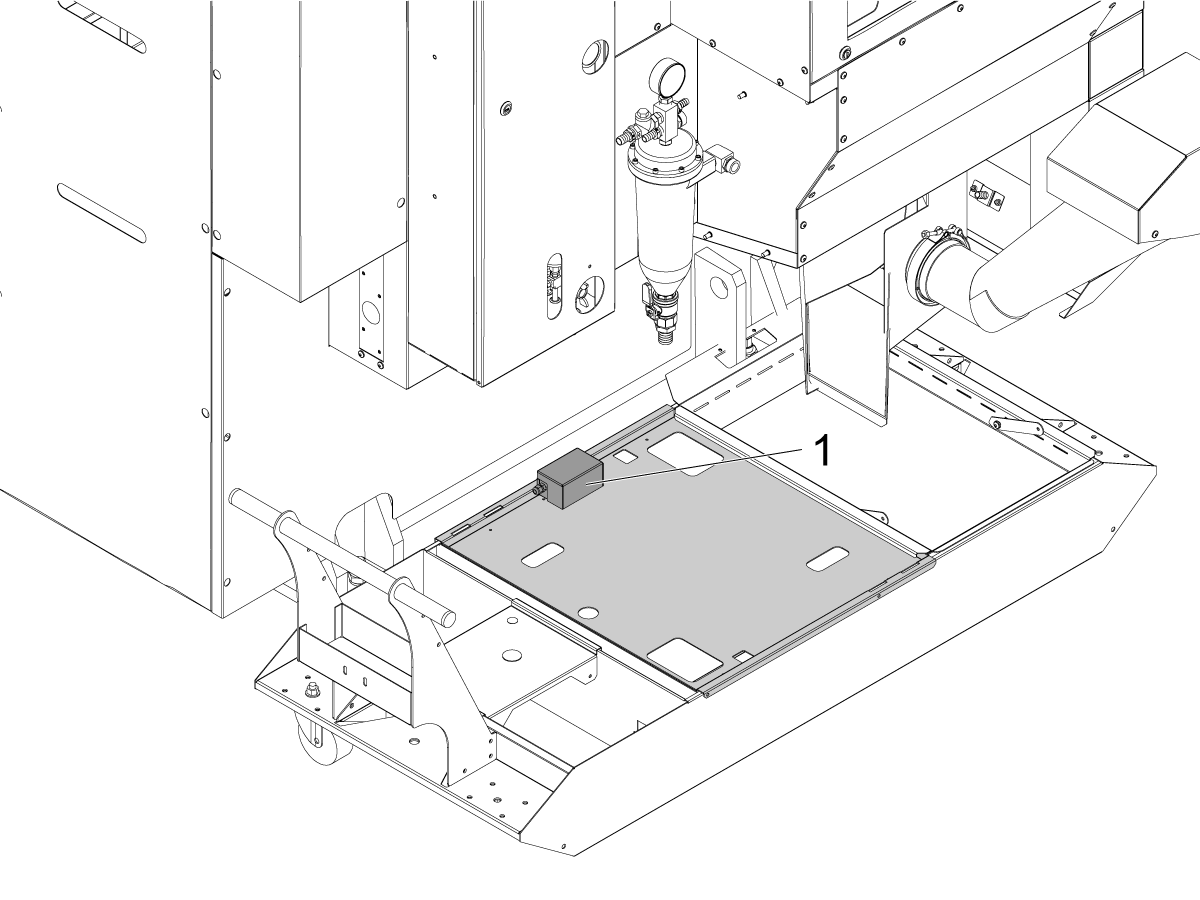
In the first image, you can see the location of the coolant level sensor on the coolant tank.

If your coolant level sensor does not display the correct level on the screen, look in the coolant tank to make sure a chip build-up does not block the float from moving freely. Also, inspect the float for any leaks to make sure no coolant has wept in. 

Corrective Action:

Make sure the coolant level sensor operates correctly:

  • Press [MEMORY]. The upper-right corner of the screen will show the coolant level.
  • Remove the coolant float sensor from the tank and manually move the float to max and min conditions.  The coolant level indicator on the screen should move at a slow pace. It takes approximately (1) minute to move from empty [2] to full [1] on the screen, but it starts to move immediately. Note the percentages that the coolant level indicator reports when the float is at min and max conditions. 
  • If the coolant level sensor does not operate correctly, unplug the coolant level sensor from the machine.


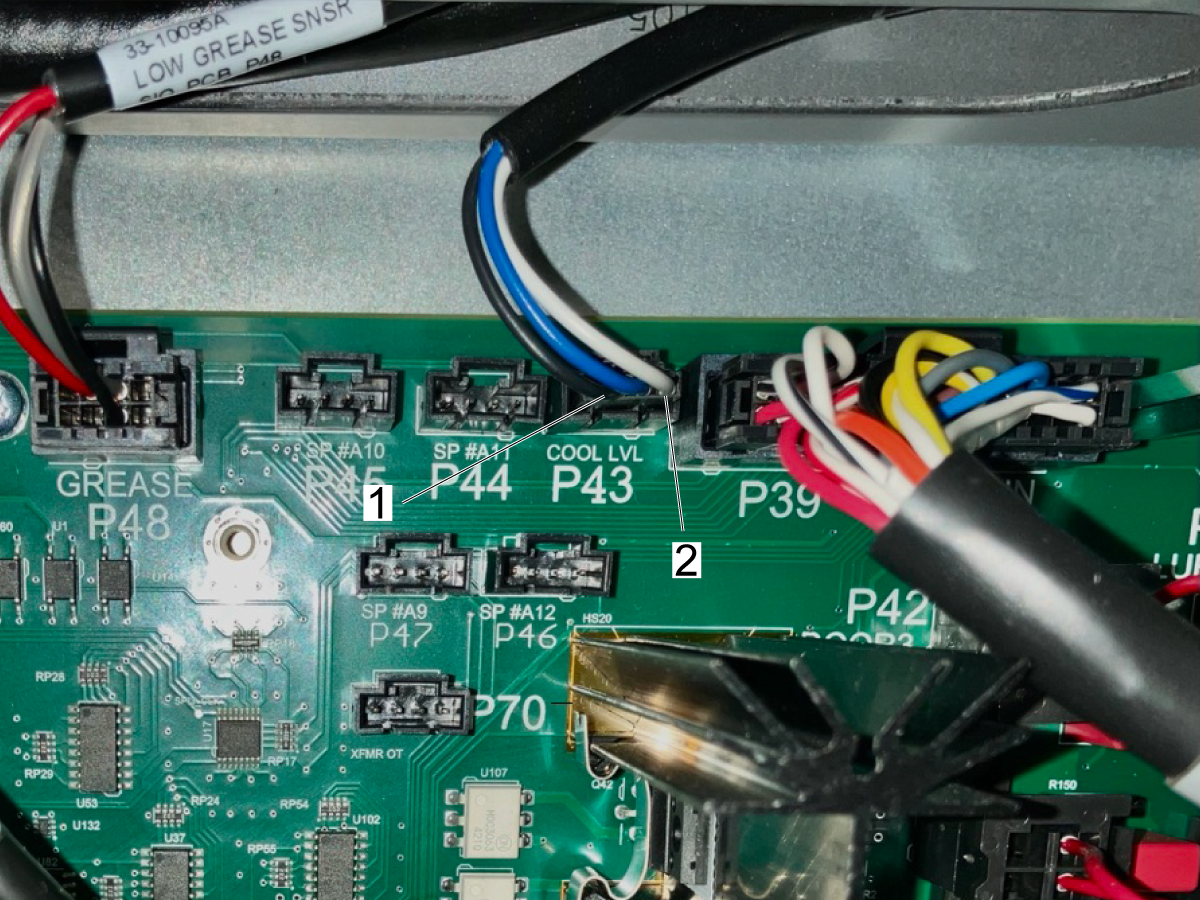
Measure the voltage across the black [1] and white [2] wires on P43 on the I/O board when the float is up and down. The voltage should be approximately 3.8V when the float is up and 2.6V when it is down.


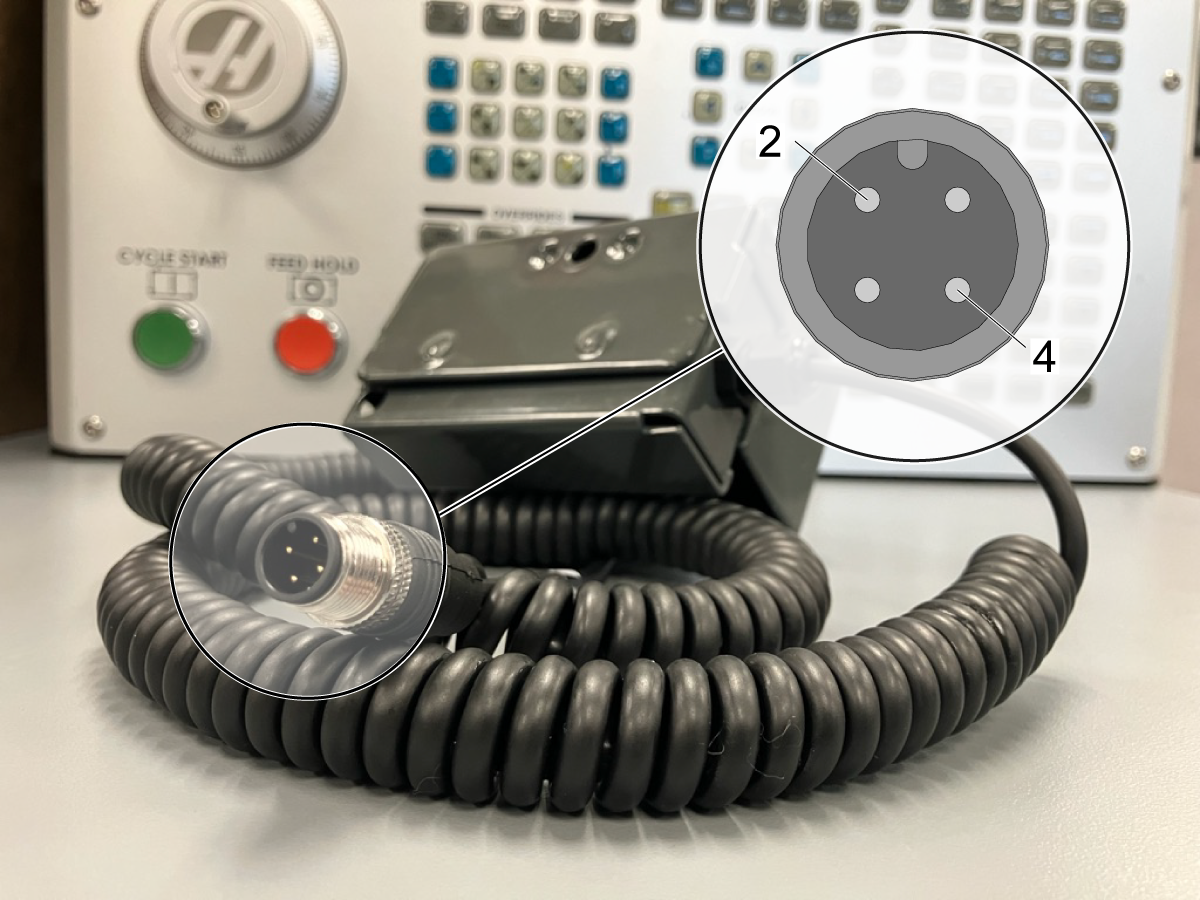
Measure the resistance at pins [2] and [4] on M12 connector when the float is up and down. The resistance should be approximately 371 Ohms when the float is up and 286 Ohms when it is down.

NOTE: Do not remove the coating around the wire, rather take the reading at the M12.


If another machine is present, test float on different machine. If the coolant level sensor continues to read incorrectly, and you have completed the troubleshooting instructions, replace the sensor.

 IMPORTANT: When returning the sensor, make sure to include an error report.

 IMPORTANT: When returning the sensor, please include the following information:

  • Machine state during malfunction (idle or cutting)
  • A video showing coolant level in the tank and on the pendant screen
  • Error Report
  • Resistance across black and white wires (see above)

I/O Mapping

The coolant level float sensor is controlled by analog input 13. The analog input uses an electronic counter to measure the input voltage signal. This input voltage signal is shown in the value section. For more information, refer to the Analog Sensors - Troubleshooting Guide. 

As the coolant lower in the tank, the less input voltage there should be. As the coolant raises in the tank, the more input voltage there should be. When moving the coolant level float, the voltage value should change from ~2500 to ~3150.

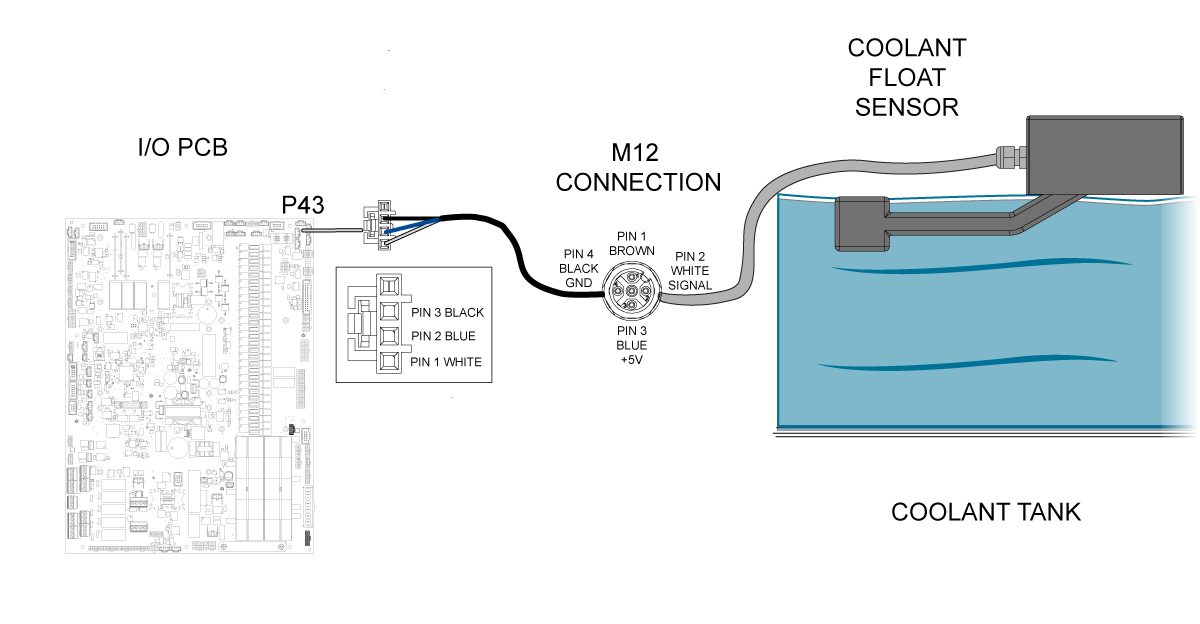
The coolant level float sensor is connected to the I/O board at pin 43 shown in the connector section. Check the end of the M12 cable that is plugged into the I/O board to make sure the voltage across pin 3 and 4. If the 5VDC is not present, then troubleshoot the I/O PCB refer to the I/O PCB - Troubleshooting Guide. 

Electrical Schematic

Recently Viewed Items

You Have No Recently Viewed Items Yet

Feedback
Haas Logo

Haas Delivered Price

This price includes shipping cost, export and import duties, insurance, and any other expenses incurred during shipping to a location in France agreed with you as a buyer. No other mandatory costs can be added to the delivery of a Haas CNC Product.

KEEP UP WITH THE LATEST HAAS TIPS AND TECHNOLOGY...

Sign up now!   

HAAS TOOLING ACCEPTS THE FOLLOWING:

  • Service & Support
  • Owners
  • Request Service
  • Operator Manuals
  • Haas Parts
  • Rotary Repair Request
  • Pre-Install Guides
  • Shopping Tools
  • Build & Price a New Haas
  • Available Inventory
  • The Haas Price List
  • CNCA Financing
  • About Haas
  • Accessibility Statement
  • DNSH Statement
  • Export Compliance
  • Careers
  • Certifications & Safety
  • Contact Us
  • History
  • Terms & Conditions
  • Haas Tooling Terms & Conditions
  • Privacy
  • Warranty
  • Haas Community
  • Haas Certification Program
  • Haas Motorsports
  • Gene Haas Foundation
  • Haas Technical Education Community
  • Events
  • Join the Conversation
  • Facebook
  • X
  • Flickr
  • YouTube
  • LinkedIn
  • Instagram
  • TikTok
© 2026 Haas Automation, Inc – CNC Machine Tools

This site is protected by reCAPTCHA and the Google Privacy Policy and Terms of Service apply.

2800 Sturgis Rd., Oxnard, CA 93030
Toll Free: (888) 817-4446 / Fax: 805-278-8554