My Haas Welcome,
!
Haas Tooling MyHaas/HaasConnect Sign In Register Haas Tooling MyHaas/HaasConnect Sign Out Welcome, My Machines Latest Activity My Quotes My Account My Users Sign Out
Find Your Distributor
  1. Select Language
    1. English
    2. Deutsch
    3. Español - España
    4. Español - México
    5. Français
    6. Italiano
    7. Português
    8. Český
    9. Dansk
    10. Nederlands
    11. Magyar
    12. Polski
    13. Svenska
    14. Türkçe
    15. 中文
    16. Suomi
    17. Norsk
    18. الإنجليزية
    19. български
    20. Hrvatski
    21. Ελληνικά
    22. Română
    23. Slovenský
    24. Slovenščina
    25. 한국어
    26. 日本語
    27. Українська
  • machines Main Menu
    • Vertical Mills
      Vertical Mills
      Vertical Mills View All
      • Vertical Mills
      • VF Series
      • Universal Machines
      • VR Series
      • VP-5 Prismatic
      • Pallet-Changing VMCs
      • Mini Mills
      • Mold Machines
      • High-Speed Drill Centers
      • Drill/Tap/ Mill Series
      • Toolroom Mills
      • Pocket Mill
      • Compact Mills
      • Gantry Series
      • SR Sheet Routers
      • Extra-Large VMC
      • Double-Column Mills
      • 3+2 Positioning Machines
    • Multi-Axis Solutions
      Multi-Axis Solutions
      Multi-Axis Solutions View All
      • Multi-Axis Solutions
      • Y-Axis Lathes
      • 5-Axis Mills
    • Lathes
      Lathes
      Lathes View All
      • Lathes
      • ST Series
      • Dual-Spindle
      • Box Way Series
      • Toolroom Lathes
      • Chucker Lathe
      • Haas Bar Feeders
    • Horizontal Mills
      Horizontal Mills
      Horizontal Mills View All
      • Horizontal Mills
      • 50-Taper
      • 40-Taper
    • Rotaries & Indexers
      Rotaries & Indexers
      Rotaries & Indexers View All
      • Rotaries & Indexers
      • Rotary Tables
      • Indexers
      • 5-Axis Rotaries
      • Extra-Large Rotaries
    • Special Series
      Special Series
      Special Series View All
      • Special Series
      • EU_Series_Redirect
    • Automation Systems
      Automation Systems
      Automation Systems View All
      • Automation Systems
      • Mill Automation
      • Lathe Automation
      • Automatic Parts Loaders
      • Automation Models
    • Desktop Machines
      Desktop Machines
      Desktop Machines View All
      • Desktop Machines
      • Desktop Mill
      • Desktop Lathe
      • Control Simulator, Standard
      • Control Simulator, Premium
    • Shop Equipment
      Shop Equipment
      Shop Equipment View All
      • Shop Equipment
      • Knee Mill
      • Haas Manual Lathes
      • Haas Saws
    • Fabrication Machines
      Fabrication Machines
      Fabrication Machines View All
      • Fabrication Machines
      • Laser Cutting Machines
      • CNC Press Brakes
    • QUICK LINKS Special Series  Special Series 
      EU SERIES EU SERIES BUILD & PRICE | PRICE LIST BUILD & PRICE | PRICE LIST In-Stock Machines In-Stock Machines WHAT’S NEW WHAT’S NEW YOUR FIRST CNC YOUR FIRST CNC
      SHOPPING TOOLS
      • Build & Price a Haas
      • Price List
      • Available Inventory
      • CNCA Financing
      WANT TO TALK TO SOMEONE?

      A Haas Factory Outlet (HFO) can answer your questions, and walk you through your best options.

      CONTACT YOUR DISTRIBUTOR >
  • Options Main Menu
    • The Haas Control Value Option Packages
      Value Option Packages
      Value Option Packages View All
      • Value Option Packages
    • Product Image Spindles
      Spindles
      Spindles View All
      • Spindles
    • Product Image Tool Changers
      Tool Changers
      Tool Changers View All
      • Tool Changers
    • Product Image 4th- | 5th-Axis
      4th- | 5th-Axis
      4th- | 5th-Axis View All
      • 4th- | 5th-Axis
    • Product Image Turrets & Live Tooling
      Turrets & Live Tooling
      Turrets & Live Tooling View All
      • Turrets & Live Tooling
    • Product Image Probing
      Probing
      Probing View All
      • Probing
    • Haas Chip & Coolant Management Chip & Coolant Management
      Chip & Coolant Management
      Chip & Coolant Management View All
      • Chip & Coolant Management
    • The Haas Control The Haas Control
      The Haas Control
      The Haas Control View All
      • The Haas Control
    • Product Image Product Options
      Product Options
      Product Options View All
      • Product Options
    • Product Image Tooling & Fixturing
      Tooling & Fixturing
      Tooling & Fixturing View All
      • Tooling & Fixturing
    • Product Image Workholding
      Workholding
      Workholding View All
      • Workholding
    • Product Image 5-Axis Solutions
      5-Axis Solutions
      5-Axis Solutions View All
      • 5-Axis Solutions
      • 5 Easy Steps to 5-Axis
    • QUICK LINKS Special Series  Special Series 
      EU SERIES EU SERIES BUILD & PRICE | PRICE LIST BUILD & PRICE | PRICE LIST In-Stock Machines In-Stock Machines WHAT’S NEW WHAT’S NEW YOUR FIRST CNC YOUR FIRST CNC
      SHOPPING TOOLS
      • Build & Price a Haas
      • Price List
      • Available Inventory
      • CNCA Financing
      WANT TO TALK TO SOMEONE?

      A Haas Factory Outlet (HFO) can answer your questions, and walk you through your best options.

      CONTACT YOUR DISTRIBUTOR >
  • Why Haas Main Menu
      Discover the Haas Difference
    • Why Haas
    • MyHaas
    • Education Community
    • Industry 4.0
    • Haas Certification
    • Customer Testimonials
  • Service Main Menu
      Welcome to Haas Service
      SERVICE HOME Operator’s Manuals How-To Procedures Troubleshooting Guides Preventive Maintenance Haas Parts Haas Tooling Videos
  • Videos Main Menu
  • Main Menu
    • View All
    • View All
    • View All
    • View All
      • HTEC Curriculum Support
      • Haas Value Option Packages (VOP) Journey
    • View All
      • Haas 10 kg Cobot Package
      • Cobot Kits
      • DC-1 Drill Center
      • CNC Sales News
      • Do More With Your Haas
    • View All
    • View All
      • contact-us-test
      • 4 - AUTOMATION SYSTEMS
      • Carousel-V2
      • expert test
      • Demo_Day_Trident-test
      • Link Test
      • image-sale-tag-test
      • article-list-test
      • Haas 25 kg Robot Package
      • test-algolia-page
    • View All
    • View All
    • View All
    • View All
      • calc-test
    • View All
    • QUICK LINKS Special Series  Special Series 
      EU SERIES EU SERIES BUILD & PRICE | PRICE LIST BUILD & PRICE | PRICE LIST In-Stock Machines In-Stock Machines WHAT’S NEW WHAT’S NEW YOUR FIRST CNC YOUR FIRST CNC
      SHOPPING TOOLS
      • Build & Price a Haas
      • Price List
      • Available Inventory
      • CNCA Financing
      WANT TO TALK TO SOMEONE?

      A Haas Factory Outlet (HFO) can answer your questions, and walk you through your best options.

      CONTACT YOUR DISTRIBUTOR >
  • Haas Tooling Main Menu
  • Haas Service Parts Main Menu

My Haas Welcome,
!
Haas Tooling MyHaas/HaasConnect Sign In Register Haas Tooling MyHaas/HaasConnect Sign Out Welcome, My Machines Latest Activity My Quotes My Account My Users Sign Out
Find Your Distributor
  1. Select Language
    1. English
    2. Deutsch
    3. Español - España
    4. Español - México
    5. Français
    6. Italiano
    7. Português
    8. Český
    9. Dansk
    10. Nederlands
    11. Magyar
    12. Polski
    13. Svenska
    14. Türkçe
    15. 中文
    16. Suomi
    17. Norsk
    18. الإنجليزية
    19. български
    20. Hrvatski
    21. Ελληνικά
    22. Română
    23. Slovenský
    24. Slovenščina
    25. 한국어
    26. 日本語
    27. Українська
×

Search Results

Web Pages

Images

    • <
    • 1
    • >

8c - CDF Chip Conveyor

Chip Removal and Coolant - Service Manual


  • 1 - Chip and Coolant - Introduction
  • 2 - Auxiliary Coolant Filter
  • 3 - Single-Stage Flood Coolant
  • 4 - Oil Skimmer
  • 5 - Programmable Coolant
  • 6 - Chip Auger
  • 7 - Coolant Chiller
  • 8 - Chip Conveyor - Overview
  • 8a - Standard Belt Chip Conveyor
  • 8c - CDF Chip Conveyor
  • 9 - Chip Conveyor - VMC
  • 10 - Chip Conveyor - UMC
  • 11 - Chip Conveyor - Lathe
  • 12 - Coolant Refill
  • 13 - High Pressure Flood Coolant
  • 14 - Through-Spindle Coolant
  • 15 - Through-Tool Air Blast
  • 15a - Through-Tool Oil Mist
  • 16 - Haas Chip Lift
  • 17 - Mist Condenser
  • 18 - Coolant Level Float Sensor
  • 19 - Mini Conveyor
  • 20 - Coolant VFD
  • 21 - Coolant Sanitizer
  • 22 - Chip Separator
  • 23 - Chip Tray Strainer
  • 24 - Multi-Stage Flood Coolant
  • 25 - Coolant Cart

Go To :

  • 8c.1 - CDF - Maintenance
  • 8c.2 - CDF - Chip Disc Filter Removal/Installation
  • 8c.3 CDF - Hinge Belt Removal/Installation
  • 8c.4 CDF - Motor Replacement
  • 8c.5 CDF - Troubleshooting

8c.1 CDF Chip Conveyor - Maintenance

Recently Updated

CDF Chip Conveyor - Maintenance


Revision A - 05/2026

Daily Maintenance

Check the Conveyor Coolant Level

Remove the cover plate and check the coolant level in the conveyor part of the system.

Normal coolant level in the conveyor should remain below the CDF shaft/center [1] of the disc filter assembly.

If it is higher than normal, inspect the filter screen for blockage.

Clean or replace the filter screen as needed to bring the system back into a normal operating condition.

Check the CDF the Backwash System

Check the CDF filtration backwash system for sufficient spray volume.

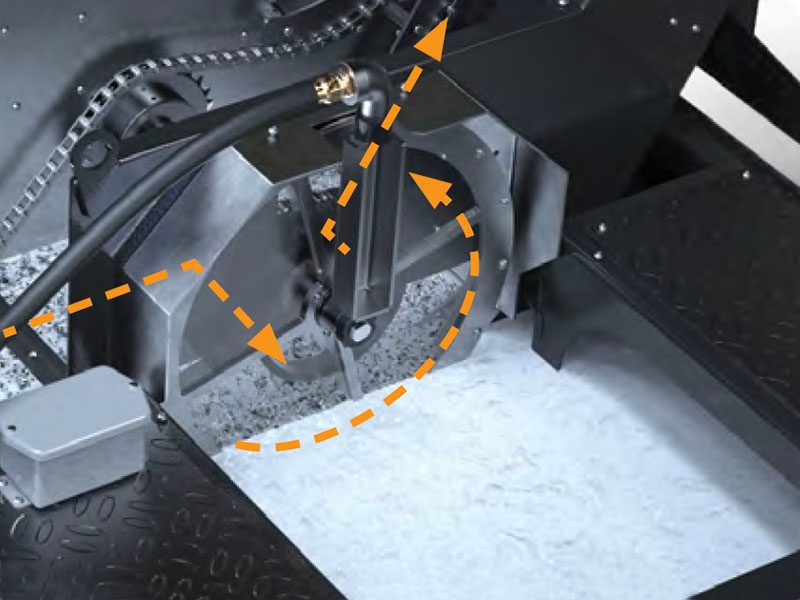
A banding (slight discoloration) of the filter screen that reflects the position of the spray nozzles [1] is normal and shows the nozzles are effectively washing chips off the filter screen.

Dotted line ( ) represents proper banding pattern on the filter.

Check the Y-Strainer

Remove the cap on the Y-strainer [1] (located on the top of the CDF disc cover) and check for chip build up.

Clean out as required and reinstall the cap.

Empty the Chip Bin

Be careful not to let the bin overflow, otherwise chips can build up at the discharge head and cause a jam.

Depending on chip flow rate, you may need to empty the chip bin more than once a day.

Preventative Maintenance

Check / Adjust Belt Tension

1

Remove the covers to access the tension bolts

2

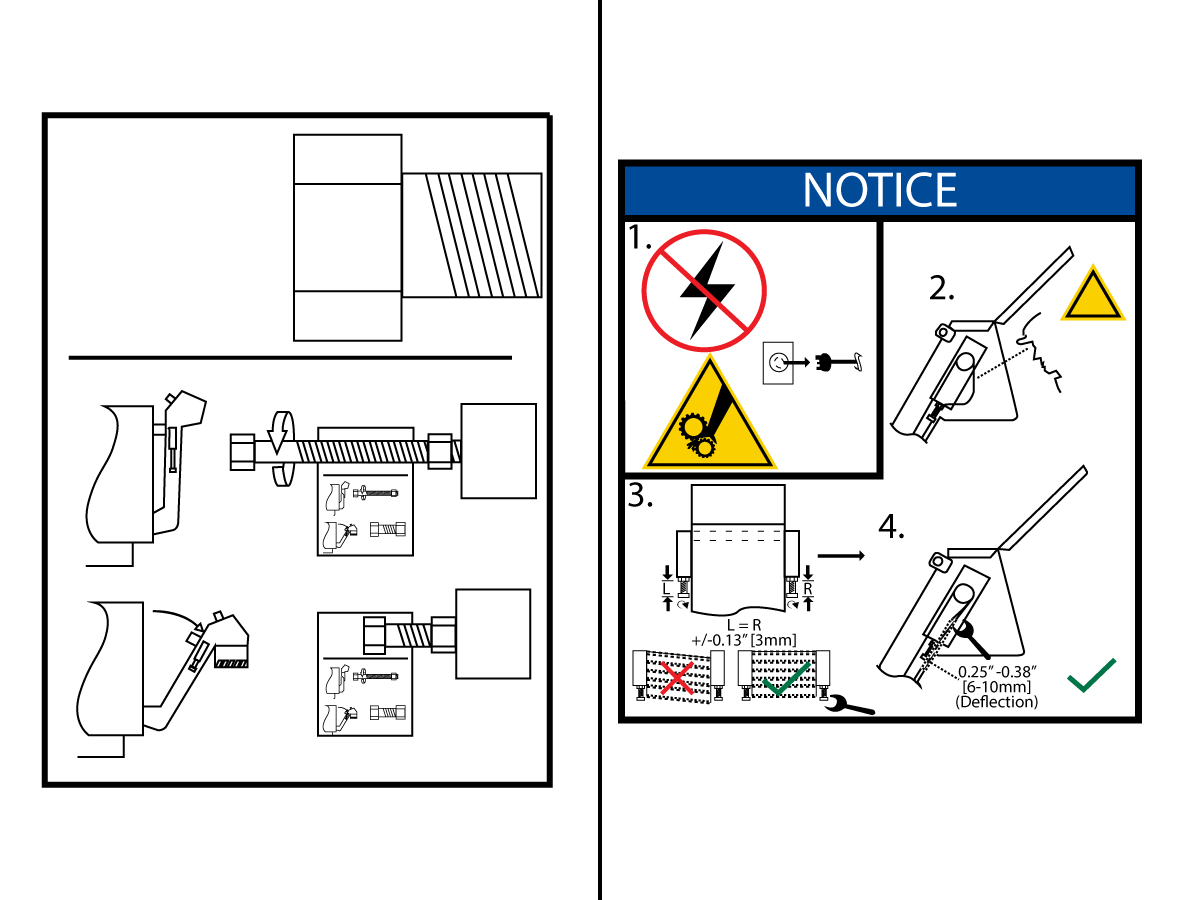
Loosen the jam nut [1] on each side of the conveyor.  

Torque the tension screws [2] (one on bearing side, one on motor side) and tighten the jam nuts [1].

Proper tension is 25in-lbs on both sides.

3

NOTE: Observe the belt running. Belt jamming (stopping) indicates the tension screws are too tight. Belt jumping out of the sprocket indicates tension screws are too loose or uneven. Adjust as needed and tighten the jam nuts.

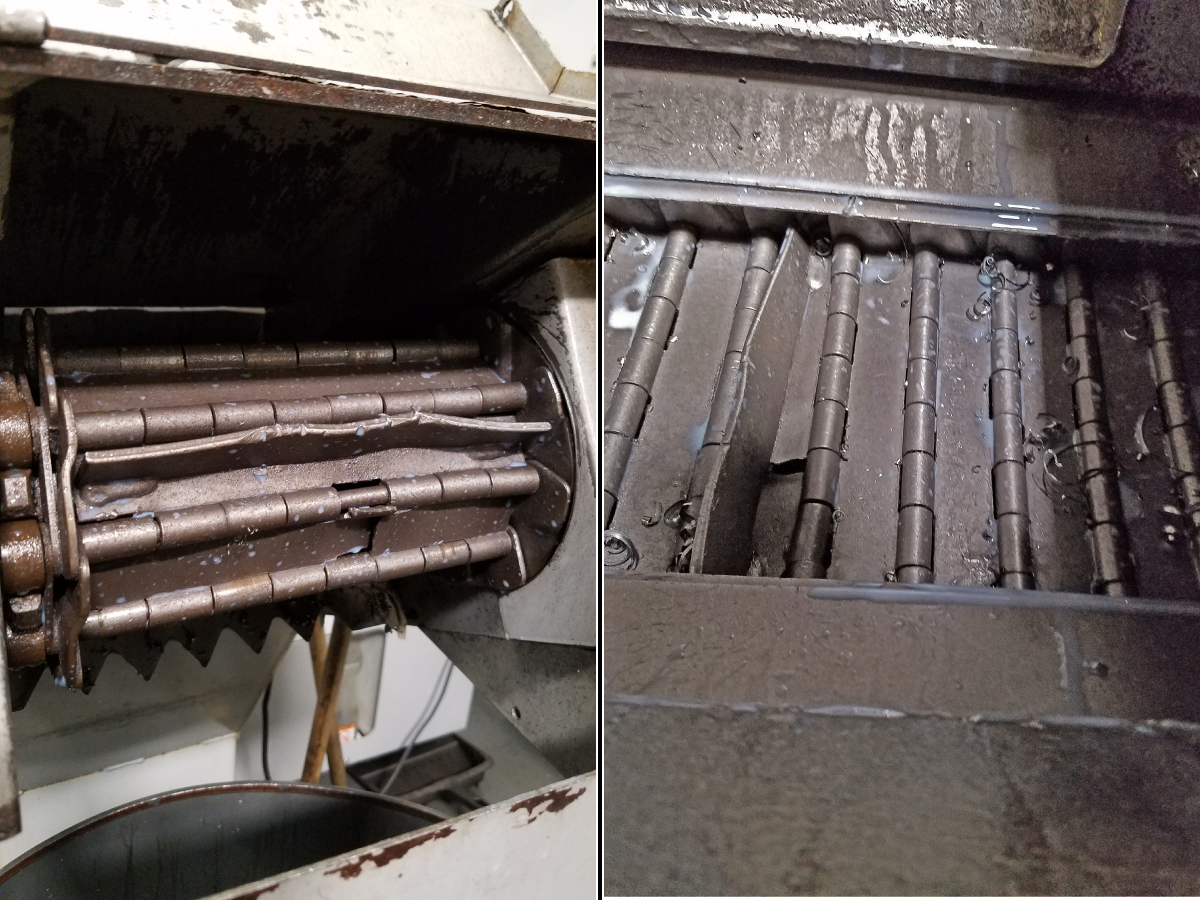
Visually Inspect Belt For Damage

General inspection of either belt type can be accomplished at the discharge opening at the head of the conveyor (by removal of the slide lid, or through openings in the trough).

To get a detailed inspection of the belt assembly, a complete removal of the belt from the conveyor body is recommended. This will provide complete access to all the integrated components. 

Ensure rollers [1] are rotating freely and check for wear.

Check belt shafts [2] for wear.

Ensure that scrapers [3] are still effective – replace if necessary. (hinge belts are equipped with plain and serrated scrapers)

Check hinge plates [4] for damage.

Grease the Take-Up Bearings

The bearings are accessible by removing a cover or plate. A good, general-purpose grease is recommended. Hennig recommends Mobilgrease XHP222.

Do not over-grease or bearing seal damage may result.

Take-up bearings are found on the sides of the discharge head (one on each side of the conveyor).

1

Remove the cover plates on each side for take up bearing access. 

2

Take up bearings are accessible once cover plates are removed.

Inspect / Clean The Filter Disc Assembly

  1. Wear Plate
  2. Rubber V-Seal
  3. Filter Disc
  4. Filter Screen
  5. Clamp Disc

Remove the disc assembly. See Chip Disc Filter Removal/Installation for filter disc removal and disassembly.

Clean out all chip accumulation in the chip disc filter components (filter disc, filter screen, clamp disc).

Regardless of adequate back-wash spray, filter screens over time can become unusable because chips become embedded in the mesh. Replace the screen if the filter screen cannot be properly cleaned or reduced performance has been observed.

Inspect the rubber V-seal. It should be free of nicks and cuts, and chips should not be embedded in it. Remove all chips before reassembly. Replace seal if there is substantial damage. Check for tension: v-seal should be tight on the disc and not be able to spin.

Inspect the wear plate. There should be no scratches or grooves in it, which could limit its sealing capability. Replace the wear plate if there is substantial wear.

Check the disc drive bearings and make sure all seals are intact.

Re-assemble and install the chip disc filter assembly when disc assembly components have been cleaned and/or replaced.

8c.2 CDF Chip Disk Filter - Removal/Installation

Recently Updated

CDF Chip Disk Filter - Removal/Installation


Revision A - 05/2026

Introduction

This procedure details how to remove and install the chip disk filter on a CDF conveyor.

Chip Disc Filter Removal

1

Remove the hose from the CDF sprayer.

2

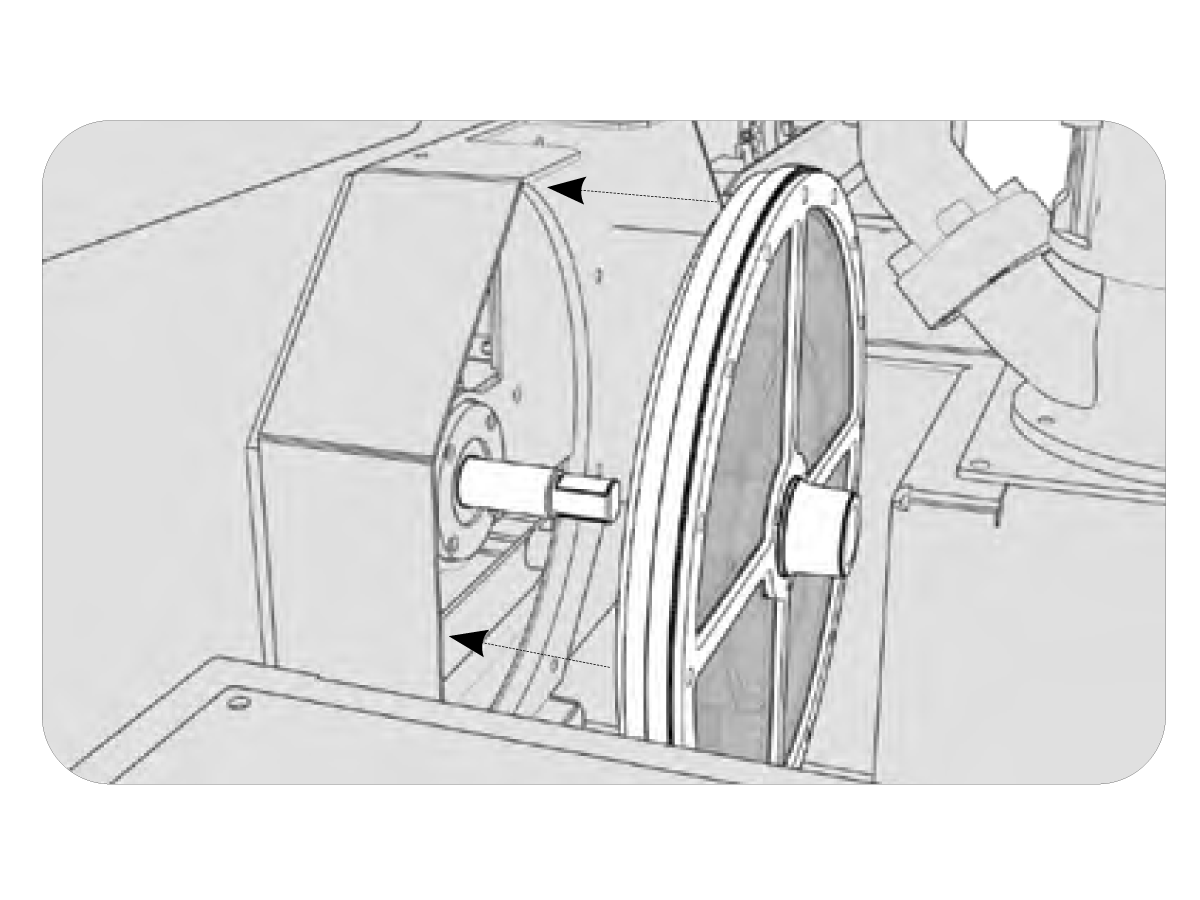
Remove CDF cover/sprayer assembly [1] by removing the allen head screws and lifting it out of the system.

3

Loosen the clamp nut lock screw and then remove the clamp nut [1] by turning it off the CDF shaft.

4

 With the clamp nut removed, now remove the disc assembly [1] by sliding it off the shaft.

5

Disassemble disc filter assembly (by removing allen head bolts) so components can be properly inspected.

Chip Disc Filter Installation

1

Position filter screen [2] on filter disc [1].

Install the clamp disc [3] and secure with allen head cap screws.

2

Coat the seal lip with a generous amount of white lithium grease and press rubber V-seal [1] on filter disc (bearing or axle grease may also be used).

V-seal should not turn on the filter disc.

3

Slide disc filter assembly on the CDF shaft, but do not press it against the wear plate yet.

4

Thread the clamp nut on the CDF shaft.

Do not tighten the clamp nut [1] yet.  

5

 Keep threading the clamp nut in (which pushes and positions the disc assembly), until the distance (x) from the CDF wear plate (a) to the edge of the filter disc (c) is 21-23 mm. Check distance every 90° .

Make sure you’re measuring at the edge of the filter disc.

Do not measure to the edge of the filter screen clamp.

  • Wear plate [1]
  • Rubber V-seal[2]
  • Filter disc [3]
  • Filter screen e Clamp disc [4]

Tighten the Allen head cap screw on the clamp nut to secure the CDF assembly

6

Install the CDF cover/sprayer assembly [1] and secure with allen head cap screws and washers.

7

Install the hose to CDF sprayer.

8c.4 CDF Chip Conveyor - Motor Replacement

Recently Updated

CDF Chip Conveyor - Motor - Replacement


AD0642

Introduction

This procedure details how to install and wire a replacement motor for a CDF conveyor.

 IMPORTANT: The images in this procedure may show a normal 1/8 HP conveyor motor but the steps will be the same for the CDF conveyor motor. 

This procedure will apply to the following kits:

93-3360 CHIPC MOTOR 1/4 HP 240V 50/60HZ 240:1

For Standard coveyor motor replacements refer to AD0345 - Chip Conveyor - Motor - Replacement.

Motor Replacement

1

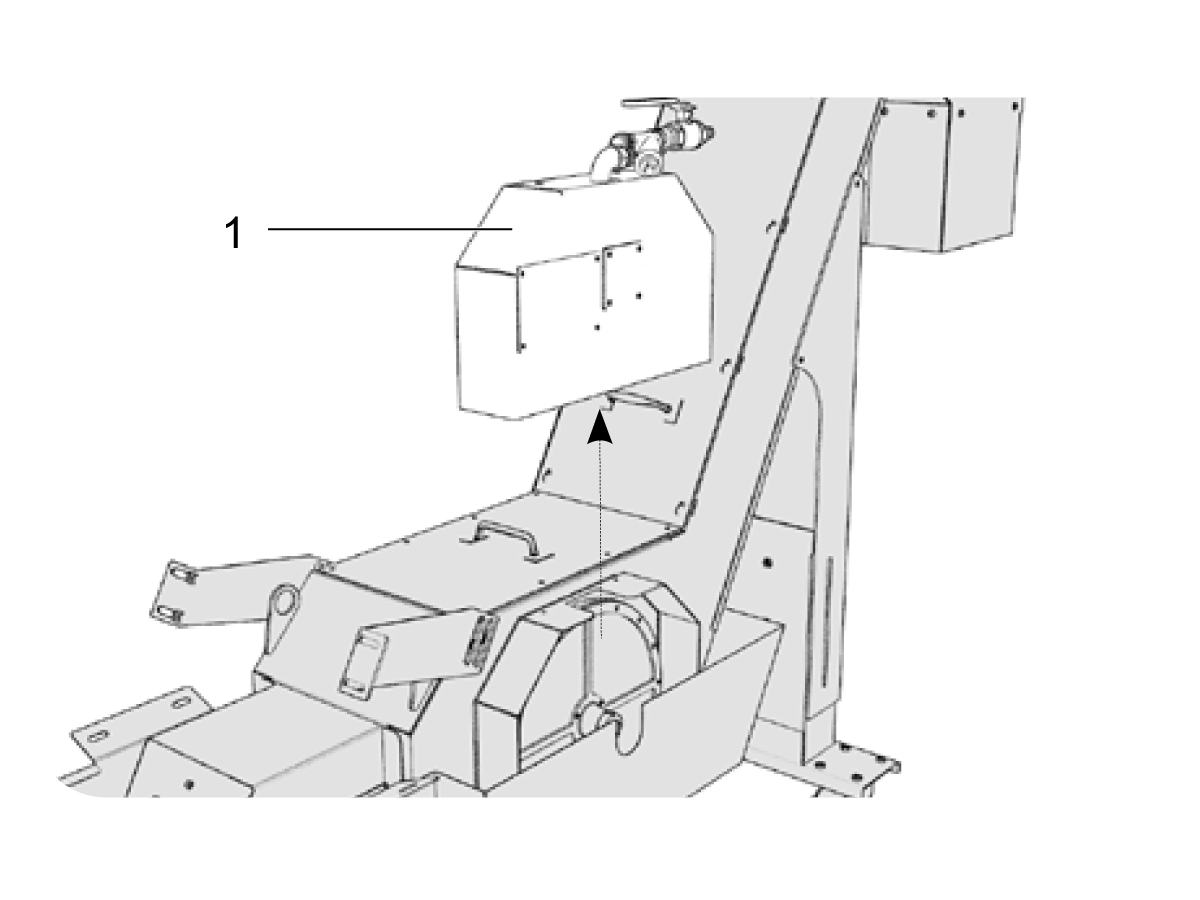
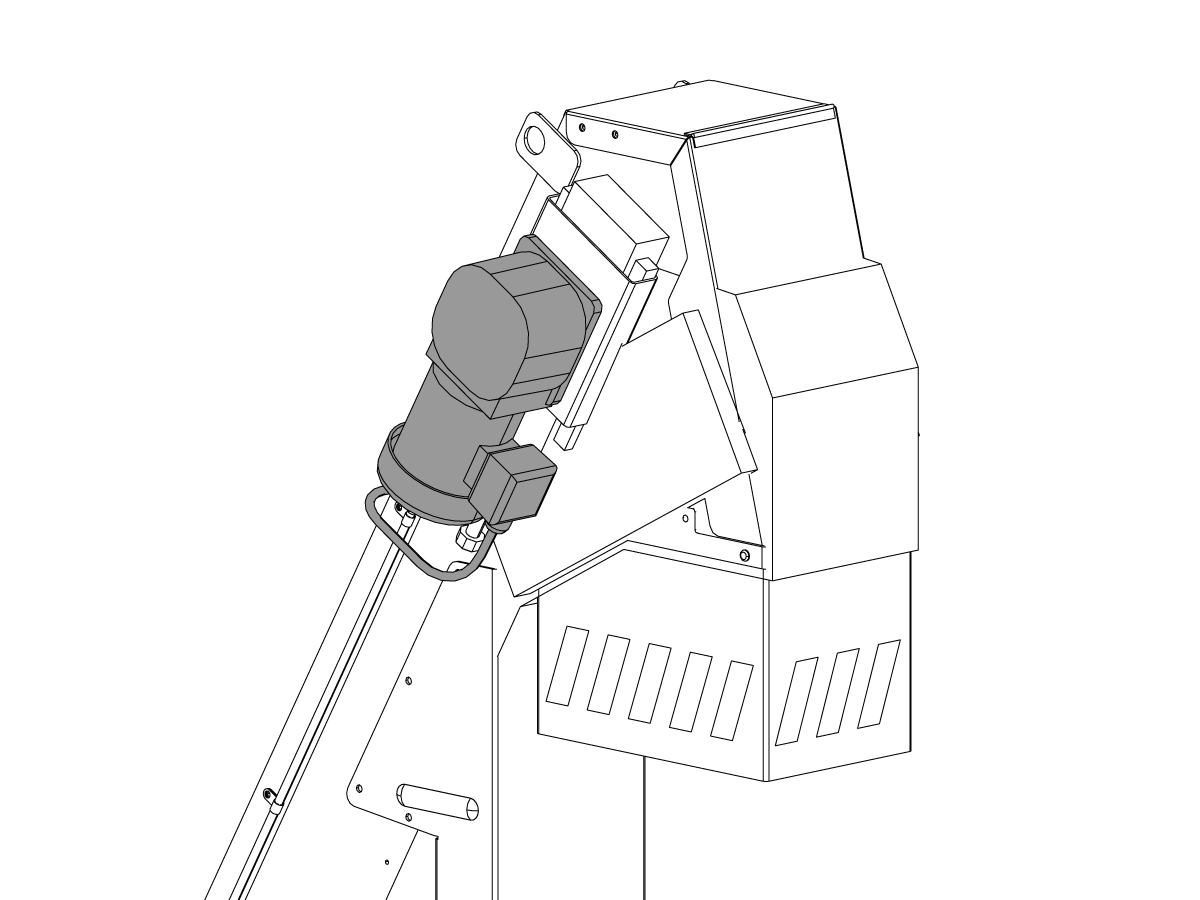
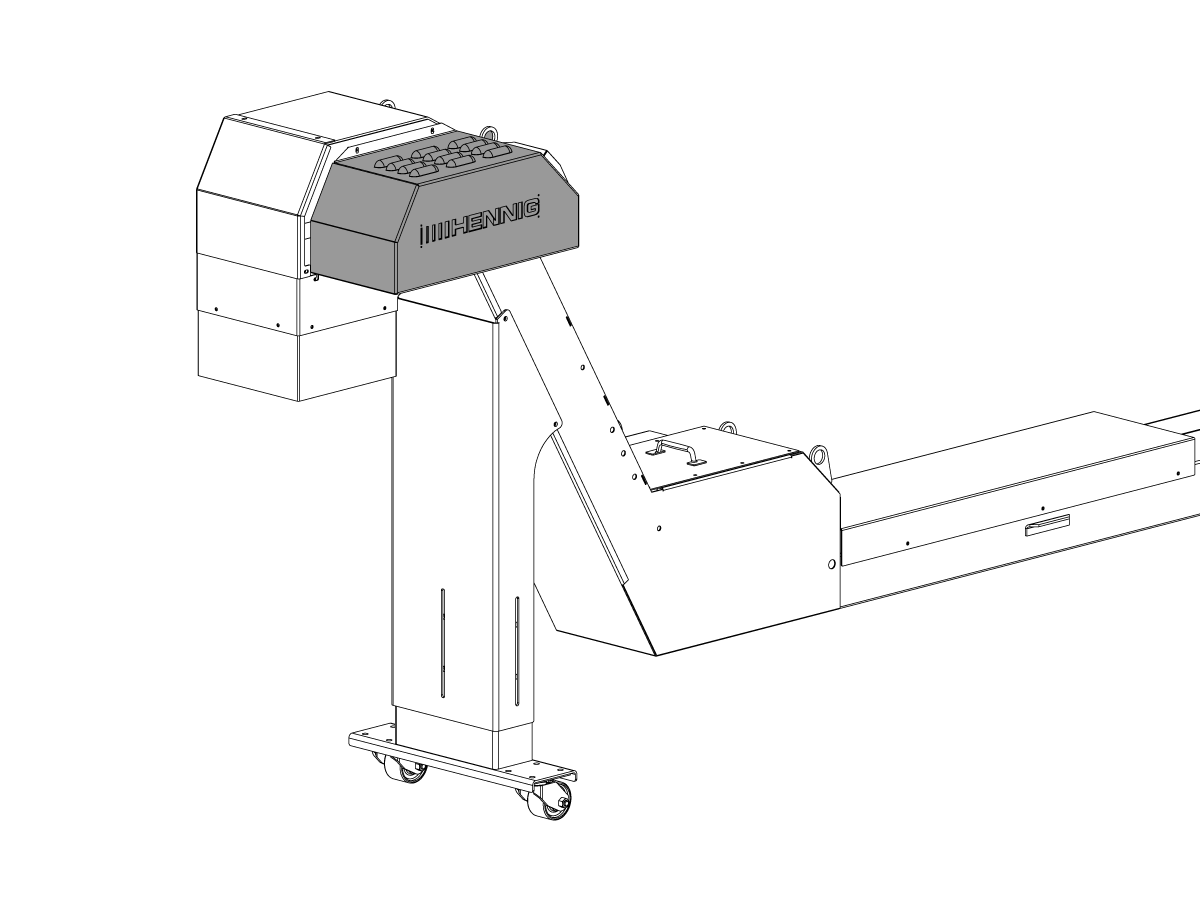
Remove the sheet metal enclosure housing the motor. 

2

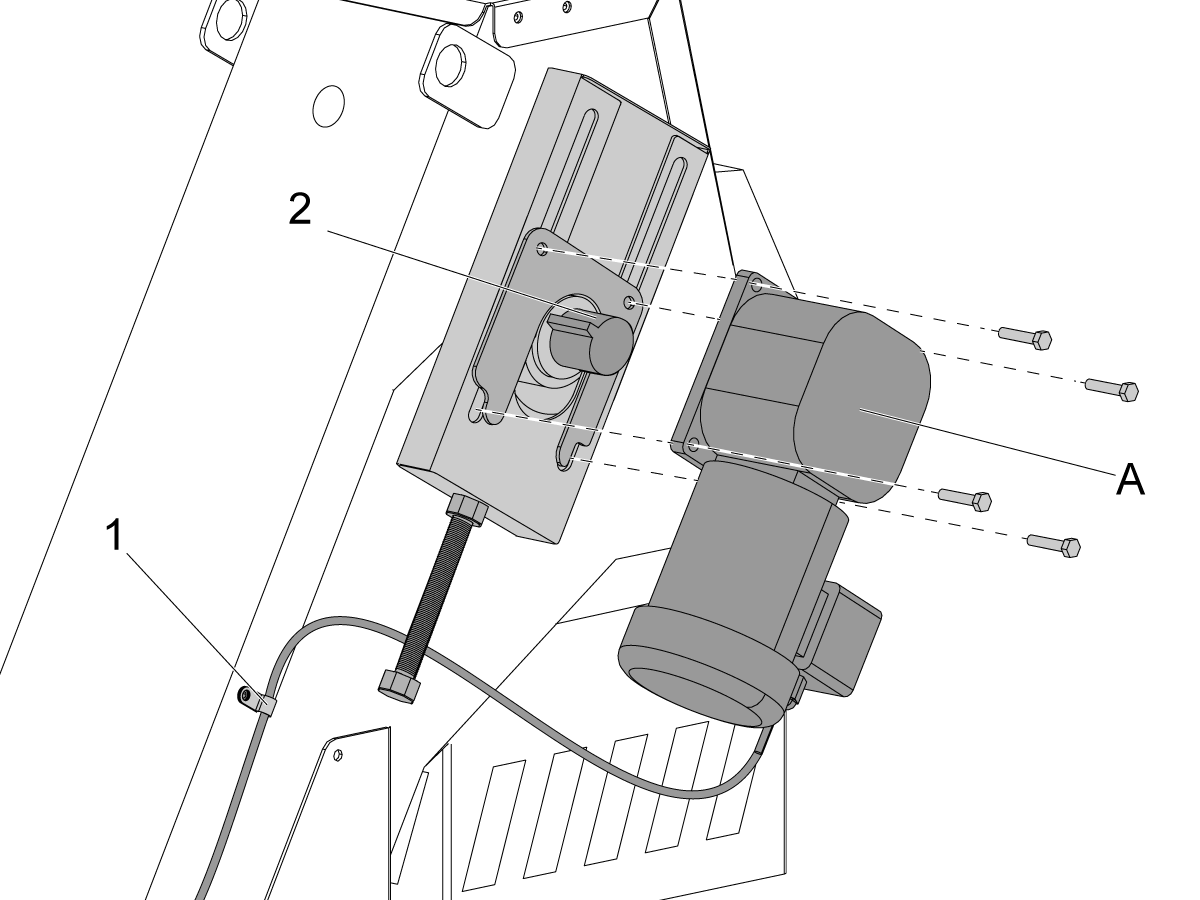
Remove the cable clamps [1].

Remove the used motor.

Press the 1/4HP CHIP CONVEYOR MOTOR CDF [A] onto the conveyor shaft. Align the slot in the motor shaft with the key [2] on the conveyor shaft.

Attach the motor to the conveyor head.

Install the cable clamps [1].

Connect the electrical cable.

3

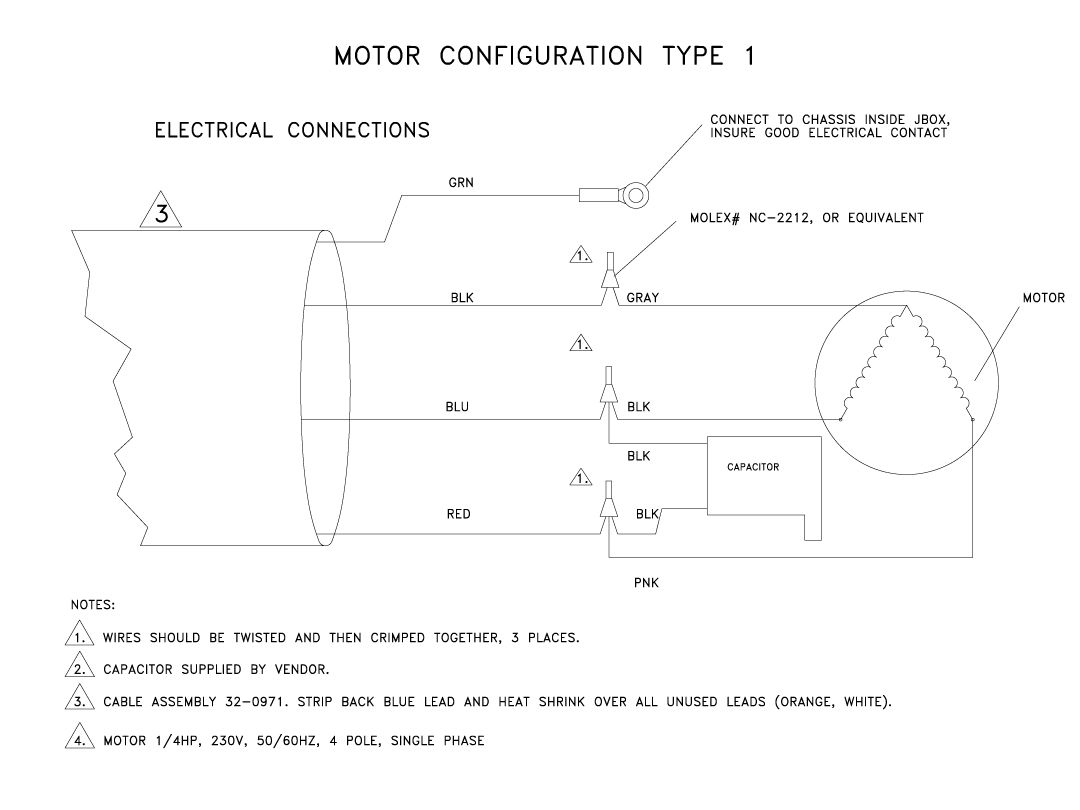
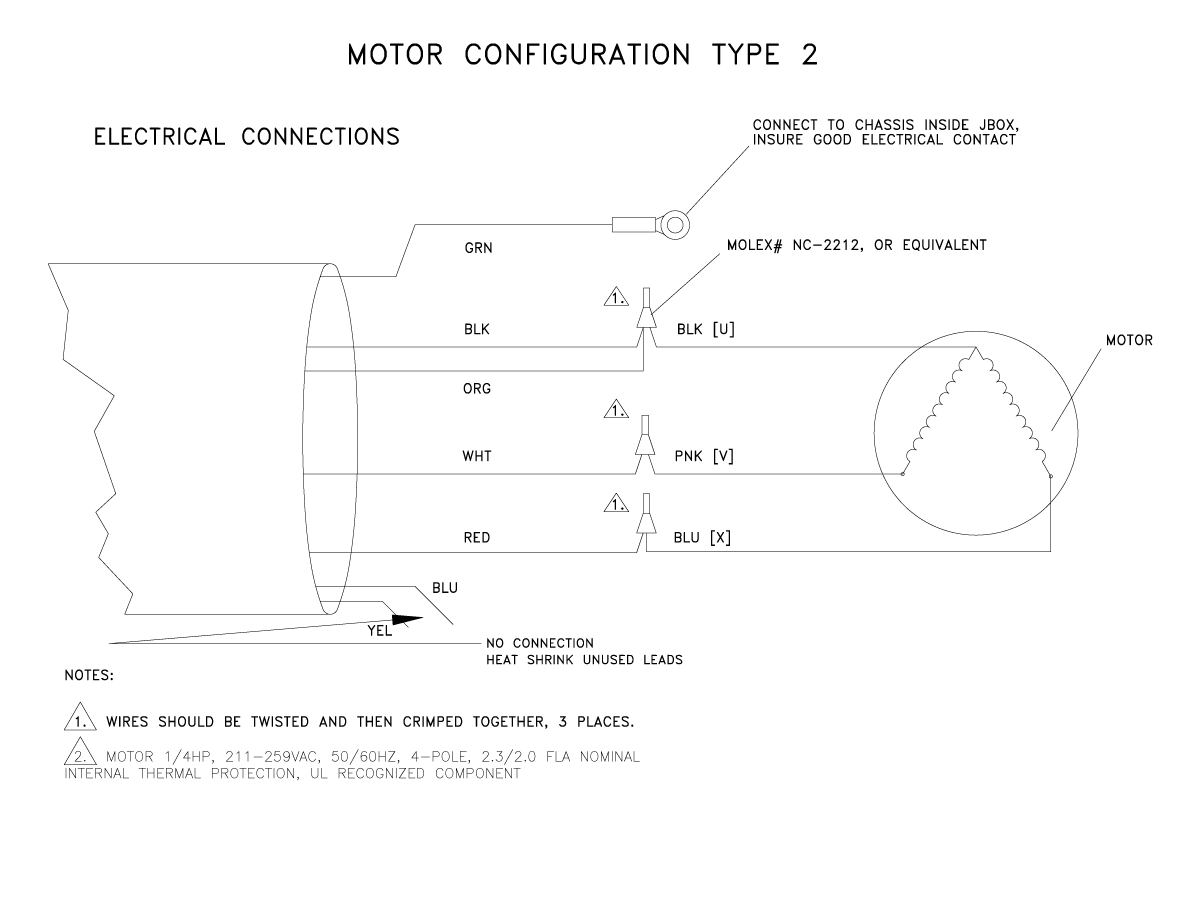
After completing the installation, run the conveyor by pressing [CHIP FWD] if the conveyor runs backwards please check the motor wiring and verify it is wired correctly. Use the wiring diagrams below for reference.  

8c.5 CDF Conveyor System - Troubleshooting

Recently Updated

CDF - Conveyor System - Troubleshooting Guide


TG0173

Revision A - 05/2026

Note: Download and fill out the Chip Conveyor System Inspection Report Checklist below before replacing any parts.

Chip Conveyor System Inspection Report Checklist

Introduction

This troubleshooting guide explains how to diagnose and resolve issues with a CDF Conveyor System.

For other conveyor types, refer to Section 8a for the Standard Belt Conveyor Troubleshooting Guide and Section 8b for the Filter Conveyor Troubleshooting Guide.

Exploded View

Symptom Table

NOTE: TO RECEIVE THE CORRECT TECHNICAL SUPPORT ON YOUR CONVEYOR, IT IS REQUIRED TO TAKE A CLEARLY VISABLE PHOTO OF THE CONVEYOR NAME PLATE AND THE MOTOR SEPCIFICATION PLATE.

Symptom Possible Cause Corrective Action
The conveyor does not start. The circuit breaker is tripped. Check for a short circuit in the motor or the cable. Refer to the Motor Cable Inspection section.
No power from I/O PCB to the motor. Verify voltage at I/O PCB and the motor.
Blown fuses (I/O-version R and earlier). Check the fuses on the I/O PCB.
The conveyor motor capacitor is defective. Inspect motor capacitor for damage.
The 230V system does not turn ON and the red LED on the motor drive PCB is OFF.  The jumper on the motor drive PCB is incorrectly located or defective.  Make sure that the motor drive PCB has a jumper installed on P3 inbetween pin 1 and 2 (the bottom two pins). 
There is no 12V input power.  Make sure that the 12V input power is connected to P2 on the motor drive PCB. 
Conveyor is noisy or oscillates between forward and reverse. There is a build up of chips. Clear excessive chips and any obstructions.
The conveyor belt is damaged. Inspect conveyor belt and repair or replace.
The conveyor belt tension is incorrect. Adjust the belt tension.
The auger is noisy or oscillates between forward and reverse. Then Alarm 9906  CHIP CONVEYOR MALFUNCTION is generated. There is an excessive chip build-up or an obstruction. Clear all chips and obstructions from the auger trough and chip chute.

There is no chip build-up or obstruction and machine generates

Alarm 9906 CHIP CONVEYOR MALFUNCTION 

The auger motor is bound up.

The machine is detecting an overcurrent condition.  Check the discrete input CHIP_CONVEYOR_OVERCURRENT cycles from 0 - 1  or 1 - 0 (0 means overload condition). Check the motor for burnout or binding.  

Run the Chip Conveyor Overcurrent Data Collection, refer to the Diagnostic Data Collection procedure for how to run the data collection.

The chip conveyor reverses direction with minimal or no chip build-up.

Chip Auger, Conveyor, may start without operator action, even with doors open.

Machine has software 100.17.000.1016 Update software to 100.17.000.2030 or greater. This problem has been corrected such that the conveyor never restarts automatically. With a Classic Haas Control, the operator can restart the conveyor with the door open. NGC machines that have been updated after October 10th, 2018 will have strict door rules that makes this impossible. 

M31 is restarting conveyor timers if the conveyor is already on.

Machine has software prior to 100.17.000.2030 and the conveyor cycle keeps restarting every time a M31 is encountered.

Update software to 100.17.000.2030 or greater. In the new software if a conveyor cycle is already running but in the off state, a M31 will NOT restart the conveyor. The conveyor will follow the cycle it is currently in.

Alarm 9819 CHIP CONVEYOR SHORT CIRCUIT The auger motor start capacitor is at fault. Inspect the auger motor start capacitor for damage.
Alarm 9848 CHIP CONVEYOR MOTOR DISCONNECTED There is no power from the I/O PCB to the motor. Verify the voltage at the I/O PCB and at the motor.
CDF Conveyor runs backwards when commanded to run forward Motor wiring is incorrect. Verify the motor wiring, use the wiring diagrams in the CDF Motor Wiring Section for reference. 

Motor Cable Inspection

Corrective Action:

Inspect the motor cable for any sign of damage. Check for burn marks at the plug. This could be caused by coolant contamination.

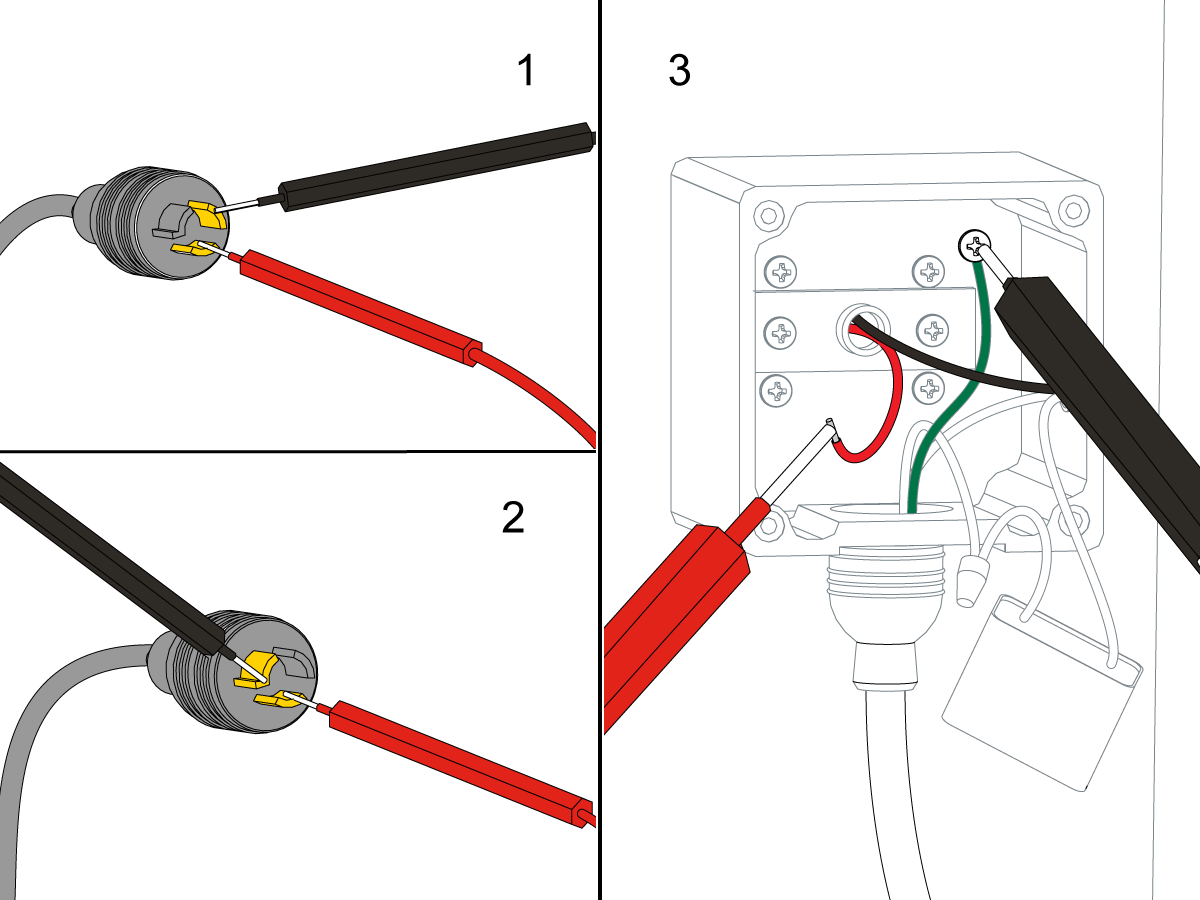
Measure the Ohms the across the motor power cable leads [1] at the plug. There should be resistance leg to leg. An open reading suggests a bad motor or cable.

Measure the Ohms on the motor power cable from each power leg to the ground leg [2] of the plug. This reading should be open.

If cable shows a short leg to ground at the plug, disconnect the power cable at the motor and check each motor power lead to the motor chassis [3]. If reading is open, the cable is at fault. If any lead tests short, the motor is shorted.

Voltage

Corrective Action:

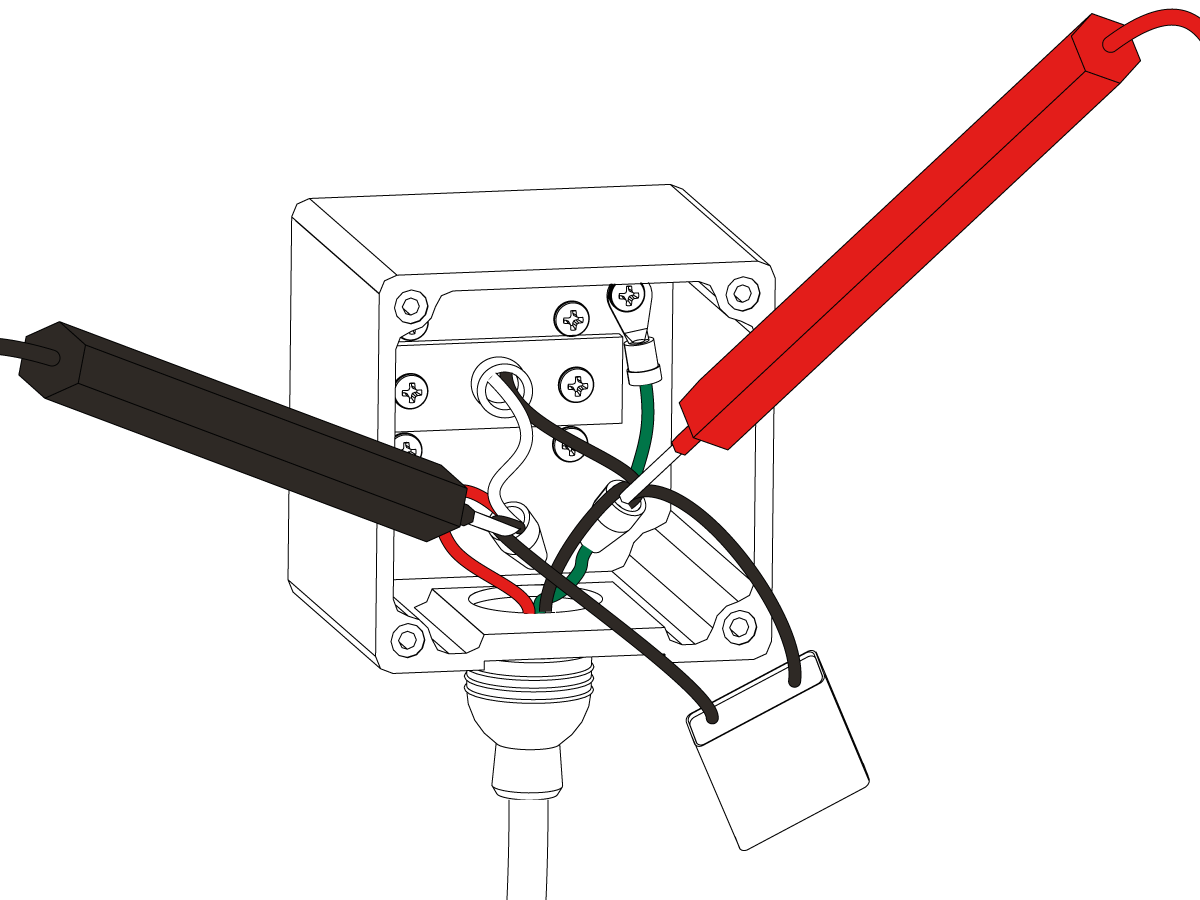
Find the chip conveyor motor cable 140 at the I/O PCB. Press [CHIP FWD]. Use a multimeter with needle tip probes to measure the voltage between the black and red wires on the cable.

Have someone press and hold [CHIP REV]. Measure the voltage between the black and white wires. When the I/O PCB operates correctly, each voltage reading is 240 VAC.

If the voltage at the I/O PCB is correct, open the conveyor motor junction box. Use a multimeter with needle tip probes to check for voltage on the power leads at the motor.

If there is no voltage, check the motor and the cable. If there is voltage, check the capacitor. If you verify the voltage and capacitor are correct, inspect the motor drive shaft and keyway.

Fuses

Corrective Action:

Check these fuses at the bottom right corner of the I/O PCB (Fuse type: AGC 5 amp):

  • Single phase motors: FU2 [1] /FU3 [2]. There should be no fuse in FU4 [3].
  • 3 phase motors: FU2 [1] /FU3 [2] /FU4 [3]

A short in the motor or the cable could have blown the fuse

Capacitor

Corrective Action:

Inspect the conveyor motor capacitor for damage. A damaged capacitor will usually have signs of deformation or bubbling on the capacitor casing. This could be caused by a short in the motor or in the cable.

Open the motor junction box. Check the capacitor. Look for burn marks on the case.

Measure the capacitor. Most multimeters can measure capacitance upon manual activation (turn to the correct units of measurement, and push the yellow button). It should be 6 or 9 microfarad as noted on the capacitor's case.

Belt Inspection

Corrective Action:

Inspect the conveyor belt for damage.  Refer to the Maintenance section 8c.1

Corrective Action:

Make sure the belt tension is correct. Refer to the decals on the side of the machine. The correct belt slack for Jorgensen conveyors is 0.25" - 0.38" (6 - 10 mm). The correct belt slack for Hennig conveyors is 0.12" - 0.25" (3 - 6 mm). 


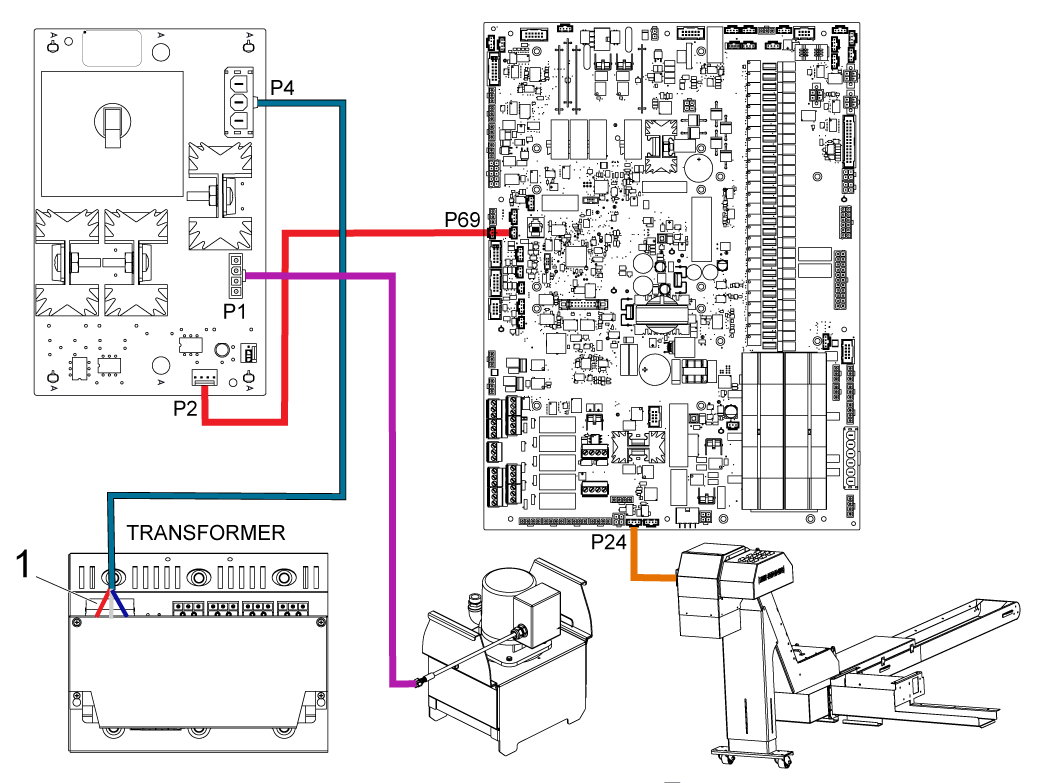
CDF Motor Wiring

Run the conveyor by pressing [CHIP FWD] if the conveyor runs backwards please check the motor wiring and verify it is wired correctly. Use the wiring diagrams below for reference. 

Electrical Diagram

Recently Viewed Items

You Have No Recently Viewed Items Yet

Feedback
Haas Logo

Haas Delivered Price

This price includes shipping cost, export and import duties, insurance, and any other expenses incurred during shipping to a location in France agreed with you as a buyer. No other mandatory costs can be added to the delivery of a Haas CNC Product.

KEEP UP WITH THE LATEST HAAS TIPS AND TECHNOLOGY...

Sign up now!   

HAAS TOOLING ACCEPTS THE FOLLOWING:

  • Service & Support
  • Owners
  • Request Service
  • Operator Manuals
  • Haas Parts
  • Rotary Repair Request
  • Pre-Install Guides
  • Shopping Tools
  • Build & Price a New Haas
  • Available Inventory
  • The Haas Price List
  • CNCA Financing
  • About Haas
  • Accessibility Statement
  • DNSH Statement
  • Export Compliance
  • Careers
  • Certifications & Safety
  • Contact Us
  • History
  • Terms & Conditions
  • Haas Tooling Terms & Conditions
  • Privacy
  • Warranty
  • Haas Community
  • Haas Certification Program
  • Haas Motorsports
  • Gene Haas Foundation
  • Haas Technical Education Community
  • Events
  • Join the Conversation
  • Facebook
  • X
  • Flickr
  • YouTube
  • LinkedIn
  • Instagram
  • TikTok
© 2026 Haas Automation, Inc – CNC Machine Tools

This site is protected by reCAPTCHA and the Google Privacy Policy and Terms of Service apply.

2800 Sturgis Rd., Oxnard, CA 93030
Toll Free: (888) 817-4446 / Fax: 805-278-8554