My Haas Welcome,
!
Haas Tooling MyHaas/HaasConnect Sign In Register Haas Tooling MyHaas/HaasConnect Sign Out Welcome, My Machines Latest Activity My Quotes My Account My Users Sign Out
Find Your Distributor
  1. Select Language
    1. English
    2. Deutsch
    3. Español - España
    4. Español - México
    5. Français
    6. Italiano
    7. Português
    8. Český
    9. Dansk
    10. Nederlands
    11. Magyar
    12. Polski
    13. Svenska
    14. Türkçe
    15. 中文
    16. Suomi
    17. Norsk
    18. الإنجليزية
    19. български
    20. Hrvatski
    21. Ελληνικά
    22. Română
    23. Slovenský
    24. Slovenščina
    25. 한국어
    26. 日本語
    27. Українська
  • machines Main Menu
    • Vertical Mills
      Vertical Mills
      Vertical Mills View All
      • Vertical Mills
      • VF Series
      • Universal Machines
      • VR Series
      • VP-5 Prismatic
      • Pallet-Changing VMCs
      • Mini Mills
      • Mold Machines
      • High-Speed Drill Centers
      • Drill/Tap/ Mill Series
      • Toolroom Mills
      • Pocket Mill
      • Compact Mills
      • Gantry Series
      • SR Sheet Routers
      • Extra-Large VMC
      • Double-Column Mills
      • 3+2 Positioning Machines
    • Multi-Axis Solutions
      Multi-Axis Solutions
      Multi-Axis Solutions View All
      • Multi-Axis Solutions
      • Y-Axis Lathes
      • 5-Axis Mills
    • Lathes
      Lathes
      Lathes View All
      • Lathes
      • ST Series
      • Dual-Spindle
      • Box Way Series
      • Toolroom Lathes
      • Chucker Lathe
      • Haas Bar Feeders
    • Horizontal Mills
      Horizontal Mills
      Horizontal Mills View All
      • Horizontal Mills
      • 50-Taper
      • 40-Taper
    • Rotaries & Indexers
      Rotaries & Indexers
      Rotaries & Indexers View All
      • Rotaries & Indexers
      • Rotary Tables
      • Indexers
      • 5-Axis Rotaries
      • Extra-Large Rotaries
    • Special Series
      Special Series
      Special Series View All
      • Special Series
      • EU_Series_Redirect
    • Automation Systems
      Automation Systems
      Automation Systems View All
      • Automation Systems
      • Mill Automation
      • Lathe Automation
      • Automatic Parts Loaders
      • Automation Models
    • Desktop Machines
      Desktop Machines
      Desktop Machines View All
      • Desktop Machines
      • Desktop Mill
      • Desktop Lathe
      • Control Simulator, Standard
      • Control Simulator, Premium
    • Shop Equipment
      Shop Equipment
      Shop Equipment View All
      • Shop Equipment
      • Knee Mill
      • Haas Manual Lathes
      • Haas Saws
    • Fabrication Machines
      Fabrication Machines
      Fabrication Machines View All
      • Fabrication Machines
      • Laser Cutting Machines
      • CNC Press Brakes
    • QUICK LINKS Special Series  Special Series 
      EU SERIES EU SERIES BUILD & PRICE | PRICE LIST BUILD & PRICE | PRICE LIST In-Stock Machines In-Stock Machines WHAT’S NEW WHAT’S NEW YOUR FIRST CNC YOUR FIRST CNC
      SHOPPING TOOLS
      • Build & Price a Haas
      • Price List
      • Available Inventory
      • CNCA Financing
      WANT TO TALK TO SOMEONE?

      A Haas Factory Outlet (HFO) can answer your questions, and walk you through your best options.

      CONTACT YOUR DISTRIBUTOR >
  • Options Main Menu
    • The Haas Control Value Option Packages
      Value Option Packages
      Value Option Packages View All
      • Value Option Packages
    • Product Image Spindles
      Spindles
      Spindles View All
      • Spindles
    • Product Image Tool Changers
      Tool Changers
      Tool Changers View All
      • Tool Changers
    • Product Image 4th- | 5th-Axis
      4th- | 5th-Axis
      4th- | 5th-Axis View All
      • 4th- | 5th-Axis
    • Product Image Turrets & Live Tooling
      Turrets & Live Tooling
      Turrets & Live Tooling View All
      • Turrets & Live Tooling
    • Product Image Probing
      Probing
      Probing View All
      • Probing
    • Haas Chip & Coolant Management Chip & Coolant Management
      Chip & Coolant Management
      Chip & Coolant Management View All
      • Chip & Coolant Management
    • The Haas Control The Haas Control
      The Haas Control
      The Haas Control View All
      • The Haas Control
    • Product Image Product Options
      Product Options
      Product Options View All
      • Product Options
    • Product Image Tooling & Fixturing
      Tooling & Fixturing
      Tooling & Fixturing View All
      • Tooling & Fixturing
    • Product Image Workholding
      Workholding
      Workholding View All
      • Workholding
    • Product Image 5-Axis Solutions
      5-Axis Solutions
      5-Axis Solutions View All
      • 5-Axis Solutions
      • 5 Easy Steps to 5-Axis
    • QUICK LINKS Special Series  Special Series 
      EU SERIES EU SERIES BUILD & PRICE | PRICE LIST BUILD & PRICE | PRICE LIST In-Stock Machines In-Stock Machines WHAT’S NEW WHAT’S NEW YOUR FIRST CNC YOUR FIRST CNC
      SHOPPING TOOLS
      • Build & Price a Haas
      • Price List
      • Available Inventory
      • CNCA Financing
      WANT TO TALK TO SOMEONE?

      A Haas Factory Outlet (HFO) can answer your questions, and walk you through your best options.

      CONTACT YOUR DISTRIBUTOR >
  • Why Haas Main Menu
      Discover the Haas Difference
    • Why Haas
    • MyHaas
    • Education Community
    • Industry 4.0
    • Haas Certification
    • Customer Testimonials
  • Service Main Menu
      Welcome to Haas Service
      SERVICE HOME Operator’s Manuals How-To Procedures Troubleshooting Guides Preventive Maintenance Haas Parts Haas Tooling Videos
  • Videos Main Menu
  • Main Menu
    • View All
    • View All
    • View All
    • View All
      • HTEC Curriculum Support
      • Haas Value Option Packages (VOP) Journey
    • View All
      • Haas 10 kg Cobot Package
      • Cobot Kits
      • DC-1 Drill Center
      • CNC Sales News
      • Do More With Your Haas
    • View All
    • View All
      • contact-us-test
      • 4 - AUTOMATION SYSTEMS
      • Carousel-V2
      • expert test
      • Demo_Day_Trident-test
      • Link Test
      • image-sale-tag-test
      • article-list-test
      • Haas 25 kg Robot Package
      • test-algolia-page
    • View All
    • View All
    • View All
    • View All
      • calc-test
    • View All
    • QUICK LINKS Special Series  Special Series 
      EU SERIES EU SERIES BUILD & PRICE | PRICE LIST BUILD & PRICE | PRICE LIST In-Stock Machines In-Stock Machines WHAT’S NEW WHAT’S NEW YOUR FIRST CNC YOUR FIRST CNC
      SHOPPING TOOLS
      • Build & Price a Haas
      • Price List
      • Available Inventory
      • CNCA Financing
      WANT TO TALK TO SOMEONE?

      A Haas Factory Outlet (HFO) can answer your questions, and walk you through your best options.

      CONTACT YOUR DISTRIBUTOR >
  • Haas Tooling Main Menu
  • Haas Service Parts Main Menu

My Haas Welcome,
!
Haas Tooling MyHaas/HaasConnect Sign In Register Haas Tooling MyHaas/HaasConnect Sign Out Welcome, My Machines Latest Activity My Quotes My Account My Users Sign Out
Find Your Distributor
  1. Select Language
    1. English
    2. Deutsch
    3. Español - España
    4. Español - México
    5. Français
    6. Italiano
    7. Português
    8. Český
    9. Dansk
    10. Nederlands
    11. Magyar
    12. Polski
    13. Svenska
    14. Türkçe
    15. 中文
    16. Suomi
    17. Norsk
    18. الإنجليزية
    19. български
    20. Hrvatski
    21. Ελληνικά
    22. Română
    23. Slovenský
    24. Slovenščina
    25. 한국어
    26. 日本語
    27. Українська
×

Search Results

Web Pages

Images

    • <
    • 1
    • >

5 - Programmable Coolant

Chip Removal and Coolant - Service Manual


  • 1 - Chip and Coolant - Introduction
  • 2 - Auxiliary Coolant Filter
  • 3 - Single-Stage Flood Coolant
  • 4 - Oil Skimmer
  • 5 - Programmable Coolant
  • 6 - Chip Auger
  • 7 - Coolant Chiller
  • 8 - Chip Conveyor - Overview
  • 8a - Standard Belt Chip Conveyor
  • 8c - CDF Chip Conveyor
  • 9 - Chip Conveyor - VMC
  • 10 - Chip Conveyor - UMC
  • 11 - Chip Conveyor - Lathe
  • 12 - Coolant Refill
  • 13 - High Pressure Flood Coolant
  • 14 - Through-Spindle Coolant
  • 15 - Through-Tool Air Blast
  • 15a - Through-Tool Oil Mist
  • 16 - Haas Chip Lift
  • 17 - Mist Condenser
  • 18 - Coolant Level Float Sensor
  • 19 - Mini Conveyor
  • 20 - Coolant VFD
  • 21 - Coolant Sanitizer
  • 22 - Chip Separator
  • 23 - Chip Tray Strainer
  • 24 - Multi-Stage Flood Coolant
  • 25 - Coolant Cart

Go To :

  • 5.1 P-COOL Overview
  • 5.2 P-COOL - Operation
  • 5.3 P-COOL - Replacement
  • 5.4 P-COOL - Field Installation - VMC, MM/SMM, TM, and DT/DM
  • 5.5 P-COOL - Field Installation - UMC
  • 5.6 P-COOL - Troubleshooting

5.1 P-Cool Overview

Introduction

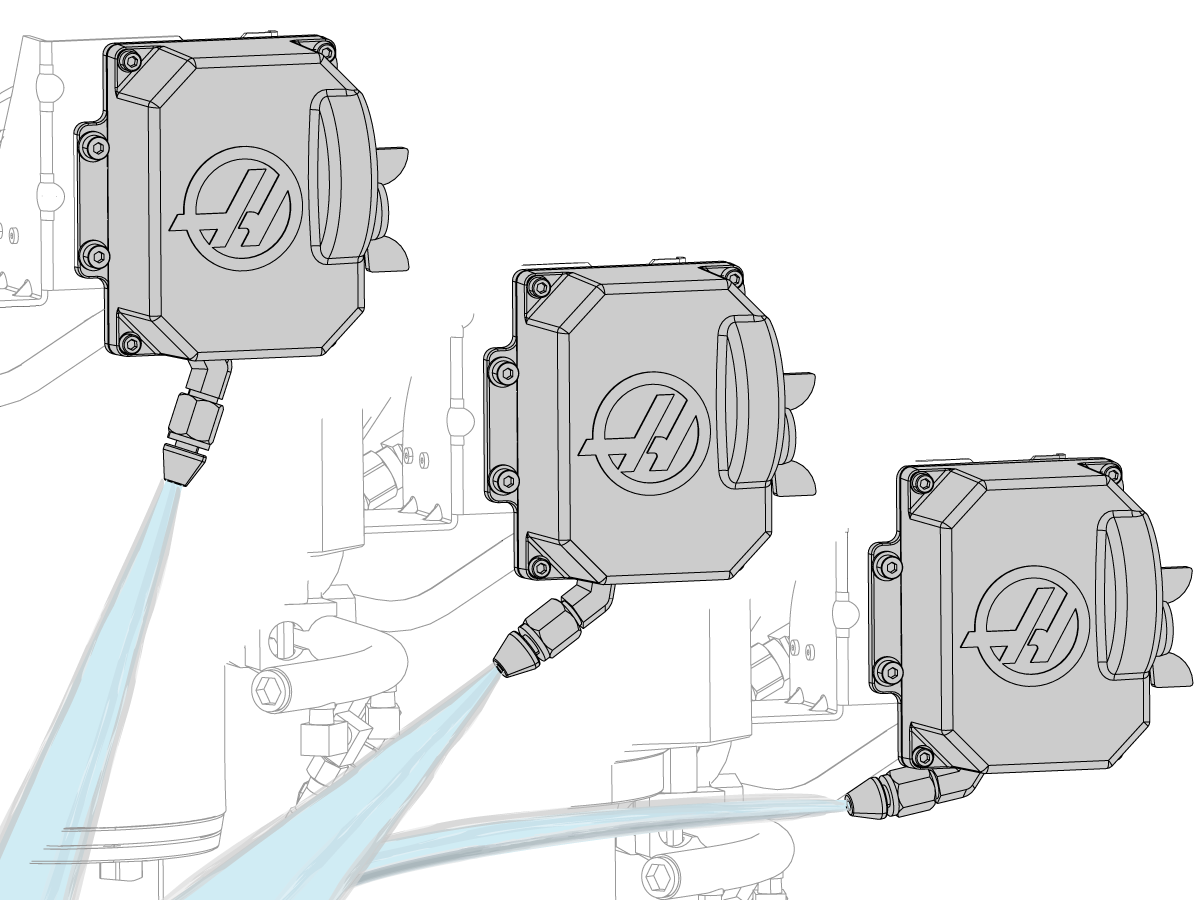
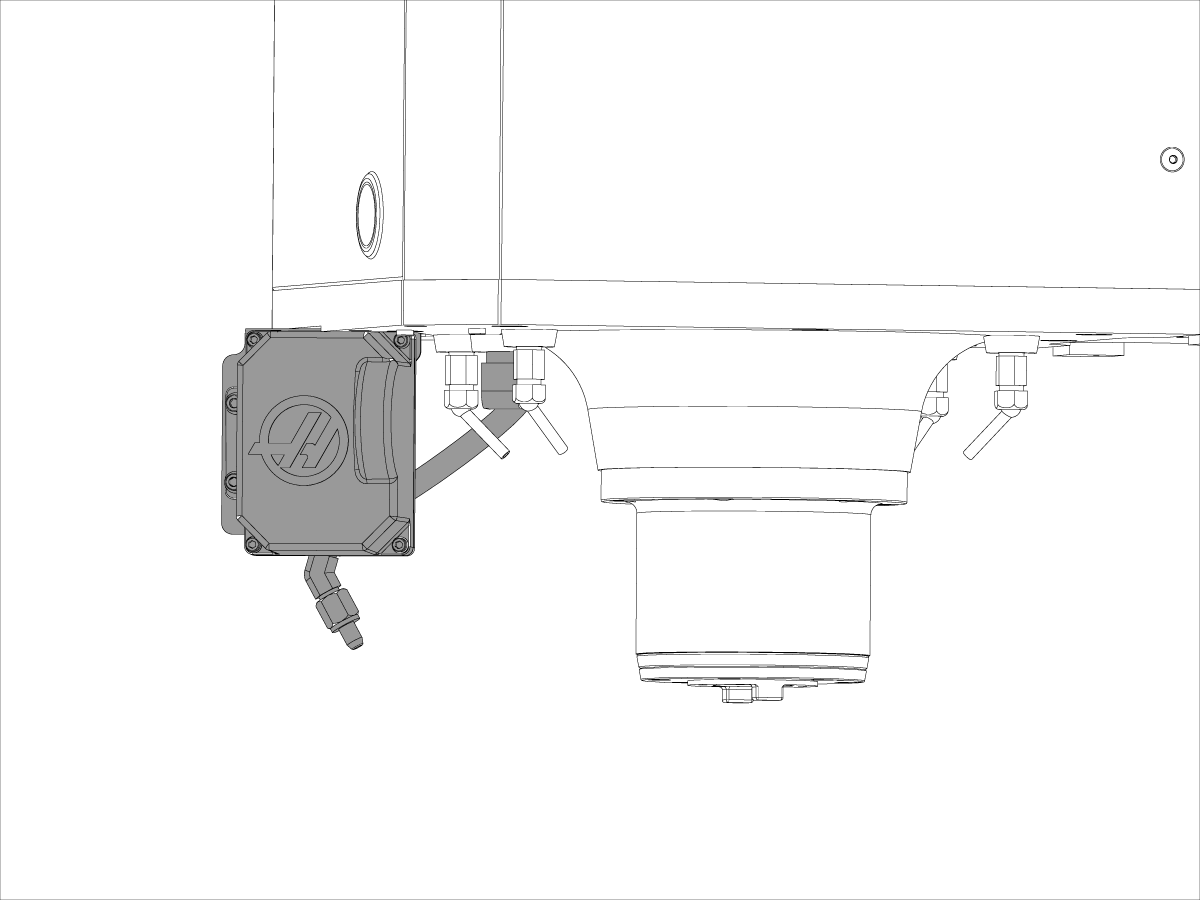
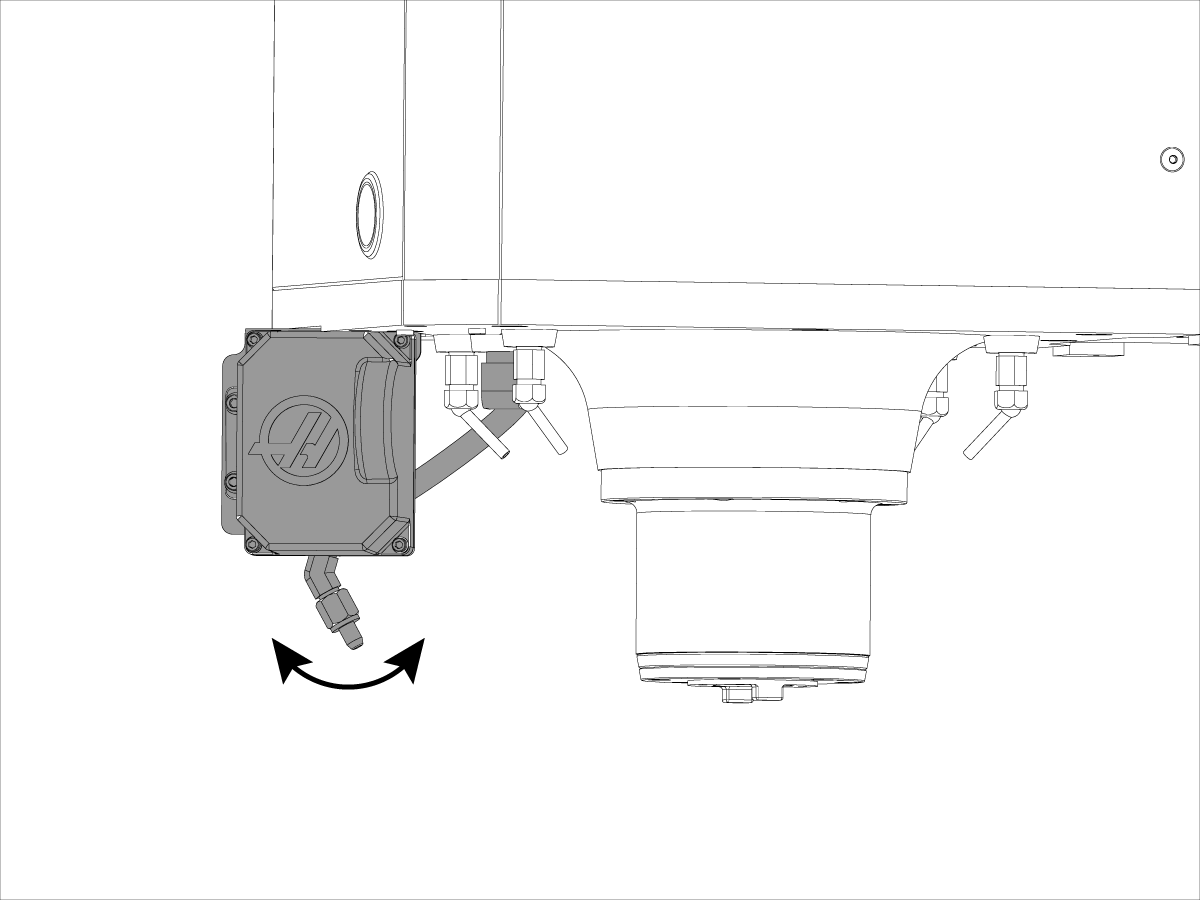
The Programmable Coolant Nozzle is a multi-position nozzle that automatically directs coolant precisely at the cutting tool.

The position of the nozzle is controlled via the program, and set specifically for each tool length – saving operator time by eliminating constant adjustments. 

Warning: Do not back drive the nozzle either by hand or when making coolant connection. 

5.2 P-COOL - Operation

Recently Updated

P-COOL - Operation


Applies to machines built from: January, 1992

Introduction

1

This procedure tells you how to find the best Programmable Coolant (PCOOL) spigot position for each tool. The PCOOL spigot adjusts its position when the program calls a tool offset.

 Caution: Do not move the PCOOL spigot by hand. This causes damage to the motor. Use only control commands.

Software Required:

  • Mill Software Version 4.19 or higher
  • Next Generation Control

Positioning

1

Set the ball valve to the PCOOL position.

 Note: This step is necessary only when you have a ball valve control to change between conventional coolant (lock lines or coolant ring) or PCOOL.

Valve placement and style can be different from the illustration.

2

Next Generation Control 

Press [OFFSET] until the TOOL OFFSET tableappears on the display.

Command the first tool into the spindle.

3

Classic Haas Control

Press [OFFSET] until the TOOL OFFSET table [1] appears on the display.

Command the first tool into the spindle.

4

Press [COOLANT] to start the coolant flow.

Press [CLNT UP] or [CLNT DOWN] to change the position of the spigot.

 Note: Continue to the next step after you find a good position, where the coolant sprays on the tool tip.

5

Next Generation Control

Press [COOLANT] to stop the coolant flow.

Record the value next to Coolant Position [1] at the bottom of the TOOL OFFSET table.

6

Classic Haas Control

Press [COOLANT] to stop the coolant flow.

Record the value next to CLNT POS [1] at the bottom of the TOOL OFFSET table.

7

Next Generation Control

Highlight the tool offset you want to adjust.

Select the COOLANT POSITION column.

Type the coolant position number that you recorded in step 4.

Press [F1] to enter the value into the COOLANT POSITION column.

 Note: The PCOOL spigot adjusts to the position in the COOLANT POSITION column when the program calls a tool offset.

8

Classic Haas Control

Highlight the tool offset you want to adjust.

Select the COOLANT POSITION column [1].

Type the coolant position number that you recorded in step 4.

Press [F1] to enter the value into the COOLANT POSITION column.

 Note: The PCOOL spigot adjusts to the position in the COOLANT POSITION column when the program calls a tool offset.

Other Positioning Methods

You can also use these methods of changing the position of the coolant spigot.

  1. Coolant Position System Variables
    • You can specify the coolant positions for tools 1 through 200. The systems variables you will use are 3401 through 3600.
    • Example: #3401=15 sets the coolant position for Tool 1 to position 15.
    • The machine must have Macros enabled.
  2. Coolant Position in the Program Blocks
    • You can adjust the spigot in a program block with an M34 or M35 command.
    • The M35 command moves the spigot one position up.
    • The M34 command moves the spigot one position down.

5.3 P-COOL - Replacement

Recently Updated

P-COOL - Replacement


AD0302

Applies to machines built from January 1992

Introduction

This procedure tells you how to replace a Programmable Coolant (P-Cool) assembly on an HMC or VMC machine. The procedure shows the replacement on a VMC machine. The steps are similar on an HMC machine.

These instructions apply to kit

  • PN: 93-1000876 PCOOL FIELD INSTALL KIT 2021
  • PN: 93-1475B, P-COOL INSTALLATION KIT 2022 (machines made May 2022 and later)

Minimum software requirements for a machine with a Classic Haas Control:

  • Older software versions do not allow 34 positions for the pcool. Versions M11.17 through M11.21 only allow 14 positions. While the pcool will function, it will be restricted to 14 positions (14° of motion). Software upgrade to M11.22 or higher is required for these machines. No other restrictions on other versions of software.

Machines with a Classic Haas Control Hardware requirements for first time installation:

  • 25-7850A  BRACKET PCOOL VF1-11/40TPCOOL
  • 25-8164    COVER CABLE PCOOL VF1-11 250/PLT
  • 52-0026A    HOSE  STRAIGHT SWIVEL PCOOL NPT 3/8M

 Note: 25-7850A BRACKET PCOOL VF1-11/40TPCOOL and 25-8164 COVER CABLE PCOOL VF1-11 250/PLT are included in 93-1000876 PCOOL FIELD INSTALL KIT 2021

Machine requirements

  • Machines made after 2005 will need a new mounting braket. 
  • Machines made after 2006 may need new M12 Cable. 

For these machines:

  • DT, MM, SMM, EC, ES, GR, VR

You must order an M12 cable [1] that has a strain-relief fitting [2]. Use P/N 32-0356.

The cable included in the kit does not have a strain relief.

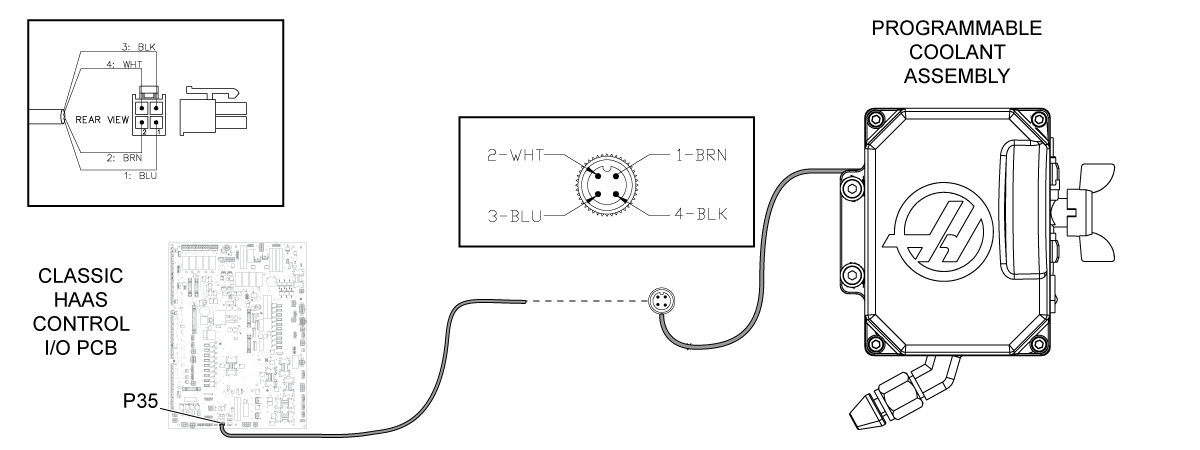
Electrical Schematic

Replacement

1

Disconnect the P-Cool hose from the valve [1] attached to the P-Cool manifold.

Disconnect the M12 cable [2] from the connector [3] on the used P-Cool assembly.

If the M12 cable has a strain relief, remove the cable bracket [4] from the spindle head cover.

Remove the (2) screws [5] that hold the used P-Cool assembly. Remove the used P-Cool assembly.

Install the new P-COOL ASSEMBLY [A]. Use the same (2) screws [5]. Connect the hose from the new P-Cool assembly to the valve [1] attached to the P-Cool manifold.

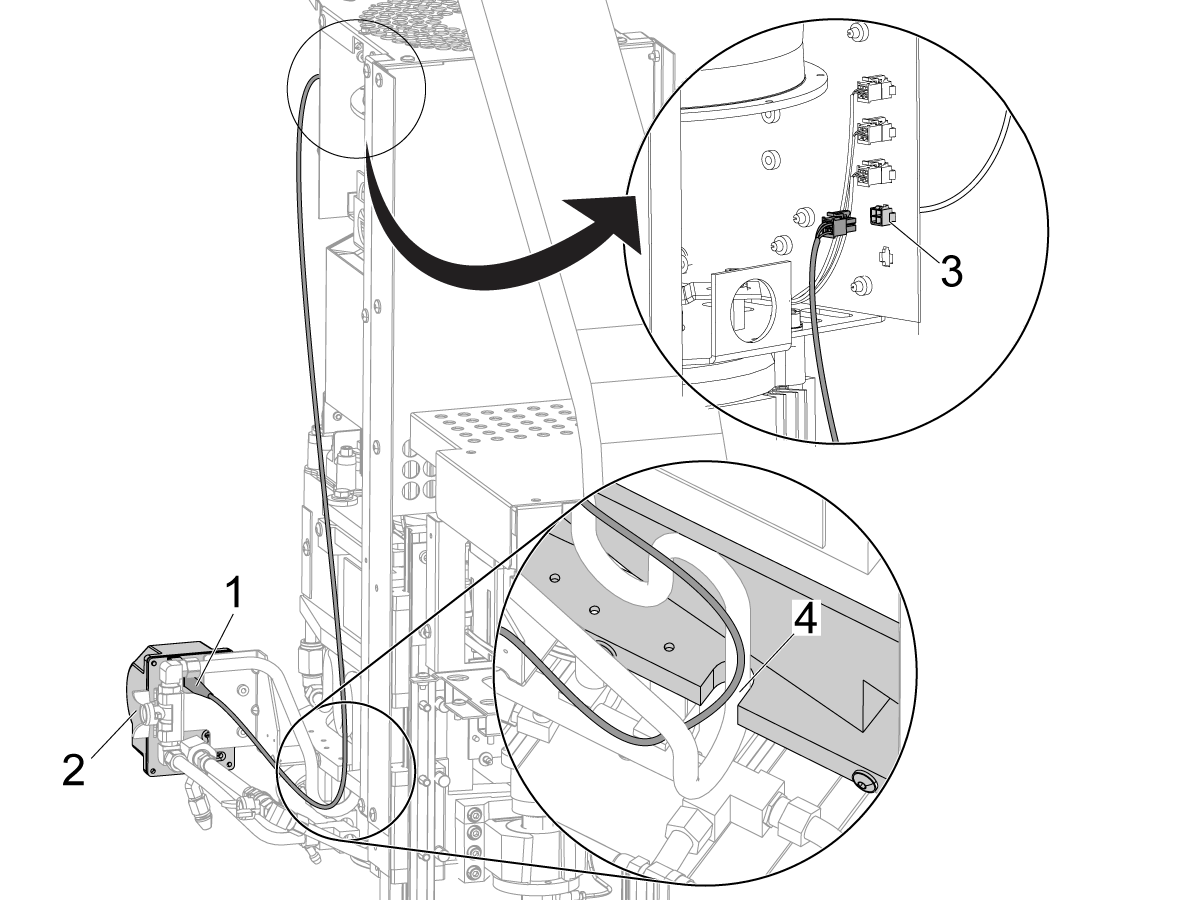
2

Remove the spindle head cover.

Connect the new M12 CABLE [B] to the receptacle on the P-COOL ASSEMBLY [A].

Put the cable up the side of the spindle head casting. Make sure the cable goes into the opening [3] at the bottom of the spindle.

Disconnect the used M12 cable [1] from the connector bracket [2].

 Note: On HMC machines, the connector bracket is near the back of the Y-Axis column. Remove the Y-Axis way covers for better access to the connector bracket.

Connect the new M12 CABLE [B] to the connector bracket.

3

Install the spindle head cover. Do not let the M12 CABLE [B] get caught between the cover and other objects.

If the M12 cable has a strain relief, put the cable and strain relief through the bracket [1]. Attach the bracket to the spindle head cover.

To replace the standard nozzle [2] with the long NOZZLE [C], do these steps:

  • Remove the fitting and nozzle [3] from the P-Cool assembly.
  • Install the long NOZZLE [C] into the FITTING [D].
  • Install the fitting into the P-Cool assembly.

Verification

1

Turn on the machine. Verify that the P-COOL homes itself.

For a Machine with a Classic Haas Control First Time Installation:

  • Go into DEBUG mode and set parameter 206 SPIGOT POSITIONS 34.

For a Machine with a Next Generation Control First Time Installation:

  • Login to the HAAS SERVICE PORTAL.
  • Download the PCOOL option configuration patch files.
  • Load the option configuration patch file to the control.  Refer to the NEXT GENERATION CONTROL - CONFIGURATION FILE - DOWNLOAD/LOAD procedure.

Test the option:

Push [CLNT UP]. Push [CLNT DOWN].

The P-Cool nozzle moves up and down.

Make sure the P-Cool system operates correctly.

5.4 P-COOL - Field Installation - VMC, MM/SMM, TM, and DT/DM

Recently Updated

P-COOL - Field Installation - VMC, MM/SMM, TM, and DT/DM


AD0197

Applies to machines built from: January, 2000

Introduction

Do this procedure for a Mini Mill or Super Mini Mill. This procedure tells you how to install a programmable coolant (PCOOL) system. 

Machine Compatibility

Mini Mills (MM) and Super Mini Mills (SMM) built in 2015 and after have these features:

  • Cable 200 is installed at the factory. You do not need to install the cable from the kit.
  • A flood coolant ring is installed at the factory. You do not need the modular-hose (Loc-Line) nozzle in the kit.

On Mini Mills and Super Mini Mills built before 2015, you must install these items from the kit:

  • Cable 200
  • The modular-hose (Loc-Line) nozzle assembly

The Coolant ring part of this procedure also works for VMCs with a coolant ring. 

Document Applies to these Parts

    Current Machines:

PN: 93-1000249 - INSTALLATION KIT, P-COOL MM/TM

93-1000966 - PCOOL KIT 40T LRG VF 2023

93-1000967 - PCOOL KIT 40T SML/MED VF 2023

93-1000970 - PCOOL KIT DT/DM 2023 (Applies for July 2014 and later. Earlier machines may need a bracket.)

Tools Required:

  • Power Drill
  • 3/8" (10mm) bit
  • Hacksaw
  • Metal File

Machine requirements

  • Pre-2006 machines will require cable and bracket 
  • Machines made after 2006 machines may require a cable. 

Templates

1

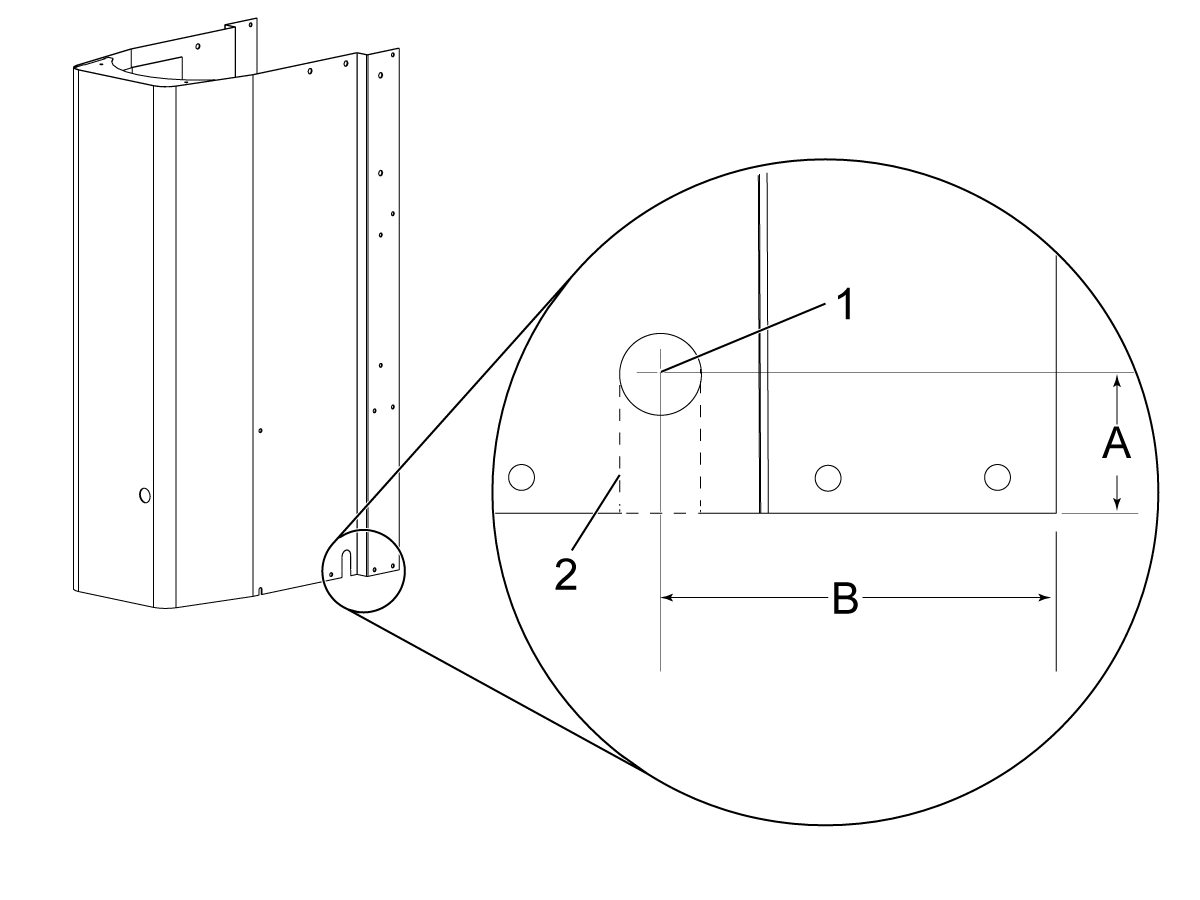
Some spindle head covers do not have the necessary slot to install the cable. For these machines, use this template.

Remove the spindle head cover.

On the side of the head cover, measure the dimensions [A] from the bottom edge of the cover and [B] from the back edge of the cover.

  • A - 1.25" (32 mm)
  • B - 3.63" (92 mm)

Put a mark [1] at the intersection of [A] and [B].

Drill a Ø0.375" (10 mm) hole at the mark [1].

Use the hacksaw to make (2) cuts [2] between the bottom edge of the spindle head cover and the hole to create the slot.

Use a file to make the edges of the slot smooth.

Electrical Schematic

Modular - Hose Nozzle - Installation

Do this procedure on a Mini Mill or Super Mini Mill that was made before 2015. These machines have a modular hose (Loc-Line). This procedure tells you how to install a programmable coolant (PCOOL) system.

1

Set the main circuit breaker to the OFF position.

Push [POWER OFF].

Lock the main circuit breaker. Use an approved lock with an approved safety tag.

2

Remove the head cover.

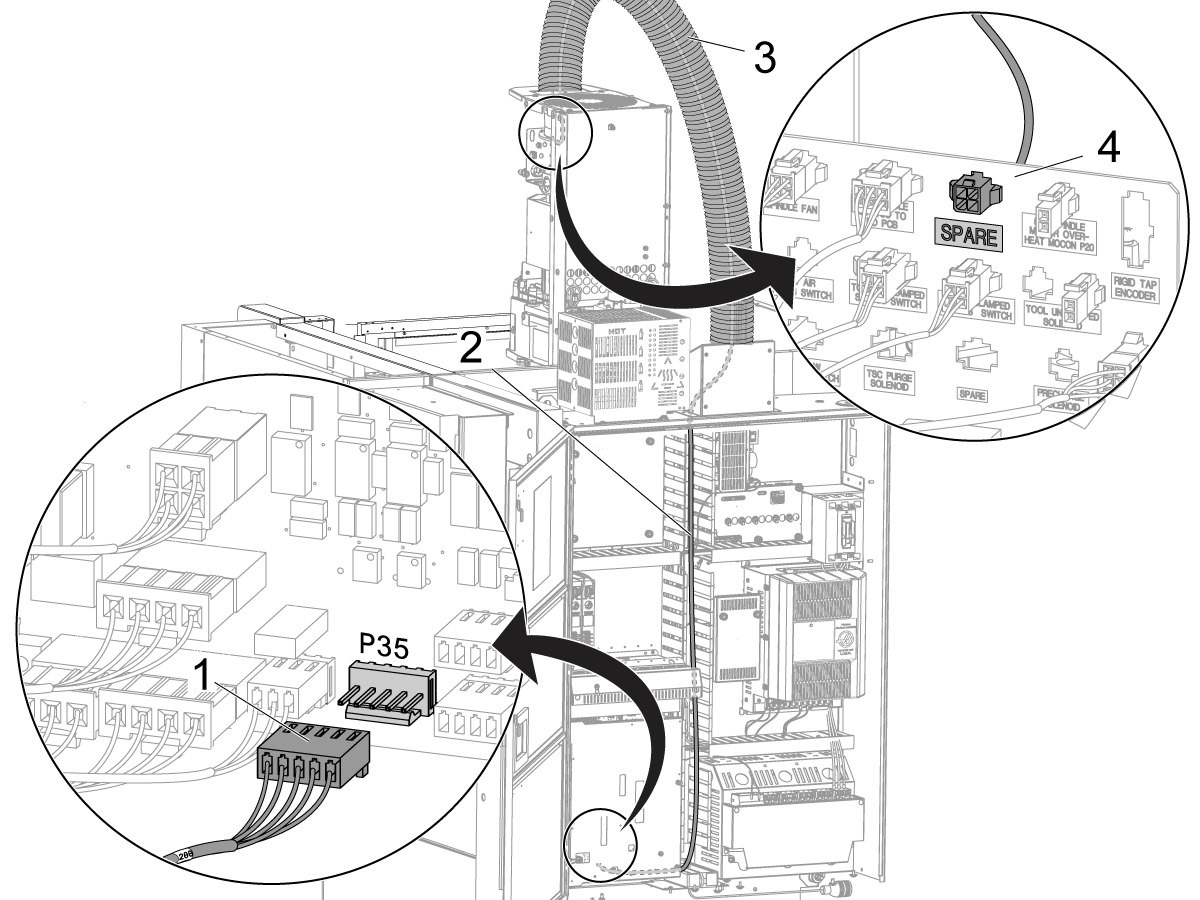
Find cable 200 in the installation kit.

To install the cable, do these steps:

  • Open the control cabinet. Find the I/O PCB.
  • Connect the cable [1] to P35 on the I/O PCB.
  • Put the cable into the cable manager [2].
  • Put the cable through the cable carrier [3].
  • Examine the connector bracket [4] at the top of the spindle.
  • Find an open hole that has the label "SPARE."
  • Push the connector on the cable through the hole.

3

Remove the modular-hose assembly [2] from the spindle head casting.

Install these parts for the P-Cool assembly:

  • tee fitting [1]
  • modular-hose assembly [2]
  • adapter [3]
  • P-Cool hose assembly [4]
  • P-Cool assembly [5]

4

Find the PCOOL cable [1] in the installation kit.

Put the cable into the bracket [3] for the pipe fitting. You must turn the cable to put it through the bracket.

Connect the cable to the PCOOL unit [4].

Put a cable clamp [2] onto the cable. Attach the cable clamp to the spindle casting as shown.

Find the connector [5] on the other end of the cable.

Find the receptacle [6] on the connector panel at the top of the spindle.

Connect the cable to the receptacle.

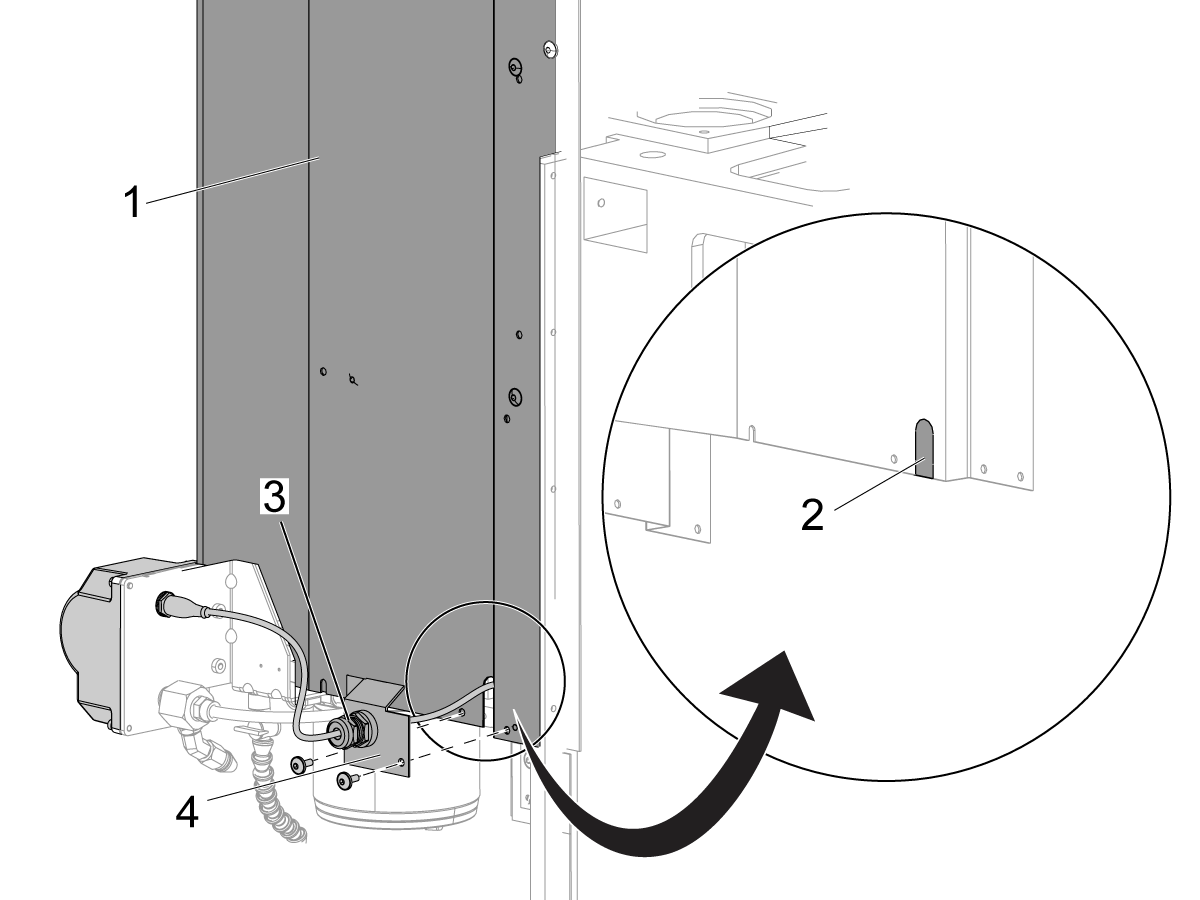
5

If the spindle head cover [1] has a plug [2] at the right rear corner, remove it before you install the cover.

Install the spindle head cover.

Attach the pipe bracket [4] to the spindle head cover.

The PCOOL cable has a special fitting [3] to prevent damage. Make sure the fitting is tight.

Note: Machines made before August 2002 possibly do not have the plug in the spindle head cover. Refer to the "Introduction" for instructions on how to modify the spindle head cover.

Flood Coolant Ring - Installation

This procedure is for Mini Mills, Super Mini Mills, or VMCs that have a flood coolant ring.  This procedure tells you how to install a programmable coolant (PCOOL) system.

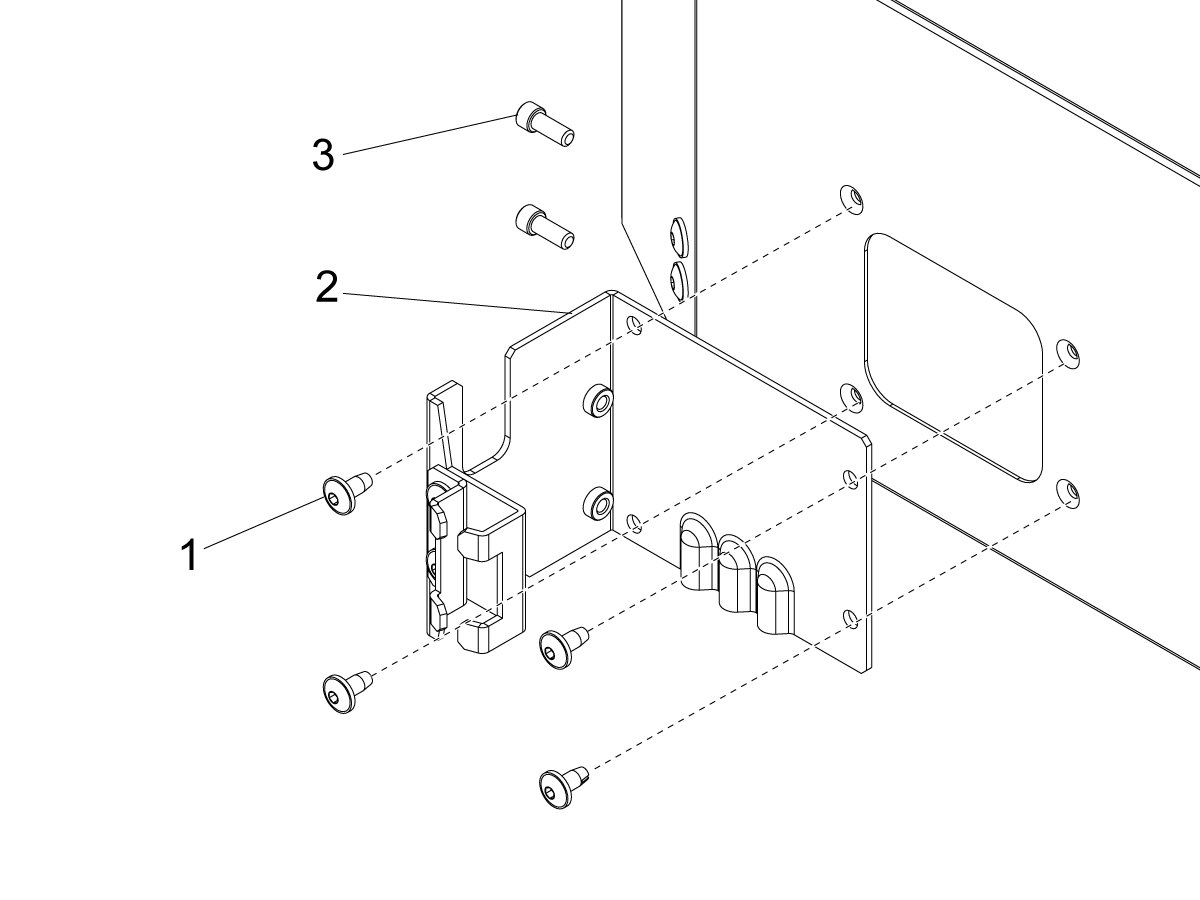
1

VMC Bracket

This bracket is installed on all machines made after 2005 by default. This will need to be installed on machines made before 2005. 

[1] These four screws will attach the bracket to the spindle housing of the machine.

[2] This bracket is where the Pcool unit is attached to the rest of the machine.

[3] These two screws attach the Pcool unit. 

2

Mini Mill and DM/DT Bracket

Remove the modular-hose assembly [2] from the spindle head casting.

Install these parts for the P-Cool assembly:

  • tee fitting [1]
  • modular-hose assembly [2]
  • adapter [3]
  • P-Cool hose assembly [4]
  • P-Cool assembly [5]

3

Set the main circuit breaker to the OFF position.

Push [POWER OFF].

Lock the main circuit breaker. Use an approved lock with an approved safety tag.

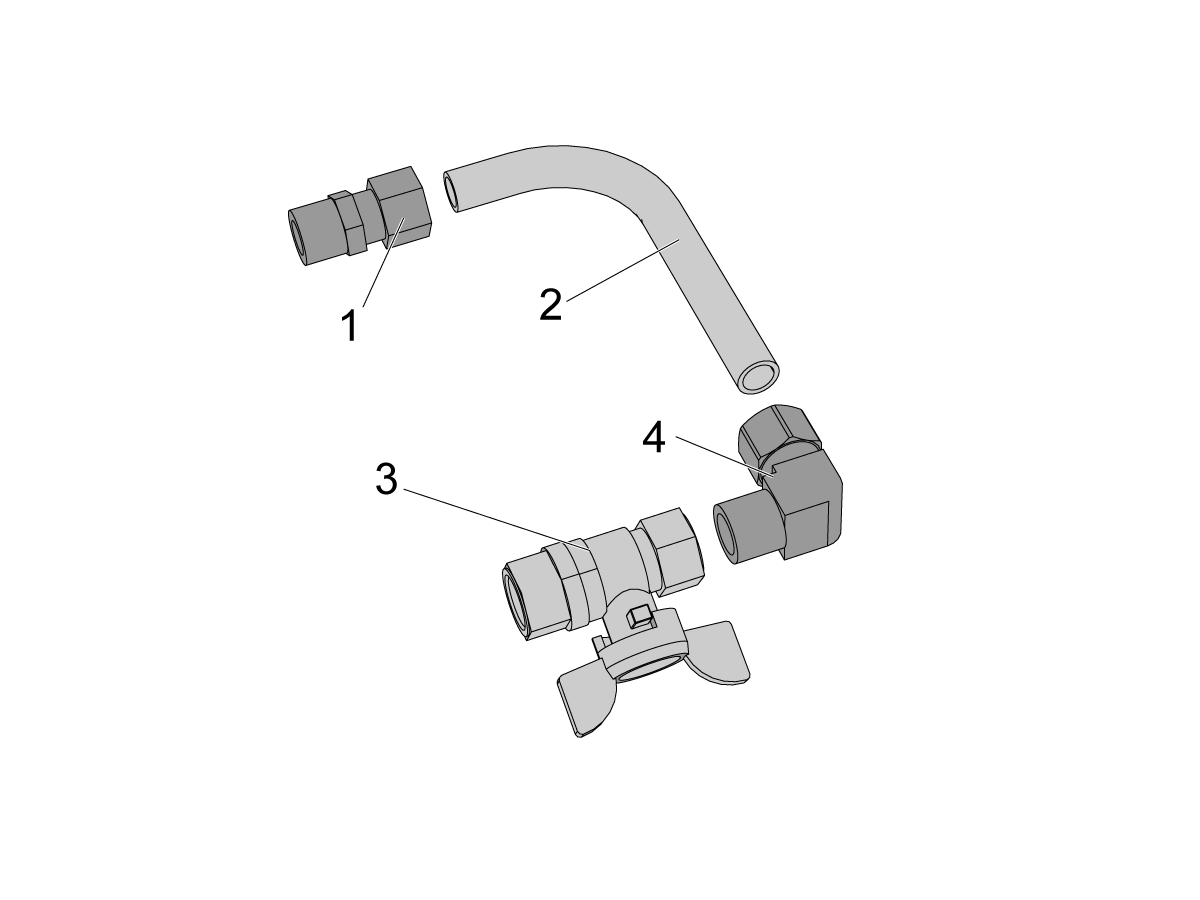
4

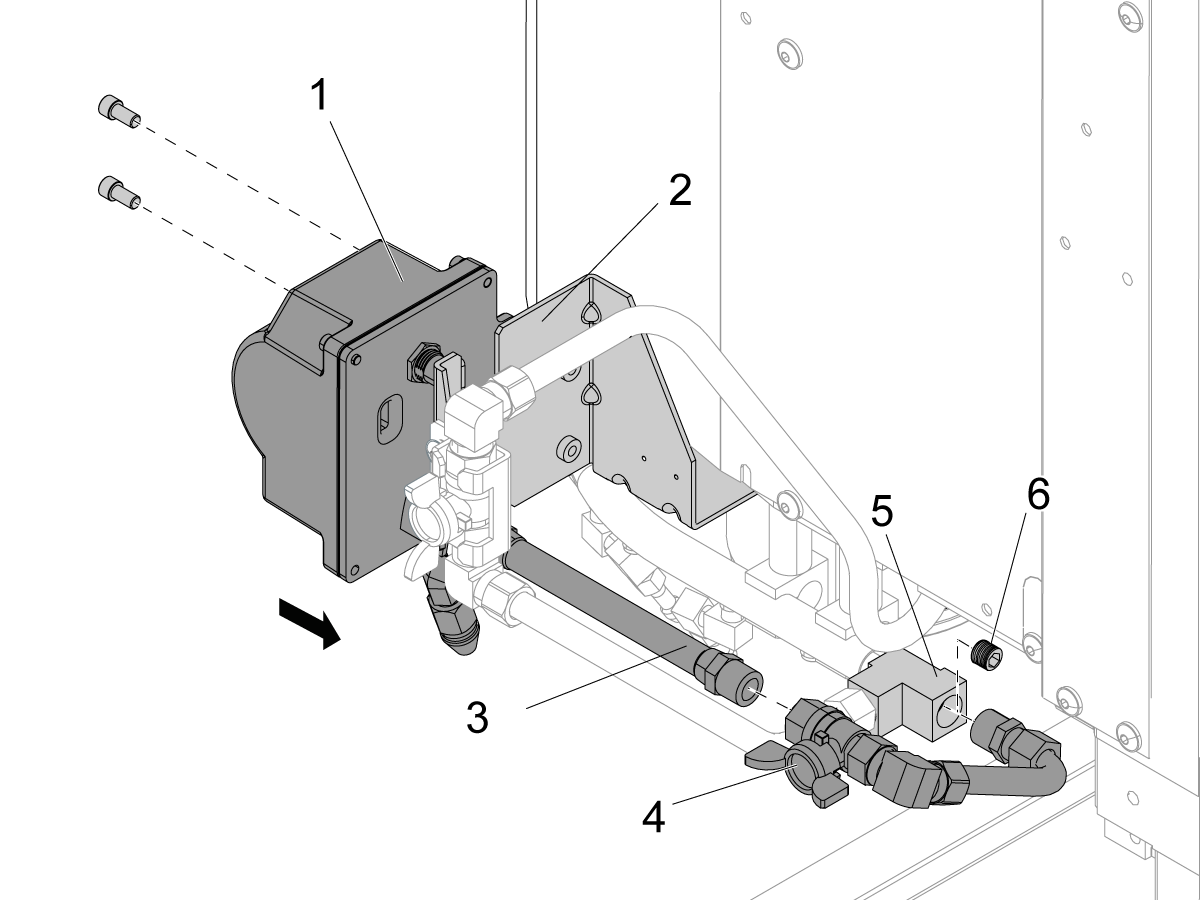
Assemble the return assembly for the flood coolant ring. Do these steps:

  • Connect a straight compression fitting [1] to the return tube [2].
  • Connect a 90-degree compression fitting [4] to the return tube.
  • Connect an inline valve [3] to the fitting.

5

Remove the plug [6] from the manifold [5] for the flood coolant.

Connect the return assembly [4] to the manifold.

Connect the PCOOL unit [1] to the PCOOL bracket [2].

Connect the hose [3] for the P-Cool to the return assembly [4].

Warning: When connecting [3] and [4], be sure not to over torque the barb at the other end of the house, as this will damage the internal components of the Pcool. If it is necessary to tighten that barb, torque should not exceed 15 ft-lbs, and the spigot should be held with a wrench. 

6

Remove the spindle head cover.

Connect the PCOOL cable [1] to the PCOOL unit [2].

Put the cable through the slot [4] in the spindle head casting.

Connect the cable to the open connector [3] on the connector bracket for the spindle head.

Install the spindle head cover.

PCOOL - Test

This procedure tells you how to make sure a programmable coolant (PCOOL) system operates correctly.

1

Classic Haas Control:

Set the main circuit breaker to the ON position.

Push [POWER ON].

Push [EMERGENCY STOP].

Change Setting 7, PARAMETER LOCK, to OFF.

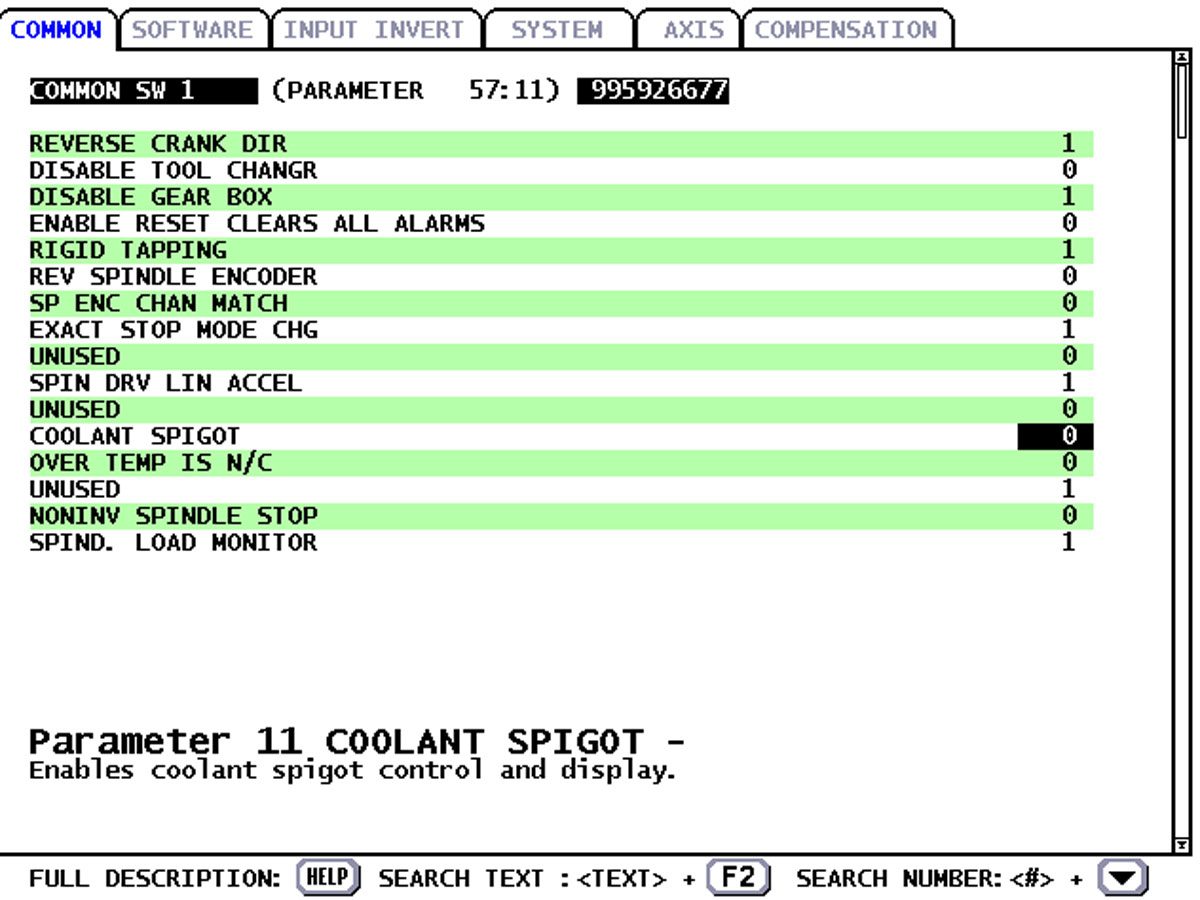
Change Parameter 57:11, COOLANT SPIGOT, to 1

2

Next Generation Control:

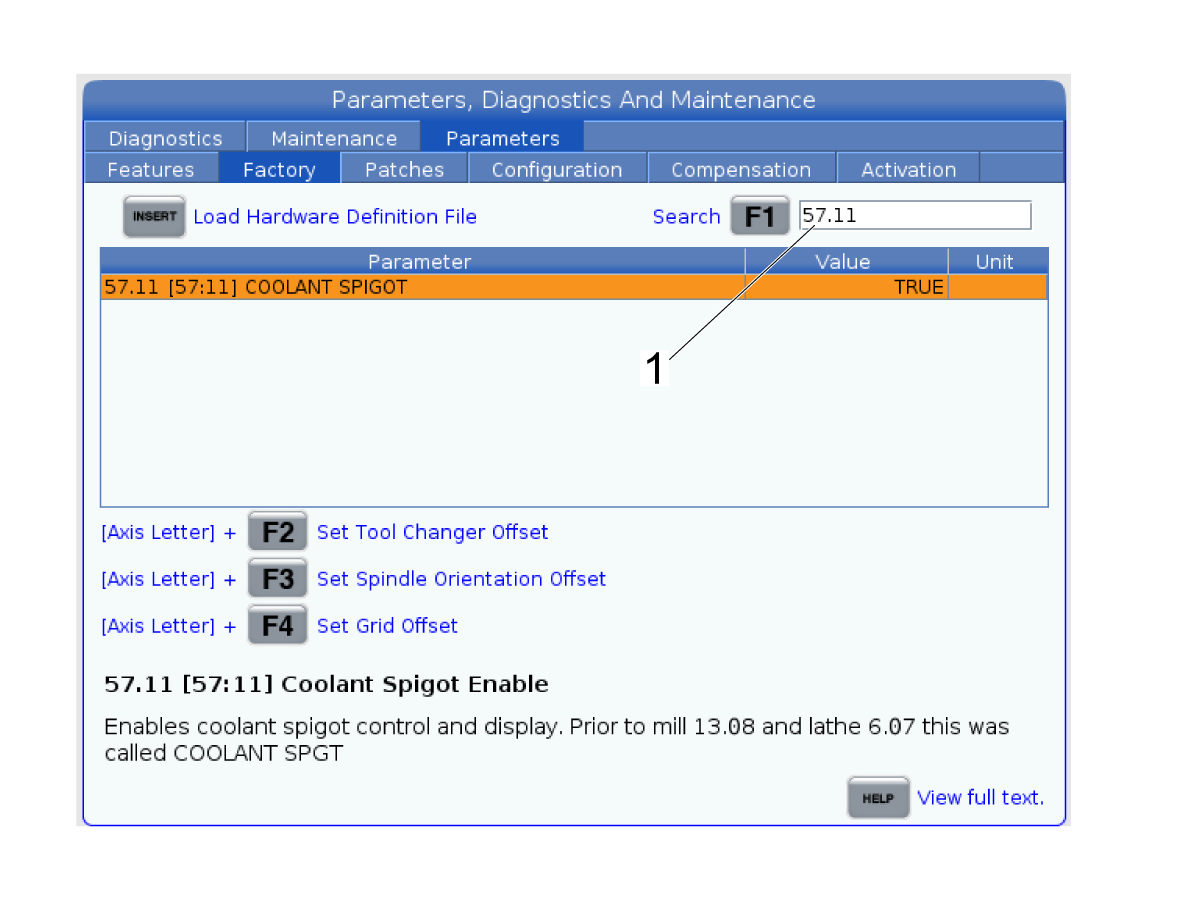
Verify P-Cool Spigot is Enabled

  • Go into Service Mode
  • Navigate to the Factory Parameters page
  • Verify parameter 57.11 is set to TRUE [1]
  • If it is FALSE, set the setting to TRUE [1]

3

Release the [EMERGENCY STOP].

Push [RESET] to clear each alarm.

Push [CLNT UP] and then [CLNT DOWN].

The PCOOL nozzle moves up and down.

5.5 P-COOL - Field Installation - UMC

Recently Updated

P-COOL - Installation - UMC-Series-NGC


AD0588

Introduction

This procedure tells you how to install the Programmable Coolant Nozzle (PCOOL) on a UMC Series.

This document applies to:

  • 93-1000969 - PCOOL KIT UMC-500/750 REBOOT/1000/GM-2
  • 93-1000968 - PCOOL KIT UMC-750 PRE REBOOT 2023 (for pre reboot UCM-750)

Use the UMC-750 Machine Version - Identification page to verify which UMC model you own. 

  You should not do mechanical or electrical machine repairs or service procedures unless you are qualified and knowledgeable about the processes.

   Only authorized personnel with the proper training and certification should do this repair procedure.

   All information herein is provided as a courtesy for Haas machine owners for reference and illustrative purposes only. Haas Automation cannot be held responsible for repairs you perform. Only those services and repairs that are provided by authorized Haas Factory Outlet distributors are guaranteed.

Installation

1

The images show parts of the machine isolated. Do not remove parts unless the instructions tell you to.

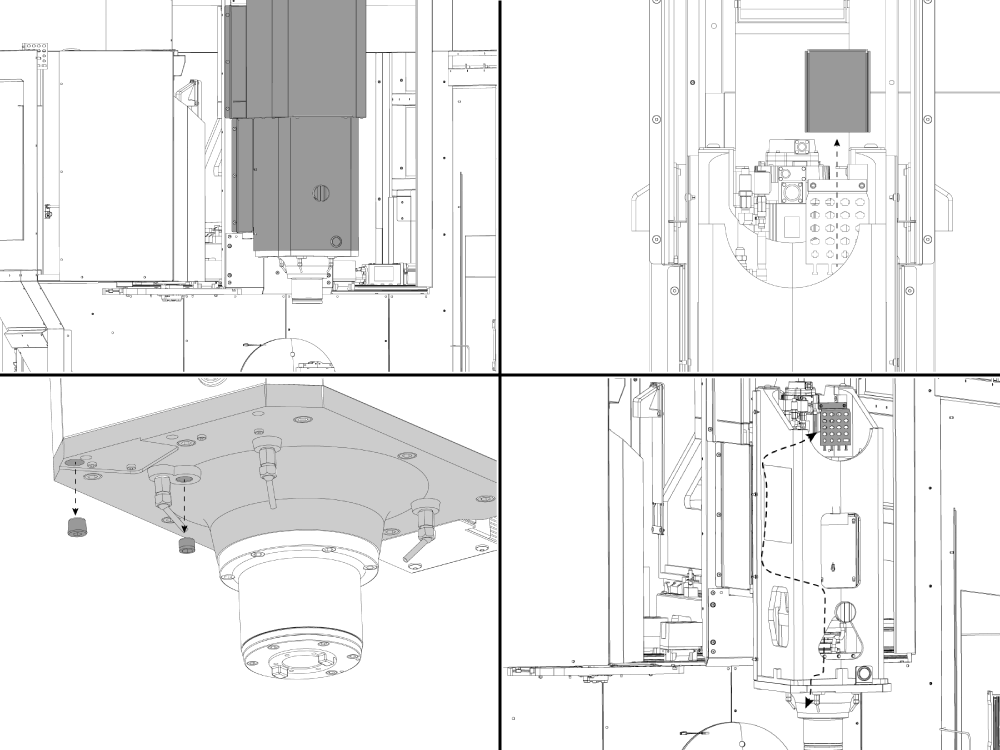
Remove the upper spindle head covers.

Remove the Junction Box Z Cover

Remove the two plugs from the Spindle Mount Casting

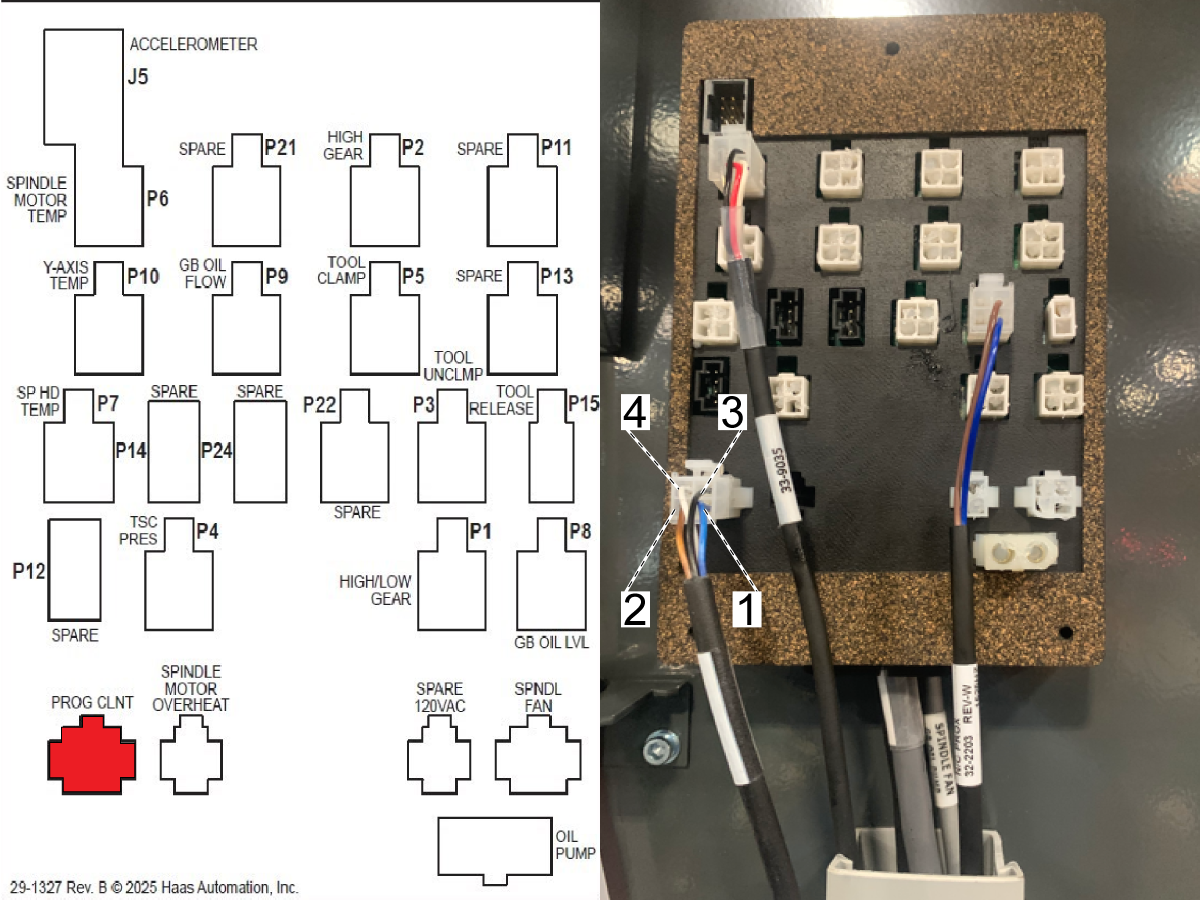
Route the PCool cable (32-0356) through the head casting to the Junction Box labeled PROG. COOLANT

2

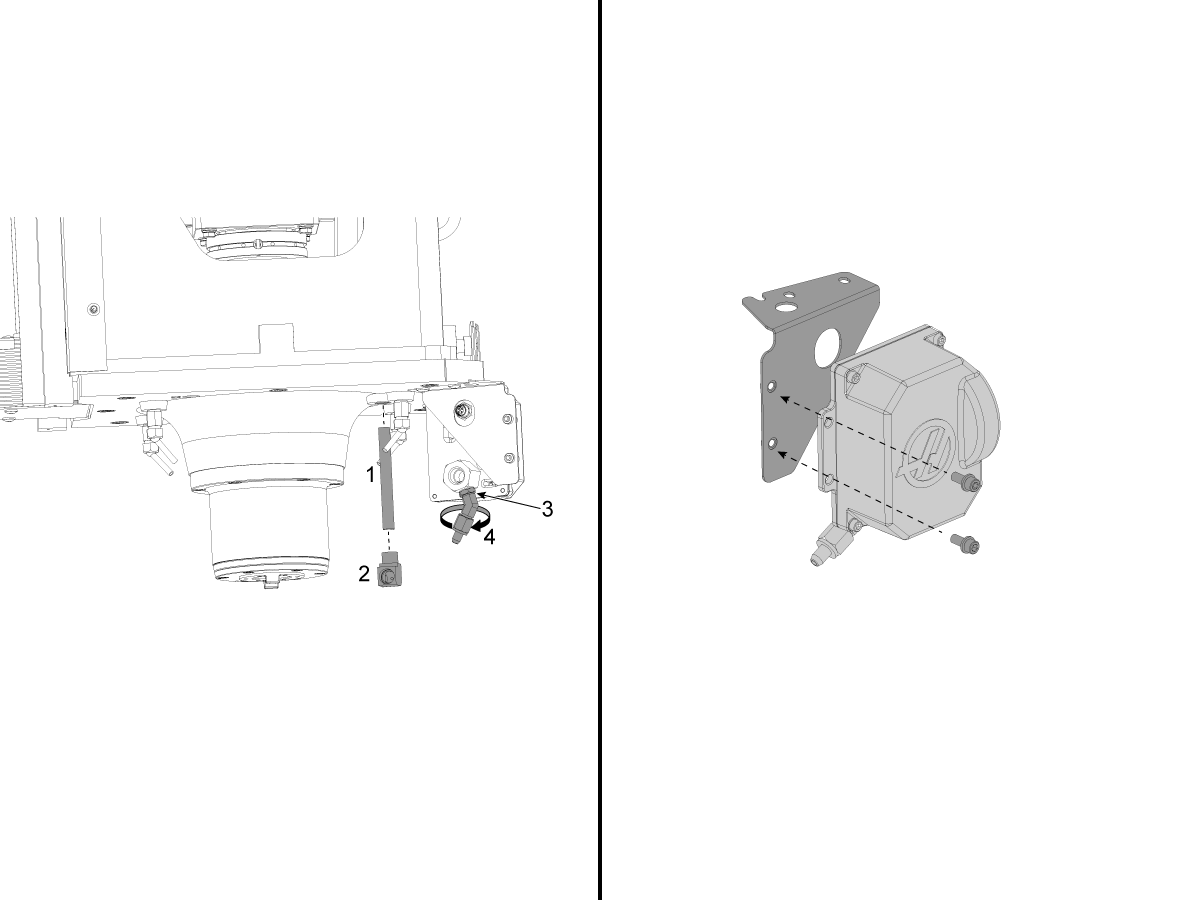
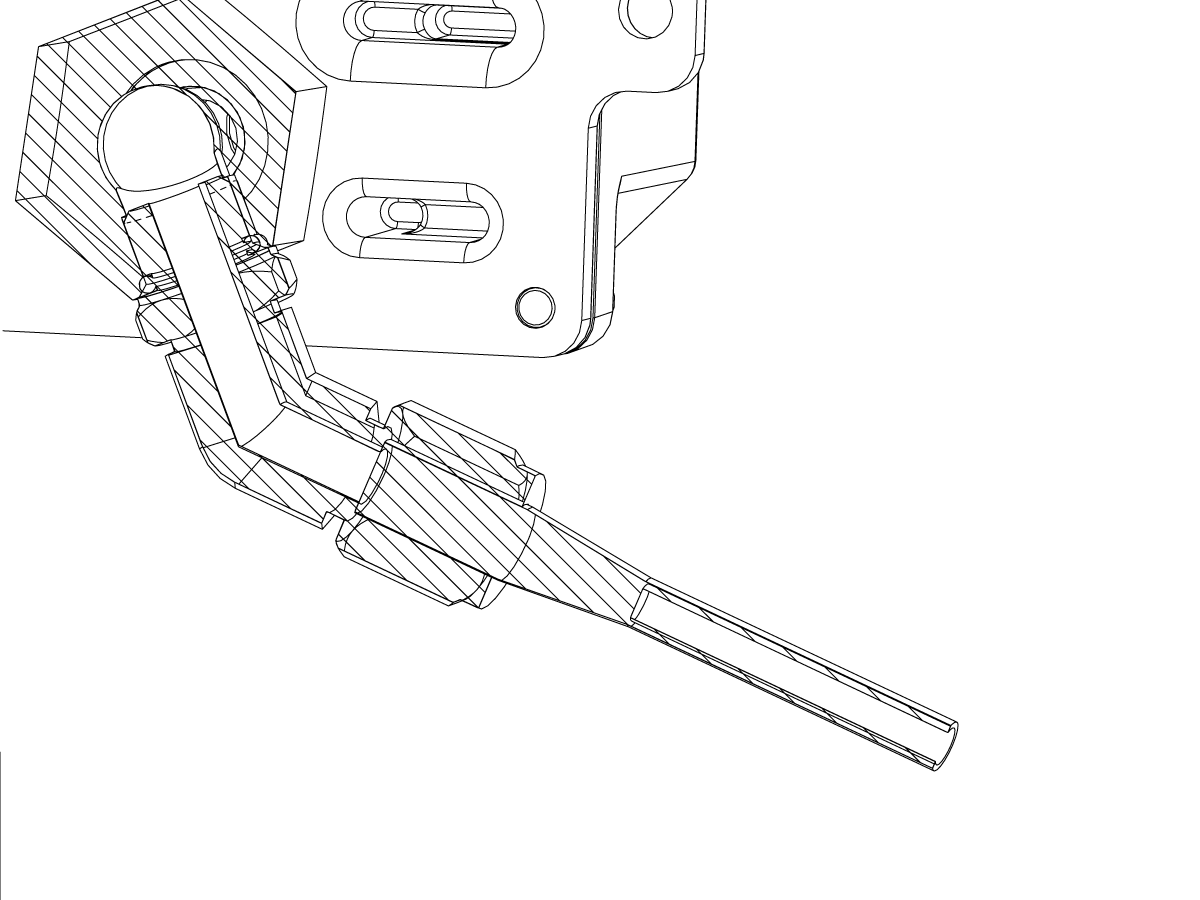
  • Install the coolant tube [1] to the casting with the 90 degree elbow fitting [2],
  • Loosen the lock nut [3] and rotate the P-Cool nozzle to the correct position [4].
  • Install the coolant tube with the fittings from the casting to the P-COOL unit.
  • Tighten all fittings so the P-COOL assembly does not leak.


IMPORTANT: LOOSEN UP THE TWO MOUNTING BOLTS TO ALLEVIATE STRESS ON THE SYSTEM, ONCE STRESS IS ALLEVIATED RE-TIGHTEN THE MOUNTING BOLTS.

3

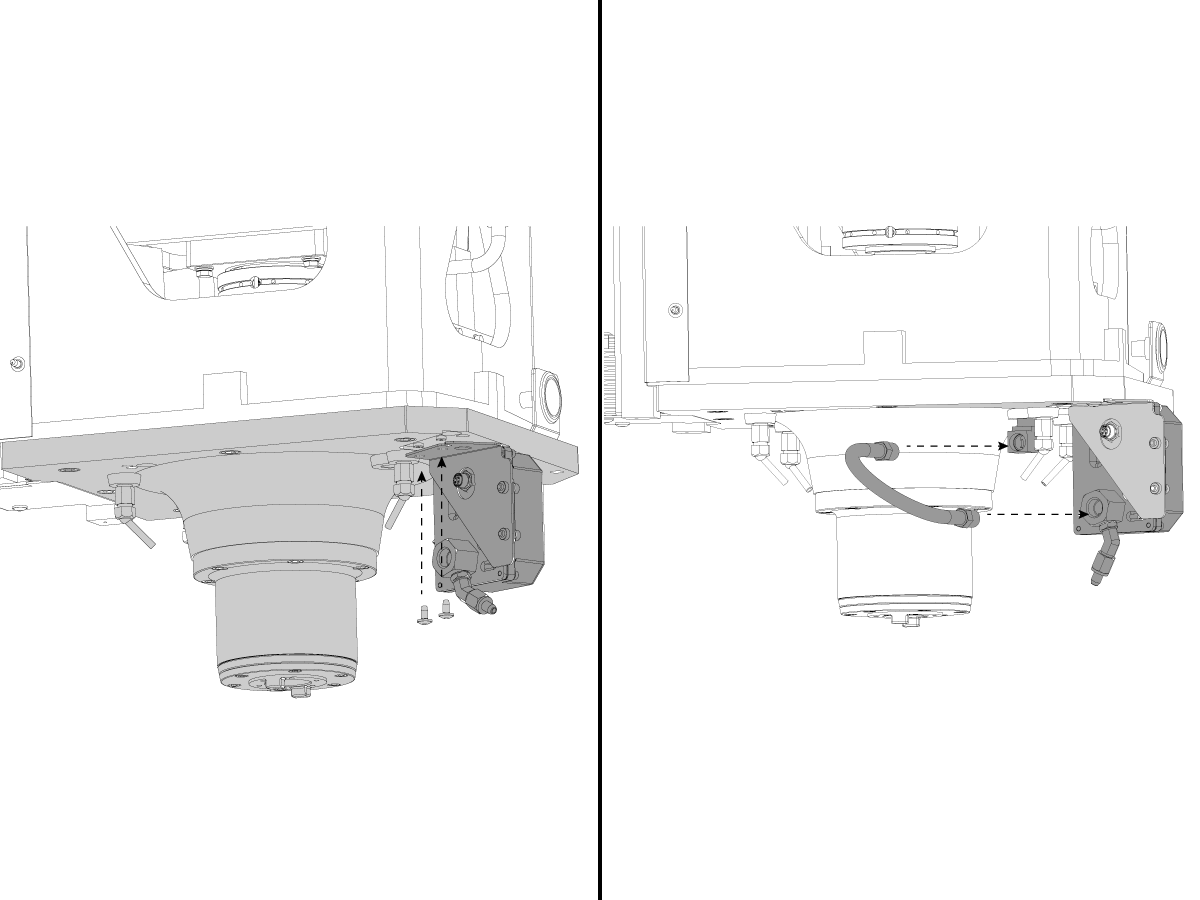
  • Install P-COOL ASSY to the P-COOL sheet metal bracket.
  • Install the P-COOL unit to the casting.

NOTE: Be sure to route the cable through the cutout in the sheet metal bracket and up to the junction bracket.

4

Verify P-Cool Spigot is Enabled

  • Go into Service Mode
  • Navigate to the Factory Parameters page
  • Verify parameter 57.11 is set to TRUE
  • If it is FALSE, set the setting to TRUE

Test

1

Press [RESET] to clear each alarm.

Power cycle the machine and verify that the P-COOL homes and resets its count switch position.

Press [CLNT UP] and then [CLNT DOWN].

The PCOOL nozzle moves up and down.

For more information on how to position the spigot use the Programmable Coolant (PCOOL) - Spigot Positioning procedure.

5.6 P-COOL - Troubleshooting

Recently Updated

P-COOL - Troubleshooting Guide


TG0106

Revision B - 6/2026

Introduction

The Programmable Coolant Nozzle is a multi-position nozzle that automatically directs coolant precisely at the cutting tool.

P-COOL Inspection Checklist

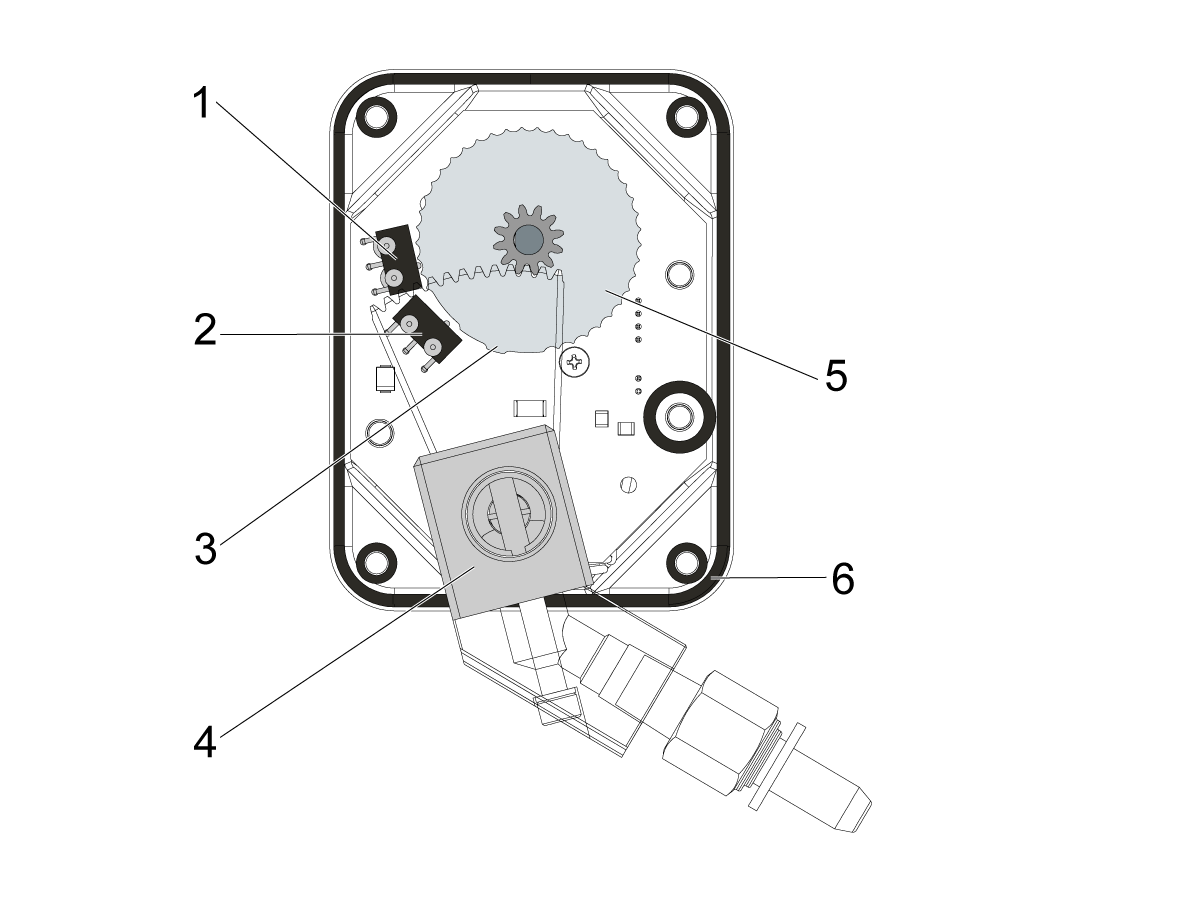
P-COOL Assembly Diagram

Caution: OPENING THE P-COOL UNIT IS NOT A RECOMMENDED STEP IN THE TROUBLESHOOTING GUIDE AND MAY VOID YOUR WARRANTY. 

[1] Position switch

[2] Home switch

[3] Home flag

[4] Nozzle Swivel Fitting

[5] Count Gear

[6] Seals

Symptom Table

Nozzle Alignment

1

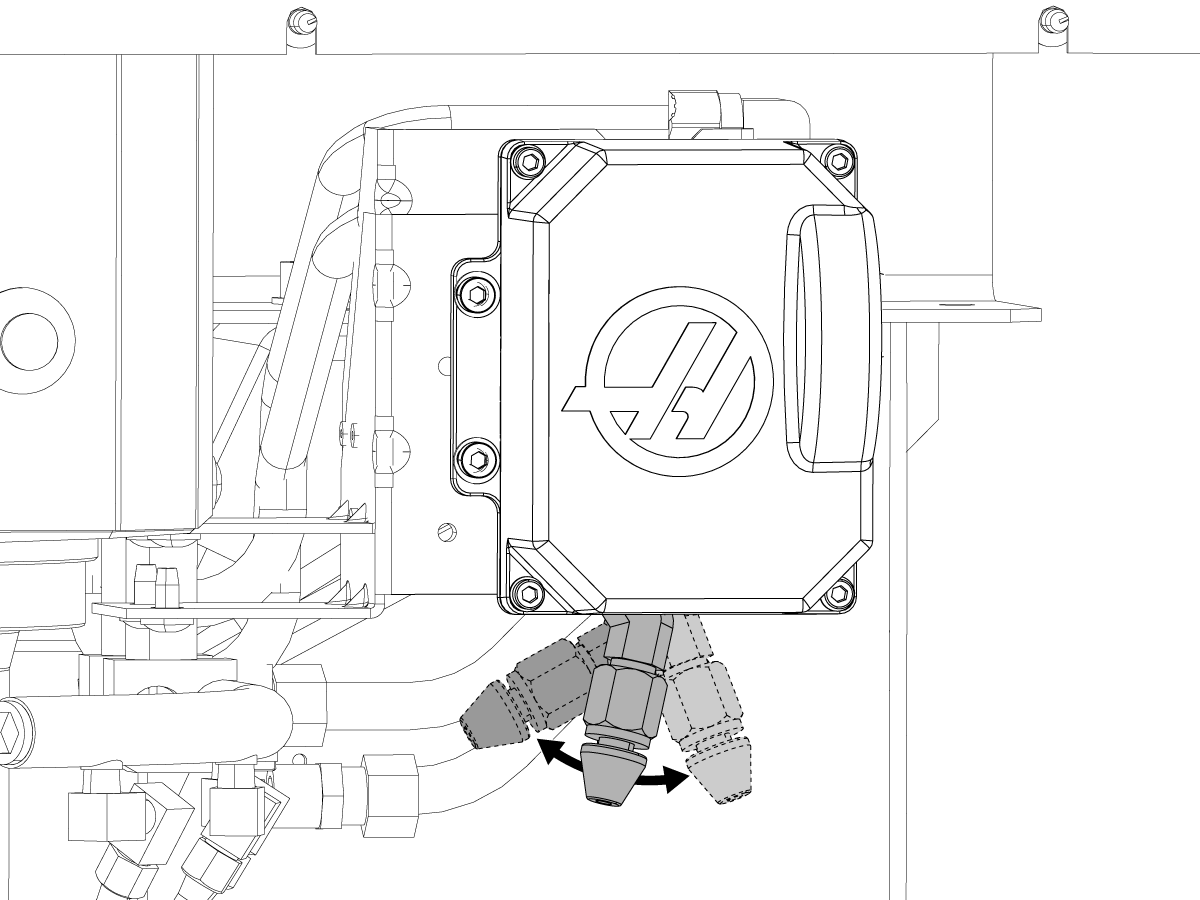
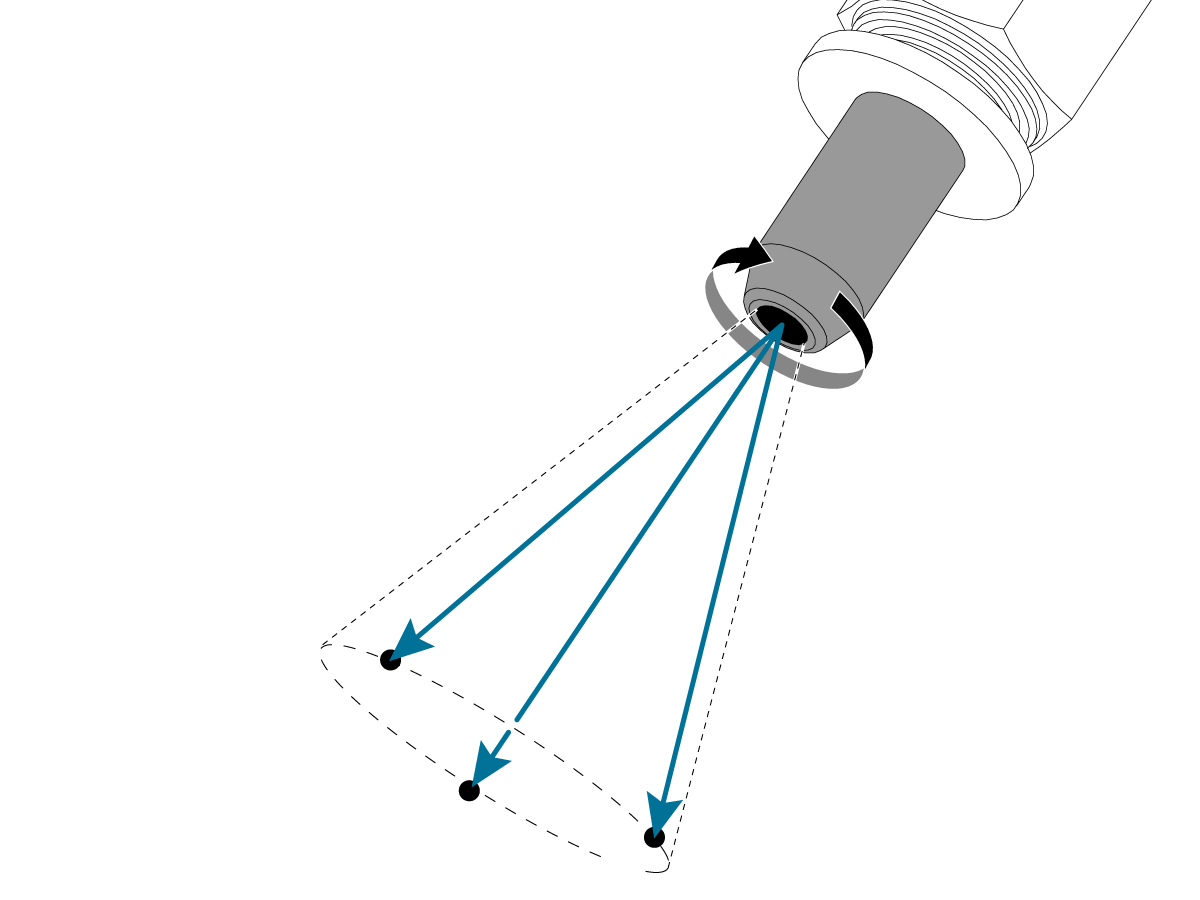
The push connect type nozzle allows for some deviation in the P-COOL coolant stream. 

The nozzle can be twisted to make small adjustment to the alignment of coolant stream. If the nozzle is not loose enough to be moved by hand, pull the nozzle out gently until it clicks. The nozzle should now be free to rotate by hand. 

Twist the nozzle incrementally, turning on coolant between adjustments, until the coolant hits the tool. 

2

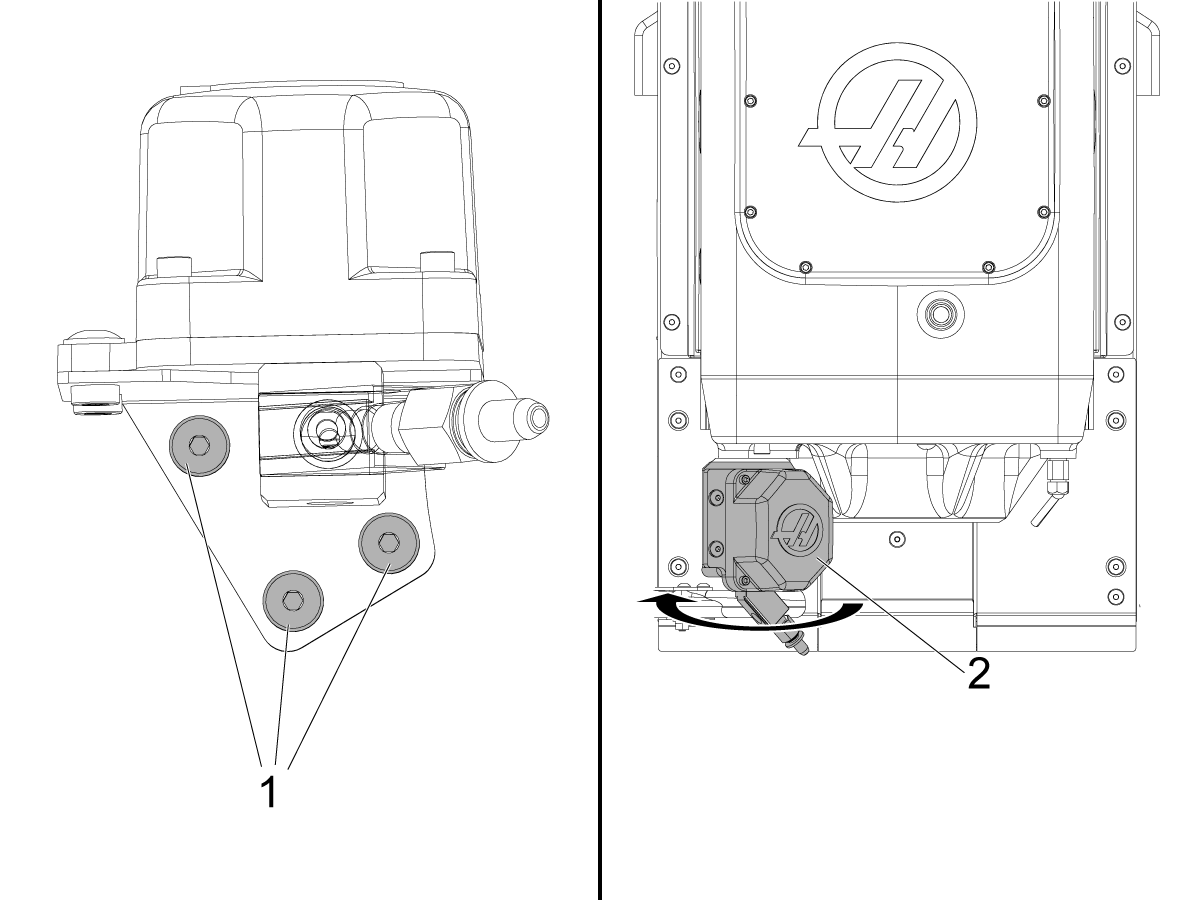
UMC Machines Only:

P-COOL unit on machines on UMC is attached to the spindle with a bracket. To adjust the alignment of the P-COOL, loosen the bolts that secure the P-COOL to the bracket [1]. 

Push the P-COOL in the desired direction [2] and hold it in place while tightening the bolts. 

Test the alignment by turning on the coolant. 


Symptom Possible Cause Corrective Action
Alarm 196 COOLANT SPIGOT FAILURE The P-COOL could not obtain the commanded position in the allotted time.  Check for drag in the P-COOL nozzle's swivel fitting. Verify that there are no other reasons for the nozzle to be moving slowly. 
There is no power to the P-COOL.  Measure the incoming voltage to the P-COOL.
The P-COOL moves up and down without stopping.  Make sure the cabling is undamaged, and the connector pins are sealed properly. 
P-COOL lost count of position Power cycle the machine to re-home the P-COOL.
There is low coolant flow from the nozzle.  Chips have clogged the P-COOL nozzle or the filters.  Verify that check valves leading to P-COOL are open. Clean and remove chips from the P-COOL nozzle and the filters. 
Chips have clogged the check valve or the coolant hoses.  Verify that check valves leading to P-COOL are open. Clean and remove chips from the check valve and coolant hoses.
HMC Mills: The P-COOL spigot moves in the opposite direction.  Parameter 209.09 SPIGOT KEY INVERT is not set correctly.   Make sure that Parameter 209.09 is set correctly.  This parameter inverts the direction the spigot moves when the CLNT UP / CLNT DOWN buttons are pressed. 
P-COOL will not position correctly or skips positions. The P-COOL position switch is damaged and does not count correctly. 

Use M34/M35 to move the spigot up and down in 1 position increments. A 0.05 second dwell will be needed with each movement. Check that all positions are reached correctly. 

HSG-A 4-4-2023

Counting gear is not aligned properly to position switch.

Power cycle the machine to home the unit.

 NOTE: When the Pcool is in motion and that action is interrupted by a loss of power, then it is possible that the unit will lose position.

Alarm 9806 SHORT CIRCUIT Short circuit on P-Cool Cable or P-Cool Motor.

Conduct a visual inspection of the cable assembly for any cable cut, pinch or damage that could cause the cable to fail. Then perform a continuity test of both ends of the cable assembly. 

IMPORTANT: If the cable is not damaged and passes the continuity tests, an error report MUST be taken and added to the machine history for troubleshooting the motor. If an error report is not taken there is a risk of warranty being rejected.

See Alarm Troubleshooting section below.

Alarm Troubleshooting

Caution: OPENING THE P-COOL UNIT IS NOT A RECOMMENDED STEP IN THE TROUBLESHOOTING GUIDE AND MAY VOID YOUR WARRANTY. 

1

Clean the P-COOL unit, removing any chips and debris.

Inspect the swivel fitting (4) attached to the nozzle and determine if it is bound or fixed in position.

Reset any alarms and power cycle the machine. The pcool will home itself, actuating the home switch (2) then reset the count switch (1) position..

NOTE: When the P-COOL is in motion and that action is interrupted by a loss of power, then it is possible that the unit will lose position. Homing the P-COOL fixes this position error. To do this, power cycle the machine.

I/O confirmation

2

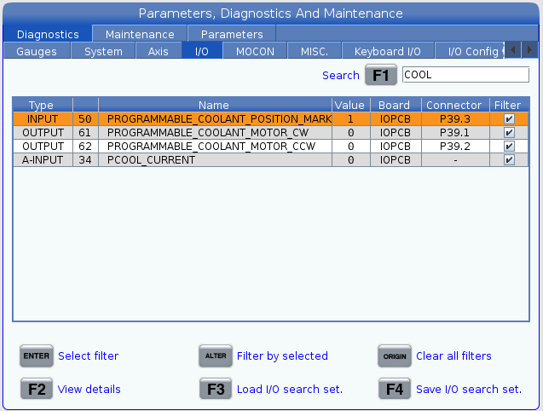
Monitor the following inputs and outputs and verify their values change across all positions by manually commanding the unit.

Use the CLNT UP or CLNT DOWN buttons on the control to actuate the nozzle.

NAME P# TYPE SW# HW# CONNECTOR INITIAL VALUE
PROGRAMMABLE_COOLANT_POSITION_MARK P39 INPUT 50 IO16 P39.3 1
PROGRAMMABLE_COOLANT_MOTOR_CW P39 OUTPUT 61 0031 P39.1 0
PROGRAMMABLE_COOLANT_MOTOR_CCW P39 OUTPUT 62 0030 P39.2 0
PCOOL_CURRENT P34 A-INPUT 34 A34 - -

Signal Confirmation

3

Verify that the cable connection on the P-COOLunit is properly secured.

Verify that the cable connection for the P-COOL cable at the spindle head bracket is secure.

Verify the cable is not damaged along its length.

Verify the connectors at P35 on the I/O PCB, are properly seated, pins are in good condition and not contaminated.

4

Run this program in MDI mode:

M34;
G04 P2. ;
M35;
G04 P2. ;
M99 ;

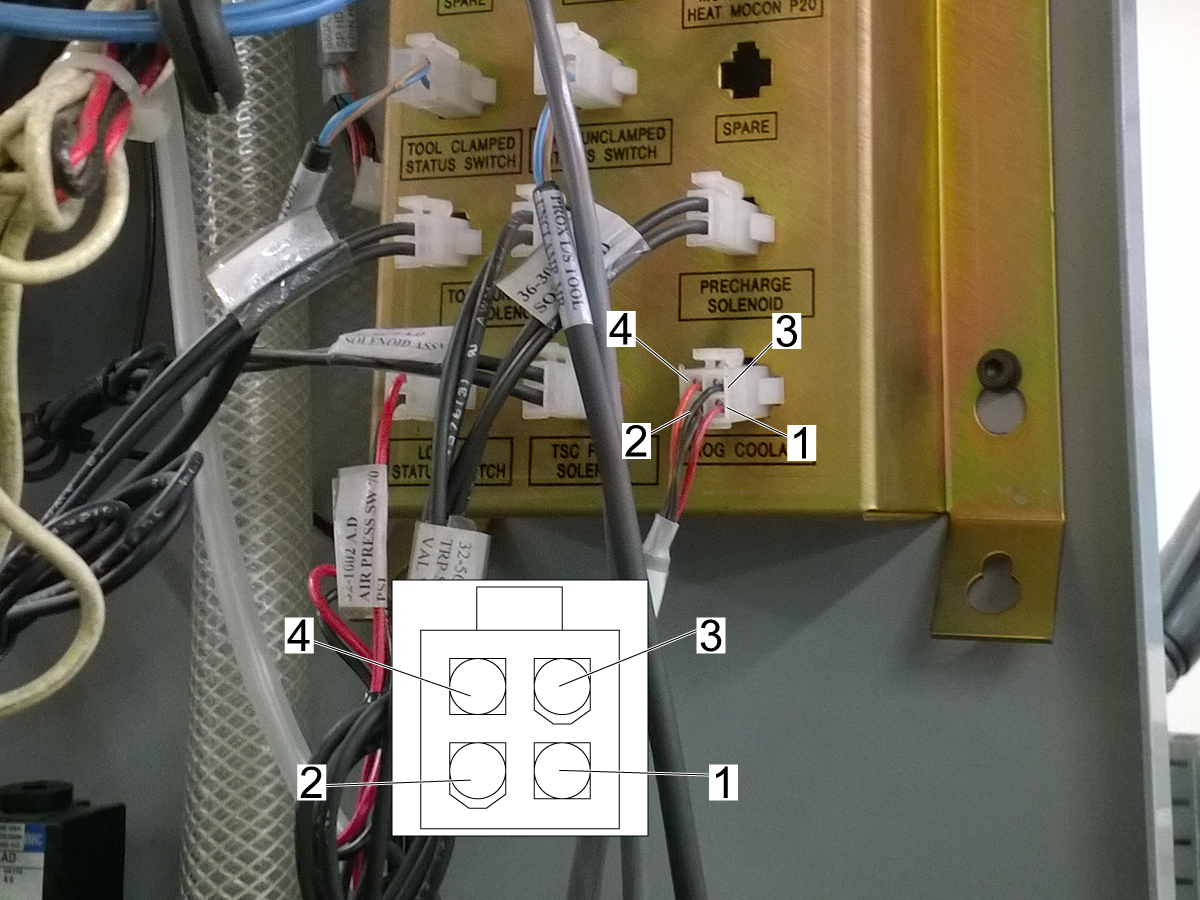
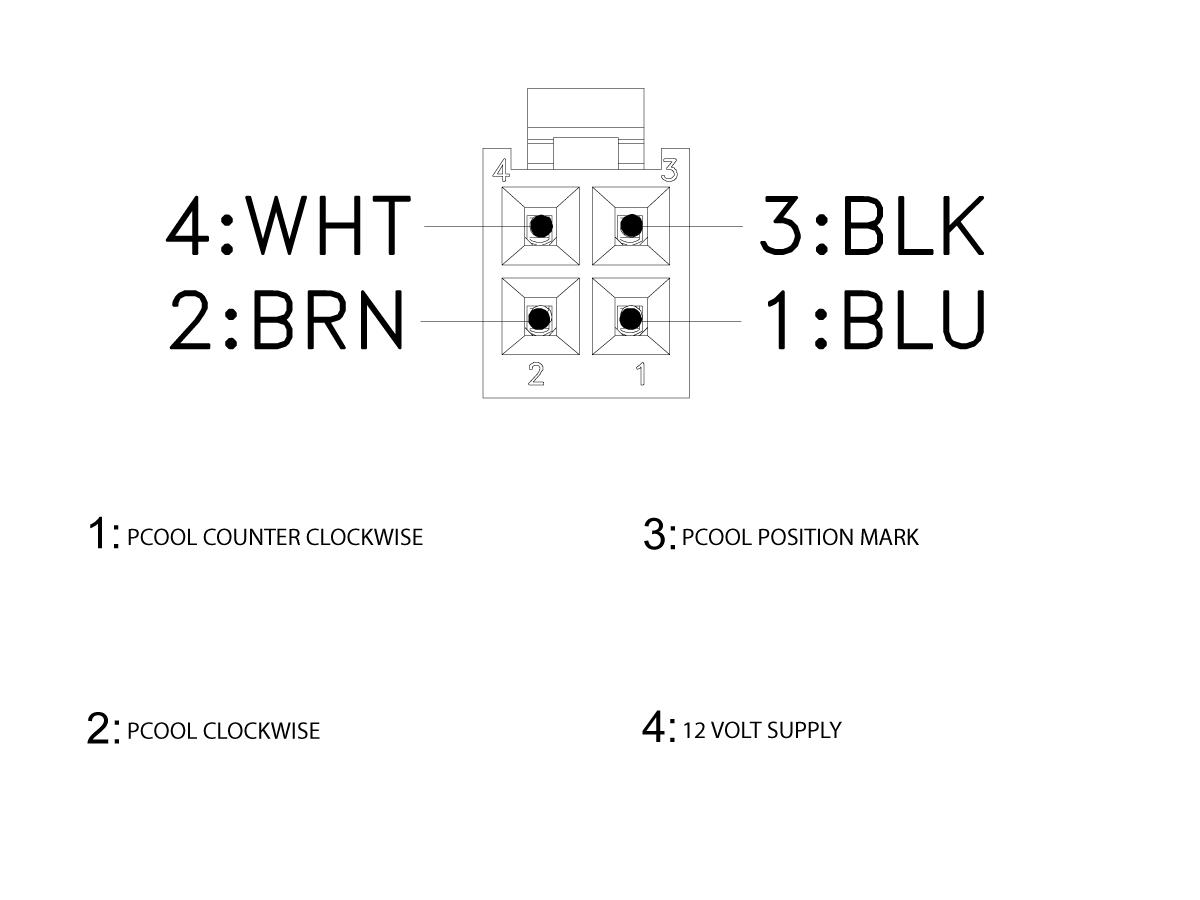
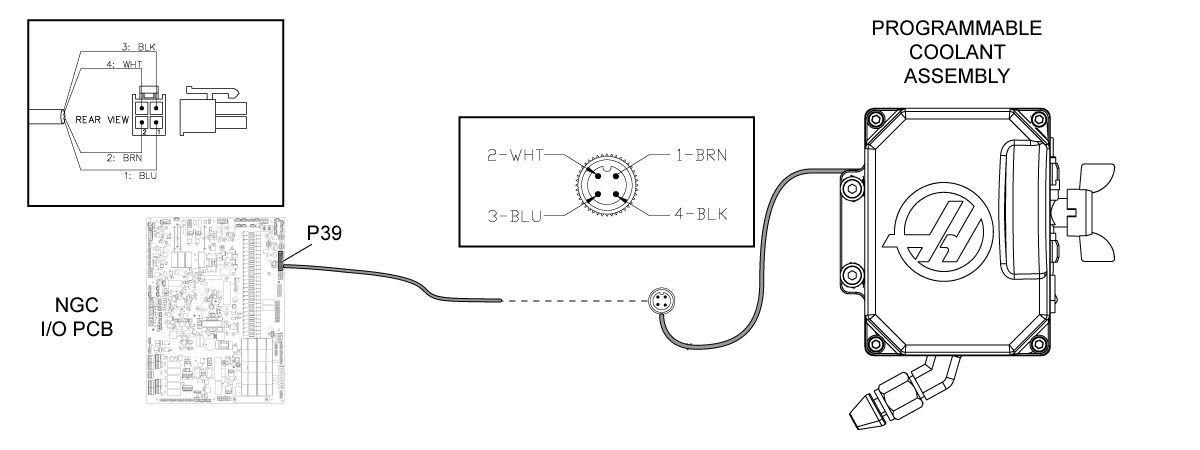
While the program runs, use a multimeter with needle-tip probes to measure the resistance from pin 3 (black) to 2 (brown). The meter will alternate between a value and OL, verifying the condition of the position switch.

While the program runs, use a multimeter with needle-tip probes to measure the voltage from pin 4 (white) to 2 (brown). The voltage must measure 12 VDC. This will verify that the position switch is supplied power.

Do not measure the voltage with the cable disconnected.

If there is no voltage, check for continuity in the cable between the P-COOL and the connector bracket. If there is no continuity, the cable is at fault. If there is continuity, the P-COOL assembly is at fault.

If there is voltage, refer to:

  • Next Generation Control - I/O PCB - Troubleshooting Guide
  • Classic Haas Control - I/O PCB - Troubleshooting Guide

5

Do a visual inspection of the cable assembly for any cable cut, pinch or damage that could cause the cable to fail.

Do a continuity test of both ends of the cable assembly. 

There should be no continuity between these pins in a resting state:

  • Pins 4 (white) and 1 (Blue).    
  • Pins 4 (white) and 2 (brown).
  • pins 4 (white) and 3 (black). 

DATA COLLECTION ProgramS

6

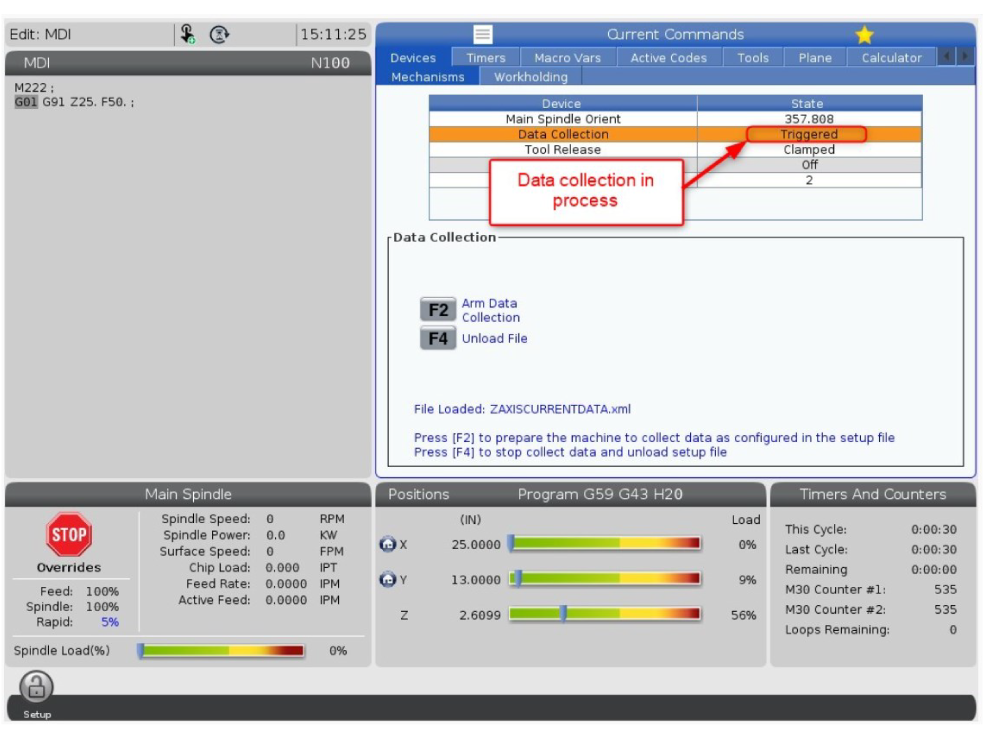
Follow the Diagnostic Data Collection - Instructions to load the P-COOL diagnostic program PCOOL_SWEEP_COLLECT.

This test will record the position switch states and motor current draw while the unit is in continuous motion.

Insert a USB into the Haas Control. Copy the following program into MDI.

M222;
M34 P34;
G04 P2. ;
M35 P1;
G04 P2.;
M99; 

Manually arm the data collection by pressing F2.

Press cycle start to run the program. When the program is finished, the results will be saved as an OSC_DATA file. 

Upload the results of this test with the work order.

7

Follow the Diagnostic Data Collection - Instructions to load the P-COOL diagnostic program PCOOL_STEP_COLLECT.

This test will record the position switch states and motor current draw while the unit is in stepped motion.

To start this test, the P-COOL nozzle should be placed in its highest position.

Copy the following program into MDI.

M222;
M34;
G04 P2.;
M99;

Manually arm the data collection by pressing F2.

Press cycle start to run the program. When the program is finished, the results will be saved as an OSC_DATA file. 

Upload the results of this test with the work order.

Clogged Spigot, Filter and/or Check Valve

Make sure the ball valve for the coolant loop on the spindle head is fully open.

Remove any chips that are stuck in the P-COOL nozzle.

Clean or replace the filter element. Check the area around the coolant pump intake for chips.

  1. Auxiliary Filter - The bag filters in the Auxiliary Filter tanks need to be cleaned or replaced. The Auxiliary Filter is an option. Your machine might not have this option.
  2. Standard Filter - The Standard Filters need to be cleaned. Remove chips from the basket filter in the coolant tank.

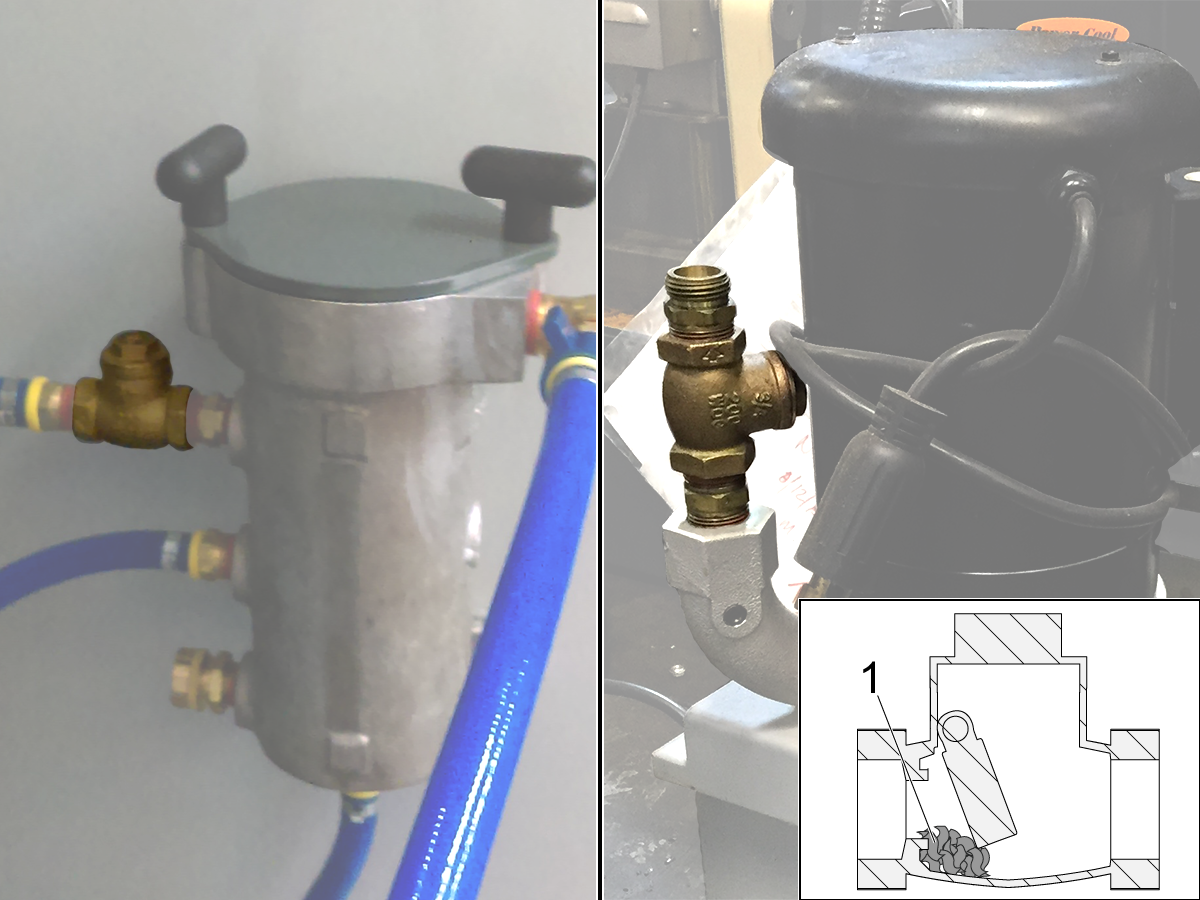
Remove the coolant check-valve. Check it for blockage [1]. Make sure the trap door opens and closes freely. If the trap door does not close, coolant flows back into the tank. This delays the flow of coolant by a few seconds.

Disconnect both ends of the coolant hoses. Remove any kinks. In the opposite direction of the coolant flow, blow air through the hoses to remove any chips. If you find chips in the hoses, check the coolant nozzles and wash-down hoses for chip buildup. Connect the coolant hoses.

Refer to the Standard Coolant - Tank - Maintenance procedure.

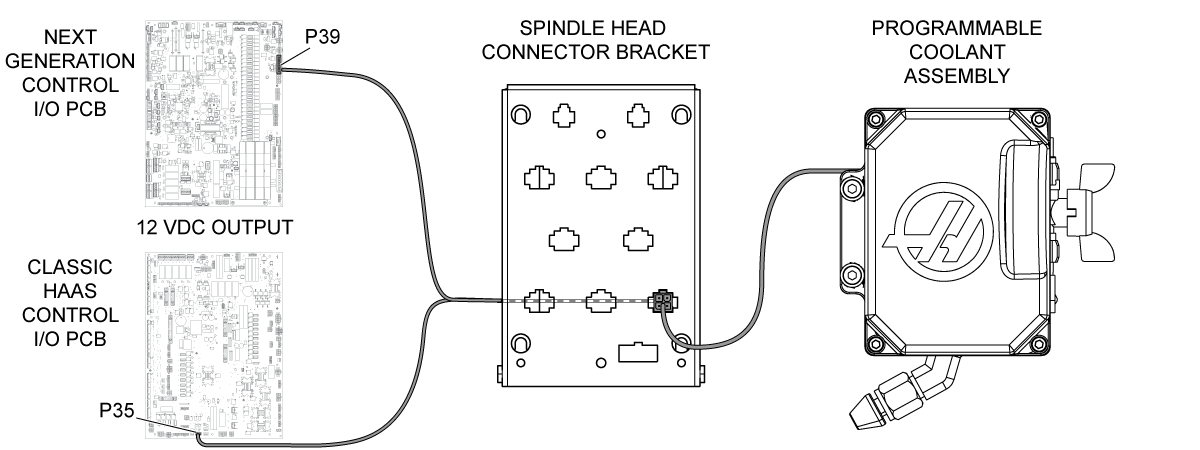
Electrical Diagram

Recently Viewed Items

You Have No Recently Viewed Items Yet

Feedback
Haas Logo

Haas Delivered Price

This price includes shipping cost, export and import duties, insurance, and any other expenses incurred during shipping to a location in France agreed with you as a buyer. No other mandatory costs can be added to the delivery of a Haas CNC Product.

KEEP UP WITH THE LATEST HAAS TIPS AND TECHNOLOGY...

Sign up now!   

HAAS TOOLING ACCEPTS THE FOLLOWING:

  • Service & Support
  • Owners
  • Request Service
  • Operator Manuals
  • Haas Parts
  • Rotary Repair Request
  • Pre-Install Guides
  • Shopping Tools
  • Build & Price a New Haas
  • Available Inventory
  • The Haas Price List
  • CNCA Financing
  • About Haas
  • Accessibility Statement
  • DNSH Statement
  • Export Compliance
  • Careers
  • Certifications & Safety
  • Contact Us
  • History
  • Terms & Conditions
  • Haas Tooling Terms & Conditions
  • Privacy
  • Warranty
  • Haas Community
  • Haas Certification Program
  • Haas Motorsports
  • Gene Haas Foundation
  • Haas Technical Education Community
  • Events
  • Join the Conversation
  • Facebook
  • X
  • Flickr
  • YouTube
  • LinkedIn
  • Instagram
  • TikTok
© 2026 Haas Automation, Inc – CNC Machine Tools

This site is protected by reCAPTCHA and the Google Privacy Policy and Terms of Service apply.

2800 Sturgis Rd., Oxnard, CA 93030
Toll Free: (888) 817-4446 / Fax: 805-278-8554