My Haas Welcome,
!
Haas Tooling MyHaas/HaasConnect Sign In Register Haas Tooling MyHaas/HaasConnect Sign Out Welcome, My Machines Latest Activity My Quotes My Account My Users Sign Out
Find Your Distributor
  1. Select Language
    1. English
    2. Deutsch
    3. Español - España
    4. Español - México
    5. Français
    6. Italiano
    7. Português
    8. Český
    9. Dansk
    10. Nederlands
    11. Magyar
    12. Polski
    13. Svenska
    14. Türkçe
    15. 中文
    16. Suomi
    17. Norsk
    18. الإنجليزية
    19. български
    20. Hrvatski
    21. Ελληνικά
    22. Română
    23. Slovenský
    24. Slovenščina
    25. 한국어
    26. 日本語
    27. Українська
  • machines Main Menu
    • Vertical Mills
      Vertical Mills
      Vertical Mills View All
      • Vertical Mills
      • VF Series
      • Universal Machines
      • VR Series
      • VP-5 Prismatic
      • Pallet-Changing VMCs
      • Mini Mills
      • Mold Machines
      • High-Speed Drill Centers
      • Drill/Tap/ Mill Series
      • Toolroom Mills
      • Pocket Mill
      • Compact Mills
      • Gantry Series
      • SR Sheet Routers
      • Extra-Large VMC
      • Double-Column Mills
      • 3+2 Positioning Machines
    • Multi-Axis Solutions
      Multi-Axis Solutions
      Multi-Axis Solutions View All
      • Multi-Axis Solutions
      • Y-Axis Lathes
      • 5-Axis Mills
    • Lathes
      Lathes
      Lathes View All
      • Lathes
      • ST Series
      • Dual-Spindle
      • Box Way Series
      • Toolroom Lathes
      • Chucker Lathe
      • Haas Bar Feeders
    • Horizontal Mills
      Horizontal Mills
      Horizontal Mills View All
      • Horizontal Mills
      • 50-Taper
      • 40-Taper
    • Rotaries & Indexers
      Rotaries & Indexers
      Rotaries & Indexers View All
      • Rotaries & Indexers
      • Rotary Tables
      • Indexers
      • 5-Axis Rotaries
      • Extra-Large Rotaries
    • Special Series
      Special Series
      Special Series View All
      • Special Series
      • EU_Series_Redirect
    • Automation Systems
      Automation Systems
      Automation Systems View All
      • Automation Systems
      • Mill Automation
      • Lathe Automation
      • Automatic Parts Loaders
      • Automation Models
    • Desktop Machines
      Desktop Machines
      Desktop Machines View All
      • Desktop Machines
      • Desktop Mill
      • Desktop Lathe
      • Control Simulator, Standard
      • Control Simulator, Premium
    • Shop Equipment
      Shop Equipment
      Shop Equipment View All
      • Shop Equipment
      • Knee Mill
      • Haas Manual Lathes
      • Haas Saws
    • Fabrication Machines
      Fabrication Machines
      Fabrication Machines View All
      • Fabrication Machines
      • Laser Cutting Machines
      • CNC Press Brakes
    • QUICK LINKS Special Series  Special Series 
      EU SERIES EU SERIES BUILD & PRICE | PRICE LIST BUILD & PRICE | PRICE LIST In-Stock Machines In-Stock Machines WHAT’S NEW WHAT’S NEW YOUR FIRST CNC YOUR FIRST CNC
      SHOPPING TOOLS
      • Build & Price a Haas
      • Price List
      • Available Inventory
      • CNCA Financing
      WANT TO TALK TO SOMEONE?

      A Haas Factory Outlet (HFO) can answer your questions, and walk you through your best options.

      CONTACT YOUR DISTRIBUTOR >
  • Options Main Menu
    • The Haas Control Value Option Packages
      Value Option Packages
      Value Option Packages View All
      • Value Option Packages
    • Product Image Spindles
      Spindles
      Spindles View All
      • Spindles
    • Product Image Tool Changers
      Tool Changers
      Tool Changers View All
      • Tool Changers
    • Product Image 4th- | 5th-Axis
      4th- | 5th-Axis
      4th- | 5th-Axis View All
      • 4th- | 5th-Axis
    • Product Image Turrets & Live Tooling
      Turrets & Live Tooling
      Turrets & Live Tooling View All
      • Turrets & Live Tooling
    • Product Image Probing
      Probing
      Probing View All
      • Probing
    • Haas Chip & Coolant Management Chip & Coolant Management
      Chip & Coolant Management
      Chip & Coolant Management View All
      • Chip & Coolant Management
    • The Haas Control The Haas Control
      The Haas Control
      The Haas Control View All
      • The Haas Control
    • Product Image Product Options
      Product Options
      Product Options View All
      • Product Options
    • Product Image Tooling & Fixturing
      Tooling & Fixturing
      Tooling & Fixturing View All
      • Tooling & Fixturing
    • Product Image Workholding
      Workholding
      Workholding View All
      • Workholding
    • Product Image 5-Axis Solutions
      5-Axis Solutions
      5-Axis Solutions View All
      • 5-Axis Solutions
      • 5 Easy Steps to 5-Axis
    • QUICK LINKS Special Series  Special Series 
      EU SERIES EU SERIES BUILD & PRICE | PRICE LIST BUILD & PRICE | PRICE LIST In-Stock Machines In-Stock Machines WHAT’S NEW WHAT’S NEW YOUR FIRST CNC YOUR FIRST CNC
      SHOPPING TOOLS
      • Build & Price a Haas
      • Price List
      • Available Inventory
      • CNCA Financing
      WANT TO TALK TO SOMEONE?

      A Haas Factory Outlet (HFO) can answer your questions, and walk you through your best options.

      CONTACT YOUR DISTRIBUTOR >
  • Why Haas Main Menu
      Discover the Haas Difference
    • Why Haas
    • MyHaas
    • Education Community
    • Industry 4.0
    • Haas Certification
    • Customer Testimonials
  • Service Main Menu
      Welcome to Haas Service
      SERVICE HOME Operator’s Manuals How-To Procedures Troubleshooting Guides Preventive Maintenance Haas Parts Haas Tooling Videos
  • Videos Main Menu
  • Main Menu
    • View All
    • View All
    • View All
    • View All
      • HTEC Curriculum Support
    • View All
      • Haas 10 kg Cobot Package
      • Cobot Kits
      • DC-1 Drill Center
      • CNC Sales News
      • Do More With Your Haas
    • View All
    • View All
      • contact-us-test
      • 4 - AUTOMATION SYSTEMS
      • Carousel-V2
      • expert test
      • Demo_Day_Trident-test
      • Link Test
      • image-sale-tag-test
      • article-list-test
      • Haas 25 kg Robot Package
    • View All
      • Choose Options
    • View All
    • View All
    • View All
    • View All
    • View All
      • calc-test
    • View All
    • QUICK LINKS Special Series  Special Series 
      EU SERIES EU SERIES BUILD & PRICE | PRICE LIST BUILD & PRICE | PRICE LIST In-Stock Machines In-Stock Machines WHAT’S NEW WHAT’S NEW YOUR FIRST CNC YOUR FIRST CNC
      SHOPPING TOOLS
      • Build & Price a Haas
      • Price List
      • Available Inventory
      • CNCA Financing
      WANT TO TALK TO SOMEONE?

      A Haas Factory Outlet (HFO) can answer your questions, and walk you through your best options.

      CONTACT YOUR DISTRIBUTOR >
  • Haas Tooling Main Menu
  • Haas Service Parts Main Menu

My Haas Welcome,
!
Haas Tooling MyHaas/HaasConnect Sign In Register Haas Tooling MyHaas/HaasConnect Sign Out Welcome, My Machines Latest Activity My Quotes My Account My Users Sign Out
Find Your Distributor
  1. Select Language
    1. English
    2. Deutsch
    3. Español - España
    4. Español - México
    5. Français
    6. Italiano
    7. Português
    8. Český
    9. Dansk
    10. Nederlands
    11. Magyar
    12. Polski
    13. Svenska
    14. Türkçe
    15. 中文
    16. Suomi
    17. Norsk
    18. الإنجليزية
    19. български
    20. Hrvatski
    21. Ελληνικά
    22. Română
    23. Slovenský
    24. Slovenščina
    25. 한국어
    26. 日本語
    27. Українська
×

Search Results

Web Pages

Images

    • <
    • 1
    • >

DT/DM Toolchanger - Alignment

Service Home How To Procedures DT/DM Toolchanger - Alignment

DT/DM Toolchanger - Alignment

- Jump to Section - Back to Top

4.4 DT/DM Alignment

Recently Updated Last updated: 02/10/2025

DT/DM Tool Changer - Alignment


Introduction

This procedure will show you how to align the tool changer on the DT/DM series.

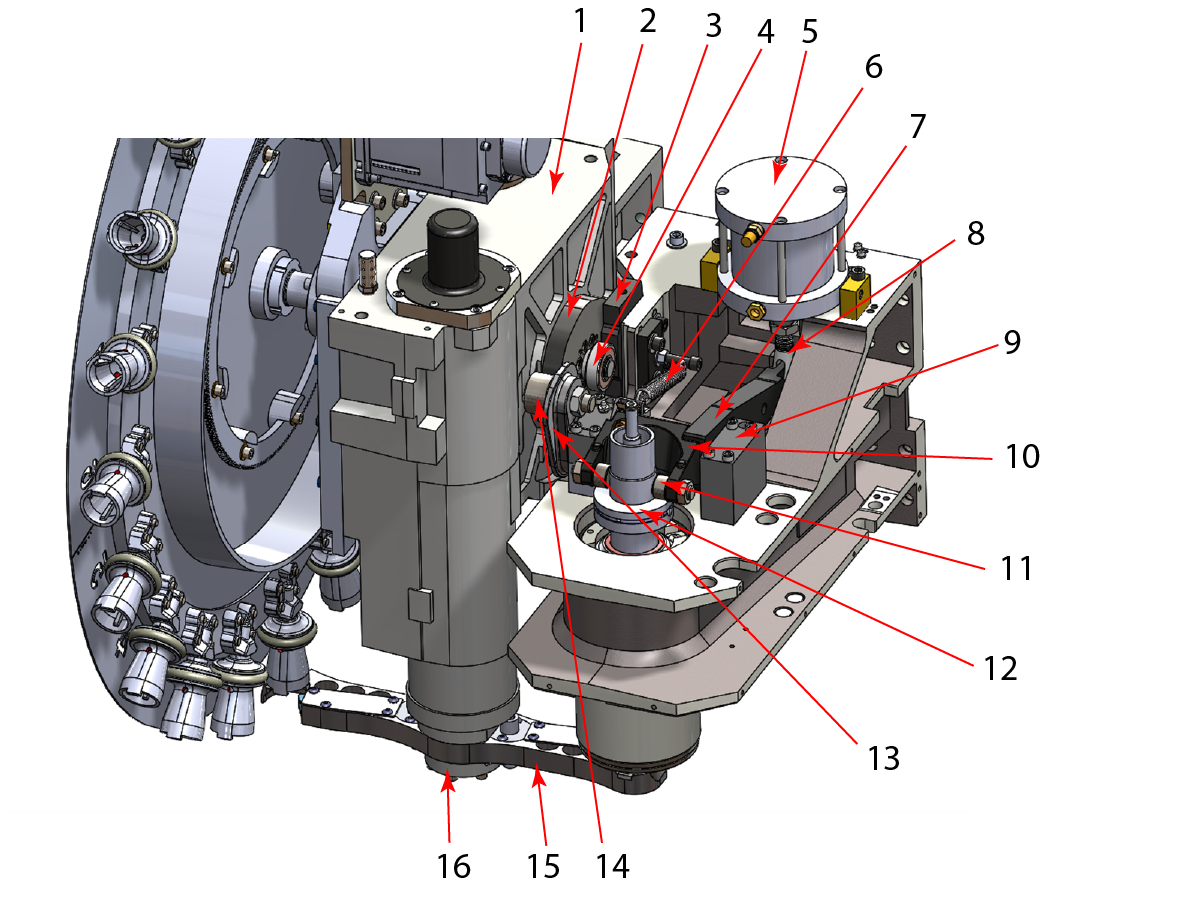
 NOTE: There are 2 independent tool unclamp systems that need to be aligned: manual [5, 7] and automatic [2,3] unclamping. Manual unclamping is responsible for manually inserting and removing the tool whereas Automatic unclamping is responsible for inserting and removing the tool during an automatic tool change operation. 


Diagram

  1.  Cam Box
  2.  Tool Release Cam
  3. Striker Block
  4. Support Bearing
  5. Tool Release Piston
  6. Rocker Arm Return Spring
  7. Manual Release Arm
  8. Pushout Adjustment Clevis
  9. Rocker Shaft Support Bearing (x2)
  10. Rocker Arm
  11. Rocker Arm Follower
  12. Guide Release
  13. Cam Follower Arm
  14. Cam Follower
  15. Double Arm
  16. Taper Lock

Tools Required

  • T-2108 Double Arm Alignment Tool
  • (2) 3/8-16 x 2.5" Socket-Head Cap Screws (SHCS)
  • DT:
    • T-1224 BT 30 Taper Split Tool
    • T-2173 BT 30 Taper Split Tool Pin
  • DM:
    • T-2086 CT 40 Taper Split Tool
    • T-2087 BT 40 Taper Split Tool

Set Striker Block

1

 NOTE: This step applies for the old style rocker arm, the new style rocker arm does not need the striker block, skip this step if the new style rocker arm is not installed in the spindle head .

Set the Z-axis tool change offset

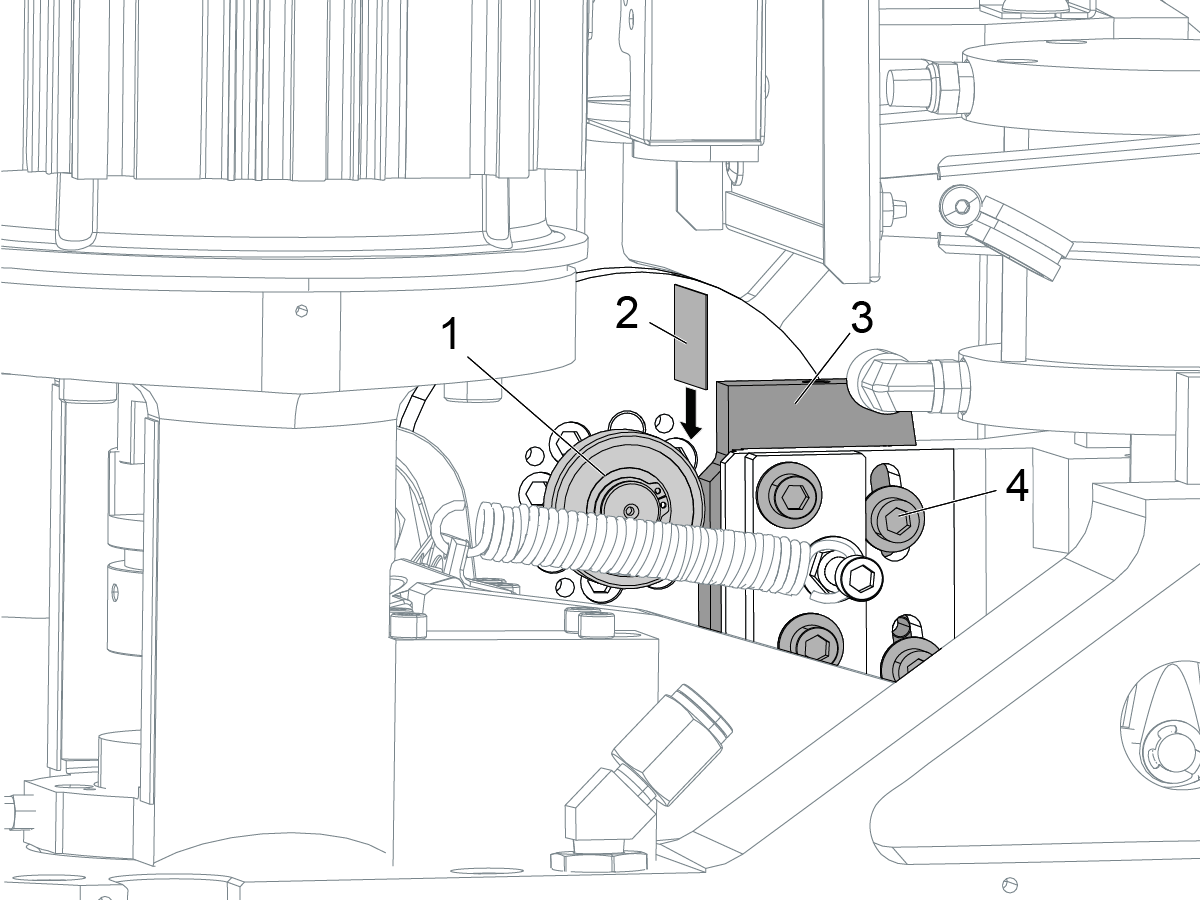
The correct gap between the striker block and the bearing is 0.0040" - 0.0020".

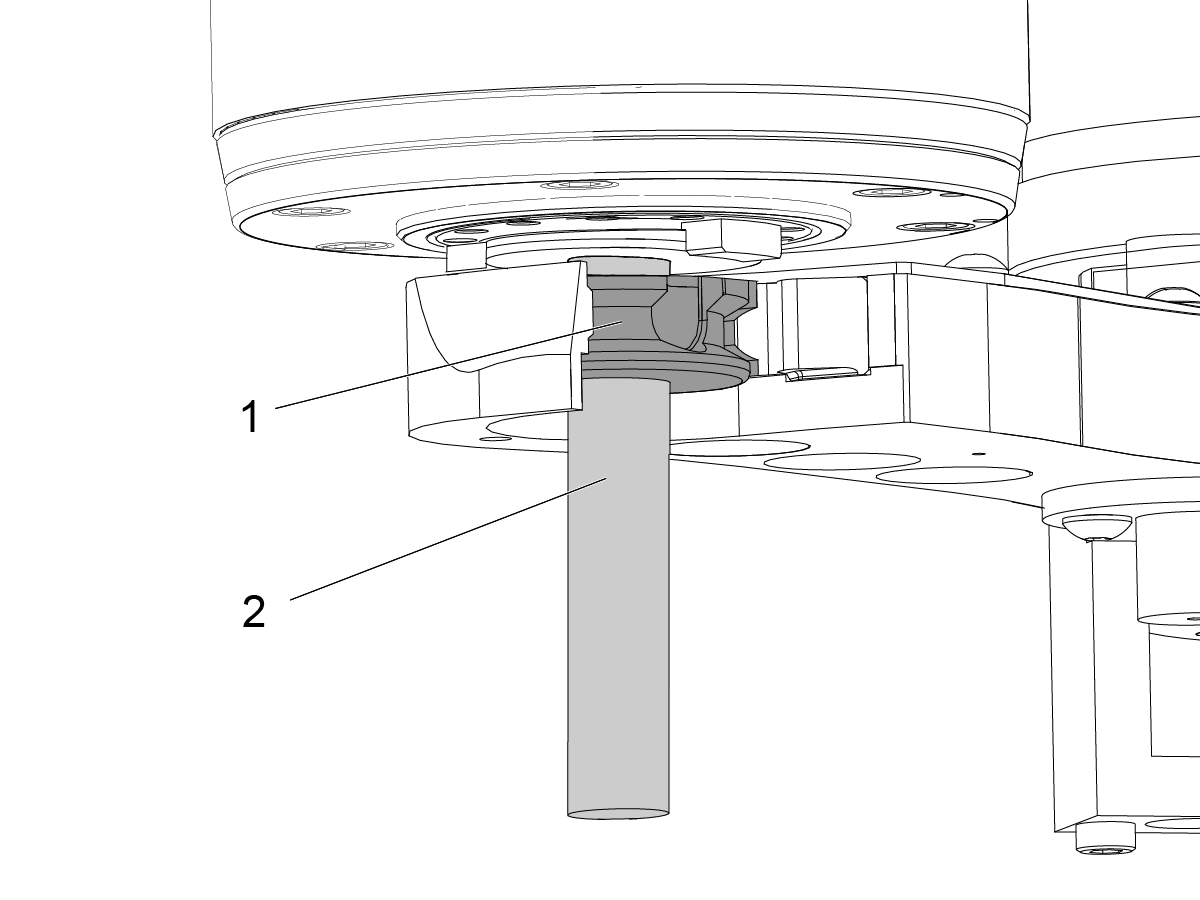
Put a 0.0040" shim [2] between the striker block [3] and the bearing [1]. If the shim does not fit, go to Step 2.

If the shim fits, do these steps:

  • Loosen the (4) screws [4] that retain the striker block.
  • Put a 0.0020" shim between the striker block and the bearing.
  • Push the sticker block against the shim.

Torque the screws. Refer to Haas Fastener Torque Specifications.

Remove the shim.

Set Manual Pushout

1

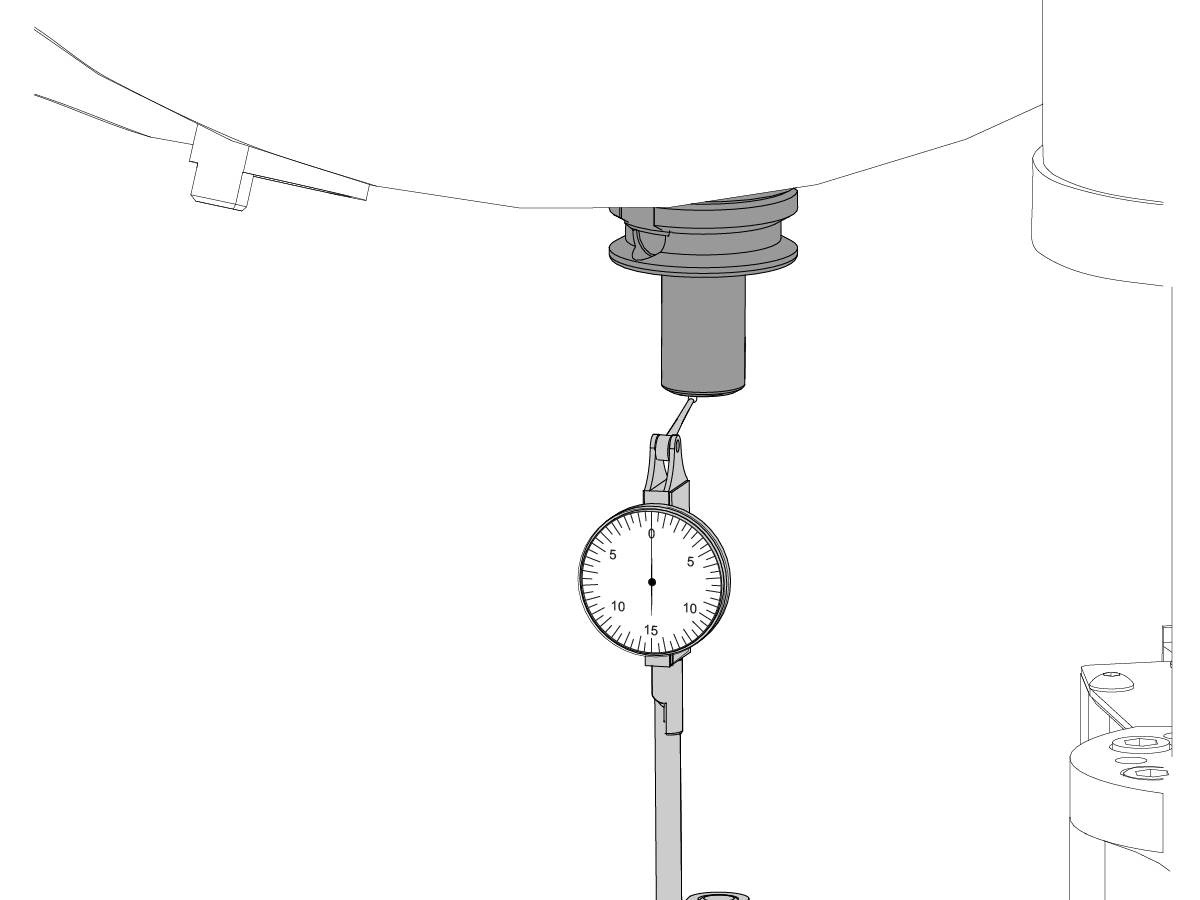
Zero return the Z-axis. With the double arm at the home position, put a toolholder into the spindle using the manual release buttom. Position a drop indicator against the bottom face of the toolholder. Zero the indicator.

2

While pushing up on the toolholder, activate the tool release button.

 Caution: Do not allow the tool to drop.

The pushout should be 0.035”(+.010”, -0). If it is not, move to step 3.

3

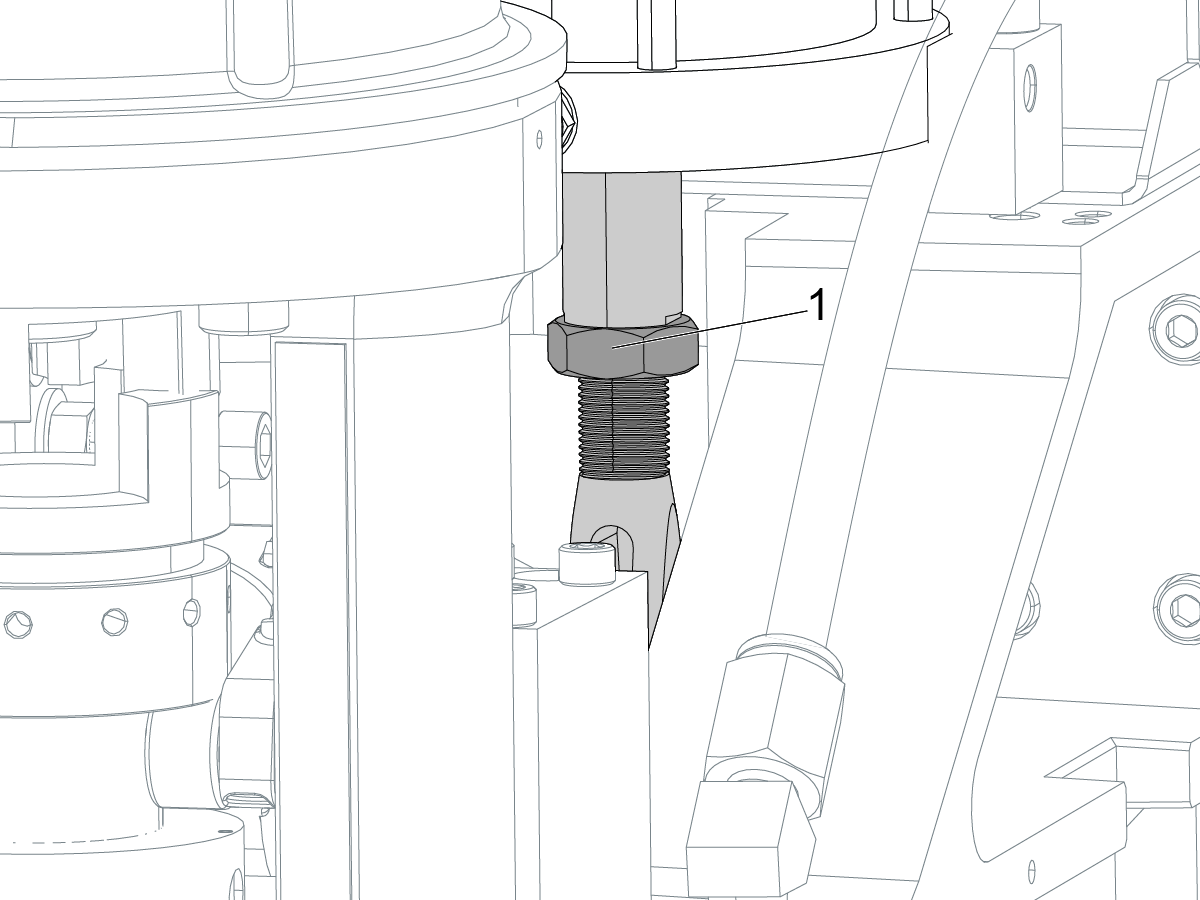
If the indicator does not show 0.035" (+0.010"/ -0"), do these steps to adjust the pushout:

  • Remove the clevis pin.
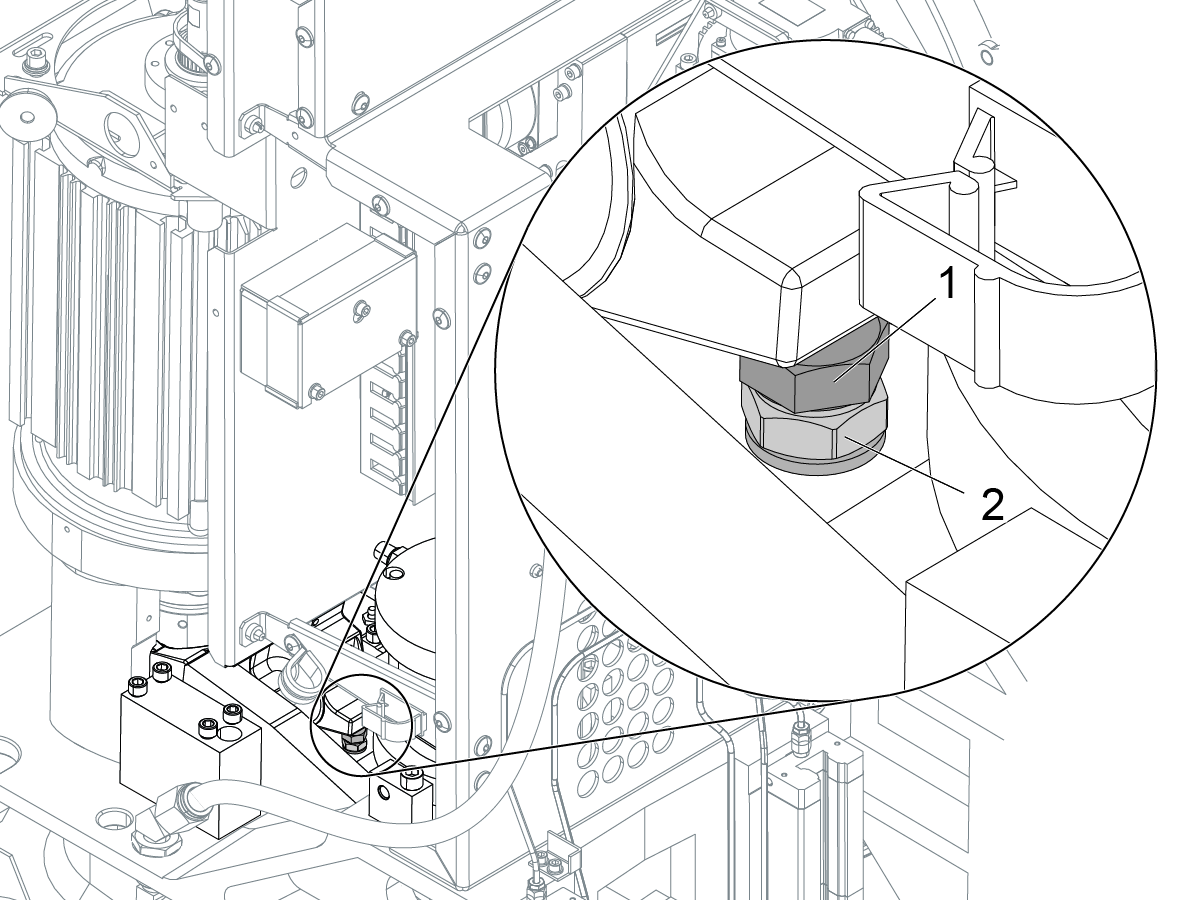
  • Use a 1 1/8" wrench to loosen the 3/4" -16 jam nut [1] on the clevis.
  • Adjust the clevis:
    • Turn the clevis clockwise to reduce pushout, counter clockwise to increase.
    • 1/2 turn of the clevis equals 0.010" of pushout.

Install the clevis pin and check the pushout again.

When the pushout is correct, tighten the jam nut.

Adjust Automatic Rocker Arm Pushout

1

In order to ensure the rocker arm pushout is adjusted correctly:

ZERO RETURN the Z Axis. Press HOME G28.

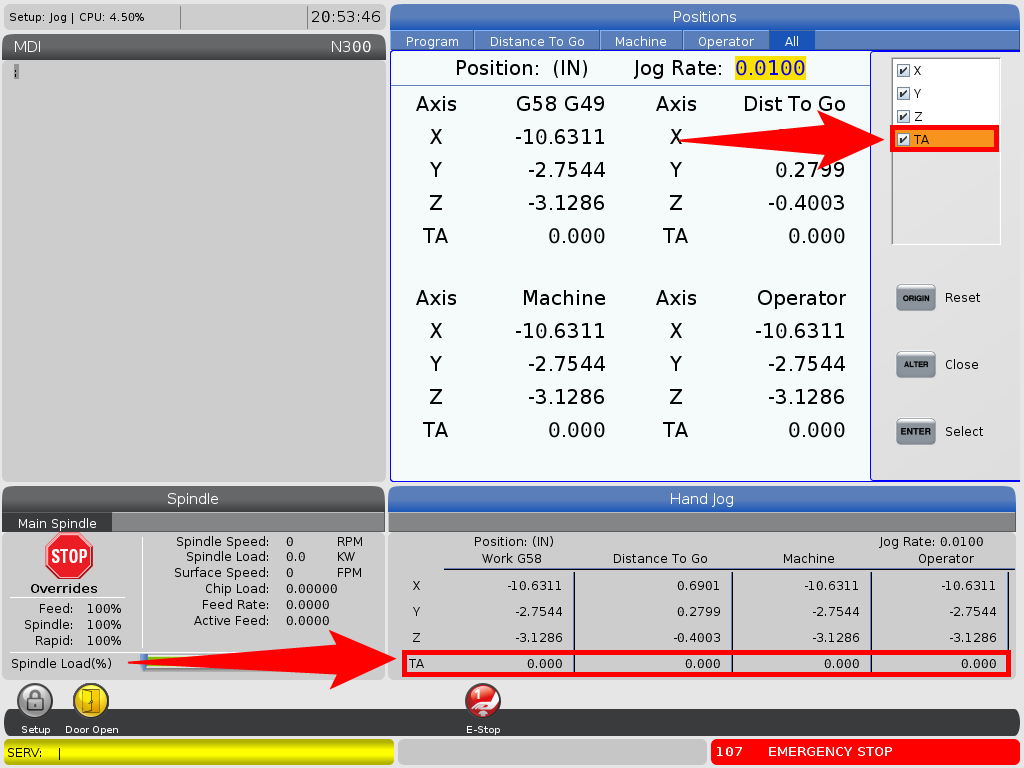
Display Toolchanger Arm axis to view the position while jogging:

  • For NGC set parameter 11.019, TA INVIS AXIS to FALSE. This will require a service key in NGC.
  • For Classic Haas Control set parameter: 462:18, V INVIS AXIS, to 0. 

Go to the Positions page and check the appropriate axis box. The axis is now displayed.

2

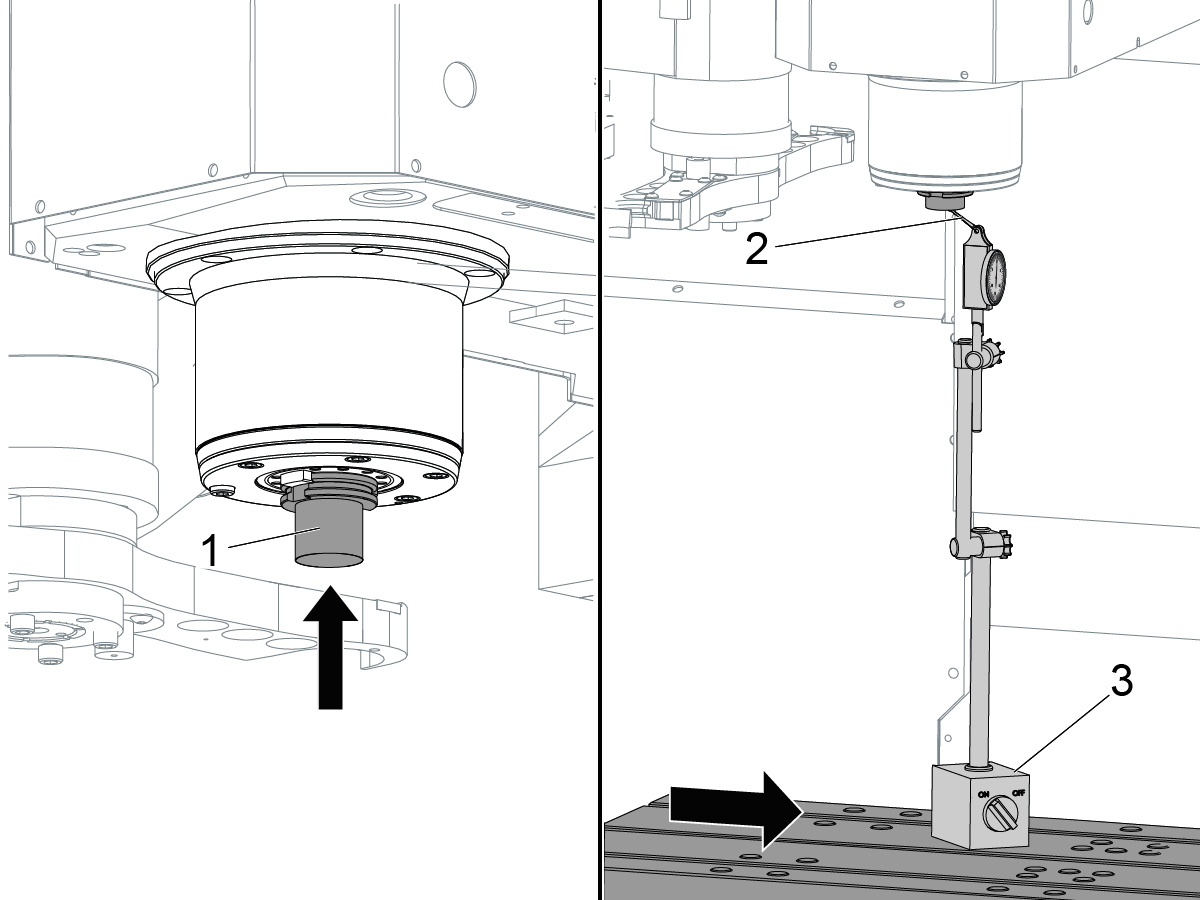
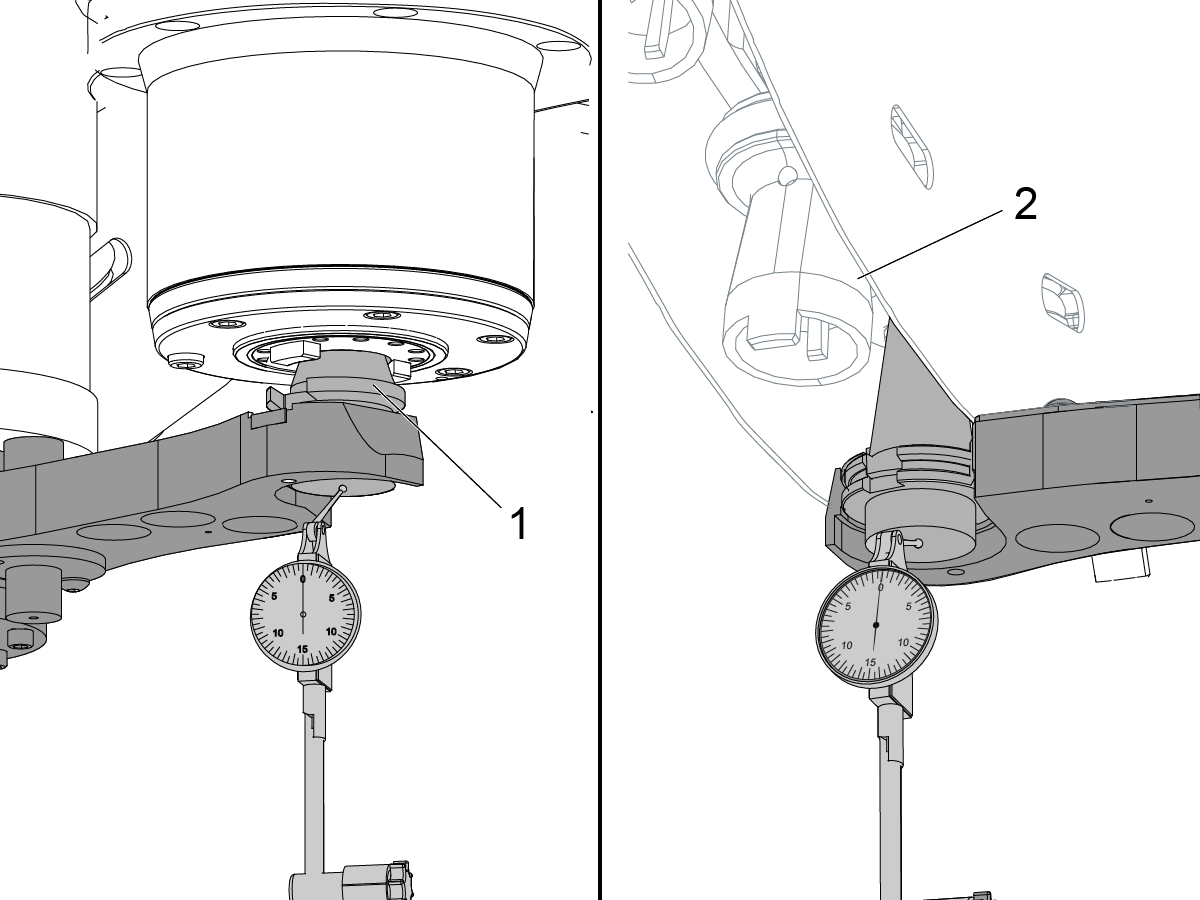
Jog the double arm until it is at the home position. Place a tool holder [1] into the spindle using the manual release.

Put the indicator tip [2] against the bottom of the toolholder. Zero the indicator.

Gently move the indicator base [3] away to allow for room to jog the toolchanger arm. Remove the toolholder.

Jog the toolchanger arm to tool change position (around 160) or until the drawbar is fully released.

3

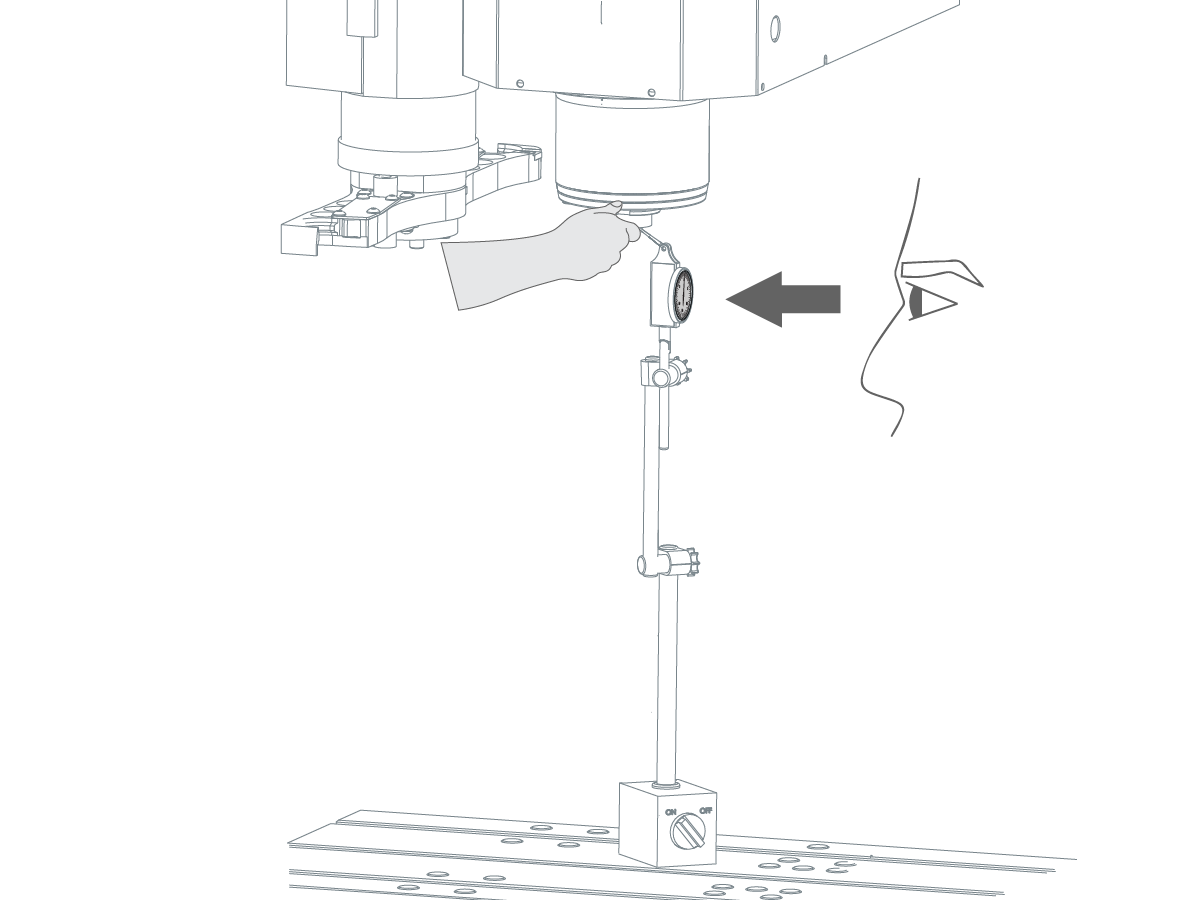
With the draw bar released,  position a toolholder all the way in the spindle taper with your hand.

 Caution: The drawbar will not clamp the toolholder.

Gently position the indicator against the bottom of the toolholder while continuing to hold it with your hand.

If the rocker arm pushout is correctly adjusted, the indicator reads 0.035" (+ 0.005"/- 0").

Add or remove rocker arm shims [1] until the indicator readout is correct.

Adjust Rocker Arm Bearings

1

Make sure the rocker arm bearings are adjusted correctly.

Jog the double arm to the home position.

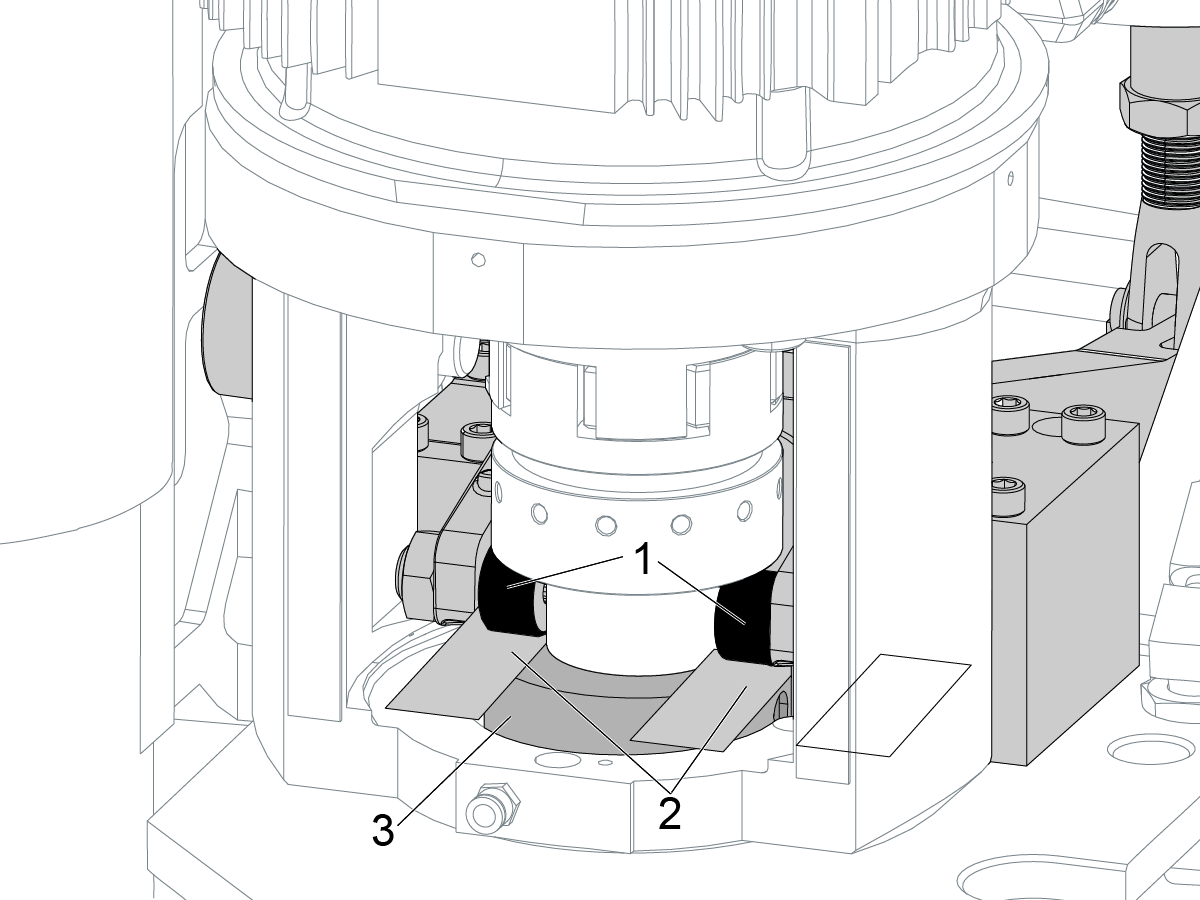
Put a 0.040" shim [2] between each of the rocker arm bearings [1]  and the spindle guide release [3].

The correct adjustment puts the bearings [1] 0.040" above the release [3].

2

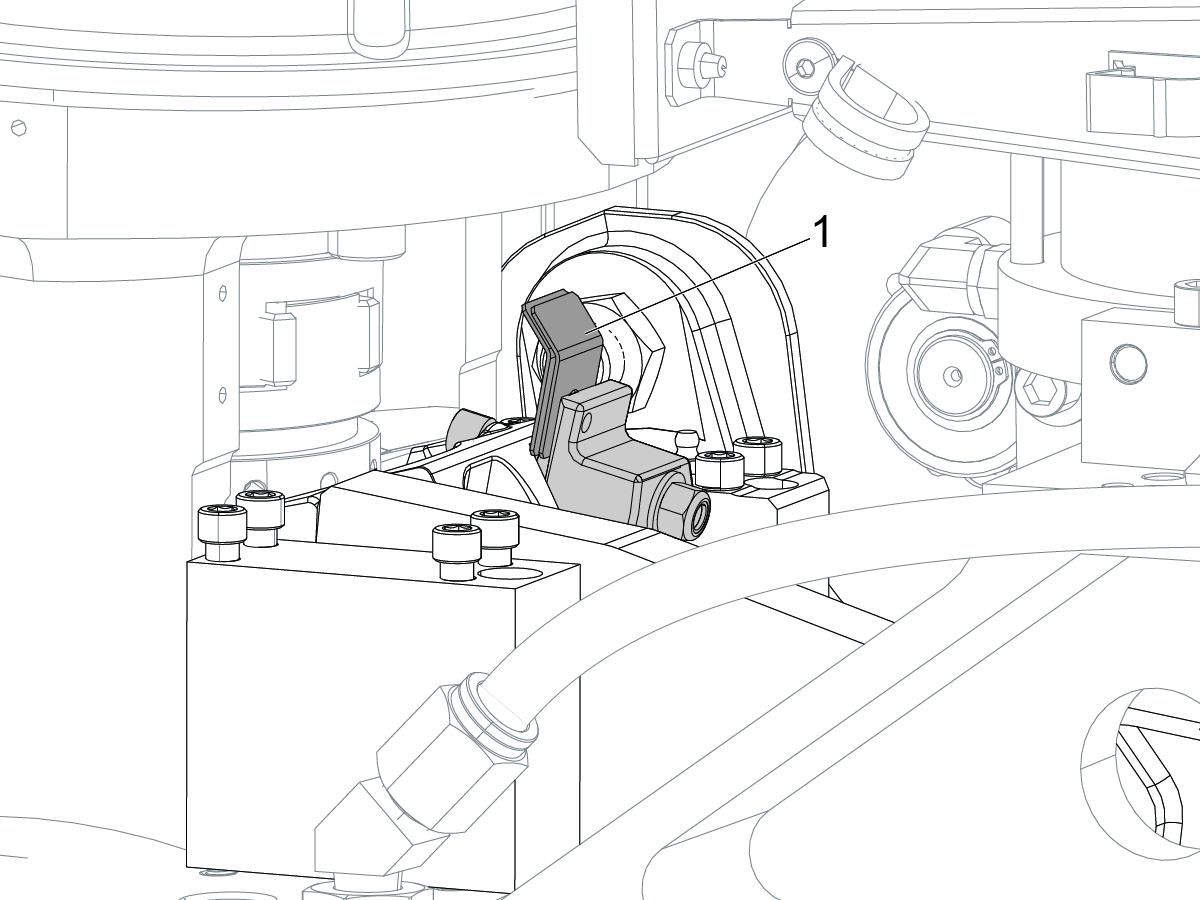
If the bearings are not 0.040 " (+/- 0.01") above the guide release, but the pushout is correct, do these steps:

  • Find the hard stop bolt [1] for the rocker arm.
  • Use a 1/2" wrench to loosen the 3/8"-24 jam nut [2].
  • Adjust the stop bolt until the bearings are 0.040" above the release.
  • Re-check the rocker arm pushout

Remove the 0.040" shims you put between each of the rocker arm bearings and the spindle guide release

Double Arm Alignment

1

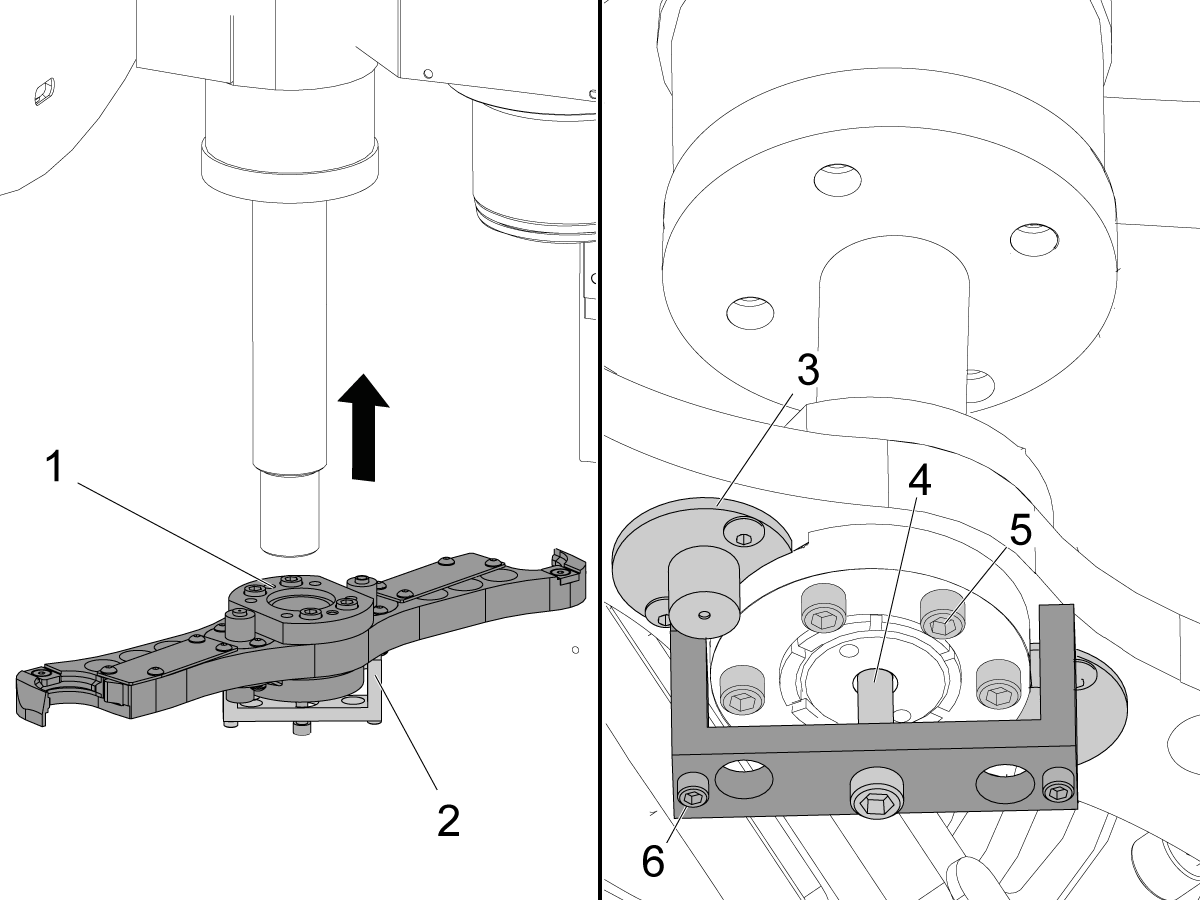
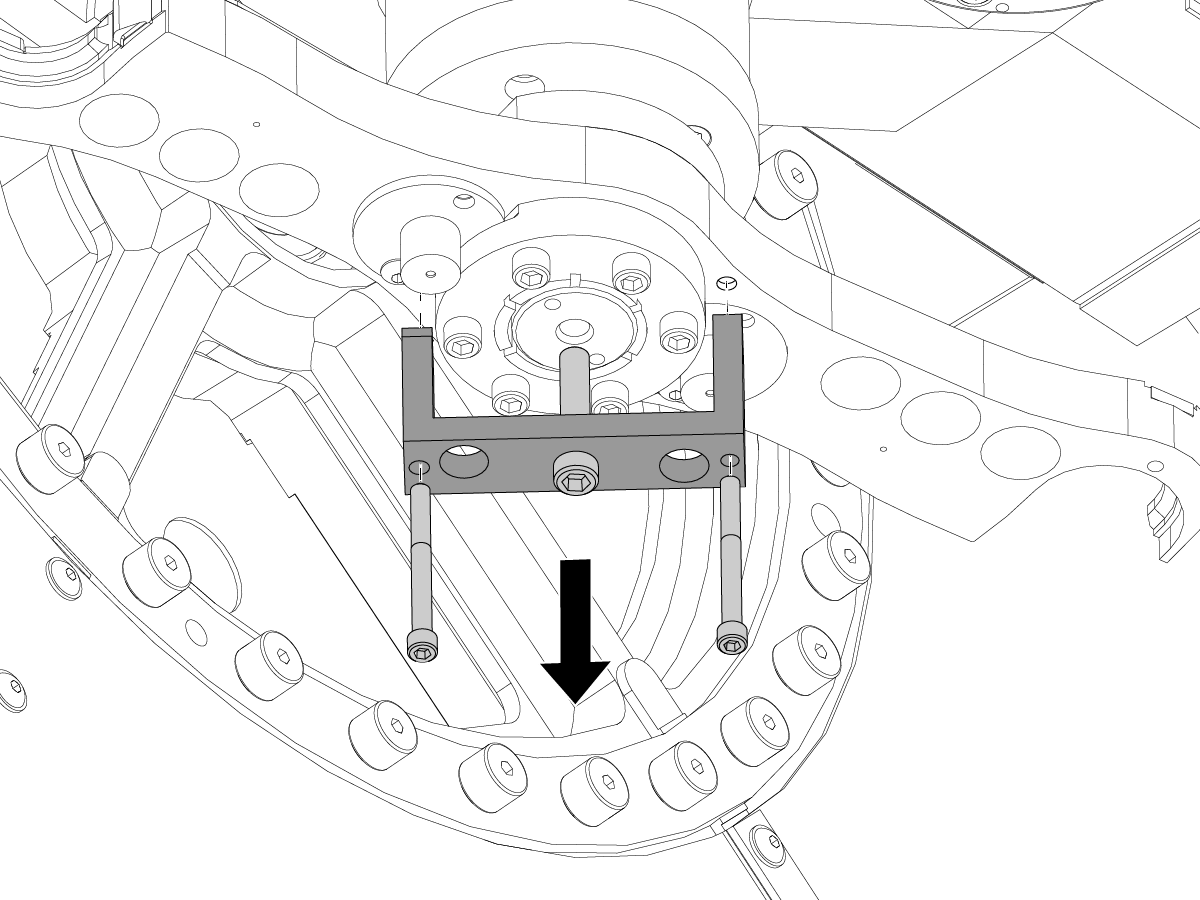
Put the alignment tool [2] onto the double arm. Use the (2) screws [6] for the alignment tool.

 Note: Make sure the legs of the alignment tool clear the covers [3] for the plungers.

Put the double arm [1] onto the output shaft.

Turn the center screw [4] to raise the double arm on the output shaft.

Lightly tighten the clamp screws [5]. Do this until the double arm stays in position, but you can move it with your hand.

 Note: Do not tighten the clamp screws too much. This makes it difficult to adjust the height for the double arm.

Release EMERGENCY STOP.

2

Jog the V-axis to 0 degrees. This rotates the carousel for the Side-Mount Tool Changer (SMTC).

Push EMERGENCY STOP.

Insert a tool holder into the active tool pocket. Make sure the tool holder has a flat face. The tool must have a minimum nose length of 2" (51 mm).

Put the indicator tip onto the bottom of the tool holder. Set the indicator to zero.

Go into DEBUG mode.

Release EMERGENCY STOP.

Jog the table to move the indicator away from the tool holder.

Remove the tool from the tool pocket.

Push ZERO RETURN. Push Z. Push HOME G28.

3

Jog the V Axis in the negative (-) direction to -8.0 degrees.

Jog the T Axis in the negative (-) direction to -243.0 degrees.

 Note: The arm should be near the bottom of the travel.

Push EMERGENCY STOP.

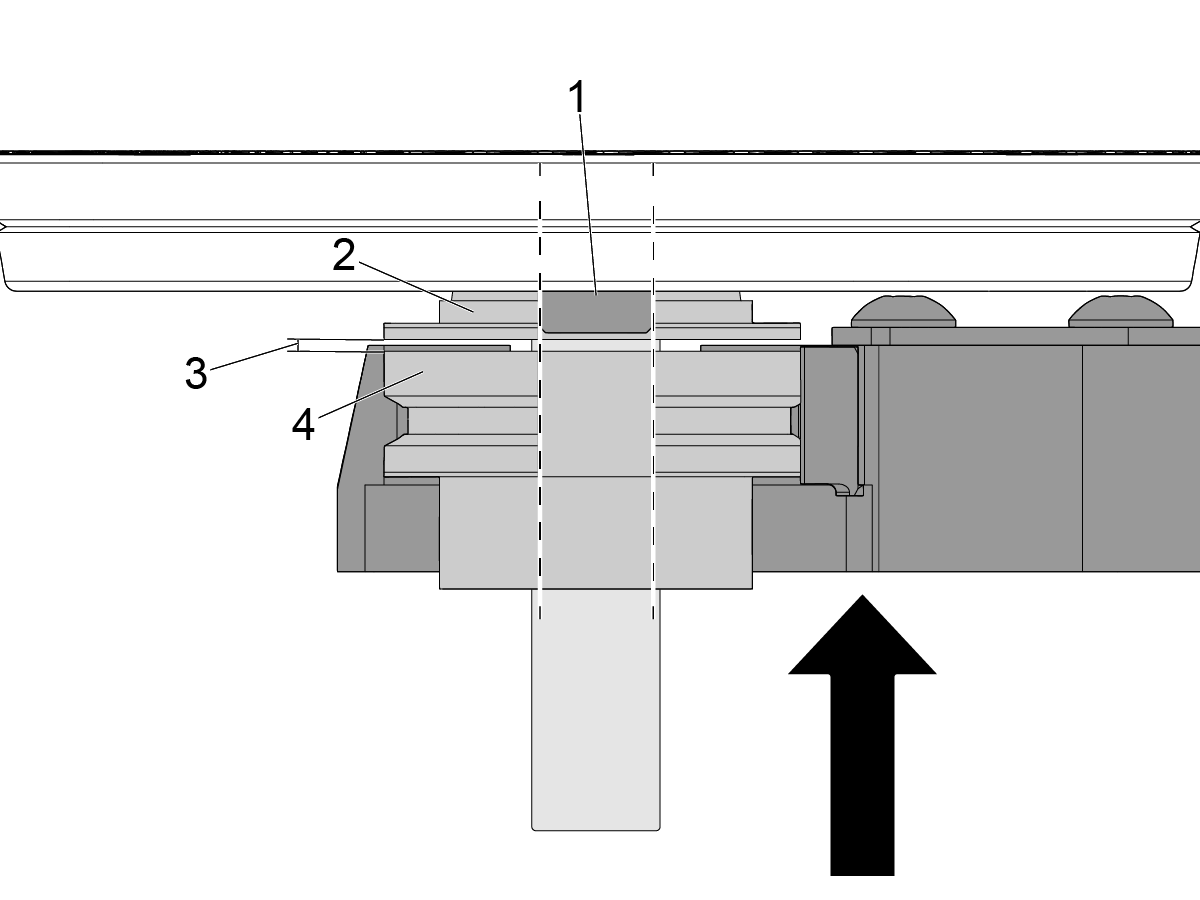
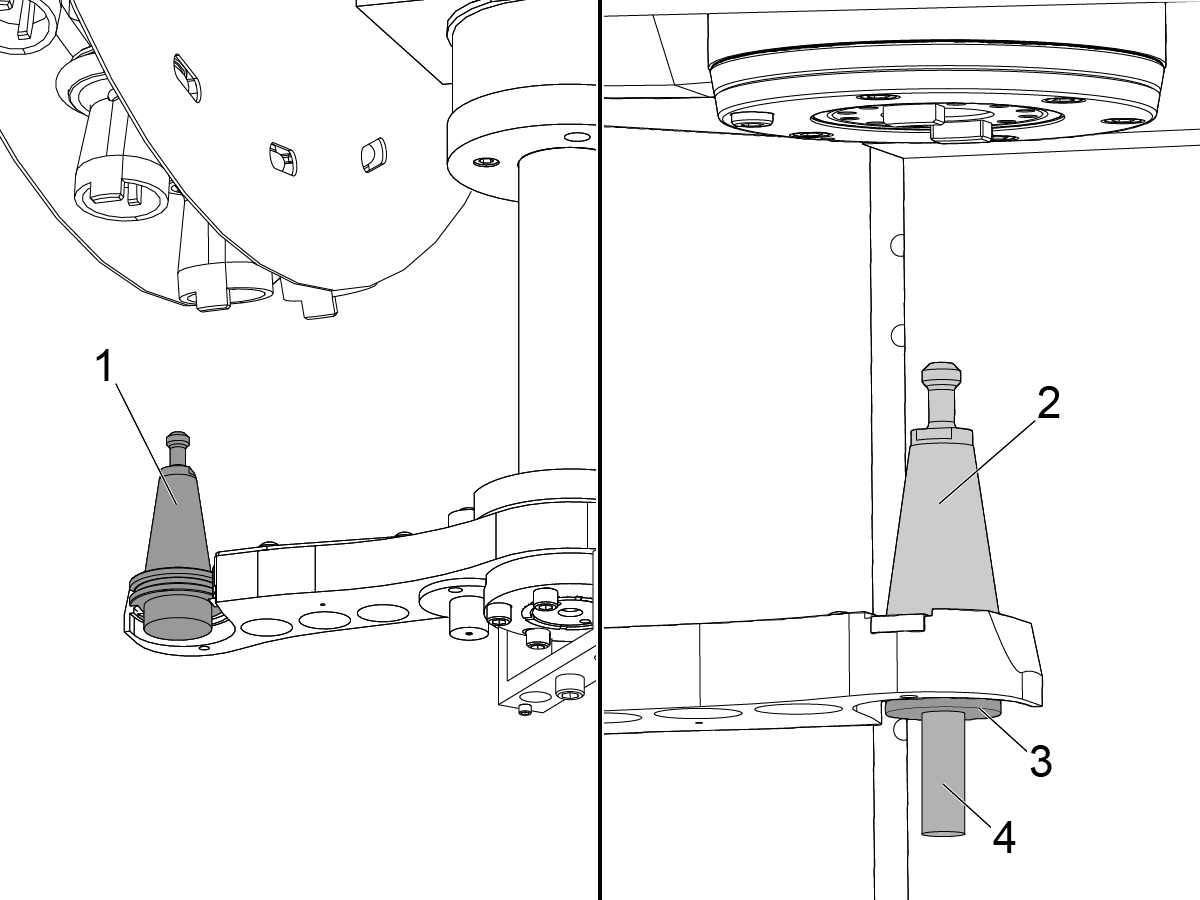
Put the tool holder [1] into the double arm on the carousel side.

Push the plunger on the double arm down. Put the lower half of the split-tool [3] in the double arm under the spindle. Put the upper half of the split-tool [2] on the lower half.

Align the split tool halves. Insert the split-tool alignment rod [4]. Hold the rod in the split-tool using your palm.

 Caution: Make sure your hand is not inbetween the arm and the spindle.

4

Release EMERGENCY STOP.

Push T. Push HAND JOG. Push .01.

Slowly jog the T Axis in the negative (-) direction to -284.0 degrees.

 Caution: Make sure the tool holder does not hit the carousel pocket.

 Caution: Make sure the spindle dog [1] and the upper half of the split-tool [2] are aligned to the lower half of the split-tool [4].

Push the upper half of the split-tool into the spindle using the rod. Make sure it is firmly seated into the spindle.

Slowly jog the T Axis in the negative (-) direction to -302.0 degrees.

To correct a misalignment, jog the T Axis in the positive (+) direction to -284.0 degrees and repeat this step.

The gap [3] between the upper half of the split-tool and the lower half of the split-tool should be no more than 0.06" (1.52mm).

5

Push EMERGENCY STOP.

Make sure the lower half of the split-tool [1] does not come out of the arm.

Remove the split-tool rod [2]. Use your hand to rotate the double arm. Align the split tool halves. Insert the split-tool alignment rod.

 Note: The split tool must go in smoothly. If the split-tool is off in the X-direction, the SMTC must be aligned.

Release EMERGENCY STOP.

6

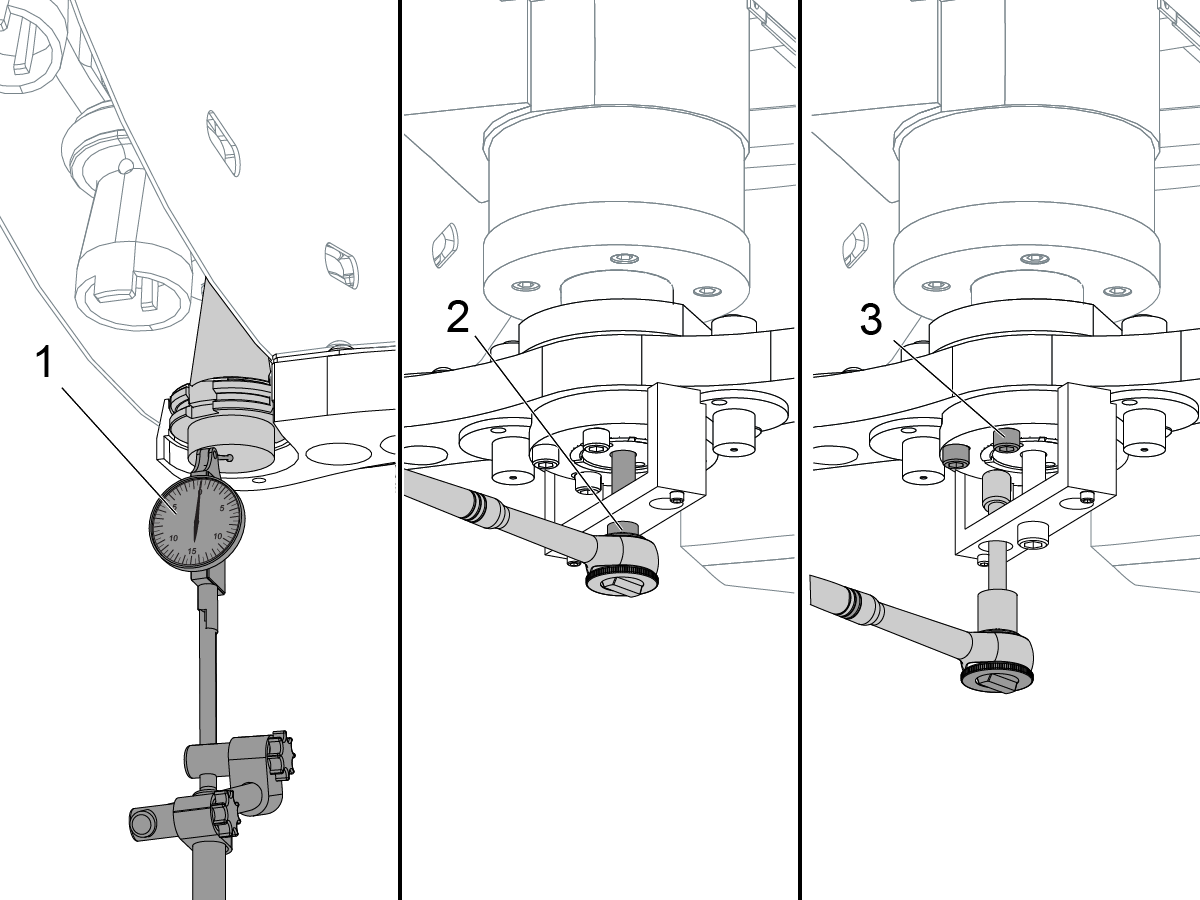
Jog the indicator [1] under the tool holder with the flat face. Turn the center screw [2] until the indicator shows 0.

The gap between the upper half of the split-tool and the lower half of the split-tool should be no more than 0.06" (1.52mm).

Lightly tighten the (6) clamp screws [3]. Do these steps to torque the screws for the clamp:

  • Tighten the screws in a star pattern.
  • Torque the screws in increments of 5 ft-lb (6.8 N-m).
  • Look at the indicator to make sure the arm is level. The indicator must not move more than 0.005" (0.13 mm). Change the tightening pattern if necessary to keep the arm level.
  • Repeat the pattern until the screws are torqued to 25 ft-lb (33.9 N-M).
  • Each time you complete the pattern insert the split-tool alignment rod. The split tool must go in smoothly. Correct the alignment if the split-tool is off.
  • If the indicator moves too far, you must re-start the alignment procedure.

Set the indicator to 0. Move the indicator away from the tool. Do not change the indicator setting.

7

Slowly jog the T Axis in the posotive (+) direction to -243.0 degrees. Remove the split-tool halves.

With the indicator measure the height of the tool holder in the positions that follow:

 Caution: Make sure you jog the arm slowly to avoid crashing it into the tool changer pockets.

  • The tool holder under the spindle [1] when the T axis is set to -302.0 degrees.
  • The tool holder between the tool pockets [2] when the T axis is set to -100.0 degrees.

If the indicator measures more than 0.01" (0.25 mm) between Step 7 and Step 9 at -302.0 degrees, the double arm is not level. Do this procedure again.

If the indicator measures more than 0.01" (0.25 mm) at -302.0 degrees or -100.0 degrees, the SMTC must be adjusted.

If the indicator measures less than 0.01" (0.25 mm), the double arm is level.

8

Jog the T Axis in the positive (+) direction to -100.0 degrees.

Jog the V Axis in the positive (+) direction to 0 degrees.

Install the split-tool halves [1, 2] in the tool pocket and double arm.

Carefully put the alignment rod [3] through the top [1] and bottom [2] halves of the split-tool.

  • If the tool pocket and the double arm do not align in the Y direction, jog the V axis no more than 0.3 degrees. Then change parameter415.
  • If the double arm does not align in the X direction, the SMTC must be adjusted.

9

Remove the alignment tool and the indicator.

Release EMERGENCY STOP.

Push RESET to clear the alarms.

Jog the T Axis down until it reaches the bottom of travel.

Push EMERGENCY STOP.

Remove the tools.

Go out of DEBUG mode.

Change Parameter 462:18, INVIS AXIS, to 1.

Change Parameter 390:18, INVIS AXIS, to 1.

Do a tool changer recovery.

Recently Viewed Items

You Have No Recently Viewed Items Yet

Feedback
Haas Logo

Haas Delivered Price

This price includes shipping cost, export and import duties, insurance, and any other expenses incurred during shipping to a location in France agreed with you as a buyer. No other mandatory costs can be added to the delivery of a Haas CNC Product.

KEEP UP WITH THE LATEST HAAS TIPS AND TECHNOLOGY...

Sign up now!   

HAAS TOOLING ACCEPTS THE FOLLOWING:

  • Service & Support
  • Owners
  • Request Service
  • Operator Manuals
  • Haas Parts
  • Rotary Repair Request
  • Pre-Install Guides
  • Shopping Tools
  • Build & Price a New Haas
  • Available Inventory
  • The Haas Price List
  • CNCA Financing
  • About Haas
  • Accessibility Statement
  • DNSH Statement
  • Export Compliance
  • Careers
  • Certifications & Safety
  • Contact Us
  • History
  • Terms & Conditions
  • Haas Tooling Terms & Conditions
  • Privacy
  • Warranty
  • Haas Community
  • Haas Certification Program
  • Haas Motorsports
  • Gene Haas Foundation
  • Haas Technical Education Community
  • Events
  • Join the Conversation
  • Facebook
  • X
  • Flickr
  • YouTube
  • LinkedIn
  • Instagram
  • TikTok
© 2026 Haas Automation, Inc – CNC Machine Tools

This site is protected by reCAPTCHA and the Google Privacy Policy and Terms of Service apply.

2800 Sturgis Rd., Oxnard, CA 93030
Toll Free: (888) 817-4446 / Fax: 805-278-8554