My Haas Welcome,
!
Haas Tooling MyHaas/HaasConnect Sign In Register Haas Tooling MyHaas/HaasConnect Sign Out Welcome, My Machines Latest Activity My Quotes My Account My Users Sign Out
Find Your Distributor
  1. Select Language
    1. English
    2. Deutsch
    3. Español - España
    4. Español - México
    5. Français
    6. Italiano
    7. Português
    8. Český
    9. Dansk
    10. Nederlands
    11. Magyar
    12. Polski
    13. Svenska
    14. Türkçe
    15. 中文
    16. Suomi
    17. Norsk
    18. الإنجليزية
    19. български
    20. Hrvatski
    21. Ελληνικά
    22. Română
    23. Slovenský
    24. Slovenščina
    25. 한국어
    26. 日本語
    27. Українська
  • machines Main Menu
    • Vertical Mills
      Vertical Mills
      Vertical Mills View All
      • Vertical Mills
      • VF Series
      • Universal Machines
      • VR Series
      • VP-5 Prismatic
      • Pallet-Changing VMCs
      • Mini Mills
      • Mold Machines
      • High-Speed Drill Centers
      • Drill/Tap/ Mill Series
      • Toolroom Mills
      • Pocket Mill
      • Compact Mills
      • Gantry Series
      • SR Sheet Routers
      • Extra-Large VMC
      • Double-Column Mills
      • 3+2 Positioning Machines
    • Multi-Axis Solutions
      Multi-Axis Solutions
      Multi-Axis Solutions View All
      • Multi-Axis Solutions
      • Y-Axis Lathes
      • 5-Axis Mills
    • Lathes
      Lathes
      Lathes View All
      • Lathes
      • ST Series
      • Dual-Spindle
      • Box Way Series
      • Toolroom Lathes
      • Chucker Lathe
      • Haas Bar Feeders
    • Horizontal Mills
      Horizontal Mills
      Horizontal Mills View All
      • Horizontal Mills
      • 50-Taper
      • 40-Taper
    • Rotaries & Indexers
      Rotaries & Indexers
      Rotaries & Indexers View All
      • Rotaries & Indexers
      • Rotary Tables
      • Indexers
      • 5-Axis Rotaries
      • Extra-Large Rotaries
    • Special Series
      Special Series
      Special Series View All
      • Special Series
      • EU_Series_Redirect
    • Automation Systems
      Automation Systems
      Automation Systems View All
      • Automation Systems
      • Mill Automation
      • Lathe Automation
      • Automatic Parts Loaders
      • Automation Models
    • Desktop Machines
      Desktop Machines
      Desktop Machines View All
      • Desktop Machines
      • Desktop Mill
      • Desktop Lathe
      • Control Simulator, Standard
      • Control Simulator, Premium
    • Shop Equipment
      Shop Equipment
      Shop Equipment View All
      • Shop Equipment
      • Knee Mill
      • Haas Manual Lathes
      • Haas Saws
    • Fabrication Machines
      Fabrication Machines
      Fabrication Machines View All
      • Fabrication Machines
      • Laser Cutting Machines
      • CNC Press Brakes
    • QUICK LINKS Special Series  Special Series 
      EU SERIES EU SERIES BUILD & PRICE | PRICE LIST BUILD & PRICE | PRICE LIST In-Stock Machines In-Stock Machines WHAT’S NEW WHAT’S NEW YOUR FIRST CNC YOUR FIRST CNC
      SHOPPING TOOLS
      • Build & Price a Haas
      • Price List
      • Available Inventory
      • CNCA Financing
      WANT TO TALK TO SOMEONE?

      A Haas Factory Outlet (HFO) can answer your questions, and walk you through your best options.

      CONTACT YOUR DISTRIBUTOR >
  • Options Main Menu
    • The Haas Control Value Option Packages
      Value Option Packages
      Value Option Packages View All
      • Value Option Packages
    • Product Image Spindles
      Spindles
      Spindles View All
      • Spindles
    • Product Image Tool Changers
      Tool Changers
      Tool Changers View All
      • Tool Changers
    • Product Image 4th- | 5th-Axis
      4th- | 5th-Axis
      4th- | 5th-Axis View All
      • 4th- | 5th-Axis
    • Product Image Turrets & Live Tooling
      Turrets & Live Tooling
      Turrets & Live Tooling View All
      • Turrets & Live Tooling
    • Product Image Probing
      Probing
      Probing View All
      • Probing
    • Haas Chip & Coolant Management Chip & Coolant Management
      Chip & Coolant Management
      Chip & Coolant Management View All
      • Chip & Coolant Management
    • The Haas Control The Haas Control
      The Haas Control
      The Haas Control View All
      • The Haas Control
    • Product Image Product Options
      Product Options
      Product Options View All
      • Product Options
    • Product Image Tooling & Fixturing
      Tooling & Fixturing
      Tooling & Fixturing View All
      • Tooling & Fixturing
    • Product Image Workholding
      Workholding
      Workholding View All
      • Workholding
    • Product Image 5-Axis Solutions
      5-Axis Solutions
      5-Axis Solutions View All
      • 5-Axis Solutions
      • 5 Easy Steps to 5-Axis
    • QUICK LINKS Special Series  Special Series 
      EU SERIES EU SERIES BUILD & PRICE | PRICE LIST BUILD & PRICE | PRICE LIST In-Stock Machines In-Stock Machines WHAT’S NEW WHAT’S NEW YOUR FIRST CNC YOUR FIRST CNC
      SHOPPING TOOLS
      • Build & Price a Haas
      • Price List
      • Available Inventory
      • CNCA Financing
      WANT TO TALK TO SOMEONE?

      A Haas Factory Outlet (HFO) can answer your questions, and walk you through your best options.

      CONTACT YOUR DISTRIBUTOR >
  • Why Haas Main Menu
      Discover the Haas Difference
    • Why Haas
    • MyHaas
    • Education Community
    • Industry 4.0
    • Haas Certification
    • Customer Testimonials
  • Service Main Menu
      Welcome to Haas Service
      SERVICE HOME Operator’s Manuals How-To Procedures Troubleshooting Guides Preventive Maintenance Haas Parts Haas Tooling Videos
  • Videos Main Menu
  • Main Menu
    • View All
    • View All
    • View All
    • View All
      • HTEC Curriculum Support
      • Haas Value Option Packages (VOP) Journey
    • View All
      • Haas 10 kg Cobot Package
      • Cobot Kits
      • DC-1 Drill Center
      • CNC Sales News
      • Do More With Your Haas
    • View All
    • View All
      • contact-us-test
      • 4 - AUTOMATION SYSTEMS
      • Carousel-V2
      • expert test
      • Demo_Day_Trident-test
      • Link Test
      • image-sale-tag-test
      • article-list-test
      • Haas 25 kg Robot Package
      • test-algolia-page
    • View All
    • View All
    • View All
    • View All
      • calc-test
    • View All
    • QUICK LINKS Special Series  Special Series 
      EU SERIES EU SERIES BUILD & PRICE | PRICE LIST BUILD & PRICE | PRICE LIST In-Stock Machines In-Stock Machines WHAT’S NEW WHAT’S NEW YOUR FIRST CNC YOUR FIRST CNC
      SHOPPING TOOLS
      • Build & Price a Haas
      • Price List
      • Available Inventory
      • CNCA Financing
      WANT TO TALK TO SOMEONE?

      A Haas Factory Outlet (HFO) can answer your questions, and walk you through your best options.

      CONTACT YOUR DISTRIBUTOR >
  • Haas Tooling Main Menu
  • Haas Service Parts Main Menu

My Haas Welcome,
!
Haas Tooling MyHaas/HaasConnect Sign In Register Haas Tooling MyHaas/HaasConnect Sign Out Welcome, My Machines Latest Activity My Quotes My Account My Users Sign Out
Find Your Distributor
  1. Select Language
    1. English
    2. Deutsch
    3. Español - España
    4. Español - México
    5. Français
    6. Italiano
    7. Português
    8. Český
    9. Dansk
    10. Nederlands
    11. Magyar
    12. Polski
    13. Svenska
    14. Türkçe
    15. 中文
    16. Suomi
    17. Norsk
    18. الإنجليزية
    19. български
    20. Hrvatski
    21. Ελληνικά
    22. Română
    23. Slovenský
    24. Slovenščina
    25. 한국어
    26. 日本語
    27. Українська
×

Search Results

Web Pages

Images

    • <
    • 1
    • >

Side Mount Tool Changer (SMTC) - Carousel and Pocket - Troubleshooting Guide - TG0127

Service Home Side Mount Tool Changer (SMTC) - Carousel and Pocket - Troubleshooting Guide - TG0127

Side Mount Tool Changer (SMTC) - Carousel and Pocket - Troubleshooting Guide - TG0127

Jump to Section Back to Top

9.3 Side Mount Tool Changer - Carousel and Pocket - Troubleshooting Guide

Recently Updated Last updated: 10/15/2025

Side Mount Tool Changer (SMTC) - Carousel and Pocket - Troubleshooting Guide


TG0127

Revision A - 08/2025

Introduction

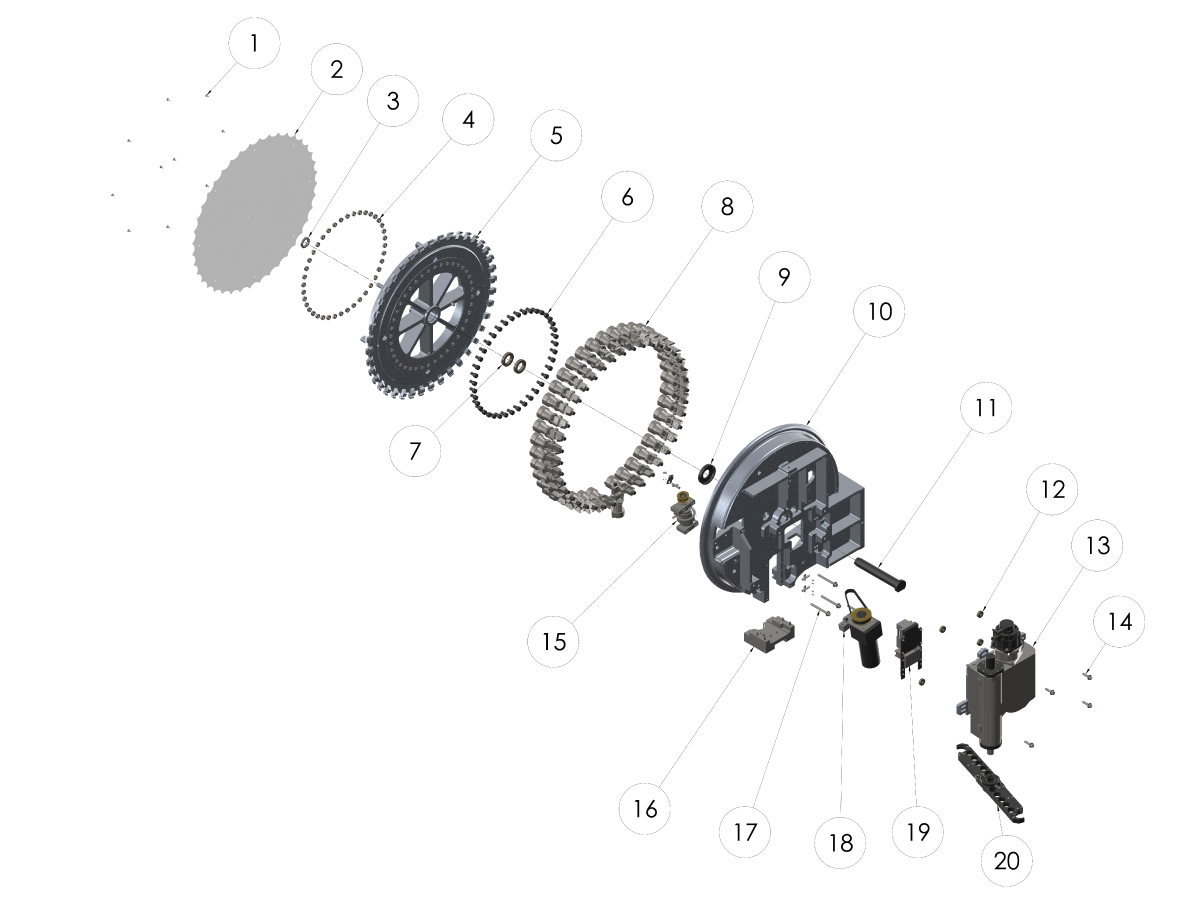
EXPLODED VIEW:

  1. FBHCS 1/4-20 X 1/2
  2. CAROUSEL COVER
  3. BEARING LOCKNUT
  4. JAM NUT 5/8-18
  5. CAROUSEL
  6. CAM FOLLOWER
  7. BEARING
  8. POCKET ASSEMBLY
  9. CAROUSEL WASHER
  10. TOOL CHANGER FRAME
  11. CAROUSEL SHAFT
  12. SPACER
  13. CAM BOX
  14. SHCS 1/2-13 X 2
  15. CAROUSEL CAM ASSEMBLY
  16. POCKET STOP
  17. SHCS 1/2-13 X 5
  18. CAROUSEL MOTOR
  19. POCKET TIPPER ASSEMBLY
  20. DOUBLE ARM

Carousel

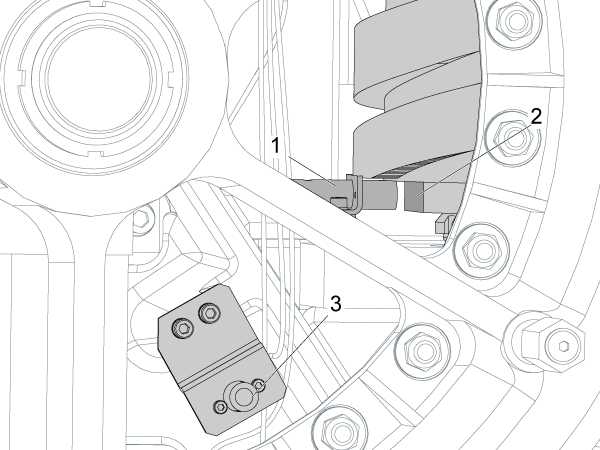
  1. Tool In Position Proximity Sensor: It lets the control know that the tool pocket is in position.
  2. Carousel Cam: A DC or Servo Motor turns this Cam that rotates the tool carousel.
  3. Tool One Proximity Sensor: It lets the control know that the tool pocket is tool one position.

Pocket

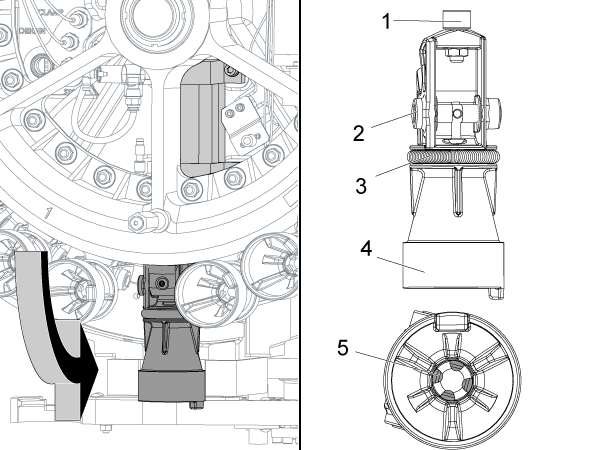
  1. Cam Follower: Keeps the pocket in the up position as the carousel rotates. The cam follower follows a groove on the carousel housing.
  2. Shaft: The axle upon which the pocket pivots up and down.
  3. Spring: Puts tension on the four plungers inside the tool pocket.
  4. Tool Pocket: Holds the tool.
  5. Plungers: The four plungers grip the tool pull stud. They are lubricated with grease.

Symptom Table

Symptom Possible Cause Corrective Action
Alarm 622 TOOL CHANGER ARM FAULT  100 PKT SMTC Carousel stopping in between pockets unable to recover. Drive sprocket moved out of the motor shaft due to failed bushing causing the idle sprocket to fail.  Replace the idle sprocket and bushing, see 100 PKT SMTC sprocket replacement section.
Alarm 625 CAROUSEL POSITIONING ERROR 100 PKT SMTC Carousel stopping in between pockets unable to recover. Drive sprocket moved out of the motor shaft due to failed bushing causing the idle sprocket to fail.  Replace the idle sprocket and bushing, see 100 PKT SMTC sprocket replacement section.
The carousel tool in position, tool one in position, pocket up or down proximity sensor is damaged or contaminated. Rotate the carousel in recovery mode and test the sensors and cabling.
No power to the carousel motor or the carousel motor is damaged. Check that the carousel can be rotated in the manual recovery mode.

VMC, HMC - Side-Mount Tool Changer - Manual Recovery

Tool change was interrupted before completion. Do a Tool Change Recovery.

VMC, HMC - Side-Mount Tool Changer - Manual Recovery

A tool change was attempted before adequate air pressure was present.
A tool change was attempted with the pocket already down.
Carousel rotation was prevented by an obstruction. Clear the carousel path.
Alarm 626 TOOL-POCKET SLIDE ERROR A tool change was attempted with the pocket already down. Do a Tool Change Recovery.

VMC, HMC - Side-Mount Tool Changer - Manual Recovery

The incoming air flow or pressure is incorrect. Correct the incoming air supply.
There is contamination in the slide guides. Clean and lubricate the slide guides.
The air cylinder for the tool pocket does not move freely. Check the air cylinder for the tool pocket.
The pocket up or pocket down proximity sensors are contaminated, damaged or have loose connections. Clean and inspect the proximity sensors.
There is a problem with the pocket up/down system. Troubleshoot the check valve, air cylinder, and solenoid.
Movement is blocked by debris. Clear debris.
The tool pocket, air cylinder, pocket slide, or slide follower is loose or damaged. Diagnose and correct.
Alarm 2066 TOOL CHANGER HOME POSITION FAULT
The pocket up and down proximity switches are in the incorrect state. Clean and inspect the proximity sensors.
The tool pocket is noisy. There is a problem with the tool-pocket stop shock-absorber. Check the tool-pocket stop shock-absorber.
The tool pocket, air cylinder, pocket slide, or slide follower is loose or damaged. Diagnose and correct.
The tool falls from the tool pocket. The toolholders or pull studs are incorrect. Check for correct tool specifications.
The spring or the plungers are worn. Check the spring and the plungers for wear.
The tool pocket moves up and down too fast for heavy tools. Install the Pocket Slow Down Service Kit (P/N 93-0254).
The tool pocket is broken. Carousel rotation was prevented by an obstruction. Clear the carousel path.
The pocket up or pocket down proximity sensors are contaminated, damaged or have loose connections. Clean and inspect the proximity sensors.
The tool pocket, air cylinder, pocket slide, or slide follower is loose or damaged. Diagnose and correct.
The carousel makes unusual noises during operation. The cam followers on the carousel need grease. Check and grease the cam followers.
The cam followers on the carousel are worn.
The tool pocket slider set screw is incorrectly adjusted. Make sure the tool pocket slider set screw is correctly adjusted. See VMC - Side-Mount Tool Changer - Pocket Slider Set Screw Adjustment procedure.
The carousel cam bearhug nuts are loose. A loose cam bearhug nut will cause rotational backlash on the carousel assembly, noise and carousel position alarms. Tighten the carousel cam bearhug nuts with a spanner wrench.
The SMTC Arm Motion Speed Is Too Fast. The tool is not flagged as heavy (H) in the tool pocket table. Tools flagged as heavy [1] in the tool pocket table, will cause the SMTC arm to rotate at 25% the speed (VFSS only).
EC/VC tool change cycle is very slow Parameter 223 Tool Changer Air Door Delay Change has a value, this should only have a value if a pnuematic door is present

Update configuration files to the latest, Parameter 223 will be set to zero. This configuration files have been backdated so that all machines will receive this updated value. 

NOTE: Remember to take a back up before loading the latest configuration files.
HSG-N 02-14-2023

Carousel Proximity Sensors

Corrective Action:

Test the tool in position sensor:

  1. Clear the alarms and go into tool changer manual recovery. Refer to VMC, HMC - Side-Mount Tool Changer - Manual Recovery.
  2. Press the left or right arrow to move the carousel. Monitor the TOOL IN POS bit on a Classic Haas Control (CHC), or SMTC_CAROUSEL_POCKET_MARK on a Next Generation Control (NGC). This bit will be 0 unless the pocket is in position. It will be 1 when the pocket is in position.
  3. If the carousel moves but the bit does not change state, remove the carousel cover. If the carousel does not move, see Section 2.
  4. To make sure the proximity sensor is not tripped, turn the carousel until the flat side of the cam [2] faces the proximity sensor [1].
  5. Touch the end of the proximity sensor with a screwdriver. Watch for the light to change, and monitor the TOOL IN POS or SMTC_CAROUSEL_POCKET_MARK value.
  6. If the light or the bit value does not change state, use the Proximity Sensor - Troubleshooting Guide to troubleshoot the proximity sensors.

Test the tool one position sensor:

  1. Find the proximity sensor [3].
  2. Press the left or right arrow to move the carousel. Monitor the TOOL ONE POS bit on a Classic Haas Control (CHC), or SMTC_CAROUSEL_POCKET_ONE on a Next Generation Control (NGC). This bit should change state once per carousel revolution at pocket one.
  3. Touch the end of the proximity sensor with a screwdriver. Watch for the light to change, and monitor the TOOL ONE POS (CHC) or SMTC_CAROUSEL_POCKET_ONE (NGC) bit value.
  4. If the sensor does not change state, use the Proximity Sensor - Troubleshooting Guide to troubleshoot the proximity sensors.

Carousel Motor

Corrective Action:

  1. With the motor connected, check for voltage at the back of the motor power connector.
  2. Set your meter to DC voltage.
  3. Set the DC voltage range on your meter to at least 200 VDC.
  4. Select the Min/Max mode to capture the voltage.
  5. Reset all the alarms, and go into tool changer manual recovery VMC, HMC - Side-Mount Tool Changer - Manual Recovery.
  6. Press the left or right arrow to move the carousel.
  7. The meter should record voltage between +/- 150 and +/-170 VDC in brief pulses.
  8. If you get the correct voltage and motor does not turn, the motor is damaged. If the voltage is incorrect, refer to:
    • Next Generation Control - I/O PCB - Troubleshooting Guide
    • Classic Haas Control - I/O PCB - Troubleshooting Guide

100 Pocket SMTC Sprocket Replacement

Corrective Action:

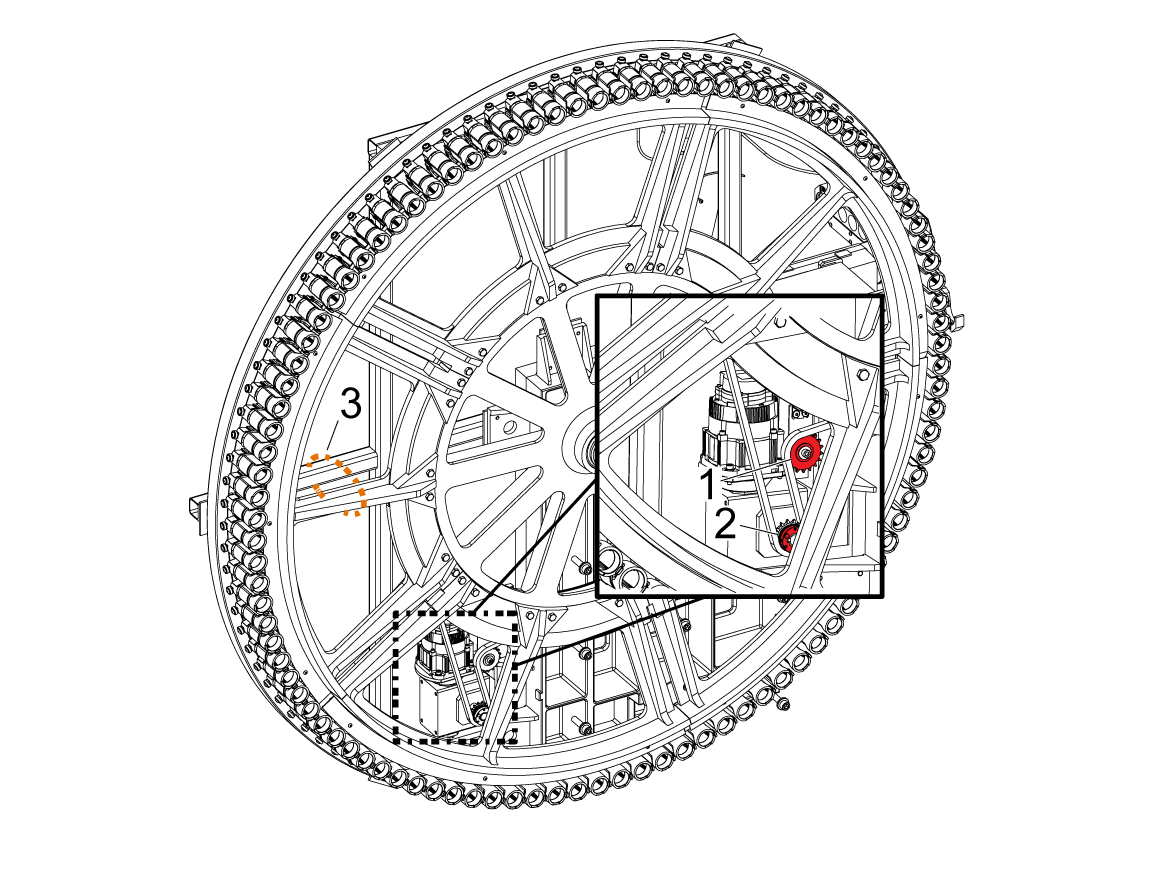
To replace the idler Sprockets [1] and the bushing [2], you must first wrap a chain or strap around the carousel and frame, this is to eliminate the carousel from freely spinning. 

WARNING: If the carousel is not tied it can cause serious injury. 

Incoming Air Flow or Pressure

Corrective Action:

  • Make sure that the air hose to the machine is the correct diameter.
  • Make sure that the air compressor supplies the correct air pressure and air flow.
  • Command a tool change on the machine. When the machine has the correct air pressure and flow, the needle on the air pressure gauge should not drop more than 10 PSI (0.70 bar) during a tool change. This test confirms that the air pressure and air flow into the machine is correct.

Refer to the "Compressed Air" requirements for your machine on New Machine Pre-Installation.

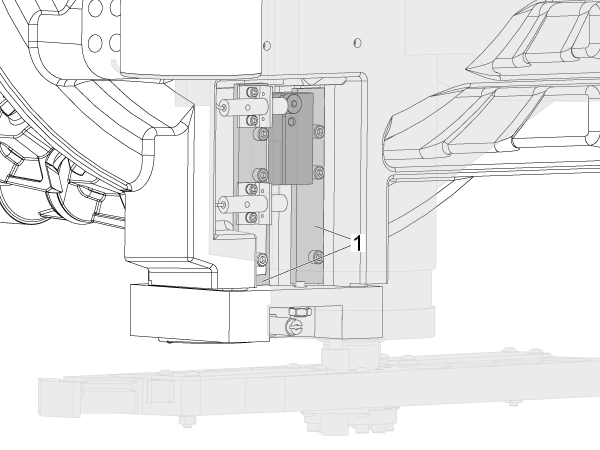
Pocket Slide Guides

Corrective Action:

  1. Visually examine the slide guides [1] for the tool pocket. Remove all contamination.
  2. Lubricate the surfaces with red grease.
  3. Go into tool changer manual recovery VMC, HMC - Side-Mount Tool Changer - Manual Recovery.
  4. Press up or down arrow to move the tool pocket. Make sure the pocked moves smoothy into and out of the tool change position.

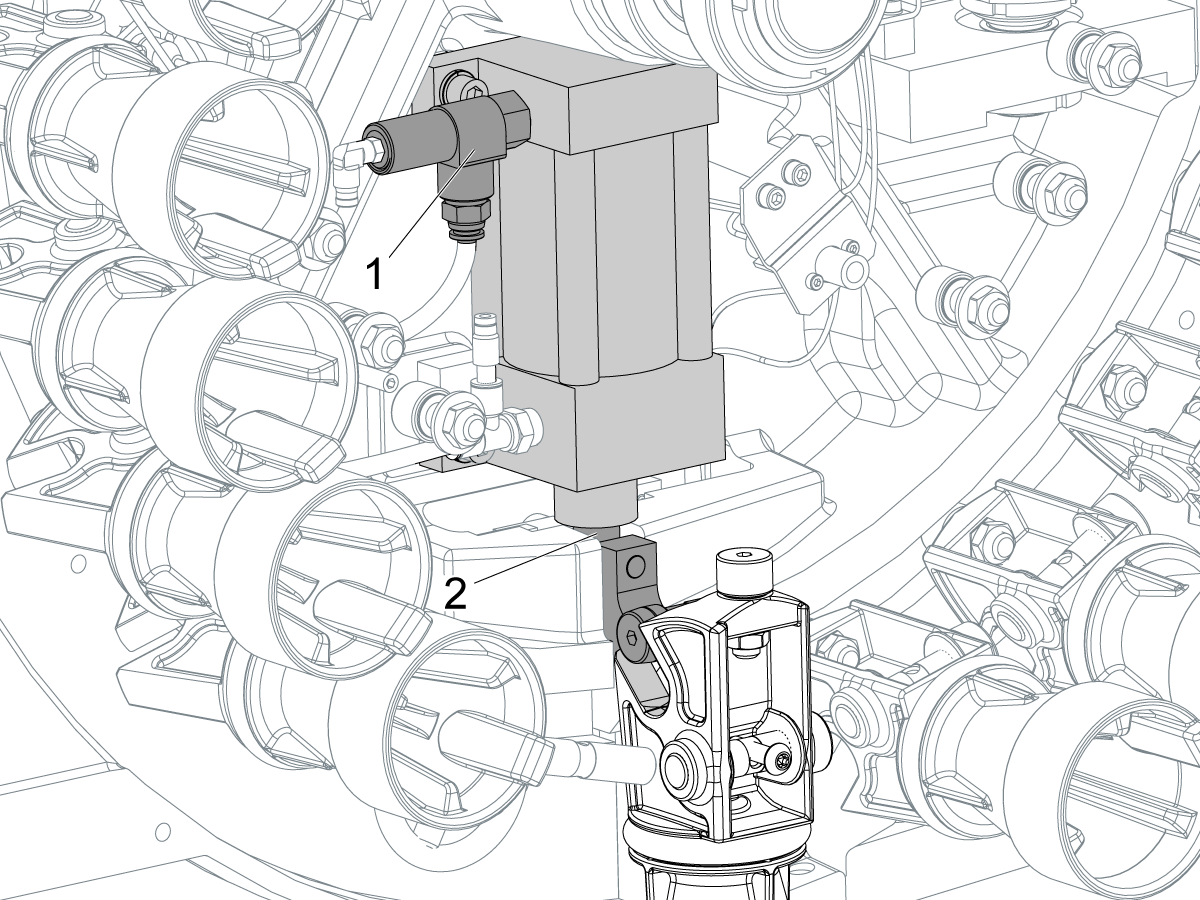
Pocket Air Cylinder

Corrective Action:

  1. Power off the machine and disconnect the air supply.
  2. Find the tool pocket cylinder.
  3. If equipped, remove the pilot-operated check valve [1] and the hose to the bottom of the cylinder. For machines that do not have a pilot-operated check valve, disconnect the top and bottom hoses on the air cylinder.
  4. Move the cylinder [2] up and down.
  5. Make sure that the piston moves freely. Spray a small quantity of silicon lubricant into the cylinder to lubricate the piston seal.
  6. If the piston does not move freely, the tool pocket air cylinder is damaged.
  7. Make sure the air supply to the machine is clean and dry.

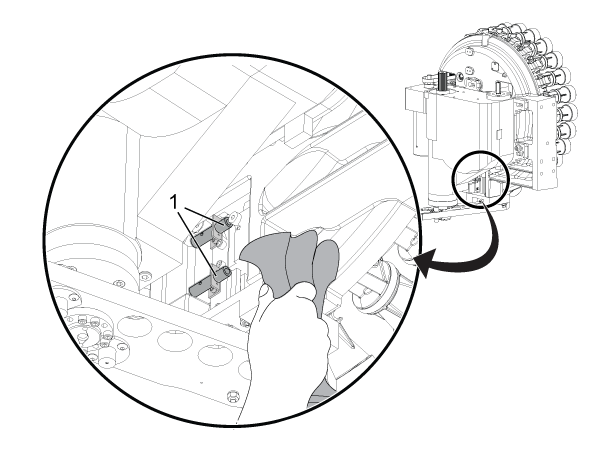
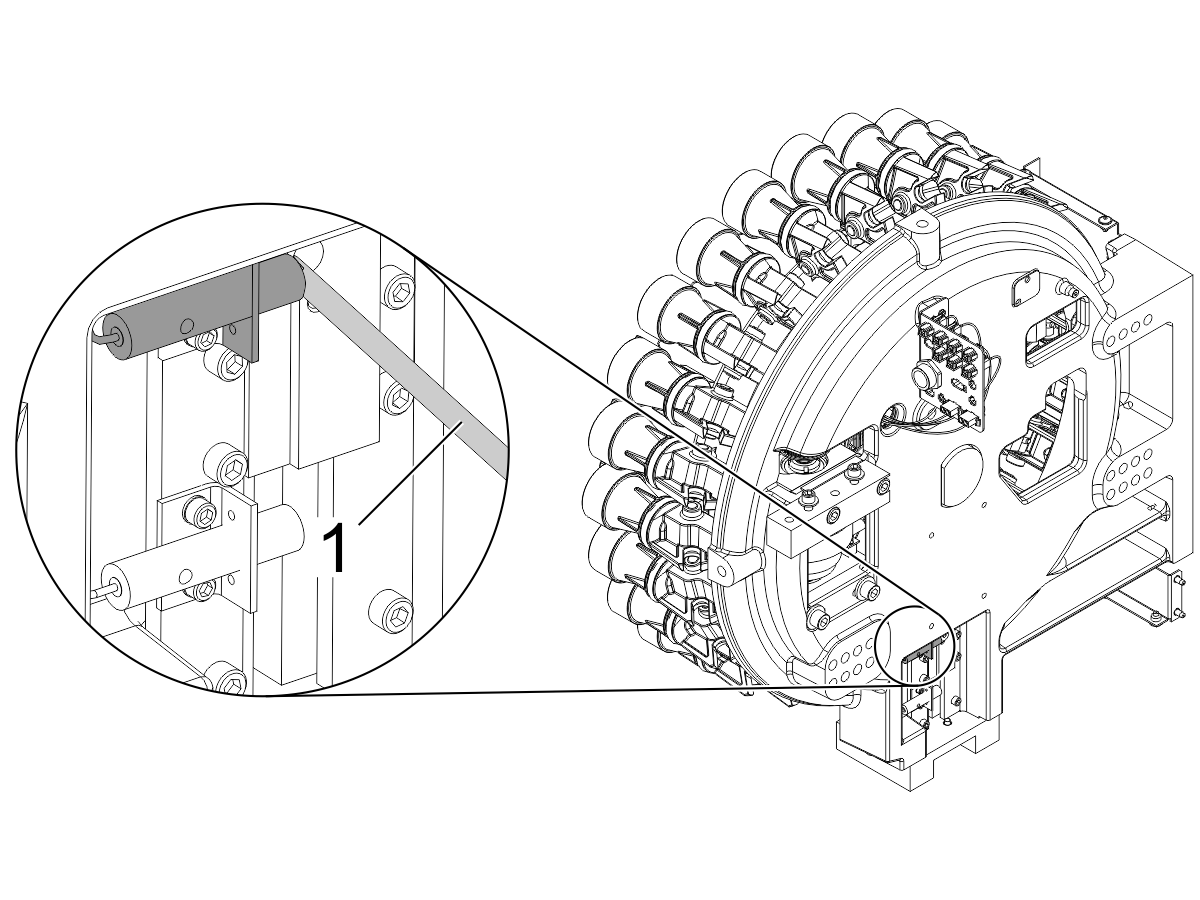
Pocket Up / Down Proximity Sensors

Corrective Action:

Make sure the pocket up and pocket down proximity sensors [1] are clean. Contamination on the switches may cause the carousel to rotate and break a pocket before it is in the fully up position.

The DIAGNOSTICS page shows the state of the sensors. If the POCKET DOWN or POCKET UP (CHC), or the SMTC_TOOL_POCKET_UP or SMTC_TOOL_POCKET_DOWN (NGC), bits do not change state, the sensors may have chips or contamination on them.

Make sure that the tool pocket is up. Press [PARAMETER/DIAGNOSTIC] and go to the I/O tab.

Touch the end of the proximity sensor with a screwdriver [1]. This test can cause Alarm 626. Ignore the alarm. The proximity sensor operates correctly if the Pocket Down (CHC), SMTC_Pocket_Down (NGC), value changes from a 1 to a 0. Continue troubleshooting if the diagnostic value does not change.

To troubleshoot the pocket up sensor, make sure that the tool pocket is down. Touch the end of the proximity sensor with a screwdriver and monitor Pocket Up (CHC), SMTC_Pocket_Up (NGC). The value must change from a 1 to a 0.

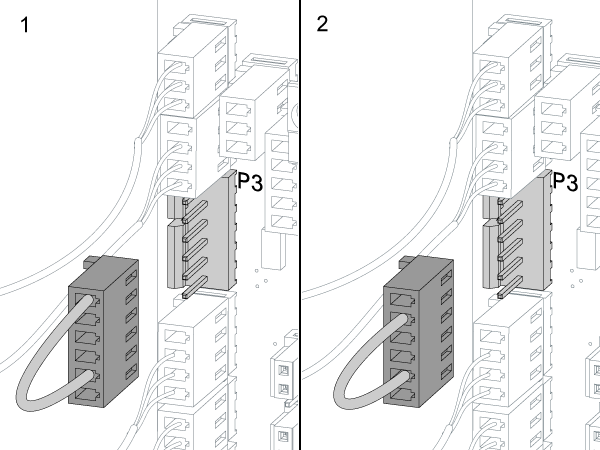
Do these steps on CHC machines only: Find where the 820 cable connects to the I/O PCB at P3. Use an electrical jumper (P/N 33-8521) at P3 [1]. If the Pocket Down value changes from a 1 to a 0, the I/O PCB operates correctly. Replace the SMTC cable assembly. Refer to Proximity Sensor How it Works and Troubleshooting - Video. Use the Proximity Sensor - Troubleshooting Guide to troubleshoot the proximity sensors.

To troubleshoot the pocket up sensor, reconfigure the jumper at P3 as shown [2]. Monitor the Pocket Up value. If the value changes from a 1 to a 0, the I/O PCB operates correctly. Replace the SMTC cable assembly.

If the Pocket Down or Pocket Up value does not change to a 0 when tested, refer to:

  • Next Generation Control - I/O PCB - Troubleshooting Guide
  •  I/O PCB - Troubleshooting Guide (Classic Haas Control)


Pocket Solenoid

Corrective Action:

Be sure to troubleshoot the solenoid correctly. Refer to Solenoid - Troubleshooting Guide to troubleshoot the system. Refer to "4 Port Solenoid Applications."

Tool Contamination

Corrective Action:

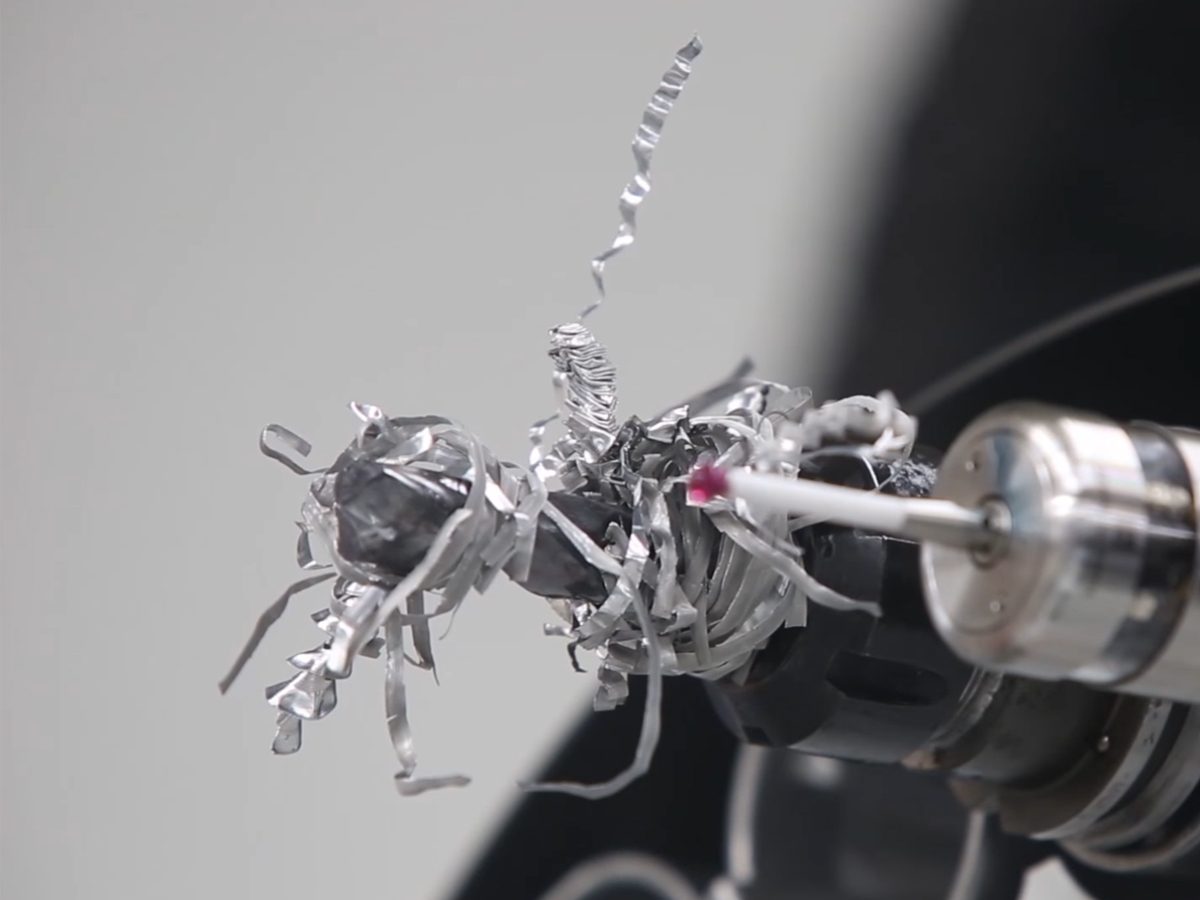
Make sure the tool is not contaminated by debris. Look for and remove any "nests" of chips in the mechanism.

Refer to TOTD Episode 33 - Stringy Chips Wrapped Around Your Tools? Chip Clear Solution to troubleshoot the system.

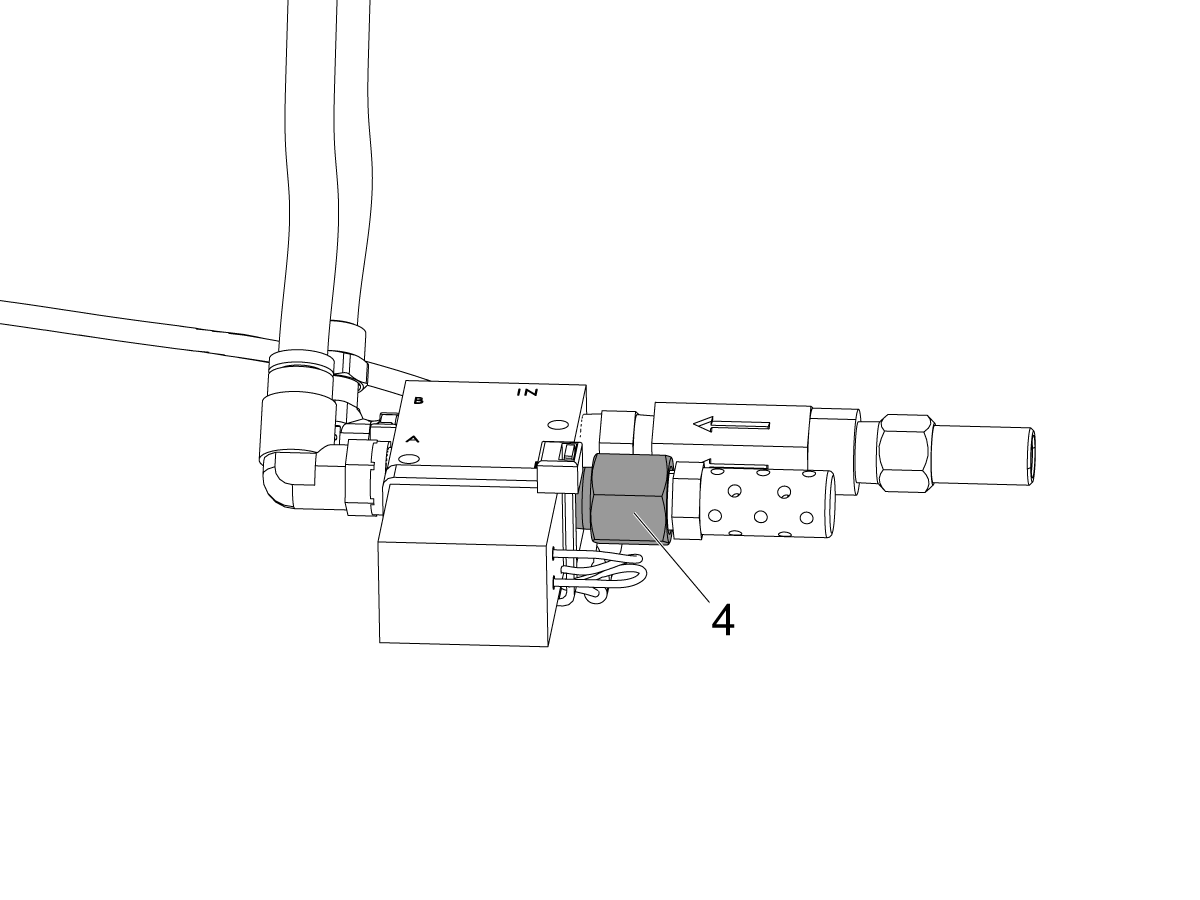
Pocket Shock Absorber

Symptom: The tool pocket is noisy.

Possible Cause: There is a problem with the tool-pocket stop shock-absorber.

Corrective Action:

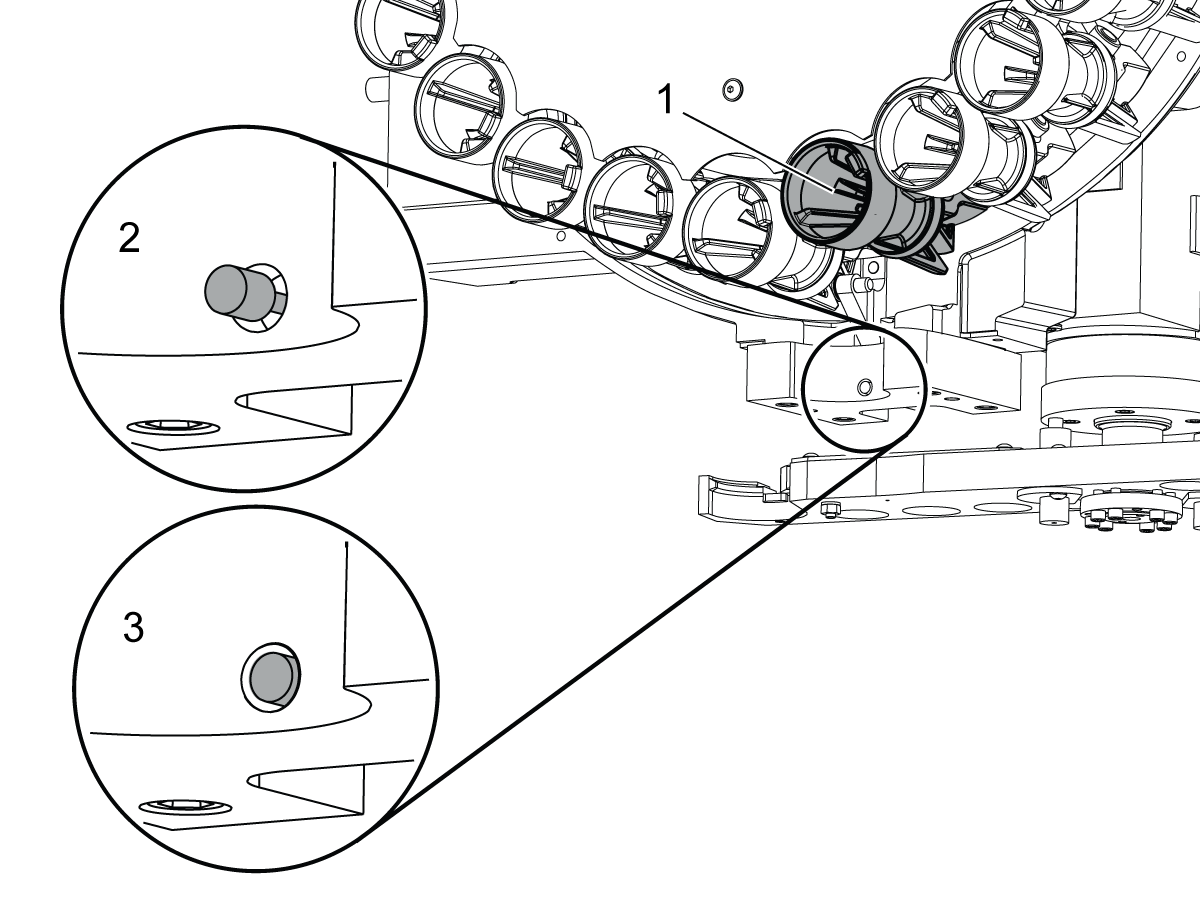
  1. Make sure that the tool pocket is in the up position [1].
  2. Push the shock-absorber in with your thumb [3].
  3. Release the shock-absorber [2].

For CALM machines, replace the shock-absorber with the correct orifice (P/N: 58-0093) [4] between the solenoid and the muffler if:

  • There is no resistance when you push the shock-absorber.
  • The shock-absorber does not extend after you push it.

 Note: For all other machines, replace the shock-absorber with a new shock-absorber.

Tool Holders and Pull Studs

Symptom: The tool falls from the tool pocket. The tool cannot be removed from the pocket.

Possible Cause: The toolholder or pull studs are incorrect.

Corrective Action:

If the tool cannot be removed, remove the garter spring [3]. Wiggle the tool to loosen the plungers [1]. Be careful not to lose any plungers. Remove the tool. Replace spring.

Refer to the Toolholder and Pull Stud Information document for the correct toolholder and pull stud [2] information.

Pocket Spring and Plungers

Corrective Action:

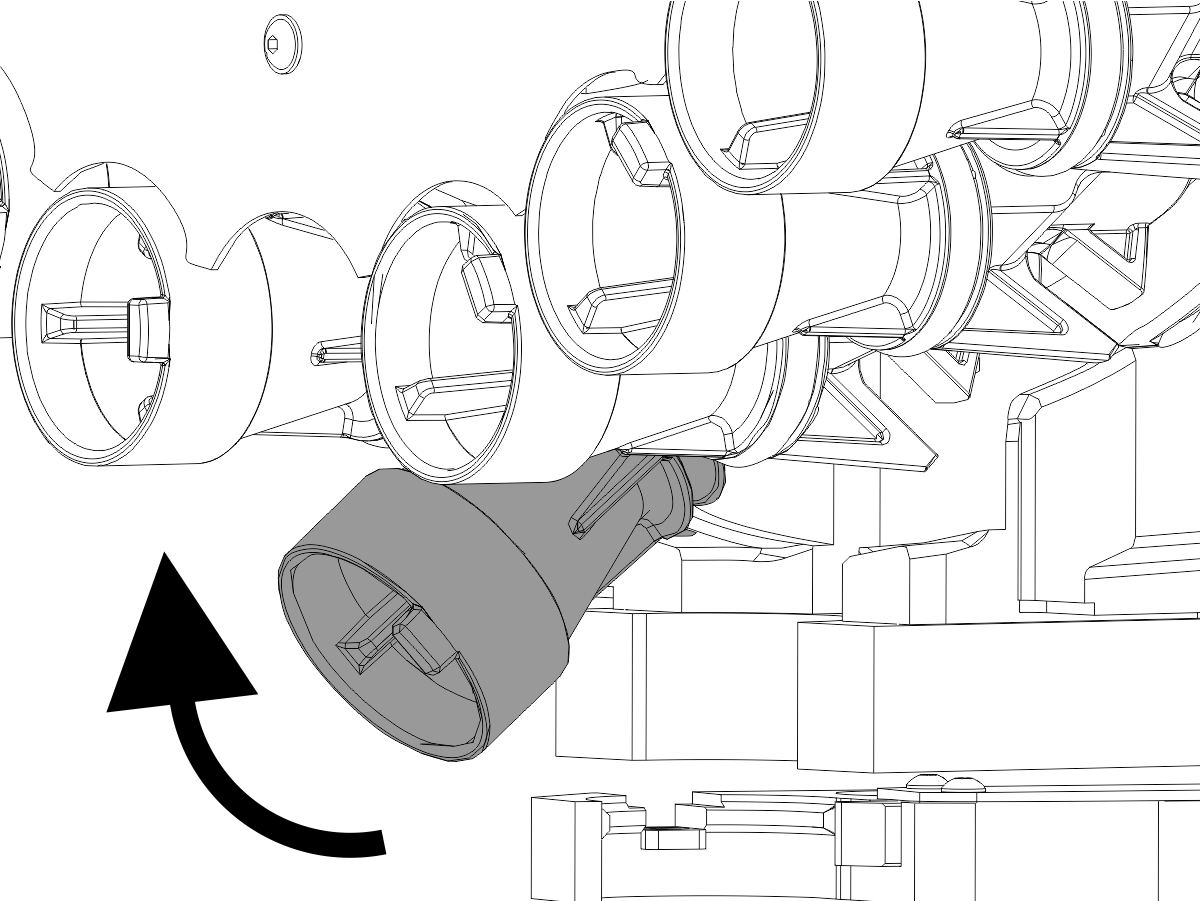
        BT/CT pocket

  1. Make sure that the (4) plungers [1] are intact in each of the pockets.
  2. Inspect the plungers for wear. Replace them if they are worn.
  3. Make sure that the hook on the spring is not on top of any of the plungers.
  4. Clean all of the debris from the tool pockets and lubricate the plungers [1] with grease. Apply grease to the tool pull stud.

Refer to Replace a Tool Pocket on Your Haas Side Mount Tool Changer (SMTC) - Video for more information on how to remove the pocket.

Some pockets use leaf springs. Look for broken leaf springs. They are stacked (2) per corner. Replace any broken leaf springs.

        HSK pocket

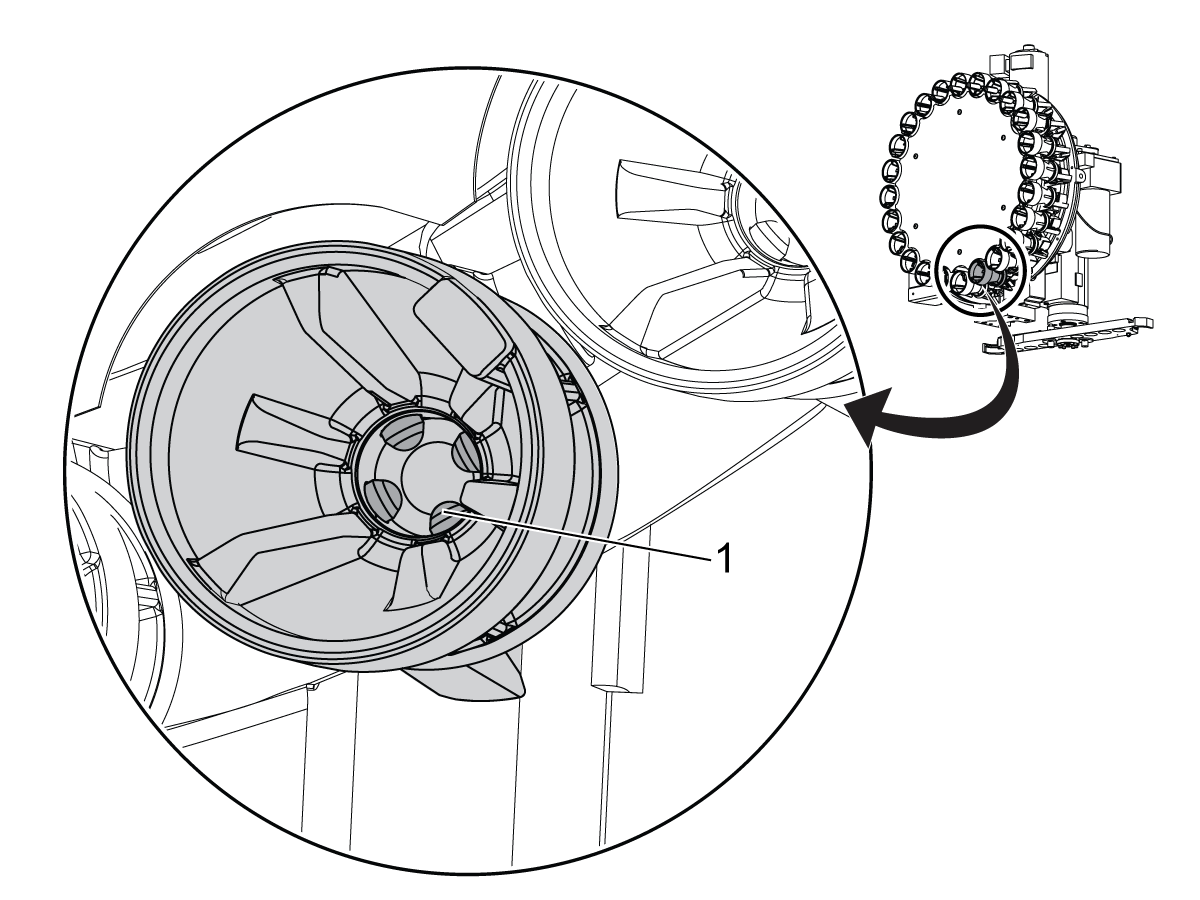
  1. Make sure that the collet assembly is intact in each of the pockets.
  2. Inspect the (3) plungers and center cap in the collet assembly for wear. Replace them if they are worn. 
  3. Inspect the rest of pocket for any damage. Replace if it is needed.
  4. Clean all of the debris from pocket and lubricate the collet assembly with grease to ensure smooth operation.

Refer to HSK Pocket and Plunger - Replacement  for more information on replacing the HSK pocket.


Pocket Slow Down Kit

Corrective Action:

Install the Pocket Slow Down Service Kit (P/N 93-0254). This kit restricts the air escaping from the pocket up/down cylinder to slow down the pocket.

Refer to the Toolholder and Pull Stud Information document.

Recently Viewed Items

You Have No Recently Viewed Items Yet

Feedback
Haas Logo

Haas Delivered Price

This price includes shipping cost, export and import duties, insurance, and any other expenses incurred during shipping to a location in France agreed with you as a buyer. No other mandatory costs can be added to the delivery of a Haas CNC Product.

KEEP UP WITH THE LATEST HAAS TIPS AND TECHNOLOGY...

Sign up now!   

HAAS TOOLING ACCEPTS THE FOLLOWING:

  • Service & Support
  • Owners
  • Request Service
  • Operator Manuals
  • Haas Parts
  • Rotary Repair Request
  • Pre-Install Guides
  • Shopping Tools
  • Build & Price a New Haas
  • Available Inventory
  • The Haas Price List
  • CNCA Financing
  • About Haas
  • Accessibility Statement
  • DNSH Statement
  • Export Compliance
  • Careers
  • Certifications & Safety
  • Contact Us
  • History
  • Terms & Conditions
  • Haas Tooling Terms & Conditions
  • Privacy
  • Warranty
  • Haas Community
  • Haas Certification Program
  • Haas Motorsports
  • Gene Haas Foundation
  • Haas Technical Education Community
  • Events

  • Join the Conversation
  • Facebook
  • X
  • Flickr
  • YouTube
  • LinkedIn
  • Instagram
  • TikTok
© 2026 Haas Automation, Inc – CNC Machine Tools

This site is protected by reCAPTCHA and the Google Privacy Policy and Terms of Service apply.

2800 Sturgis Rd., Oxnard, CA 93030
Toll Free: (888) 817-4446 / Fax: 805-278-8554