My Haas Welcome,
!
Haas Tooling MyHaas/HaasConnect Sign In Register Haas Tooling MyHaas/HaasConnect Sign Out Welcome, My Machines Latest Activity My Quotes My Account My Users Sign Out
Find Your Distributor
  1. Select Language
    1. English
    2. Deutsch
    3. Español - ES
    4. Español - MX
    5. Français
    6. Italiano
    7. Português
    8. Český
    9. Dansk
    10. Nederlands
    11. Magyar
    12. Polski
    13. Svenska
    14. Türkçe
    15. 中文
    16. Suomi
    17. Norsk
    18. الإنجليزية
    19. български
    20. Hrvatski
    21. Ελληνικά
    22. Română
    23. Slovenský
    24. Slovenščina
    25. 한국어
    26. 日本語
    27. Українська
  • machines Main Menu
    • Vertical Mills
      Vertical Mills
      Vertical Mills View All
      • Vertical Mills
      • VF Series
      • Universal Machines
      • VR Series
      • VP-5 Prismatic
      • Pallet-Changing VMCs
      • Mini Mills
      • Mold Machines
      • High-Speed Drill Centers
      • Drill/Tap/ Mill Series
      • Toolroom Mills
      • Pocket Mill
      • Compact Mills
      • Gantry Series
      • SR Sheet Routers
      • Extra-Large VMC
      • Double-Column Mills
      • 3+2 Positioning Machines
    • Multi-Axis Solutions
      Multi-Axis Solutions
      Multi-Axis Solutions View All
      • Multi-Axis Solutions
      • Y-Axis Lathes
      • 5-Axis Mills
    • Lathes
      Lathes
      Lathes View All
      • Lathes
      • ST Series
      • Dual-Spindle
      • Box Way Series
      • Toolroom Lathes
      • Chucker Lathe
      • Pocket Lathe
      • Haas Bar Feeders
    • Horizontal Mills
      Horizontal Mills
      Horizontal Mills View All
      • Horizontal Mills
      • 50-Taper
      • 40-Taper
    • Rotaries & Indexers
      Rotaries & Indexers
      Rotaries & Indexers View All
      • Rotaries & Indexers
      • Rotary Tables
      • Indexers
      • 5-Axis Rotaries
      • Extra-Large Rotaries
    • Special Series
      Special Series
      Special Series View All
      • Special Series
      • EU_Series_Redirect
    • Automation Systems
      Automation Systems
      Automation Systems View All
      • Automation Systems
      • Mill Automation
      • Lathe Automation
      • Automatic Parts Loaders
      • Automation Models
    • Desktop Machines
      Desktop Machines
      Desktop Machines View All
      • Desktop Machines
      • Desktop Mill
      • Desktop Lathe
      • Control Simulator, Standard
      • Control Simulator, Premium
    • Shop Equipment
      Shop Equipment
      Shop Equipment View All
      • Shop Equipment
      • Knee Mill
      • Haas Manual Lathes
      • Haas Saws
    • Fabrication Machines
      Fabrication Machines
      Fabrication Machines View All
      • Fabrication Machines
      • Laser Cutting Machines
      • CNC Press Brakes
    • QUICK LINKS Special Series  Special Series 
      EU SERIES EU SERIES BUILD & PRICE | PRICE LIST BUILD & PRICE | PRICE LIST In-Stock Machines In-Stock Machines WHAT’S NEW WHAT’S NEW YOUR FIRST CNC YOUR FIRST CNC
      SHOPPING TOOLS
      • Build & Price a Haas
      • Price List
      • Available Inventory
      • CNCA Financing
      WANT TO TALK TO SOMEONE?

      A Haas Factory Outlet (HFO) can answer your questions, and walk you through your best options.

      CONTACT YOUR DISTRIBUTOR >
  • Options Main Menu
    • The Haas Control Value Option Packages
      Value Option Packages
      Value Option Packages View All
      • Value Option Packages
    • Product Image Spindles
      Spindles
      Spindles View All
      • Spindles
    • Product Image Tool Changers
      Tool Changers
      Tool Changers View All
      • Tool Changers
    • Product Image 4th- | 5th-Axis
      4th- | 5th-Axis
      4th- | 5th-Axis View All
      • 4th- | 5th-Axis
    • Product Image Turrets & Live Tooling
      Turrets & Live Tooling
      Turrets & Live Tooling View All
      • Turrets & Live Tooling
    • Product Image Probing
      Probing
      Probing View All
      • Probing
    • Haas Chip & Coolant Management Chip & Coolant Management
      Chip & Coolant Management
      Chip & Coolant Management View All
      • Chip & Coolant Management
    • The Haas Control The Haas Control
      The Haas Control
      The Haas Control View All
      • The Haas Control
    • Product Image Product Options
      Product Options
      Product Options View All
      • Product Options
    • Product Image Tooling & Fixturing
      Tooling & Fixturing
      Tooling & Fixturing View All
      • Tooling & Fixturing
    • Product Image Workholding
      Workholding
      Workholding View All
      • Workholding
    • Product Image 5-Axis Solutions
      5-Axis Solutions
      5-Axis Solutions View All
      • 5-Axis Solutions
      • 5 Easy Steps to 5-Axis
    • QUICK LINKS Special Series  Special Series 
      EU SERIES EU SERIES BUILD & PRICE | PRICE LIST BUILD & PRICE | PRICE LIST In-Stock Machines In-Stock Machines WHAT’S NEW WHAT’S NEW YOUR FIRST CNC YOUR FIRST CNC
      SHOPPING TOOLS
      • Build & Price a Haas
      • Price List
      • Available Inventory
      • CNCA Financing
      WANT TO TALK TO SOMEONE?

      A Haas Factory Outlet (HFO) can answer your questions, and walk you through your best options.

      CONTACT YOUR DISTRIBUTOR >
  • Why Haas Main Menu
      Discover the Haas Difference
    • Why Haas
    • MyHaas
    • Education Community
    • Industry 4.0
    • Haas Certification
    • Customer Testimonials
  • Service Main Menu
      Welcome to Haas Service
      SERVICE HOME Operator’s Manuals How-To Procedures Troubleshooting Guides Preventive Maintenance Haas Parts Haas Tooling Videos
  • Videos Main Menu
  • Main Menu
    • View All
    • View All
    • View All
    • View All
      • HTEC Curriculum Support
      • Haas Value Option Packages (VOP) Journey
    • View All
      • Haas 10 kg Cobot Package
      • Cobot Kits
      • DC-1 Drill Center
      • CNC Sales News
      • Do More With Your Haas
    • View All
    • View All
      • contact-us-test
      • 4 - AUTOMATION SYSTEMS
      • Carousel-V2
      • expert test
      • Demo_Day_Trident-test
      • Link Test
      • image-sale-tag-test
      • article-list-test
      • Haas 25 kg Robot Package
      • test-algolia-page
    • View All
    • View All
    • View All
    • View All
      • calc-test
    • View All
    • QUICK LINKS Special Series  Special Series 
      EU SERIES EU SERIES BUILD & PRICE | PRICE LIST BUILD & PRICE | PRICE LIST In-Stock Machines In-Stock Machines WHAT’S NEW WHAT’S NEW YOUR FIRST CNC YOUR FIRST CNC
      SHOPPING TOOLS
      • Build & Price a Haas
      • Price List
      • Available Inventory
      • CNCA Financing
      WANT TO TALK TO SOMEONE?

      A Haas Factory Outlet (HFO) can answer your questions, and walk you through your best options.

      CONTACT YOUR DISTRIBUTOR >
  • Haas Tooling Main Menu
  • Haas Service Parts Main Menu

My Haas Welcome,
!
Haas Tooling MyHaas/HaasConnect Sign In Register Haas Tooling MyHaas/HaasConnect Sign Out Welcome, My Machines Latest Activity My Quotes My Account My Users Sign Out
Find Your Distributor
  1. Select Language
    1. English
    2. Deutsch
    3. Español - ES
    4. Español - MX
    5. Français
    6. Italiano
    7. Português
    8. Český
    9. Dansk
    10. Nederlands
    11. Magyar
    12. Polski
    13. Svenska
    14. Türkçe
    15. 中文
    16. Suomi
    17. Norsk
    18. الإنجليزية
    19. български
    20. Hrvatski
    21. Ελληνικά
    22. Română
    23. Slovenský
    24. Slovenščina
    25. 한국어
    26. 日本語
    27. Українська
×

Search Results

Web Pages

Images

    • <
    • 1
    • >

8 - VF/VM - HSK - Spindle

VF/VM-Series - Service Manual


  • 1 - VF/VM - Introduction
  • 2 - VF/VM - Specifications
  • 3 - VF/VM - Installation
  • 4 - VF/VM - Umbrella Tool Changer
  • 5 - VF/VM - HSK - SMTC
  • 6 - VF/VM - 40T/50T - SMTC
  • 7 - VF/VM - Axis Motion
  • 8 - VF/VM - HSK - Spindle
  • 9 - VF/VM - 40T - Spindle
  • 10 - VF/VM - 40T - Spindle Motor
  • 11 - VF/VM - 40T - Gearbox
  • 12 - VF/VM - 50T - Spindle
  • 13 - VF/VM - 50T - Gearbox
  • 14 - VF/VM - Lubrication Systems
  • 15 - VF/VM - Electrical Control
  • 16 - VF/VM - Chip Removal and Coolant
  • 17 - VF/VM - Workholding
  • 18 - VF/VM - Maintenance
  • 19 - VF/VM - Autodoor
  • 20 - VF/VM - Robot and Automation
  • 21 - VF/VM - Enclosure
  • 22 - VF/VM - CAN Bus Systems
  • 23 - VF/VM - Spindle C-Axis Drive

Go To :

  • 8.1 HSK-A63 - Spindle - Replacement
  • 8.2 HSK-A63 - Spindle Drawbar - Push Out
  • 8.3 HSK-A63 - Troubleshooting

8.1 HSK-A63 Spindle - Replacement

Recently Updated

VMC - HSK-A63 Spindle - Replacement


AD0541

Introduction

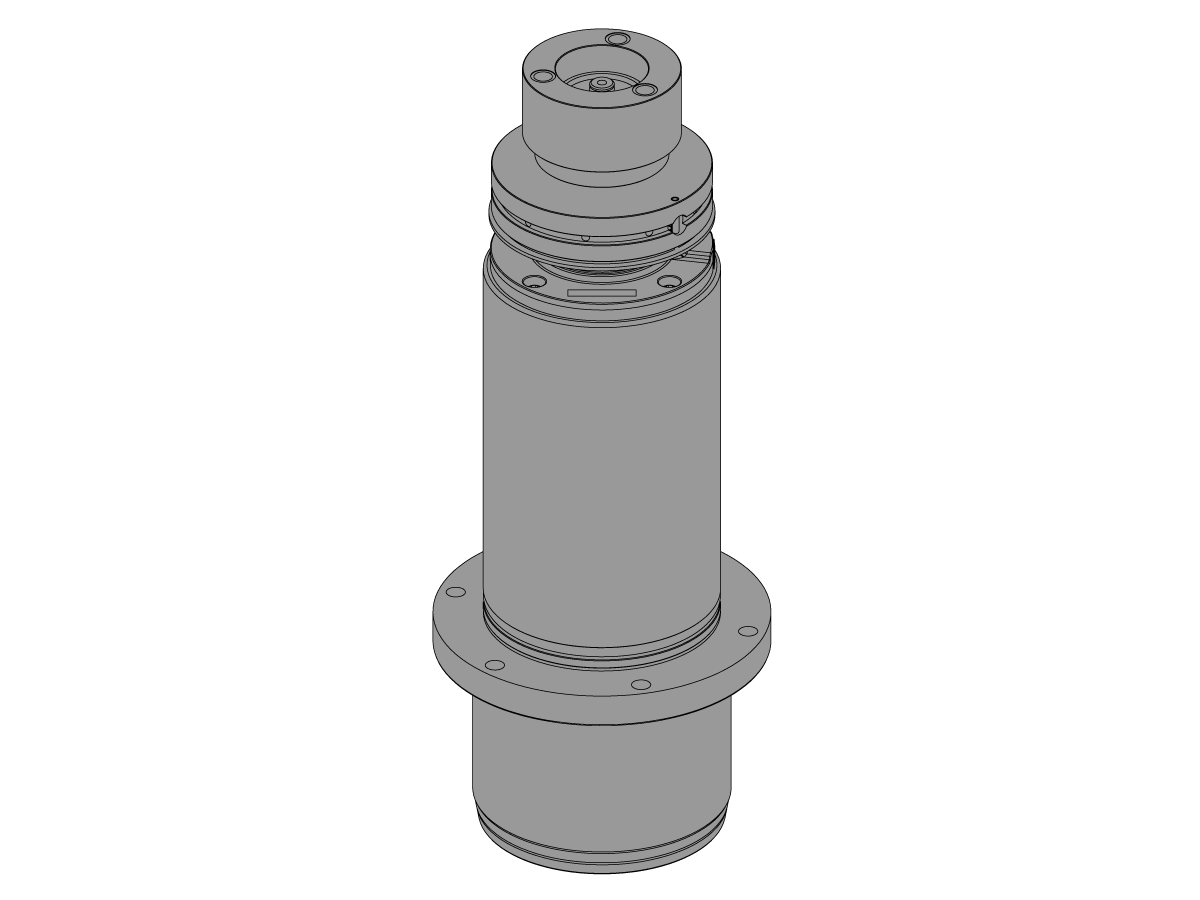
This procedure tells you how to replace the HSK-A63 Spindle.

Note: If you install a new spindle, install new spindle shims when you do the VMC - SPINDLE - SPINDLE SWEEP procedure.

Note: If you install the same spindle that you remove, record the location of the spindle shims. Install the spindle shims in the same location and then do the VMC - SPINDLE - SPINDLE SWEEP procedure.

Tools Required:
  • White lithium grease

Applicable Kits:

  • 93-30-12369: SPINDLE HSK-A63 INLN 15K PIN DRV VMC SVC
  • 93-30-14458: SPINDLE HSKA63 INLIN 18K PIN DRV VMC SVC

Removal

1

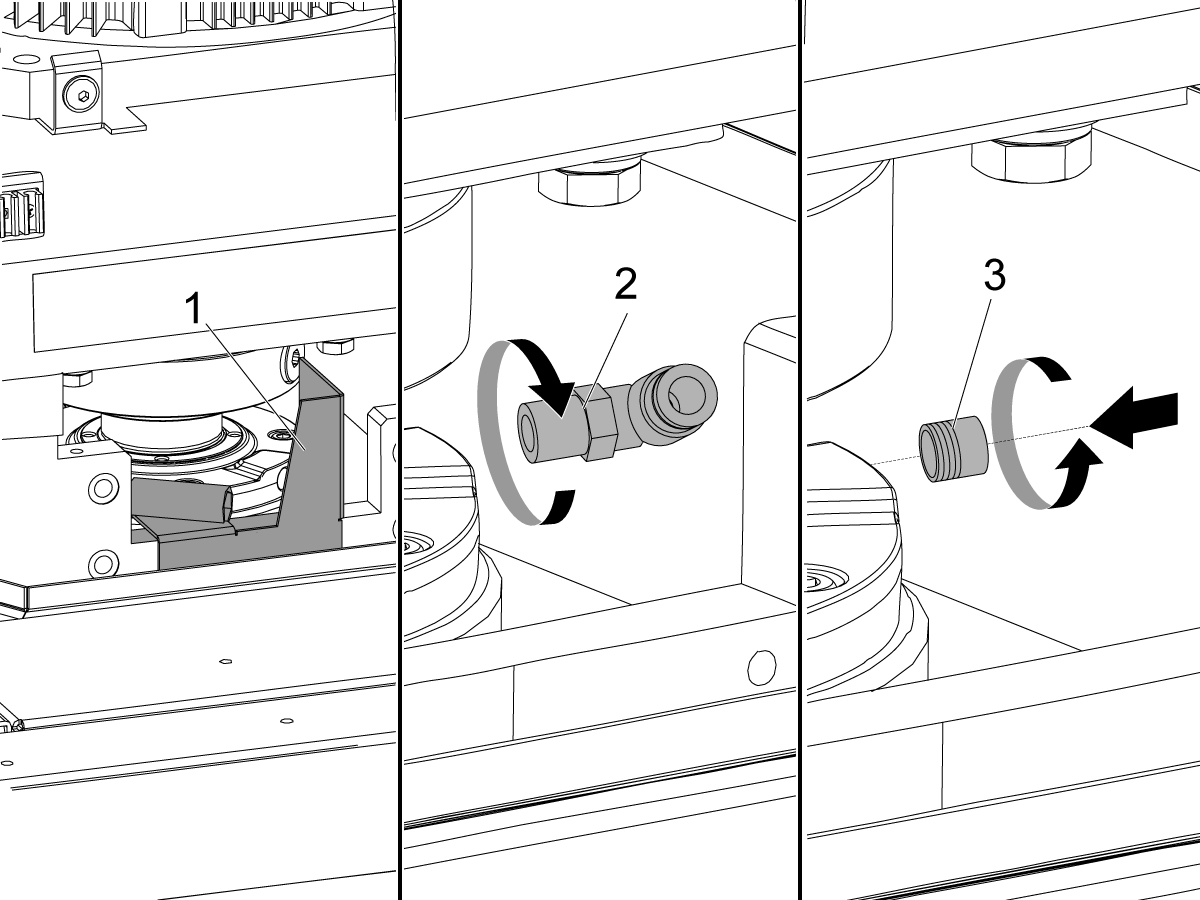
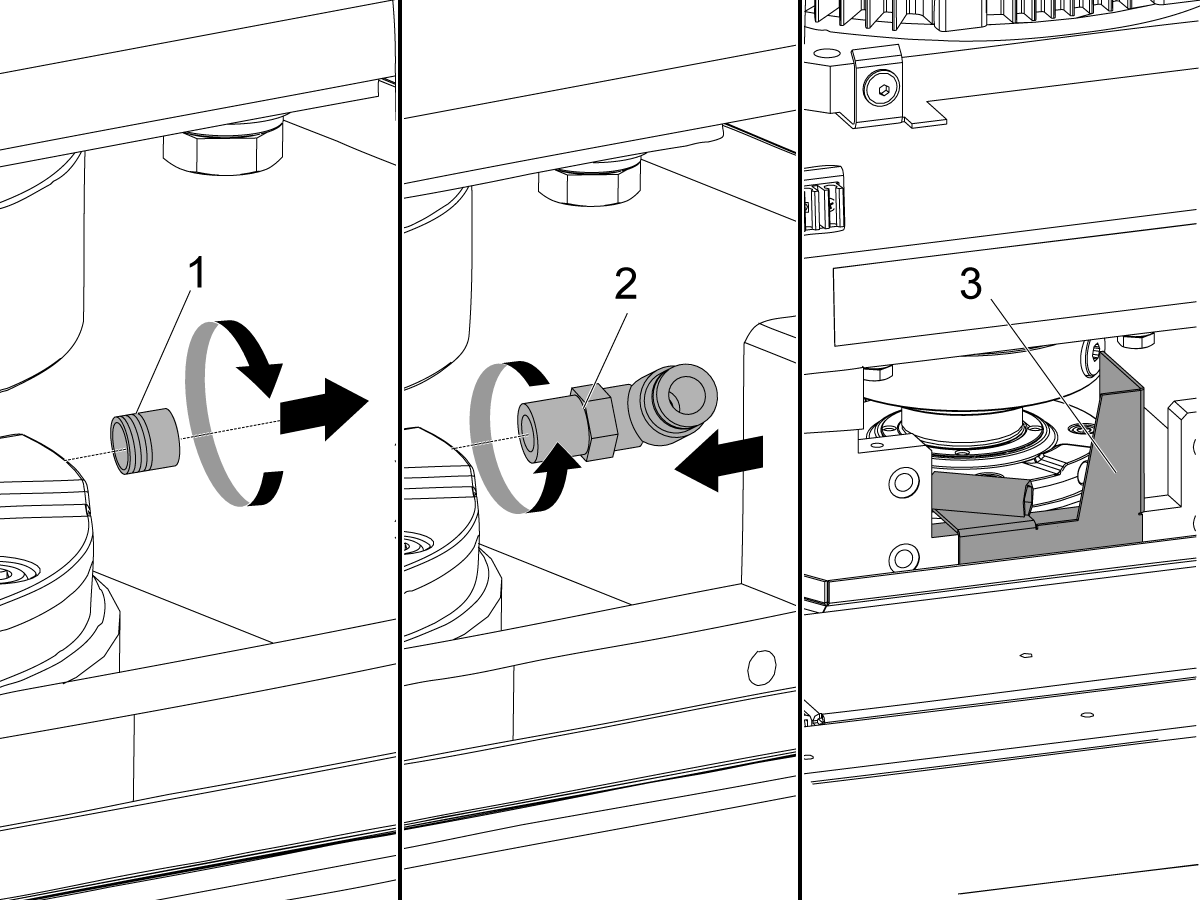
Remove the front air scraper [1].

Record the location of the spindle lubrication fitting.

Disconnect the spindle lubrication tube.

Remove the 90° spindle lubrication fitting [2].

Install a 1/8" NPT plug [3] into the lubrication port. Install the plug [3] flush or below flush with the surface of the spindle.

2

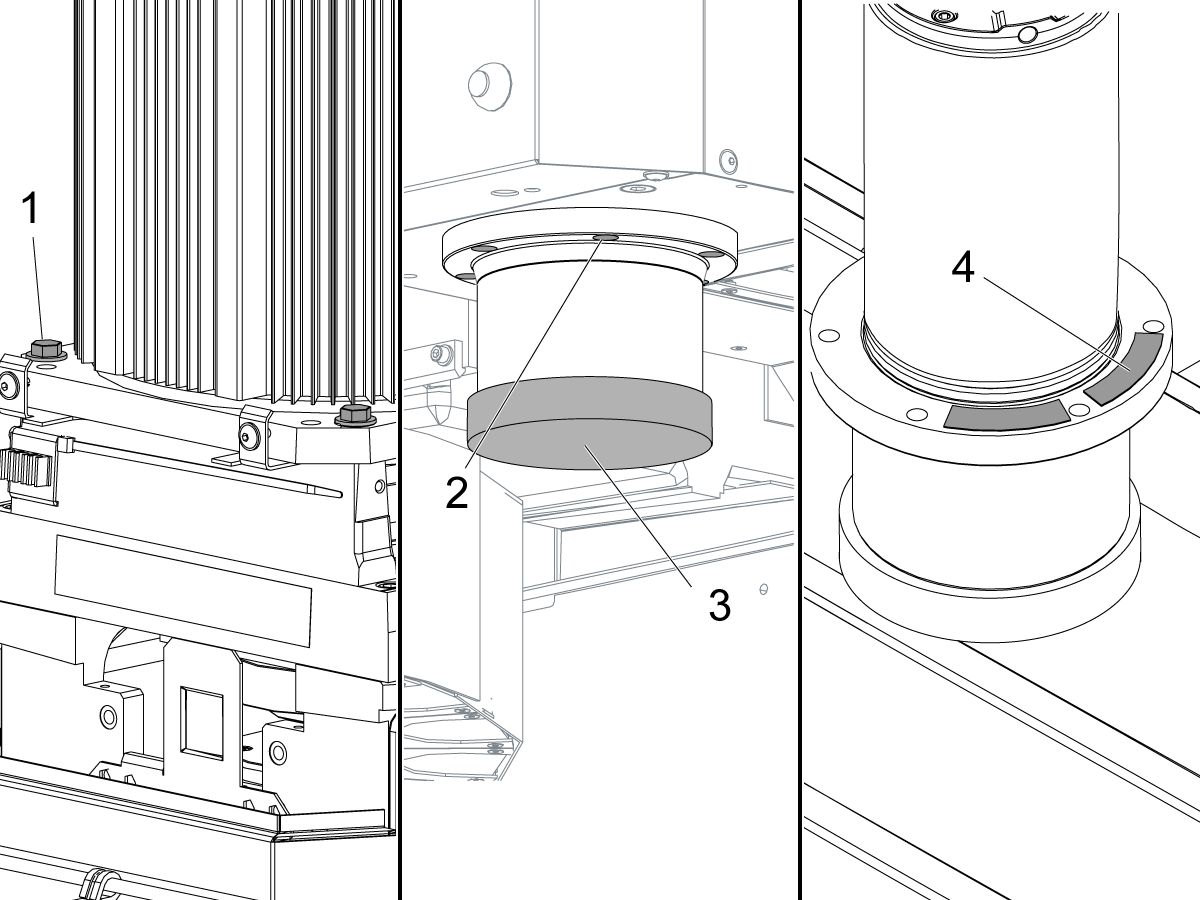
Loosen the (4) screws [1] that attach the motor to the mounting plate. Do not remove the screws.

Loosen the (6) spindle screws [2] approximately (2) turns.

Install the protective cap [3] over the spindle nose.

Caution: The protective cap is necessary. It prevents damage to the spindle when it touches the table in the next step.

Jog the z-axis in the negative (-) direction until the spindle touches the table. If the spindle does not touch the table, put a wooden or aluminium block under the spindle.

Remove the (6) spindle screws [2].

Jog the z-axis in the positive (+) direction until the spindle is fully out of the spindle head.

Remove the shims [4].

Installation

1

Jog the z-axis in the positive (+) direction to the top of travel.

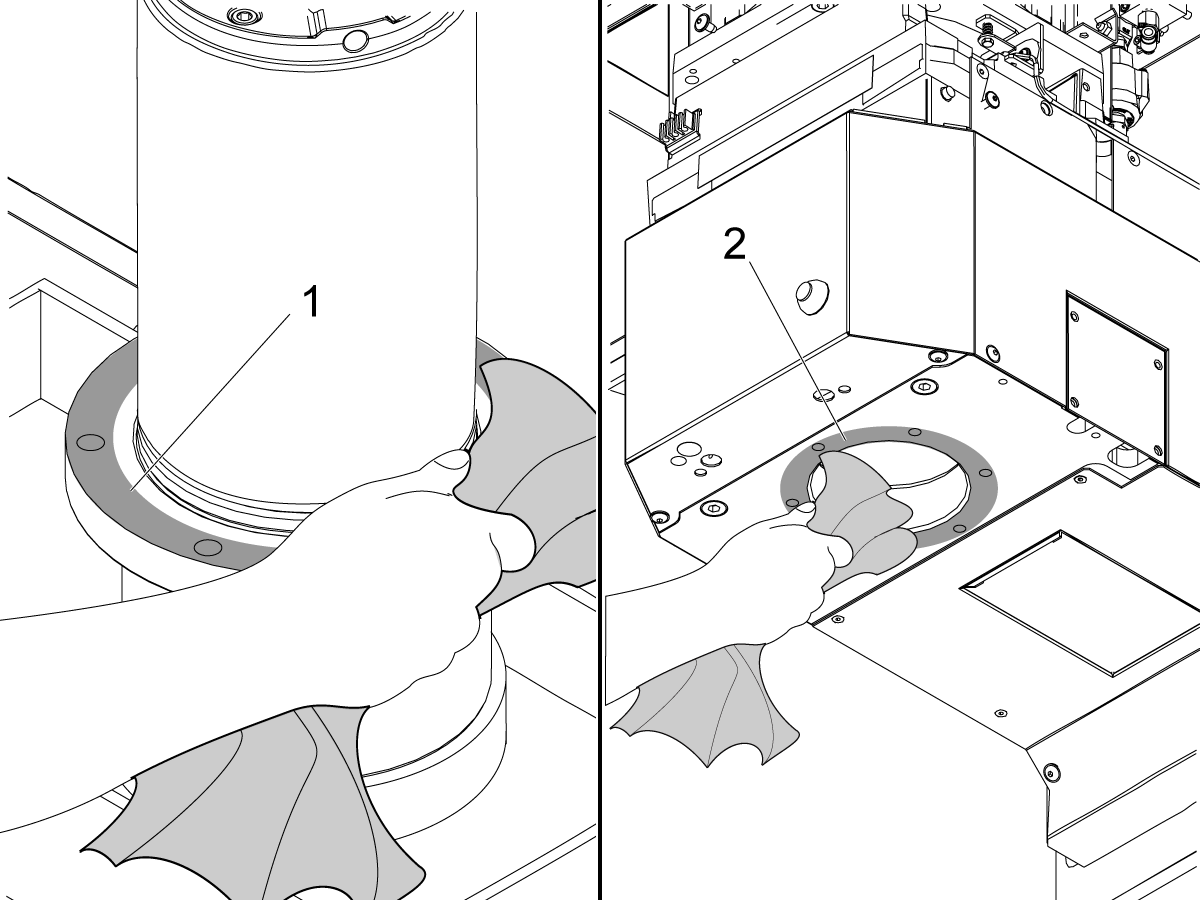
Clean and stone the spindle flange [1] and the spindle head surface [2] where the spindle flange will touch.

2

Caution: The motor shaft may become misaligned if spindle installation is done incorrectly.

Before installing the spindle loosen the motor mounting bolts at least a half of an inch.

If the pins are misaligned with the coupler, the motor will visibly lift instead of transmitting all of the axis thrust force into the motor shaft.

3

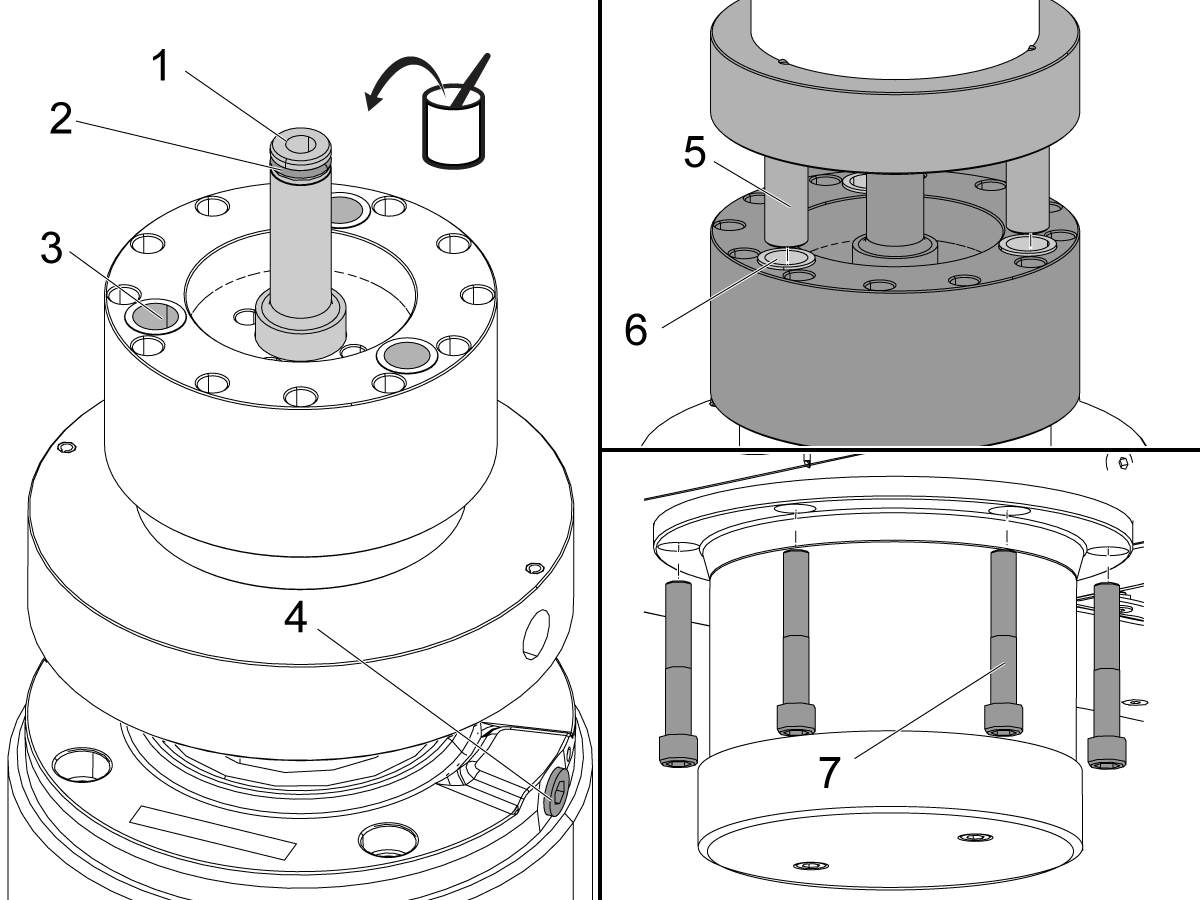
Apply a thin layer of lithium grease to these parts:

  • transfer tube [1]
  • (2) transfer tube o-rings [2]
  • pin-coupler bushings [3]
  • spindle coupler pins [5]

Install the transfer tube [1].

Turn the spindle until the lubrication port [4] aligns approximately with the position recorded when you removed the spindle.

Visually align the bushings [6] to the pins [5] on the motor coupler.

Caution: An incorrectly aligned coupler can cause damage to the bearings.

Slowly jog the z-axis in the negative (-) direction over the spindle.

While you jog the z-axis, use your hand to turn the spindle. If you feel a change in tension, stop immediately. Align the coupler pins to the bushings again.

When the spindle is fully into the spindle housing, do these steps:

  • Turn the spindle to align it with the tapped holes in the casting.
  • Install the (6) spindle screws [7].
  • Torque the (6) spindle mounting screws in a star pattern. Refer to the Haas Fastener Torque Specification guide.

4

Remove the 1/8" NPT plug [1] from the lubrication port.

Install the 90° spindle lubrication fitting [2].

Install the front air scraper [3].

Connect the spindle lubrication tube.

Perform the VMC - Spindle - Spindle Sweep procedure.

Operate the spindle at 500 RPM for 20 seconds. Stop the spindle. This aligns the motor to the spindle.

Torque the (4) screws tat attach the motor to the mounting plate. Refer to Haas Fastener Torque Specifications. The TRP can be iron or aluminium. Use the correct value for iron or aluminium.

Note: Do not add oil to the spindle casting.

5

  • Adjust the Push Out: Refer to HSK-A63 - Spindle Drawbar - Push Out
  • Set Z-Axis Tool Change Offset: Refer to SIDE-MOUNT TOOL CHANGER - Z-AXIS TOOL CHANGE OFFSET - NGC
  • Set Spindle Orientation: Refer to Side-Mount Tool Changer - HSK - Spindle Orentation Offset - NGC
  • Run the spindle break-in program: SPINDLE - BREAK-IN PROGRAMS - LATHE AND MILL

8.2 HSK-63A - Spindle Drawbar - Push Out

Recently Updated

HSK-A63 - Spindle Drawbar - Push Out


Introduction

IMPORTANT: This procedure is intended for HAAS HSK - A63 spindle only. Do not use for H-5AX ES779 or ES789 spindles.

This procedure outlines how to set the push out on the HSK-A63 Spindle Drawbar.

Tools Required:

  • Depth Gauge
  • HSK Clamp Force Gauge
  • Torque Wrench
  • 5mm hex bit

HSK-A63 - Set Push Out

1

  • Set Push Out:
  • Engage the TRP (Tool Release Piston) so that the drawbar is in the unclamped position
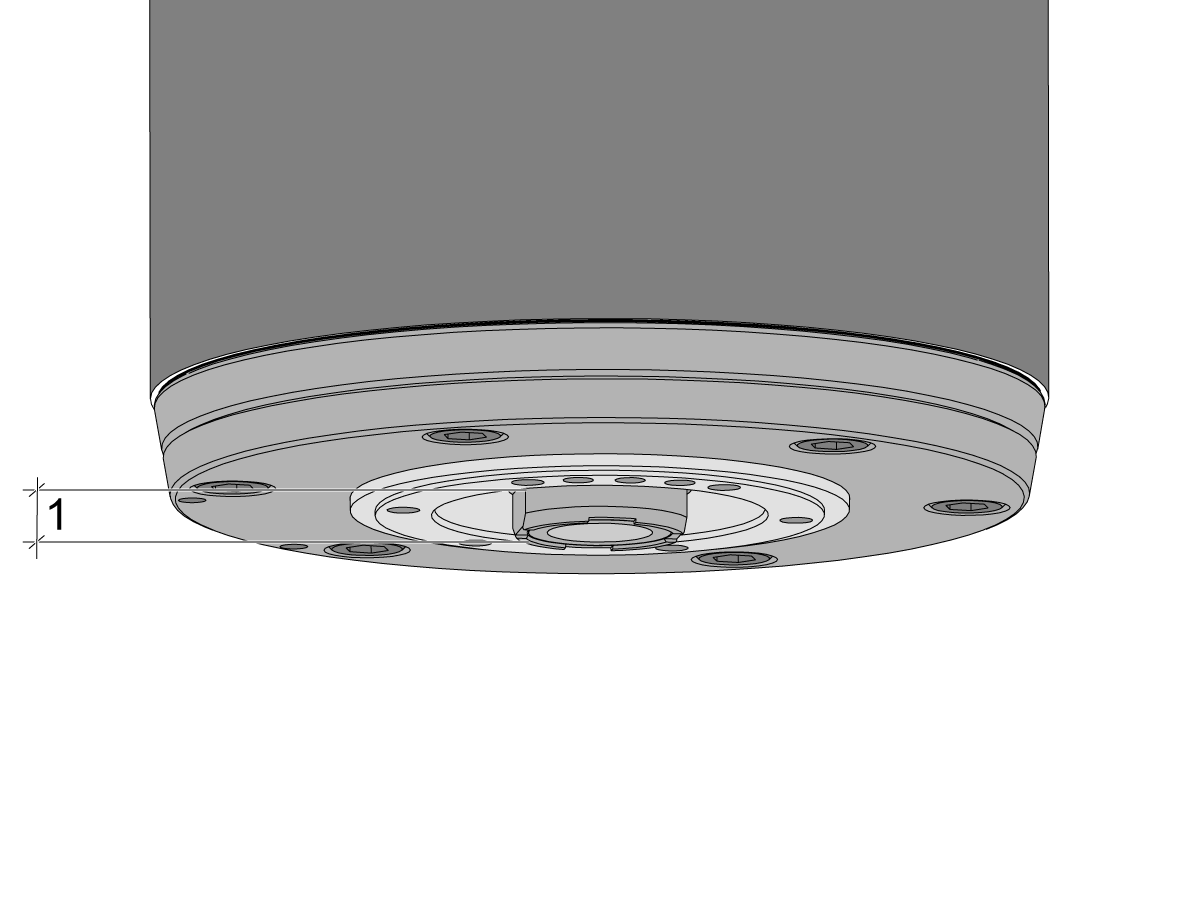
  • With the TRP engaged, use a depth gauge to measure the distance between the face of the clamping cone and the face of the spindle [1]
    • NTE (not to exceed) [0.41 in +/- 0.004 in] OR [10.5 mm +/- 0.1mm]
    • NOTE: For H-5AX HSK A63 spindles the push out distance is NTE (not to exceed) [0.417 in +.003/- 0 in] OR [10.59 mm +/- 0 mm]
  • If the push out is not within the above specification do the following:
  • Loosen the locking screw only 1-2 turns   
    • Note: backing out the locking screw too much can damage the spindle 
  • Unscrew or tighten the clamping cone to adjust the push out distance measured
  • Once set snug the locking screw using a 24mm wrench on the flats of the clamping cone and a 5mm hex bit

2

  • Torque Locking Screw:
  • Insert a hollow HSK-A63 tool holder without a collet to the spindle - this will prevent the drawbar from rotating while you torque the locking screw
    •  Use a long 5mm hex bit that will reach through the tool holder and a collet spanner wrench on the tool holder to prevent it from rotating
  • Torque the locking screw to 20 Ft-lbs  (27 N-m)
  • Check clamp force 2,835 - 4,050 lbs
    • Note: A new unit should be near 4,050 lbs, but if you are simply replacing it after cleaning, slightly lower force is acceptable
    • Once the force drops below 70% of max (2,835 lbs) is when the unit needs to either be re-greased, cleaned, inspected for damage, or have the drawbar inspected for damage as well.
  • To achieve clamp force the clamping unit must be thoroughly greased, the drawbar must not have broken springs, the gripper segments must not be broken, and the spacer unit and gripper segments must not be worn

Set TRP Clamp Switch

1

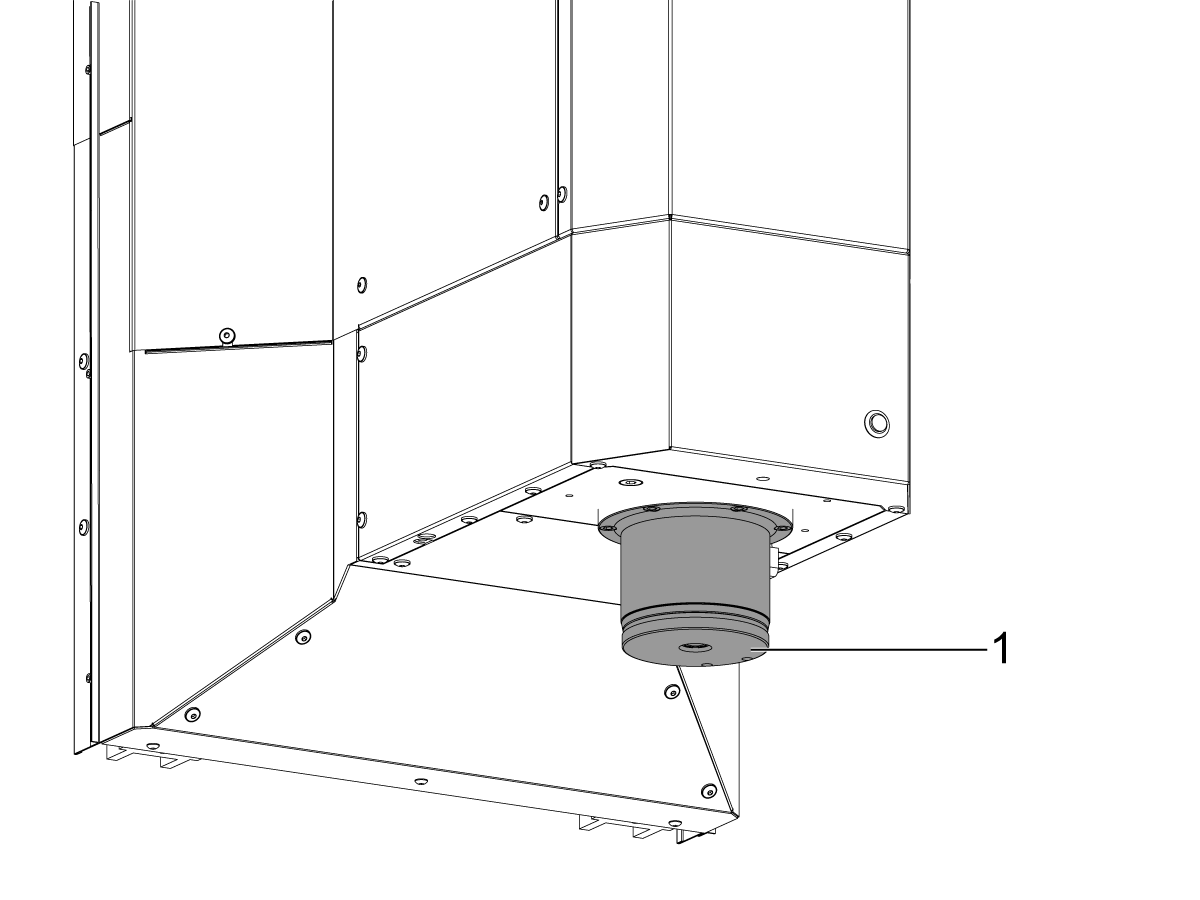
Place a tool in the spindle and verify it is seated correctly. A correctly installed tool has no gap and is seated flush to the spindle [1].

2

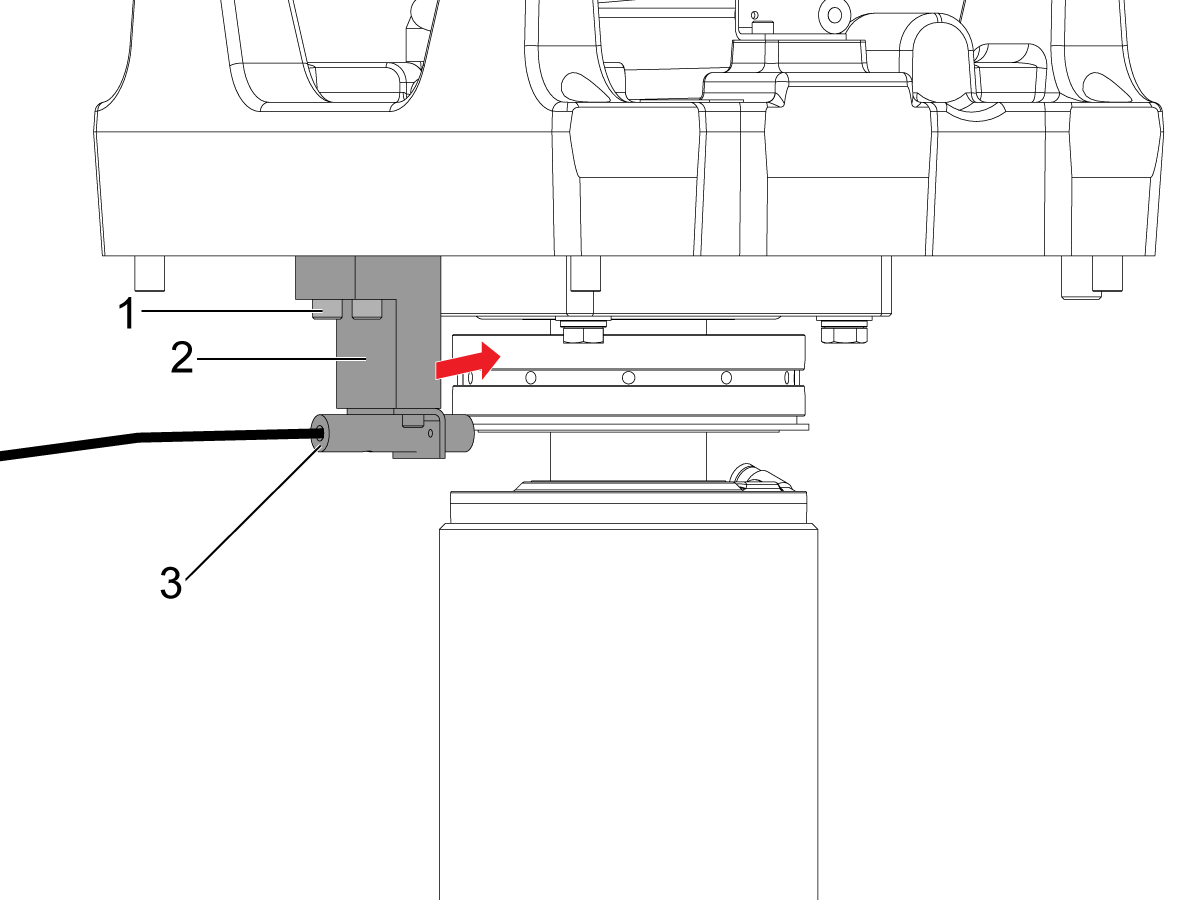
Remove the spindle head cover to gain access to the clamp switch.

Loosen the (2) screws [1] that hold the Clamp switch block [2] to the TRP.

Slowly slide the block [2] and sensor towards the spindle until the sensor [3] turns ON (becomes red).

Then lightly tighten the (2) screws [1].

3

Test Sensor Adjustment

1. Remove the tool from the spindle.

  • The sensor should turn OFF and remain OFF.

2. Insert the tool in the spindle incorrectly, so that is a gap between the tool and spindle.

  • The sensor should stay OFF.

3. Re-Insert the tool correctly.

  • The sensor should turn ON.

Note: If any of these three tests are not met, readjust the switch until all three are satisfied. 

Perform this sensor test using (2) other tool holders.

When the sensor adjustment is satisfied, torque the (2) 1/4-20 SHCS that hold the sensor block. Refer to HAAS Fastener Torque Specifications.

4

Proceed to the following procedures:

  • Set Z-Axis Tool Change Offset: Refer to SIDE-MOUNT TOOL CHANGER - Z-AXIS TOOL CHANGE OFFSET - NGC
  • Set Spindle Orientation: Refer to SIDE-MOUNT TOOL CHANGER - HSK - SPINDLE ORENTATION OFFSET - NGC

8.3 HSK-A63 Troubleshooting

HSK - Troubleshooting Guides

Troubleshooting Guide Description
HSK - Spindle - Troubleshooting Guide This troubleshooting guide will help you troubleshoot problems with the HSK spindle.

Recently Viewed Items

You Have No Recently Viewed Items Yet

Feedback
Haas Logo

Haas Delivered Price

This price includes shipping cost, export and import duties, insurance, and any other expenses incurred during shipping to a location in France agreed with you as a buyer. No other mandatory costs can be added to the delivery of a Haas CNC Product.

KEEP UP WITH THE LATEST HAAS TIPS AND TECHNOLOGY...

Sign up now!   

HAAS TOOLING ACCEPTS THE FOLLOWING:

  • Service & Support
  • Owners
  • Request Service
  • Operator Manuals
  • Haas Parts

  • Rotary Repair Request
  • Pre-Install Guides
  • Shopping Tools
  • Build & Price a New Haas
  • Available Inventory
  • The Haas Price List
  • CNCA Financing
  • About Haas
  • Accessibility Statement
  • DNSH Statement
  • Export Compliance
  • Careers
  • Certifications & Safety
  • Contact Us
  • History
  • Terms & Conditions
  • Haas Tooling Terms & Conditions
  • Privacy
  • Warranty
  • Haas Community
  • Haas Certification Program
  • Haas Motorsports
  • Gene Haas Foundation
  • Haas Technical Education Community
  • Events
  • Join the Conversation
  • Facebook
  • X
  • Flickr
  • YouTube
  • LinkedIn
  • Instagram
  • TikTok
© 2026 Haas Automation, Inc – CNC Machine Tools

This site is protected by reCAPTCHA and the Google Privacy Policy and Terms of Service apply.

2800 Sturgis Rd., Oxnard, CA 93030
Toll Free: (888) 817-4446 / Fax: 805-278-8554