My Haas Welcome,
!
Haas Tooling MyHaas/HaasConnect Sign In Register Haas Tooling MyHaas/HaasConnect Sign Out Welcome, My Machines Latest Activity My Quotes My Account My Users Sign Out
Find Your Distributor
  1. Select Language
    1. English
    2. Deutsch
    3. Español - España
    4. Español - México
    5. Français
    6. Italiano
    7. Português
    8. Český
    9. Dansk
    10. Nederlands
    11. Magyar
    12. Polski
    13. Svenska
    14. Türkçe
    15. 中文
    16. Suomi
    17. Norsk
    18. الإنجليزية
    19. български
    20. Hrvatski
    21. Ελληνικά
    22. Română
    23. Slovenský
    24. Slovenščina
    25. 한국어
    26. 日本語
    27. Українська
  • machines Main Menu
    • Vertical Mills
      Vertical Mills
      Vertical Mills View All
      • Vertical Mills
      • VF Series
      • Universal Machines
      • VR Series
      • VP-5 Prismatic
      • Pallet-Changing VMCs
      • Mini Mills
      • Mold Machines
      • High-Speed Drill Centers
      • Drill/Tap/ Mill Series
      • Toolroom Mills
      • Pocket Mill
      • Compact Mills
      • Gantry Series
      • SR Sheet Routers
      • Extra-Large VMC
      • Double-Column Mills
      • 3+2 Positioning Machines
    • Multi-Axis Solutions
      Multi-Axis Solutions
      Multi-Axis Solutions View All
      • Multi-Axis Solutions
      • Y-Axis Lathes
      • 5-Axis Mills
    • Lathes
      Lathes
      Lathes View All
      • Lathes
      • ST Series
      • Dual-Spindle
      • Box Way Series
      • Toolroom Lathes
      • Chucker Lathe
      • Haas Bar Feeders
    • Horizontal Mills
      Horizontal Mills
      Horizontal Mills View All
      • Horizontal Mills
      • 50-Taper
      • 40-Taper
    • Rotaries & Indexers
      Rotaries & Indexers
      Rotaries & Indexers View All
      • Rotaries & Indexers
      • Rotary Tables
      • Indexers
      • 5-Axis Rotaries
      • Extra-Large Rotaries
    • Special Series
      Special Series
      Special Series View All
      • Special Series
      • EU_Series_Redirect
    • Automation Systems
      Automation Systems
      Automation Systems View All
      • Automation Systems
      • Mill Automation
      • Lathe Automation
      • Automatic Parts Loaders
      • Automation Models
    • Desktop Machines
      Desktop Machines
      Desktop Machines View All
      • Desktop Machines
      • Desktop Mill
      • Desktop Lathe
      • Control Simulator, Standard
      • Control Simulator, Premium
    • Shop Equipment
      Shop Equipment
      Shop Equipment View All
      • Shop Equipment
      • Knee Mill
      • Haas Manual Lathes
      • Haas Saws
    • Fabrication Machines
      Fabrication Machines
      Fabrication Machines View All
      • Fabrication Machines
      • Laser Cutting Machines
      • CNC Press Brakes
    • QUICK LINKS Special Series  Special Series 
      EU SERIES EU SERIES BUILD & PRICE | PRICE LIST BUILD & PRICE | PRICE LIST In-Stock Machines In-Stock Machines WHAT’S NEW WHAT’S NEW YOUR FIRST CNC YOUR FIRST CNC
      SHOPPING TOOLS
      • Build & Price a Haas
      • Price List
      • Available Inventory
      • CNCA Financing
      WANT TO TALK TO SOMEONE?

      A Haas Factory Outlet (HFO) can answer your questions, and walk you through your best options.

      CONTACT YOUR DISTRIBUTOR >
  • Options Main Menu
    • The Haas Control Value Option Packages
      Value Option Packages
      Value Option Packages View All
      • Value Option Packages
    • Product Image Spindles
      Spindles
      Spindles View All
      • Spindles
    • Product Image Tool Changers
      Tool Changers
      Tool Changers View All
      • Tool Changers
    • Product Image 4th- | 5th-Axis
      4th- | 5th-Axis
      4th- | 5th-Axis View All
      • 4th- | 5th-Axis
    • Product Image Turrets & Live Tooling
      Turrets & Live Tooling
      Turrets & Live Tooling View All
      • Turrets & Live Tooling
    • Product Image Probing
      Probing
      Probing View All
      • Probing
    • Haas Chip & Coolant Management Chip & Coolant Management
      Chip & Coolant Management
      Chip & Coolant Management View All
      • Chip & Coolant Management
    • The Haas Control The Haas Control
      The Haas Control
      The Haas Control View All
      • The Haas Control
    • Product Image Product Options
      Product Options
      Product Options View All
      • Product Options
    • Product Image Tooling & Fixturing
      Tooling & Fixturing
      Tooling & Fixturing View All
      • Tooling & Fixturing
    • Product Image Workholding
      Workholding
      Workholding View All
      • Workholding
    • Product Image 5-Axis Solutions
      5-Axis Solutions
      5-Axis Solutions View All
      • 5-Axis Solutions
      • 5 Easy Steps to 5-Axis
    • QUICK LINKS Special Series  Special Series 
      EU SERIES EU SERIES BUILD & PRICE | PRICE LIST BUILD & PRICE | PRICE LIST In-Stock Machines In-Stock Machines WHAT’S NEW WHAT’S NEW YOUR FIRST CNC YOUR FIRST CNC
      SHOPPING TOOLS
      • Build & Price a Haas
      • Price List
      • Available Inventory
      • CNCA Financing
      WANT TO TALK TO SOMEONE?

      A Haas Factory Outlet (HFO) can answer your questions, and walk you through your best options.

      CONTACT YOUR DISTRIBUTOR >
  • Why Haas Main Menu
      Discover the Haas Difference
    • Why Haas
    • MyHaas
    • Education Community
    • Industry 4.0
    • Haas Certification
    • Customer Testimonials
  • Service Main Menu
      Welcome to Haas Service
      SERVICE HOME Operator’s Manuals How-To Procedures Troubleshooting Guides Preventive Maintenance Haas Parts Haas Tooling Videos
  • Videos Main Menu
  • Main Menu
    • View All
    • View All
    • View All
    • View All
      • HTEC Curriculum Support
      • Haas Value Option Packages (VOP) Journey
    • View All
      • Haas 10 kg Cobot Package
      • Cobot Kits
      • DC-1 Drill Center
      • CNC Sales News
      • Do More With Your Haas
    • View All
    • View All
      • contact-us-test
      • 4 - AUTOMATION SYSTEMS
      • Carousel-V2
      • expert test
      • Demo_Day_Trident-test
      • Link Test
      • image-sale-tag-test
      • article-list-test
      • Haas 25 kg Robot Package
      • test-algolia-page
    • View All
      • Choose Options
    • View All
    • View All
    • View All
    • View All
    • View All
      • calc-test
    • View All
    • QUICK LINKS Special Series  Special Series 
      EU SERIES EU SERIES BUILD & PRICE | PRICE LIST BUILD & PRICE | PRICE LIST In-Stock Machines In-Stock Machines WHAT’S NEW WHAT’S NEW YOUR FIRST CNC YOUR FIRST CNC
      SHOPPING TOOLS
      • Build & Price a Haas
      • Price List
      • Available Inventory
      • CNCA Financing
      WANT TO TALK TO SOMEONE?

      A Haas Factory Outlet (HFO) can answer your questions, and walk you through your best options.

      CONTACT YOUR DISTRIBUTOR >
  • Haas Tooling Main Menu
  • Haas Service Parts Main Menu

My Haas Welcome,
!
Haas Tooling MyHaas/HaasConnect Sign In Register Haas Tooling MyHaas/HaasConnect Sign Out Welcome, My Machines Latest Activity My Quotes My Account My Users Sign Out
Find Your Distributor
  1. Select Language
    1. English
    2. Deutsch
    3. Español - España
    4. Español - México
    5. Français
    6. Italiano
    7. Português
    8. Český
    9. Dansk
    10. Nederlands
    11. Magyar
    12. Polski
    13. Svenska
    14. Türkçe
    15. 中文
    16. Suomi
    17. Norsk
    18. الإنجليزية
    19. български
    20. Hrvatski
    21. Ελληνικά
    22. Română
    23. Slovenský
    24. Slovenščina
    25. 한국어
    26. 日本語
    27. Українська
×

Search Results

Web Pages

Images

    • <
    • 1
    • >

PulseJet - Installation - AD0454

Service Home How To Procedures PulseJet - Installation - AD0454

PulseJet - Installation - AD0454

- Jump to Section - Back to Top
Recently Updated Last updated: 02/09/2021

PulseJet - Installation


AD0454

Revision C - 5/2025

Introduction

This procedure will show you how to install a PulseJet on VMC/UMC mills.

Machine Requirements:

  • VMC/UMC built on October 2019 or later.
  • 100.19.000.1123 Software Version or higher.
  • Programmable Coolant option

PulseJet Installation Video

The following service video shows how to install the PulseJet System on VMC and UMC machines.

 NOTE: This service video is for reference only and does not replace the written procedure.

Hoses and Sensor Cable Installation

Note:  This section is required for field installations, go to the next section if the Pulsejet option was purchased from the factory.

1

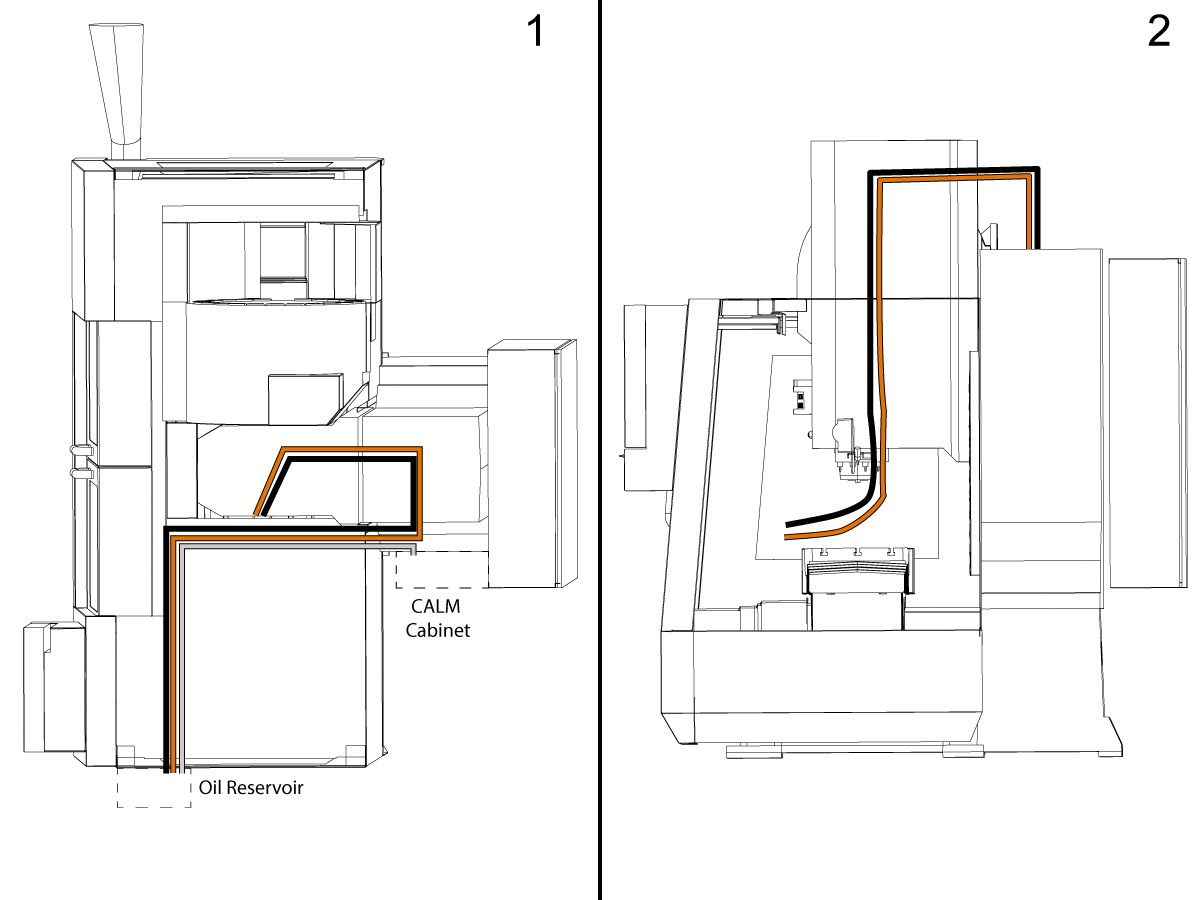
The illustration shows the PulseJet hose routing on a VF-2: 1: Top View 2: Side View.

Route the nozzle air hose (1/4 inch black hose) from the CALM cabinet, through spindle head,  towards the PulseJet/PCool location.

Route the nozzle oil hose (5/32 inch clear hose): from the Oil reservoir, up onto the roof, into cable carrier, through spindle head, towards the PulseJet/Pcool location.

Route the Oil Reservoir air hose (1/4 inch clear hose) from CALM cabinet solenoid towards the Oil Reservoir location.

NOTE: Make sure you leave enough slack at both ends.

2

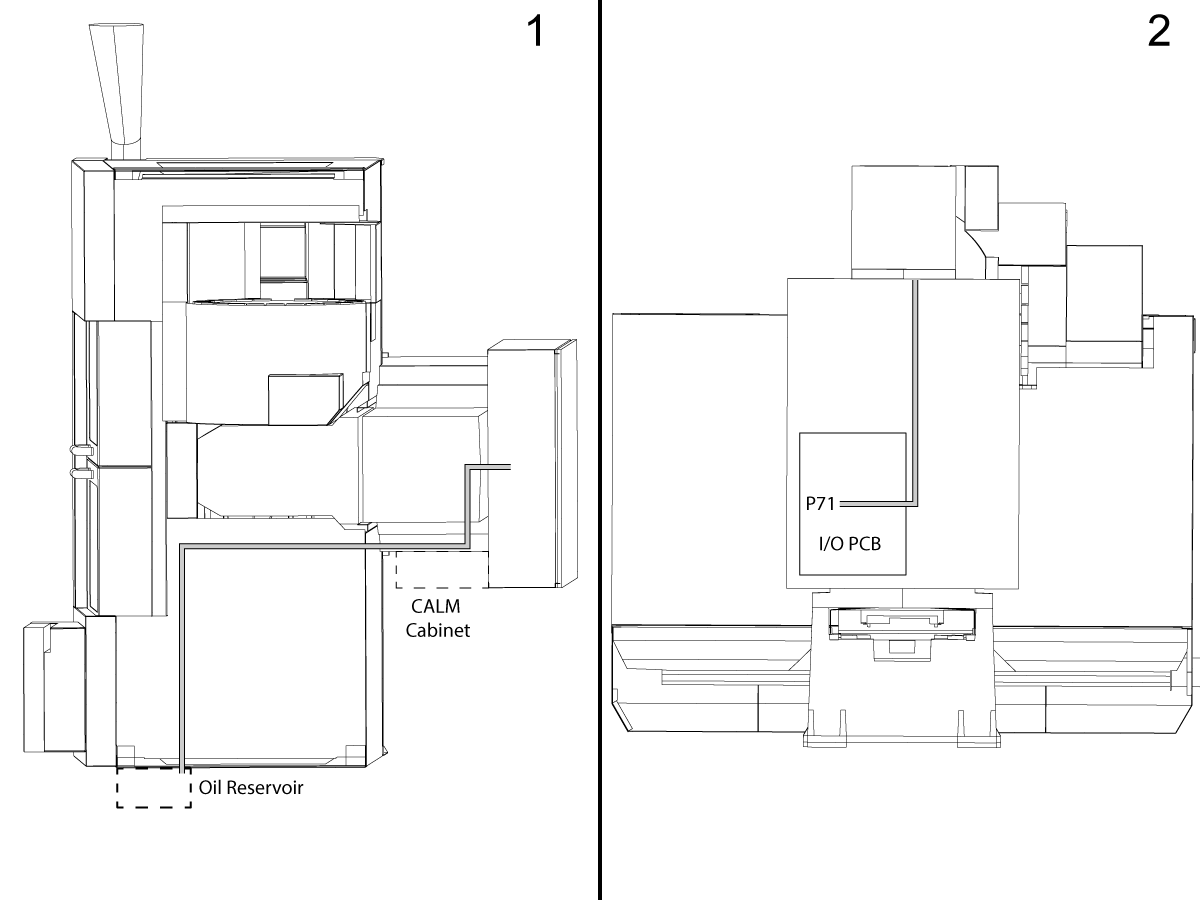
Route the Oil Reservoir level sensor cable from the Oil Reservoir location, to the top of the roof to the electrical cabinet.

NOTE: Make sure you leave enough slack to connect the cable to the Oil Reservoir sensor.

Plug in the cable to the I/O PCB at P71.

PulseJet & Tank Installation

1

Turn off air to the machine.

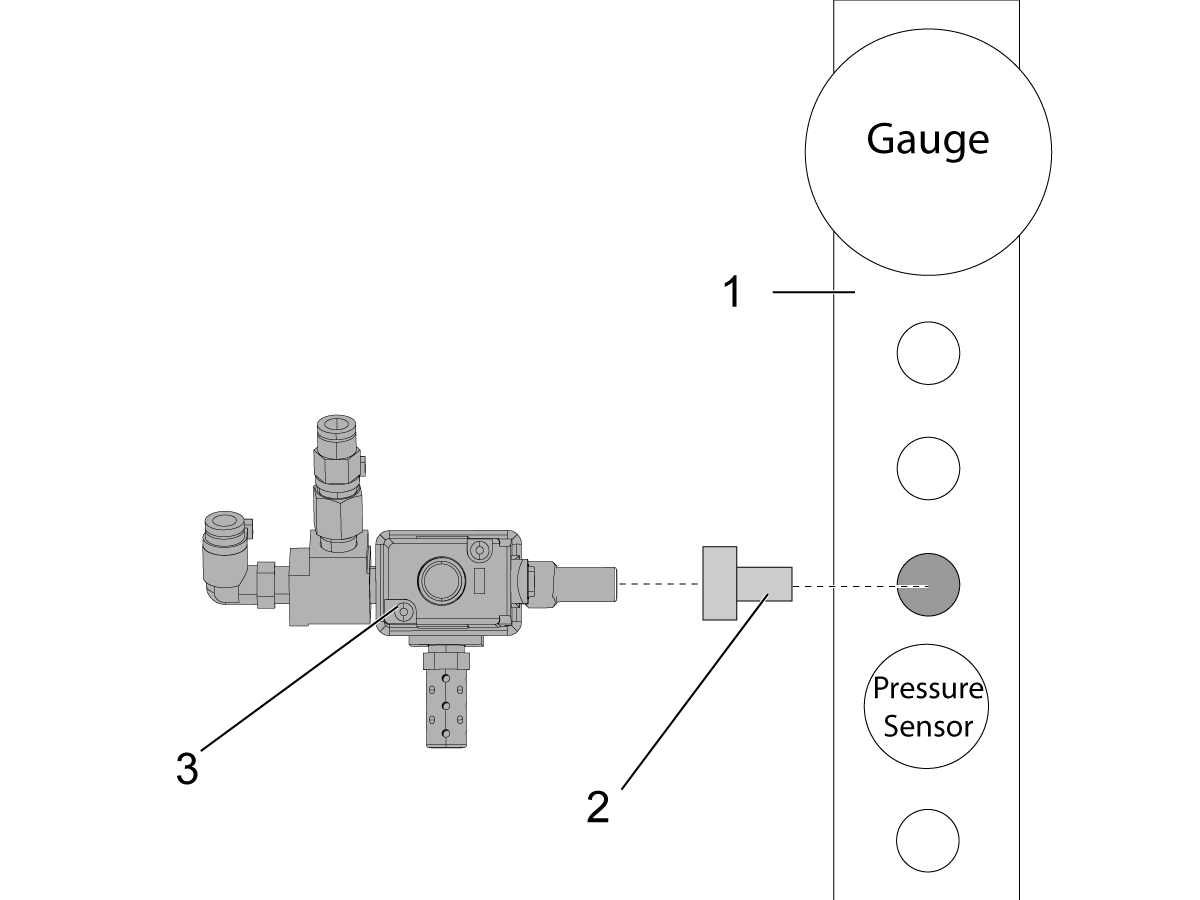
Locate the air manifold [1], remove the third NPT plug below the air gauge.

Install the adapter fitting P/N 58-1521 [2] into the manifold.

Install the solenoid valve [3] oriented as shown.

Connect the solenoid cable to the adapter then connect the adapter to the connector panel labeled "PULSEJET".

 NOTE: If installing on a machine that has the CAN Lube Rack, do not use the air/lube solenoid cable adapter (33-0596). Instead, plug directly into the connector labeled 'PULSEJET" on the CAN Lube Rack.

2

Unpack the PulseJet nozzle assembly.

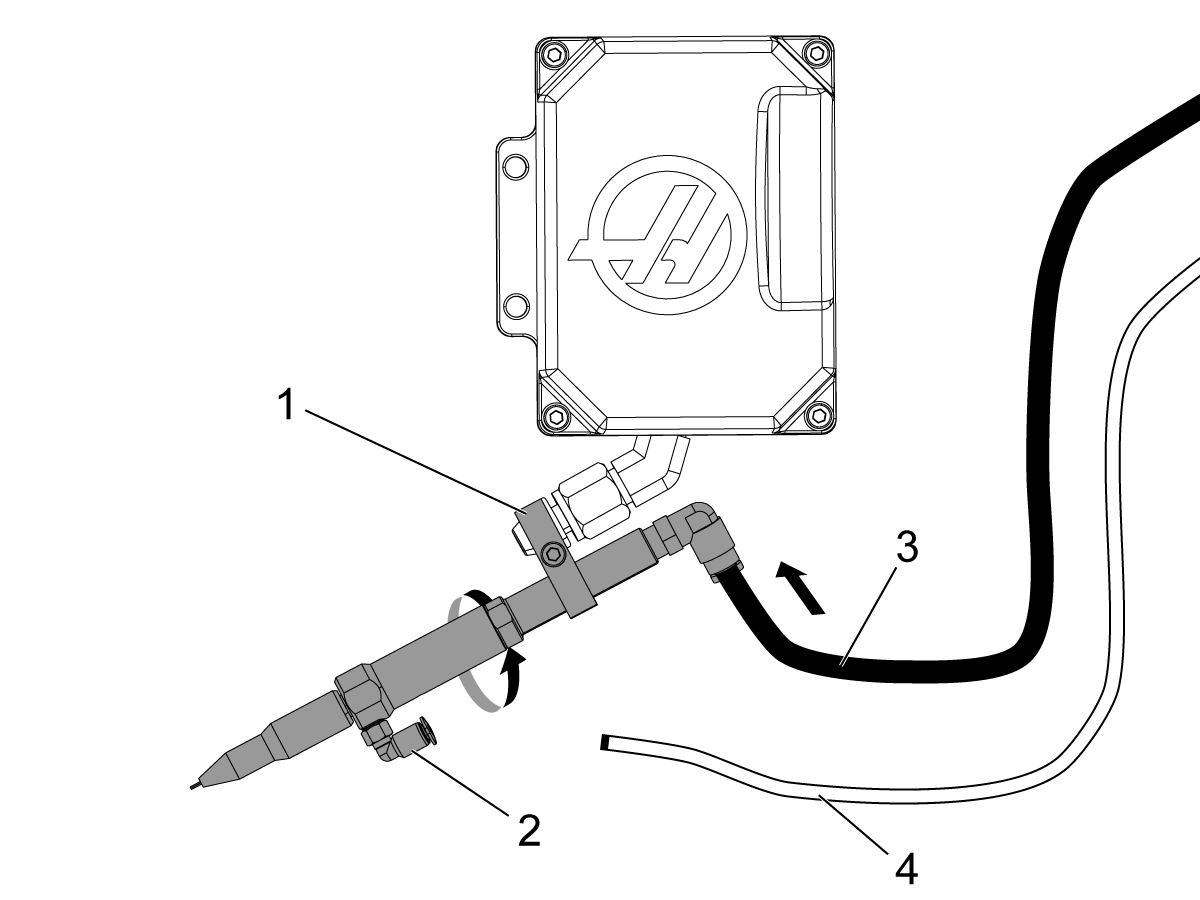
Loosen the clamp screw [1] and slide the clamp and the PulseJet assembly onto the P-COOL nozzle.

Adjust the PulseJet nozzle so that the oil inlet fitting [2] is on the bottom. 

Aim the nozzle approximately at the spindle centerline (it will be adjusted later).

Tighten the clamp set screw.

Find the 1/4” black air hose [3] and connect it to the air fitting on the nozzle assembly.
Find the 5/32” clear oil hose [4] but DO NOT connect it to the oil fitting.  This hose will be connected during the prime procedure.

3

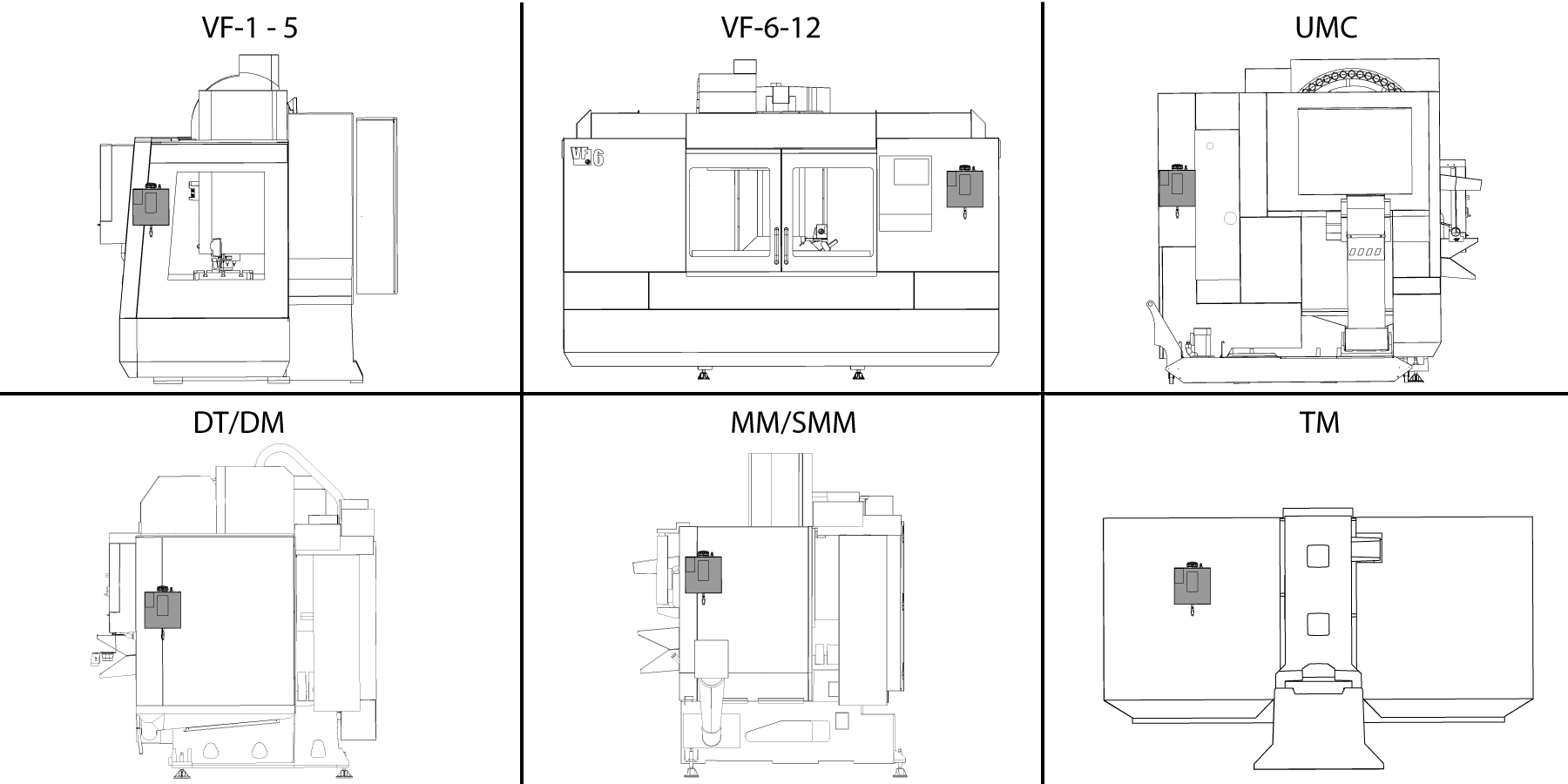
Mount the Oil Reservoir to the machine enclosure, refer to the illustration.

The oil reservoir assembly has magnets for easy mounting. 

Important: Do not slide the magnets on the enclosure. Instead, if you need to move the reservoir, tilt it to detach the magnets and then gently set it back down.

4

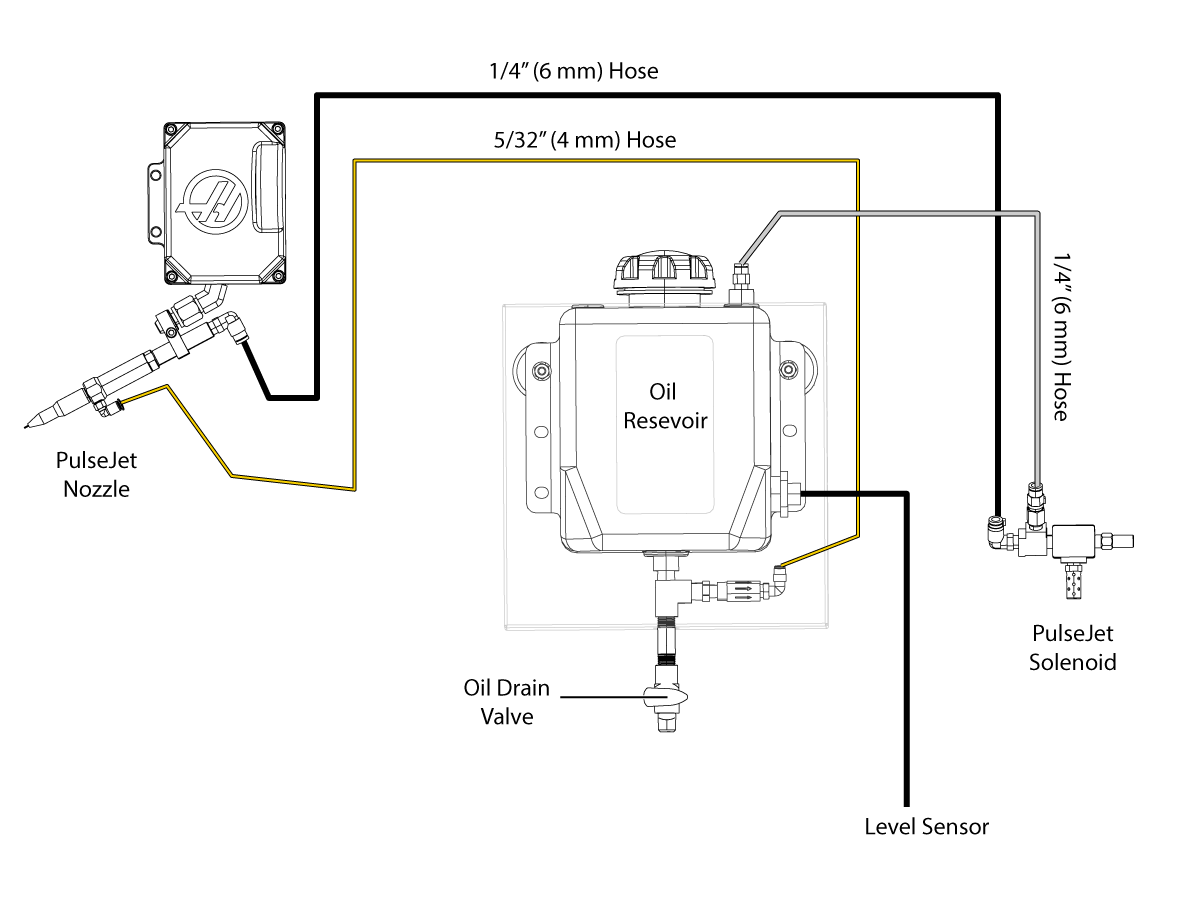
Connect the cable and air hoses to the Oil Reservoir assembly refer to the diagram.

Connect the air hoses to the solenoid. 

  Important: Make sure to connect the correct hoses to the solenoid, matching the color zip ties. If the hoses are swapped, it will send high pressure to the tank and could rupture the tank.

5

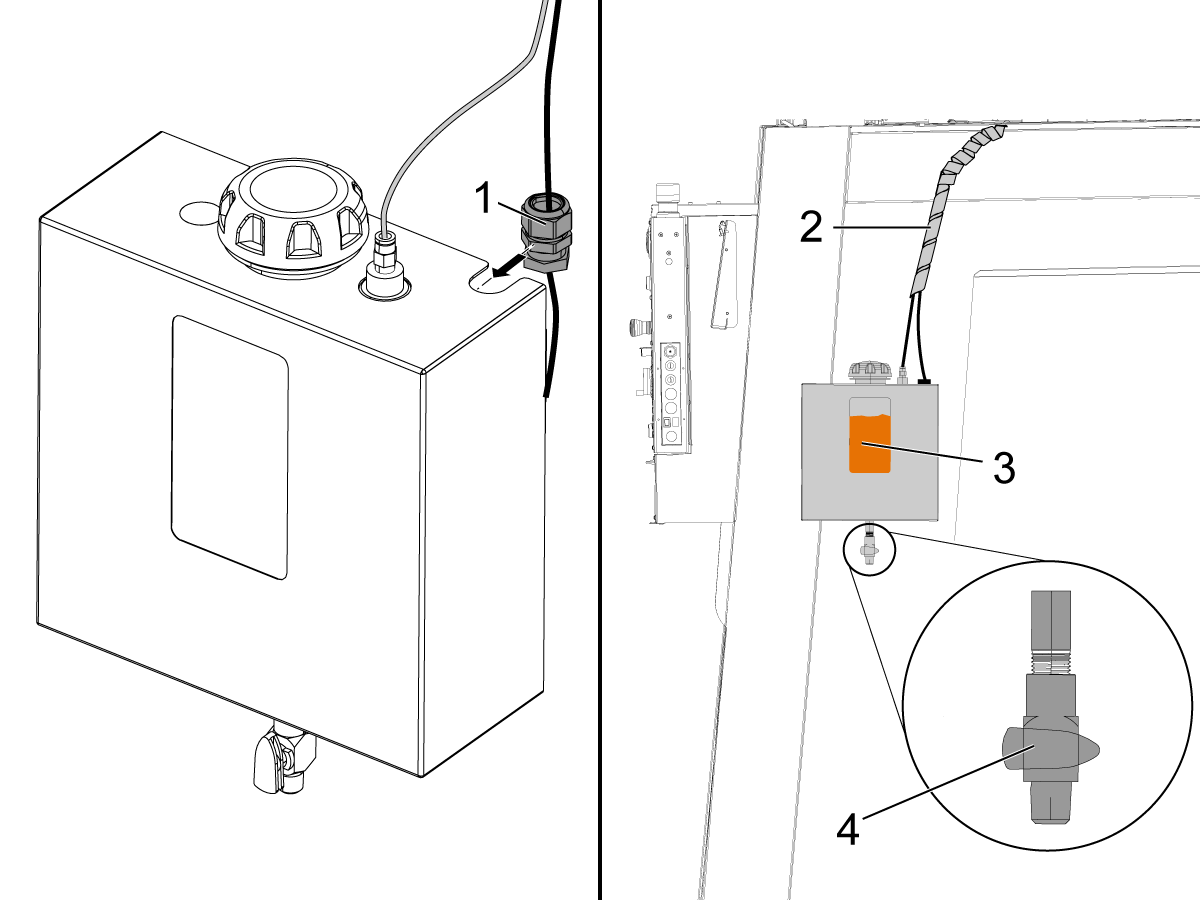
Slide the strain relief [1] into the slot on the reservoir assembly and tighten the retaining nut.

Apply the supplied spiral wrap [2] from the enclosure to the top of the machine to help neatly organize and secure the cables.

Make sure the drain valve on the bottom of the reservoir is in the closed (horizontal) position [4].

Remove the reservoir cap and fill the tank with oil [3].  Do not overfill the tank.
NOTE: The tank requires air space above the oil to maintain positive pressure above the oil.

Reinstall cap.

Prime the Oil Line

Make sure there is oil in the PulseJet reservoir and that the lid is tightly installed. Make sure the reservoir air and oil lines are connected. 

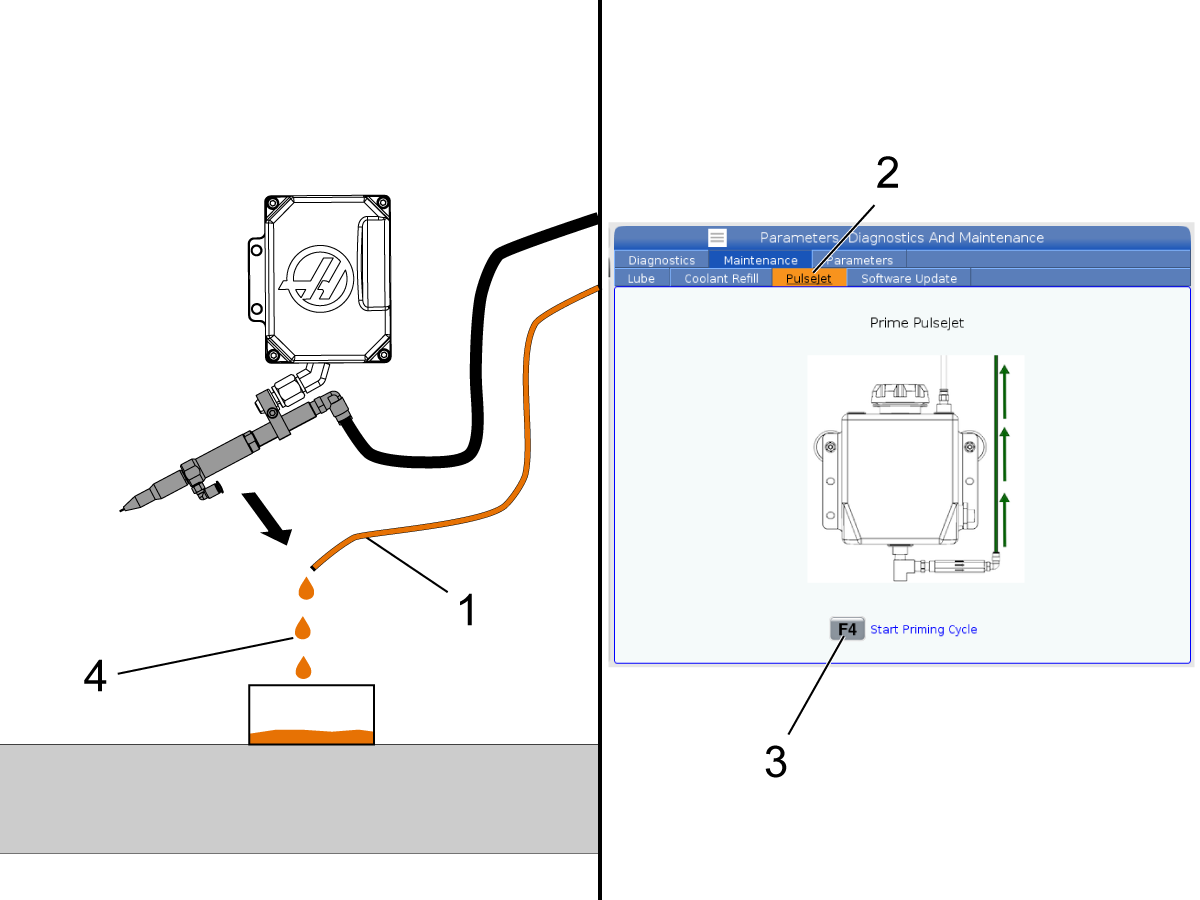
Disconnect the oil line [1] from the PulseJet nozzle and let it drape over a container placed on the mill table.

Press [DIAGNOSTIC] and navigate to the Maintenance then to the PulseJet tab [2]. 

Press [F4] to begin a priming cycle. Each cycle lasts 10 minutes.  The reservoir will be pressurized during the cycle. 

Note: Small machines may take only 1 cycle to fully prime the line. Larger machines may take 3 or 4 cycles. Heavier oils may take longer to prime. Continue running priming cycles until oil [4] begins to drip out of the oil line into the container. 

Note: While the machine is in the prime cycle the user can start a program.   However the user will not be able to start the prime cycle again while the program is running.

Reconnect the oil line to the PulseJet nozzle.

In MDI run:

M162 P10;
G04 P10.;
M30;

Test the PulseJet until a strong stream develops. 

PulseJet M-codes

M-CODE

DESCRIPTION

WHAT IT’S USED FOR

M160

Cancel Active PulseJet

To cancel an active PulseJet M-code.

M161 Pnn

Continuous Mode

Will turn PulseJet on whenever a feed move is active in a program. Pnn is how many seconds between oil pulses. Min = 1 sec Max = 99 sec

M162 Pnn

Single Event Mode

Will turn on PulseJet for a defined number of pulses. Pnn is how many pulses. Best used for drilling and tapping or to manually lubricate a tool.
Note:  M162 Pnn Is a non-blocking code.  Anything after the code will be executed immediately.

M163 Pnn

Modal Mode

Activates PulseJet to turn on during any canned drill or tap cycles. Pnn is how many pulses for each hole.

Note: Any PulseJet M-code will override any active previous PulseJet M-code.  
Note: Settings 369 and 370 can be used to change the default values for M161 and M162 when no P is specified.

Tips and Troubleshooting

1.       PulseJet will produce a consistent, fast, and tight oil pulse if the line is well primed, the dispenser needle is not clogged, and a recommended oil is being used.

2.       To always keep the line well primed:

  • Place the reservoir assembly near or above the spindle elevation
  • never let the tank run completely dry

3.       If you suspect that the dispenser needle is clogged, replace it. To do this, unscrew the knurled nozzle cap from the nozzle and gently twist and pull the yellow base of the needle off of the nozzle.

Note: This will expose the small check valve spring, do not lose it. Firmly press the replacement needle onto the nozzle taper. Re-install the nozzle cap finger tight.

4.       Use recommended oil: light viscosity oils and tapping or cutting fluids work the best. Heavy viscosity oils such as motor oil, gear oil, or heavy tapping oils may not produce a high-quality stream.

5.       If the oil line does get air bubbles inside, the pump inside the PulseJet nozzle will pass them through the system. While bubbles are moving through the nozzle, the stream will appear weak, aerated, and inconsistent. After the bubbles pass through, the stream will return to its proper form.

6.       Always make sure the reservoir cap is installed and tightened when running PulseJet to maintain the proper tank pressure.

PulseJet Lubrication

Refer to Lubricant Grease, and Sealant Table to see our recommended oil list.

Recently Viewed Items

You Have No Recently Viewed Items Yet

Feedback
Haas Logo

Haas Delivered Price

This price includes shipping cost, export and import duties, insurance, and any other expenses incurred during shipping to a location in France agreed with you as a buyer. No other mandatory costs can be added to the delivery of a Haas CNC Product.

KEEP UP WITH THE LATEST HAAS TIPS AND TECHNOLOGY...

Sign up now!   

HAAS TOOLING ACCEPTS THE FOLLOWING:

  • Service & Support
  • Owners
  • Request Service
  • Operator Manuals
  • Haas Parts

  • Rotary Repair Request
  • Pre-Install Guides
  • Shopping Tools
  • Build & Price a New Haas
  • Available Inventory
  • The Haas Price List
  • CNCA Financing
  • About Haas
  • Accessibility Statement
  • DNSH Statement
  • Export Compliance
  • Careers
  • Certifications & Safety
  • Contact Us
  • History
  • Terms & Conditions
  • Haas Tooling Terms & Conditions
  • Privacy
  • Warranty
  • Haas Community
  • Haas Certification Program
  • Haas Motorsports
  • Gene Haas Foundation
  • Haas Technical Education Community
  • Events
  • Join the Conversation
  • Facebook
  • X
  • Flickr
  • YouTube
  • LinkedIn
  • Instagram
  • TikTok
© 2026 Haas Automation, Inc – CNC Machine Tools

This site is protected by reCAPTCHA and the Google Privacy Policy and Terms of Service apply.

2800 Sturgis Rd., Oxnard, CA 93030
Toll Free: (888) 817-4446 / Fax: 805-278-8554