My Haas Welcome,
!
Haas Tooling MyHaas/HaasConnect Sign In Register Haas Tooling MyHaas/HaasConnect Sign Out Welcome, My Machines Latest Activity My Quotes My Account My Users Sign Out
Find Your Distributor
  1. Select Language
    1. English
    2. Deutsch
    3. Español - España
    4. Español - México
    5. Français
    6. Italiano
    7. Português
    8. Český
    9. Dansk
    10. Nederlands
    11. Magyar
    12. Polski
    13. Svenska
    14. Türkçe
    15. 中文
    16. Suomi
    17. Norsk
    18. الإنجليزية
    19. български
    20. Hrvatski
    21. Ελληνικά
    22. Română
    23. Slovenský
    24. Slovenščina
    25. 한국어
    26. 日本語
    27. Українська
  • machines Main Menu
    • Vertical Mills
      Vertical Mills
      Vertical Mills View All
      • Vertical Mills
      • VF Series
      • Universal Machines
      • VR Series
      • VP-5 Prismatic
      • Pallet-Changing VMCs
      • Mini Mills
      • Mold Machines
      • High-Speed Drill Centers
      • Drill/Tap/ Mill Series
      • Toolroom Mills
      • Pocket Mill
      • Compact Mills
      • Gantry Series
      • SR Sheet Routers
      • Extra-Large VMC
      • Double-Column Mills
      • 3+2 Positioning Machines
    • Multi-Axis Solutions
      Multi-Axis Solutions
      Multi-Axis Solutions View All
      • Multi-Axis Solutions
      • Y-Axis Lathes
      • 5-Axis Mills
    • Lathes
      Lathes
      Lathes View All
      • Lathes
      • ST Series
      • Dual-Spindle
      • Box Way Series
      • Toolroom Lathes
      • Chucker Lathe
      • Haas Bar Feeders
    • Horizontal Mills
      Horizontal Mills
      Horizontal Mills View All
      • Horizontal Mills
      • 50-Taper
      • 40-Taper
    • Rotaries & Indexers
      Rotaries & Indexers
      Rotaries & Indexers View All
      • Rotaries & Indexers
      • Rotary Tables
      • Indexers
      • 5-Axis Rotaries
      • Extra-Large Rotaries
    • Special Series
      Special Series
      Special Series View All
      • Special Series
      • EU_Series_Redirect
    • Automation Systems
      Automation Systems
      Automation Systems View All
      • Automation Systems
      • Mill Automation
      • Lathe Automation
      • Automatic Parts Loaders
      • Automation Models
    • Desktop Machines
      Desktop Machines
      Desktop Machines View All
      • Desktop Machines
      • Desktop Mill
      • Desktop Lathe
      • Control Simulator, Standard
      • Control Simulator, Premium
    • Shop Equipment
      Shop Equipment
      Shop Equipment View All
      • Shop Equipment
      • Knee Mill
      • Haas Manual Lathes
      • Haas Saws
    • Fabrication Machines
      Fabrication Machines
      Fabrication Machines View All
      • Fabrication Machines
      • Laser Cutting Machines
      • CNC Press Brakes
    • QUICK LINKS Special Series  Special Series 
      EU SERIES EU SERIES BUILD & PRICE | PRICE LIST BUILD & PRICE | PRICE LIST In-Stock Machines In-Stock Machines WHAT’S NEW WHAT’S NEW YOUR FIRST CNC YOUR FIRST CNC
      SHOPPING TOOLS
      • Build & Price a Haas
      • Price List
      • Available Inventory
      • CNCA Financing
      WANT TO TALK TO SOMEONE?

      A Haas Factory Outlet (HFO) can answer your questions, and walk you through your best options.

      CONTACT YOUR DISTRIBUTOR >
  • Options Main Menu
    • The Haas Control Value Option Packages
      Value Option Packages
      Value Option Packages View All
      • Value Option Packages
    • Product Image Spindles
      Spindles
      Spindles View All
      • Spindles
    • Product Image Tool Changers
      Tool Changers
      Tool Changers View All
      • Tool Changers
    • Product Image 4th- | 5th-Axis
      4th- | 5th-Axis
      4th- | 5th-Axis View All
      • 4th- | 5th-Axis
    • Product Image Turrets & Live Tooling
      Turrets & Live Tooling
      Turrets & Live Tooling View All
      • Turrets & Live Tooling
    • Product Image Probing
      Probing
      Probing View All
      • Probing
    • Haas Chip & Coolant Management Chip & Coolant Management
      Chip & Coolant Management
      Chip & Coolant Management View All
      • Chip & Coolant Management
    • The Haas Control The Haas Control
      The Haas Control
      The Haas Control View All
      • The Haas Control
    • Product Image Product Options
      Product Options
      Product Options View All
      • Product Options
    • Product Image Tooling & Fixturing
      Tooling & Fixturing
      Tooling & Fixturing View All
      • Tooling & Fixturing
    • Product Image Workholding
      Workholding
      Workholding View All
      • Workholding
    • Product Image 5-Axis Solutions
      5-Axis Solutions
      5-Axis Solutions View All
      • 5-Axis Solutions
      • 5 Easy Steps to 5-Axis
    • QUICK LINKS Special Series  Special Series 
      EU SERIES EU SERIES BUILD & PRICE | PRICE LIST BUILD & PRICE | PRICE LIST In-Stock Machines In-Stock Machines WHAT’S NEW WHAT’S NEW YOUR FIRST CNC YOUR FIRST CNC
      SHOPPING TOOLS
      • Build & Price a Haas
      • Price List
      • Available Inventory
      • CNCA Financing
      WANT TO TALK TO SOMEONE?

      A Haas Factory Outlet (HFO) can answer your questions, and walk you through your best options.

      CONTACT YOUR DISTRIBUTOR >
  • Why Haas Main Menu
      Discover the Haas Difference
    • Why Haas
    • MyHaas
    • Education Community
    • Industry 4.0
    • Haas Certification
    • Customer Testimonials
  • Service Main Menu
      Welcome to Haas Service
      SERVICE HOME Operator’s Manuals How-To Procedures Troubleshooting Guides Preventive Maintenance Haas Parts Haas Tooling Videos
  • Videos Main Menu
  • Main Menu
    • View All
    • View All
    • View All
    • View All
      • HTEC Curriculum Support
      • Haas Value Option Packages (VOP) Journey
    • View All
      • Haas 10 kg Cobot Package
      • Cobot Kits
      • DC-1 Drill Center
      • CNC Sales News
      • Do More With Your Haas
    • View All
    • View All
      • contact-us-test
      • 4 - AUTOMATION SYSTEMS
      • Carousel-V2
      • expert test
      • Demo_Day_Trident-test
      • Link Test
      • image-sale-tag-test
      • article-list-test
      • Haas 25 kg Robot Package
      • test-algolia-page
    • View All
    • View All
    • View All
    • View All
      • calc-test
    • View All
    • QUICK LINKS Special Series  Special Series 
      EU SERIES EU SERIES BUILD & PRICE | PRICE LIST BUILD & PRICE | PRICE LIST In-Stock Machines In-Stock Machines WHAT’S NEW WHAT’S NEW YOUR FIRST CNC YOUR FIRST CNC
      SHOPPING TOOLS
      • Build & Price a Haas
      • Price List
      • Available Inventory
      • CNCA Financing
      WANT TO TALK TO SOMEONE?

      A Haas Factory Outlet (HFO) can answer your questions, and walk you through your best options.

      CONTACT YOUR DISTRIBUTOR >
  • Haas Tooling Main Menu
  • Haas Service Parts Main Menu

My Haas Welcome,
!
Haas Tooling MyHaas/HaasConnect Sign In Register Haas Tooling MyHaas/HaasConnect Sign Out Welcome, My Machines Latest Activity My Quotes My Account My Users Sign Out
Find Your Distributor
  1. Select Language
    1. English
    2. Deutsch
    3. Español - España
    4. Español - México
    5. Français
    6. Italiano
    7. Português
    8. Český
    9. Dansk
    10. Nederlands
    11. Magyar
    12. Polski
    13. Svenska
    14. Türkçe
    15. 中文
    16. Suomi
    17. Norsk
    18. الإنجليزية
    19. български
    20. Hrvatski
    21. Ελληνικά
    22. Română
    23. Slovenský
    24. Slovenščina
    25. 한국어
    26. 日本語
    27. Українська
×

Search Results

Web Pages

Images

    • <
    • 1
    • >

DC-Series - Spindle Replacement - AD0821

Service Home How To Procedures DC-Series - Spindle Replacement - AD0821
Recently Updated Last updated: 12/03/2024

DC-Series - Spindle Replacement


AD0821

DC-Series - Spindle Replacement - AD0821

- Jump to Section - 1. Introduction 2. Remove Spindle (7 steps) 3. Install New Spindle (8 steps) 4. Set Spindle Orientation Offset (3 steps) Back to Top

Introduction

This procedure is to replace the spindle on a DC-series machine. This applies to the following service kit:

  • 93-3945 -Spindle 30T Inline DC-1

The following tools are required to follow this procedure spindle:

  • Set of metric and standard hex bits
  • Torque Wrench
  • Open ended adjustable wrench
  • Set of feeler gauges (0.119" gauge)
  • Wood blocks (or something to hold the spindle as it is removed)
  • Spindle Vibration Tester

Important: The tool carousel is not shown in the images in this procedure to clearly show what is happening in each step. Do not try and alter the carousel in any way during this procedure. The spindle can be replaced with the carousel in place.

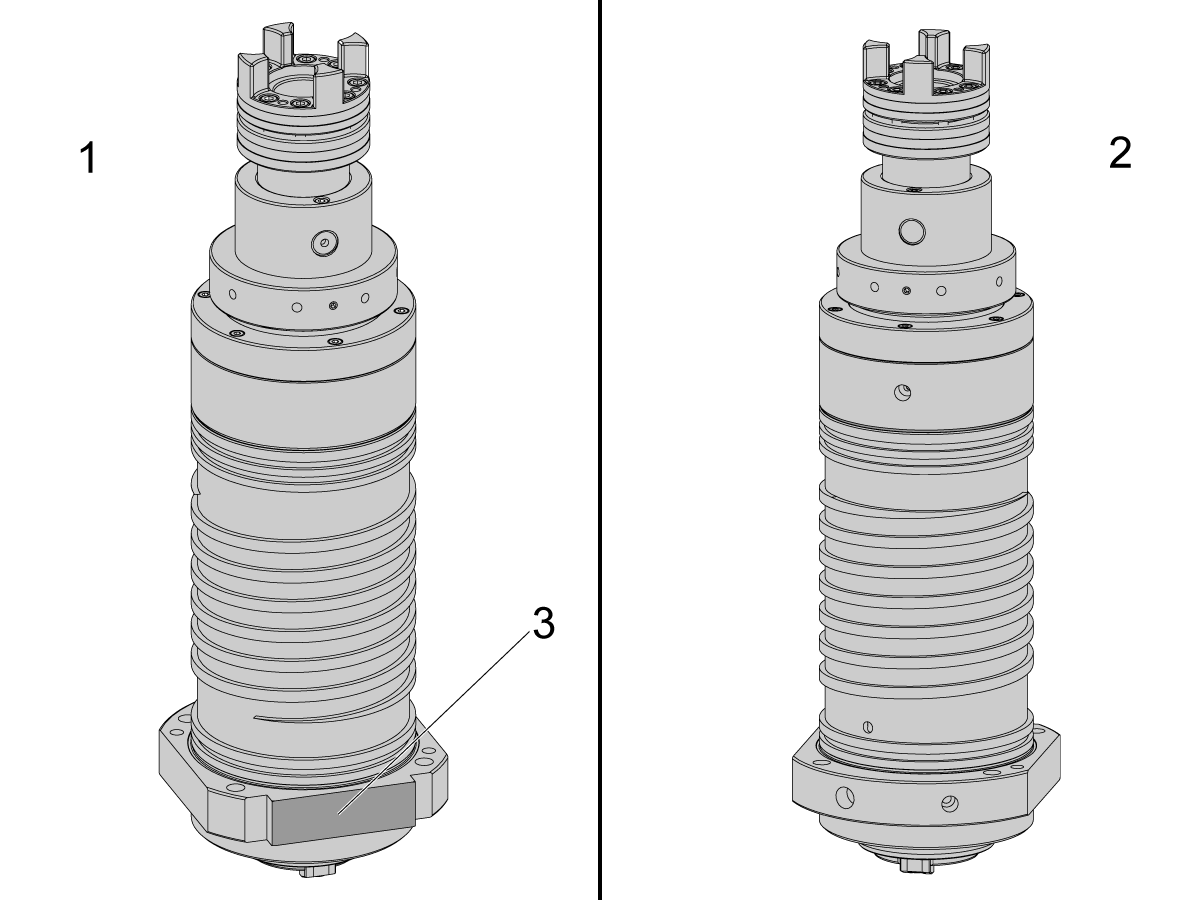
The image shows what the spindle looks like on a DC-1 30T machine. The front [1] and back [2] of the spindle can be identified by locating the flat face [3] which is on the front of the spindle assembly.

Remove Spindle

1

Start by removing the front and back plastic covers from the tool carousel. This will help with visibility and access to the spindle head where the spindle motor and spindle are coupled together.

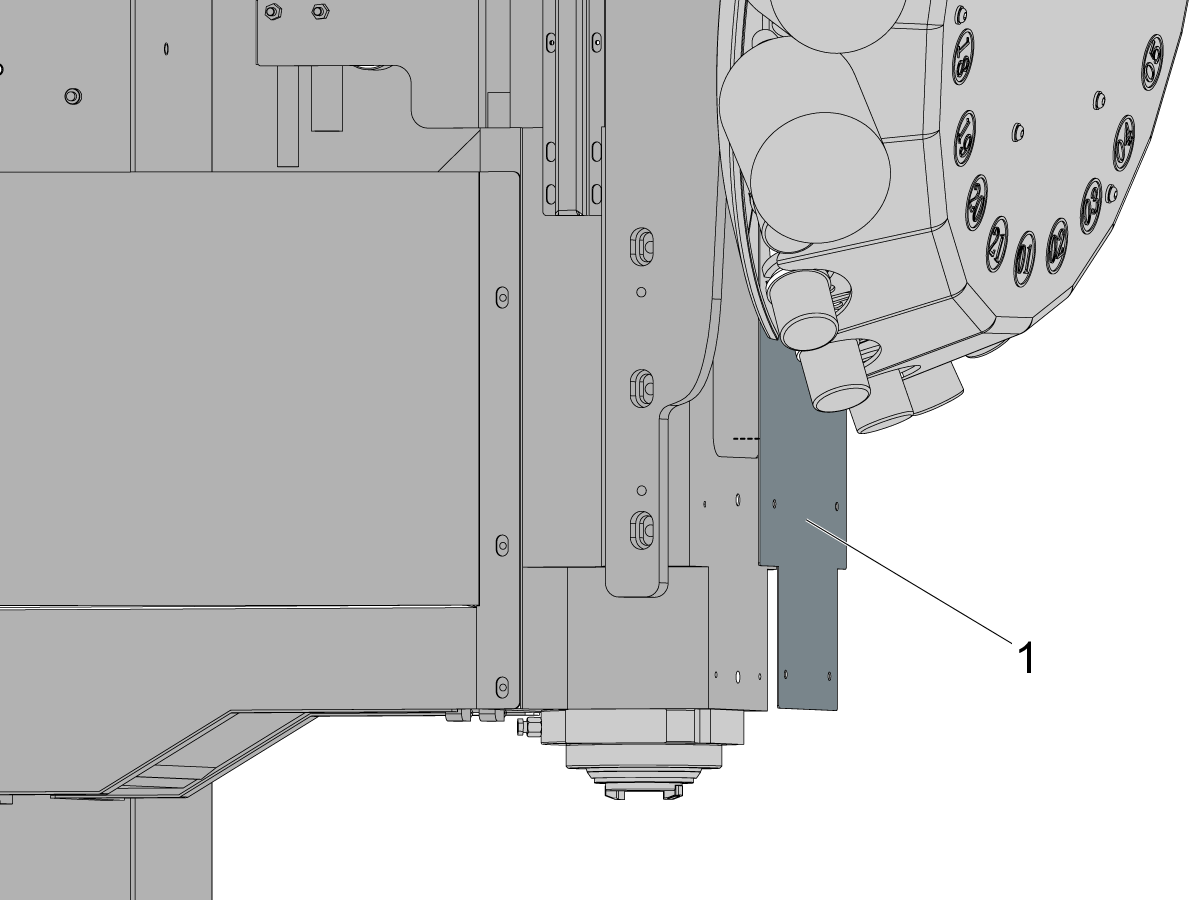
Remove the front plate [1] that covers the access hole in the spindle head casting.

Note: The coupler between the spindle and spindle motor does not need to be removed from either side. Do not try and remove the coupler.

2

Important: The tool carousel is not shown in the images in this procedure to clearly show what is happening in each step. Do not try and alter the carousel in any way during this procedure. The spindle can be replaced with the carousel in place.

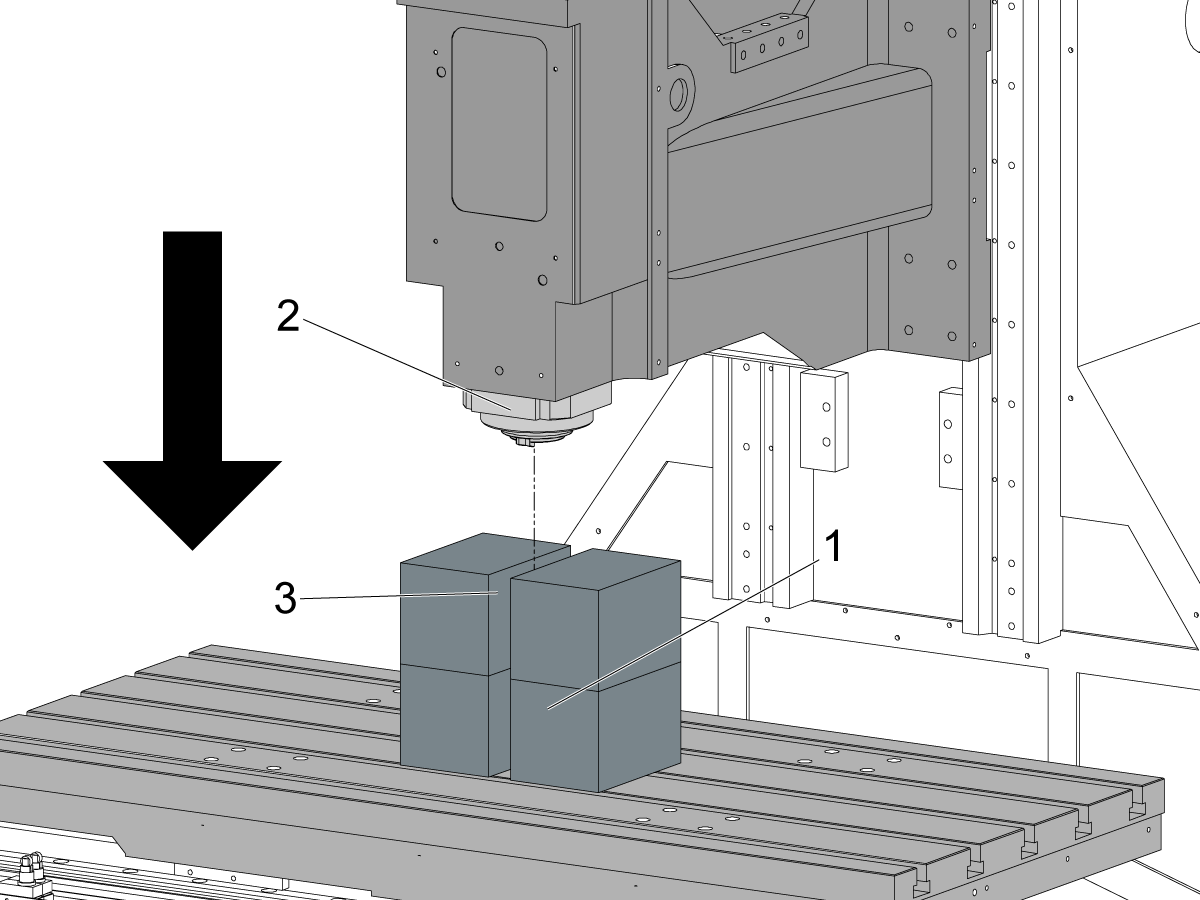
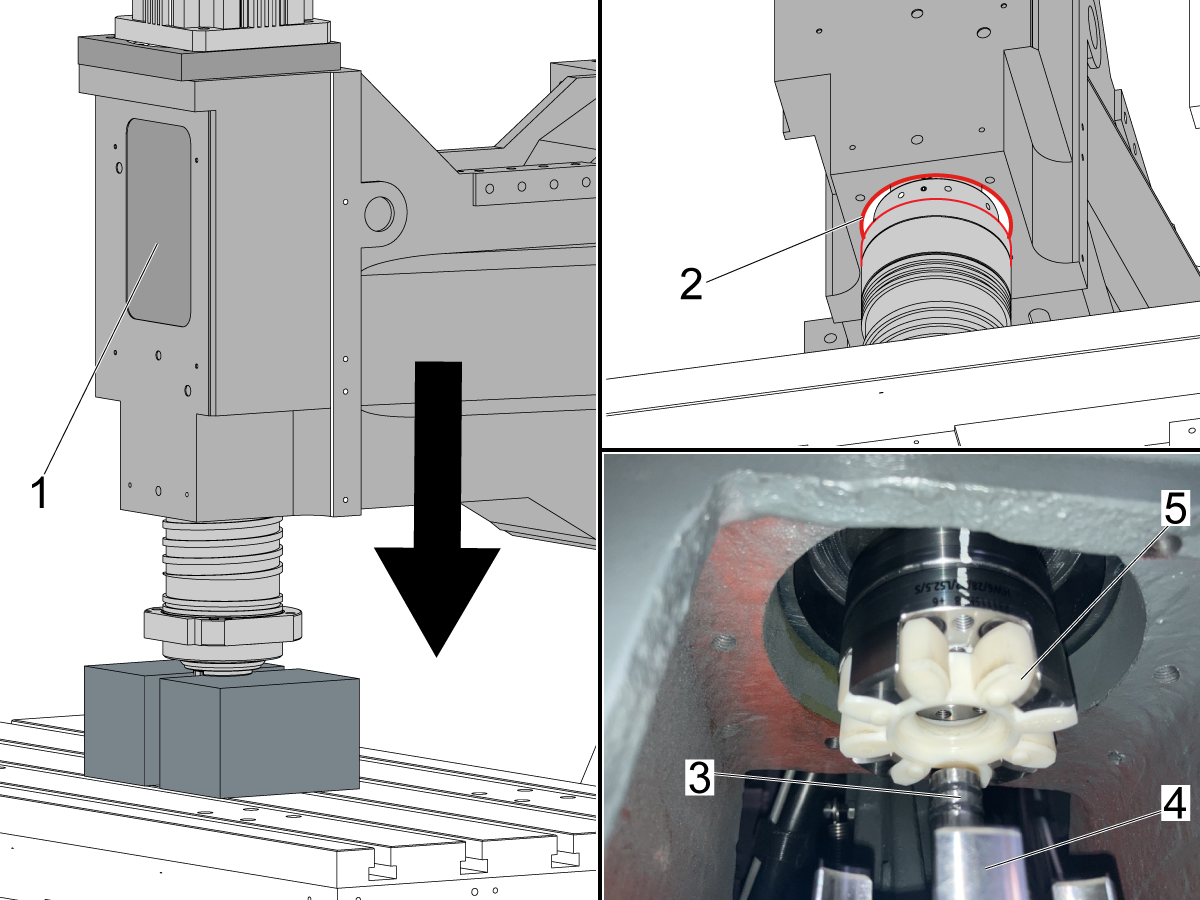
Place some blocks [1] on the table of the machine.

Jog the Z-axis down towards the blocks until there is about a 1/2" - 1" gap between the face of the spindle [2] and the blocks.

Leave a gap between the blocks [3] wide enough for the spindle drive dogs so that the spindle can sit flush on the blocks when removed.

Note: The spindle will not fall quickly out of the casting. The blocks are there as a precaution and act as a rest for the spindle instead of sitting it on the table.

3

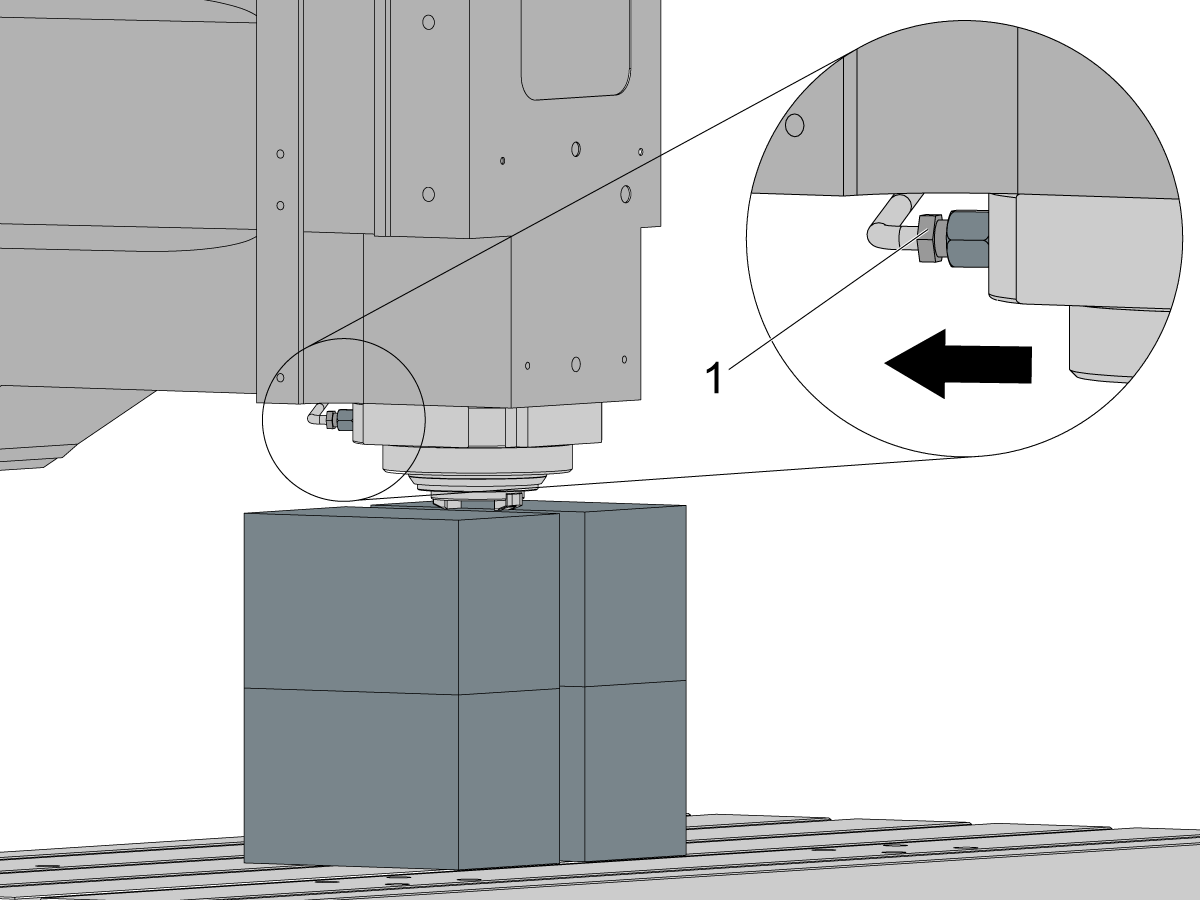
There is a line that feeds to the bottom of the spindle. Disconnect the line [1] using an open ended wrench.

Once the fitting is loosened, slightly bend the line so that the male fitting is not resting inside the female fitting in the spindle.

Note: When the spindle is removed, the fitting could get caught and the line could get damaged. Make sure the line going into the spindle head is free from the spindle before moving on.

4

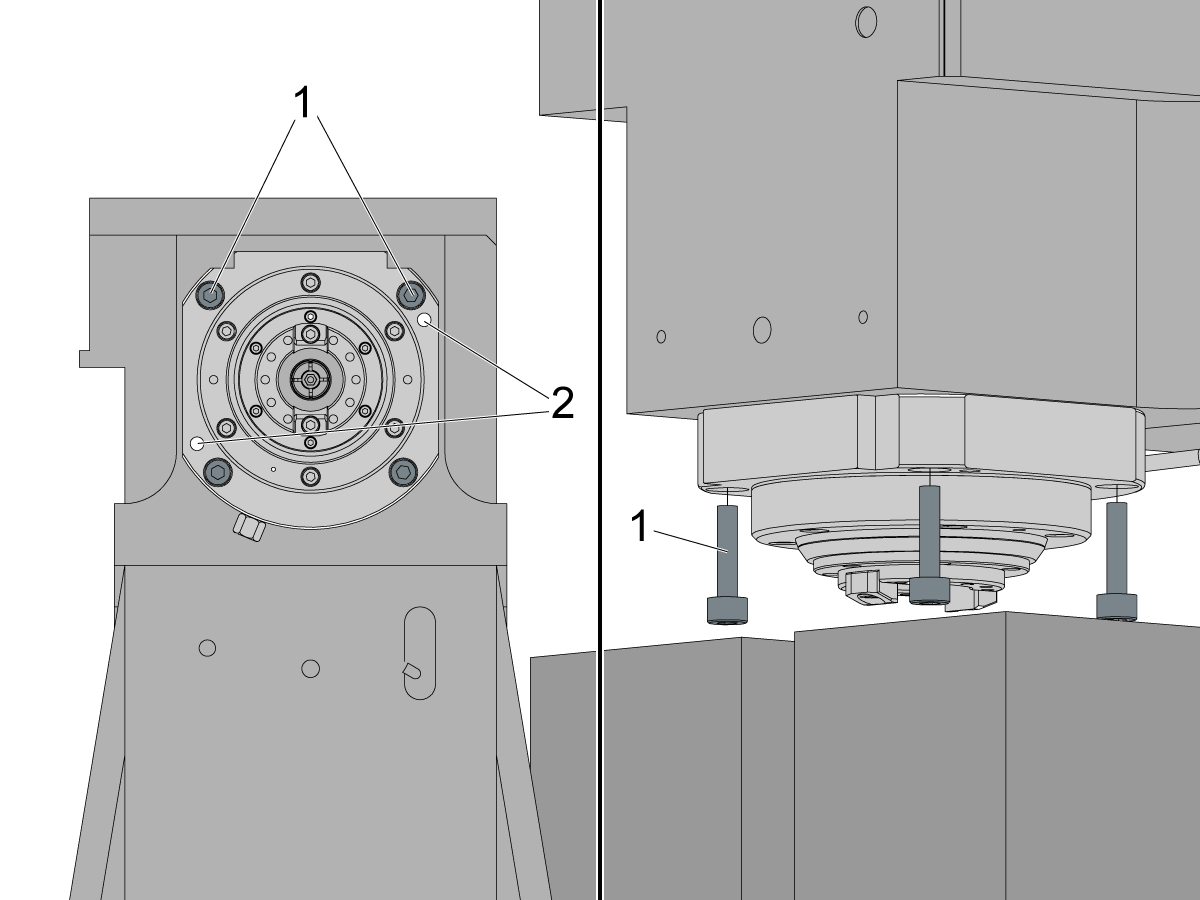
With the spindle about an inch from the blocks on the table, start loosening the 4 mounting bolts [1] that fasten the spindle to the head casting.

Remove the screws from the spindle one at a time. Keep these screws. They are not only used to mount the replacement spindle, but they are used in the next step to separate the spindle from the casting.

Note: The spindle should not drop out of the casting on its own. Even with no bolts holding it in place the spindle still needs to be jacked off of the casting.

Important: The 2 holes [2] on the spindle face are used to jack the spindle away from the casting. The next step covers how these holes are used.

5

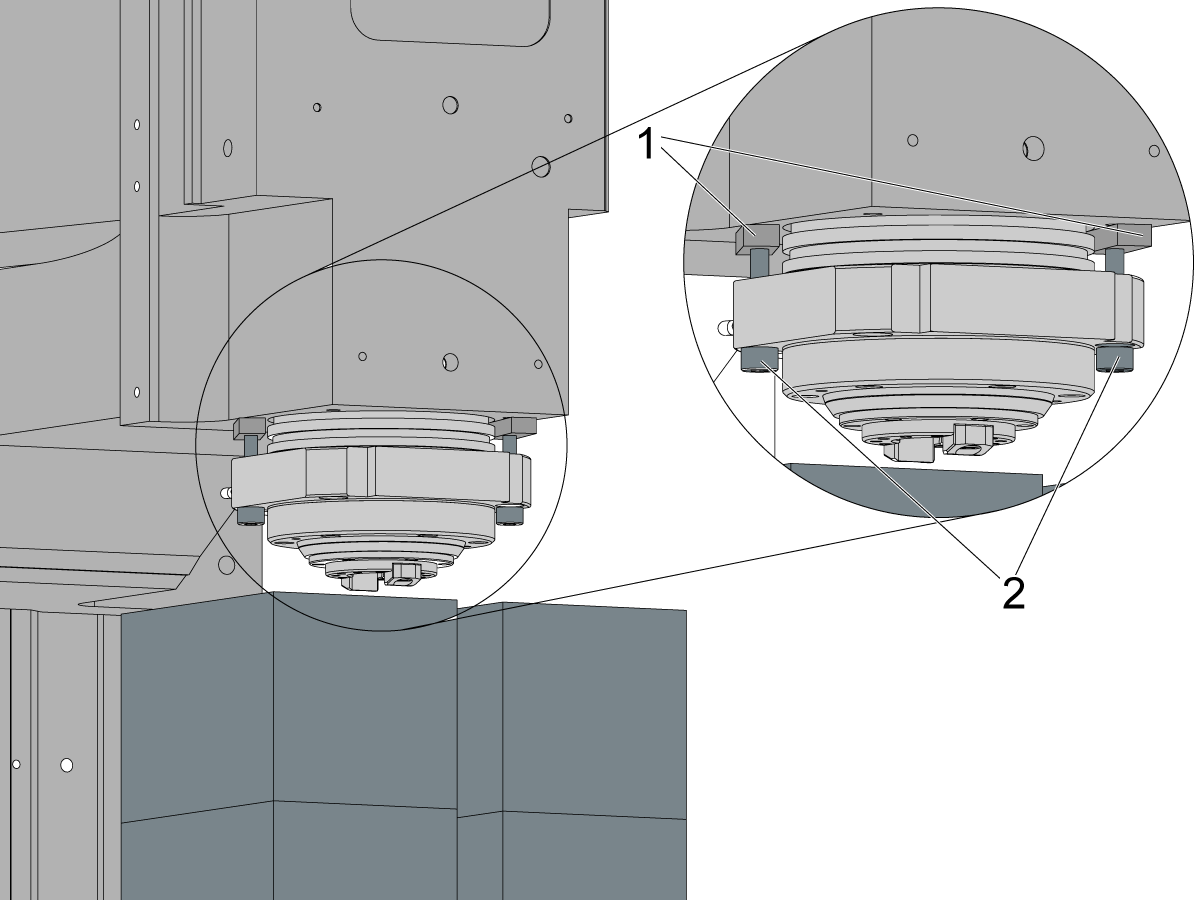
Use 2 of the screws [1] removed in the previous step to separate the spindle from the head casting.

Tighten the screws in the jacking holes (shown in previous step) until you start to see separation between the bottom face of the spindle head casting [2] and the top face of the spindle [3].

Note: As you separate the spindle, the spindle will start to hit the blocks placed on the table. Slowly jog the Z-axis up so that the jacking screws can continue to be tightened.

Important: Try to keep the bottom of the spindle about 1 inch from the blocks as you separate the spindle from the casting.

6

The screws used to jack the spindle free [1] will bottom out before there is enough separation between the casting and the spindle.

Once the screws bottom out, back them out so that a piece of material [2] can be placed in between the screw and the casting. This will allow the screw to separate the spindle even more.

Once the material is in place, start tightening the jacking screws again until they bottom out again.

At that point there should be enough of a gap between the spindle and casting so that the spindle can be firmly held in place.

7

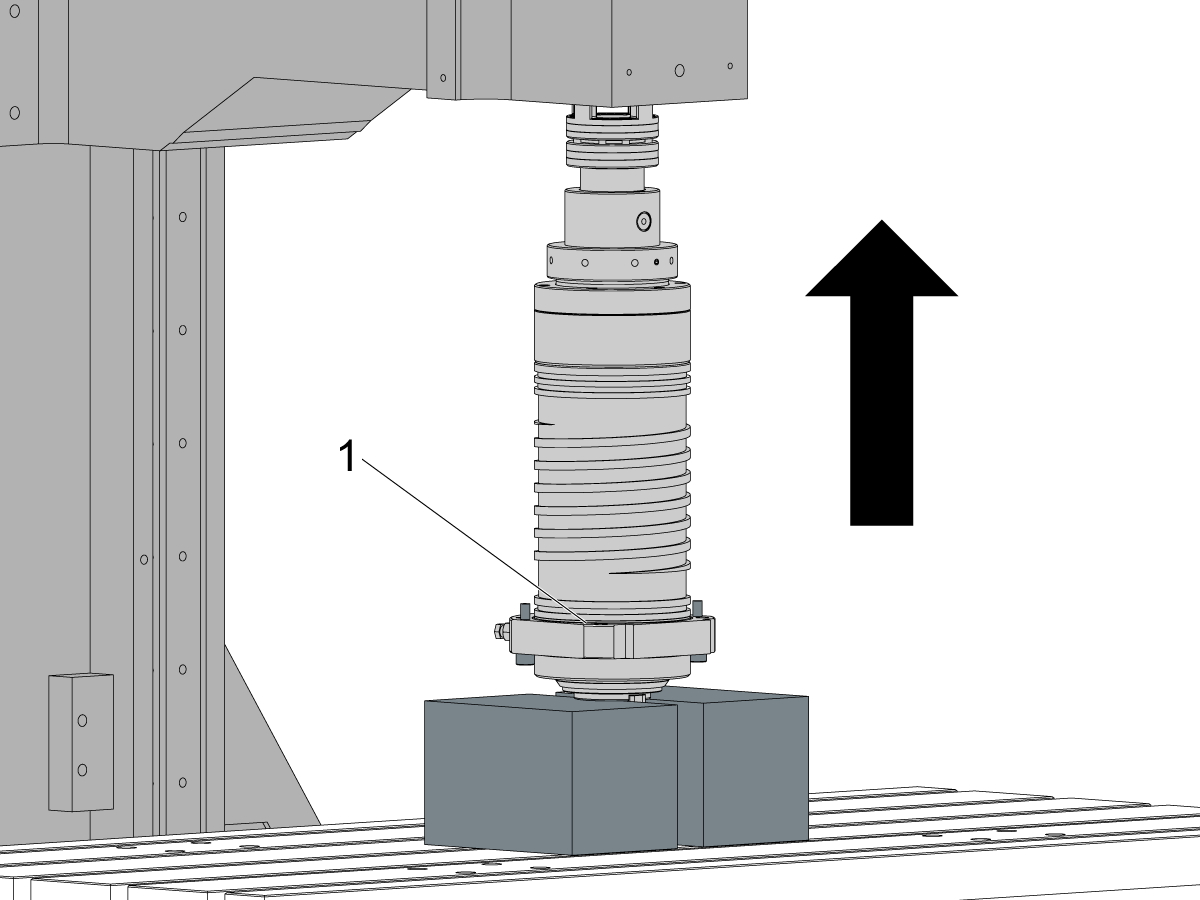
Pull the spindle down until it is resting on the blocks [1] placed on the table.

Then slowly jog the Z-axis up about 1" and then pull the spindle down to the blocks.

Repeat this process of incrementally jogging the Z-axis higher, and then pulling the spindle out more.

Keep an eye on the coupler between the spindle and the spindle motor. You should clear the motor end of the coupler after a few repetitions of this.

Note: As the spindle is pulled more out, you may start to reach the Z-axis zero position, limiting the ability to jog the head up. Change the height of the blocks on the table so that you can get the spindle free of the casting.

Note: The spindle assembly weighs around 40 lbs. It can be lifted in and out of the machine by hand.

Install New Spindle

1

Install the transfer tube into the new spindle. A transfer tube should come with the spindle.

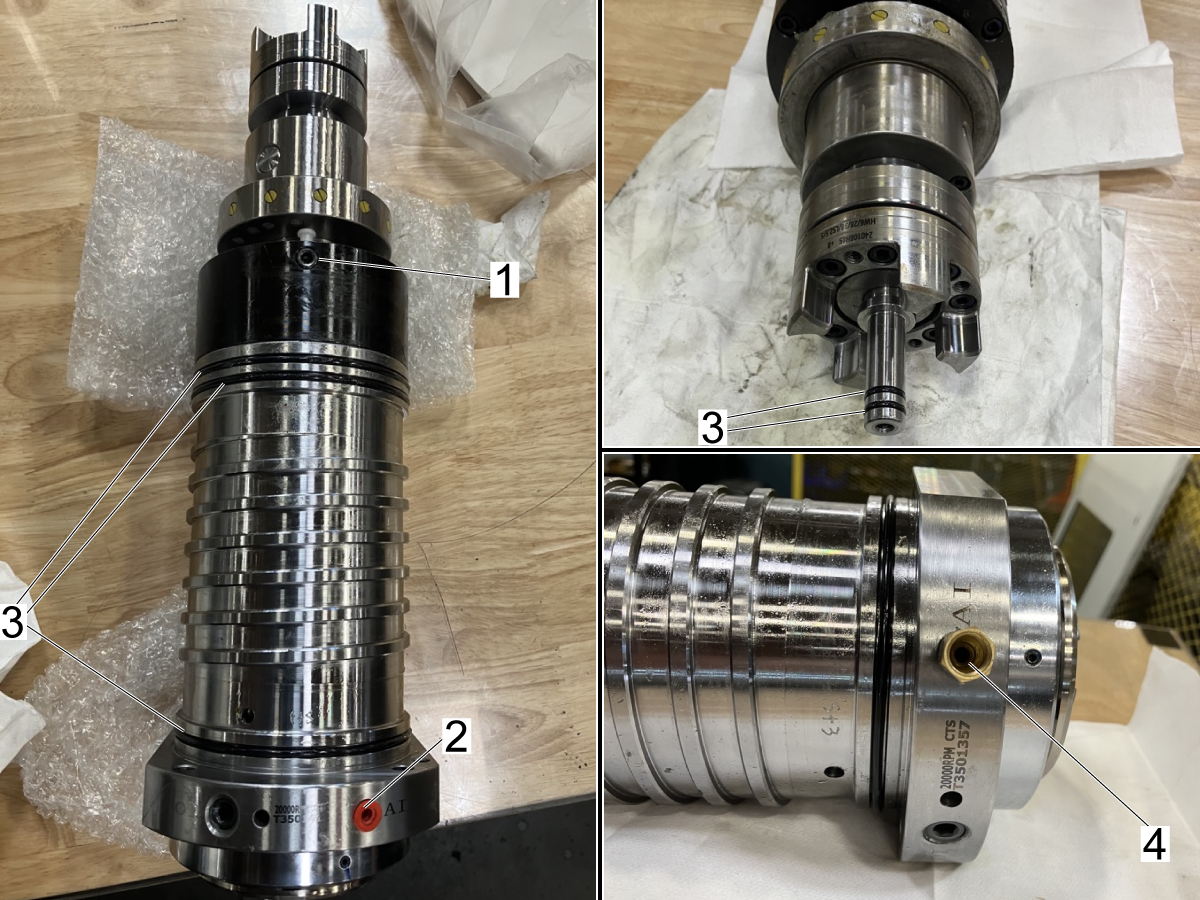
Make sure the transfer tube is fully seated in the spindle. Then put some silicon grease on the  O-rings on the transfer tube [3].

Inspect the new replacement spindle. Verify the following:

  • Make sure that all O-rings [3] are on the spindle/transfer tube and in good shape 
  • Make sure that there is a plug [1] located on the upper part of the spindle. 
  • Make sure that the red plug [2] on the bottom is there.

Remove the red plug from the bottom of the spindle [2] and insert the fitting [4] from the spindle being replaced. This will get connected to the hard line coming from the spindle head.

Note: The spindle assembly weighs around 40 lbs. It can be lifted in and out of the machine by hand.

2

Place the spindle back on the table under the bore in the spindle casting.

Slowly jog the Z-axis down so that the casting moves closer to the spindle.

Keep close watch of the spindle to make sure it is not hitting the spindle bore in the casting.  Make sure when you get to the largest diameter of the spindle that the casting [2] does not catch the edges of the spindle.

Important: Watch the Z-axis loads when jogging. If the load begins to change significantly then something is obstructing the spindle head. 

Note: As the spindle moves higher in the casting, use the front window [1] in the spindle head to keep an eye on the when the transfer tube [3] and coupler teeth [4] are getting close to the spindle motor coupler [5]. STOP Jogging when you get close to the motor coupler.

Important: Stop jogging before the transfer tube gets to the motor and go to the next step. It is possible to damage the spindle motor at this point.

3

Caution: The motor shaft may become misaligned if spindle installation is done incorrectly.

Before installing the spindle loosen the motor mounting bolts at least a half of an inch.

Note: the animation shows a 40T in-line spindle motor but the same process applies to the DC-1 spindle motor. Loosen the mounting bolts to ensure the coupler meshes right and doesn't damage the motor. If the motor begins to lift then you know the coupler is not aligned.

4

Once the motor bolts are loose you can jog the Z-axis down very slowly while watching the motor to see if it starts to lift. If you see it lift, jog the Z-axis back up and adjust the spindle coupler teeth.

Note: With the spindle face sitting on the blocks on the table, the spindle and coupler teeth can't be rotated. If you have two people, have one person lift the spindle at the bottom and have someone guide the coupler teeth into the spindle motor coupler.

Lifting the spindle by hand the last few inches reduces the risk of damaging the transfer tube or spindle motor.

Fasten the spindle to the head casting using the 4 mounting bolts [3] once the motor [1] and spindle [2] are coupled correctly.

 Torque the screws per Haas Torque Specifications.

5

Reconnect the line [1] to the fitting [2] on the back of the spindle.

Use an open ended wrench to tighten it.

6

Once the spindle is mounted to the casting, tighten the motor mounting bolts so that they are hand tight, and then back them off a few turns.

Run the spindle at 1000 RPM to align the spindle and motor.

In MDI run the program S1000 M03;

Let the spindle run for 1 minute and then snug the motor mounting bolts while the spindle is still running.

Note: When motors stops it will jolt to the side and misalign if not snugged down.

Stop the spindle.

Then torque the mounting bolts to hold the motor in position. Torque the screws per Haas Torque Specifications.

7

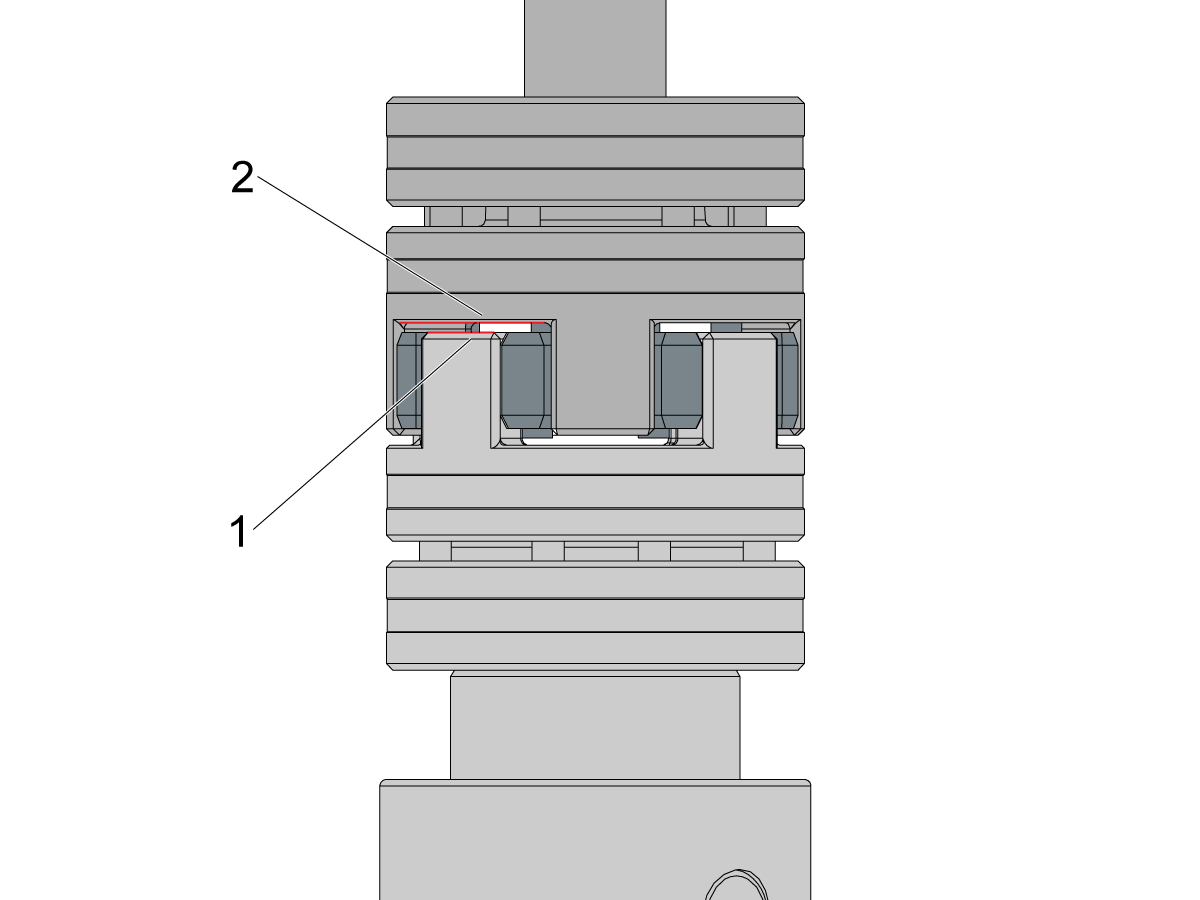
Check the gap between the spindle coupler teeth [1] and the motor side of the coupler [2].

Note: Before you check the gap, make sure that the motor mounting bolts and the spindle mounting bolts are torqued down.

The gap between the coupler should be 3.0mm. To verify the gap, use a feeler gauge to check the distance between the coupler. If you can fit a gauge bigger than 0.119" between the coupler (surfaces [1] and [2] in the image) then verify that all mounting bolts are torqued correctly.

Note: Contact Haas Service if the spindle coupler teeth bottom out on the motor coupler, or if there is an excessive gap between the motor and spindle parts of the coupler.

8

Perform the VMC - Spindle - Spindle Sweep procedure.

Once the spindle and motor are torqued down to specification, run the mill spindle vibration test per Mill - Spindle Vibration - Tolerances.

Make sure to run the spindle break-in program: Spindle - Break-in Programs - Lathe and Mill

Install the front panel on the spindle head casting as well as the front and back tool carousel covers.

Set Spindle Orientation Offset

1

Turn the spindle so that the spindle dogs are in line with the Y-axis.

Place a magbase on the table and use an indicator to check if the dogs are parallel with the Y-axis.

Indicate from the front dog [1] to the rear dog [2] by jogging the machine in the Y-axis. 

Note: Align the spindle so that the error when sweeping with an indicator is 0.001" or less. 

2

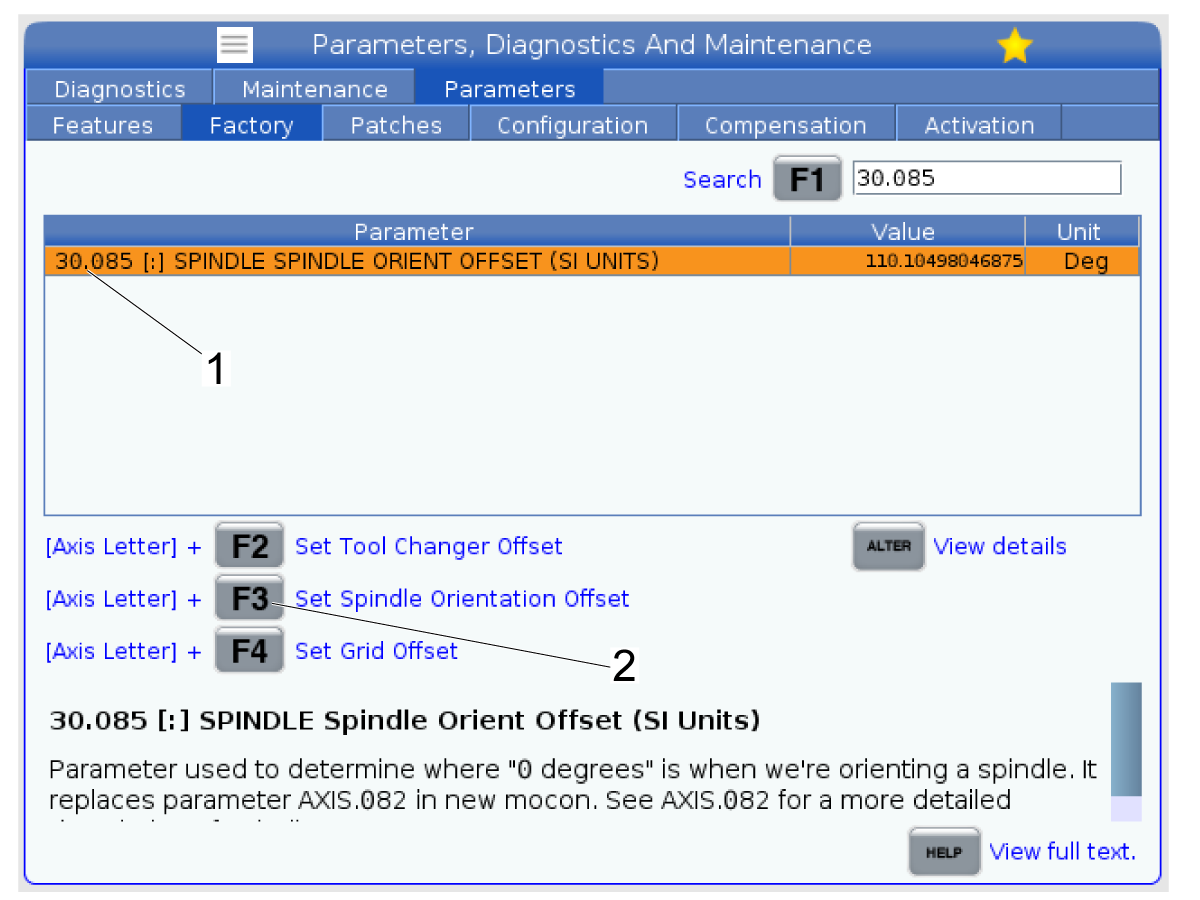
Once you have the spindle oriented so that there is less than 0.001" error between the dogs and the Y-axis, go to the Factory Settings tab on the Parameters window.

Search for parameter 30.085 [1] which is the Spindle Orientation Offset parameter.

Highlight the parameter as shown in the image.

Press [E-Stop] on the pendant.

Press [S] + [F3] [2] to set the spindle orientation offset to the current position.

The value should populate for the parameter.

3

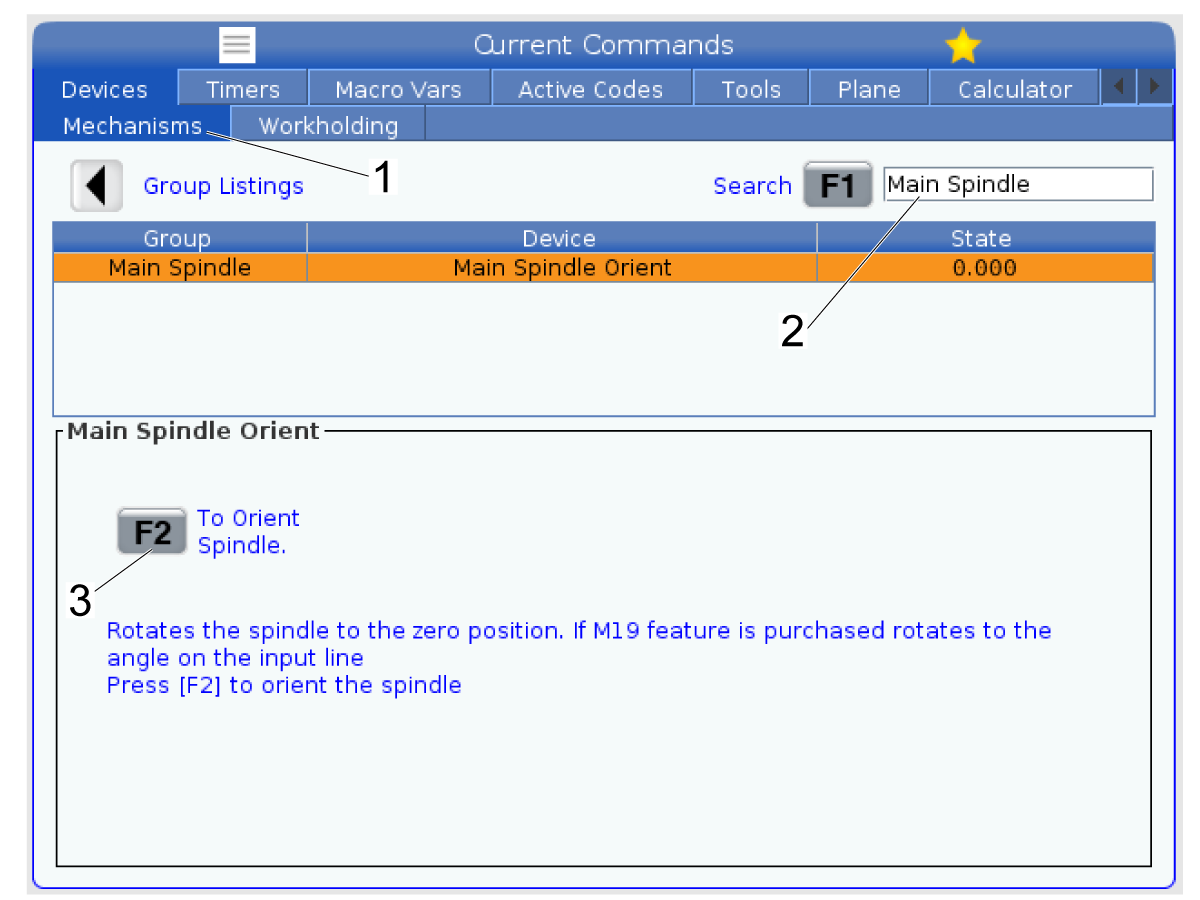
Go to Current Commands -> Devices -> Mechanisms [1] and then search for "Main Spindle" [2] and press [F1].

Press [F2] to orient the spindle so the offset position.

Repeat Step 1 and use the indicator to check whether the spindle orientation was set to the correct position. 

If the error between spindle dogs is greater than 0.001" then incrementally change the 30.085 parameter by 0.250 degrees or less until the orient position aligns the dogs parallel to the Y-axis of the machine.

Recently Viewed Items

You Have No Recently Viewed Items Yet

Feedback
Haas Logo

Haas Delivered Price

This price includes shipping cost, export and import duties, insurance, and any other expenses incurred during shipping to a location in France agreed with you as a buyer. No other mandatory costs can be added to the delivery of a Haas CNC Product.

KEEP UP WITH THE LATEST HAAS TIPS AND TECHNOLOGY...

Sign up now!   

HAAS TOOLING ACCEPTS THE FOLLOWING:

  • Service & Support
  • Owners
  • Request Service
  • Operator Manuals
  • Haas Parts
  • Rotary Repair Request
  • Pre-Install Guides
  • Shopping Tools
  • Build & Price a New Haas
  • Available Inventory
  • The Haas Price List
  • CNCA Financing
  • About Haas
  • Accessibility Statement
  • DNSH Statement
  • Export Compliance
  • Careers
  • Certifications & Safety
  • Contact Us
  • History
  • Terms & Conditions
  • Haas Tooling Terms & Conditions
  • Privacy
  • Warranty
  • Haas Community
  • Haas Certification Program
  • Haas Motorsports
  • Gene Haas Foundation
  • Haas Technical Education Community
  • Events
  • Join the Conversation
  • Facebook
  • X
  • Flickr
  • YouTube
  • LinkedIn
  • Instagram
  • TikTok
© 2026 Haas Automation, Inc – CNC Machine Tools
This site is protected by reCAPTCHA and the Google Privacy Policy and Terms of Service apply.

2800 Sturgis Rd., Oxnard, CA 93030
Toll Free: (888) 817-4446 / Fax: 805-278-8554