My Haas Welcome,
!
Haas Tooling MyHaas/HaasConnect Sign In Register Haas Tooling MyHaas/HaasConnect Sign Out Welcome, My Machines Latest Activity My Quotes My Account My Users Sign Out
Find Your Distributor
  1. Select Language
    1. English
    2. Deutsch
    3. Español - España
    4. Español - México
    5. Français
    6. Italiano
    7. Português
    8. Český
    9. Dansk
    10. Nederlands
    11. Magyar
    12. Polski
    13. Svenska
    14. Türkçe
    15. 中文
    16. Suomi
    17. Norsk
    18. الإنجليزية
    19. български
    20. Hrvatski
    21. Ελληνικά
    22. Română
    23. Slovenský
    24. Slovenščina
    25. 한국어
    26. 日本語
    27. Українська
  • machines Main Menu
    • Vertical Mills
      Vertical Mills
      Vertical Mills View All
      • Vertical Mills
      • VF Series
      • Universal Machines
      • VR Series
      • VP-5 Prismatic
      • Pallet-Changing VMCs
      • Mini Mills
      • Mold Machines
      • High-Speed Drill Centers
      • Drill/Tap/ Mill Series
      • Toolroom Mills
      • Pocket Mill
      • Compact Mills
      • Gantry Series
      • SR Sheet Routers
      • Extra-Large VMC
      • Double-Column Mills
      • 3+2 Positioning Machines
    • Multi-Axis Solutions
      Multi-Axis Solutions
      Multi-Axis Solutions View All
      • Multi-Axis Solutions
      • Y-Axis Lathes
      • 5-Axis Mills
    • Lathes
      Lathes
      Lathes View All
      • Lathes
      • ST Series
      • Dual-Spindle
      • Box Way Series
      • Toolroom Lathes
      • Chucker Lathe
      • Haas Bar Feeders
    • Horizontal Mills
      Horizontal Mills
      Horizontal Mills View All
      • Horizontal Mills
      • 50-Taper
      • 40-Taper
    • Rotaries & Indexers
      Rotaries & Indexers
      Rotaries & Indexers View All
      • Rotaries & Indexers
      • Rotary Tables
      • Indexers
      • 5-Axis Rotaries
      • Extra-Large Rotaries
    • Special Series
      Special Series
      Special Series View All
      • Special Series
      • EU_Series_Redirect
    • Automation Systems
      Automation Systems
      Automation Systems View All
      • Automation Systems
      • Mill Automation
      • Lathe Automation
      • Automatic Parts Loaders
      • Automation Models
    • Desktop Machines
      Desktop Machines
      Desktop Machines View All
      • Desktop Machines
      • Desktop Mill
      • Desktop Lathe
      • Control Simulator, Standard
      • Control Simulator, Premium
    • Shop Equipment
      Shop Equipment
      Shop Equipment View All
      • Shop Equipment
      • Knee Mill
      • Haas Manual Lathes
      • Haas Saws
    • Fabrication Machines
      Fabrication Machines
      Fabrication Machines View All
      • Fabrication Machines
      • Laser Cutting Machines
      • CNC Press Brakes
    • QUICK LINKS Special Series  Special Series 
      EU SERIES EU SERIES BUILD & PRICE | PRICE LIST BUILD & PRICE | PRICE LIST In-Stock Machines In-Stock Machines WHAT’S NEW WHAT’S NEW YOUR FIRST CNC YOUR FIRST CNC
      SHOPPING TOOLS
      • Build & Price a Haas
      • Price List
      • Available Inventory
      • CNCA Financing
      WANT TO TALK TO SOMEONE?

      A Haas Factory Outlet (HFO) can answer your questions, and walk you through your best options.

      CONTACT YOUR DISTRIBUTOR >
  • Options Main Menu
    • The Haas Control Value Option Packages
      Value Option Packages
      Value Option Packages View All
      • Value Option Packages
    • Product Image Spindles
      Spindles
      Spindles View All
      • Spindles
    • Product Image Tool Changers
      Tool Changers
      Tool Changers View All
      • Tool Changers
    • Product Image 4th- | 5th-Axis
      4th- | 5th-Axis
      4th- | 5th-Axis View All
      • 4th- | 5th-Axis
    • Product Image Turrets & Live Tooling
      Turrets & Live Tooling
      Turrets & Live Tooling View All
      • Turrets & Live Tooling
    • Product Image Probing
      Probing
      Probing View All
      • Probing
    • Haas Chip & Coolant Management Chip & Coolant Management
      Chip & Coolant Management
      Chip & Coolant Management View All
      • Chip & Coolant Management
    • The Haas Control The Haas Control
      The Haas Control
      The Haas Control View All
      • The Haas Control
    • Product Image Product Options
      Product Options
      Product Options View All
      • Product Options
    • Product Image Tooling & Fixturing
      Tooling & Fixturing
      Tooling & Fixturing View All
      • Tooling & Fixturing
    • Product Image Workholding
      Workholding
      Workholding View All
      • Workholding
    • Product Image 5-Axis Solutions
      5-Axis Solutions
      5-Axis Solutions View All
      • 5-Axis Solutions
      • 5 Easy Steps to 5-Axis
    • QUICK LINKS Special Series  Special Series 
      EU SERIES EU SERIES BUILD & PRICE | PRICE LIST BUILD & PRICE | PRICE LIST In-Stock Machines In-Stock Machines WHAT’S NEW WHAT’S NEW YOUR FIRST CNC YOUR FIRST CNC
      SHOPPING TOOLS
      • Build & Price a Haas
      • Price List
      • Available Inventory
      • CNCA Financing
      WANT TO TALK TO SOMEONE?

      A Haas Factory Outlet (HFO) can answer your questions, and walk you through your best options.

      CONTACT YOUR DISTRIBUTOR >
  • Why Haas Main Menu
      Discover the Haas Difference
    • Why Haas
    • MyHaas
    • Education Community
    • Industry 4.0
    • Haas Certification
    • Customer Testimonials
  • Service Main Menu
      Welcome to Haas Service
      SERVICE HOME Operator’s Manuals How-To Procedures Troubleshooting Guides Preventive Maintenance Haas Parts Haas Tooling Videos
  • Videos Main Menu
  • Main Menu
    • View All
    • View All
    • View All
    • View All
      • HTEC Curriculum Support
    • View All
      • Haas 10 kg Cobot Package
      • Cobot Kits
      • DC-1 Drill Center
      • CNC Sales News
      • Do More With Your Haas
    • View All
    • View All
      • contact-us-test
      • 4 - AUTOMATION SYSTEMS
      • Carousel-V2
      • expert test
      • Demo_Day_Trident-test
      • Link Test
      • image-sale-tag-test
      • article-list-test
      • Haas 25 kg Robot Package
    • View All
      • Choose Options
    • View All
    • View All
    • View All
    • View All
    • View All
      • calc-test
    • View All
    • QUICK LINKS Special Series  Special Series 
      EU SERIES EU SERIES BUILD & PRICE | PRICE LIST BUILD & PRICE | PRICE LIST In-Stock Machines In-Stock Machines WHAT’S NEW WHAT’S NEW YOUR FIRST CNC YOUR FIRST CNC
      SHOPPING TOOLS
      • Build & Price a Haas
      • Price List
      • Available Inventory
      • CNCA Financing
      WANT TO TALK TO SOMEONE?

      A Haas Factory Outlet (HFO) can answer your questions, and walk you through your best options.

      CONTACT YOUR DISTRIBUTOR >
  • Haas Tooling Main Menu
  • Haas Service Parts Main Menu

My Haas Welcome,
!
Haas Tooling MyHaas/HaasConnect Sign In Register Haas Tooling MyHaas/HaasConnect Sign Out Welcome, My Machines Latest Activity My Quotes My Account My Users Sign Out
Find Your Distributor
  1. Select Language
    1. English
    2. Deutsch
    3. Español - España
    4. Español - México
    5. Français
    6. Italiano
    7. Português
    8. Český
    9. Dansk
    10. Nederlands
    11. Magyar
    12. Polski
    13. Svenska
    14. Türkçe
    15. 中文
    16. Suomi
    17. Norsk
    18. الإنجليزية
    19. български
    20. Hrvatski
    21. Ελληνικά
    22. Română
    23. Slovenský
    24. Slovenščina
    25. 한국어
    26. 日本語
    27. Українська
×

Search Results

Web Pages

Images

    • <
    • 1
    • >

Lathe Spindle - Troubleshooting Guide - TG0093

Service Home Lathe Spindle - Troubleshooting Guide - TG0093

Lathe Spindle - Troubleshooting Guide - TG0093

Jump to Section Back to Top

4.2 Lathe Spindle - Troubleshooting

Recently Updated Last updated: 10/14/2025

Lathe Spindle - Troubleshooting Guide


TG0093

Revision A - 4/2025

Lathe Spindle Inspection Report

Download and fillout the lathe spindle Inspection Report Checklist below before replacing any parts.

Lathe Spindle - Service checklist

Section 1: Introduction

NOTE: Although this troubleshooting guide is for the main spindle many of the symptoms in the symptoms table can be used for the sub spindle. 

The most common problems with a lathe spindle are vibration, noise and surface finish. 

Vibration is caused by runout. Look first at your workholding and your material. Ensure the chuck body or collet nose runs true; that your jaws are bored correctly; that your material isn’t running out. If you are bar feeding make sure the liner fits the material properly. If you still have a problem check runout of the hydraulic closer, the brake disc and all adapters.

If you haven’t fixed noise by addressing vibration above then the most likely cause is the drive belt. Make sure tension is correct; that the belt is in good condition; that shaft alignment is good and the belt isn’t forced against a pulley flange. 

If you have a surface finish problem that hasn’t been solved by the above then check the application: speeds, feeds, tool tip alignment, coolant flow, etc. also check machine alignments. 

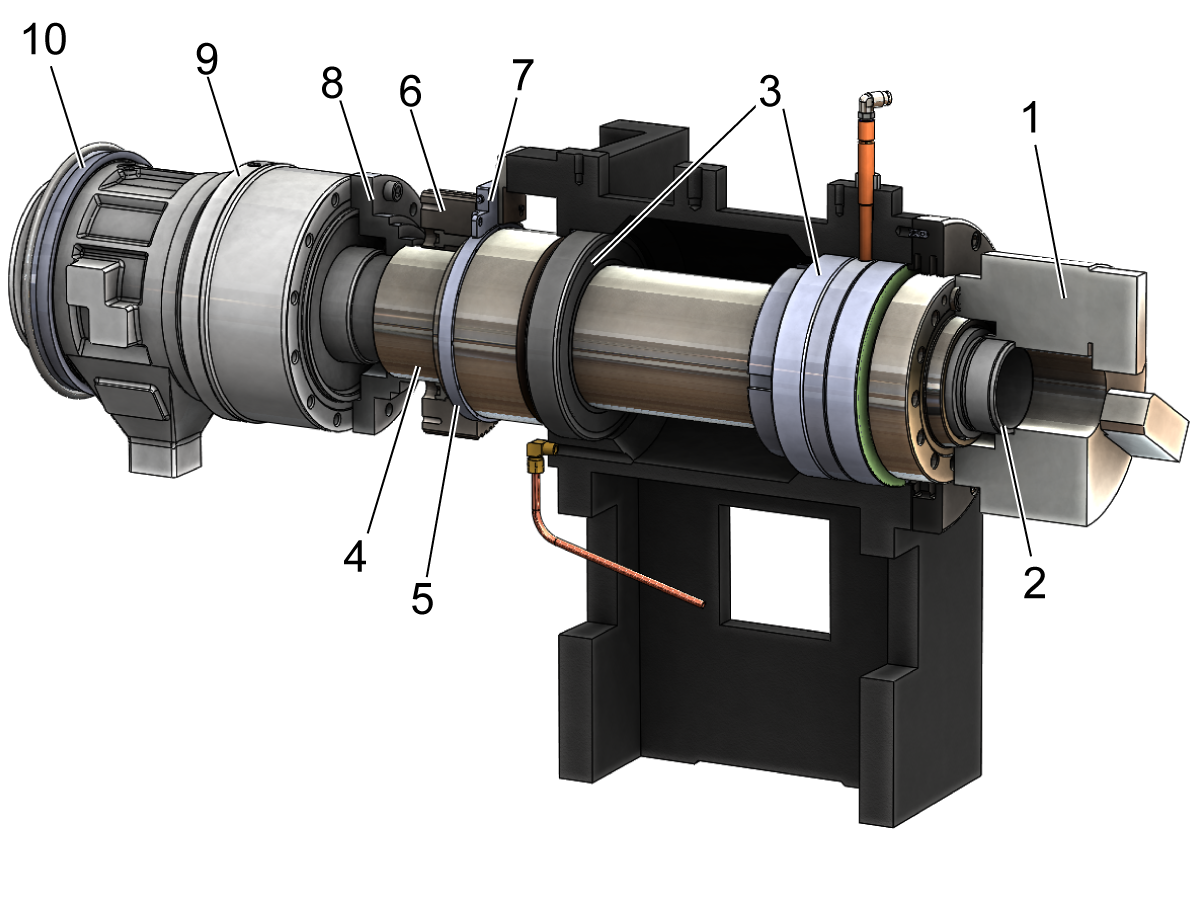
For more lathe spindle symptoms please view the troubleshooting table below. For reference, the spindle drivetrain consists of the following:

  1. Chuck or Collet
  2. Drawtube
  3. Bearings
  4. Spindle Shaft
  5. Non-Contact Encoder Ring
  6. Sprocket
  7. Non-Contact Encoder Read-Head
  8. Adapter
  9. Hydraulic Actuator
  10. Coolant Collector

Symptom Table

Symptom Possible Cause Corrective Action

Vibration

Alarm 966 Excessive Tool Imbalance

Workpiece runout Indicate in workpiece runout depending diameter and spindle speed
Long bar stock or liner adapters with a poor fit Do not run bar stock past the hydraulic union stop. Only use tight fit liner adapters (Big Bore). 
Big Bore Spindle Liner O-Rings do not center Liner to drawtube and union.

For the following Liner Kits replace both O-Rings with 93-3772. See Lathe - Spindle Liner O-ring - Replacement

  • LINER KIT 4.00 12
  • LINERKIT-4-ST40
Spindle drivetrain misalignment Verify each component is within specified runouts - see Section 2
Spindle speed is running in a resonance frequency of the machine Speed up or slow down the spindle by 10% until vibration or surface finish improves
Spindle imbalance Run a vibration analyzer test.  Balance out high vibration using set screws in the union adapter - see Section 3
Motor vibration Run the motor without the belt to isolate motor vibration from spindle vibration
Damaged spindle bearings Run a vibration analyzer test to determine bearing health - See Section 6.  Test the spindle lubrication system - See Section 5 and the  Spindle Minimum Lubrication System Troubleshooting Guide
Encoder feedback Test the spindle to see if vibration goes away when you cut machine power and allow the spindle to coast to a stop
Spindle retaining ring alignment Sweep with a .001" shim between the spindle shaft nose and ring to check gap - adjust ring if needed
The Main Processor PCB standoff hardware is loose or the Control Cabinet mounting hardware is loose or causing a bind.   Tighten the Main Processor PCB standoff hardware. Loosen the Control Cabinet mounting hardware, snug the hardware, then torque down the hardware.

ST-35Y only:

Machine missing spindle motor stabilizer.

See Lathe - Spindle Motor Stabilizer - Installation to add stabilizer.
Bearing Noise Ball bearings and cage sound like they are skating around the races - caused by too little pre-load Run a vibration analyzer test to determine bearing health.  Inspect the spindle retaining ring step (that presses on the outer bearing race) for permanent deformation - see Section 6
High pitched whining noise - caused by too much pre-load Run a vibration analyser test to determine bearing health - see Section 6
Clicking noise - caused by a brinelling of the bearing which occurs when there is an impact to the spindle Run a vibration analyzer test to determine bearing health - see Section 6
Belt Noise Tooth wear, tensile break, incorrect belt tension See Drive Belt Troubleshooting Guide and Section 4

Alarm 9918 Serial Encoder Fault

Alarm 9959 Serial Encoder Cable Fault

Alarm 4.103 Spindle Axis Servo Error too Large

Encoder gap incorrect See Spindle Encoder Troubleshooting Guide and Section 7
Encoder ring damaged
Encoder cable damaged or loose
Alarm 174 Tool Load Exceeded Insert worn Inspect and replace insert if necessary
Tool load limit incorrect View the Advanced Tool Management (ATM) tab to adjust user defined tool load limit
Aggressive feedrates Adjust your program for a more conservative feedrate
Alarm 4.116 S (SPINDLE) SPINDLE ORIENTATION FAULT The workholding has been replaced and the spindle load parameter is not set correctly Follow Setting 413 Procedure to set the Main Spindle Load Type parameter correctly. 
Alarm 12.116 SS (SECONDARY SPINDLE) ORIENTATION FAULT Alarm happens when the sub-spindle to orient with M119 Check on the mocon tab channel 14 [SS] home switch and move the spindle slowly by hand and verify the bit changes, if it does not check if the home switch or trip flag works properly. 
The spindle orient position changes after powering down the machine and powering back up. At power up if the spindle home switch is located exactly in the middle of the two encoder Z pulse locations. Depending on the first spindle rotation direction after booting up the machine, the spindle may pick different encoder Z pulse as a reference for the spindle Z pulse which can cause the spindle orient to be inconsistent. Update the machine to the latest software and configurations.
  • Non-repeatable spindle orients between power cycles.
  • C-Axis engagement alarms.
  • Re-running taps and threads between power cycles.

ST-15/20/25 lathes and variants built from 8/1/2022 switched the 5.6" Non-Contact Encoder mounted on the spindle to a 3" NCE on the motor output shaft. A home switch was added to the spindle to ensure repeatable spindle orientation at power up. This home switch was not enabled by parameters for these machines.

The home switch was also not enabled by parameters for all NGC ST-50/55 machines built 1/1/2021 and later.

Update the machine to the latest software version and download and load the latest configuration files from the service portal.

HSG-A  02-7-2023

The machine experiences issues during spindle deceleration, spindle orientation with M19, the C-axis engaging, or the following alarms after changing to a new job with a large or small workholding or a large or small part. Alarms: 650 DC BUS OVER VOLTAGE, 4.994 S (SPINDLE) AMPLIFIER OVERLOAD, 4.116 S (SPINDLE) SPINDLE ORIENTATION FAULT, 9989 C AXIS FAILED TO ENGAGE. The machine parameters are not tuned for the part or workholding installed.

Machines with Alarms: 650 DC Bus Over Voltage / 4.994 S see Section 8.

Follow Setting 413 Procedure to set the Main Spindle Load Type parameter correctly.

Setting 413 is available for machines with the New Mocon enabled and with software version 100.21.000.1111 or greater. The New Mocon, is a Motion Control algorithm that uses more parameters to better control the axis of the machine. Press Diagnostic and navigate to the System tab. The Mocon version will be in the Software section. Mocon version 1.16  .S. is the New Mocon. If the Mocon Version is 1.16 or 1.16  .K, then you have the old Mocon Version.

Note: At this time we are not updating machines to New Mocon in the field.

Alarm 4.108 S (SPINDLE) AXIS SERVO OVERLOAD
A large amount of constant surface speed (CSS) can cause acceleration/deceleration. That constant acceleration/deceleration causes the load meter to go above 100%. If the load meter remains above 100% for too long, you will get this alarm.  This can also happen if the average load over time is above 100%. Change the roughing constant surface speed (CSS) to a fixed spindle speed.
Alarm 12.9107 SS (2ND SPINDLE) CHECK YOUR HOME SWITCH Loss of ability to command finishing spindle on ST lathes. Verify that sub-spindle home switch is operational. Refer to Finishing Spindle section below.

Section 2: Spindle Drivetrain Alignment

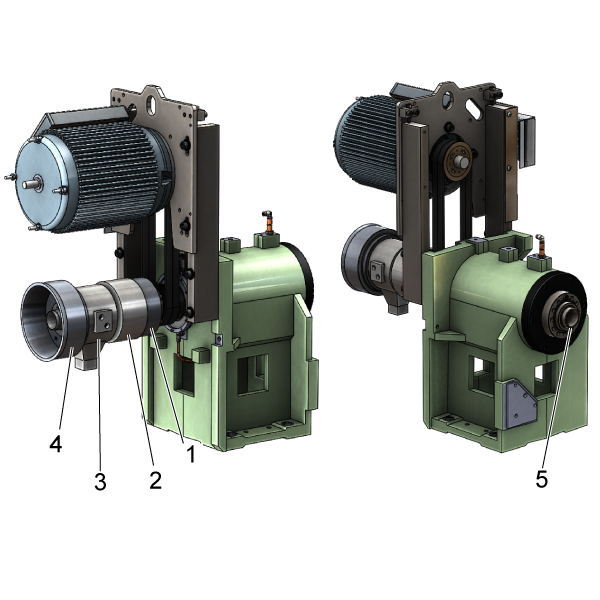
 Note: For illustration purposes the chuck is removed. The chuck should not be removed to perform the following checks.
 
Check the runout at the following locations and adjust if necessary:
  • Radial runout of the hydraulic actuator rotary body on the steel strip [2] - NTE (not to exceed) 0.0005" TIR (total indicated runout)
  • Radial runout of the hydraulic actuator adapter on the inner diameter bore [1] - NTE  0.001"TIR 
  • Radial runout of the inner diameter of the drawtube [5]
    •  If more than 0.010" TIR this could indicate that the drawtube is not perpendicular to the bore of the hydraulic actuator piston
    • This causes excessive vibration and the drawtube would need to be re-installed
  • Measure the deflection on the side of the hydraulic actuator static body [3] or the coolant collector [4] while rotating the spindle. If more than .0015" TIR is measured, this will induce excessive vibration. You can attempt to loosen the screws that secure the actuator to the adaptor plate and lightly tap the rotary body of the actuator until you reduce the deflection runout on the static body. Use the vibration analyzer to see how this changed the vibration displacement and velocity plots.
  • Check the gap between the retaining ring (front spindle cap) and the spindle shaft nose using a 0.001" shim. To Align:
    • Break loose the retaining ring bolts
    • Tap the retaining ring to set the gap to 0.001"
    • Gradually tighten the bolts in a star pattern until they are torqued per the Haas Torque Chart
    • Verify the gap using a 0.001" shim

Section 3: Spindle Balancing

Lathe spindle balancing is applicable to re-boot ST machines. Use the Octavis Vibrational Analyzer program to view the displacement plot as you attempt to balance the spindle. If you do not have set screws to balance the spindle you can order kit 93-2867 .

  • Vibration Analysis - Ethernet Interface
  • Vibration Analysis - RS-232 Interface

There are balancing holes provided on the actuator adapter [1]. The goal is to make the displacement spike the lowest possible value at whichever speed the test is being run at.

  • If the Displacement spike decreases when a weight is added, then continue to increase the amount of weight inserted into the hole until the spike gets to the lowest possible value. Check that moving the weight or adding weight to the surrounding holes does not lower the spike as well.
  • If the Displacement spike increases, then remove weight and move to the next balancing hole on the union adapter until the Displacement spike reaches the lowest possible value. Experiment with small and large weights to get the best results.

Section 4: Belt Noise

Inspect the condition and tension of the spindle drive belts. A belt that is too tight or too loose will induce undesirable vibration. ST-30 NGC gearbox machines with prematurely worn belts will need the ST-30 Gearbox Non-Contact Encoder Upgrade Kit

Refer to the Drive Belts Troubleshooting Guide for more information.

Section 5: Lubrication System

Verify the spindle is getting adequate lubrication by completing a bottle test

  • Insufficient oil will cause premature bearing failure that will induce vibration
  • Excessive amount of oil will cause the bearings to overheat and prematurely fail

Refer to the Lubrication System Troubleshooting links below:

  • Mechanical Bijur Lube Pump - Troubleshooting Guide
  • Spindle Minimum Lubrication System - Troubleshooting Guide

Section 6: Bearing Noise

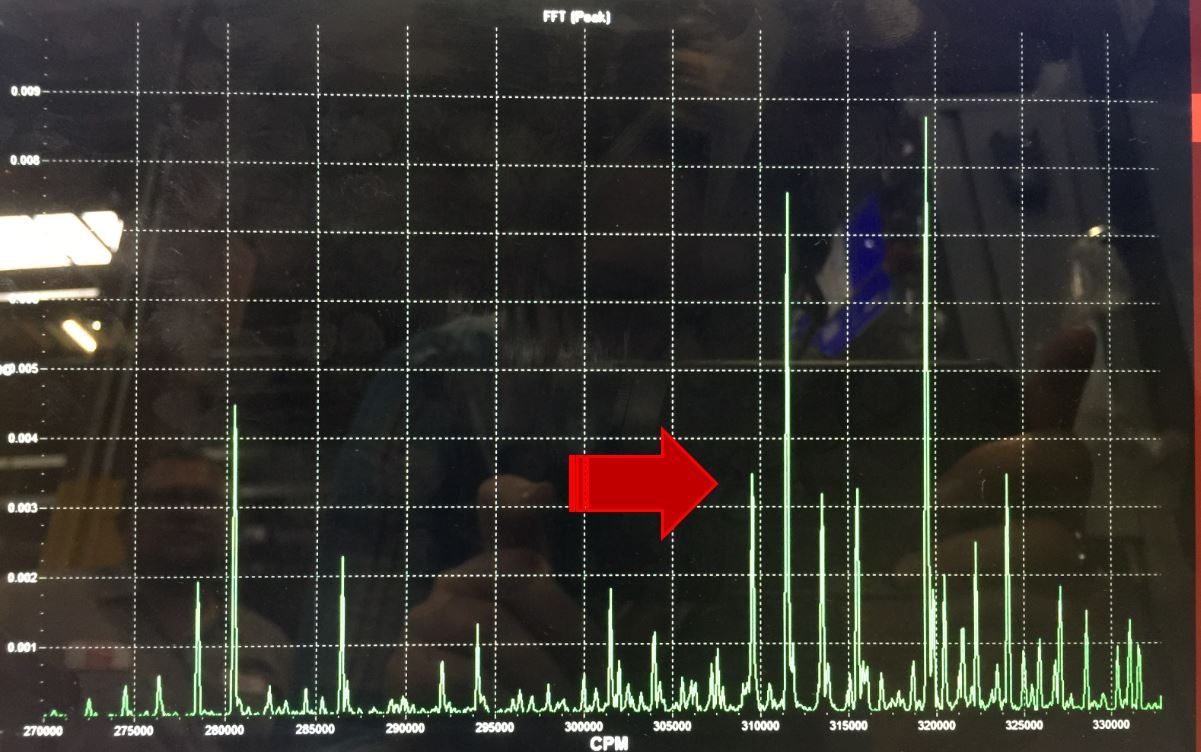
Use the Octavis Vibration Analyzer to monitor bearing health.  Place the accelerometer on the side on the spindle head retaining ring or motor mount.

  • Run a vibration test throughout the machine's entire RPM range while taking note of the following:
    • Cage rattle - sounds like the ball bearings are skating on the races or the cage is rattling - [Velocity Plot 1]
    • High pitched squeal or screech caused by a ball flaw or damaged race- [Velocity Plot 2]
    • If you encounter an RPM where the machine makes noise, check the velocity plots for signs of bearing damage or cage rattle
    • Harmonic nodes where the machine displacement is amplified - these look like sudden increased in value spikes on the displacement plot.  Do these harmonic nodes correlate to the RPM where the machine is vibrating? If so - the machine is struggling with a resonant frequency.
  • If you note any signs of bearing damage, perform the following checks to verify the mechanical soundness of the spindle:
    • Check the machine history for any signs of a machine crash
    • Check the fore and aft movement of the spindle with an indicator on the spindle nose.  The movement should be less than 0.0005" if pushing by hand and the indicator should return to zero within 0.0001"
    • Check the axial and radial runout of the spindle nose.  Runout should be less than 0.0005" TIR
  • Corrective action includes:
    • Attempting to increase or decrease spindle speed in 10% intervals to reduce the affect of resonant frequencies
    • Balancing the spindle at the speed in which the owner most uses the spindle to reduce the displacement spike and reduce noise seen on the velocity plots
    • Verifying the spindle receives adequate oil (Section 5)
    • Check machine level and verify the machine is not too high up on the leveling feet
    • Check the step on the spindle retainer to see if it has permanent deformation.  The retainer must be removed to perform this check.
  • If nothing reduces vibration then the spindle may be at the end of its life and need to be replaced.  Contact Haas Service for approval if within warranty.

Section 7: Motor Encoder Feedback

The Haas spindle drive system is a Closed Loop System and requires continuous feedback from the encoder to precisely control the spindle speed via the motor. Inadequate encoder feedback could cause vibration and noise in the spindle drivetrain. Test the encoder feedback by turning the power to the machine off while running the spindle and let the spindle coast. If the vibration goes away when power is off, then troubleshoot the Encoder / Encoder belt / Wye-Delta Contactor / or Vector Drive.

  • If the machine is equipped with the non-contact spindle encoder, then check the read head alignment with the provided shim (incorrect read head alignment could cause unreliable feedback).

For Encoder troubleshooting information refer to the Spindle Encoder - Troubleshooting Guide.

For Vector drive troubleshooting information refer to the Vector Drive - Troubleshooting Guide.

For Belt troubleshooting information refer to the Drive Belts - Troubleshooting Guide.

Section 8: Lathe Spindle Inertia Load Type Setting

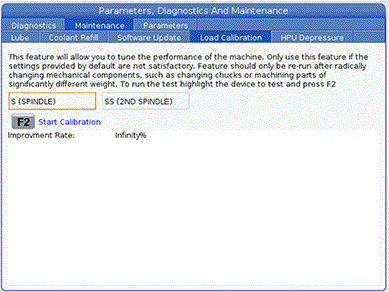
Machines that experience alarm 650 / Alarm 4.994 will need to do the following:

  1. Remove the chuck from the lathe
  2. Run the load calibration
  3. Take an error report and provide it to Haas Service

Note: Refer to the Lathe - Spindle Inertia Load Type Setting for information regarding the load calibration. 

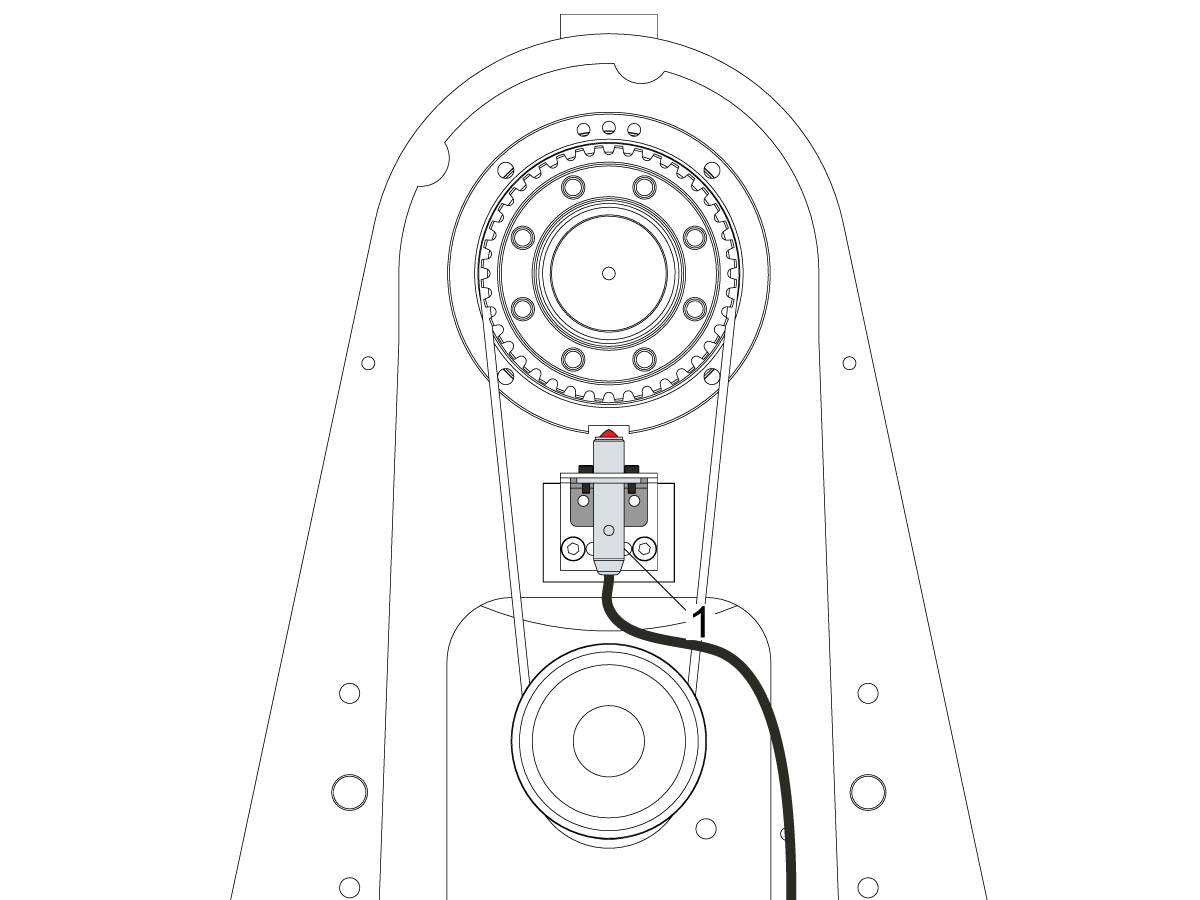
Finishing Spindle : Alarm 12.9107

Haas Finishing spindles used on ST series machines use a home switch unlike secondary spindle in DS series lathes.

Remove the sheet metal enclosure and examine functionality of home switch [1].

Refer to Proximity Sensor - Troubleshooting Guide for more detail.

Setting 413 – Main Spindle Load Type

Setting 413 is available for machines with the New Mocon enabled and with software version 100.21.000.1111 or greater. The New Mocon, is a Motion Control algorithm that uses more parameters to better control the axis of the machine. Press Diagnostic and navigate to the System tab. The Mocon version will be in the Software section. Mocon version 1.16  .S. is the New Mocon. If the Mocon Version is 1.16 or 1.16  .K, then you have the old Mocon Version.

Note: At this time we are not updating machines to New Mocon in the field.

Recently Viewed Items

You Have No Recently Viewed Items Yet

Feedback
Haas Logo

Haas Delivered Price

This price includes shipping cost, export and import duties, insurance, and any other expenses incurred during shipping to a location in France agreed with you as a buyer. No other mandatory costs can be added to the delivery of a Haas CNC Product.

KEEP UP WITH THE LATEST HAAS TIPS AND TECHNOLOGY...

Sign up now!   

HAAS TOOLING ACCEPTS THE FOLLOWING:

  • Service & Support
  • Owners
  • Request Service
  • Operator Manuals
  • Haas Parts
  • Rotary Repair Request
  • Pre-Install Guides
  • Shopping Tools
  • Build & Price a New Haas
  • Available Inventory
  • The Haas Price List
  • CNCA Financing
  • About Haas
  • Accessibility Statement
  • DNSH Statement
  • Export Compliance
  • Careers
  • Certifications & Safety
  • Contact Us
  • History
  • Terms & Conditions
  • Haas Tooling Terms & Conditions
  • Privacy
  • Warranty
  • Haas Community
  • Haas Certification Program
  • Haas Motorsports
  • Gene Haas Foundation
  • Haas Technical Education Community
  • Events
  • Join the Conversation
  • Facebook
  • X
  • Flickr
  • YouTube
  • LinkedIn
  • Instagram
  • TikTok
© 2026 Haas Automation, Inc – CNC Machine Tools

This site is protected by reCAPTCHA and the Google Privacy Policy and Terms of Service apply.

2800 Sturgis Rd., Oxnard, CA 93030
Toll Free: (888) 817-4446 / Fax: 805-278-8554