My Haas Welcome,
!
Haas Tooling MyHaas/HaasConnect Sign In Register Haas Tooling MyHaas/HaasConnect Sign Out Welcome, My Machines Latest Activity My Quotes My Account My Users Sign Out
Find Your Distributor
  1. Select Language
    1. English
    2. Deutsch
    3. Español - España
    4. Español - México
    5. Français
    6. Italiano
    7. Português
    8. Český
    9. Dansk
    10. Nederlands
    11. Magyar
    12. Polski
    13. Svenska
    14. Türkçe
    15. 中文
    16. Suomi
    17. Norsk
    18. الإنجليزية
    19. български
    20. Hrvatski
    21. Ελληνικά
    22. Română
    23. Slovenský
    24. Slovenščina
    25. 한국어
    26. 日本語
    27. Українська
  • machines Main Menu
    • Vertical Mills
      Vertical Mills
      Vertical Mills View All
      • Vertical Mills
      • VF Series
      • Universal Machines
      • VR Series
      • VP-5 Prismatic
      • Pallet-Changing VMCs
      • Mini Mills
      • Mold Machines
      • High-Speed Drill Centers
      • Drill/Tap/ Mill Series
      • Toolroom Mills
      • Pocket Mill
      • Compact Mills
      • Gantry Series
      • SR Sheet Routers
      • Extra-Large VMC
      • Double-Column Mills
      • 3+2 Positioning Machines
    • Multi-Axis Solutions
      Multi-Axis Solutions
      Multi-Axis Solutions View All
      • Multi-Axis Solutions
      • Y-Axis Lathes
      • 5-Axis Mills
    • Lathes
      Lathes
      Lathes View All
      • Lathes
      • ST Series
      • Dual-Spindle
      • Box Way Series
      • Toolroom Lathes
      • Chucker Lathe
      • Haas Bar Feeders
    • Horizontal Mills
      Horizontal Mills
      Horizontal Mills View All
      • Horizontal Mills
      • 50-Taper
      • 40-Taper
    • Rotaries & Indexers
      Rotaries & Indexers
      Rotaries & Indexers View All
      • Rotaries & Indexers
      • Rotary Tables
      • Indexers
      • 5-Axis Rotaries
      • Extra-Large Rotaries
    • Special Series
      Special Series
      Special Series View All
      • Special Series
      • EU_Series_Redirect
    • Automation Systems
      Automation Systems
      Automation Systems View All
      • Automation Systems
      • Mill Automation
      • Lathe Automation
      • Automatic Parts Loaders
      • Automation Models
    • Desktop Machines
      Desktop Machines
      Desktop Machines View All
      • Desktop Machines
      • Desktop Mill
      • Desktop Lathe
      • Control Simulator, Standard
      • Control Simulator, Premium
    • Shop Equipment
      Shop Equipment
      Shop Equipment View All
      • Shop Equipment
      • Knee Mill
      • Haas Manual Lathes
      • Haas Saws
    • Fabrication Machines
      Fabrication Machines
      Fabrication Machines View All
      • Fabrication Machines
      • Laser Cutting Machines
      • CNC Press Brakes
    • QUICK LINKS Special Series  Special Series 
      EU SERIES EU SERIES BUILD & PRICE | PRICE LIST BUILD & PRICE | PRICE LIST In-Stock Machines In-Stock Machines WHAT’S NEW WHAT’S NEW YOUR FIRST CNC YOUR FIRST CNC
      SHOPPING TOOLS
      • Build & Price a Haas
      • Price List
      • Available Inventory
      • CNCA Financing
      WANT TO TALK TO SOMEONE?

      A Haas Factory Outlet (HFO) can answer your questions, and walk you through your best options.

      CONTACT YOUR DISTRIBUTOR >
  • Options Main Menu
    • The Haas Control Value Option Packages
      Value Option Packages
      Value Option Packages View All
      • Value Option Packages
    • Product Image Spindles
      Spindles
      Spindles View All
      • Spindles
    • Product Image Tool Changers
      Tool Changers
      Tool Changers View All
      • Tool Changers
    • Product Image 4th- | 5th-Axis
      4th- | 5th-Axis
      4th- | 5th-Axis View All
      • 4th- | 5th-Axis
    • Product Image Turrets & Live Tooling
      Turrets & Live Tooling
      Turrets & Live Tooling View All
      • Turrets & Live Tooling
    • Product Image Probing
      Probing
      Probing View All
      • Probing
    • Haas Chip & Coolant Management Chip & Coolant Management
      Chip & Coolant Management
      Chip & Coolant Management View All
      • Chip & Coolant Management
    • The Haas Control The Haas Control
      The Haas Control
      The Haas Control View All
      • The Haas Control
    • Product Image Product Options
      Product Options
      Product Options View All
      • Product Options
    • Product Image Tooling & Fixturing
      Tooling & Fixturing
      Tooling & Fixturing View All
      • Tooling & Fixturing
    • Product Image Workholding
      Workholding
      Workholding View All
      • Workholding
    • Product Image 5-Axis Solutions
      5-Axis Solutions
      5-Axis Solutions View All
      • 5-Axis Solutions
      • 5 Easy Steps to 5-Axis
    • QUICK LINKS Special Series  Special Series 
      EU SERIES EU SERIES BUILD & PRICE | PRICE LIST BUILD & PRICE | PRICE LIST In-Stock Machines In-Stock Machines WHAT’S NEW WHAT’S NEW YOUR FIRST CNC YOUR FIRST CNC
      SHOPPING TOOLS
      • Build & Price a Haas
      • Price List
      • Available Inventory
      • CNCA Financing
      WANT TO TALK TO SOMEONE?

      A Haas Factory Outlet (HFO) can answer your questions, and walk you through your best options.

      CONTACT YOUR DISTRIBUTOR >
  • Why Haas Main Menu
      Discover the Haas Difference
    • Why Haas
    • MyHaas
    • Education Community
    • Industry 4.0
    • Haas Certification
    • Customer Testimonials
  • Service Main Menu
      Welcome to Haas Service
      SERVICE HOME Operator’s Manuals How-To Procedures Troubleshooting Guides Preventive Maintenance Haas Parts Haas Tooling Videos
  • Videos Main Menu
  • Main Menu
    • View All
    • View All
    • View All
    • View All
      • HTEC Curriculum Support
    • View All
      • Haas 10 kg Cobot Package
      • Cobot Kits
      • DC-1 Drill Center
      • CNC Sales News
      • Do More With Your Haas
    • View All
    • View All
      • contact-us-test
      • 4 - AUTOMATION SYSTEMS
      • Carousel-V2
      • expert test
      • Demo_Day_Trident-test
      • Link Test
      • image-sale-tag-test
      • article-list-test
      • Haas 25 kg Robot Package
    • View All
      • Choose Options
    • View All
    • View All
    • View All
    • View All
    • View All
      • calc-test
    • View All
    • QUICK LINKS Special Series  Special Series 
      EU SERIES EU SERIES BUILD & PRICE | PRICE LIST BUILD & PRICE | PRICE LIST In-Stock Machines In-Stock Machines WHAT’S NEW WHAT’S NEW YOUR FIRST CNC YOUR FIRST CNC
      SHOPPING TOOLS
      • Build & Price a Haas
      • Price List
      • Available Inventory
      • CNCA Financing
      WANT TO TALK TO SOMEONE?

      A Haas Factory Outlet (HFO) can answer your questions, and walk you through your best options.

      CONTACT YOUR DISTRIBUTOR >
  • Haas Tooling Main Menu
  • Haas Service Parts Main Menu

My Haas Welcome,
!
Haas Tooling MyHaas/HaasConnect Sign In Register Haas Tooling MyHaas/HaasConnect Sign Out Welcome, My Machines Latest Activity My Quotes My Account My Users Sign Out
Find Your Distributor
  1. Select Language
    1. English
    2. Deutsch
    3. Español - España
    4. Español - México
    5. Français
    6. Italiano
    7. Português
    8. Český
    9. Dansk
    10. Nederlands
    11. Magyar
    12. Polski
    13. Svenska
    14. Türkçe
    15. 中文
    16. Suomi
    17. Norsk
    18. الإنجليزية
    19. български
    20. Hrvatski
    21. Ελληνικά
    22. Română
    23. Slovenský
    24. Slovenščina
    25. 한국어
    26. 日本語
    27. Українська
×

Search Results

Web Pages

Images

    • <
    • 1
    • >

Hydraulic Power Unit - Troubleshooting Guide - TG0087

Service Home Hydraulic Power Unit - Troubleshooting Guide - TG0087

Hydraulic Power Unit - Troubleshooting Guide - TG0087

Jump to Section 1. Introduction 2. Symptom Table 3. Depressurizing HPU (2 steps) 4. Repressurize HPU (3 steps) 5. Oil Leaks 6. Solenoids 7. Settings 8. Air Leaks/Pickup Tube 9. Oil Pressure 10. Oil Level 11. Fans 12. Filters 13. Adjusting Valves 14. Coolant Contamination 15. Tank Reconfiguration 16. Electrical Phasing 17. Damaged Gauges 18. Plugs and O-rings 19. Electrical Diagram Back to Top
Recently Updated Last updated: 10/14/2025

Hydraulic Power Unit - Troubleshooting Guide


TG0087

Revision A - 7/2025

Download and fill out the hydraulic power unit Inspection Report Checklist below before replacing any parts.

Hydraulic Power Unit Inspection Report Checklist

Introduction

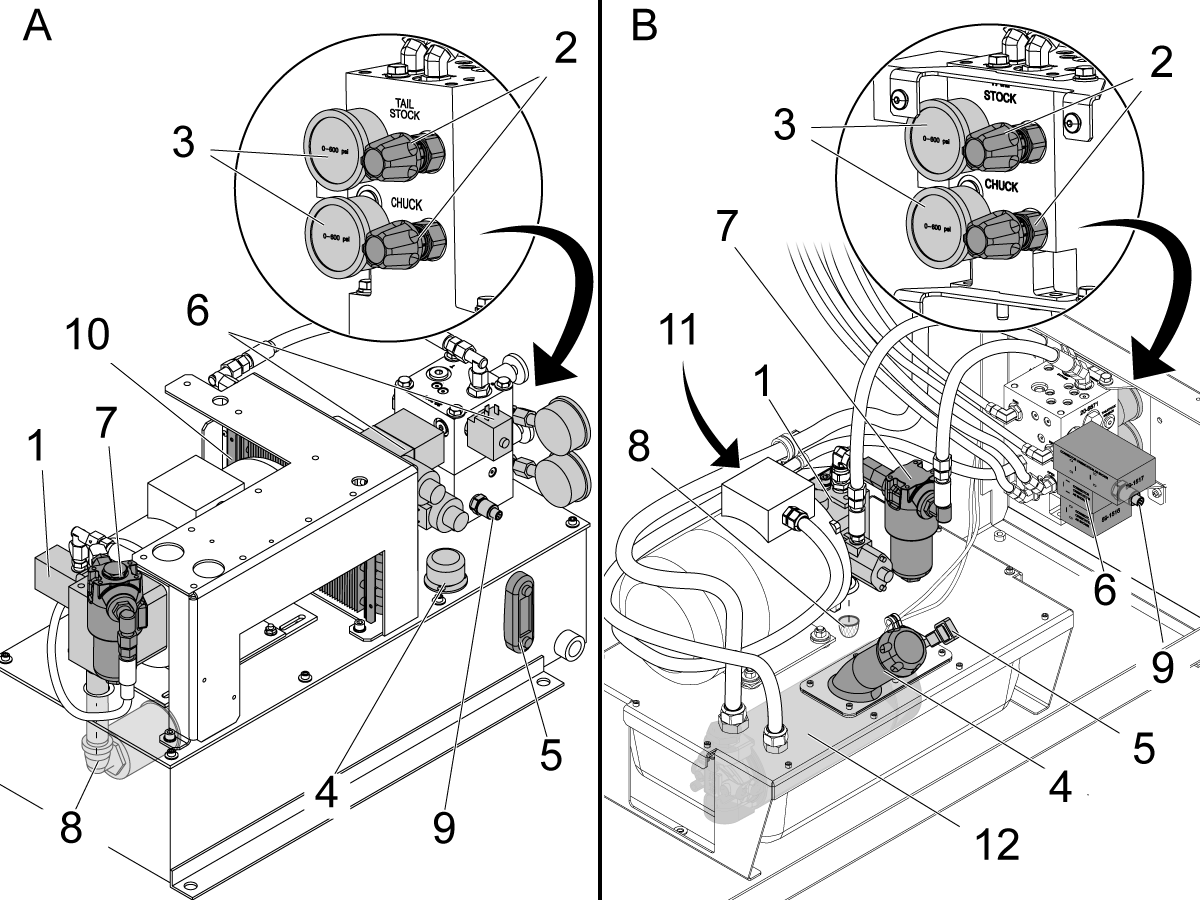
A: Haas HPU for most lathes made before 2016.

B: Haas HPU for most lathes made after 2016.

 Note: Not all lathes will have all of the components shown.

  1. Hydraulic pump
  2. Chuck and Tailstock pressure adjustment valves
  3. Chuck and Tailstock pressure gauges
  4. Oil fill cap
  5. Oil dip stick/Oil sight glass
  6. Solenoids
  7. Pressure filter
  8. Intake screen
  9. Pressure sensor
  10. Heat exchanger (can be mounted remotely, with or without fans)
  11. Cooling fans
  12. Return filter

Symptom Table

Symptom Possible Cause Corrective Action
Oil leaks The hoses are split or the fittings are loose. Tighten the fittings or replace the hoses.
The oil tank overflows. Diagnose the cause and drain the oil to the correct level.
Coolant contaminated the oil. Check the coolant collector for blockage.
Missing/damaged O-rings/ plugs on manifold assembly. Replace the missing/damaged O-rings/plug on the manifold assembly. Refill HPU to correct oil level. Refer to Plugs and O-rings section below.
Chuck or tailstock does not operate correctly. Or incorrect chuck or tailstock clamp force or pressure. The solenoid system does not operate correctly. Troubleshoot the system.
There are air bubbles in the oil. Reduce the clamp force, RPM, or duty cycle.
Check/tighten pickup tube. Refer to Air Leaks/Pickup Tube section below.
Re-configure the return and pick-up pipes.
The oil level is low. Fill the HPU to the correct oil level.
A filter is clogged. Check the pressure filter and the intake screen for clogs.
The adjustment valve is contaminated. Open the adjustment valve to purge the system.
Coolant contaminated the oil. Check the coolant collector for blockage.
Pressure fluctuates wildly. Pump oscillates and vibrates. Or noisy There are air bubbles in the oil. Reduce the clamp force, RPM, or duty cycle.
Check/tighten pickup tube. Refer to Air Leaks/Pickup Tube section below.
Re-configure the return and pick-up pipes.
The oil level is low. Fill the HPU to the correct oil level.
The fans do not operate. Make sure the fans operate.
Coolant contaminated the oil. Check the coolant collector for blockage.
Overheating. Check for signs of overheating.
A filter is clogged. Check the pressure filter and the intake screen for clogs.
The HPU pump needs adjustment. Contact your local Haas Factory Outlet. Refer to the Lathe - Hydraulic Power Unit - Nachi Pump Adjustment. Do not replace the pump.
Overheating The oil level is low. Fill the HPU to the correct oil level.
The fans do not operate. Make sure the fans operate.
There are air bubbles in the oil. Reduce the clamp force, RPM, or duty cycle.
Setting 216 is not enabled. Enable Setting 216.
A filter is clogged. Check the pressure filter and the intake screen for clogs.
Low or no hydraulic pressure. Incorrect power phasing - the pump motor is running backward. Check the phasing indicators and change the incoming power cables, if necessary.
The Tailstock pressure does not adjust. The Tailstock Rapid Solenoid is engaged on an ST-10/15. Make sure that the Tailstock Rapid solenoid is not engaged when you adjust the Tailstock pressure. Press [RESET] twice after you release [EMERGENCY STOP].
Pressure does not adjust or irregular changes in pressure. The pressure valve is bent or damaged. Replace the damaged adjustment valve. Refer to Adjusting Valves section below.
Damaged pressure gauge. Snubber screw has backed out. Remove the gauge, install the snubber set screw, install new gauge.
Lathe HPU circuit breaker trips intermittently during normal operation. 10A circuit breaker is too small. Replace the 10A breaker with a 15A breaker. Only replace the breaker after all other causes have been checked and eliminated. Refer to the PSUP PCB Troubleshooting Guide.
Tailstock pressure stays at max PSI. The adjustment valve does not change the pressure. The Tailstock Rapid Solenoid is engaged. Troubleshoot the Tailstock Rapid solenoid.
The pressure gauge comes up to pressure slowly or low pressure alarms are generated. This is due to cold oil and/or a lower pressure setting. 

Allow more time for the pressure gauge to adjust.

Note: There is a long set screw snubber in the manifold behind the gauge and a 10-micron sintered bronze snubber in the gauge. These components protect gauges from failing during large pressure changes and slow the pressure gauge’s response to pressure changes or coming up to pressure from idle. These pressure changes are happening quicker at the chuck or tailstock then at the gauge or gauge page. The higher the pressure and warmer the oil, the faster the gauges will respond to pressure changes.

Alarm 9505 or 9505.001 COMMANDED PRESSURE NOT REACHED The commanded device pressure was not reached within the specified timeout.  Check electrical connections to the pressure switch or motor or for failed hardware such as the pressure valve, hydraulic motor, or coupler. See the Programmable Pressure Adjustment Valve - Troubleshooting Guide for more information.

Depressurizing HPU

 Important: This only applies to machines that have access to this feature.

1

Zero return all Axis before depressurizing the HPU

Enter Service Mode.

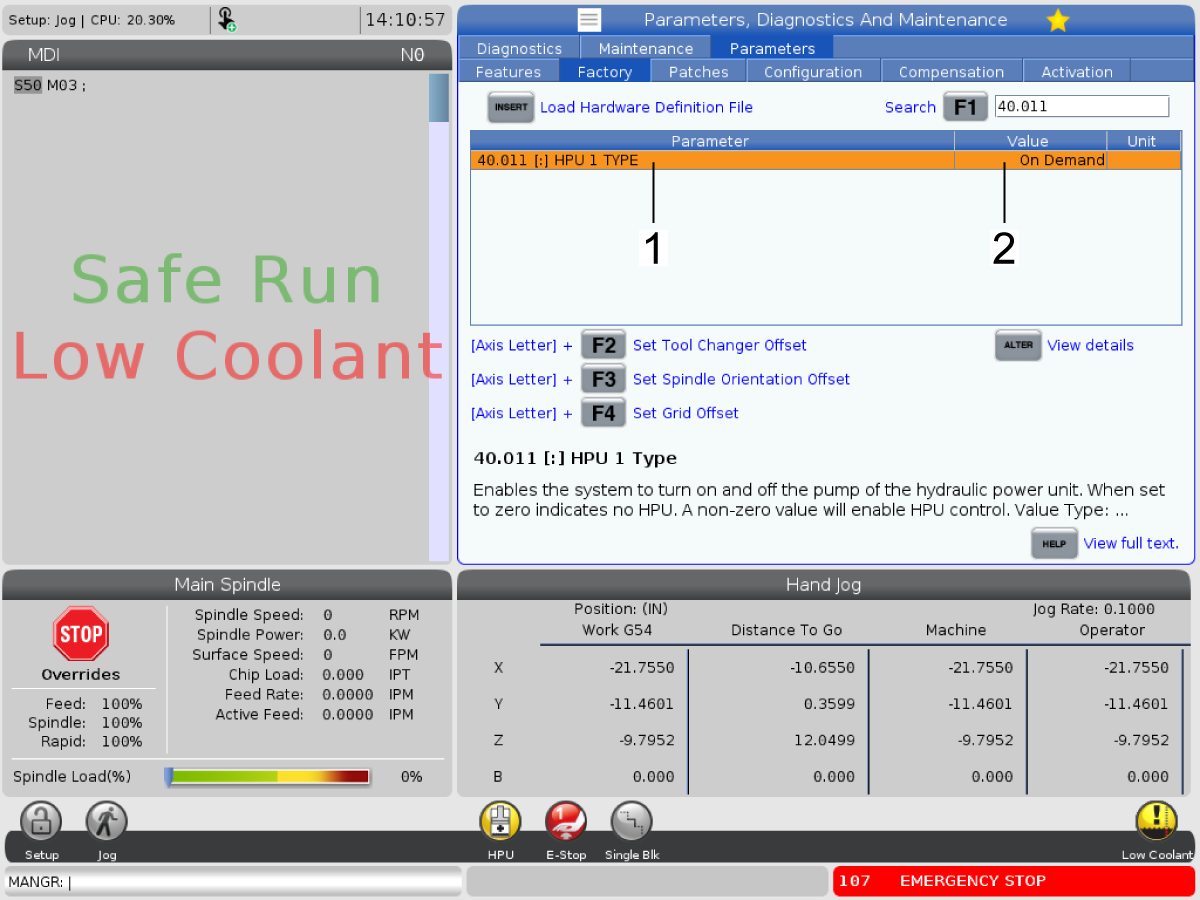
Press [DIAGNOSTIC] then navigate to the PARAMETERS tab then navigate to the FACTORY tab.

Set parameter 40.011 HPU 1 TYPE [1] to ON DEMAND [2]. 

 NOTE: Parameter 40.011 HPU 1 TYPE will need to be set to ON DEMAND in order for the depressurize page to work. If it is set to ALWAYS ON or DISABLED the HPU will not depressurize.

2

Depressurize the HPU using the HPU DEPRESSURE page.

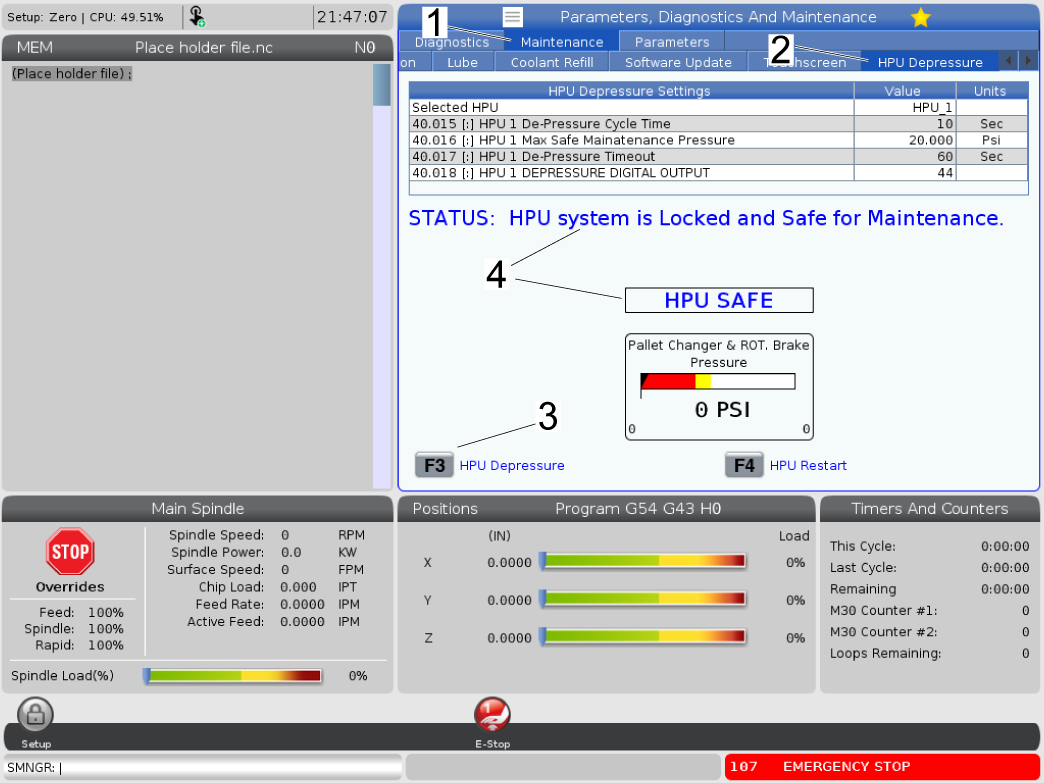
Press [DIAGNOSTIC] then navigate to the MAINTENANCE tab [1] then navigate to the HPU DEPRESSURE tab [2]. Press [F3] to depressurize the HPU [3] and the HPU should no longer have pressure in the lines. The text on the screen will display a status that the HPU is safe to use [4]

 NOTE: Parameter 40.011 HPU 1 TYPE will need to be set to ON DEMAND in order for the depressurize page to work. If it is set to ALWAYS ON or DISABLED the HPU will not depressurize.

Release the brake, press E-stop and place lock-out on the machine.

Repressurize HPU

 Important: This only applies to machines that have access to this feature.

1

Warning: Before repressurizing the HPU, you will need to loosen any bleed plugs found in machines with pallet changers or rotary brakes. Do not completely remove the plugs. Allow the air to bleed from the system by cycling the brake toggling between the axis of the pallet changer or rotary multiple times until there are no sounds or visible bubbles. Then tighten the plug(s).

Repressure the HPU using the HPU DEPRESSURE page.

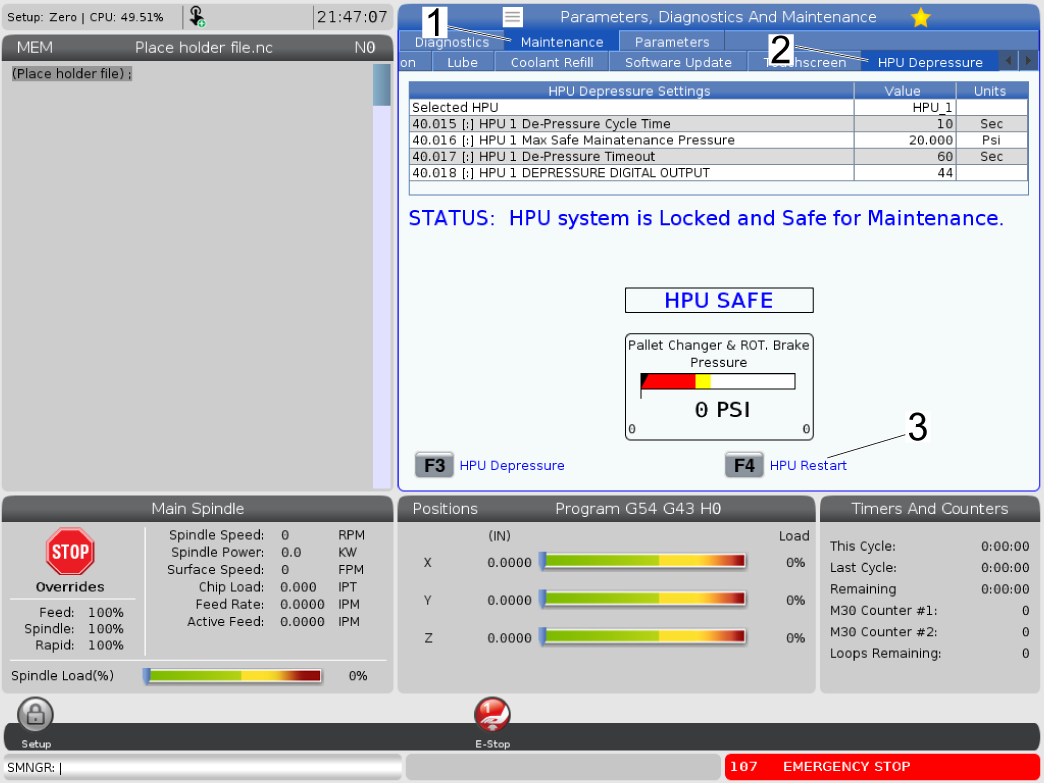
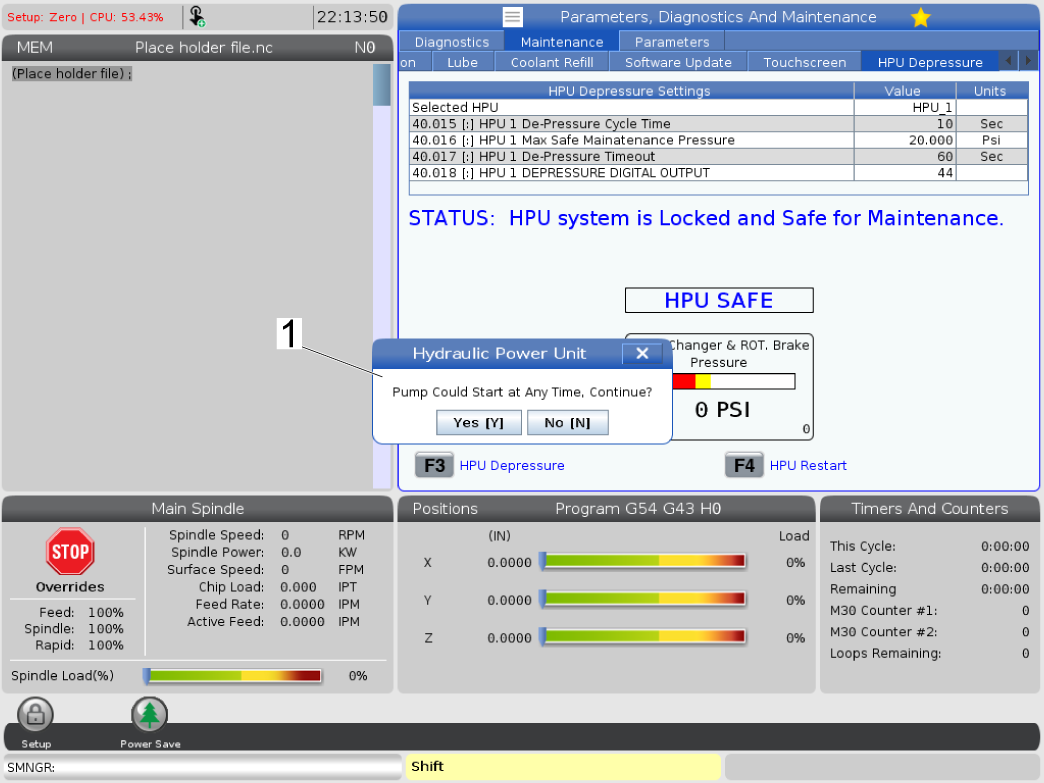
Press [DIAGNOSTIC] then navigate to the MAINTENANCE tab [1] then navigate to the HPU DEPRESSURE tab [2]. Press [F4] to restart the HPU [3].


2

A prompt will show up that the pump could start any time.

Press YES [Y] and the pump will restart.

3

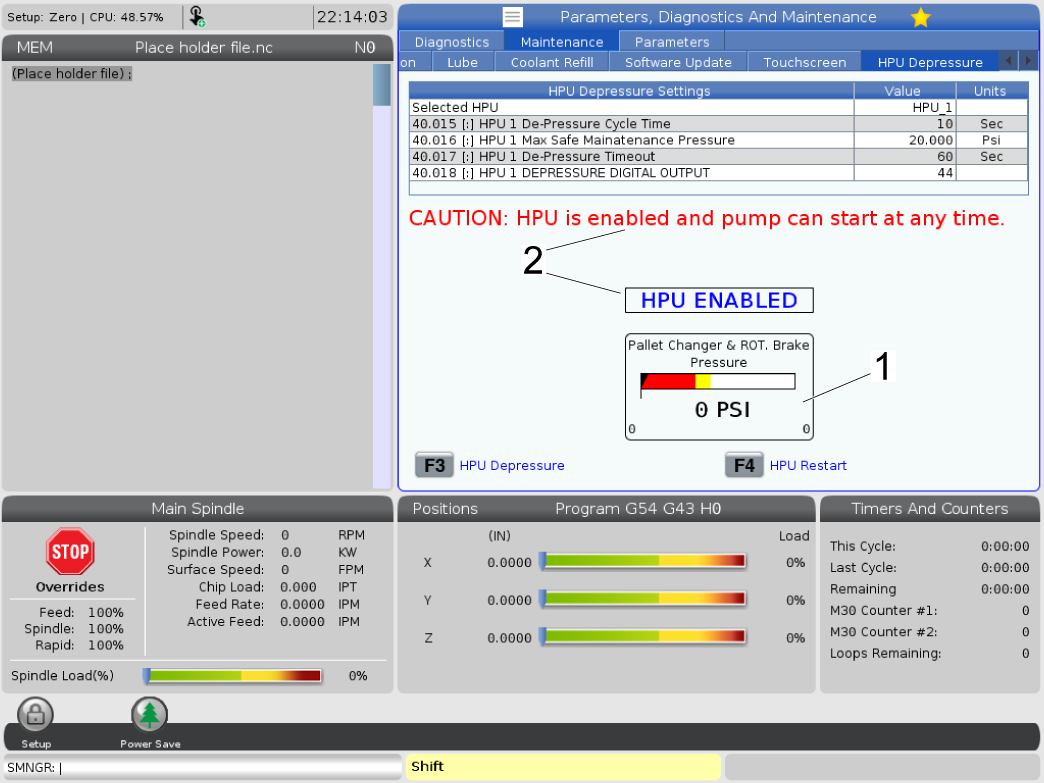
The HPU pressure gauge will rise [1] and the page will display cautionary text that the pump is enabled [2].

NOTE: This image uses a simulator page for reference, the gauge SHOULD NOT read 0 PSI after restarting the pump. 

Verify no leaks are present after restarting the pump. 

Exit Service Mode.

Oil Leaks

Corrective Action:

If the oil tank overflows, find the cause, and fill the oil to the correct level. If the oil is contaminated with coolant, drain and replace the oil (refer to the Coolant Contamination section).

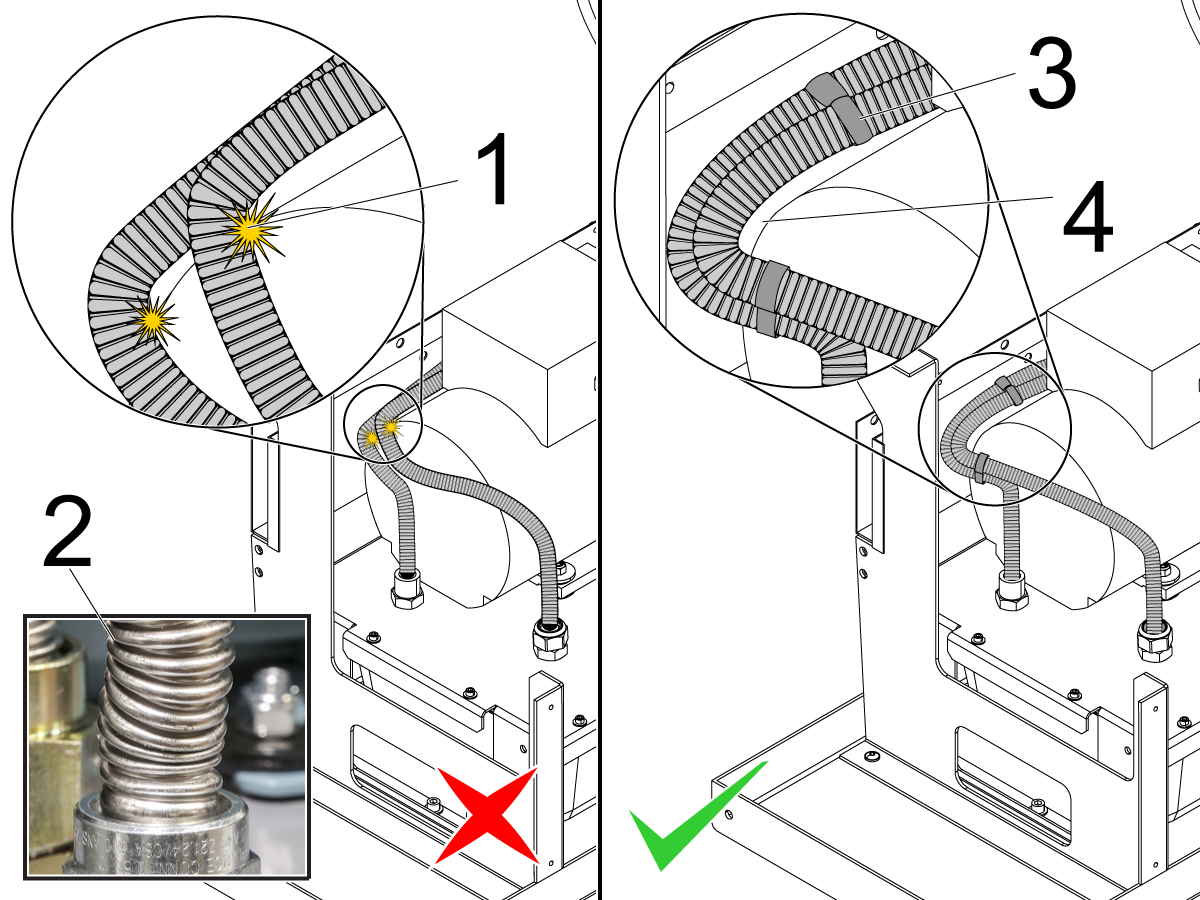
Make sure the hoses are routed correctly [4] and are secure. Tie them together with zip ties [3]. Damage can occur to the hoses if they rub [1] against other components, have sharp bends, or are kinked [2]. Replace the hoses if they are damaged.

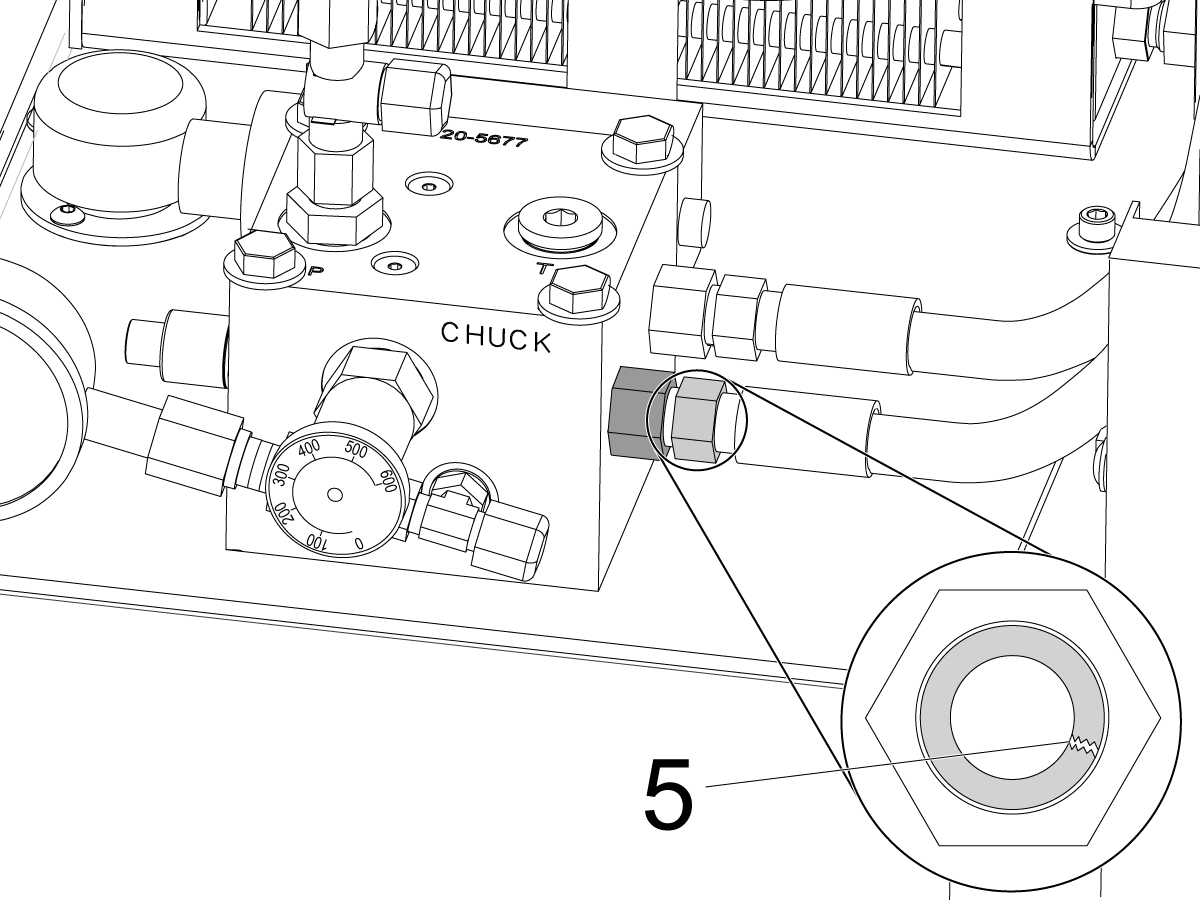
Check the condition of the hydraulic hose fittings: Look for leaks at both ends of the hose. If a leak is found, try tightening the fittings. Refer to Lathe - Hydraulic Power Unit (HPU) - Hoses and Fittings - Maintenance. If a fitting has cracks [5], wear, continues to leak, the hose must be replaced.

Do not over-tighten the fittings.

Solenoids

Corrective Action:

It is normal for the solenoids to be hot to the touch. Check the voltage to the solenoid.

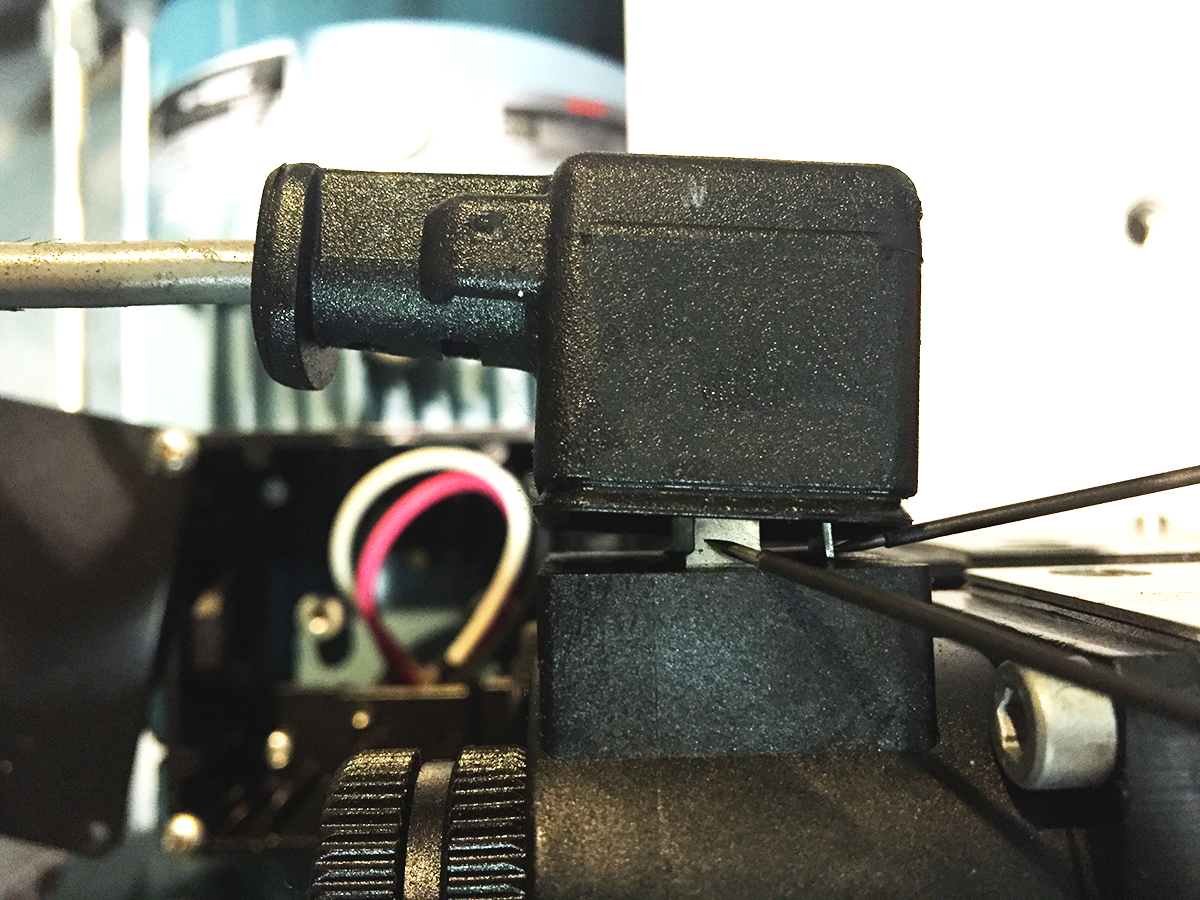
  1. Pull the solenoid connectors partially apart so you can access the leads with your needle-tip probes while the solenoid is connected.
  2. With the chuck or tailstock in operation, measure the voltage to the solenoid. The measured voltage must be 120 VAC.

If there is no voltage, refer to these troubleshooting guides:

  • NGC - I/O PCB - Troubleshooting Guide
  • CHC - I/O PCB - Troubleshooting Guide

If the solenoid receives voltage, but it does not operate correctly, clean the valve:

  1. Power off the machine.
  2. Remove the solenoid valve. Use compressed air to clean the solenoid valve.
  3. Reinstall the solenoid valve.
  4. Test for correct operation.

 Caution: Do not lose the (4) O-rings when you reinstall the solenoid valve.

Settings

Corrective Action:

Make sure Setting 216 SERVO AND HYDRAULIC SHUTOFF is set to (120) seconds or less. Do not have this setting set to (0), the HPU will not turn off, and will create unwanted air bubbles and heat. This setting will power-down the HPU when the machine is idle. This helps dissipate the air bubbles in the oil.

Machines with the Classic Haas Control with software version 11.27A or higher and all Next Generation Control machines do not allow you to set this setting to (0). The limits on this setting for these machines are 10 seconds to 99 minutes.

Air Leaks/Pickup Tube

Corrective Action:

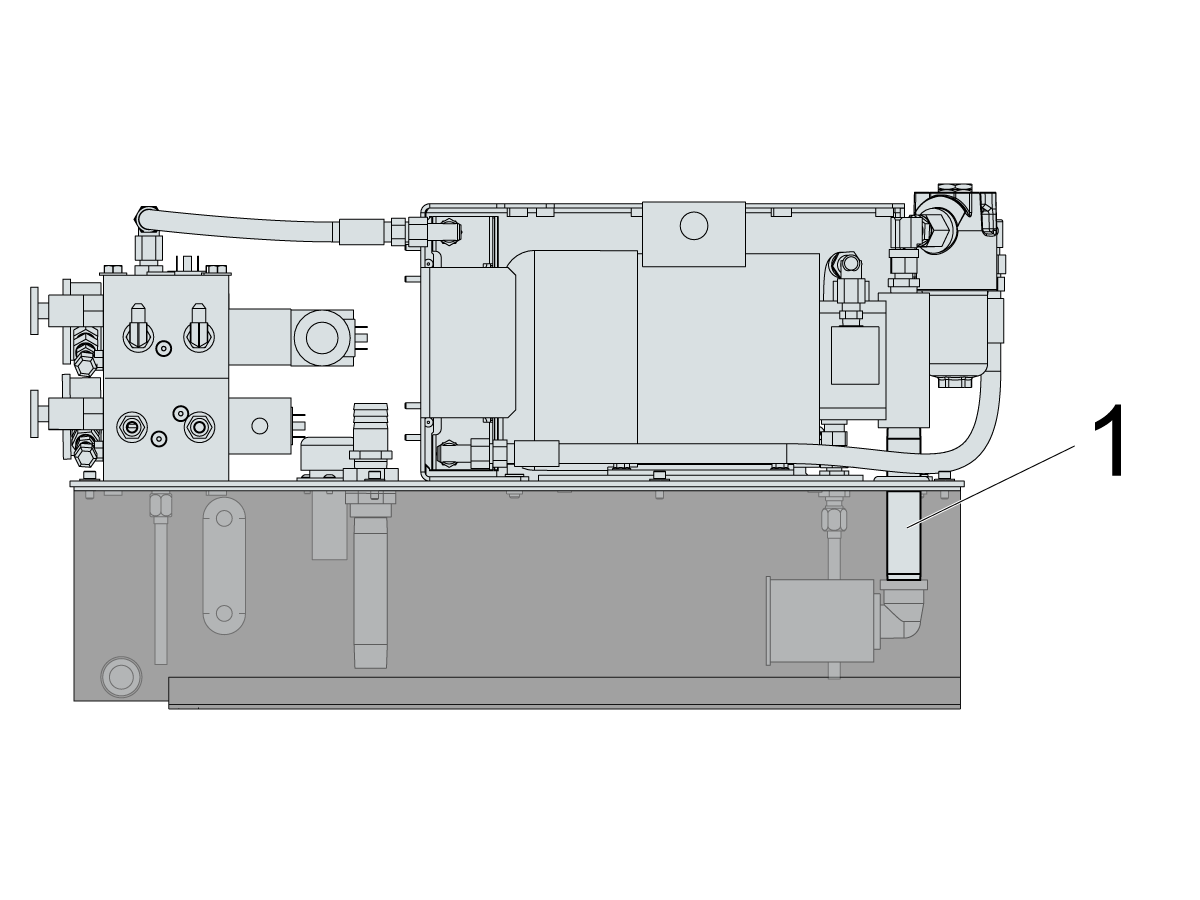
Check for oil leaks at the intake pipe [1]. If there are leaks, clean the threads on the intake pipe [1]. Reapply thread sealant and install the intake pipe [1].

If the symptom persists, go to the Tank Reconfiguration section to reconfigure the pipes.

Oil Pressure

Corrective Action:

Always make sure the oil level is correct, and the filter is clean (refer to the Oil Level section and the Filter section).

Push [EMERGENCY STOP]. Wait half an hour while the air and oil separate. Resume machine operation. Check if the normal pressure returns while the operation resumes. If the symptom occurs again:

  • Reduce the hydraulic clamp pressure by about 25 PSI to reduce the rate of the hydraulic union leak at the slip joint.
  • Reduce the cycle time with higher feed rates.
  • Reduce the spindle RPM.

 Caution: Do not add anti-foaming agents. These agents are already present in the HPU oil.

Note: If low pressure alarms are generated or the hydraulic pressure gauge comes up to pressure very slowly, it can be due to cold oil and/or a lower pressure setting. There is a long set screw snubber in the manifold behind the gauge and a 10-micron sintered bronze snubber in the gauge. These components protect gauges from failing during large pressure changes and slow the pressure gauge’s response to pressure changes or coming up to pressure from idle. These usually happen when the tailstock is reversing direction. These pressure changes are happening quicker at the chuck or tailstock then at the gauge or gauge page. The higher the pressure and warmer the oil, the faster the gauges will respond to pressure changes.

Maximum Chuck Operating Pressures
Type psi Bar
5" Chuck 330 23
6" Chuck 330 23
8" Chuck, 2" Bore 330 23
8" Chuck, 2.5" Bore 260 18
10" Chuck 330 23
12" Chuck, 3" Bore 400 28
12" Chuck, 4" Bore 250 17
15" Chuck 340 23
18" Chuck 300 21

Oil Level

Corrective Action:

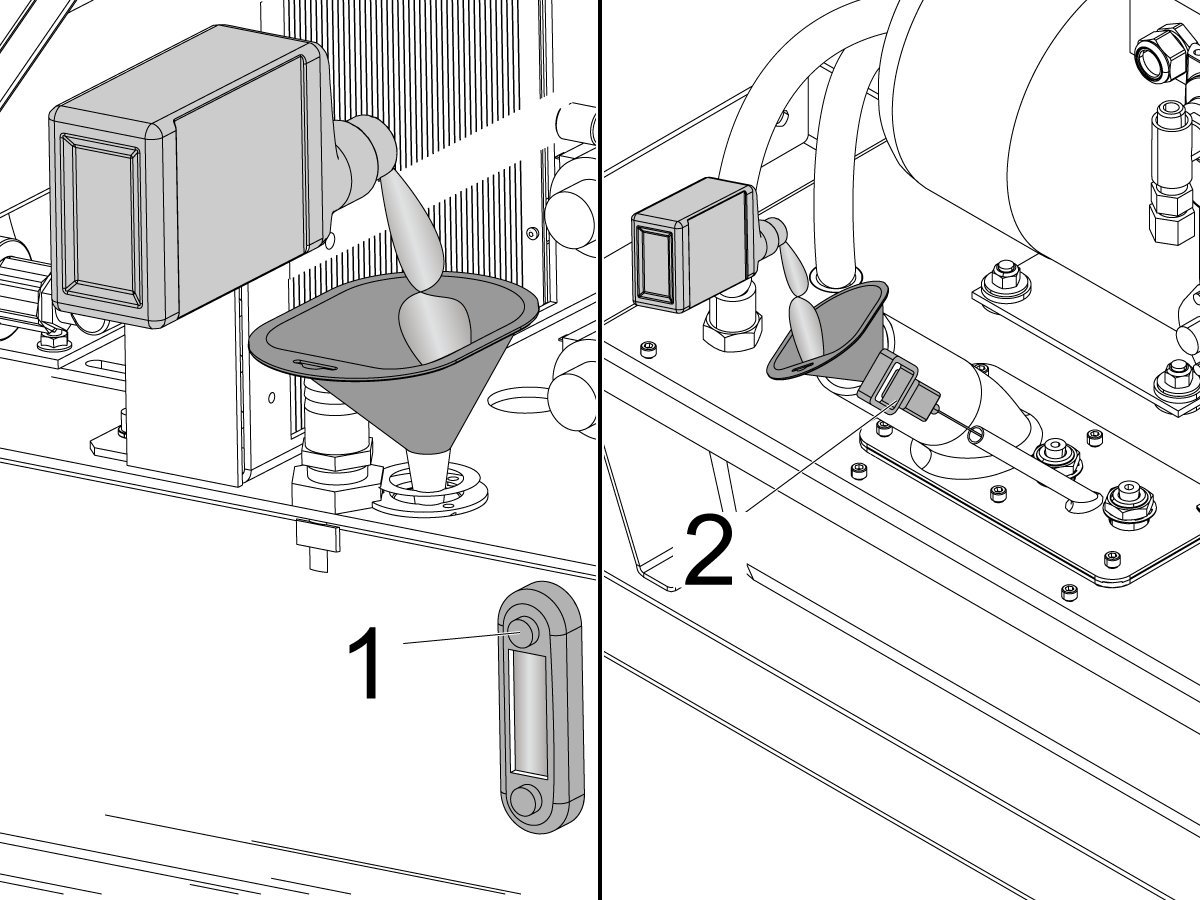
Check the gauge [1] or dipstick [2] to make sure that the HPU has enough oil. If the oil level is low, check for a leak. If there is a leak, repair the leak. Refill the oil.

Fans

Corrective Action:

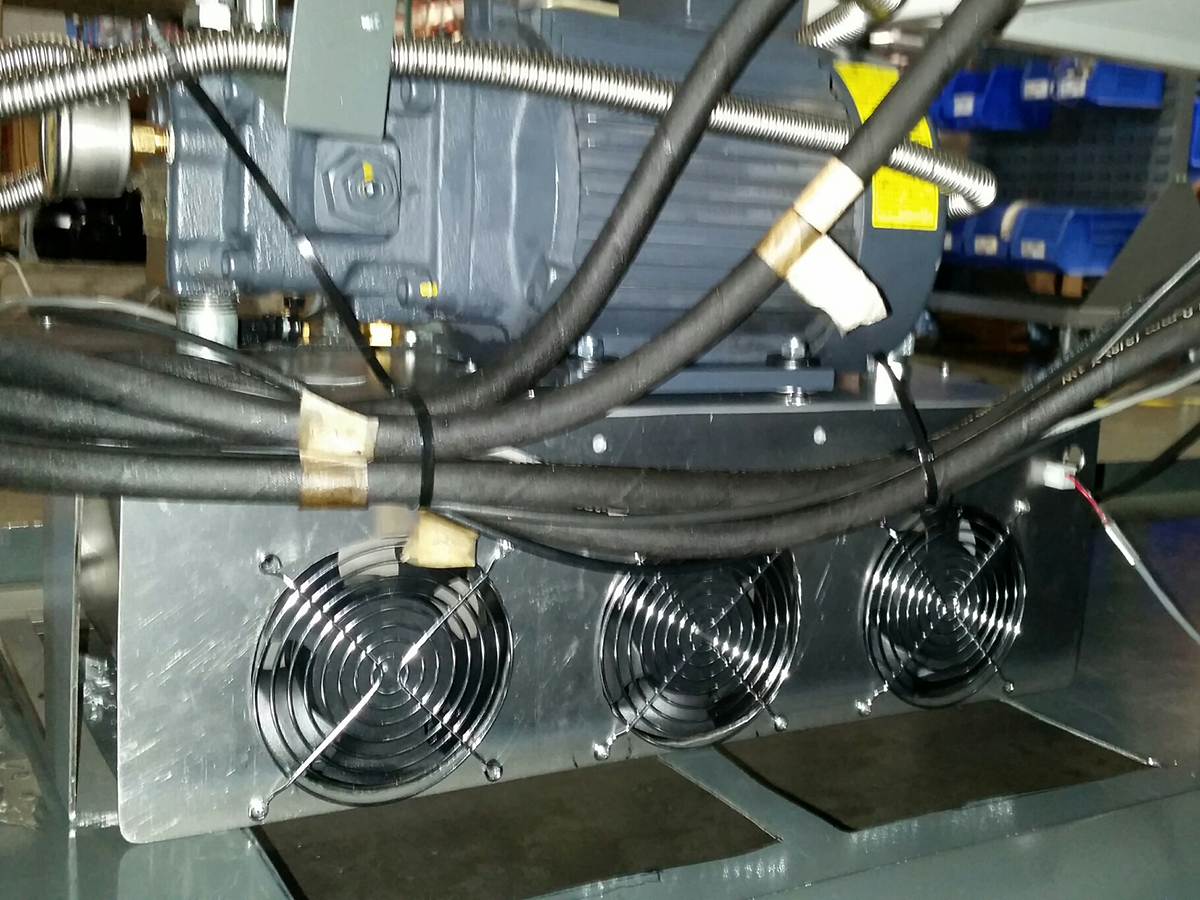
If the HPU oil overheats: Some HPU assemblies have fans installed on the back. Make sure the fans operate when the spindle is in operation.

Make sure the spindle motor fan operates.

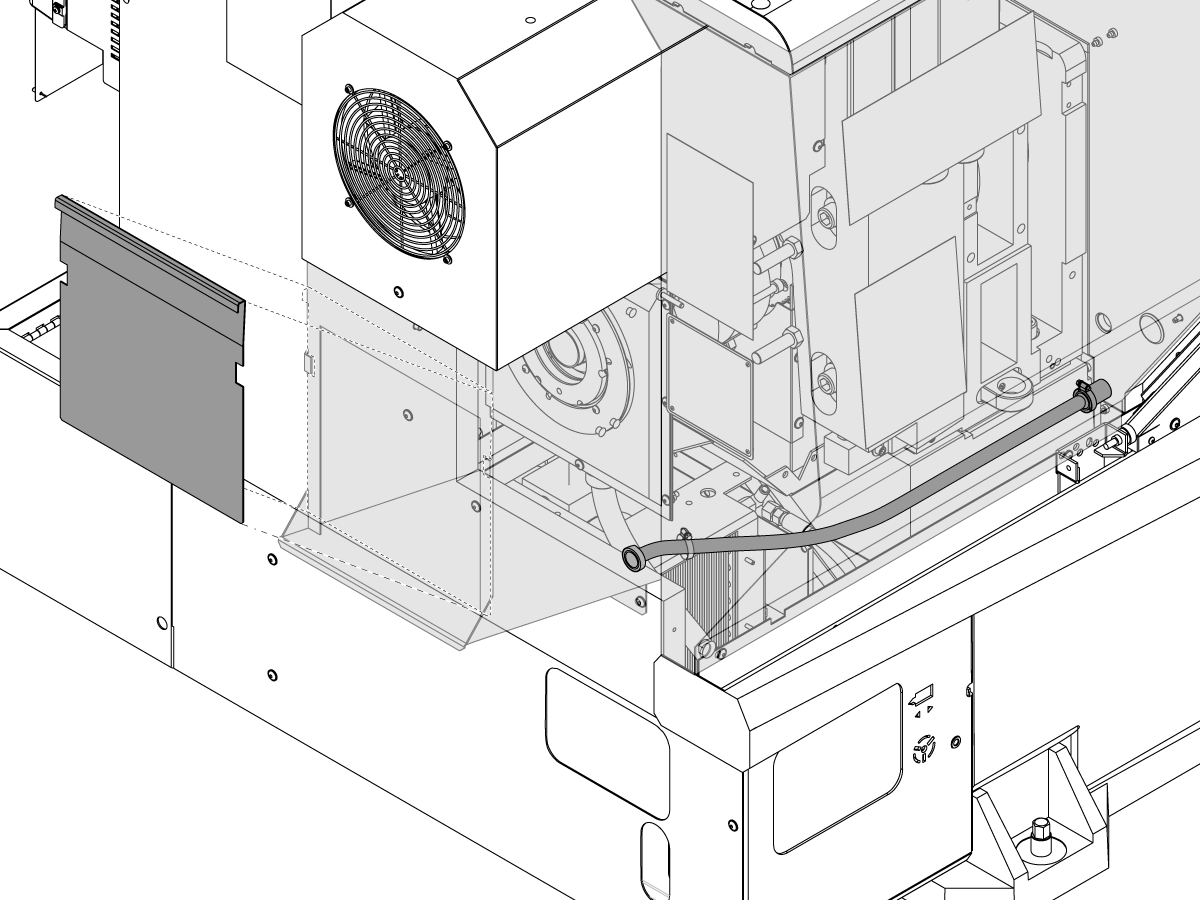
If the machine has a heat exchanger, make sure the heat exchanger is clean, and its fan operate correctly. Not all heat exchangers have a separate fan. Some machines have remotely-mounted heat exchangers with integral fans.

The spindle fan on machines with the Classic Haas Control with software version 11.27A or higher and all Next Generation Control machines must stay on when the HPU is on.

Filters

Corrective Action:

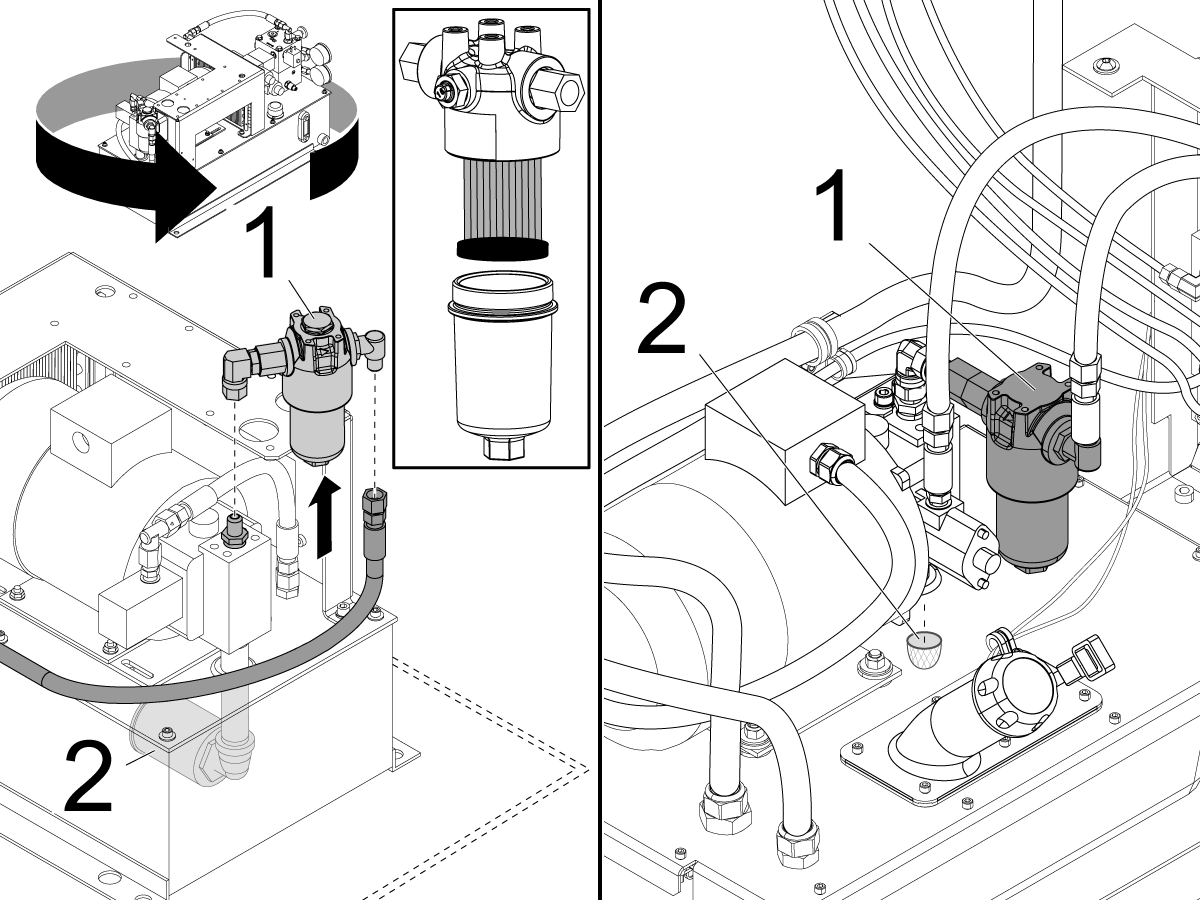
Clean or replace the pressure filter [1] on the pump assembly. Make sure the intake filter [2] is not clogged. Clean it if necessary.

Test the hydraulic components for the correct pressure.

Adjusting Valves

Corrective Action:

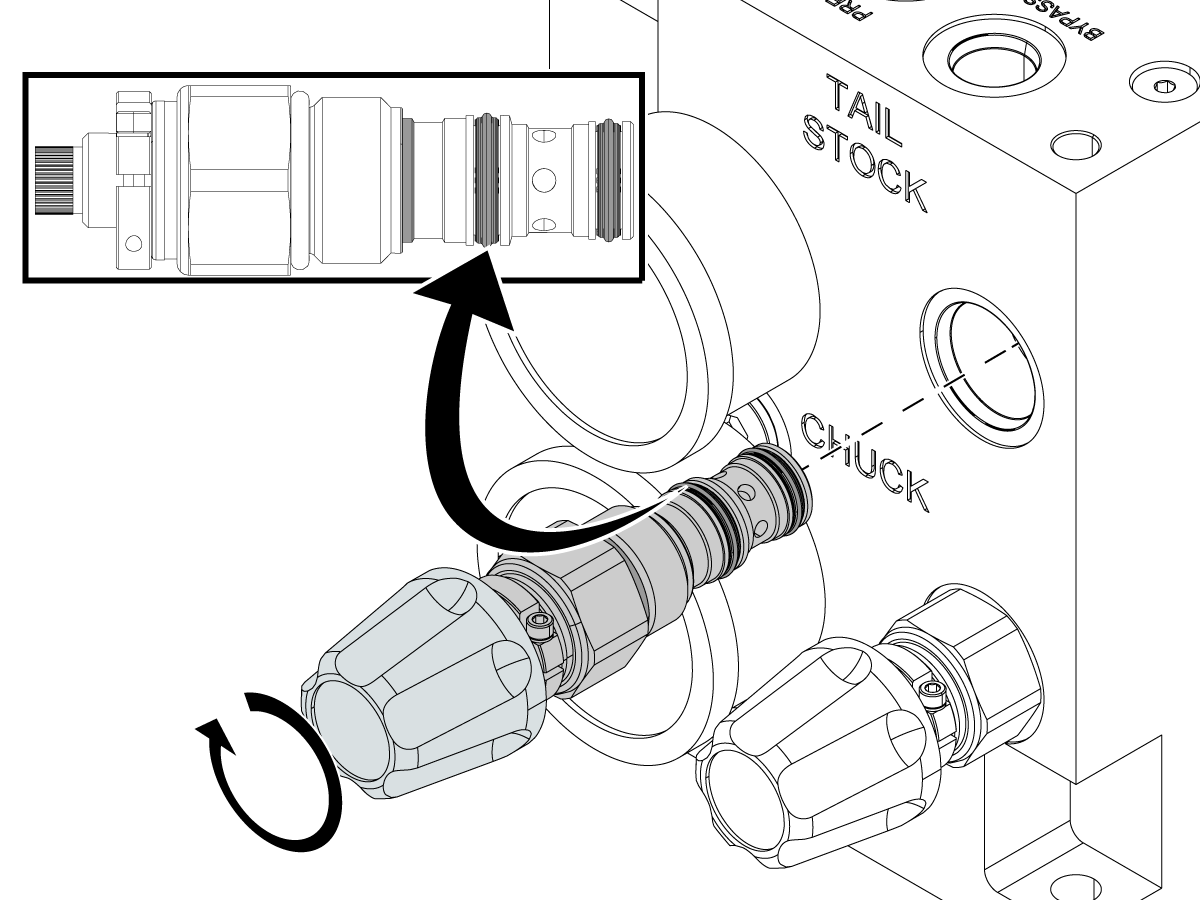
Check the adjustment valve for debris: With the HPU powered on, open and close the adjustment valve fully to flush any contamination out. Power off the HPU and remove the adjustment valve. Inspect the O-rings for damage. Damaged O-rings can also cause incorrect pressure.

If the adjustment valve is damaged, replace it. For adjustment valve replacement instructions, refer to the ST/DS Lathe - Chuck and Tailstock Pressure Adjusting Valve - Replacement procedure.

Note: A bent or damaged valve can prevent pressure adjustment or irregular changes in pressure.

An ST-10/15 can have the Rapid Tailstock solenoid engaged when the tailstock is not in use. Press [RESET] twice after you release [EMERGENCY STOP] to disengage the solenoid and the pressure can be adjusted.

Coolant Contamination

Corrective Action:

Find the coolant return line under the spindle. If chips block the coolant return line, coolant floods into the hydraulic union and will contaminate the HPU oil and cause it to foam. It can also cause the tank to overfill.

Unclog the coolant return line.

Drain the HPU and blow shop air through the hoses. Clean or replace all HPU filters. Clean the HPU and refill it with new oil. Cycle the chuck and tailstock several times. Check the oil again.

Tank Reconfiguration

Corrective Action:

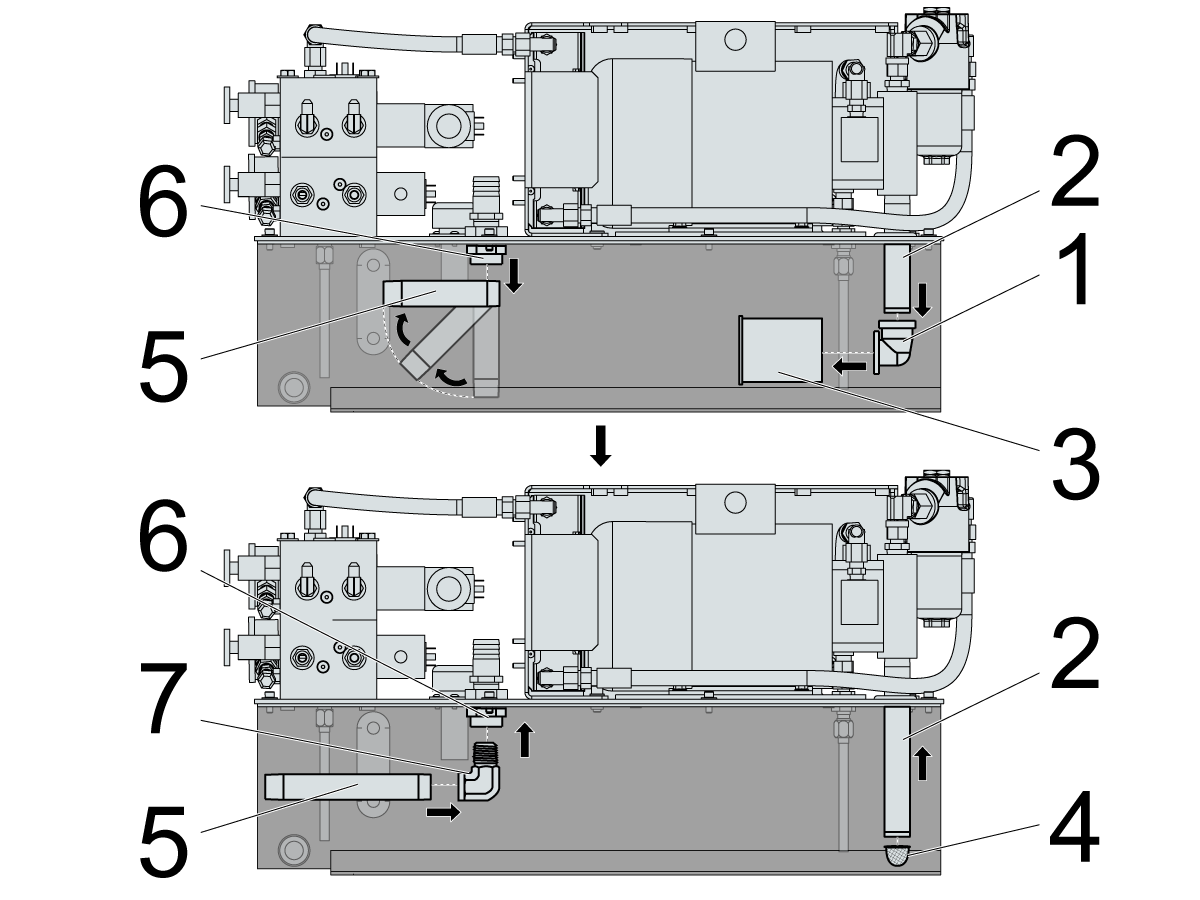
Reconfigure the return and pick-up pipes to separate them. This gives the oil more time to dissipate the bubbles.

Remove the elbow fitting [1] from the intake line [2] and the intake filter [3]. Install the new intake screen [4] (Haas P/N 58-1832) on a new nipple (available locally). The new nipple length must be long enough, so the new intake screen [4] is 1/4" from the bottom of the tank.

Remove the return line [5] from the return drain [6]. Install an elbow fitting [7] between the return line [5] and the return drain [6]. Install a new pipe nipple (available locally) to the elbow fitting [7] that reaches approximately 1" from the side of the tank.

Electrical Phasing

Corrective Action:

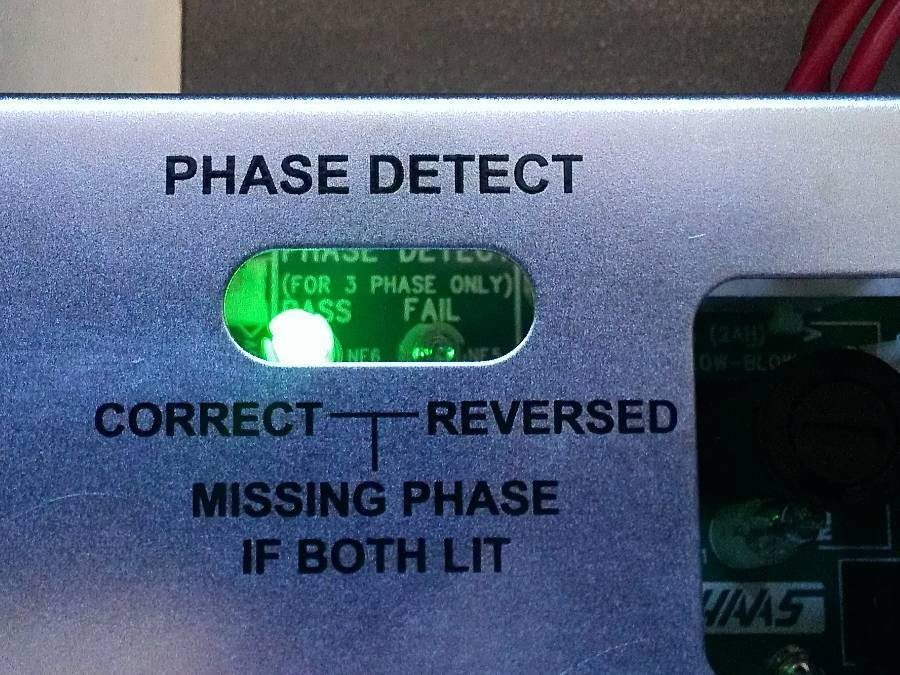
The power supply PCB has a phase detect with neon indicators on the top center portion of the board. Make sure that the electrical power is phased correctly:

  • Green Light: The incoming power is phased correctly.
  • Orange Light: The incoming power is incorrectly phased.
  • Both Lights: A phase is missing (there is a loose cable in the system).

If the electrical power is phased incorrectly:

Set the main circuit breaker to the OFF position.

Lock the main circuit breaker. Use an approved lock with an approved safety tag.

Swap the #74 and #75 incoming power cables at the main transformer.

Damaged Gauges

Corrective Action:

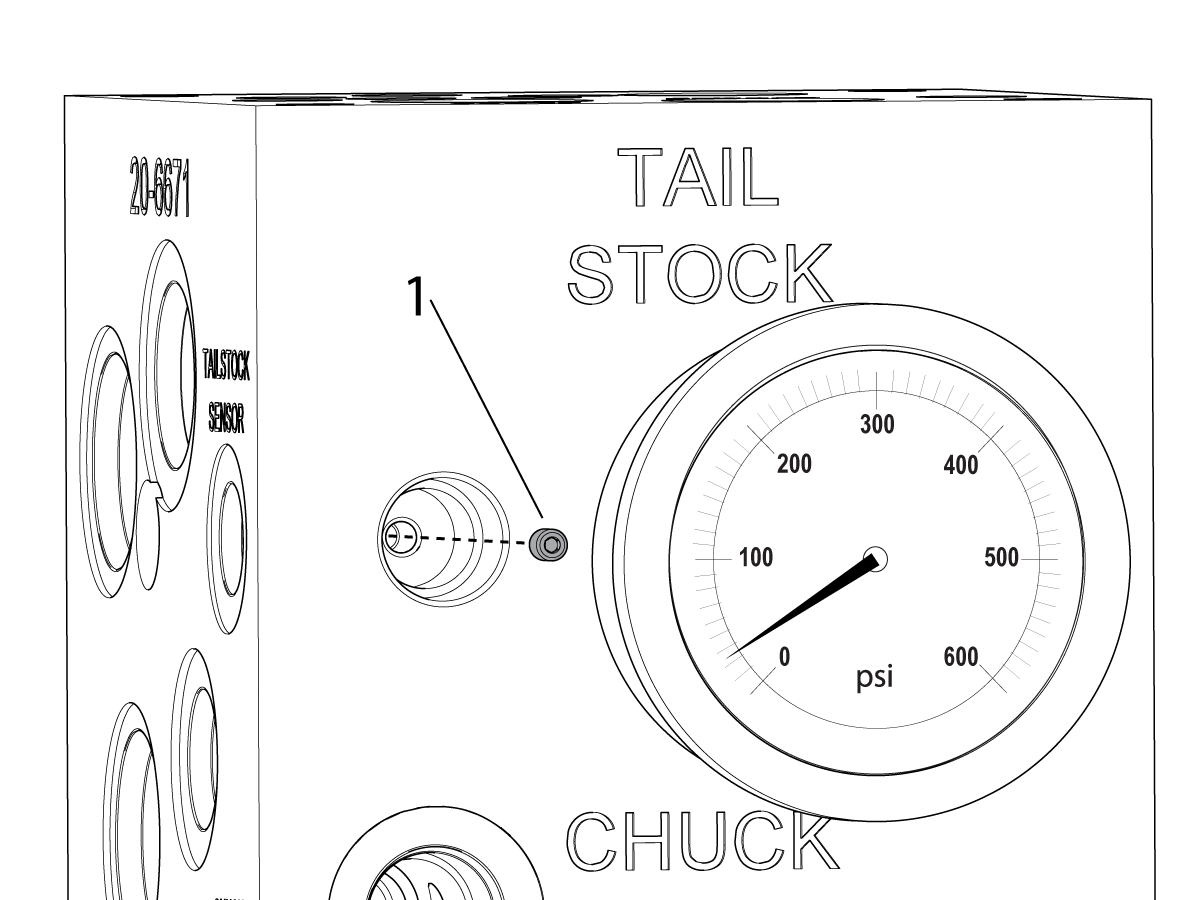
Damaged gauges may include: Displaying incorrect pressure, broken needles, not returning to 0 PSI when off, ect.

Remove the pressure gauge and check that the snubber set screw [1] has not backed out. The snubber set screw is similar to the Haas Liquid Grease restrictor fitting. Re-install the snubber set screw without any thread locker. Replace the gauge as needed.

Plugs and O-rings

Corrective Action:

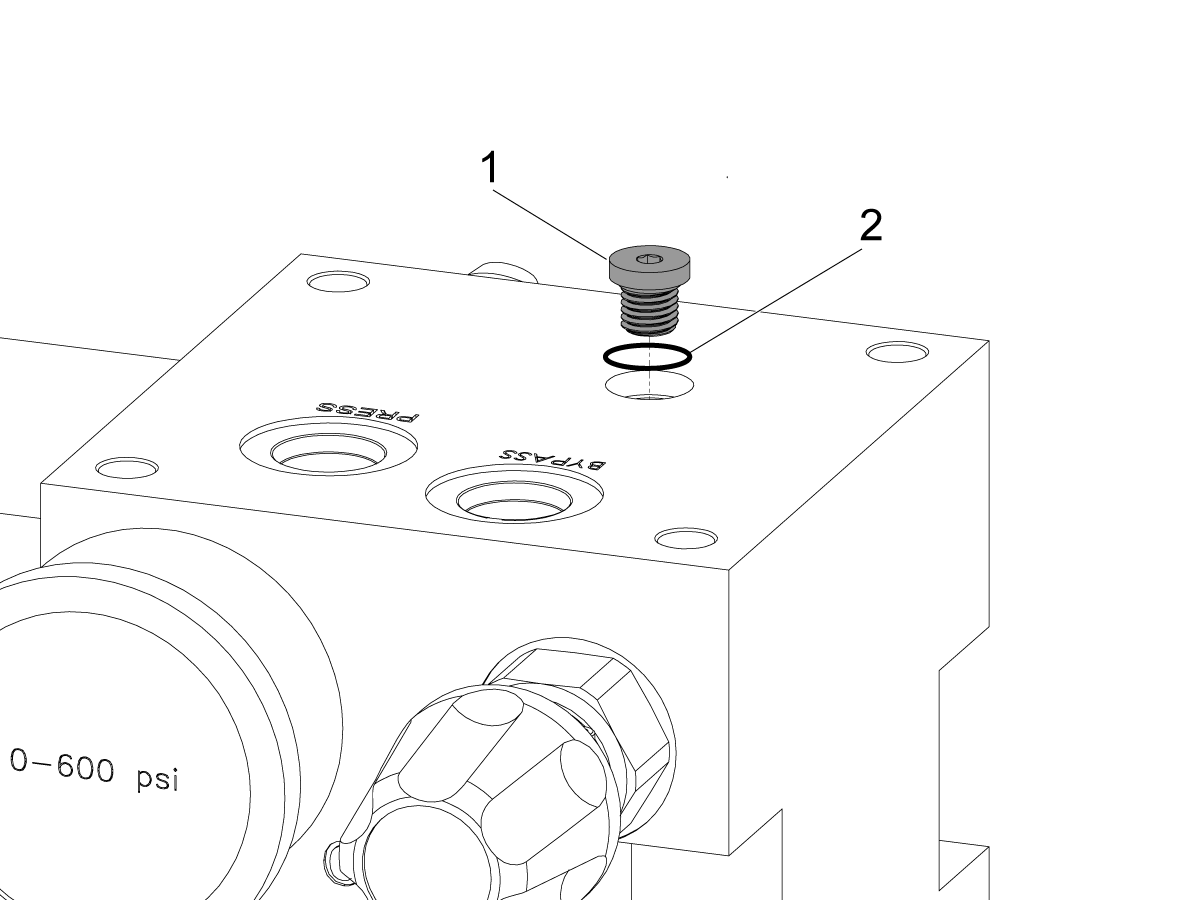
The plugs [1] on the manifold have O-rings [2] on them to help seal the manifold. If there is oil leak from one of these plugs, check to make sure that the plug is tight. Replace the plug and O-ring if it is damaged or missing.

Haas Lathe Hydraulic Power Unit (HPU) Troubleshooting

In this Haas Service Video, Haas Service Engineer Andrew Harnett walks you through how to troubleshoot an HPU on a Haas ST lathe. If your HPU is noisy and pressure is fluctuatiing, before you assume the unit is bad you need to see this video.

WARNING: You should not do mechanical or electrical machine repairs or service procedures unless you are qualified and knowledgeable about the processes.

WARNING: Only authorized personnel with the proper training and certification should do this repair procedure.

All information herein is provided as a courtesy for Haas machine owners for reference and illustrative purposes only. Haas Automation cannot be held responsible for repairs you perform. Only those services and repairs that are provided by authorized Haas Factory Outlet distributors are guaranteed.

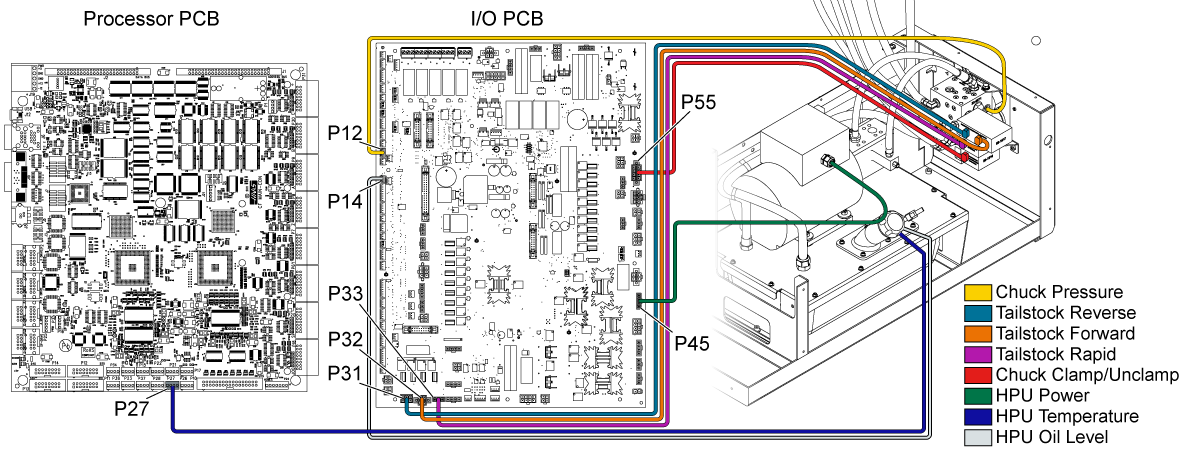
Electrical Diagram

Recently Viewed Items

You Have No Recently Viewed Items Yet

Feedback
Haas Logo

Haas Delivered Price

This price includes shipping cost, export and import duties, insurance, and any other expenses incurred during shipping to a location in France agreed with you as a buyer. No other mandatory costs can be added to the delivery of a Haas CNC Product.

KEEP UP WITH THE LATEST HAAS TIPS AND TECHNOLOGY...

Sign up now!   

HAAS TOOLING ACCEPTS THE FOLLOWING:

  • Service & Support
  • Owners
  • Request Service
  • Operator Manuals
  • Haas Parts
  • Rotary Repair Request
  • Pre-Install Guides
  • Shopping Tools
  • Build & Price a New Haas
  • Available Inventory
  • The Haas Price List
  • CNCA Financing
  • About Haas
  • Accessibility Statement
  • DNSH Statement
  • Export Compliance
  • Careers
  • Certifications & Safety
  • Contact Us
  • History
  • Terms & Conditions
  • Haas Tooling Terms & Conditions
  • Privacy
  • Warranty
  • Haas Community
  • Haas Certification Program
  • Haas Motorsports
  • Gene Haas Foundation
  • Haas Technical Education Community
  • Events

  • Join the Conversation
  • Facebook
  • X
  • Flickr
  • YouTube
  • LinkedIn
  • Instagram
  • TikTok
© 2026 Haas Automation, Inc – CNC Machine Tools
This site is protected by reCAPTCHA and the Google Privacy Policy and Terms of Service apply.

2800 Sturgis Rd., Oxnard, CA 93030
Toll Free: (888) 817-4446 / Fax: 805-278-8554