My Haas Welcome,
!
Haas Tooling MyHaas/HaasConnect Sign In Register Haas Tooling MyHaas/HaasConnect Sign Out Welcome, My Machines Latest Activity My Quotes My Account My Users Sign Out
Find Your Distributor
  1. Select Language
    1. English
    2. Deutsch
    3. Español - España
    4. Español - México
    5. Français
    6. Italiano
    7. Português
    8. Český
    9. Dansk
    10. Nederlands
    11. Magyar
    12. Polski
    13. Svenska
    14. Türkçe
    15. 中文
    16. Suomi
    17. Norsk
    18. الإنجليزية
    19. български
    20. Hrvatski
    21. Ελληνικά
    22. Română
    23. Slovenský
    24. Slovenščina
    25. 한국어
    26. 日本語
    27. Українська
  • machines Main Menu
    • Vertical Mills
      Vertical Mills
      Vertical Mills View All
      • Vertical Mills
      • VF Series
      • Universal Machines
      • VR Series
      • VP-5 Prismatic
      • Pallet-Changing VMCs
      • Mini Mills
      • Mold Machines
      • High-Speed Drill Centers
      • Drill/Tap/ Mill Series
      • Toolroom Mills
      • Pocket Mill
      • Compact Mills
      • Gantry Series
      • SR Sheet Routers
      • Extra-Large VMC
      • Double-Column Mills
      • 3+2 Positioning Machines
    • Multi-Axis Solutions
      Multi-Axis Solutions
      Multi-Axis Solutions View All
      • Multi-Axis Solutions
      • Y-Axis Lathes
      • 5-Axis Mills
    • Lathes
      Lathes
      Lathes View All
      • Lathes
      • ST Series
      • Dual-Spindle
      • Box Way Series
      • Toolroom Lathes
      • Chucker Lathe
      • Haas Bar Feeders
    • Horizontal Mills
      Horizontal Mills
      Horizontal Mills View All
      • Horizontal Mills
      • 50-Taper
      • 40-Taper
    • Rotaries & Indexers
      Rotaries & Indexers
      Rotaries & Indexers View All
      • Rotaries & Indexers
      • Rotary Tables
      • Indexers
      • 5-Axis Rotaries
      • Extra-Large Rotaries
    • Special Series
      Special Series
      Special Series View All
      • Special Series
      • EU_Series_Redirect
    • Automation Systems
      Automation Systems
      Automation Systems View All
      • Automation Systems
      • Mill Automation
      • Lathe Automation
      • Automatic Parts Loaders
      • Automation Models
    • Desktop Machines
      Desktop Machines
      Desktop Machines View All
      • Desktop Machines
      • Desktop Mill
      • Desktop Lathe
      • Control Simulator, Standard
      • Control Simulator, Premium
    • Shop Equipment
      Shop Equipment
      Shop Equipment View All
      • Shop Equipment
      • Knee Mill
      • Haas Manual Lathes
      • Haas Saws
    • Fabrication Machines
      Fabrication Machines
      Fabrication Machines View All
      • Fabrication Machines
      • Laser Cutting Machines
      • CNC Press Brakes
    • QUICK LINKS Special Series  Special Series 
      EU SERIES EU SERIES BUILD & PRICE | PRICE LIST BUILD & PRICE | PRICE LIST In-Stock Machines In-Stock Machines WHAT’S NEW WHAT’S NEW YOUR FIRST CNC YOUR FIRST CNC
      SHOPPING TOOLS
      • Build & Price a Haas
      • Price List
      • Available Inventory
      • CNCA Financing
      WANT TO TALK TO SOMEONE?

      A Haas Factory Outlet (HFO) can answer your questions, and walk you through your best options.

      CONTACT YOUR DISTRIBUTOR >
  • Options Main Menu
    • The Haas Control Value Option Packages
      Value Option Packages
      Value Option Packages View All
      • Value Option Packages
    • Product Image Spindles
      Spindles
      Spindles View All
      • Spindles
    • Product Image Tool Changers
      Tool Changers
      Tool Changers View All
      • Tool Changers
    • Product Image 4th- | 5th-Axis
      4th- | 5th-Axis
      4th- | 5th-Axis View All
      • 4th- | 5th-Axis
    • Product Image Turrets & Live Tooling
      Turrets & Live Tooling
      Turrets & Live Tooling View All
      • Turrets & Live Tooling
    • Product Image Probing
      Probing
      Probing View All
      • Probing
    • Haas Chip & Coolant Management Chip & Coolant Management
      Chip & Coolant Management
      Chip & Coolant Management View All
      • Chip & Coolant Management
    • The Haas Control The Haas Control
      The Haas Control
      The Haas Control View All
      • The Haas Control
    • Product Image Product Options
      Product Options
      Product Options View All
      • Product Options
    • Product Image Tooling & Fixturing
      Tooling & Fixturing
      Tooling & Fixturing View All
      • Tooling & Fixturing
    • Product Image Workholding
      Workholding
      Workholding View All
      • Workholding
    • Product Image 5-Axis Solutions
      5-Axis Solutions
      5-Axis Solutions View All
      • 5-Axis Solutions
      • 5 Easy Steps to 5-Axis
    • QUICK LINKS Special Series  Special Series 
      EU SERIES EU SERIES BUILD & PRICE | PRICE LIST BUILD & PRICE | PRICE LIST In-Stock Machines In-Stock Machines WHAT’S NEW WHAT’S NEW YOUR FIRST CNC YOUR FIRST CNC
      SHOPPING TOOLS
      • Build & Price a Haas
      • Price List
      • Available Inventory
      • CNCA Financing
      WANT TO TALK TO SOMEONE?

      A Haas Factory Outlet (HFO) can answer your questions, and walk you through your best options.

      CONTACT YOUR DISTRIBUTOR >
  • Why Haas Main Menu
      Discover the Haas Difference
    • Why Haas
    • MyHaas
    • Education Community
    • Industry 4.0
    • Haas Certification
    • Customer Testimonials
  • Service Main Menu
      Welcome to Haas Service
      SERVICE HOME Operator’s Manuals How-To Procedures Troubleshooting Guides Preventive Maintenance Haas Parts Haas Tooling Videos
  • Videos Main Menu
  • Main Menu
    • View All
    • View All
    • View All
    • View All
      • HTEC Curriculum Support
      • Haas Value Option Packages (VOP) Journey
    • View All
      • Haas 10 kg Cobot Package
      • Cobot Kits
      • DC-1 Drill Center
      • CNC Sales News
      • Do More With Your Haas
    • View All
    • View All
      • contact-us-test
      • 4 - AUTOMATION SYSTEMS
      • Carousel-V2
      • expert test
      • Demo_Day_Trident-test
      • Link Test
      • image-sale-tag-test
      • article-list-test
      • Haas 25 kg Robot Package
      • test-algolia-page
    • View All
    • View All
    • View All
    • View All
      • calc-test
    • View All
    • QUICK LINKS Special Series  Special Series 
      EU SERIES EU SERIES BUILD & PRICE | PRICE LIST BUILD & PRICE | PRICE LIST In-Stock Machines In-Stock Machines WHAT’S NEW WHAT’S NEW YOUR FIRST CNC YOUR FIRST CNC
      SHOPPING TOOLS
      • Build & Price a Haas
      • Price List
      • Available Inventory
      • CNCA Financing
      WANT TO TALK TO SOMEONE?

      A Haas Factory Outlet (HFO) can answer your questions, and walk you through your best options.

      CONTACT YOUR DISTRIBUTOR >
  • Haas Tooling Main Menu
  • Haas Service Parts Main Menu

My Haas Welcome,
!
Haas Tooling MyHaas/HaasConnect Sign In Register Haas Tooling MyHaas/HaasConnect Sign Out Welcome, My Machines Latest Activity My Quotes My Account My Users Sign Out
Find Your Distributor
  1. Select Language
    1. English
    2. Deutsch
    3. Español - España
    4. Español - México
    5. Français
    6. Italiano
    7. Português
    8. Český
    9. Dansk
    10. Nederlands
    11. Magyar
    12. Polski
    13. Svenska
    14. Türkçe
    15. 中文
    16. Suomi
    17. Norsk
    18. الإنجليزية
    19. български
    20. Hrvatski
    21. Ελληνικά
    22. Română
    23. Slovenský
    24. Slovenščina
    25. 한국어
    26. 日本語
    27. Українська
×

Search Results

Web Pages

Images

    • <
    • 1
    • >

Servo Bar 300 - Troubleshooting Guide - TG0126

Service Home Servo Bar 300 - Troubleshooting Guide - TG0126
Recently Updated Last updated: 10/15/2025

Servo Bar 300 - Troubleshooting Guide


TG0126

Servo Bar 300 - Troubleshooting Guide - TG0126

Jump to Section 1. Introduction 2. Symptom Table 3. Barfeeder Trolley 4. The Bar is Stuck 5. Servo Motor 6. Bar Feeder Lifter 7. Motor Brushes 8. Proximity Sensors 9. DC Motor Voltage Inspection 10. Electrical Cables 11. Inconsistent Push Lengths 12. Electrical Diagram Back to Top

Introduction

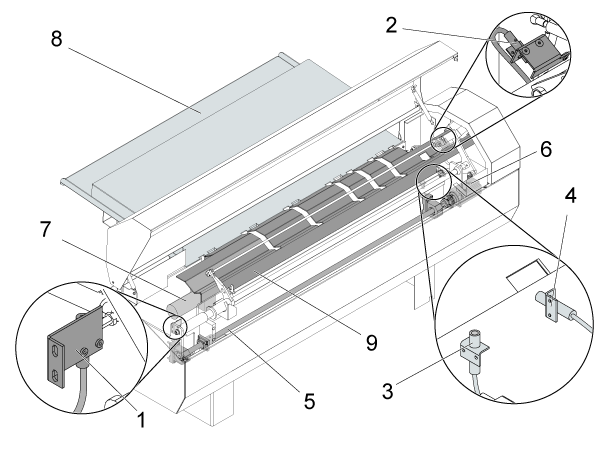
Servo Bar 300

  1. Home switch
  2. EOB (End of Bar) switch
  3. Load bar switch
  4. Load "Q" switch
  5. Ballscrew (trolley)
  6. Servo motor (trolley)
  7. DC motor (bar feeder)
  8. Charging tray
  9. Transfer tray

Symptom Table

Symptom Possible Cause Corrective Action
Alarm 702 V AXIS POSITION ERROR The trolley hit an obstruction. Adjust the charging tray.
A bar is stuck. Clear bar path.
Alarm 712 V AXIS SERVO OVERLOAD The V Axis ballscrew is not lubricated. Check for ballscrew damage.
The servo motor does not operate correctly. Troubleshoot the servo motor.
Alarm 452 SERVO BAR MOTOR TIMEOUT The bar feeder lifter hit an obstruction. Remove obstructions from the lifter.
The DC motor brushes are worn. Measure resistance of the DC motor.
The proximity sensor does not operate correctly. (Load bar) Measure voltage to the proximity sensor.
There is no voltage to the DC motor. Measure voltage to the DC motor.
Alarm 423 SERVO BAR EOB SWITCH POSITION The proximity sensor does not operate correctly. (EOB switch) Measure voltage to the proximity sensor.
Alarm 175 GROUND FAULT DETECTED Cables are damaged or there is a contaminated electrical connection. Check for connector damage.
The brushes are contaminated or there is a carbon buildup. Check for contamination and remove dust.
Alarm 1015 CHECK SENSOR OR BAR The proximity sensor does not operate correctly (Load "Q"). Measure voltage to the proximity sensor.
Noisy The V Axis ballscrew is not lubricated. Check for ballscrew damage.
Inconsistent push lengths. Affected by previous push, pushrod timing delay, spindle liner size, chuck jaw size or grip strength. Troubleshoot the pusher.
Pusher positions incorrectly. Incorrecet parameters for V-Axis ballscrew pitch. See the Barfeeder - Servo Bar 300 - 10mm - Ballscrew - Parameters - CHC procedure for setting the parameters for the installed ballscrew pitch.

Barfeeder Trolley

Corrective Action:

Make sure bar feeder charging tray is not too high. When the tray is too high, the bar feeder can attempt to load two bars. Refer to the bar feeder manual for more information.

Press [RESET] to clear the alarm.

Handle jog the V Axis away from the obstruction.

The Bar is Stuck

Corrective Action:

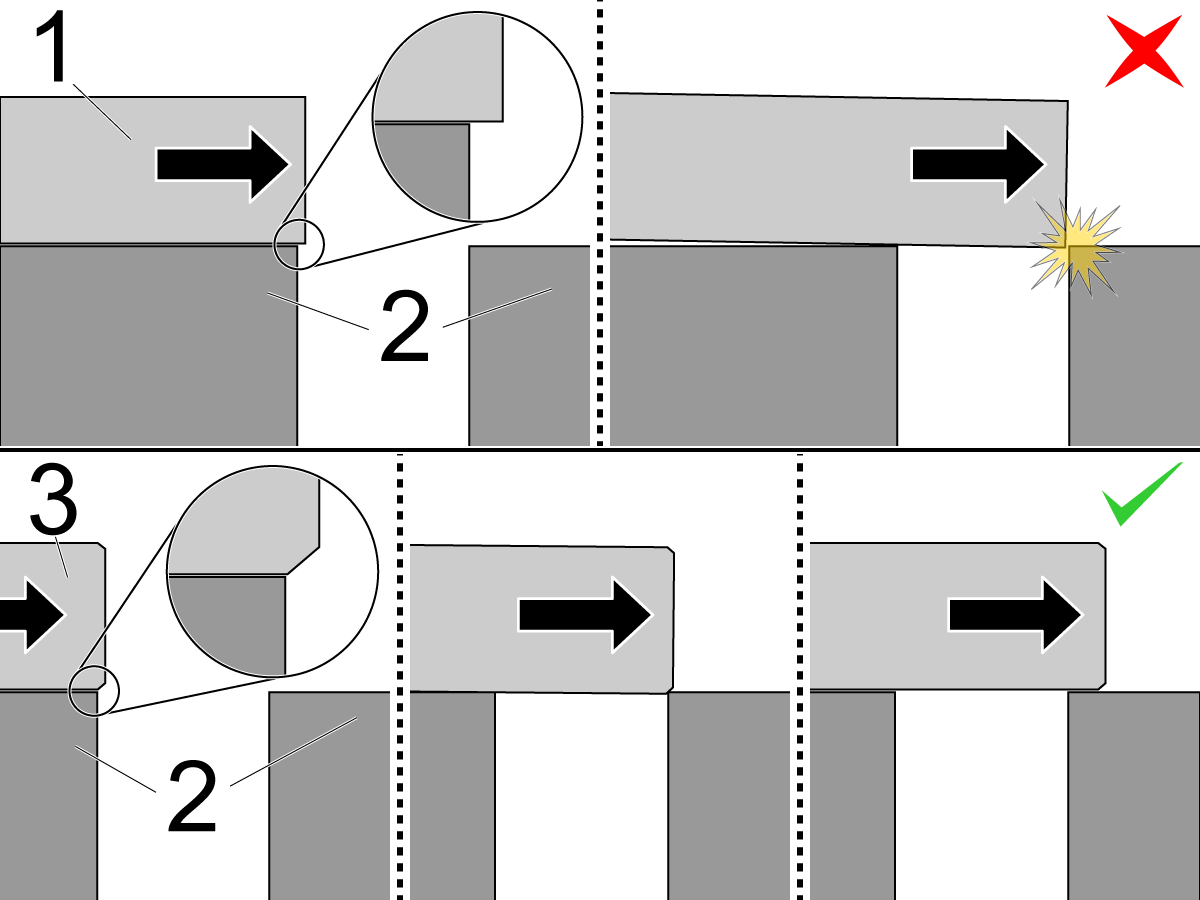
  1. Squared-corner bar
  2. Transfer tray
  3. Chamfered-corner bar

The bar can get stuck when:

  • The bar is not chamfered: Bars must have a smooth path. Any sharp corner in the bar path must be removed. Sharp corners can cause problems when you load a bar. Collets and chucks must have lead-in corners chamfered. Leading ends of a bar must be chamfered. When you create liners or small use bar discs, use a generous lead-in chamfer.
  • The bar feeder is not aligned correctly: Refer to the bar feeder manual; it has specific instructions on how to correctly position the bar feeder and adjust the transfer tray.
  • The bar is caught on the chuck jaw: When you load a new bar, add a M19 code to your program to orient the chuck, and give the bar clearance to pass the chuck jaws.

Press [RESET] to clear the alarm.

Handle jog the V Axis away from the obstruction.

Servo Motor

Corrective Action:

Make sure the motor connections are properly seated and the cables are not damaged.

Go to Servo Amplifier - Troubleshooting Guide and Sigma 5 - Axis Servo Motor and Cables - Troubleshooting Guide. Check for shorts to the motor.

Bar Feeder Lifter

Corrective Action:

Refer to: Haas Bar Feeder - Troubleshooting Guide

Motor Brushes

Corrective Action:

Refer to: Haas Bar Feeder - Troubleshooting Guide

Proximity Sensors

Corrective Action:

Find the correct sensor to troubleshoot:

  1. Load bar (Alarm 452)
  2. Home switch (Alarm 469)
  3. EOB switch (Alarm 423)
  4. Load "Q" (Alarm 1015)

Test the sensor for correct operation: hold a key or other steel object in front of the sensor. If the sensor lights up, the sensor is not faulty. If the sensor does not light up, continue to further troubleshoot the proximity sensor.

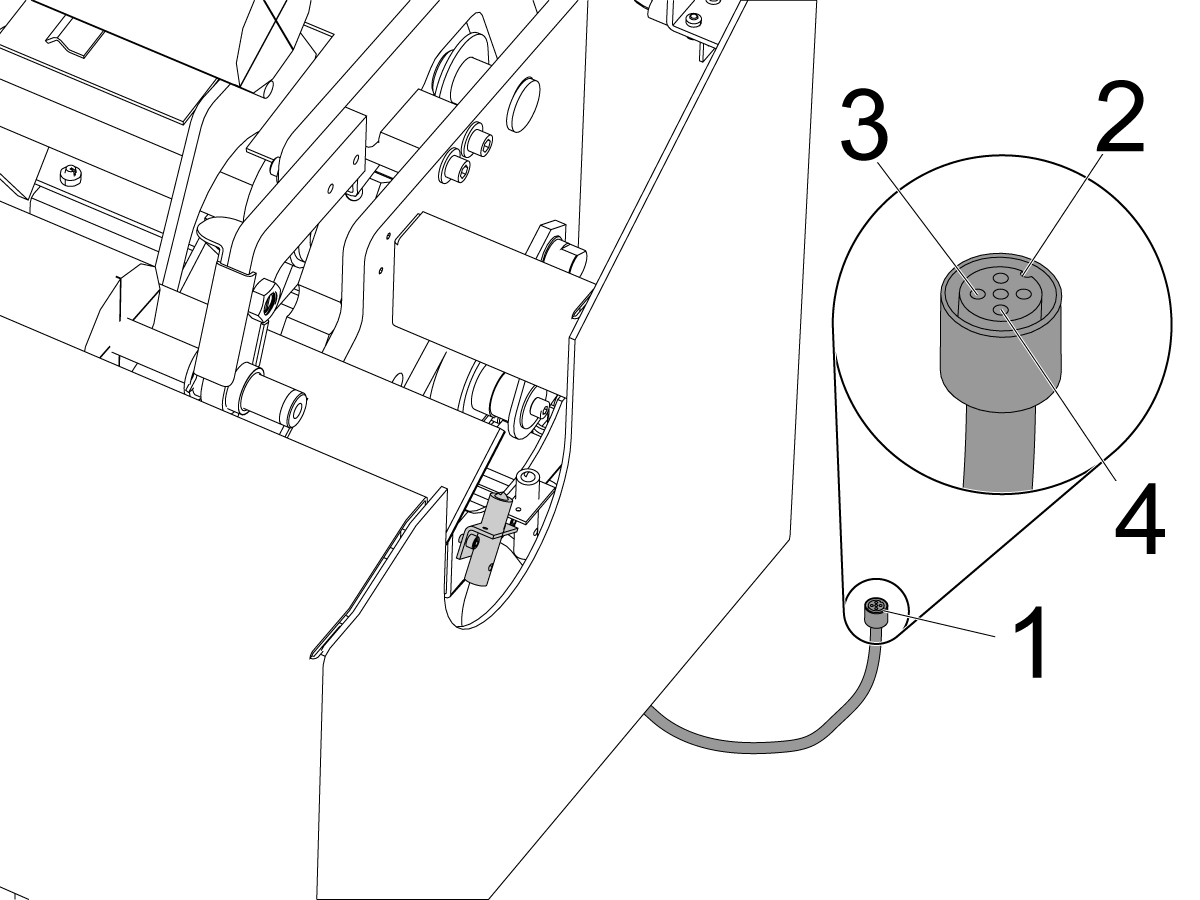
Disconnect the cable [1] from the sensor. Use the marker [2] on the cable connector to measure the correct pins. Measure the voltage between the pins [3] and [4] on the cable connector. Make sure to use a multimeter with needle tipped probes.

The correct voltage is 12 VDC.

If voltage is correct, the sensor is at fault. Go to Proximity Sensor - Troubleshooting Guide to further troubleshoot the proximity sensor.

If there is no voltage, go to I/O PCB - Troubleshooting Guide (Classic Haas Control).

DC Motor Voltage Inspection

Corrective Action:

Refer to: Haas Bar Feeder - Troubleshooting Guide

Electrical Cables

Corrective Action:

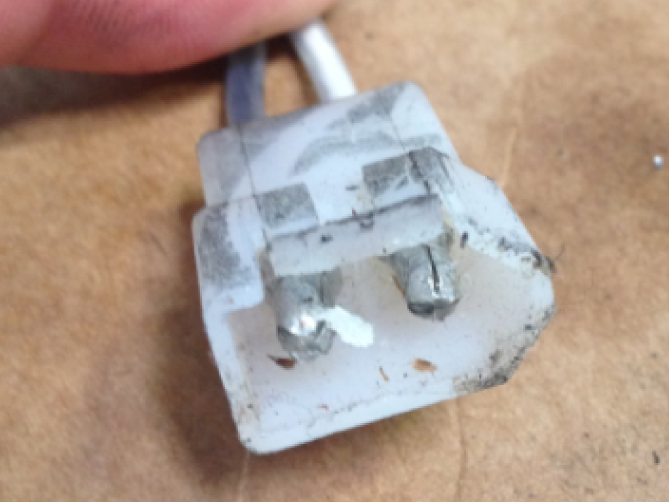
Perform a visual inspection of the motor cable and connectors. Make sure that the cable is in good condition and that the connectors are clean and secure.

Inconsistent Push Lengths

Corrective Action:

Refer to: Haas Bar Feeder - Troubleshooting Guide

Electrical Diagram

Recently Viewed Items

You Have No Recently Viewed Items Yet

Feedback
Haas Logo

Haas Delivered Price

This price includes shipping cost, export and import duties, insurance, and any other expenses incurred during shipping to a location in France agreed with you as a buyer. No other mandatory costs can be added to the delivery of a Haas CNC Product.

KEEP UP WITH THE LATEST HAAS TIPS AND TECHNOLOGY...

Sign up now!   

HAAS TOOLING ACCEPTS THE FOLLOWING:

  • Service & Support
  • Owners
  • Request Service
  • Operator Manuals
  • Haas Parts
  • Rotary Repair Request
  • Pre-Install Guides
  • Shopping Tools
  • Build & Price a New Haas
  • Available Inventory
  • The Haas Price List
  • CNCA Financing
  • About Haas
  • Accessibility Statement
  • DNSH Statement
  • Export Compliance
  • Careers
  • Certifications & Safety
  • Contact Us
  • History
  • Terms & Conditions
  • Haas Tooling Terms & Conditions
  • Privacy
  • Warranty
  • Haas Community
  • Haas Certification Program
  • Haas Motorsports
  • Gene Haas Foundation
  • Haas Technical Education Community
  • Events
  • Join the Conversation
  • Facebook
  • X
  • Flickr
  • YouTube
  • LinkedIn
  • Instagram
  • TikTok
© 2026 Haas Automation, Inc – CNC Machine Tools

This site is protected by reCAPTCHA and the Google Privacy Policy and Terms of Service apply.

2800 Sturgis Rd., Oxnard, CA 93030
Toll Free: (888) 817-4446 / Fax: 805-278-8554