My Haas Welcome,
!
Haas Tooling MyHaas/HaasConnect Sign In Register Haas Tooling MyHaas/HaasConnect Sign Out Welcome, My Machines Latest Activity My Quotes My Account My Users Sign Out
Find Your Distributor
  1. Select Language
    1. English
    2. Deutsch
    3. Español - España
    4. Español - México
    5. Français
    6. Italiano
    7. Português
    8. Český
    9. Dansk
    10. Nederlands
    11. Magyar
    12. Polski
    13. Svenska
    14. Türkçe
    15. 中文
    16. Suomi
    17. Norsk
    18. الإنجليزية
    19. български
    20. Hrvatski
    21. Ελληνικά
    22. Română
    23. Slovenský
    24. Slovenščina
    25. 한국어
    26. 日本語
    27. Українська
  • machines Main Menu
    • Vertical Mills
      Vertical Mills
      Vertical Mills View All
      • Vertical Mills
      • VF Series
      • Universal Machines
      • VR Series
      • VP-5 Prismatic
      • Pallet-Changing VMCs
      • Mini Mills
      • Mold Machines
      • High-Speed Drill Centers
      • Drill/Tap/ Mill Series
      • Toolroom Mills
      • Pocket Mill
      • Compact Mills
      • Gantry Series
      • SR Sheet Routers
      • Extra-Large VMC
      • Double-Column Mills
      • 3+2 Positioning Machines
    • Multi-Axis Solutions
      Multi-Axis Solutions
      Multi-Axis Solutions View All
      • Multi-Axis Solutions
      • Y-Axis Lathes
      • 5-Axis Mills
    • Lathes
      Lathes
      Lathes View All
      • Lathes
      • ST Series
      • Dual-Spindle
      • Box Way Series
      • Toolroom Lathes
      • Chucker Lathe
      • Haas Bar Feeders
    • Horizontal Mills
      Horizontal Mills
      Horizontal Mills View All
      • Horizontal Mills
      • 50-Taper
      • 40-Taper
    • Rotaries & Indexers
      Rotaries & Indexers
      Rotaries & Indexers View All
      • Rotaries & Indexers
      • Rotary Tables
      • Indexers
      • 5-Axis Rotaries
      • Extra-Large Rotaries
    • Special Series
      Special Series
      Special Series View All
      • Special Series
      • EU_Series_Redirect
    • Automation Systems
      Automation Systems
      Automation Systems View All
      • Automation Systems
      • Mill Automation
      • Lathe Automation
      • Automatic Parts Loaders
      • Automation Models
    • Desktop Machines
      Desktop Machines
      Desktop Machines View All
      • Desktop Machines
      • Desktop Mill
      • Desktop Lathe
      • Control Simulator, Standard
      • Control Simulator, Premium
    • Shop Equipment
      Shop Equipment
      Shop Equipment View All
      • Shop Equipment
      • Knee Mill
      • Haas Manual Lathes
      • Haas Saws
    • Fabrication Machines
      Fabrication Machines
      Fabrication Machines View All
      • Fabrication Machines
      • Laser Cutting Machines
      • CNC Press Brakes
    • QUICK LINKS Special Series  Special Series 
      EU SERIES EU SERIES BUILD & PRICE | PRICE LIST BUILD & PRICE | PRICE LIST In-Stock Machines In-Stock Machines WHAT’S NEW WHAT’S NEW YOUR FIRST CNC YOUR FIRST CNC
      SHOPPING TOOLS
      • Build & Price a Haas
      • Price List
      • Available Inventory
      • CNCA Financing
      WANT TO TALK TO SOMEONE?

      A Haas Factory Outlet (HFO) can answer your questions, and walk you through your best options.

      CONTACT YOUR DISTRIBUTOR >
  • Options Main Menu
    • The Haas Control Value Option Packages
      Value Option Packages
      Value Option Packages View All
      • Value Option Packages
    • Product Image Spindles
      Spindles
      Spindles View All
      • Spindles
    • Product Image Tool Changers
      Tool Changers
      Tool Changers View All
      • Tool Changers
    • Product Image 4th- | 5th-Axis
      4th- | 5th-Axis
      4th- | 5th-Axis View All
      • 4th- | 5th-Axis
    • Product Image Turrets & Live Tooling
      Turrets & Live Tooling
      Turrets & Live Tooling View All
      • Turrets & Live Tooling
    • Product Image Probing
      Probing
      Probing View All
      • Probing
    • Haas Chip & Coolant Management Chip & Coolant Management
      Chip & Coolant Management
      Chip & Coolant Management View All
      • Chip & Coolant Management
    • The Haas Control The Haas Control
      The Haas Control
      The Haas Control View All
      • The Haas Control
    • Product Image Product Options
      Product Options
      Product Options View All
      • Product Options
    • Product Image Tooling & Fixturing
      Tooling & Fixturing
      Tooling & Fixturing View All
      • Tooling & Fixturing
    • Product Image Workholding
      Workholding
      Workholding View All
      • Workholding
    • Product Image 5-Axis Solutions
      5-Axis Solutions
      5-Axis Solutions View All
      • 5-Axis Solutions
      • 5 Easy Steps to 5-Axis
    • QUICK LINKS Special Series  Special Series 
      EU SERIES EU SERIES BUILD & PRICE | PRICE LIST BUILD & PRICE | PRICE LIST In-Stock Machines In-Stock Machines WHAT’S NEW WHAT’S NEW YOUR FIRST CNC YOUR FIRST CNC
      SHOPPING TOOLS
      • Build & Price a Haas
      • Price List
      • Available Inventory
      • CNCA Financing
      WANT TO TALK TO SOMEONE?

      A Haas Factory Outlet (HFO) can answer your questions, and walk you through your best options.

      CONTACT YOUR DISTRIBUTOR >
  • Why Haas Main Menu
      Discover the Haas Difference
    • Why Haas
    • MyHaas
    • Education Community
    • Industry 4.0
    • Haas Certification
    • Customer Testimonials
  • Service Main Menu
      Welcome to Haas Service
      SERVICE HOME Operator’s Manuals How-To Procedures Troubleshooting Guides Preventive Maintenance Haas Parts Haas Tooling Videos
  • Videos Main Menu
  • Main Menu
    • View All
    • View All
    • View All
    • View All
      • HTEC Curriculum Support
      • Haas Value Option Packages (VOP) Journey
    • View All
      • Haas 10 kg Cobot Package
      • Cobot Kits
      • DC-1 Drill Center
      • CNC Sales News
      • Do More With Your Haas
    • View All
    • View All
      • contact-us-test
      • 4 - AUTOMATION SYSTEMS
      • Carousel-V2
      • expert test
      • Demo_Day_Trident-test
      • Link Test
      • image-sale-tag-test
      • article-list-test
      • Haas 25 kg Robot Package
      • test-algolia-page
    • View All
    • View All
    • View All
    • View All
      • calc-test
    • View All
    • QUICK LINKS Special Series  Special Series 
      EU SERIES EU SERIES BUILD & PRICE | PRICE LIST BUILD & PRICE | PRICE LIST In-Stock Machines In-Stock Machines WHAT’S NEW WHAT’S NEW YOUR FIRST CNC YOUR FIRST CNC
      SHOPPING TOOLS
      • Build & Price a Haas
      • Price List
      • Available Inventory
      • CNCA Financing
      WANT TO TALK TO SOMEONE?

      A Haas Factory Outlet (HFO) can answer your questions, and walk you through your best options.

      CONTACT YOUR DISTRIBUTOR >
  • Haas Tooling Main Menu
  • Haas Service Parts Main Menu
My Haas Welcome,
!
Haas Tooling MyHaas/HaasConnect Sign In Register Haas Tooling MyHaas/HaasConnect Sign Out Welcome, My Machines Latest Activity My Quotes My Account My Users Sign Out
Find Your Distributor
  1. Select Language
    1. English
    2. Deutsch
    3. Español - España
    4. Español - México
    5. Français
    6. Italiano
    7. Português
    8. Český
    9. Dansk
    10. Nederlands
    11. Magyar
    12. Polski
    13. Svenska
    14. Türkçe
    15. 中文
    16. Suomi
    17. Norsk
    18. الإنجليزية
    19. български
    20. Hrvatski
    21. Ελληνικά
    22. Română
    23. Slovenský
    24. Slovenščina
    25. 한국어
    26. 日本語
    27. Українська
×

Search Results

Web Pages

Images

    • <
    • 1
    • >

50-Taper - Non-Contact Encoder - Replacement - AD0180

Service Home How To Procedures 50-Taper - Non-Contact Encoder - Replacement - AD0180
Recently Updated Last updated: 07/30/2025

50-Taper - Non-Contact Encoder - Replacement


AD0180

Revision A - 7/2025

50-Taper - Non-Contact Encoder - Replacement - AD0180

- Jump to Section - 1. Introduction 2. Non-Contact Encoder - Identification 3. 50-Taper - Non-Contact Encoder - Replacement (6 steps) 4. Mill Encoder Ring to Read Head Alignment 5. 50-Taper - Non-Contact Encoder - Test (5 steps) Back to Top

Introduction

This procedure tells you how to replace a non-contact encoder.

If you have one of these conditions:

  • You must replace the read head for a non-contact encoder.
  • You must replace a 50-Taper spindle that has a non-contact encoder.

 Important: When replacing a non-contact encoder under warranty, make sure the old part is returned in the replacement part packaging or the warranty may be voided.

Non-Contact Encoder - Identification

Generation 1 and Generation 2 non-contact encoders are not compatible, and will not communicate with each other. If you are upgrading from a Generation 1 NCE to a Generation 2 NCE, the read head and encoder ring will both need to be replaced. 

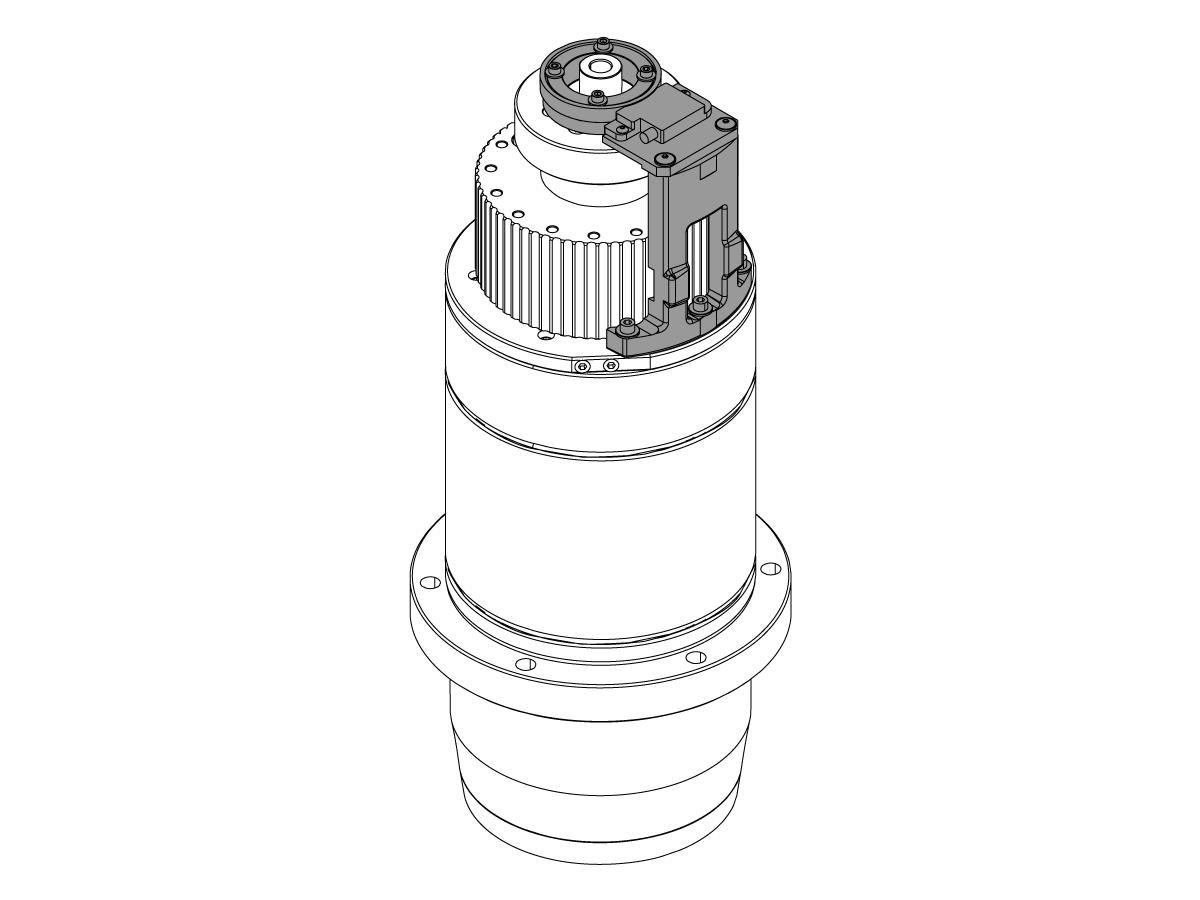
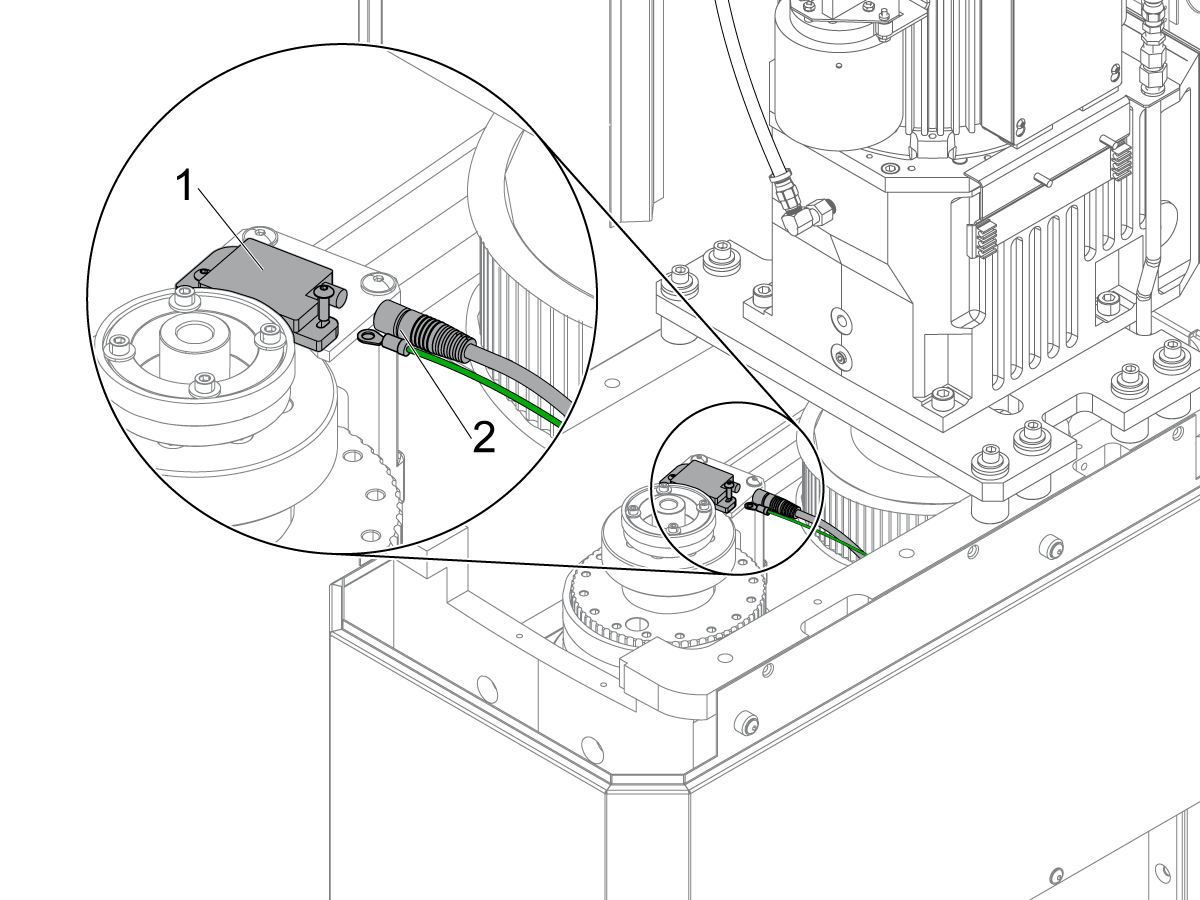
Generation 2 non-contact encoders can be identified by the pigtail cable attached to the side of the read head [1]. Generation 1 encoders do not have this cable. 

50-Taper - Non-Contact Encoder - Replacement

1

Push [POWER OFF].

Set the main circuit breaker to the OFF position.

Lock the main circuit breaker. Use an approved lock with an approved safety tag.

Close the primary air valve. This stops the air supply to the machine.

2

Remove the Tool Release Piston. Refer to VMC - 50-Taper - TRP - Replacement.

Disconnect the encoder cable and the ground cable [2] from the encoder read-head [1].

3

If you must replace the read head for a non-contact encoder:

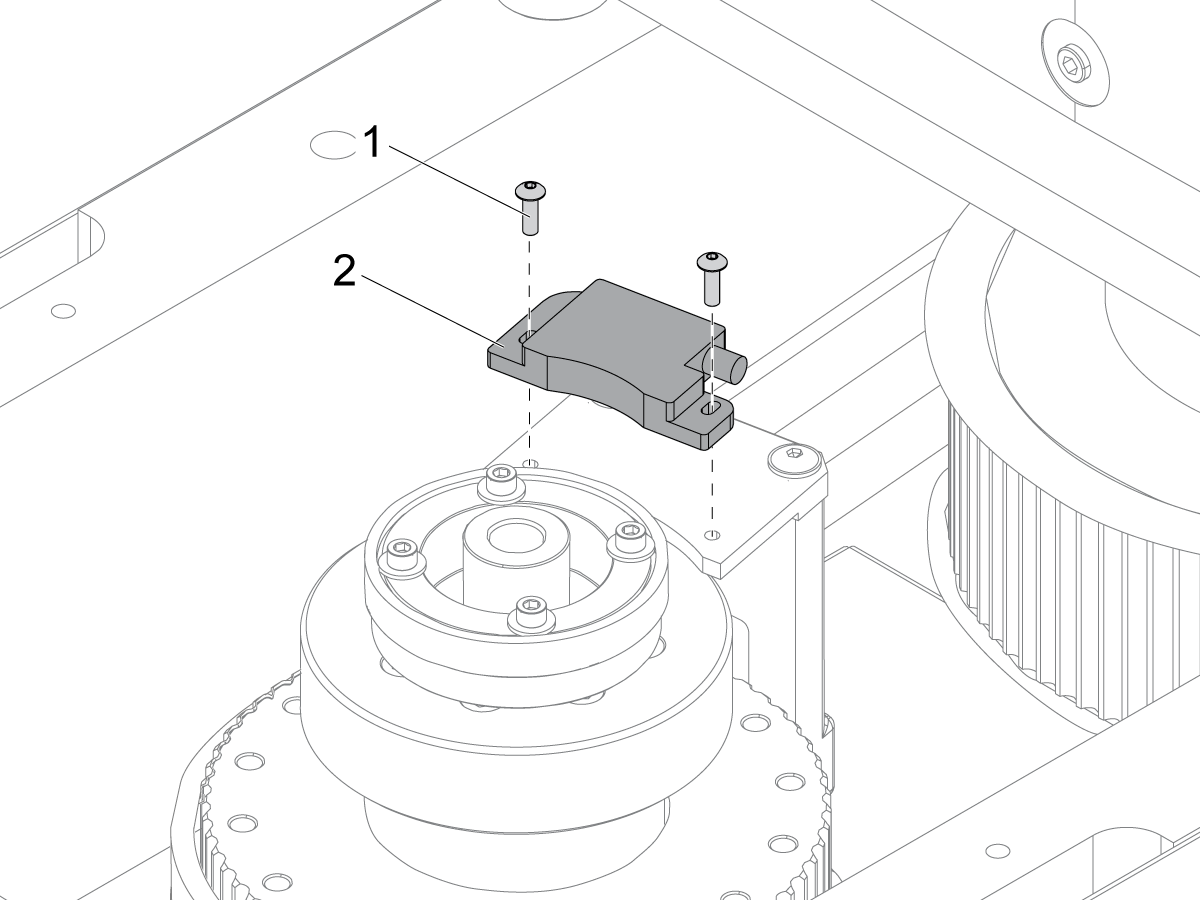
Remove the (2) screws [1].

Remove the encoder read-head [2].

Go to Step 5.

4

If you must replace the spindle:

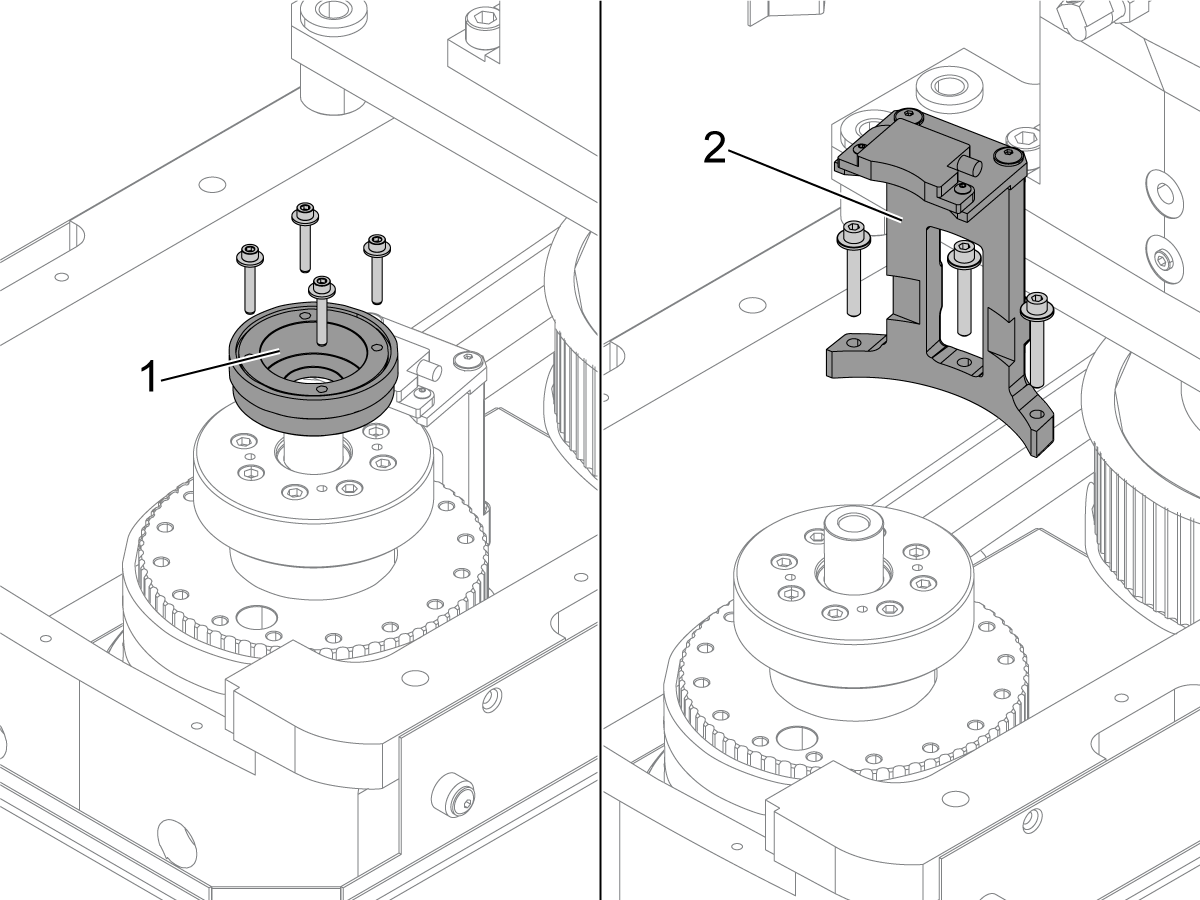
Remove the (4) screws. Remove the encoder ring assembly [1].

Remove the (3) screws. Remove the encoder read-head assembly [2].

Replace the spindle. Refer to VMC - 50-Taper - Spindle - Replacement.

IMPORTANT: Do not dispose of the read head mount. It will be re-installed.

5

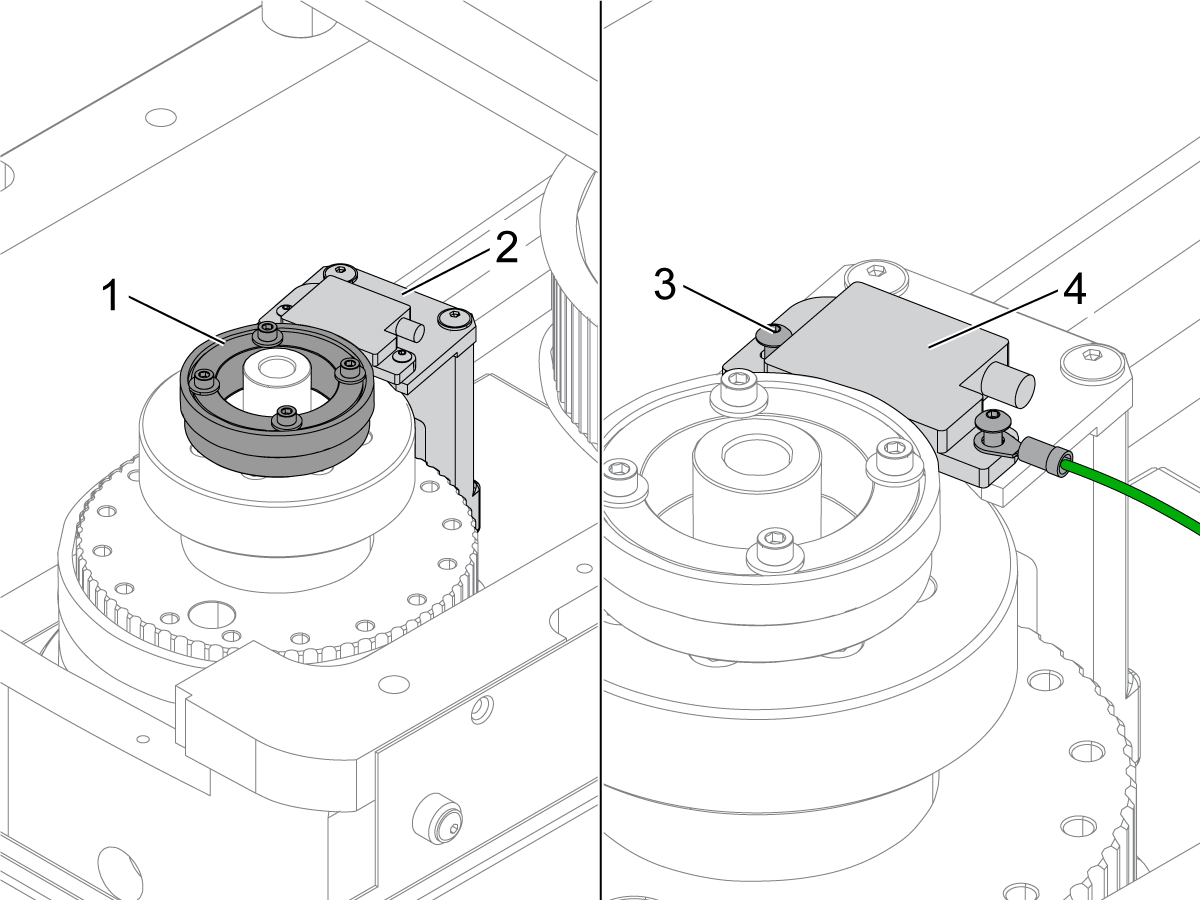
Install the encoder ring [1] onto the replacement spindle.

Measure the total indicated runout (TIR) on the encoder ring [1]. Set the TIR as close to .0005" (0.01 mm) as possible, do not exceed 0.002" (0.05 mm).

Torque the (4) screws to 56 in-lb (633 N-cm).

Make sure to install the ground cable.

Install the encoder read-head assembly [2] onto the replacement spindle being sure to use (2) WASHER FLAT 0.170ID X 0.400OD. Make sure the ground cable sits on top of the washer (not under) before installing read head mounting screws.

Torque the (3) screws to 12 ft-lb (16 N-m).

Loosen the (2) screws [3] for the encoder read-head [4].

6

 Note: Before this step, make sure you adjust the drive belts to the correct tension.

For the RLS type encoder:

Put a 0.3 mm plastic shim [2] between the encoder read-head [1] and the encoder ring [3].

Push the encoder read-head toward the encoder ring.

Make sure there is a uniform air gap [4] between the encoder read-head and the encoder ring.

Tighten the (2) screws [6] for the encoder read-head. Remove the shim.

Connect the encoder cable [5] to the encoder read-head.

Mill Encoder Ring to Read Head Alignment

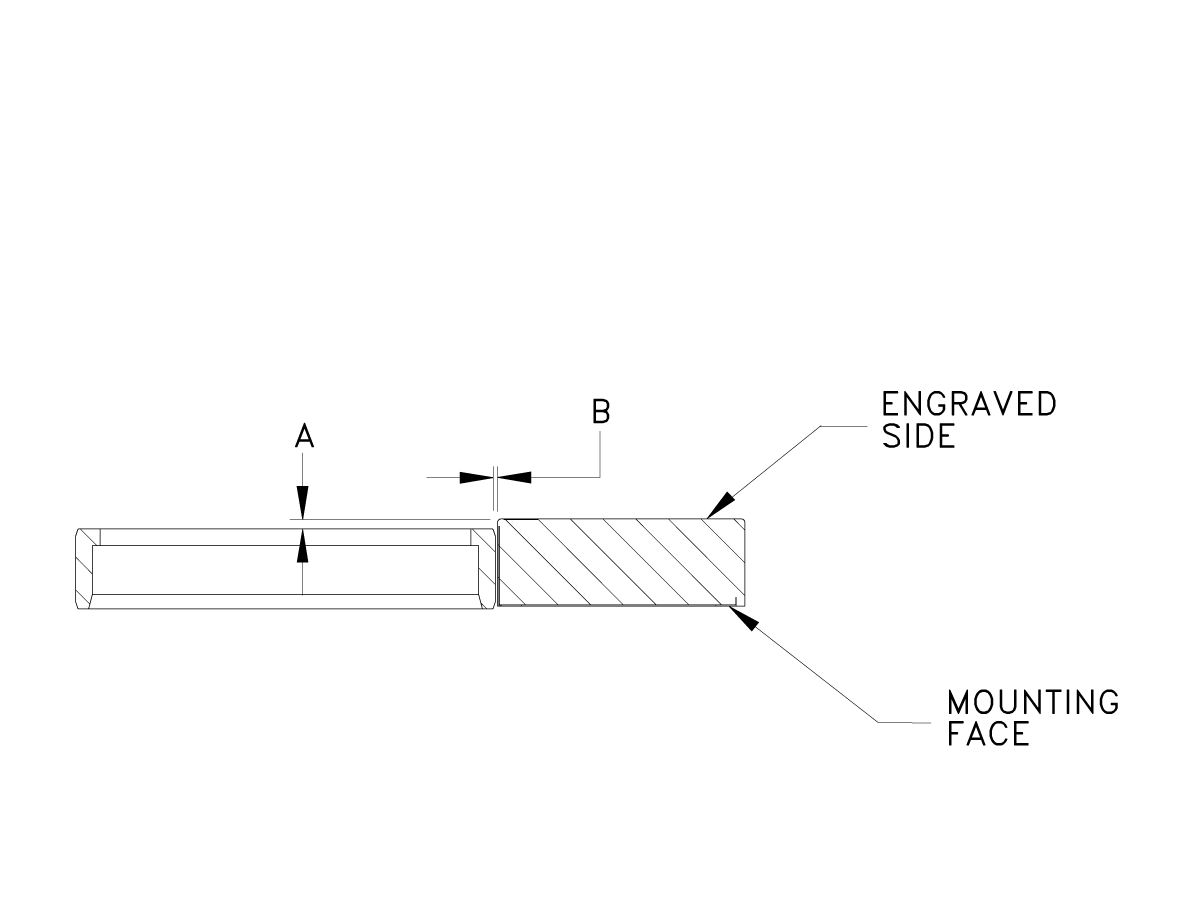
Generation 2 Alignment: Proper alignment of the read head to the encoder ring is critical.  Check that the axial alignment and running gap of the encoder ring are correct.

[A] 0.000 +/- 0.045

[B] 0.012 + 0.008 - 0.004


 Note: If the read head and encoder cannot be aligned, the alignment bracket may need to be replaced. See Replace Alignment Bracket below. 

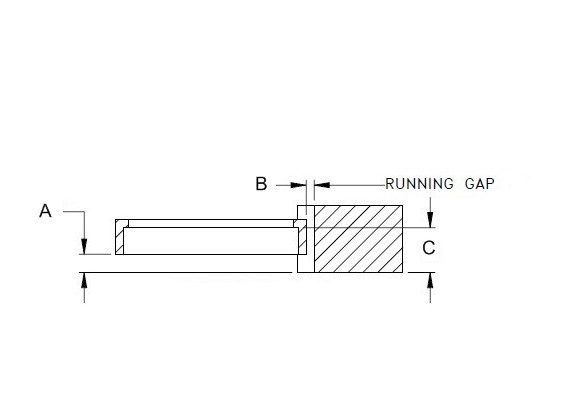
Note: For Generation 1 encoders, use the chart below. 

Generation 1 Alignment: Proper alignment of the read head to the encoder ring is critical. The alignment will vary based on the brand of encoder.  Use the chart provided to make sure the encoder ring and read head are properly aligned.

VENDOR                               RLS                                    BAUMER

A                              0.020" +0.020 / -0.039                 0.0453" +/- 0.019

B                              0.0118" +0.0079 / -0.0039           0.0118" +/- 0.0039

C                                           0.362"                                     0.360"

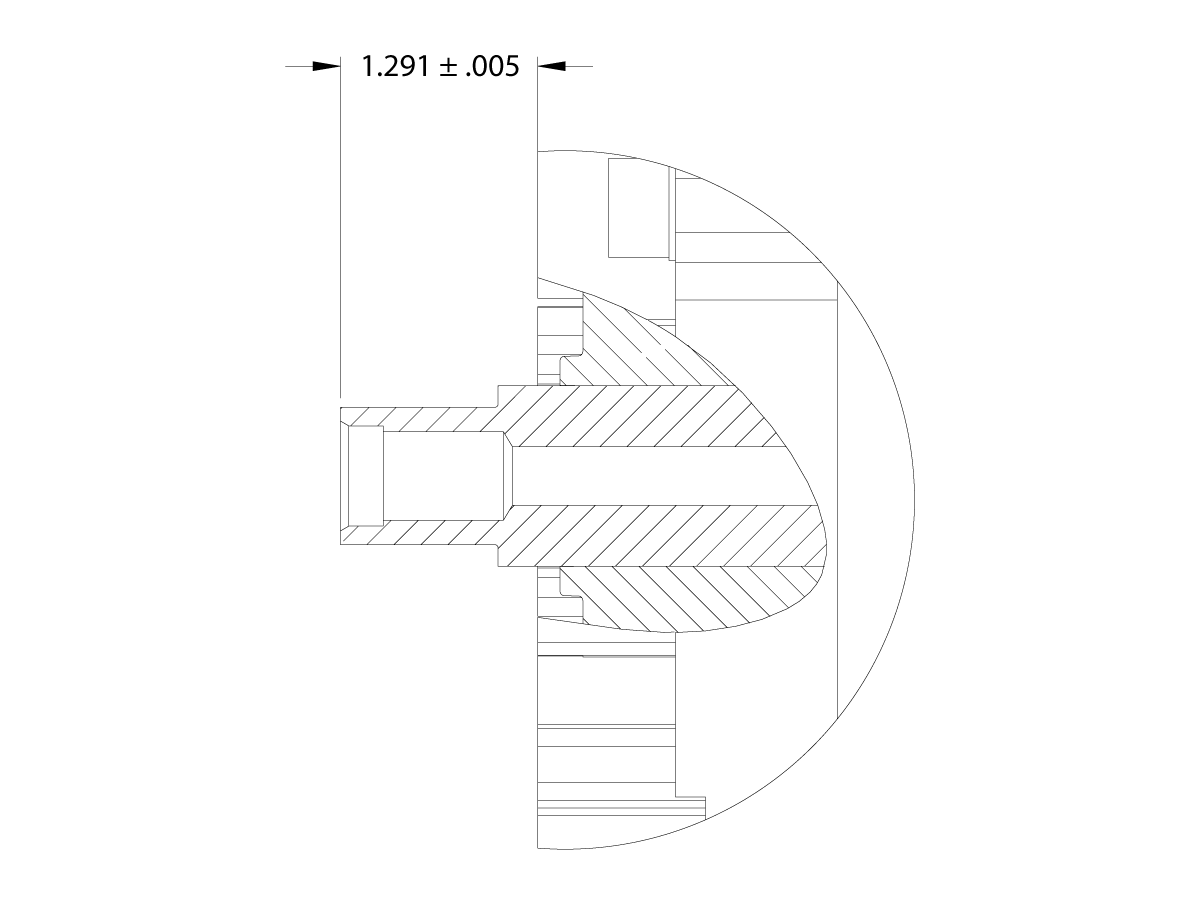
Incorrect installation of the spindle may axially misalign the motor shaft.  Measure the distance from the top of the motor shaft to the top of the motor TSC mounting hole surfaces.  It should be 1.291 ± .005.

If the shaft is axially misaligned the spindle motor must be replaced.

50-Taper - Non-Contact Encoder - Test

1

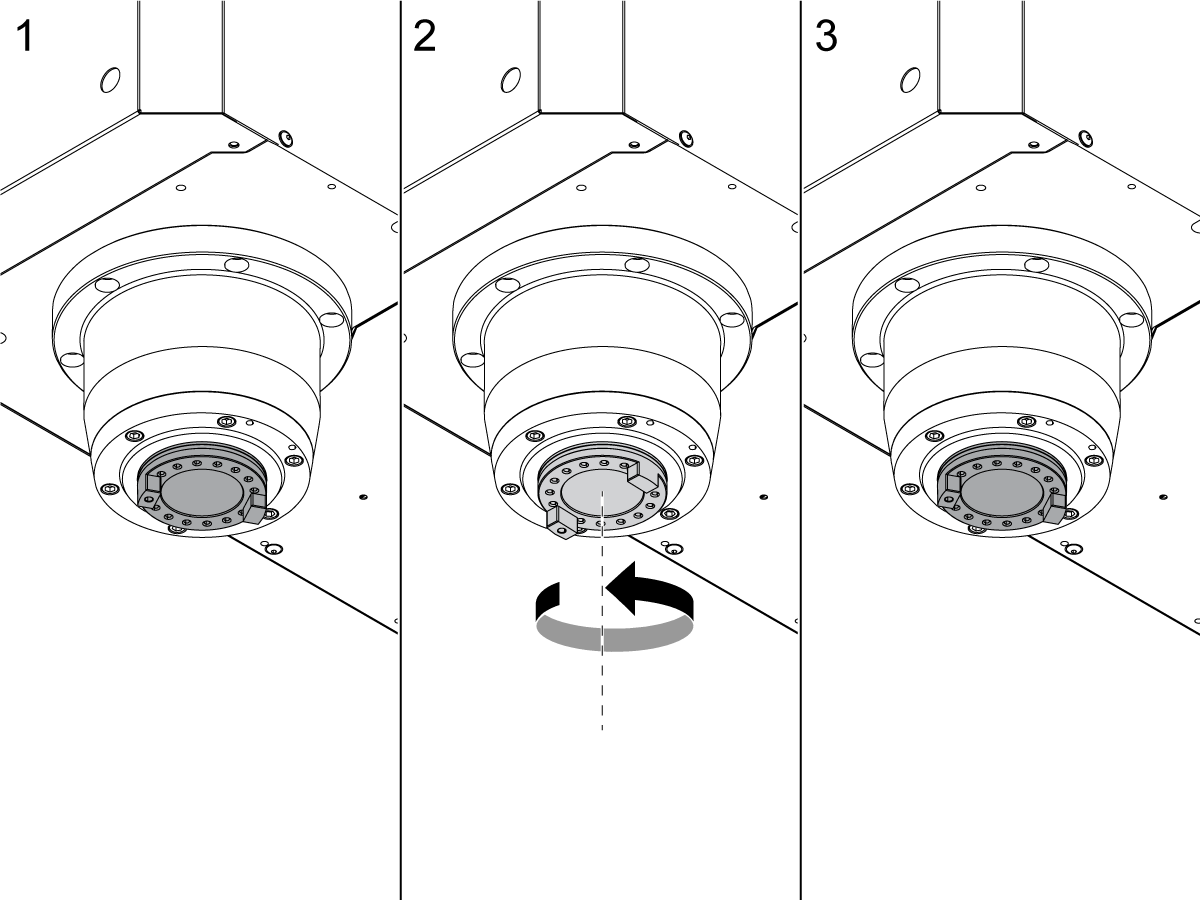
To make sure [ORIENT SPINDLE] operates correctly in a Haas Classic Control Machine:

  1. Set the main circuit breaker to the ON position.
  2. Push [POWER ON].
  3. Push [MDI]. Push [ORIENT SPINDLE].
  4. Look at the position of the spindle dogs [1].
  5. Push [RESET].
  6. Manually turn the spindle dogs to a different position [2]. Push [ORIENT SPINDLE] again.
  7. Make sure the spindle dogs stop at the same position [3].

Repeat this process several times to make sure the spindle always orients to the same position.

If the spindle does not orient correctly, the gap between the encoder ring and the read head is not correct. Repeat Step 5 of the replacement procedure.

2

To make sure ORIENT SPINDLE operates correctly in a Haas Next Gen Control Machine:

  1. Set the main circuit breaker to the ON position.
  2. Push [POWER ON].
  3. Push [MDI]. 
  4. Enter M19 
  5. Push [CYCLE START]
  6. Look at the position of the spindle dogs [1].
  7. Push [RESET].
  8. Manually turn the spindle dogs to a different position [2].
  9. Push [MDI]. 
  10. Enter M19 
  11. Push [CYCLE START]
  12. Make sure the spindle dogs stop at the same position [3].

Repeat this process several times to make sure the spindle always orients to the same position.

If the spindle does not orient correctly, the gap between the encoder ring and the read head is not correct. Repeat Step 5 of the replacement procedure.

3

To make sure that the spindle operates correctly:

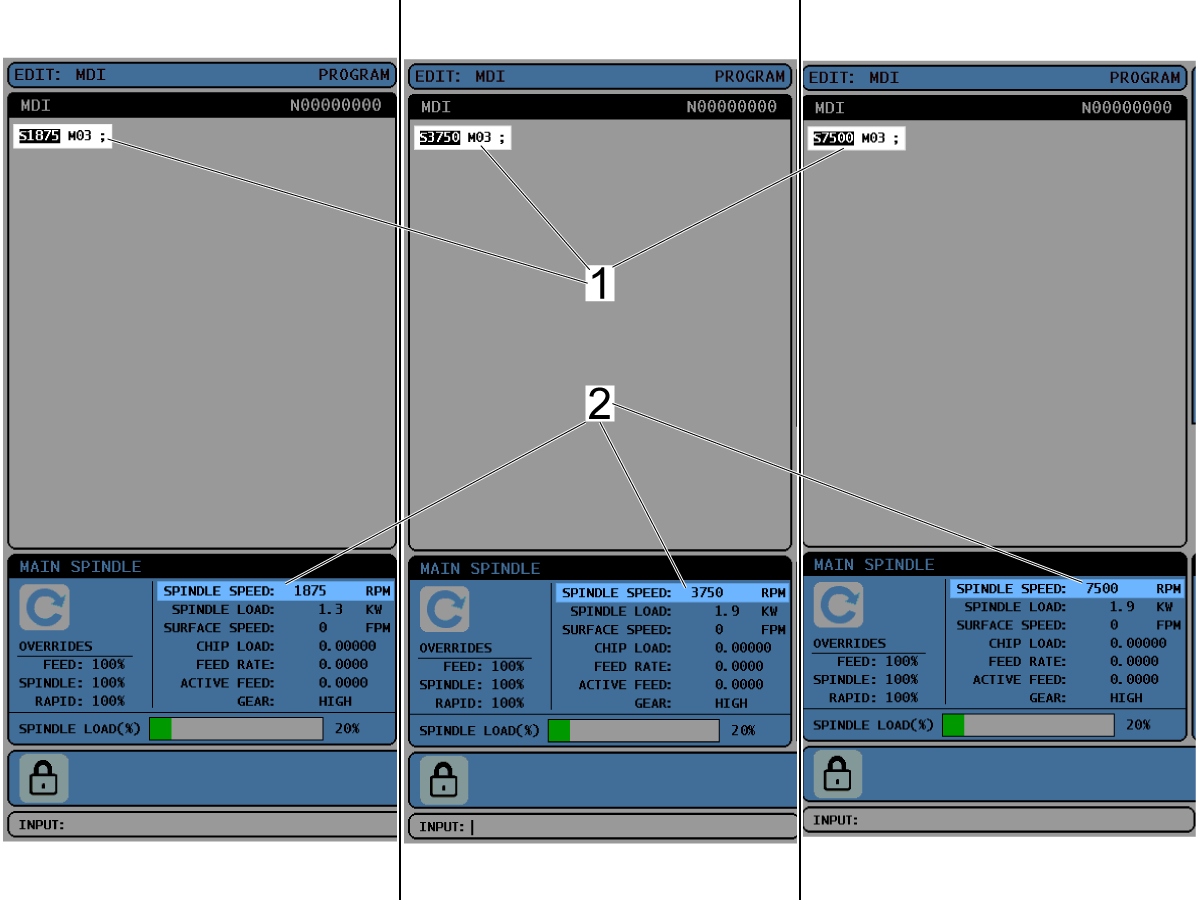
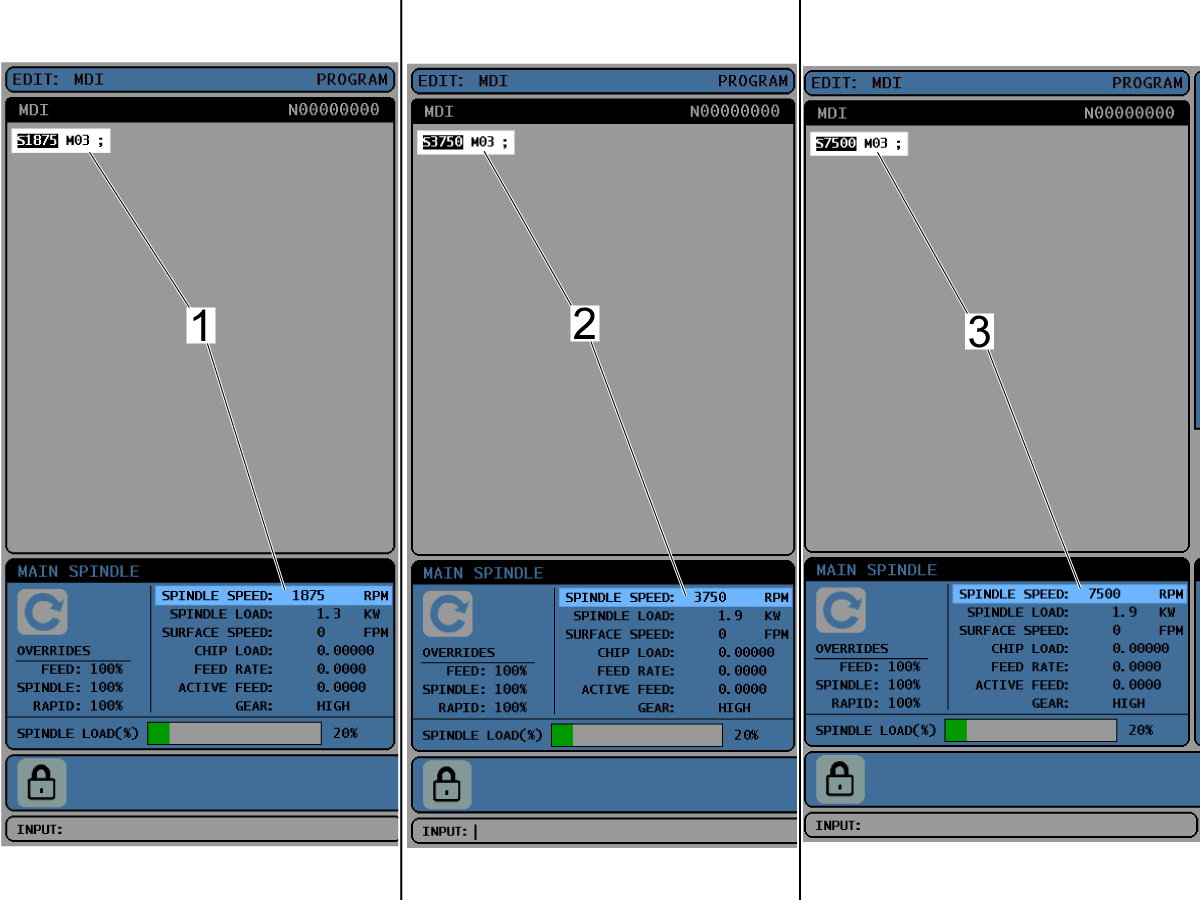
Operate the spindle at 25% [1], 50% [2], and 100% [3] of the maximum speed.

 Note: In this example the maximum speed is 7500 RPM.

4

Make sure the spindle speed in the code [1] is the same as the spindle speed on the display [2].

If these spindle speeds are not the same, make sure the encoder parameters are correct.

5

Install the Tool Release Piston. Refer to the VMC - 50-Taper - TRP - Replacement procedure.

Refer to:

  • CHC - Side-Mount Tool Changer - Spindle Orientation Offset - Parameter 257
  • NGC - Side-Mount Tool Changer - Spindle Orientation Offset

Recently Viewed Items

You Have No Recently Viewed Items Yet

Feedback
Haas Logo

Haas Delivered Price

This price includes shipping cost, export and import duties, insurance, and any other expenses incurred during shipping to a location in France agreed with you as a buyer. No other mandatory costs can be added to the delivery of a Haas CNC Product.

KEEP UP WITH THE LATEST HAAS TIPS AND TECHNOLOGY...

Sign up now!   

HAAS TOOLING ACCEPTS THE FOLLOWING:

  • Service & Support
  • Owners
  • Request Service
  • Operator Manuals
  • Haas Parts
  • Rotary Repair Request
  • Pre-Install Guides
  • Shopping Tools
  • Build & Price a New Haas
  • Available Inventory
  • The Haas Price List
  • CNCA Financing
  • About Haas
  • Accessibility Statement
  • DNSH Statement
  • Export Compliance
  • Careers
  • Certifications & Safety
  • Contact Us
  • History
  • Terms & Conditions
  • Haas Tooling Terms & Conditions
  • Privacy
  • Warranty
  • Haas Community
  • Haas Certification Program
  • Haas Motorsports

  • Gene Haas Foundation
  • Haas Technical Education Community
  • Events

  • Join the Conversation
  • Facebook
  • X
  • Flickr
  • YouTube
  • LinkedIn
  • Instagram
  • TikTok
© 2026 Haas Automation, Inc – CNC Machine Tools

This site is protected by reCAPTCHA and the Google Privacy Policy and Terms of Service apply.

2800 Sturgis Rd., Oxnard, CA 93030
Toll Free: (888) 817-4446 / Fax: 805-278-8554