My Haas Welcome,
!
Haas Tooling MyHaas/HaasConnect Sign In Register Haas Tooling MyHaas/HaasConnect Sign Out Welcome, My Machines Latest Activity My Quotes My Account My Users Sign Out
Find Your Distributor
  1. Select Language
    1. English
    2. Deutsch
    3. Español - España
    4. Español - México
    5. Français
    6. Italiano
    7. Português
    8. Český
    9. Dansk
    10. Nederlands
    11. Magyar
    12. Polski
    13. Svenska
    14. Türkçe
    15. 中文
    16. Suomi
    17. Norsk
    18. الإنجليزية
    19. български
    20. Hrvatski
    21. Ελληνικά
    22. Română
    23. Slovenský
    24. Slovenščina
    25. 한국어
    26. 日本語
    27. Українська
  • machines Main Menu
    • Vertical Mills
      Vertical Mills
      Vertical Mills View All
      • Vertical Mills
      • VF Series
      • Universal Machines
      • VR Series
      • VP-5 Prismatic
      • Pallet-Changing VMCs
      • Mini Mills
      • Mold Machines
      • High-Speed Drill Centers
      • Drill/Tap/ Mill Series
      • Toolroom Mills
      • Pocket Mill
      • Compact Mills
      • Gantry Series
      • SR Sheet Routers
      • Extra-Large VMC
      • Double-Column Mills
      • 3+2 Positioning Machines
    • Multi-Axis Solutions
      Multi-Axis Solutions
      Multi-Axis Solutions View All
      • Multi-Axis Solutions
      • Y-Axis Lathes
      • 5-Axis Mills
    • Lathes
      Lathes
      Lathes View All
      • Lathes
      • ST Series
      • Dual-Spindle
      • Box Way Series
      • Toolroom Lathes
      • Chucker Lathe
      • Haas Bar Feeders
    • Horizontal Mills
      Horizontal Mills
      Horizontal Mills View All
      • Horizontal Mills
      • 50-Taper
      • 40-Taper
    • Rotaries & Indexers
      Rotaries & Indexers
      Rotaries & Indexers View All
      • Rotaries & Indexers
      • Rotary Tables
      • Indexers
      • 5-Axis Rotaries
      • Extra-Large Rotaries
    • Special Series
      Special Series
      Special Series View All
      • Special Series
      • EU_Series_Redirect
    • Automation Systems
      Automation Systems
      Automation Systems View All
      • Automation Systems
      • Mill Automation
      • Lathe Automation
      • Automatic Parts Loaders
      • Automation Models
    • Desktop Machines
      Desktop Machines
      Desktop Machines View All
      • Desktop Machines
      • Desktop Mill
      • Desktop Lathe
      • Control Simulator, Standard
      • Control Simulator, Premium
    • Shop Equipment
      Shop Equipment
      Shop Equipment View All
      • Shop Equipment
      • Knee Mill
      • Haas Manual Lathes
      • Haas Saws
    • Fabrication Machines
      Fabrication Machines
      Fabrication Machines View All
      • Fabrication Machines
      • Laser Cutting Machines
      • CNC Press Brakes
    • QUICK LINKS Special Series  Special Series 
      EU SERIES EU SERIES BUILD & PRICE | PRICE LIST BUILD & PRICE | PRICE LIST In-Stock Machines In-Stock Machines WHAT’S NEW WHAT’S NEW YOUR FIRST CNC YOUR FIRST CNC
      SHOPPING TOOLS
      • Build & Price a Haas
      • Price List
      • Available Inventory
      • CNCA Financing
      WANT TO TALK TO SOMEONE?

      A Haas Factory Outlet (HFO) can answer your questions, and walk you through your best options.

      CONTACT YOUR DISTRIBUTOR >
  • Options Main Menu
    • The Haas Control Value Option Packages
      Value Option Packages
      Value Option Packages View All
      • Value Option Packages
    • Product Image Spindles
      Spindles
      Spindles View All
      • Spindles
    • Product Image Tool Changers
      Tool Changers
      Tool Changers View All
      • Tool Changers
    • Product Image 4th- | 5th-Axis
      4th- | 5th-Axis
      4th- | 5th-Axis View All
      • 4th- | 5th-Axis
    • Product Image Turrets & Live Tooling
      Turrets & Live Tooling
      Turrets & Live Tooling View All
      • Turrets & Live Tooling
    • Product Image Probing
      Probing
      Probing View All
      • Probing
    • Haas Chip & Coolant Management Chip & Coolant Management
      Chip & Coolant Management
      Chip & Coolant Management View All
      • Chip & Coolant Management
    • The Haas Control The Haas Control
      The Haas Control
      The Haas Control View All
      • The Haas Control
    • Product Image Product Options
      Product Options
      Product Options View All
      • Product Options
    • Product Image Tooling & Fixturing
      Tooling & Fixturing
      Tooling & Fixturing View All
      • Tooling & Fixturing
    • Product Image Workholding
      Workholding
      Workholding View All
      • Workholding
    • Product Image 5-Axis Solutions
      5-Axis Solutions
      5-Axis Solutions View All
      • 5-Axis Solutions
      • 5 Easy Steps to 5-Axis
    • QUICK LINKS Special Series  Special Series 
      EU SERIES EU SERIES BUILD & PRICE | PRICE LIST BUILD & PRICE | PRICE LIST In-Stock Machines In-Stock Machines WHAT’S NEW WHAT’S NEW YOUR FIRST CNC YOUR FIRST CNC
      SHOPPING TOOLS
      • Build & Price a Haas
      • Price List
      • Available Inventory
      • CNCA Financing
      WANT TO TALK TO SOMEONE?

      A Haas Factory Outlet (HFO) can answer your questions, and walk you through your best options.

      CONTACT YOUR DISTRIBUTOR >
  • Why Haas Main Menu
      Discover the Haas Difference
    • Why Haas
    • MyHaas
    • Education Community
    • Industry 4.0
    • Haas Certification
    • Customer Testimonials
  • Service Main Menu
      Welcome to Haas Service
      SERVICE HOME Operator’s Manuals How-To Procedures Troubleshooting Guides Preventive Maintenance Haas Parts Haas Tooling Videos
  • Videos Main Menu
  • Main Menu
    • View All
    • View All
    • View All
    • View All
      • HTEC Curriculum Support
      • Haas Value Option Packages (VOP) Journey
    • View All
      • Haas 10 kg Cobot Package
      • Cobot Kits
      • DC-1 Drill Center
      • CNC Sales News
      • Do More With Your Haas
    • View All
    • View All
      • contact-us-test
      • 4 - AUTOMATION SYSTEMS
      • Carousel-V2
      • expert test
      • Demo_Day_Trident-test
      • Link Test
      • image-sale-tag-test
      • article-list-test
      • Haas 25 kg Robot Package
      • test-algolia-page
    • View All
    • View All
    • View All
    • View All
      • calc-test
    • View All
    • QUICK LINKS Special Series  Special Series 
      EU SERIES EU SERIES BUILD & PRICE | PRICE LIST BUILD & PRICE | PRICE LIST In-Stock Machines In-Stock Machines WHAT’S NEW WHAT’S NEW YOUR FIRST CNC YOUR FIRST CNC
      SHOPPING TOOLS
      • Build & Price a Haas
      • Price List
      • Available Inventory
      • CNCA Financing
      WANT TO TALK TO SOMEONE?

      A Haas Factory Outlet (HFO) can answer your questions, and walk you through your best options.

      CONTACT YOUR DISTRIBUTOR >
  • Haas Tooling Main Menu
  • Haas Service Parts Main Menu

My Haas Welcome,
!
Haas Tooling MyHaas/HaasConnect Sign In Register Haas Tooling MyHaas/HaasConnect Sign Out Welcome, My Machines Latest Activity My Quotes My Account My Users Sign Out
Find Your Distributor
  1. Select Language
    1. English
    2. Deutsch
    3. Español - España
    4. Español - México
    5. Français
    6. Italiano
    7. Português
    8. Český
    9. Dansk
    10. Nederlands
    11. Magyar
    12. Polski
    13. Svenska
    14. Türkçe
    15. 中文
    16. Suomi
    17. Norsk
    18. الإنجليزية
    19. български
    20. Hrvatski
    21. Ελληνικά
    22. Română
    23. Slovenský
    24. Slovenščina
    25. 한국어
    26. 日本語
    27. Українська
×

Search Results

Web Pages

Images

    • <
    • 1
    • >

37 - NGC - 24V LED - Worklights

Next Gen Control Electrical - Service Manual


  • 1 - NGC - Introduction
  • 2 - NGC - Activation
  • 3 - NGC - Software Update
  • 4 - NGC - Firmware Update
  • 5 - NGC - Configuration
  • 6 - NGC - Error Report and Backup
  • 7 - NGC - Main Processor
  • 8 - NGC - I/O and TC PCB
  • 9 - NGC - CAN Systems and Autodoor
  • 10 - NGC - Servo Motors and Axis Cables
  • 11 - NGC - 4th and 5th Axis
  • 12 - NGC - Servo Amplifiers
  • 13 - NGC - Vector Drive
  • 14 - NGC - Regen
  • 15 - NGC - 320V Power Supply
  • 16 - NGC - Wye / Delta
  • 17 - NGC - Circuit Breaker and Transformer
  • 18 - NGC - PSUP PCB
  • 19 - NGC - SKBIF and LCD Monitor
  • 20 - NGC - Remote Jog Handle
  • 21 - NGC - 115V LED - WorkLights
  • 22 - NGC - CabCool
  • 23 - NGC - MyHaas
  • 24 - NGC - Networking
  • 25 - NGC - 8M PCB
  • 26 - NGC - Robot and Automation
  • 27 - NGC - Machine Data Collection
  • 28 - NGC - Control Icons
  • 29 - NGC - Sensors and Switches
  • 30 - NGC - USB
  • 31 - NGC - Keypad
  • 32 - NGC - Broken Tool Detection
  • 33 - NGC - IPFDM PCB
  • 34. NGC - LVPS
  • 35 - NGC - Camera Monitor System
  • 36 - NGC - High Intensity Lights
  • 37 - NGC - 24V LED - Worklights
  • 38 - NGC - Mill - Rotary Scale Cable Installation

Go To :

  • 37.1 - 24V LED - Table Work Light - Installation
  • 37.2 - 24V LED - Work Light - 200W LVPS - Replacement
  • 37.3 - 24V LED - Work Light - Troubleshooting Guide

37.1 - 24V LED - Table Work Light - Installation

Recently Updated

24V LED - Table Work Light - Installation - NGC


AD0531

Revision A - 11/2025

Introduction

This procedure tells you how to install the 24VDC (30Watt) table work light on the following machines:

  • VF 3-14
  • VR-14
  • UMC 500-1000
  • UMC 500-1000 W/ Pallet Pool
  • UMC 1500 DUO
  • EC-1600

Parts Required:
  • 93-1000843 VF-3 TO VF-5 WRITING TABLE FIELD KIT
  • 93-1000514 VF-6 TO VF-9 WRITING TABLE FIELD KIT
  • 93-1000521 VF-10 TO VF-11 WRITING TABLE FIELD KIT
  • 93-1000522 VF-12 WRITING TABLE FIELD KIT
  • 93-1000511 UMC-500 TO 1000 W/PP WRITING TABLE FIELD KIT
  • 93-1000512 UMC-500 TO 1000 W/O PP WRITING TABLE FIELD KIT
  • 93-1000520 UMC-1500 DUO WRITING TABLE FIELD KIT
  • 93-1000513 EC-1600/UMC-1600 WRITING TABLE FIELD KIT
  • 93-1000296 WRITING TABLE 24V 30W LED FIELD INSTALL
  • 93-1000292 WORK TABLE LIGHT

Note: For the VF-14 and VR-14, use the field install kit 93-1000522 for the Writing Table

Note: If you are looking for the 115V work table light installation, go to 115V Table Work Light - Installation

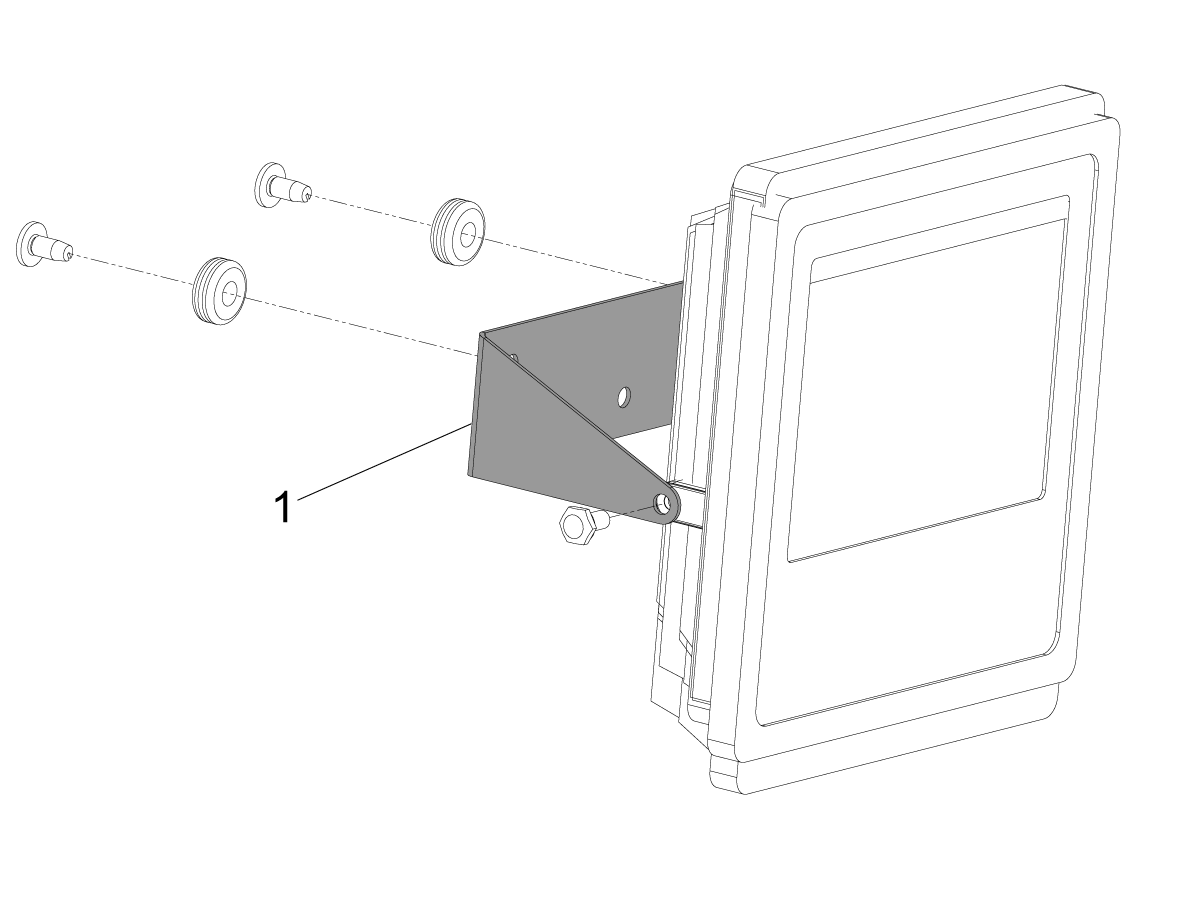
Work Table Light - Assembly

Using the components given in the kit assemble the work light as shown.

The bracket [1] will need to be changed to the provided bracket before proceeding with the install.

Installation: VF-3 to VF-9

1

Push [POWER OFF].

Set the main circuit breaker to the OFF position.

Lock the main circuit breaker. Use an approved lock with an approved safety tag.


2

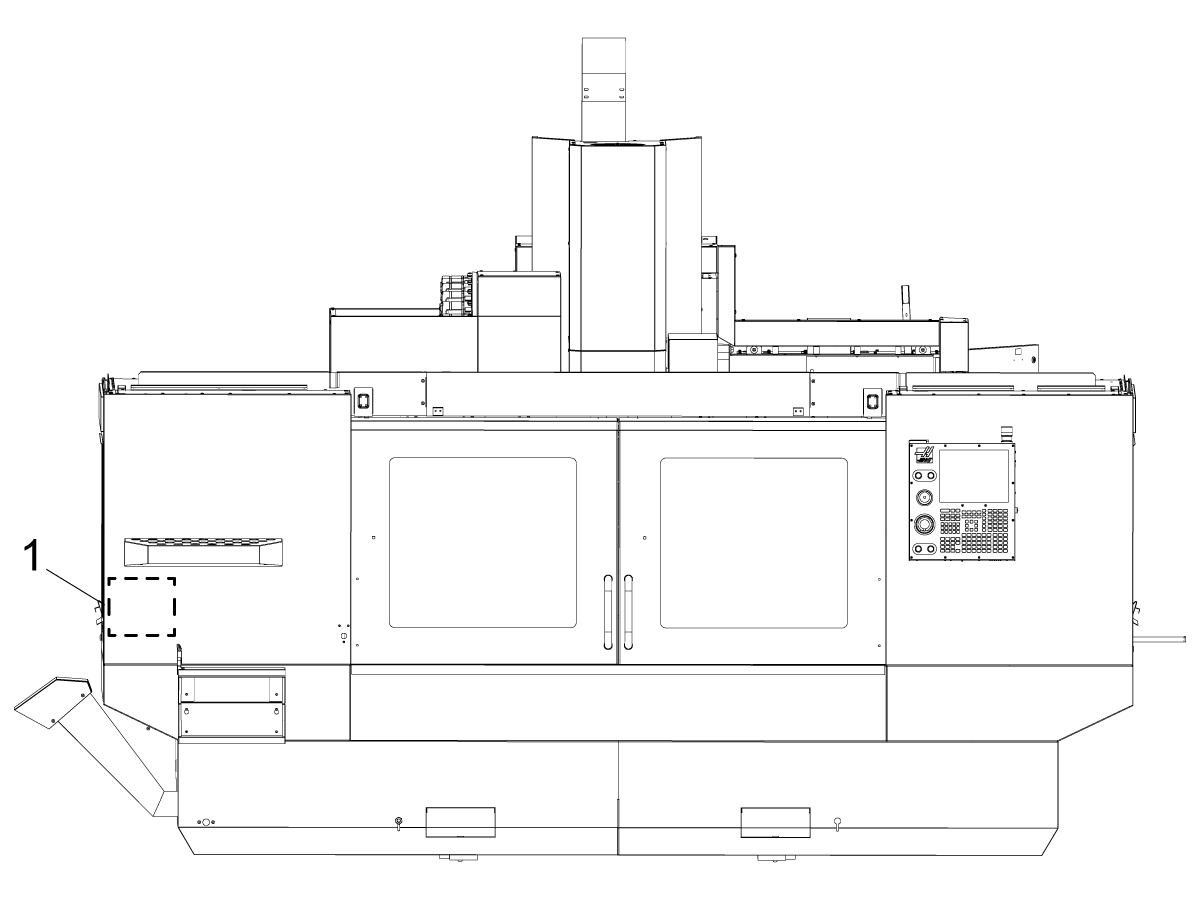
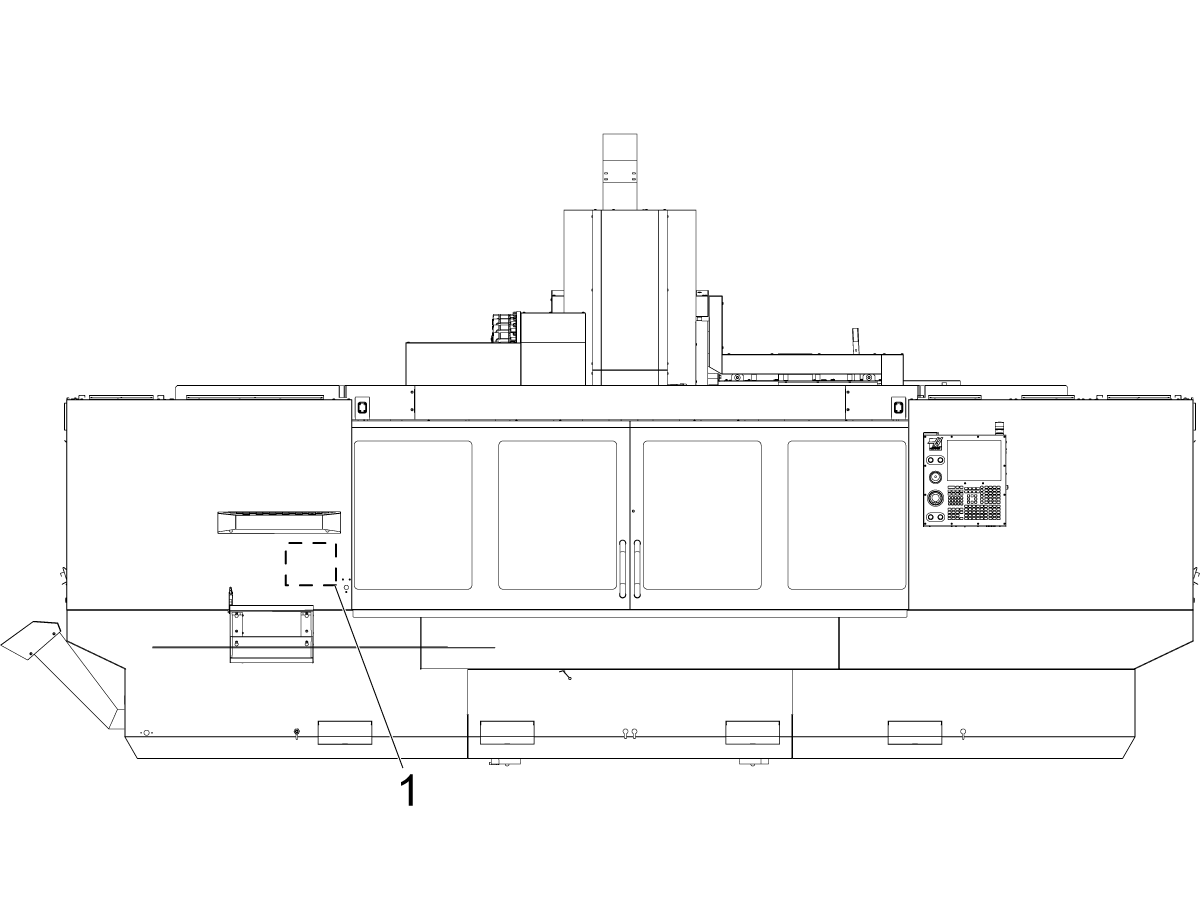
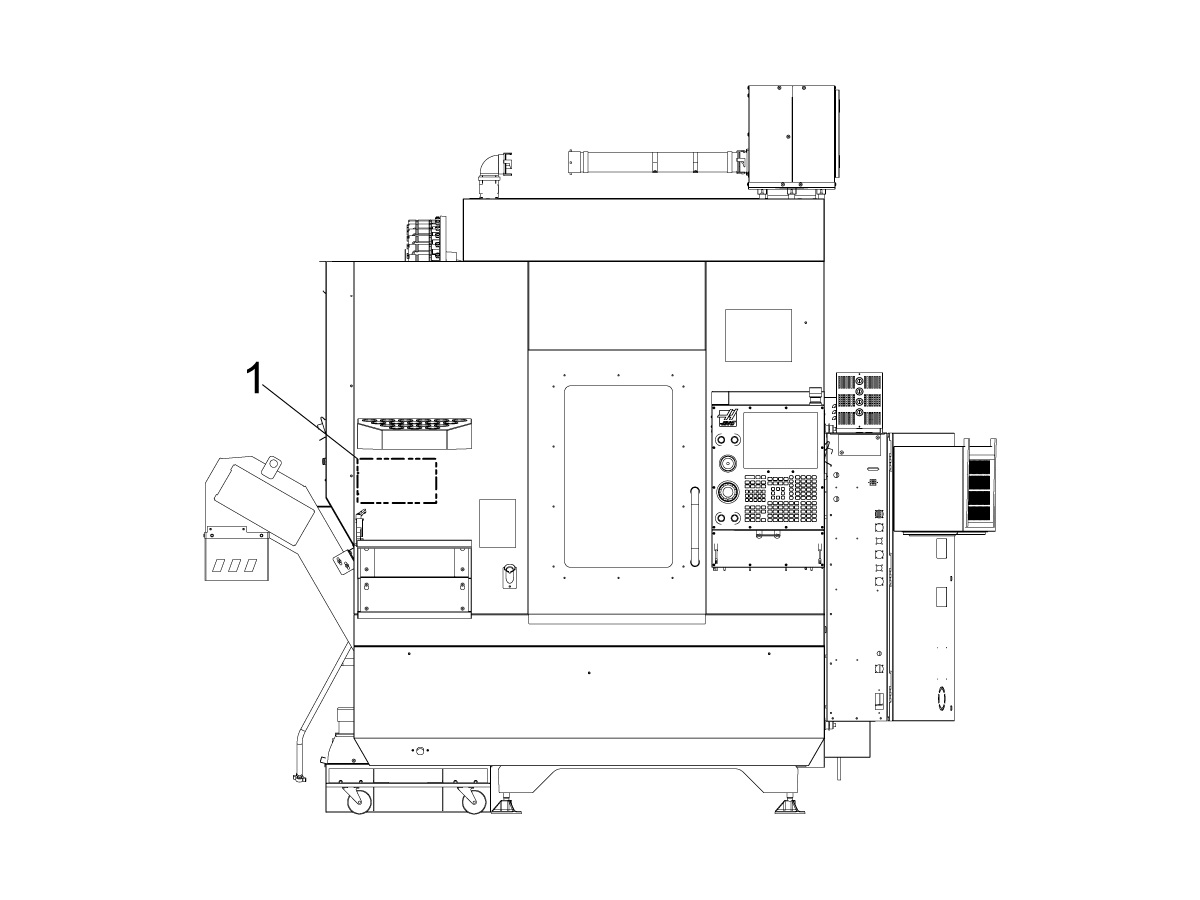
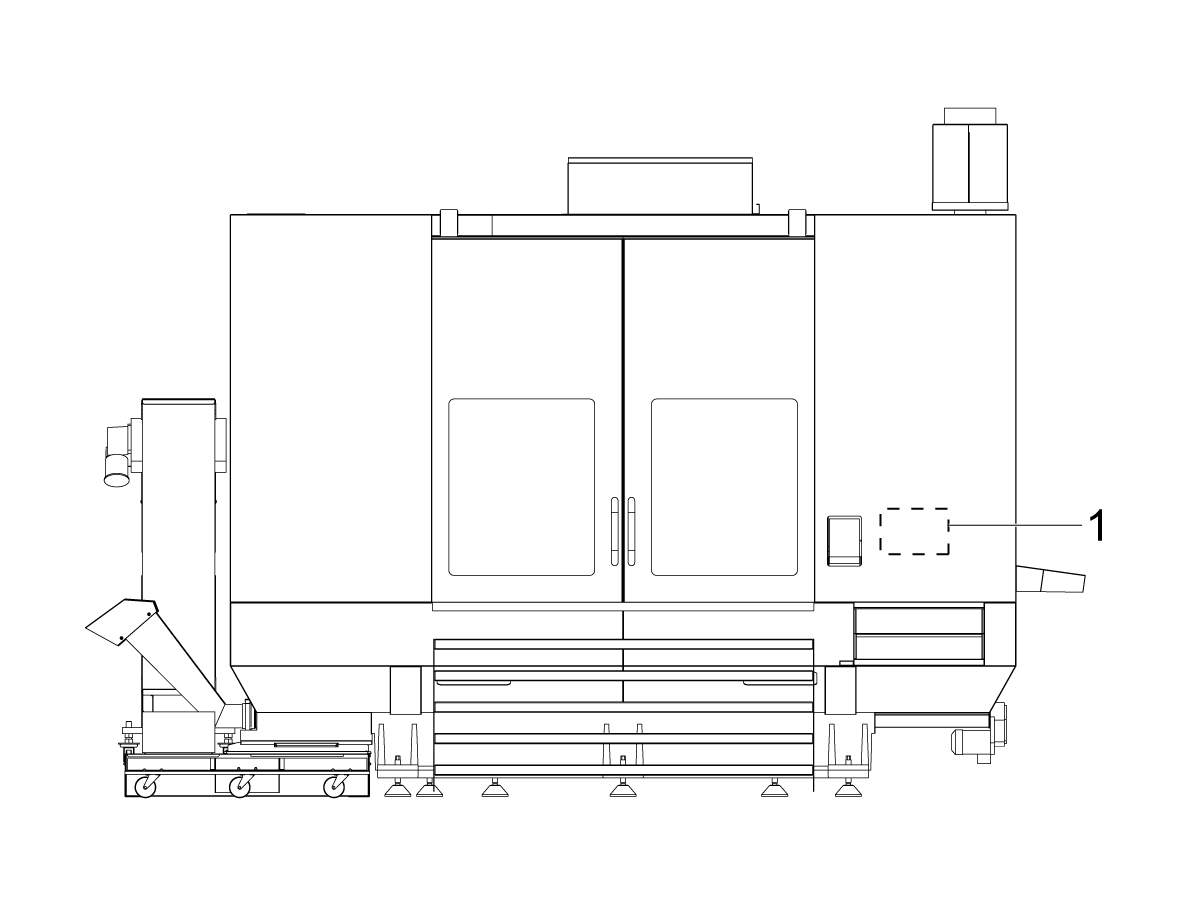
For the VF 3-9 the work table light will be placed in the location denoted as [1].

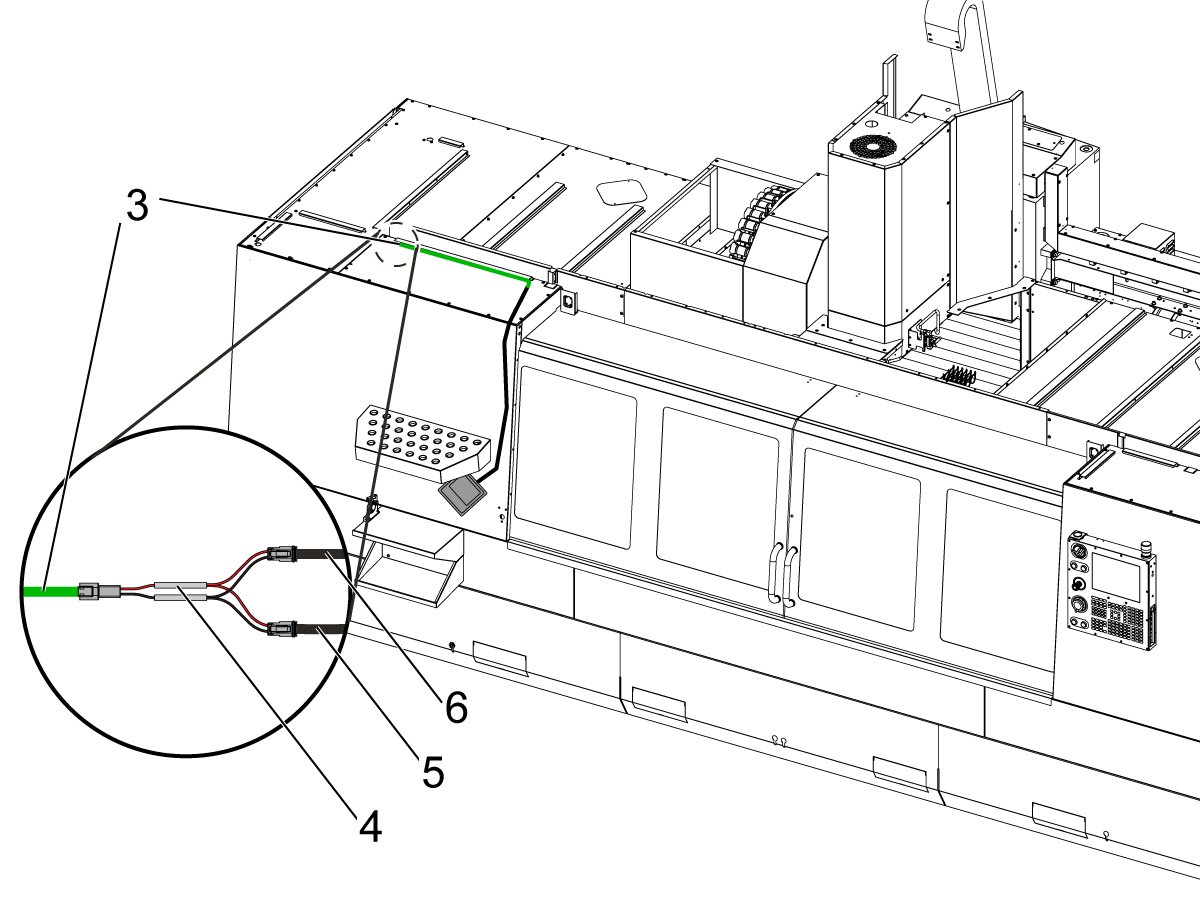
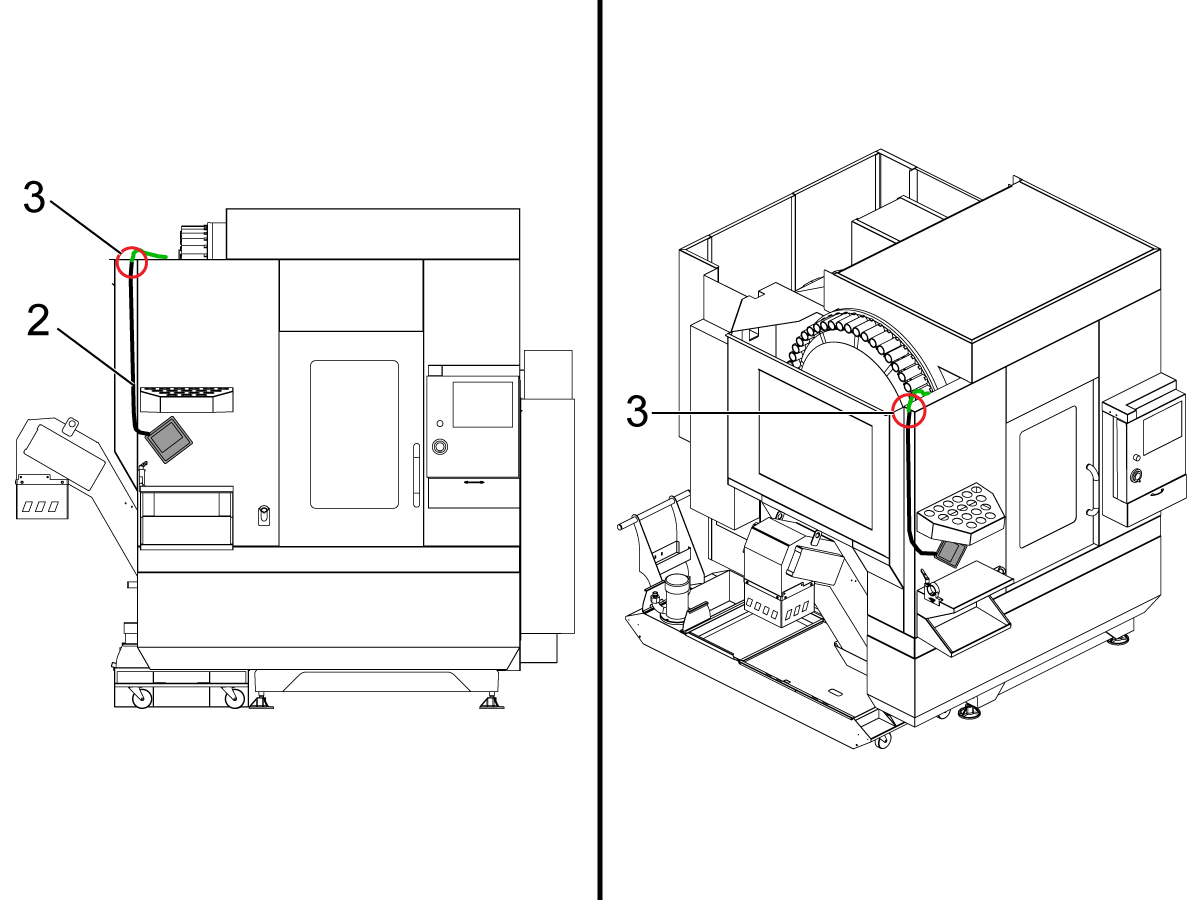
 Note: The images for steps 2-5 demonstrate the procedure on VF6-9 series machines, however can be used to reference VF3-5 work light installation. 

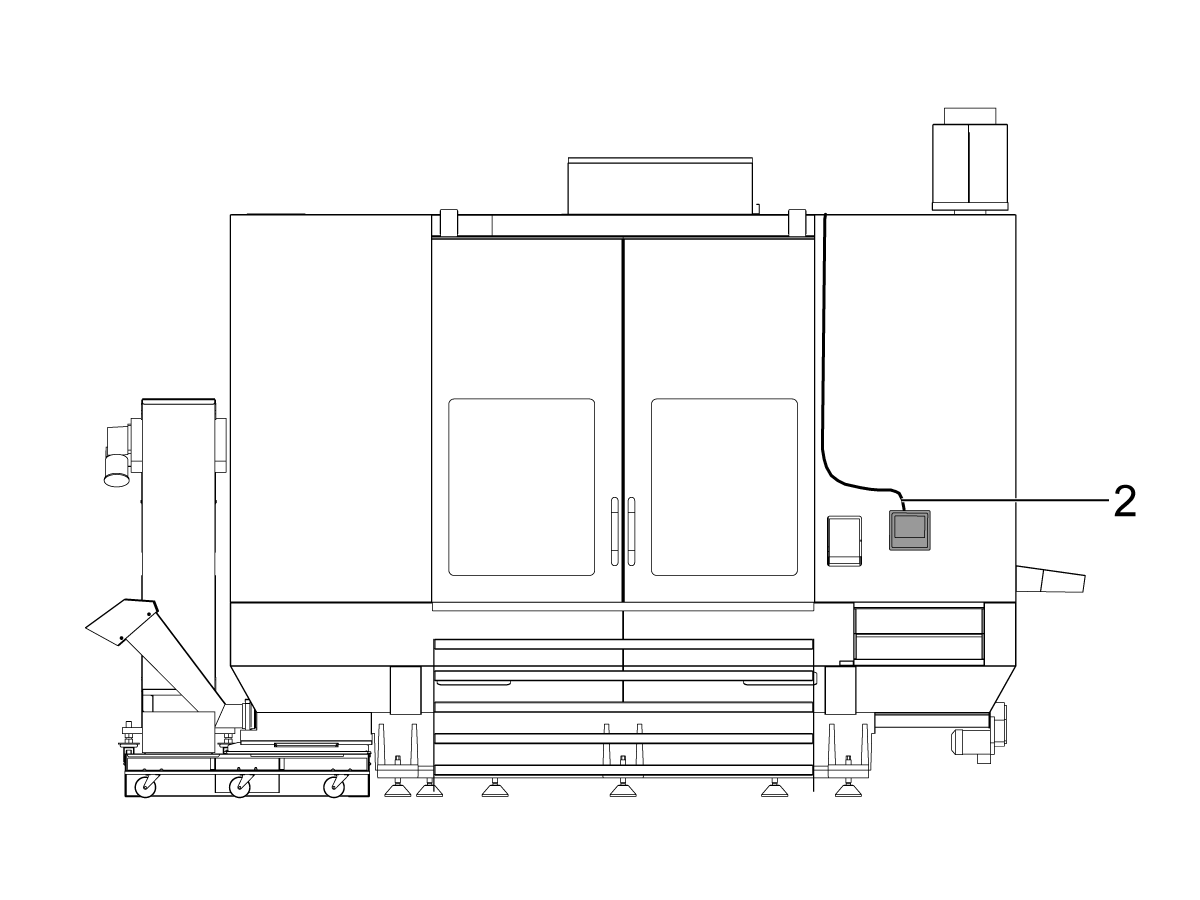
3

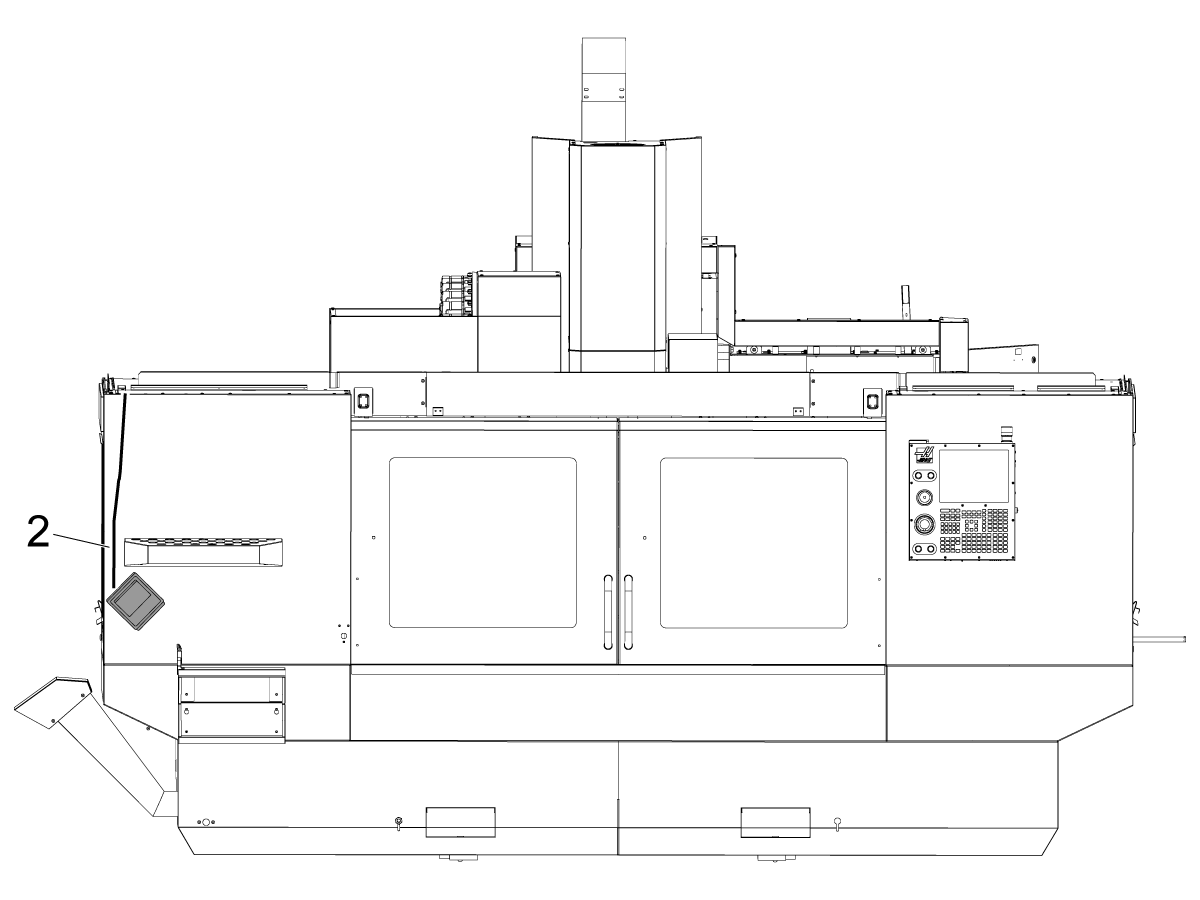
Start routing the cable to the top of the machine [2], use the wire channels given in the kit to neatly tuck away the cable on the front face of the machine.

4

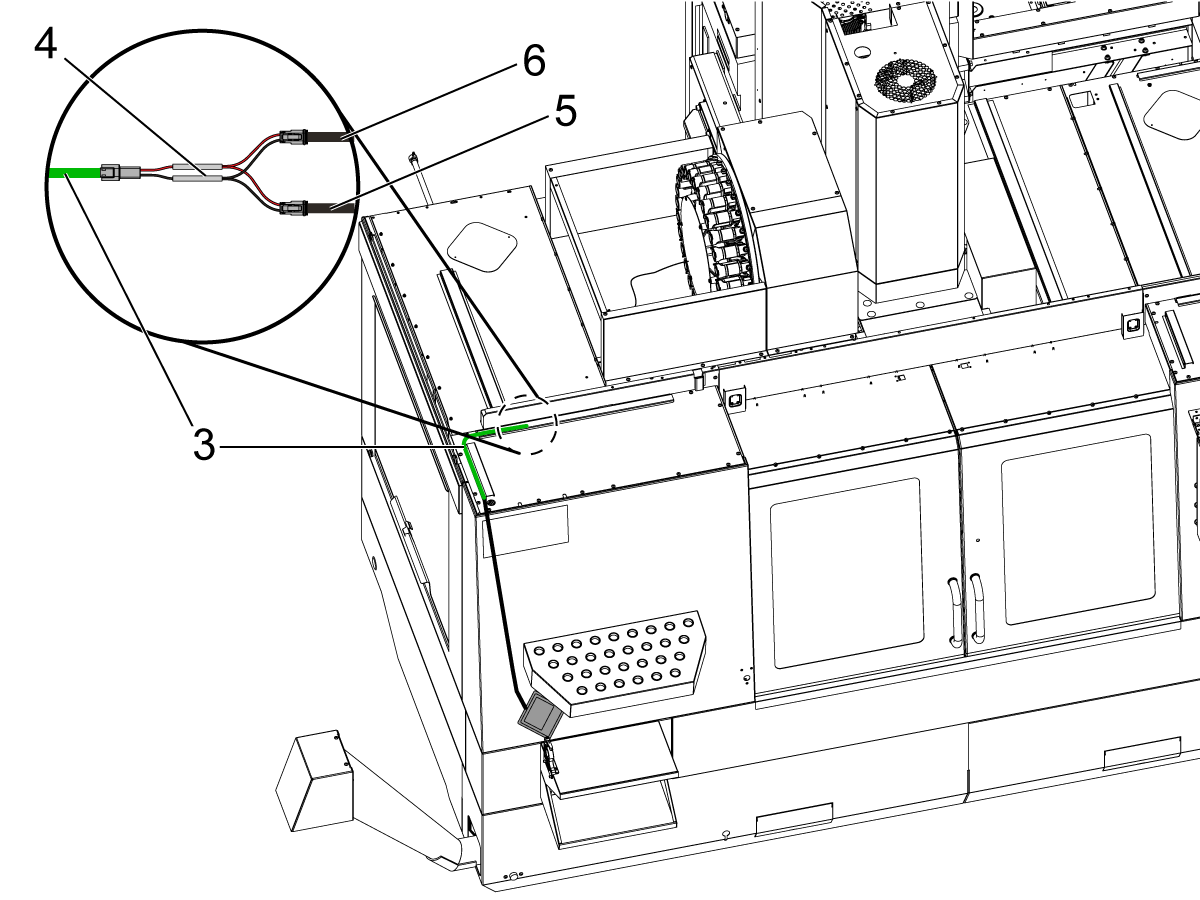
Most kits come with an extension cable (33-5812) . Once above the machine connect the extension cable [3] so that the work table light cable will now reach the connection area.

Note: The work table light cable may be long enough to meet the junction. If not, connect the extension and neatly ziptie excess together. 

Disconnect the inner LED cable [5] and connect the splitter cable (33-5842) [4]. Connect both, the cable pre-routed from the control cabinet [6] and the work table light extension cable [3], to the splitter cable [4].

5

For VF-3 through VF-5 machines, the 100W Work Light Power Supply must be replaced with the 200W Work Light Power Supply (69-009) included in the kit.

Refer to the to the following guide for more details on installing the 200W LVPS.

24V LED - Work Light - 200W LVPS - Replacement


6

Actuate the light switch on the side of the controller to test that the work light turns on.

Installation: VF-10 to VF-11

1

Push [POWER OFF].

Set the main circuit breaker to the OFF position.

Lock the main circuit breaker. Use an approved lock with an approved safety tag.

2

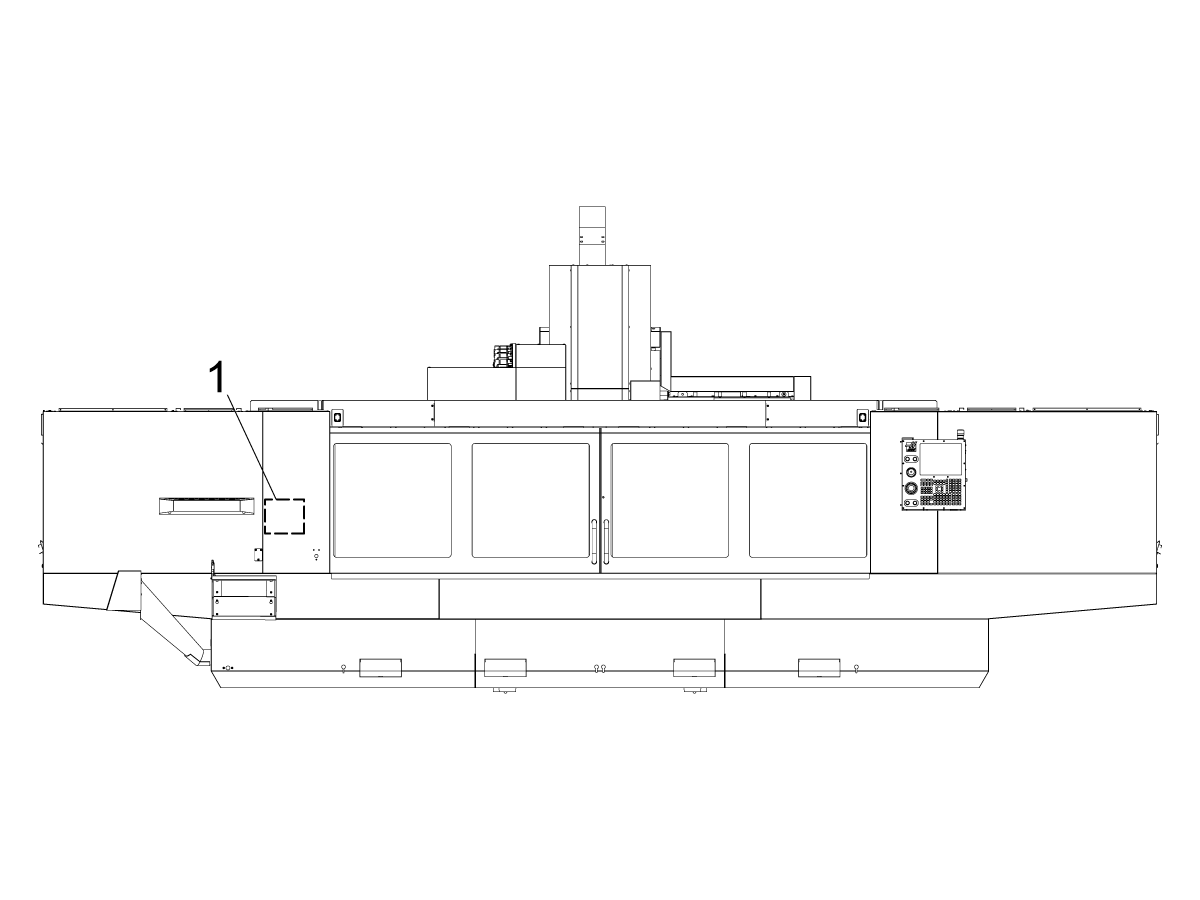
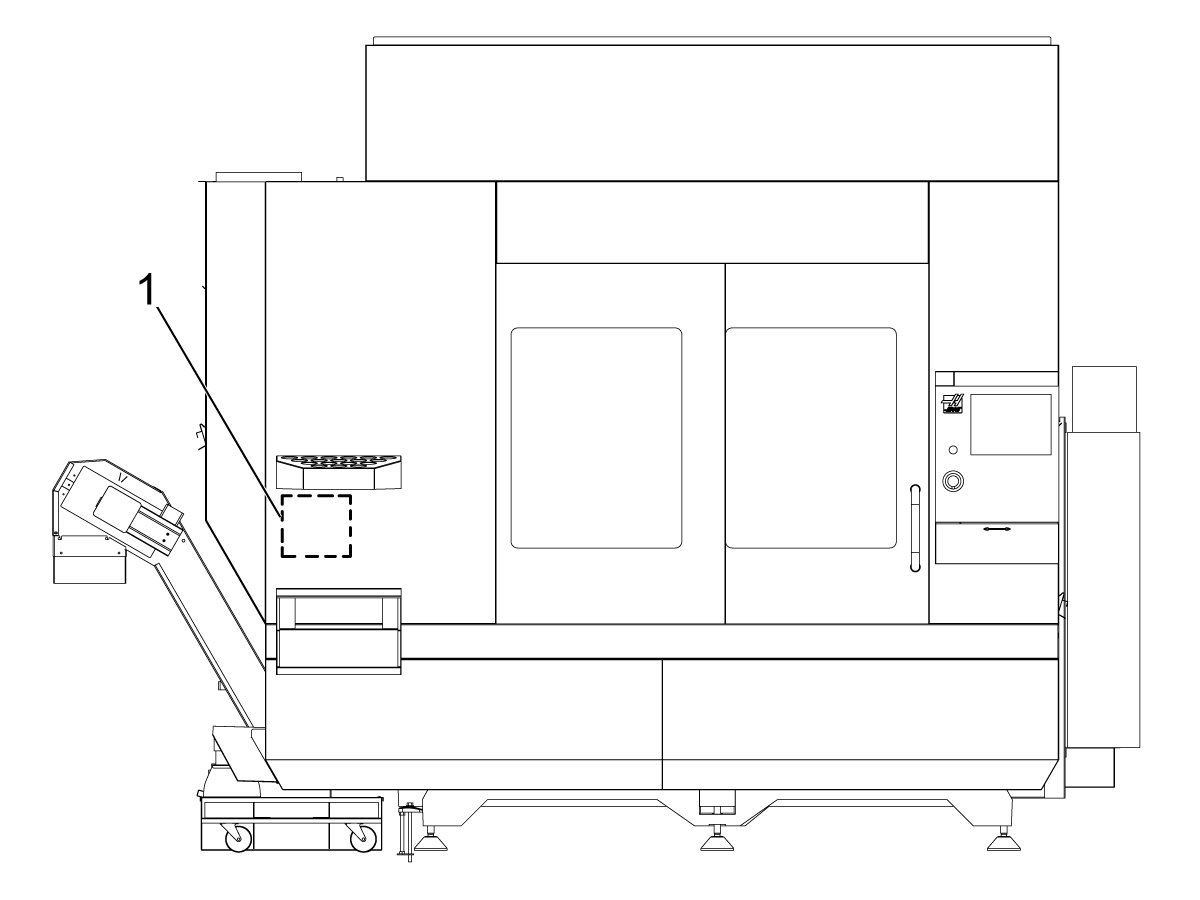
For the VF 10/11 the work table light will be placed in the location denoted as [1].

3

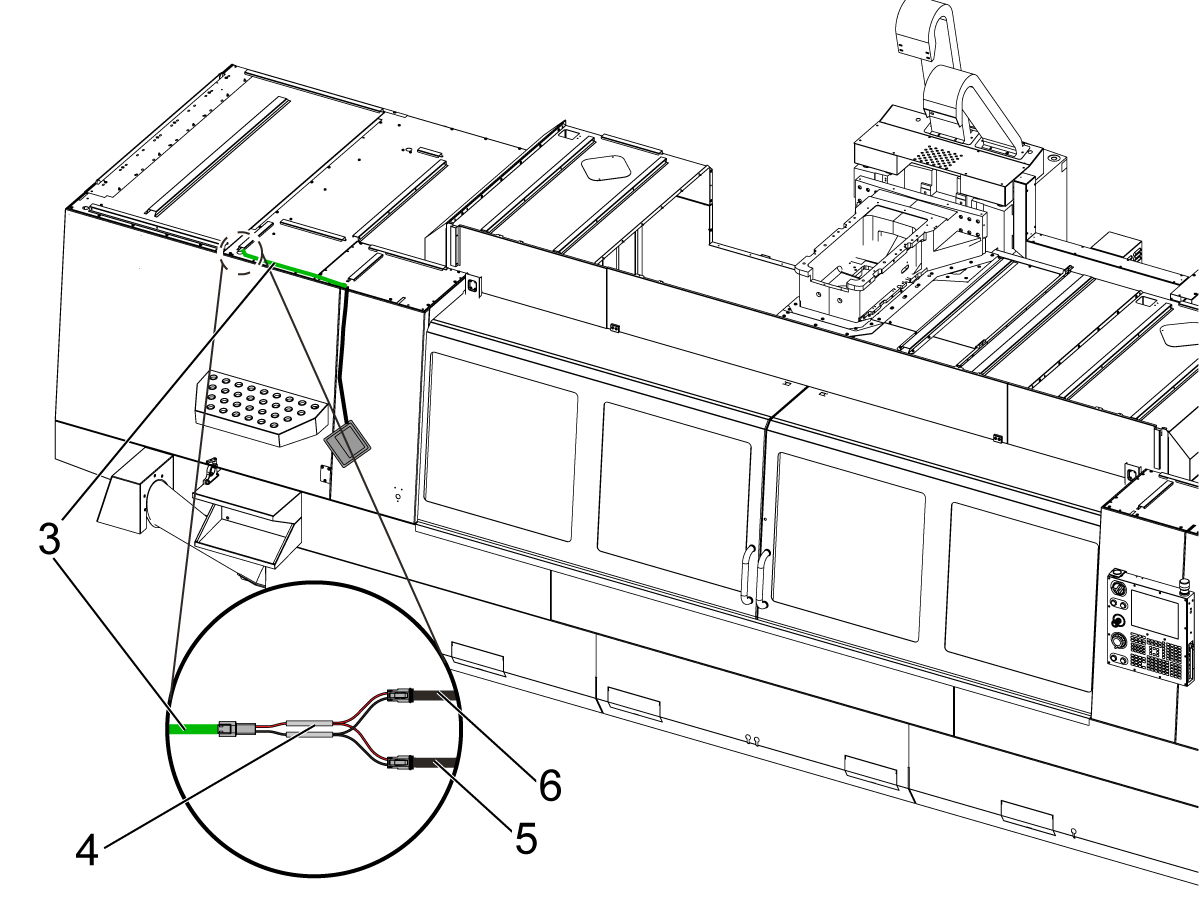
Start routing the cable to the top of the machine [2], use the wire channels given in the kit to neatly tuck away the cable on the front face of the machine.

4

Once above the machine connect the extension cable (33-5814) [3] so that the work table light cable will now reach the connection area.

Note: The work table light cable may be long enough to meet the junction, if not use the extension and neatly ziptie excess together. 

Disconnect the inner LED cable [5] and connect the splitter cable (33-5842) [4]. Connect both, the cable pre-routed from the control cabinet [6] and the work table light extension cable [3], to the splitter cable [4].

5

Actuate the light switch on the side of the controller to test that the work light turns on.

Installation: VF-12, VF-14, & VR-14

1

Push [POWER OFF].

Set the main circuit breaker to the OFF position.

Lock the main circuit breaker. Use an approved lock with an approved safety tag.

2

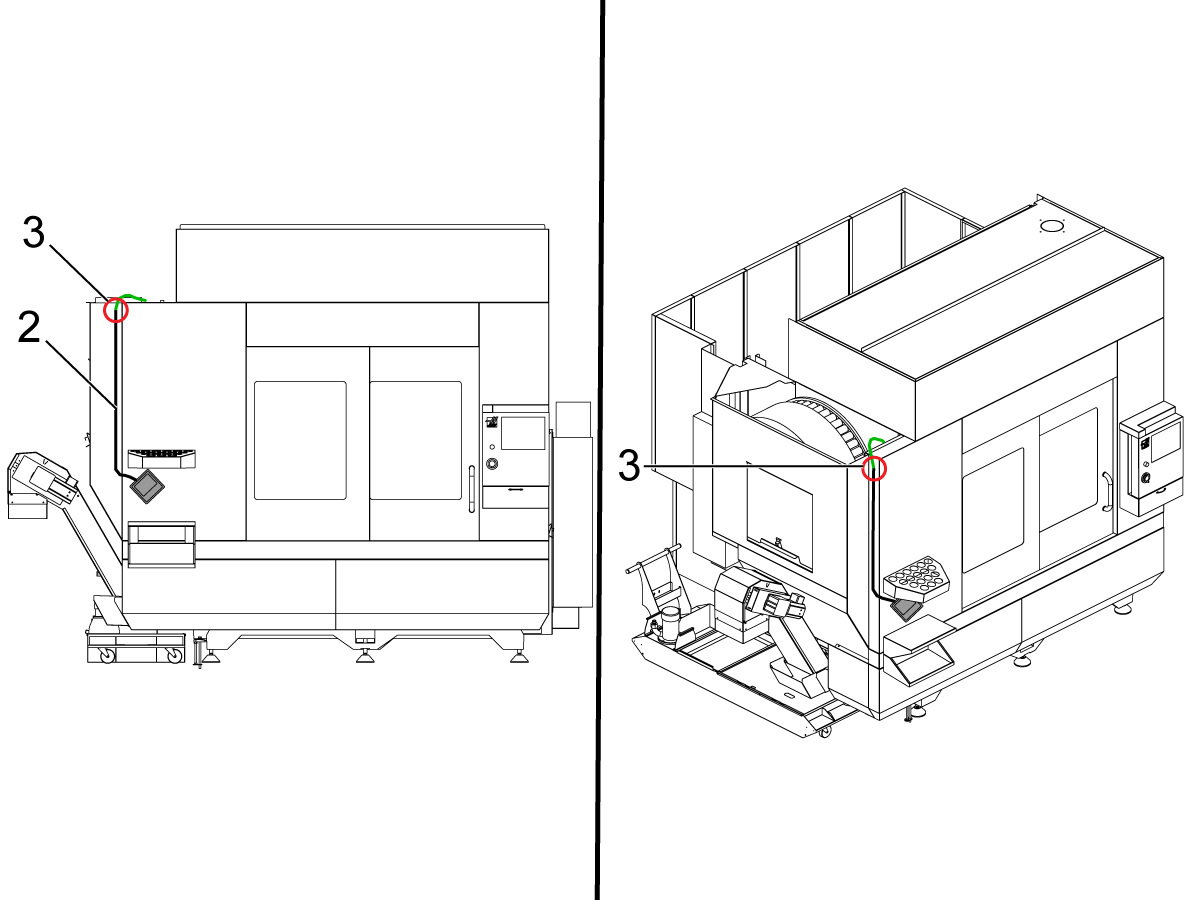
The work table light will be placed in the location denoted as [1] for these machines.

3

Start routing the cable to the top of the machine [2], use the wire channels given in the kit to neatly tuck away the cable on the front face of the machine.

4

Once above the machine connect the extension cable (33-5813) [3] so that the work table light cable will now reach the connection area.

Note: The work table light cable may be long enough to meet the junction, if not use the extension and neatly ziptie excess together. 

Disconnect the inner LED cable [5] and connect the splitter cable (33-5842) [4]. Connect both, the cable pre-routed from the control cabinet [6] and the work table light extension cable [3], to the splitter cable [4].

5

Actuate the light switch on the side of the controller to test that the work light turns on.

Installation: UMC-500 to 1000

1

Push [POWER OFF].

Set the main circuit breaker to the OFF position.

Lock the main circuit breaker. Use an approved lock with an approved safety tag.

2

For the UMC line the work table light will be placed in the location denoted as [1].

3

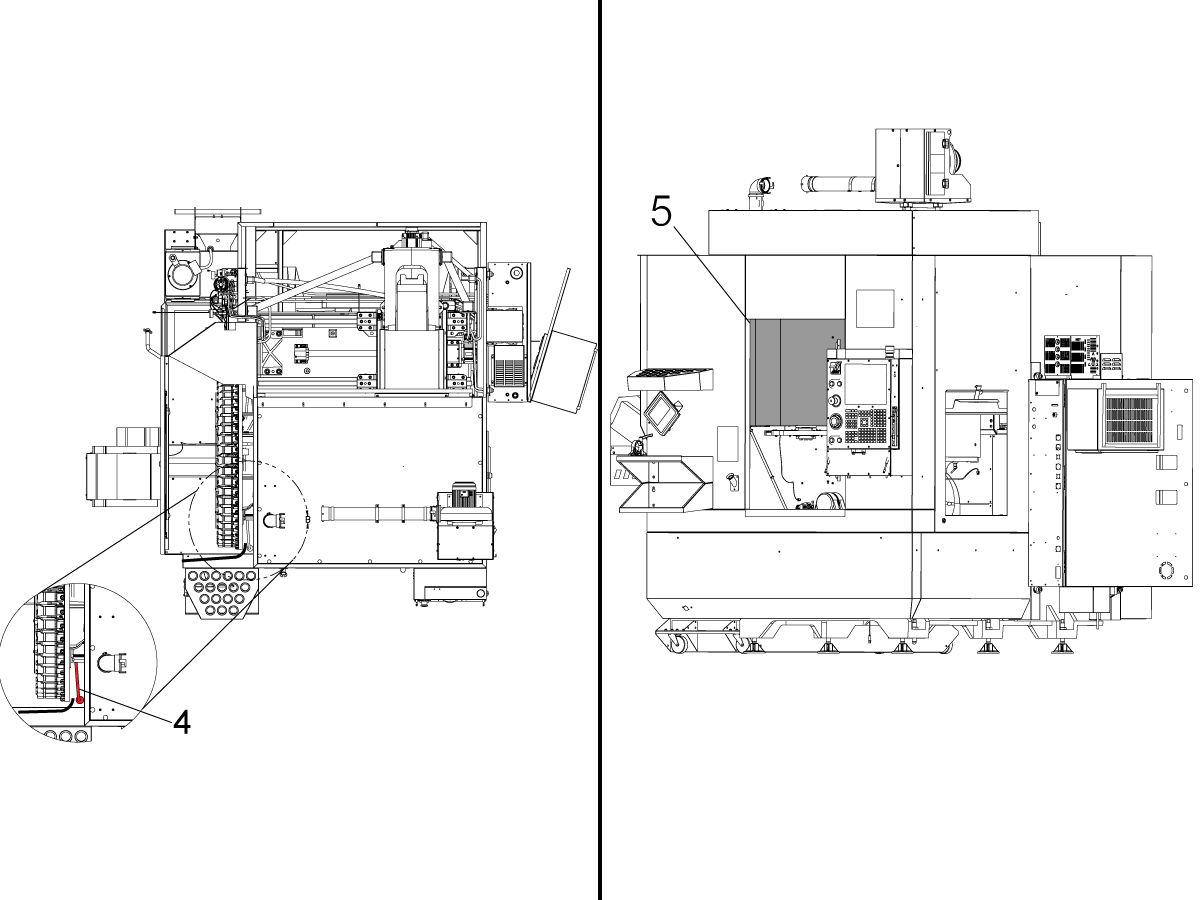
Start routing the cable to the top of the machine by placing the cable on the side of the machine right next to the edge where the tool holders would be placed [2]. Use the wire channels given in the kit to neatly tuck away the cable on the front face of the machine.

Connect the extension cable (33-5815) in the area specified [3] so that it may be routed into the tool changer area.

4

Follow the cable [4] to find the inner LED cable connection and unplug it to add the splitter cable (33-5842) to the connection area. Connect the work table light cable, the cable pre-routed from the control cabinet, and the inner LED light cable to the splitter cable.

Note: you may need to remove the sheet metal [5] on the inside of the machine to reach the cable connection.

Note: This is the last step if the machine does not have a pallet pool. Continue on if the machine does have a pallet pool.

5

This step must be performed for UMCs with a pallet pool.

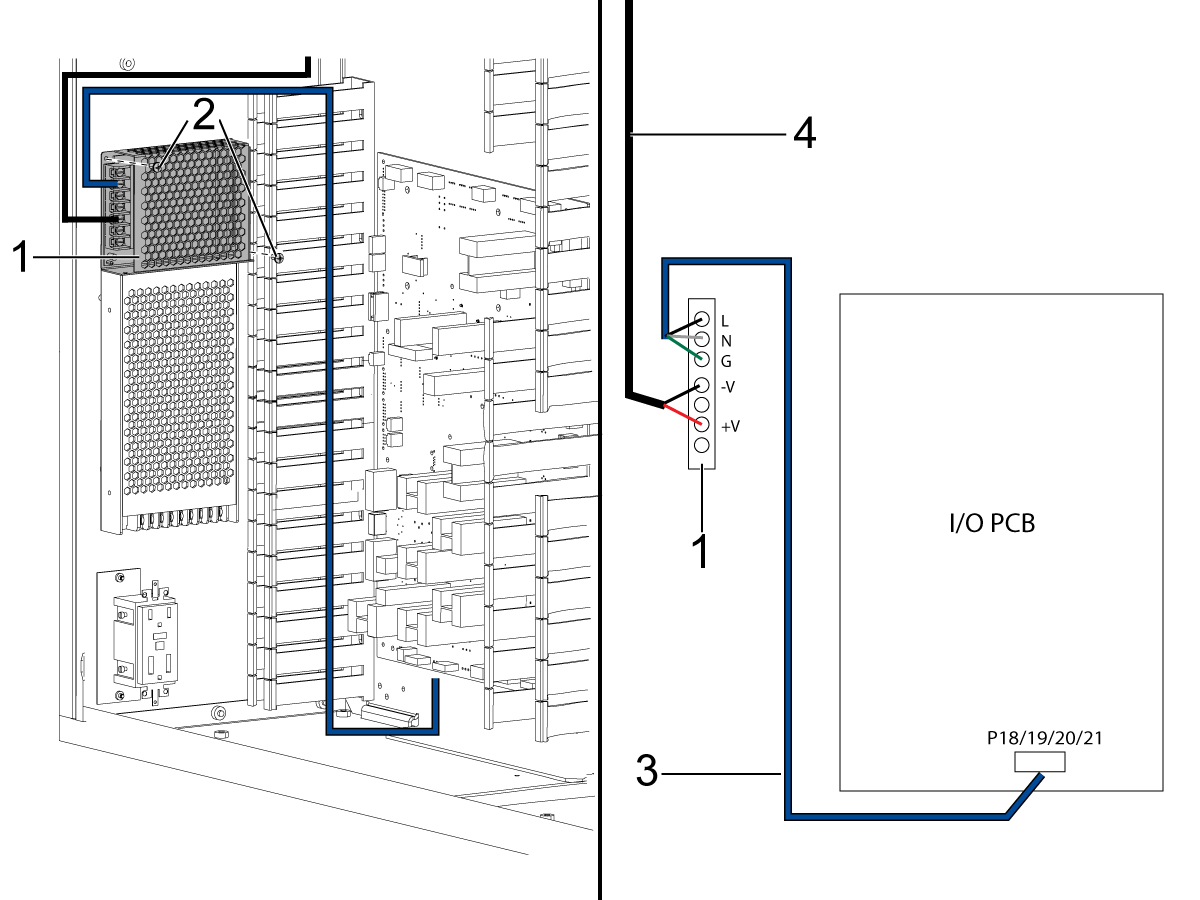
Mount 100W POWER SUPPLY [1] above the standard 24V work light power supply using PPHS SCREWS [2].

Connect the POWER SUPPLY CABLE [3] to the 100W POWER SUPPLY [1] terminals L, N, and ground.

Route the other end of the POWER SUPPLY CABLE (33-1592) [3] over the 100W POWER SUPPLY down the left cable track and connect it to a 120VAC output on the I/O PCB, P18/19/20/21.

Disconnect the work light cable [4] from the existing power supply and connect it to V+ and V- terminals on the 100W POWER SUPPLY. Red to V+ and black to V-. 

 Important: The work light cable [4] needs to be routed along the left panel.  Do not route the extesion cable through the center track with the High Voltage cables..

 Important: Secure all cables and make sure the wires don't get caught on the door.

6

Actuate the light switch on the side of the controller to test that the work light turns on.

Installation: UMC-1500 DUO

1

Push [POWER OFF].

Set the main circuit breaker to the OFF position.

Lock the main circuit breaker. Use an approved lock with an approved safety tag.

2

The work table light will be placed in the location denoted as [1].

3

Start routing the cable to the top of the machine by placing the cable on the side of the machine right next to the edge where the tool holders would be placed [2]. Use the wire channels given in the kit to neatly tuck away the cable on the front face of the machine.

Connect the extension cable (33-5816) in the area specified [3] so that it may be routed into the tool changer area.

4

Follow the cable [4] to find the inner LED cable connection and unplug it to add the splitter cable (33-5842) to the connection area. Connect the work table light cable, the cable pre-routed from the control cabinet, and the inner LED light cable to the splitter cable.

Note: you may need to remove the sheet metal [5] on the inside of the machine to reach the cable connection.

5

Actuate the light switch on the side of the controller to test that the work light turns on.

Installation: EC-1600

1

Push [POWER OFF].

Set the main circuit breaker to the OFF position.

Lock the main circuit breaker. Use an approved lock with an approved safety tag.

2

The work table light will be placed in the location denoted as [1].

3

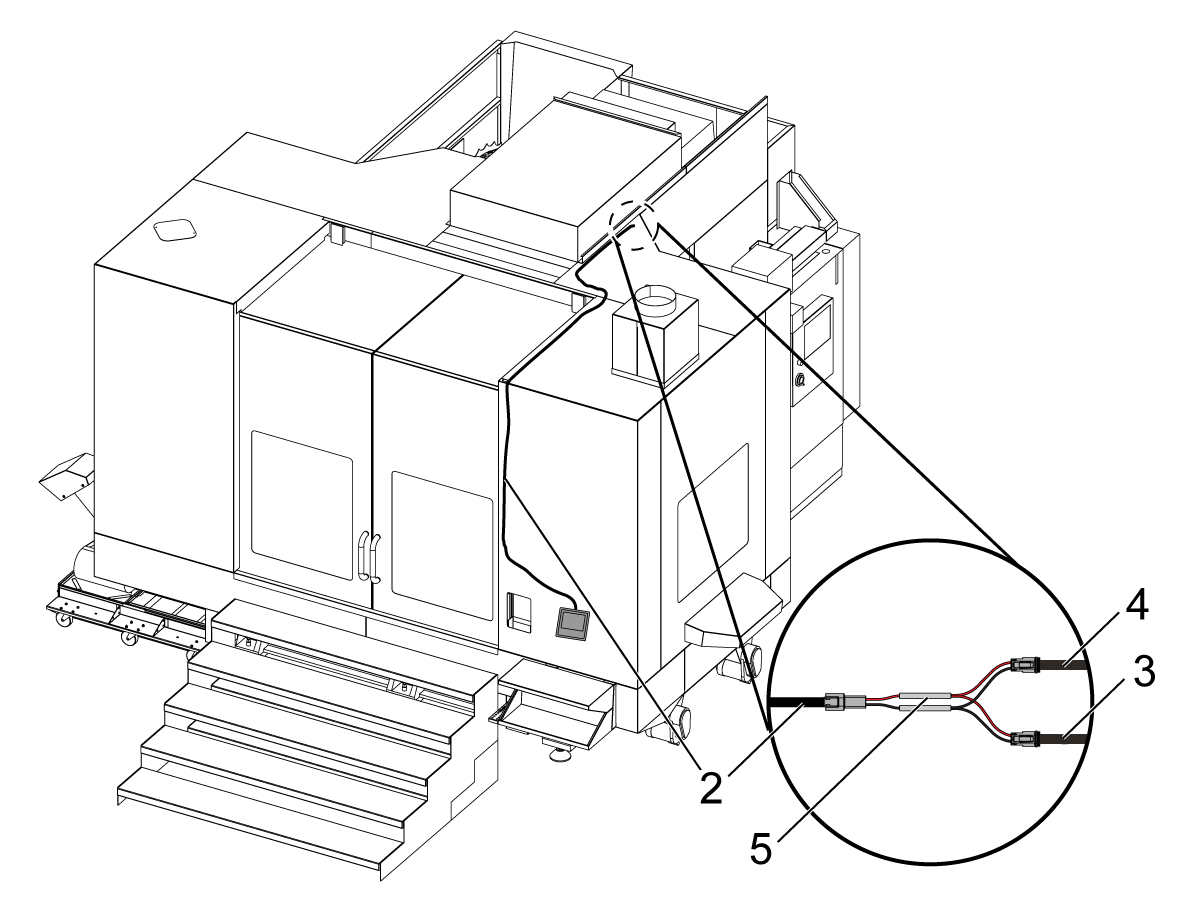
Start routing the cable to the top of the machine [2], use the wire channels given in the kit to neatly tuck away the cable on the front face of the machine.

4

Unplug the inner LED cable from the cable pre-routed to the control cabinet. Connect the splitter cable (33-5842) [5] to the work table light cable [2]. 

Then connect the inner LED cable [3] and the cable pre-routed from the control cabinet [4] to the splitter cable [5].

5

Mount 100W POWER SUPPLY [1] above the standard 24V work light power supply using PPHS SCREWS [2].

Connect the POWER SUPPLY CABLE [3] to the 100W POWER SUPPLY [1] terminals L, N, and ground.

Route the other end of the POWER SUPPLY CABLE (33-1592) [3] over the 100W POWER SUPPLY down the left cable track and connect it to a 120VAC output on the I/O PCB, P18/19/20/21.

Disconnect the work light cable [4] from the existing power supply and connect it to V+ and V- terminals on the 100W POWER SUPPLY. Red to V+ and black to V-. 

 Important: The work light cable [4] needs to be routed along the left panel.  Do not route the extesion cable through the center track with the High Voltage cables..

 Important: Secure all cables and make sure the wires don't get caught on the door.

6

Actuate the light switch on the side of the controller to test that the work light turns on.

37.2 - 24V LED - Work Light - 200W LVPS - Replacement

Recently Updated

24V LED - Work Light - 200W LVPS - Replacement


AD0613

Introduction

This procedure will show you how to replace the Low-Volt Power Supply (LVPS) for the Work Light or Table Work Light (If equipped). 

This Document Applies to the following Service Kits:

  • 93-3521 VF-M WRITING TABLE 200W PS RETROFIT KIT

Note: Do NOT send back the old 100W power supply once it is replaced.

Electrical Safety

 DANGER: Working with the electrical services required for CNC machines is extremely hazardous and can result in serious injury or death.

Before connecting line wires to the CNC:

  • Turn off all power to the machine at the source.
  • Perform a Lockout-Tagout (LOTO) procedure to ensure the power remains off during service.
  • Verify that power has been disconnected by using an AC voltage detector on all incoming lines.

If you are uncertain about how to safely disconnect power or perform LOTO procedures:

  • Do not proceed.
  • Contact qualified personnel or obtain appropriate assistance before continuing.

Failure to follow these precautions may result in electrical shock, equipment damage, or fatal injury.

 Danger: Before beginning any work inside the control cabinet, verify that the High Voltage indicator light on the 320V Power Supply / Vector Drive has been off for a minimum of five (5) minutes. This waiting period ensures that residual voltage has dissipated and reduces the risk of electric shock.

Certain service procedures involve high-risk electrical components and may pose serious injury or fatality hazards. Technicians must not attempt any procedure unless they have a complete understanding of the steps involved and the associated risks.

If there is any uncertainty regarding a procedure, contact your Haas Factory Outlet (HFO) to arrange for a qualified service technician.

Replacement

1

Push [POWER OFF].

Set the main circuit breaker to the [OFF] position.

Lock the main circuit breaker. Use an approved lock with an approved safety tag.

Danger: If the voltage indicator light is on, do not touch the electrical components. The high voltage in the electrical cabinet can kill you. Wait for the voltage indicator LED to go off fully.

2

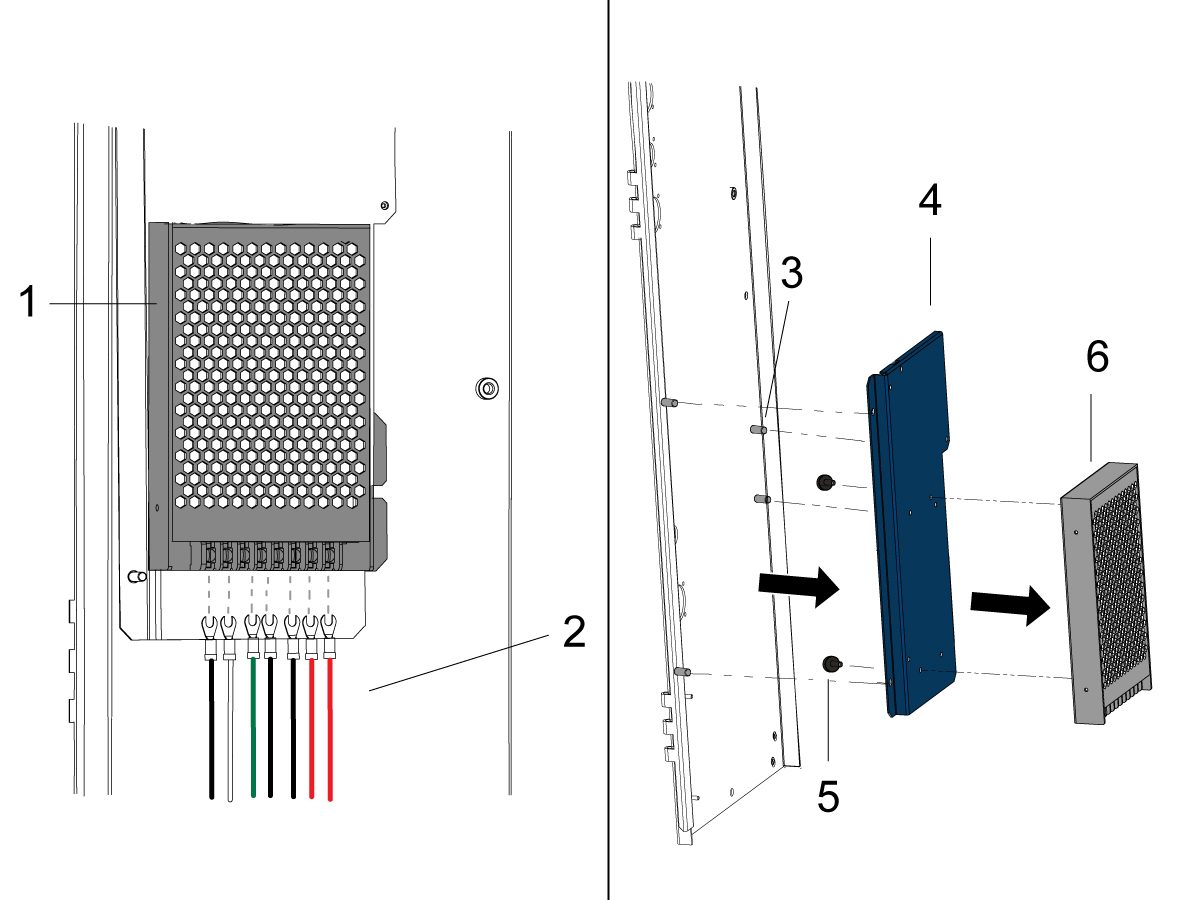
Locate the 24V Work Light LVPS [1] next to the left panel.

Disconnect the wires [2] going to the LVPS terminal strip.

NOTE: Before disconecting the wires note the location of the wires attached to the LVPS terminal strip.

Remove the screws [5] securing the LVPS [6] to the plate [4].

Remove the screws [3] securing the plate [4] to the enclosure. 

3

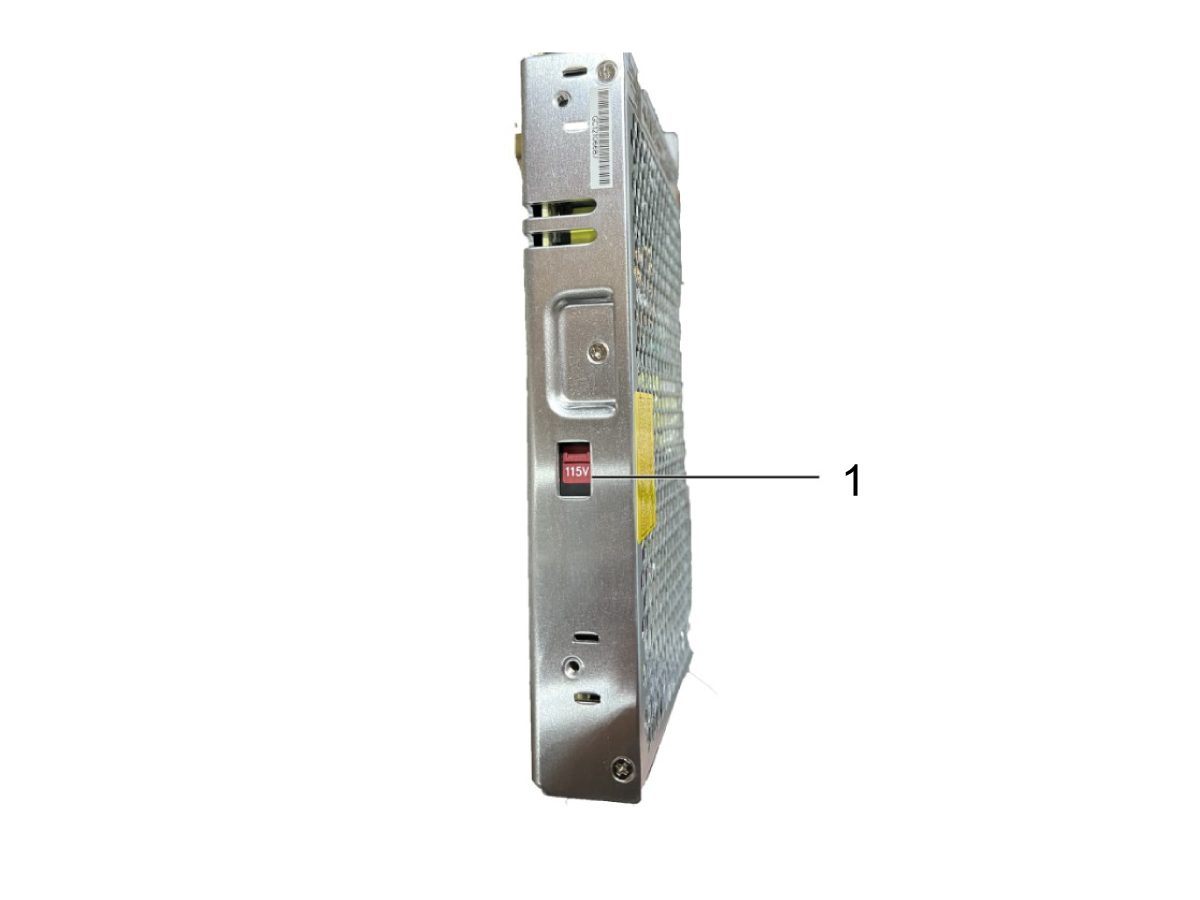
On the side of the power supply there is a voltage input switch. Set the voltage input switch to 115V [1].

4

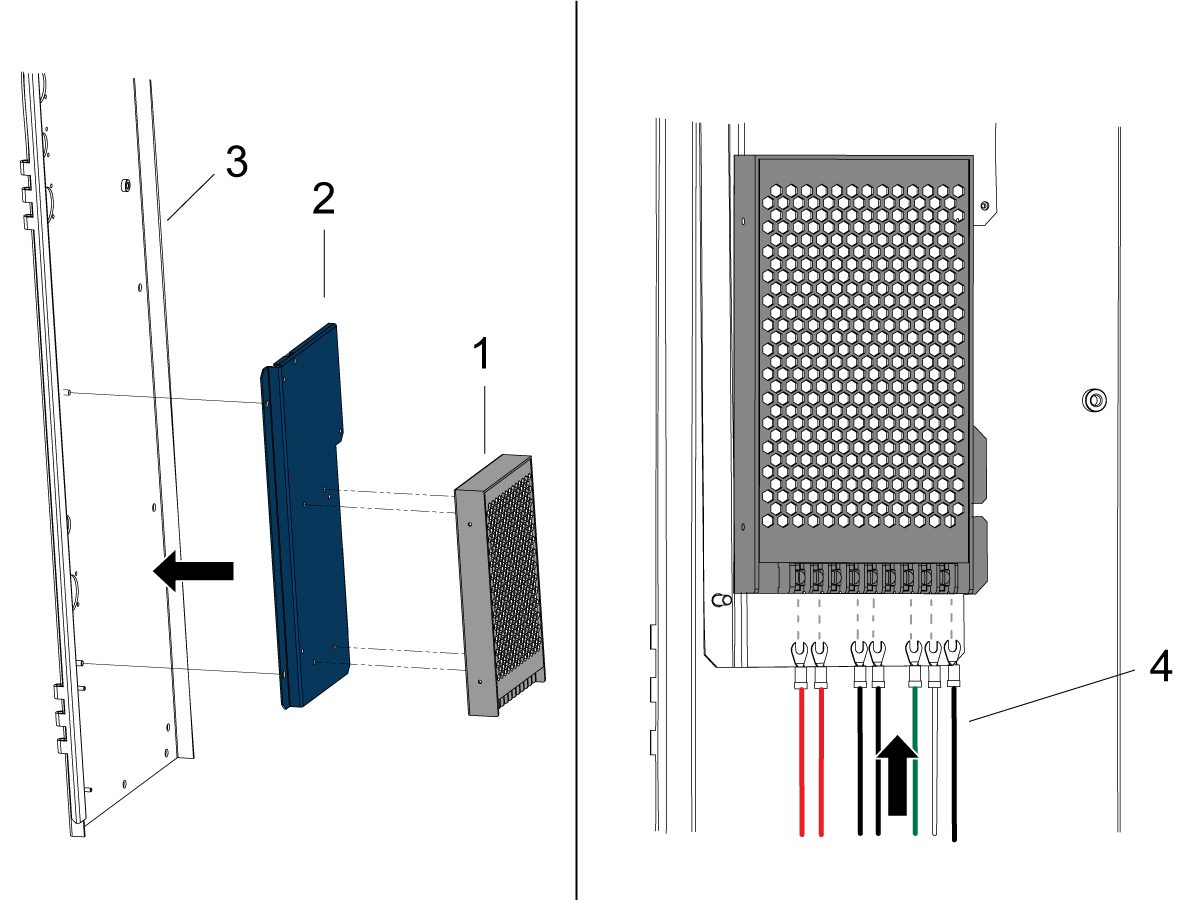
Install the new 200W LVPS [1] to the plate [2] using the 4 screws.

Then, install the plate [2] to the enclosure [3] using the 4 screws.

Reconnect the wires [4] to the LVPS terminal strip.

NOTE: Make sure the labels on the spade connectors match the terminal strip label.

5

Turn on the Machine.

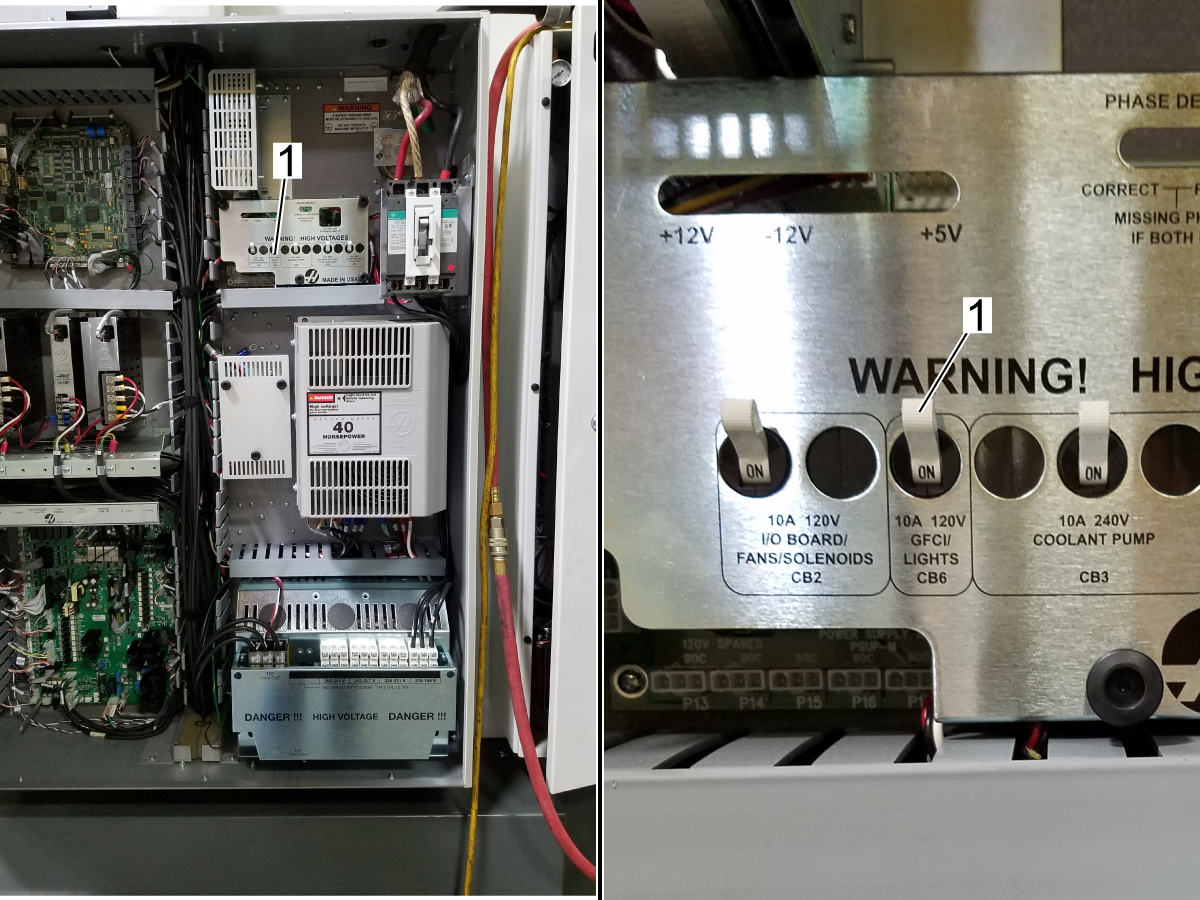
Actuate the light switch on the side of the controller to test that the work and table light turn on.

37.3 - 24V LED - Work Light - Troubleshooting Guide

Recently Updated

24V LED - Work Light - Troubleshooting Guide - NGC


TG0170

Introduction

Standard work lights are either:
  • 24VDC LED 30-Watt lamps
  • 24VDC LED 50-Watt lamps
  • 24VDC LED 45-Watt lamps
  • 24VDC LED 60-Watt lamps


Symptom Table

Symptom Possible Cause Corrective Action
The light does not power on. Problem with the GFCI circuit/receptacle.

If the machine has a GFCI, check if the GFCI is tripped.
If the receptacle needs to be replaced, order the following part number:

  • For machines with 24VDC LED lamps: 74-0078
Problem with the LED assembly. Check the light for damage. Check for 24 VDC at the fixture connector. It must be replaced if the voltage is correct and the LED does not work. If the LED is flickering on and off, re-seat the connections. If flickering continues, replace the LED assembly.
Problem with the worklight or HIL momentary button. Go to the Diagnostics / Keyboard I/O page and toggle the button. Check the switch operation with an Ohm meter to see if the bit does not toggle in Diagnostics.
The cable from the HIL momentary button to the SKBIF is incorrectly wired. See the HIL Button Cable Incorrectly Wired section for additional details.
Incorrect input voltage selection on Worklight or HIL low voltage power supply.

Locate the 24V Work Light/HIL LVPS next to the left panel, and set the voltage input switch to 115V. 

Follow the  24V Work Light - LVPS - Replacement procedure for detailed instructions.

The light flickers. Problem with the LED assembly. Check the light for damage. Check for 24 VDC at the fixture connector. If the voltage is correct and the LED does not work, it must be replaced. If the LED is flickering on and off, re-seat the connections. If flickering continues, replace the LED assembly.
Problem with the HIL/Worklight cable routing or a missing ferrite filter. This applies only to the 24VDC HIL/Worklight assemblies. Make sure the Hil/Worklight cable is routed on the left side of the cabinet. Also, make sure a ferrite filter is installed on the regen cable.
On Medium VMCs (VF-3 to VF-5), the 24V Work Table Light flickers when the machine comes on or when commanded to turn on. The machine has a 100W power supply for the work lights installed. DO NOT REPLACE THE TABLE WORK LIGHT.  Upgrade to the 200W power supply,  order 93-3521, and follow the 24V Work Light - LVPS - Replacement procedure.  

NOTE: Not all VF-3 to VF-5 with the work table option will experience light flickering. Depending on the tolerances/voltages, plugging the 3 lights into the 100W power supply in some scenarios wouldn't cause the lights to flicker as the power supply doesn't enter the overload protection mode.
Alarm 552  TRIPPED CIRCUIT BREAKER The incorrect GFCI was installed If a machine has a 120V Worklights or HIL, ensure the outlet is a GFCI. 
Note:  Machines with the 24V Worklights and HIL do not need a GFCI outlet. 

Tripped Breaker/GFI Plug

Corrective Action:

  • Check if CB2 (NGC) on the PDIST PCB has been tripped. If necessary, reset the circuit breaker.
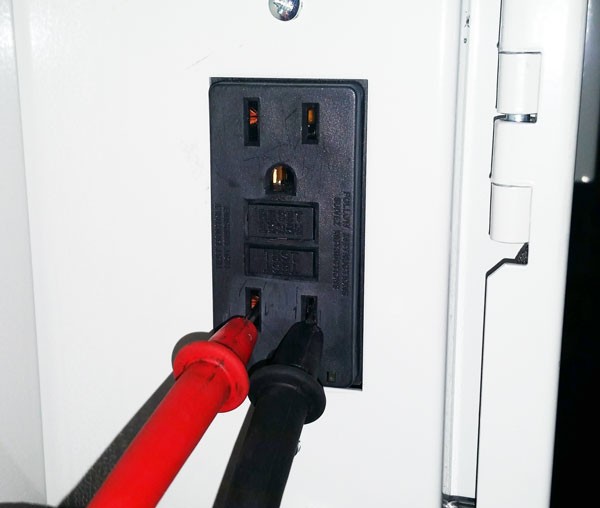
  • Disconnect anything connected to the GFCI receptacle. Push the [RESET] button on the GFCI receptacle. Measure the voltage at the plug. When the [RESET] button is fully engaged, the voltage must measure 120 VAC.
  • If the [RESET] button does not fully engage, disconnect the light cable:
    • Work light: I/O P18-21 (NGC)
    • HIL: I/O PCB P22 (NGC)
  • Push the [RESET] button on the GFCI receptacle again.
    • The GFI plug works correctly if the [RESET] button fully engages and you have 120 VAC. Check the cable and fixtures to find the cause of the short in the light circuit.
    • If the [RESET] button does not fully engage, the GFCI receptacle is defective. Replace the GFCI receptacle.
  • After you replace the GFCI, if there is still no voltage, go to
    • Power Distribution PCB - Troubleshooting Guide (Next Generation Control)

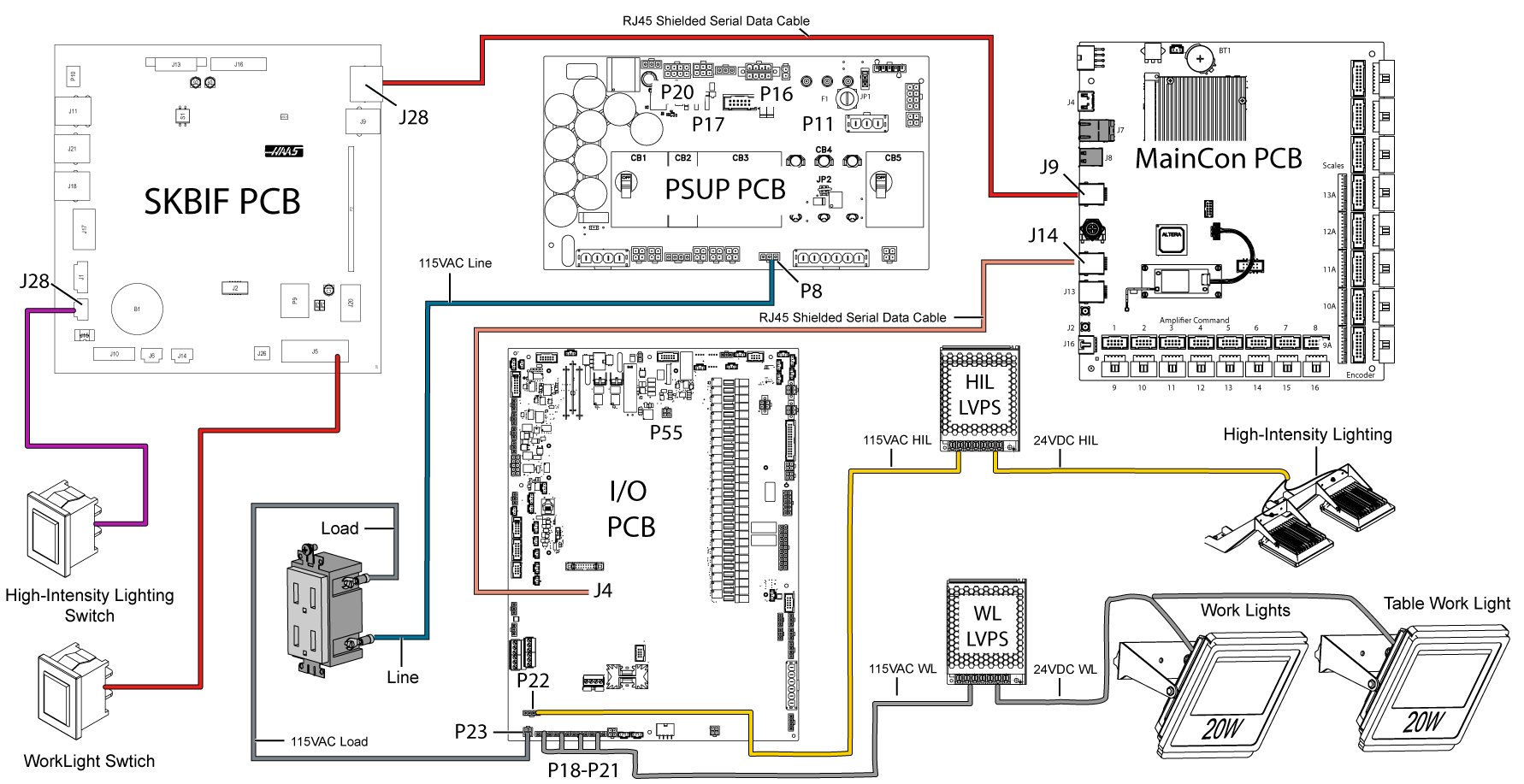
Electrical Diagram

24VDC Worklight LED diagram

Recently Viewed Items

You Have No Recently Viewed Items Yet

Feedback
Haas Logo

Haas Delivered Price

This price includes shipping cost, export and import duties, insurance, and any other expenses incurred during shipping to a location in France agreed with you as a buyer. No other mandatory costs can be added to the delivery of a Haas CNC Product.

KEEP UP WITH THE LATEST HAAS TIPS AND TECHNOLOGY...

Sign up now!   

HAAS TOOLING ACCEPTS THE FOLLOWING:

  • Service & Support
  • Owners
  • Request Service
  • Operator Manuals
  • Haas Parts
  • Rotary Repair Request
  • Pre-Install Guides
  • Shopping Tools
  • Build & Price a New Haas
  • Available Inventory
  • The Haas Price List
  • CNCA Financing
  • About Haas
  • Accessibility Statement
  • DNSH Statement
  • Export Compliance
  • Careers
  • Certifications & Safety
  • Contact Us
  • History
  • Terms & Conditions
  • Haas Tooling Terms & Conditions
  • Privacy
  • Warranty
  • Haas Community
  • Haas Certification Program
  • Haas Motorsports
  • Gene Haas Foundation
  • Haas Technical Education Community
  • Events
  • Join the Conversation
  • Facebook
  • X
  • Flickr
  • YouTube
  • LinkedIn
  • Instagram
  • TikTok
© 2026 Haas Automation, Inc – CNC Machine Tools
This site is protected by reCAPTCHA and the Google Privacy Policy and Terms of Service apply.

2800 Sturgis Rd., Oxnard, CA 93030
Toll Free: (888) 817-4446 / Fax: 805-278-8554