My Haas Welcome,
!
Haas Tooling MyHaas/HaasConnect Sign In Register Haas Tooling MyHaas/HaasConnect Sign Out Welcome, My Machines Latest Activity My Quotes My Account My Users Sign Out
Find Your Distributor
  1. Select Language
    1. English
    2. Deutsch
    3. Español - España
    4. Español - México
    5. Français
    6. Italiano
    7. Português
    8. Český
    9. Dansk
    10. Nederlands
    11. Magyar
    12. Polski
    13. Svenska
    14. Türkçe
    15. 中文
    16. Suomi
    17. Norsk
    18. الإنجليزية
    19. български
    20. Hrvatski
    21. Ελληνικά
    22. Română
    23. Slovenský
    24. Slovenščina
    25. 한국어
    26. 日本語
    27. Українська
  • machines Main Menu
    • Vertical Mills
      Vertical Mills
      Vertical Mills View All
      • Vertical Mills
      • VF Series
      • Universal Machines
      • VR Series
      • VP-5 Prismatic
      • Pallet-Changing VMCs
      • Mini Mills
      • Mold Machines
      • High-Speed Drill Centers
      • Drill/Tap/ Mill Series
      • Toolroom Mills
      • Pocket Mill
      • Compact Mills
      • Gantry Series
      • SR Sheet Routers
      • Extra-Large VMC
      • Double-Column Mills
      • 3+2 Positioning Machines
    • Multi-Axis Solutions
      Multi-Axis Solutions
      Multi-Axis Solutions View All
      • Multi-Axis Solutions
      • Y-Axis Lathes
      • 5-Axis Mills
    • Lathes
      Lathes
      Lathes View All
      • Lathes
      • ST Series
      • Dual-Spindle
      • Box Way Series
      • Toolroom Lathes
      • Chucker Lathe
      • Haas Bar Feeders
    • Horizontal Mills
      Horizontal Mills
      Horizontal Mills View All
      • Horizontal Mills
      • 50-Taper
      • 40-Taper
    • Rotaries & Indexers
      Rotaries & Indexers
      Rotaries & Indexers View All
      • Rotaries & Indexers
      • Rotary Tables
      • Indexers
      • 5-Axis Rotaries
      • Extra-Large Rotaries
    • Special Series
      Special Series
      Special Series View All
      • Special Series
      • EU_Series_Redirect
    • Automation Systems
      Automation Systems
      Automation Systems View All
      • Automation Systems
      • Mill Automation
      • Lathe Automation
      • Automatic Parts Loaders
      • Automation Models
    • Desktop Machines
      Desktop Machines
      Desktop Machines View All
      • Desktop Machines
      • Desktop Mill
      • Desktop Lathe
      • Control Simulator, Standard
      • Control Simulator, Premium
    • Shop Equipment
      Shop Equipment
      Shop Equipment View All
      • Shop Equipment
      • Knee Mill
      • Haas Manual Lathes
      • Haas Saws
    • Fabrication Machines
      Fabrication Machines
      Fabrication Machines View All
      • Fabrication Machines
      • Laser Cutting Machines
      • CNC Press Brakes
    • QUICK LINKS Special Series  Special Series 
      EU SERIES EU SERIES BUILD & PRICE | PRICE LIST BUILD & PRICE | PRICE LIST In-Stock Machines In-Stock Machines WHAT’S NEW WHAT’S NEW YOUR FIRST CNC YOUR FIRST CNC
      SHOPPING TOOLS
      • Build & Price a Haas
      • Price List
      • Available Inventory
      • CNCA Financing
      WANT TO TALK TO SOMEONE?

      A Haas Factory Outlet (HFO) can answer your questions, and walk you through your best options.

      CONTACT YOUR DISTRIBUTOR >
  • Options Main Menu
    • The Haas Control Value Option Packages
      Value Option Packages
      Value Option Packages View All
      • Value Option Packages
    • Product Image Spindles
      Spindles
      Spindles View All
      • Spindles
    • Product Image Tool Changers
      Tool Changers
      Tool Changers View All
      • Tool Changers
    • Product Image 4th- | 5th-Axis
      4th- | 5th-Axis
      4th- | 5th-Axis View All
      • 4th- | 5th-Axis
    • Product Image Turrets & Live Tooling
      Turrets & Live Tooling
      Turrets & Live Tooling View All
      • Turrets & Live Tooling
    • Product Image Probing
      Probing
      Probing View All
      • Probing
    • Haas Chip & Coolant Management Chip & Coolant Management
      Chip & Coolant Management
      Chip & Coolant Management View All
      • Chip & Coolant Management
    • The Haas Control The Haas Control
      The Haas Control
      The Haas Control View All
      • The Haas Control
    • Product Image Product Options
      Product Options
      Product Options View All
      • Product Options
    • Product Image Tooling & Fixturing
      Tooling & Fixturing
      Tooling & Fixturing View All
      • Tooling & Fixturing
    • Product Image Workholding
      Workholding
      Workholding View All
      • Workholding
    • Product Image 5-Axis Solutions
      5-Axis Solutions
      5-Axis Solutions View All
      • 5-Axis Solutions
      • 5 Easy Steps to 5-Axis
    • QUICK LINKS Special Series  Special Series 
      EU SERIES EU SERIES BUILD & PRICE | PRICE LIST BUILD & PRICE | PRICE LIST In-Stock Machines In-Stock Machines WHAT’S NEW WHAT’S NEW YOUR FIRST CNC YOUR FIRST CNC
      SHOPPING TOOLS
      • Build & Price a Haas
      • Price List
      • Available Inventory
      • CNCA Financing
      WANT TO TALK TO SOMEONE?

      A Haas Factory Outlet (HFO) can answer your questions, and walk you through your best options.

      CONTACT YOUR DISTRIBUTOR >
  • Why Haas Main Menu
      Discover the Haas Difference
    • Why Haas
    • MyHaas
    • Education Community
    • Industry 4.0
    • Haas Certification
    • Customer Testimonials
  • Service Main Menu
      Welcome to Haas Service
      SERVICE HOME Operator’s Manuals How-To Procedures Troubleshooting Guides Preventive Maintenance Haas Parts Haas Tooling Videos
  • Videos Main Menu
  • Main Menu
    • View All
    • View All
    • View All
    • View All
      • HTEC Curriculum Support
      • Haas Value Option Packages (VOP) Journey
    • View All
      • Haas 10 kg Cobot Package
      • Cobot Kits
      • DC-1 Drill Center
      • CNC Sales News
      • Do More With Your Haas
    • View All
    • View All
      • contact-us-test
      • 4 - AUTOMATION SYSTEMS
      • Carousel-V2
      • expert test
      • Demo_Day_Trident-test
      • Link Test
      • image-sale-tag-test
      • article-list-test
      • Haas 25 kg Robot Package
      • test-algolia-page
    • View All
    • View All
    • View All
    • View All
      • calc-test
    • View All
    • QUICK LINKS Special Series  Special Series 
      EU SERIES EU SERIES BUILD & PRICE | PRICE LIST BUILD & PRICE | PRICE LIST In-Stock Machines In-Stock Machines WHAT’S NEW WHAT’S NEW YOUR FIRST CNC YOUR FIRST CNC
      SHOPPING TOOLS
      • Build & Price a Haas
      • Price List
      • Available Inventory
      • CNCA Financing
      WANT TO TALK TO SOMEONE?

      A Haas Factory Outlet (HFO) can answer your questions, and walk you through your best options.

      CONTACT YOUR DISTRIBUTOR >
  • Haas Tooling Main Menu
  • Haas Service Parts Main Menu

My Haas Welcome,
!
Haas Tooling MyHaas/HaasConnect Sign In Register Haas Tooling MyHaas/HaasConnect Sign Out Welcome, My Machines Latest Activity My Quotes My Account My Users Sign Out
Find Your Distributor
  1. Select Language
    1. English
    2. Deutsch
    3. Español - España
    4. Español - México
    5. Français
    6. Italiano
    7. Português
    8. Český
    9. Dansk
    10. Nederlands
    11. Magyar
    12. Polski
    13. Svenska
    14. Türkçe
    15. 中文
    16. Suomi
    17. Norsk
    18. الإنجليزية
    19. български
    20. Hrvatski
    21. Ελληνικά
    22. Română
    23. Slovenský
    24. Slovenščina
    25. 한국어
    26. 日本語
    27. Українська
×

Search Results

Web Pages

Images

    • <
    • 1
    • >

Sigma 1 - Axis Servo Motor and Cables - Troubleshooting Guide - CHC - TG0129

Service Home Sigma 1 - Axis Servo Motor and Cables - Troubleshooting Guide - CHC - TG0129
Recently Updated Last updated: 05/12/2026

Sigma 1 - Axis Servo Motor and Cables - Troubleshooting Guide - CHC


TG0129

Revision B - 05/2026

Sigma 1 - Axis Servo Motor and Cables - Troubleshooting Guide - CHC - TG0129

Jump to Section 1. Electrical Safety 2. Symptom Table 3. Power Cable 4. Servo Motor 5. Main Processor/Encoder Cable/Encoder 6. Motor Brake 7. Electrical Diagrams 8. Sigma 1 - Service Replacement Motor Instructions Back to Top

Electrical Safety

 DANGER: Working with the electrical services required for CNC machines is extremely hazardous and can result in serious injury or death.

Before connecting line wires to the CNC:

  • Turn off all power to the machine at the source.
  • Perform a Lockout-Tagout (LOTO) procedure to ensure the power remains off during service.
  • Verify that power has been disconnected by using an AC voltage detector on all incoming lines.

If you are uncertain about how to safely disconnect power or perform LOTO procedures:

  • Do not proceed.
  • Contact qualified personnel or obtain appropriate assistance before continuing.

Failure to follow these precautions may result in electrical shock, equipment damage, or fatal injury.

 Danger: Before beginning any work inside the control cabinet, verify that the High Voltage indicator light on the 320V Power Supply / Vector Drive has been off for a minimum of five (5) minutes. This waiting period ensures that residual voltage has dissipated and reduces the risk of electric shock.

Certain service procedures involve high-risk electrical components and may pose serious injury or fatality hazards. Technicians must not attempt any procedure unless they have a complete understanding of the steps involved and the associated risks.

If there is any uncertainty regarding a procedure, contact your Haas Factory Outlet (HFO) to arrange for a qualified service technician.

Symptom Table

Symptom Probable Cause Corrective Action
Alarm 161 - 164 AXIS DRIVE FAULT.

Alarm 993 AMPLIFIER SHORT CIRCUIT

Faulty servo amplifier. Check the corresponding amplifier assembly.

Refer to Servo Amplifier - Troubleshooting Guide to troubleshoot the amplifier.

Faulty power cable. Inspect the cables and connectors. Refer to the Power Cable section below.
Faulty servo motor. Check the corresponding servo motor. Refer to Servo Motor section below.

Alarm 103 - 105, 270, 709 AXIS SERVO ERROR TOO LARGE.

Faulty encoder cable/connection or faulty encoder. Inspect the cables and connectors. Refer to the Main Processor/Encoder Cable section below. Check the encoder steps/revolution versus and ball screw pitch and verify the encoder counts are accurate per each rotation.
The axis motor brake, is not disengaging when servos are enabled. See the Motor Brake section below:
The axis ballscrew is damaged. Check the corresponding axis ballscrew.

Refer to Ballscrew - Troubleshooting Guide to troubleshoot the ballscrew.

Classic Haas Control Only - The machine parameters are not correct. Make sure you have the correct parameters for the type of axis motor.
  1. Determine if machine has Sigma-1 or Sigma-5 motors.

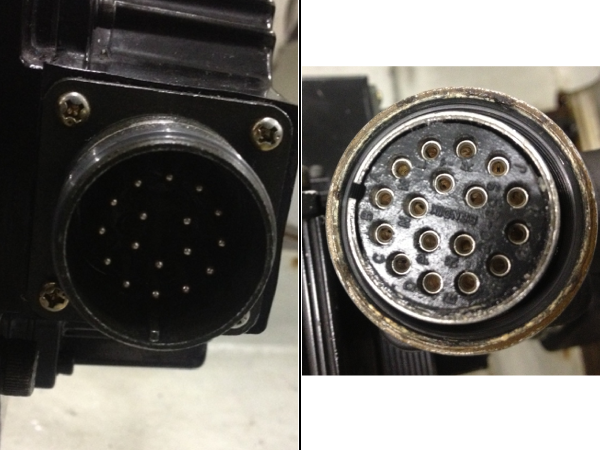
    Note: The Sigma-5 axis motor have a push-lock connector for the encoder plug.

  2. Run parameter checker and select either Sigma-1 or Sigma-5 option.

Alarm 103 - 105 AXIS SERVO ERROR TOO LARGE, during the zero return process. The axis zero returns in the wrong direction.

The home sensor is being made during the zero return process causing the axis to zero return in the opposite direction. Check the axis home switch to make sure there are no metal chips on top of the sensor.
Alarm 135 - 137 AXIS MOTOR OVERHEAT. Faulty encoder cable/connection or faulty encoder. Inspect the cables and connectors. Refer to the Main Processor/Encoder Cable section below. Check the encoder steps/revolution versus and ball screw pitch and verify the encoder counts are accurate per each rotation..
The Mocon/Maincon PCB axis channel is defective. Swap the Encoder/Drive channels with another axis, if the alarm stays with the encoder/drive channel then the Mocon/Maincon PCB is defective.
The low-volt-power-supply is defective. Check the +5V / +12V / -12V DC voltages going to the Mocon/ Maincon PCB.
The parameter OVER TEMP NC bit 14 for the axis is incorrect. Make sure this parameter bit is set correctly. This is normally a 0.

Alarm 139 - 142 190, 273 MOTOR Z FAULT.

Alarm 153 - 156 Z CHANNEL MISSING

Alarm 182 - 185, 194, 278 AXIS ENCODER CABLE FAULT.

Alarm 217, 218, 219 AXIS PHASE ERROR

Alarm 224 - 228 AXIS TRANSITION FAULT

Faulty encoder cable or connection. Inspect the cables and connectors. Refer to the Main Processor/Encoder Cable section below.
Faulty encoder on servo motor. Check the motor for coolant contamination. Check the encoder steps/revolution versus and ball screw pitch and verify the encoder counts are accurate per each rotation.

Power Cable

Corrective Action:

Make sure the cables are connected correctly to the corresponding amplifier. Inspect the connector at the motor. Look for loose connections or contamination.

Look for signs of damage or stiffness on the cable. Disconnect the power cable from the amplifier and motor. Measure the resistance from leg to leg, and from leg to ground. Make sure the measurements result in an open connection. Check each leg from one end of the cable to the corresponding leg on the other end of the cable for continuity. If there is an open connection, there is a problem with the cable.

Servo Motor

Corrective Action:

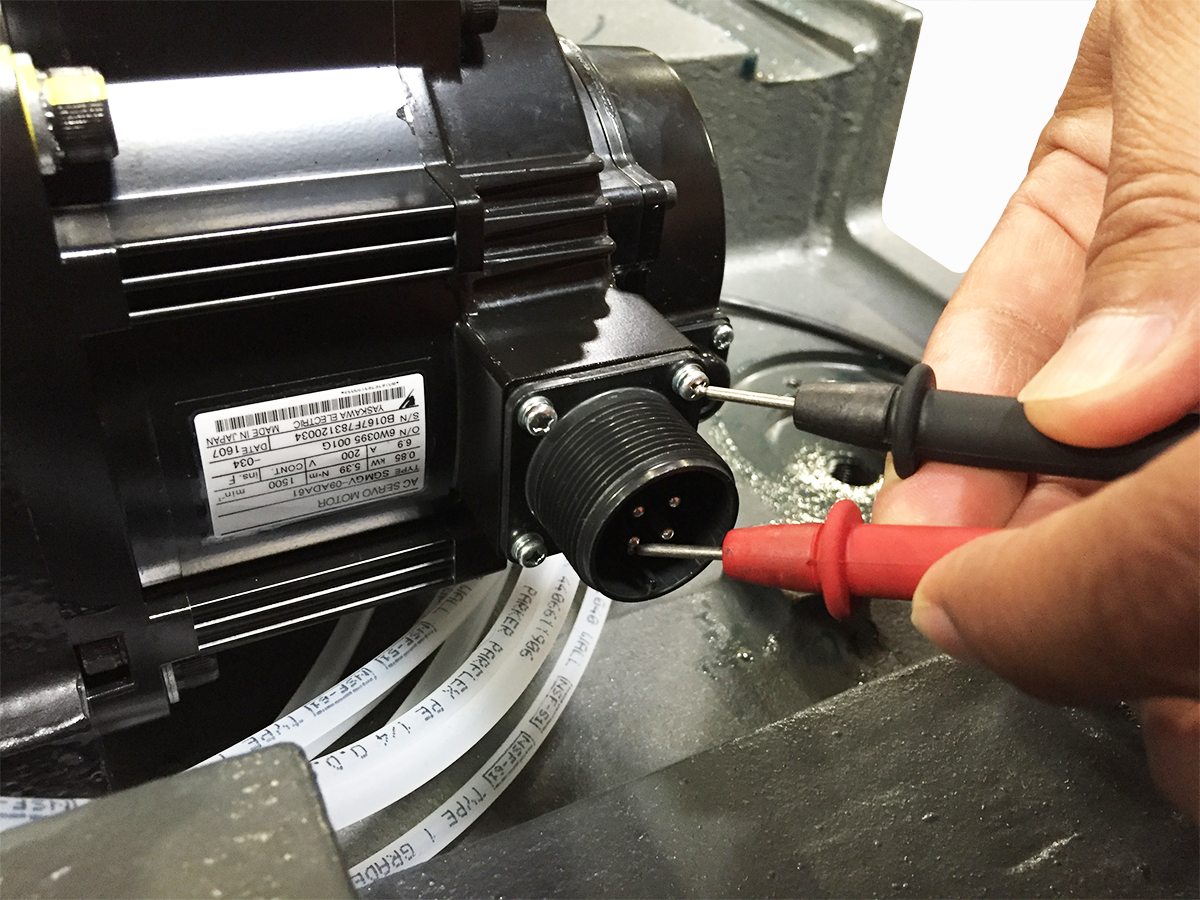
Make sure the motor's connectors are not contaminated. Disconnect and inspect the power cable connector at the motor. Make sure that there is no coolant contamination. Coolant contamination can generate drive fault alarms and damage the amplifier. Measure the resistance from the pins labeled A, B and C at the motor connector to chassis ground.

  • The reading must show an open circuit.
  • If the reading does not show an open circuit, the servo motor is at fault.

Main Processor/Encoder Cable/Encoder

Corrective Action - Main Processor/Cable:

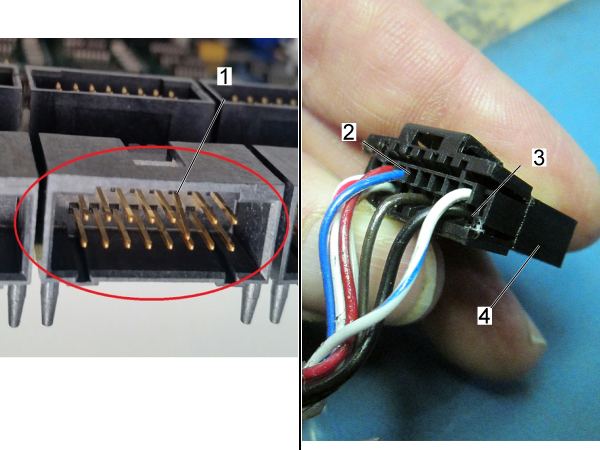
Examine the connector [1] on the Maincon or MOCON PCB. Make sure it is not damaged.

Examine the cable. Look for signs of damage or stiffness. The connector [4] has two housings [2,3] for the cable pins.

Measure the resistance on the encoder cable from leg to leg, and from leg to ground. Make sure each measurement results in an open connection.

Make sure the cable is firmly connected at both ends. Reseat both connections. Make sure the cable is installed in the correct connector at the Maincon or MOCON PCB.

Corrective Action - Servo Motor Encoder:

Check the encoder steps/revolution in the configuration file. Jog the axis and based on the distance the ball screw travels per revolution (ball screw pitch), verify the encoder counts are accurate per each rotation. View the diagnostic>axis page as you jog the axis. The raw encoder count will show you how many encoder steps have been counted.  The z axis channel will also show how many steps have been counted, but will reset each time the z-pulse is passed.  The z-pulse is the encoder zero point, so it will reset every time the encoder does one revolution. Based on this information, you will know if the encoder works if the correct amount of steps per revolution are counted each time you jog the axis the distance of the ball screw pitch length.  If the numbers do not match up, you have a problem.


Motor Brake

Corrective Action:

Reseat the the connection for connectors P79 or P78 [1] on the I/O PCB.

Measure the voltage across the red and black cables.

Press [EMERGENCY STOP]. There should be no voltage.

Press [RESET] to clear the alarms. The voltage should be between 20-30 VDC.

Examine the connection at the motor's brake [2] and power connectors [3] for contamination. Reseat the connections.

If no voltage is present, refer to:

  •  I/O PCB -Troubleshooting Guide (Classic Haas Control)

Electrical Diagrams

Sigma 1 - Service Replacement Motor Instructions

Updated

This following reference document addresses the end‑of‑life status of Yaskawa Sigma 1 motors (‑02, ‑04, and ‑08) used on legacy machines and rotary tables from the mid‑1990s to mid‑2000s. Since these motors are no longer in production, continued service support depends on refurbishment and repair. The Sigma 1 - Service Replacement Motor Instructions document identifies the appropriate contacts and resources for supporting refurbishment and repair of these motors to meet ongoing service needs.

Recently Viewed Items

You Have No Recently Viewed Items Yet

Feedback
Haas Logo

Haas Delivered Price

This price includes shipping cost, export and import duties, insurance, and any other expenses incurred during shipping to a location in France agreed with you as a buyer. No other mandatory costs can be added to the delivery of a Haas CNC Product.

KEEP UP WITH THE LATEST HAAS TIPS AND TECHNOLOGY...

Sign up now!   

HAAS TOOLING ACCEPTS THE FOLLOWING:

  • Service & Support
  • Owners
  • Request Service
  • Operator Manuals
  • Haas Parts
  • Rotary Repair Request
  • Pre-Install Guides
  • Shopping Tools
  • Build & Price a New Haas
  • Available Inventory
  • The Haas Price List
  • CNCA Financing
  • About Haas
  • Accessibility Statement
  • DNSH Statement
  • Export Compliance
  • Careers
  • Certifications & Safety
  • Contact Us
  • History
  • Terms & Conditions
  • Haas Tooling Terms & Conditions
  • Privacy
  • Warranty
  • Haas Community
  • Haas Certification Program
  • Haas Motorsports
  • Gene Haas Foundation
  • Haas Technical Education Community
  • Events
  • Join the Conversation
  • Facebook
  • X
  • Flickr
  • YouTube
  • LinkedIn
  • Instagram
  • TikTok
© 2026 Haas Automation, Inc – CNC Machine Tools

This site is protected by reCAPTCHA and the Google Privacy Policy and Terms of Service apply.

2800 Sturgis Rd., Oxnard, CA 93030
Toll Free: (888) 817-4446 / Fax: 805-278-8554